Site-kit-wp: Inform users on pre-5.0 versions of WP about limitations
Site Kit should display a notification to users that are on pre-5.0 versions of WordPress and inform them that they are missing out on certain features, due to those older WordPress versions not offering the necessary infrastructure.
An example of that is JS translations support (see #2171).
_Do not alter or remove anything below. The following sections will be managed by moderators only._
Acceptance criteria
- The compatibility checks during setup should include a new "check" that displays a (non-blocking) warning if the site's WP version is lower than 5.0.
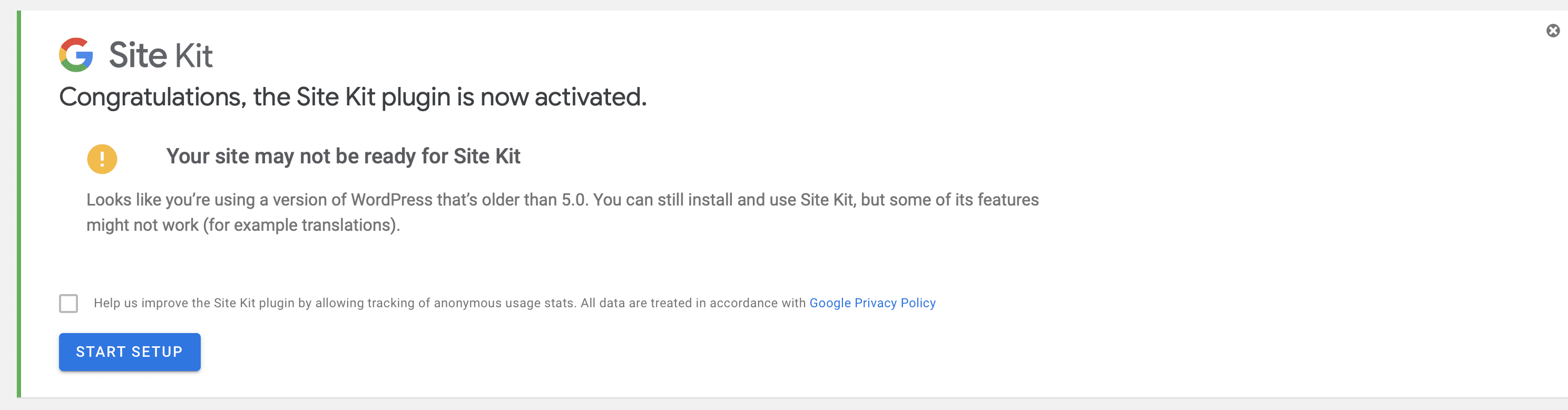
- The message should have the following copy: _Looks like you're using a version of WordPress that's older than 5.0. You can still install and use Site Kit, but some of its features might not work (for example translations)._
Implementation Brief
- Add the current WordPress version to the
$dataarray in theinline_js_base_datamethod of theAuthenticationclass; - Add a new check to the checks array in the
assets/js/components/setup/compatibility-checks.jsfile It should read WP version from theglobal._googlesitekitBaseDataobject and throwERROR_OLD_VERSIONerror if the current version is lower than 5; - Update the
renderErrorfunction of theCompatibilityCheckscomponent to render a message forERROR_OLD_VERSIONerror. Use the message from the AC.
Test Coverage
- Not needed.
Visual Regression Changes
- A new warning notice should appear on the splash screen.
QA Brief
- Set up a new instance of WordPress 4.9 or older;
- Install and activate the Google Site Kit plugin;
- Go to the splash screen and make sure you see the new warning notice that contains a message from the AC.
Changelog entry
- Display informational warning before setup about limited support for WordPress versions before 5.0.
 felixarntz
All 9 comments
@eugene-manuilov The IB here is not quite correct: The version check should be incorporated as part of the compatibility checks which happen on the splash screen, see CompatibilityChecks component.
In this case, we don't need to run any logic for the check, but it should still be implemented as part of that component, also visually. An admin notice would not be the same visual outcome. In order to get the WordPress version in JS, we could do something simple as exposing it with the site info on the global and e.g. add a getWordPressVersion() selector to the core/site store.
felixarntz
on 5 Nov 2020
@felixarntz got it. Unfortunately, we can't use getWordPressVersion selector because of the way how other checks are configured right now. I have updated IB to use global._googlesitekitBaseData directly to get the WordPress version. Let me know if it works.
 eugene-manuilov
on 6 Nov 2020
eugene-manuilov
on 6 Nov 2020
@eugene-manuilov IB ✅ , however I'd suggest to expose the WordPress version on _googlesitekitSiteData, where most other site-related data is exposed (the only data in _googlesitekitBaseData should be information that may be needed even outside of Site Kit screens like regular WP Admin). This way we're also prepared to introducing a core/site selector for this at some point.
felixarntz
on 9 Nov 2020
@felixarntz hm... where is _googlesitekitSiteData defined? I can't find it in the code.
eugene-manuilov
on 9 Nov 2020
@eugene-manuilov My bad - core/site uses _googlesitekitBaseData, so nvm :)
felixarntz
on 9 Nov 2020
@cole10up @aaemnnosttv currently blocked on this. Unable to switch to the develop branch on my test site because the Google tester plugin does not function with WP 4.9.16 or lower. Works fine with 5.0+ Would appreciate some advice on how I can progress with this testing. Thanks.
 wpdarren
on 18 Nov 2020
wpdarren
on 18 Nov 2020
@wpdarren you have a few options:
- Switch to the develop branch before downgrading WP
- Install the plugin from the latest develop build manually
Let me know if these don't work for you for some reason.
 aaemnnosttv
on 18 Nov 2020
aaemnnosttv
on 18 Nov 2020
QA update: Fail ❌
@eugene-manuilov The warning message is not appearing on the splash screen with latest development build and WP 4.9.16.
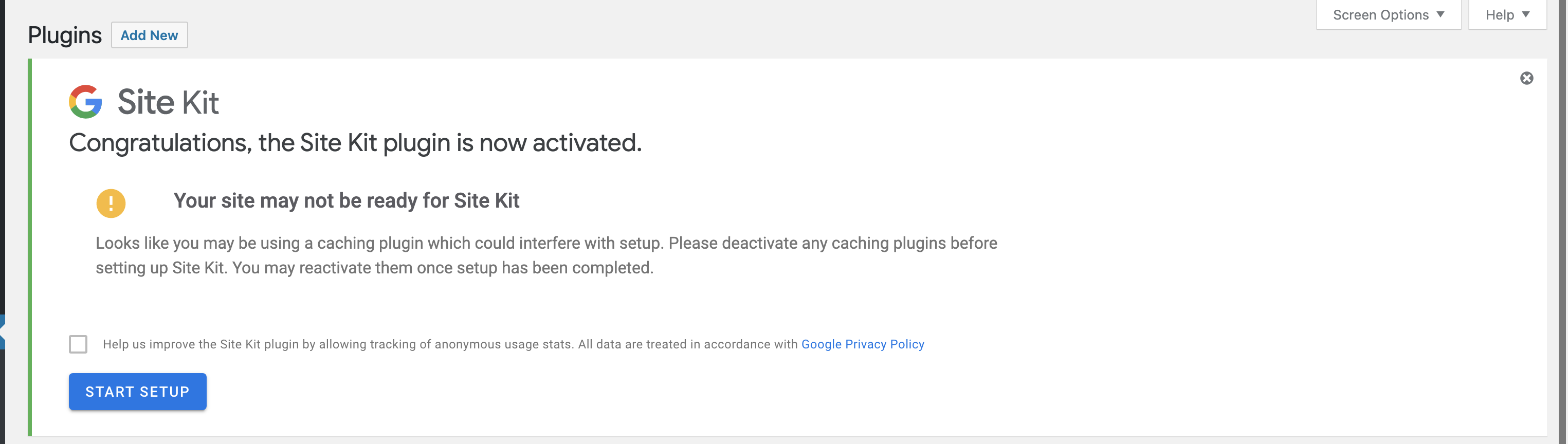
I do not have any cache plugins activated on this test site. When the plugin was activated I was expecting to see a message as per the AC: Looks like you're using a version of WordPress that's older than 5.0. You can still install and use Site Kit, but some of its features might not work (for example translations).
UPDATE: Needs to be a fresh site to complete this test. Not a fail testing recommencing.
wpdarren
on 18 Nov 2020
QA Update: Pass ✅
Verified: on a fresh install - with WP 4.9.16, and develop build of SK, the message appears as per the AC
wpdarren
on 18 Nov 2020
Related issues
aaemnnosttv
·
4Comments
aaemnnosttv
·
3Comments
 tunakode
·
4Comments
tunakode
·
4Comments
 theeducatedbarfly
·
4Comments
theeducatedbarfly
·
4Comments
 Loganson
·
5Comments
Loganson
·
5Comments