Site-kit-wp: Prevent user quota errors and timeouts for users with many Analytics accounts
Bug Description
During the Analytics setup flow and in Analytics settings, Site Kit tries to find the user's correct Analytics property to choose for the current site, based on matching the site URL. This works correctly overall, however it can cause problems if a user has many Analytics accounts in their Google account: For every account, an individual request is being made, which e.g. with 20 accounts results in 20 GET:properties-profiles requests. This can result in rate limits being exceeded, and theoretically at some point it could also result in server timeouts.
This lookup should be made more scalable. Some ideas:
- If one of the requests fails with an error, cancel the process and simply return as if there had not been a match found.
- Limit the number of accounts that the logic runs for to some threshold, e.g. 10. If it's more, just don't run the matching logic (again return as if there had not been a match found).
- Combine all requests into a single batch request (would not help with quota errors, but with potential timeouts).
Let's discuss which of these ideas make the most sense to implement in order to improve this functionality's reliability.
Related: #341 (but it's not worth it to make client-side adjustments for this, like multiple requests etc.)
_Do not alter or remove anything below. The following sections will be managed by moderators only._
Acceptance criteria
- When iterating over accounts to match a property in the Analytics
GET:accounts-properties-profilesdatapoint, errors should be handled gracefully: An error in that logic should not cause the request to fail, it should only result in no property being matched. If possible, the properties and profiles for the first account should be returned in the response then.
- Before running the loop, we should query
properties-profilesfor the first account in the array of accounts. - If that succeeds and it includes
matchedProperty, it should be returned. Otherwise, we should store it in a variable, to use as a fallback if nomatchedPropertyis found. If an error, we should simply return without any properties and profiles. - Then we should iterate through the remaining accounts and query
properties-profiles. Doing this in reverse order (as happening now) is no longer necessary since we'll always get properties for the first account first. - As soon as one of the
properties-profilesrequests from that loop fails, no more such requests should be made, and that error should be ignored. If so, the properties and profiles for the first account (as received prior) should be returned.
- Before running the loop, we should query
- The number of accounts to iterate over should be limited to 25. In other words, we should limit searching for a
matchedPropertyto only the first 25 accounts to avoid excessive requests. Users that have that many accounts are likely power users anyway.
Implementation Brief
Update the Analytics::parse_data_response function in the includes/Modules/Analytics.php file for the GET:accounts-properties-profiles case:
- Before the
foreach ( array_reverse( $accounts ) as $account ) {loop add call to get the property for the first account id in the list and assign it to a variable (ie.$first_account) we can use later using$this->get_data('properties-profiles':... - If the
$first_accountvariable is an error return the accounts array without any properties and profiles. - If the
$first_accountvariable is not an error and result hasmatchedPropertyattribute return the$first_account. - Limit the foreach loop to the next 25 accounts after the first account selected above by using
array_slice($accounts, 1, 25);- make sure to remove the first element from the array (using the offset in the array_slice as ie. or using array_shift) so that the first profile is not fetched twice. - Remove the reverse function from the loop on line 1225 as it's no longer required.
- Add a new condition within the loop to catch a returned
WP_Errorand immediately return the$first_account. Finally remove the redundant! is_wp_errorcheck.
Test Coverage
- N/A
Visual Regression Changes
- N/A
QA Brief
- Check the Analytics module to make sure that it doesn't send excessive requests to
GET:properties-profileswhen it handles theGET:accounts-properties-profilesendpoint:
- It should stop as soon as it finds the first property with a non-empty
matchedPropertykey; - It should fallback to the first response if no properties have the aforementioned key;
- It should check the first 25 accounts only;
- It should return empty properties if at least one response failed with an error.
- It should stop as soon as it finds the first property with a non-empty
Changelog entry
- Improve Analytics property matching logic so that users with many Analytics accounts do not run into user quota errors.
 felixarntz
All 14 comments
I was reading the issue report here on this and wanted to share that I'm getting the same error.
I have about 39 accounts connected to the user account I'm using. But some have a pretty significant amount of properties under them. Is the form trying to request all accounts/properties/views at the same time?
 dwatts3624
on 23 Oct 2020
dwatts3624
on 23 Oct 2020
I'm the original reporter of this issue. Is there a workaround that can be done while this issue is worked on?
 WesternWeb
on 24 Oct 2020
WesternWeb
on 24 Oct 2020
I'm also getting this error. Under this GA account, I have about 10 accounts and 20-ish properties.
 brettkelly
on 26 Oct 2020
brettkelly
on 26 Oct 2020
I'm also getting this error. Under this GA account, I have about 10 accounts and 20-ish properties.
I retried about a half dozen times and it eventually stopped giving the error, for what that's worth.
brettkelly
on 26 Oct 2020
Same here. First thing in the morning I can get a site to attach ... some times
WesternWeb
on 27 Oct 2020
Thanks everyone for confirming you are experiencing the same issue, and for your patience while we work on this issue. We should have a fix in place soon.
 adamsilverstein
on 6 Nov 2020
adamsilverstein
on 6 Nov 2020
I've been able to recreate this on one site, a site which I didn't log into for a few weeks:
Error: Quota exceeded for quota group 'default' and limit 'Queries per 100 seconds' of service 'pagespeedonline.googleapis.com' for consumer 'project_number:583797351490'.
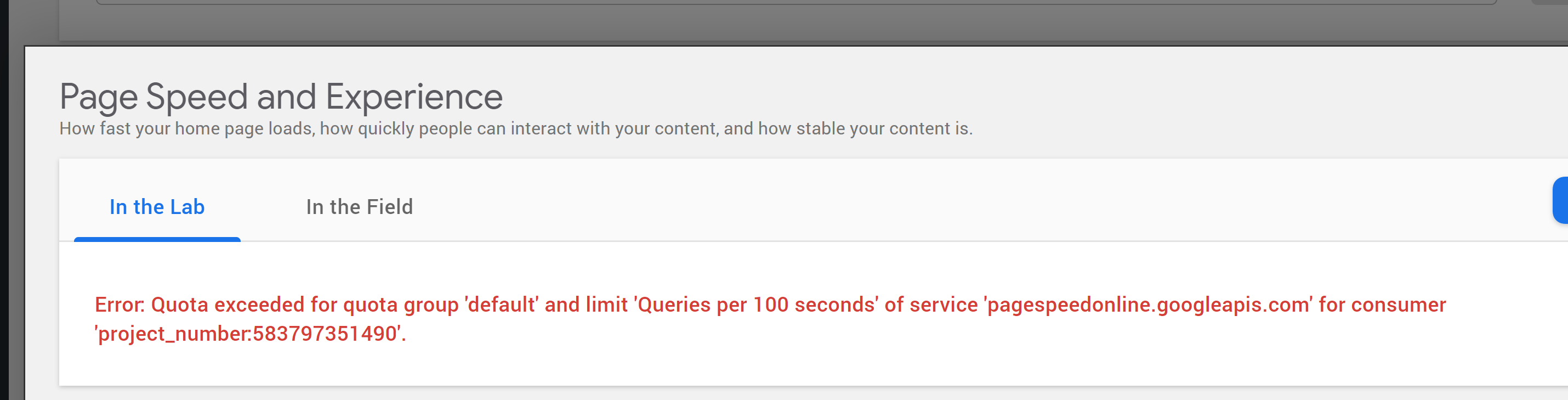
Console error:
WP Error in data response
Object
code: "fetch_error"
message: "You are probably offline."
__proto__: Object
Additional information:
- The error appeared in the PSI module. I also had additional widget errors.
- SK version 1.18.0
- Approx 20-25 properties exist for the account which is connected
- No changed or modifications were made to this account
- In my case I had to reconnect as I also encountered a "Invalid authorization code..." dashboard notice (on my primary WordPress dashboard screen, not on the Site Kit dashboard screen.
- Once I reconnected the issue no longer occurred
 jamesozzie
on 7 Nov 2020
jamesozzie
on 7 Nov 2020
IB Written
 benbowler
on 2 Dec 2020
benbowler
on 2 Dec 2020
@benbowler Mostly LGTM, just one point of feedback:
Limit the foreach loop to the first 25 accounts by using array_splice to truncate the array
- It'd be good to clarify here that this shouldn't be the "first 25 accounts", but rather the remaining 25 accounts. Otherwise we'd double-request the data for the first one. You can use something like
array_shiftto get the first account and remove it from the array. - I think
array_sliceis more appropriate for this usage above.
One overall recommendation, you can avoid adding specific code, unless it's really beneficial for explaining what would require way too many words. As soon as code is involved, the IB review can become a bit too much of a code review, when it's more to determine the approach.
Also, can you add an estimate here? (It's part of the IB phase.)
felixarntz
on 3 Dec 2020
Thanks @felixarntz, I've updated the IB based on your comments and removed blocks of example code in favour of in line suggestions. Finally, I've added and estimate.
benbowler
on 3 Dec 2020
IB ✅
felixarntz
on 14 Dec 2020
This just needs a QA brief and then can be moved to Merge Review 👍🏻
 tofumatt
on 23 Dec 2020
tofumatt
on 23 Dec 2020
Yes, this one is tough to test. I have added the QA brief and QA: Eng tag because I think QA engineers won't be able to verify it anyway.
 eugene-manuilov
on 23 Dec 2020
eugene-manuilov
on 23 Dec 2020
QA ✅
tofumatt
on 14 Jan 2021
Related issues
 jsmshay
·
3Comments
felixarntz
·
4Comments
tofumatt
·
5Comments
jsmshay
·
3Comments
felixarntz
·
4Comments
tofumatt
·
5Comments
 aaemnnosttv
·
3Comments
aaemnnosttv
·
3Comments
 Loganson
·
5Comments
Loganson
·
5Comments