Site-kit-wp: Improve handling for domain names containing unicode bidirectional control (and other special) characters
Bug Description
From a report in the forums, the Site Kit service is not fully compatible with unicode domain extensions. In this case, the Hebrew .קום.
The service doesn't proceed for the site (in punnycode) after pressing "Add Site" at Step 3 _Set up Search Console_ :

However, the unicode domain is added to Search Console:
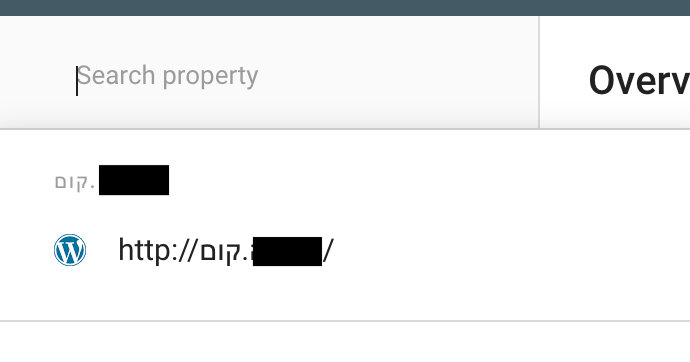
Steps to reproduce
- On a site with a unicode extension
.קום, proceed through the setup process - At Step 3 _Set up Search Console_ , click on "Add Site"
- Process stops
- Once fixed and setup is complete, data requests to Search Console fail with an error.
Additional details
- The domain as stored and returned by Search console are in Unicode and may include bidirectional control characters
- We Also need to review how other services handle these characters to ensure our matching works as expected (for example in Analytics).
- In general I expect that when requesting data from APIs we may need to strip these characters.
Additional Context
- PHP Version: 7.3.12
- OS: MacOS
- Browser: Chrome
- Plugin Version: 1.8.0
- Device: MacBook Air
Also addressed unicode compatibility in #794
_Do not alter or remove anything below. The following sections will be managed by moderators only._
Acceptance criteria
- Domain names with RTL characters including the TLD should work correctly in Site Kit.
- In particular, during "Step 3" of setup the domain check should work and allow the user to succeed.
- Data requests for the domain to the Search console API should work as expected
- Analytics, PSI and AdSense setup and data requests should also work correctly.
Implementation Brief
- introduce a class
Util\Google_URL_Normalizerwith a single publicnormalize_urlmethod that takes a $url parameter normalizes it by removing any trailing slash, removing directional control characters, decoding unicode characters and converting to lowercase:
public function normalize_url( $url ) {
        // Remove bidirectional control characters.
        $url = preg_replace( array( '/\xe2\x80\xac/', '/\xe2\x80\xab/' ), '', $url );
        $url = $this->decode_unicode_url_or_domain( $url );
        $url = untrailingslashit( $url );
        $url = strtolower( $url );

        return $url;
}
- Call this function on any url passed before making Search Console API data requests:
- In
/Users/adamjs/repositories/site-kit-wp/includes/Modules/Search_Console.php-
Increate_data_request
- In
- Change
$data_request['page'] = $data['url'];to$data_request['page'] = $url_normalizer->normalize_url( $data['url'] ); Change
$site_url = $data['siteURL'];to$site_url = $url_normalizer->normalize_url( $data['siteURL'] );Adjust the domains when used for comparisons in the legacy setup flow:
- in
/Users/adamjs/repositories/site-kit-wp/includes/Core/Util/Google_URL_Matcher_Trait.php - Adjust
is_url_match, remove the existing domain calls todecode_unicode_url_or_domainanduntrailingslashit, callnormalize_urlinstead:
- in
$url  = $url_normalizer->normalize_url( $url );
$compare = $url_normalizer->normalize_url( $compare );
- Similarly adjust
is_domain_match:
$domain  = $url_normalizer->normalize_url( $domain );
$compare = $url_normalizer->normalize_url( $compare );
Testing
- Add unit tests for
normalize_url, we have example data for the tests in the existingtest_is_url_matchand test_is_domain_match.
QA Brief
- To test, domain must contain directional control characters.
- Note that the fix here also consolidated previous fixes for unusual domains so QA should include testing for:
- domains set up in WP with CamelCase
- domains registered with Unicode characters (eg türkish.com) and entered in wp settings as
- unicode or as
- punicode (http://xn--trkish-3ya.com/).
- Support should have access to unicode/directional test sites set up if you need them. for CamelCase.com, changing WordPress settings is sufficient for testing.
Changelog entry
- Improve support for URLs containing unicode, mixed case, and bidirectional control characters when requesting and sending data to Search Console.
 ernee
ernee
All 24 comments
@ernee Closing this as resolved. Please feel free to re-open if this is still an issue.
 adamsilverstein
on 29 Jun 2020
adamsilverstein
on 29 Jun 2020
@ernee - I did some research against staging and the test site you provided and discovered the following:
- The domain is stored as Punicode in WP, and added as such to Search Console via API.
- When we query the Search Console API for the list of sites, the site is included in the list, however it contains Unicode Bidirectional Control Characters. This is because the URL characters are in Hebrew (RTL) while the
http://,.and/parts are in english (LTR).
eg: "siteUrl": "http://\u202bביקדקוםה\u202c.\u202bקום\u202c/",
Because the URL contains these control characters it does not pass our comparison tests and the system determines that user does not have the site in their Search Console account, and sends them back to Step 3 to add it.
Here are some more details on these control characters and how to handle them: https://www.w3.org/International/articles/inline-bidi-markup/uba-basics
I tested a change in staging that strips these control characters before comparing the domains and was able to complete step 3 on your test site.
When I returned to Site Kit with setup complete, I discovered a new, related issue - the Search Console API rejects the data request as coming from an invalid URL. Site Kit shows an error:
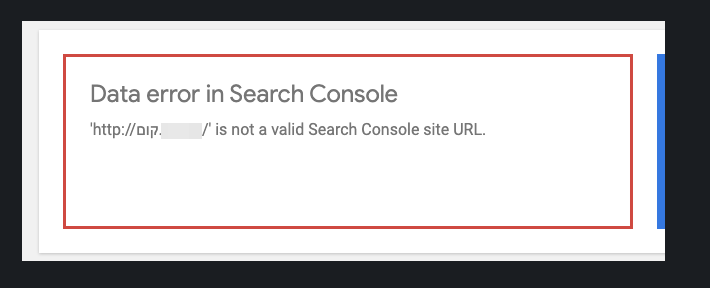
I was able to reproduce this error using the API explorer:
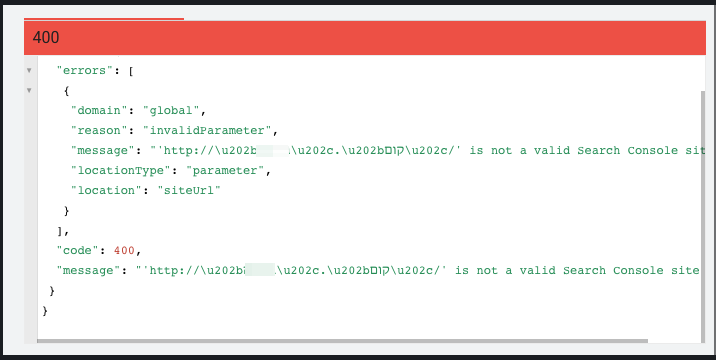
Removing the control characters fixes the issue:
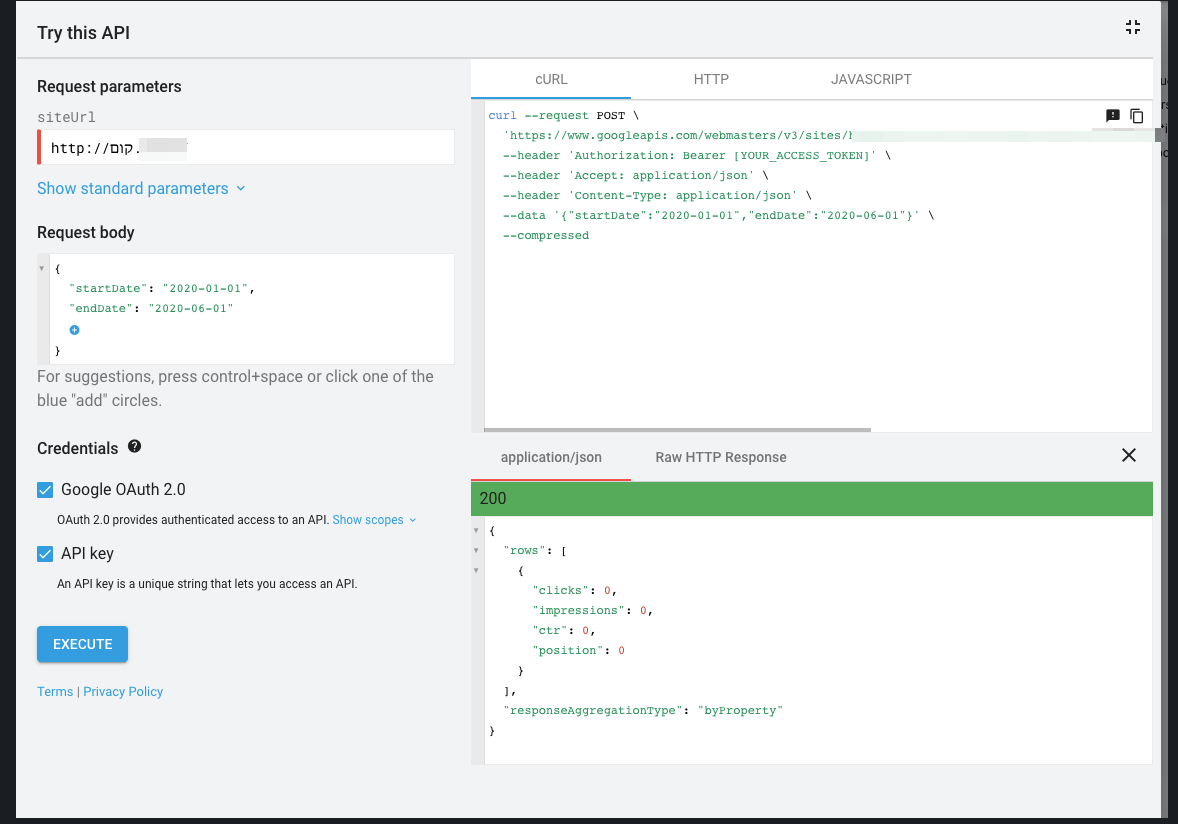
Therefore I expect we need to remove the control characters on the plugin side as well when sending queries. Moving this to AC which I will work on next.
adamsilverstein
on 30 Jun 2020
Added AC, moving to IB
adamsilverstein
on 1 Jul 2020
I started work on the IB then realized I need to do some additional testing with other APIs to see how we handle these domains.
For example with Analytics, when we search for a matching domain, will the match work to find an existing set up domain? Does this affect the 'New Account' provisioning flow? With Analytics, once we have the correct Account/Property/View selected, our API requests use these IDs, not the domain name - except for requests that include the page url (wp-admin data and details page). Do these work correctly with the control characters present?
Similar questions arise with AdSense and even PSI - we need to test each API to make sure each part of the setup and data retrieval works as expected when domains contain the control characters.
@felixarntz - I'd like to suggest that we refocus this ticket to only address these domains for the setup including the initial Search Console data request. I can then create follow up tickets for each API and we can research them separately. What do you think?
adamsilverstein
on 27 Aug 2020
@adamsilverstein Sounds good, we can limit this issue to Search Console. So this would mean if I understand correctly:
- Handle such domain names in any Search Console report API requests
- Handle such domain names in the URL / domain comparison in Site Kit which happens as part of the legacy setup flow
Does that sound right?
 felixarntz
on 27 Aug 2020
felixarntz
on 27 Aug 2020
Yep, that sounds right.
adamsilverstein
on 28 Aug 2020
- Note: check if data request work with lower case and unicode characters.
- Ensure comparison helpers match service code: lowercase, unicode and control character removal.
adamsilverstein
on 8 Sep 2020
@adamsilverstein Assigning back to you to amend the IB after your findings regarding the above.
For the IB so far: I would suggest to add the new logic to Google_URL_Matcher_Trait which has the related existing logic already. A normalize_url method could be added there which contains the bidirectional control character piece, but potentially (see above) also the unicode-to-punicode and lowercase parts.
felixarntz
on 8 Sep 2020
@adamsilverstein
In
includes/Context.phpadd a new helpernormalize_url_for_request
I meant this function shouldn't go into Context, it should live in a more specific place. Maybe we could introduce a class Util\Google_URL_Normalizer with a single public normalize_url method. Then this class could be used within Util\Google_URL_Matcher_Trait and also anywhere else where this normalization is needed (e.g. sending Search Console data requests).
Another point, do we really need different normalize_url functions for a request vs for a comparison? Regarding our conversation the other day, what was the outcome of testing data requests with unicode URLs and camelcase URLs?
felixarntz
on 11 Sep 2020
I meant this function shouldn't go into Context, it should live in a more specific place. Maybe we could introduce a class Util\Google_URL_Normalizer with a single public normalize_url method.
Good suggestion, I'll update the IB.
Another point, do we really need different normalize_url functions for a request vs for a comparison?
I will do more testing to be sure, in my testing previously we do need to remove control characters before sending the domain to reporting requests with the Search console API. We need to test the requirements for each API, checking upper/lower case, unicode and control characters in the domain.
adamsilverstein
on 14 Sep 2020
@felixarntz Updated IB as per your suggestion.
Tested Search console requests again using the API explorer. Verified:
- URLs with control characters do not work in request, i get an error:
{Domain} is not a valid Search Console site URL. Removing them fixes the issue. - Uppercase/lowercase are not an issue when sending data request to search console: case is ignored.
- I'm still testing unicode vs. punicode data requests, unfortunately my test sites don't appear to have any search console data making the testing difficult. However, I do not get the
not a valid Search Console site URLerror when trying unicode or punicode. Also, when adding a domain to search console, it treats the punicode and unicode versions as the same domain (only shows once in the UI). I think we are fine here.
@jamesozzie or @ernee Can you confirm that since we fixed the unicode domain verification setup issue (with domains like "http://türkish.com/") we haven't heard of any follow up issues with getting data for these domains? ie. once users were unblocked from setup, did they start getting data from search console?
adamsilverstein
on 16 Sep 2020
@adamsilverstein I do not recall reports of issues getting data for unicode domains.
ernee
on 16 Sep 2020
@adamsilverstein I do not recall reports of issues getting data for unicode domains.
Thanks for confirming. testing is challenging because our test site doesn't generate real traffic.
adamsilverstein
on 16 Sep 2020
@adamsilverstein The IB here still includes different normalize_url_for_request and normalize_url_for_comparison functions. Can we not have a single one that covers both (Util\Google_URL_Normalizer::normalize_url)? If camel-case is ignored for the request, we can still normalize it the same way, and I'd imagine the same about the Unicode/Punycode. When you test for the latter, if you don't get any error back, that should mean it work fine (i.e. is ignored). If it was a problem, I'd expect you to either get an "invalid SC URL" error or a permissions error because it would be interpreted as a different SC property. But if you get a success response with "zero" data, that should all be good.
In that case, I think we should rely on a single normalization method and use that throughout.
felixarntz
on 23 Sep 2020
In that case, I think we should rely on a single normalization method and use that throughout.
Agreed, I will update the IB with a single normalize_url function.
adamsilverstein
on 23 Sep 2020
- Updated IB with a combined
normalize_urlfunction. - Added note about adding tests.
adamsilverstein
on 23 Sep 2020
IB ✅
@adamsilverstein Can you expand the QA brief to also test with the other two types of URLs (camel-case and Unicode in general)?
felixarntz
on 24 Sep 2020
After spending more time on this, adding tests and trying to reproduce the original bug, I found some issues with the implementation outlined here.
Moving this back to IB to clean up the approach.
adamsilverstein
on 8 Oct 2020
@felixarntz - This is ready for review. The trickiest part here was removing the control characters from the string. My original str_replace approach only if I pasted the actual control character into the code which was confusing (you can't see them, and they do strange things to your cursor when you use arrow keys to navigate thru them). In the end I settles on an approach that uses preg_replace and the UTF-8 conversions of these characters.
adamsilverstein
on 8 Oct 2020
Tested
Installed, activated and setup SK on a site with unicode characters

Confirmed no errors displayed. Ran a series of simple regression on the site, no errors found.
Passed QA ✅
 cole10up
on 9 Oct 2020
cole10up
on 9 Oct 2020
I did some follow up testing here after sending some traffic to our test site and still see some potentially related issues:
- ~When I reset the plugin and re-activated Analytics, the setup process did not preselect my domain as it should.~
- ~I don't see the Analytics snippet on the page, even after enabling it (and visiting the site not logged in)~
- I don't see Search Console data even though the API response seems to show some data.
adamsilverstein
on 9 Oct 2020
The setup issues I was seeing were resolved by re-installing the develop version. Still checking on the "Zero Data" state, may be just because there is so little data.
adamsilverstein
on 9 Oct 2020
The missing search console data seems unrelated the to issue here and more to do with the data on the test site. I will continue to send some traffic there and then test in the upcoming days when that data becomes visible in the API.
adamsilverstein
on 9 Oct 2020
✅ Confirming I new see data in the Dashboard on the test site.
adamsilverstein
on 10 Oct 2020
Related issues
 tunakode
·
4Comments
tunakode
·
4Comments
 quindo
·
5Comments
quindo
·
5Comments
 aaemnnosttv
·
3Comments
aaemnnosttv
·
3Comments
aaemnnosttv
·
4Comments
aaemnnosttv
·
3Comments
aaemnnosttv
·
3Comments
aaemnnosttv
·
4Comments