Site-kit-wp: Analytics module setup fails despite full account access: User does not have sufficient permissions for this account
When attempting to setup the Analytics module the following notice appears, despite the user having access to that Analytics account.
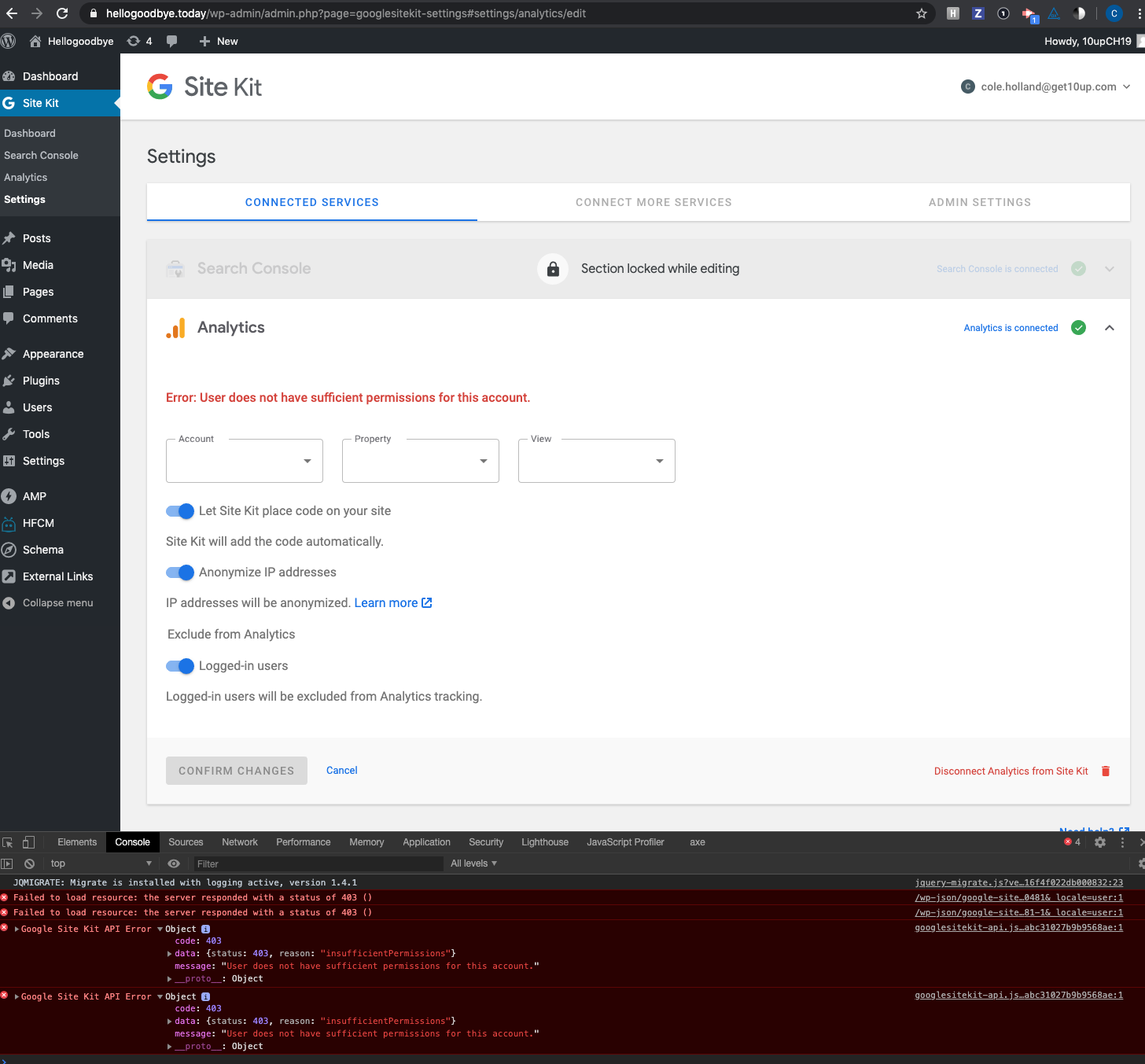
Error: User does not have sufficient permissions for this account.

The permissions notice does not disappear when selecting another GA account using the dropdown, although connection does proceed.
The typical troubleshoot steps failed to resolve this issue, including the below:
- Confirming account (and property) permission access at GA level
- Resetting Site Kit, clearing cache and attempting setup incognito
- Revoking Site Kite access from Google account.
Additional context:
- Search Console works fine
- When selecting another GA account using the same Google profile it works
- When using another Google account (which has access to the specific account) the same issue arises
- Disconnecting and reconnecting Analytics account to Google profile does not work
- Only one WordPress admin (all connections using same Google account)
WordPress Support topic: https://wordpress.org/support/topic/error-user-does-not-have-sufficient-permissions-for-this-account/#post-12821941
Site URL: https://www.swisslaos.ch/
Additional support topic:
https://wordpress.org/support/topic/existing-analytics-tag-but-cant-connect
Site Health information:
### wp-core ###

version: 5.4.1
site_language: de_DE
user_language: de_DE
permalink: /%postname%/
https_status: true
user_registration: 0
default_comment_status: open
multisite: false
user_count: 33
dotorg_communication: true

### wp-paths-sizes ###

wordpress_path: /home/swisslao/public_html/swisslaos2018
wordpress_size: 74,93 MB (78574474 bytes)
uploads_path: /home/swisslao/public_html/swisslaos2018/wp-content/uploads
uploads_size: 282,66 MB (296388293 bytes)
themes_path: /home/swisslao/public_html/swisslaos2018/wp-content/themes
themes_size: 37,01 MB (38810891 bytes)
plugins_path: /home/swisslao/public_html/swisslaos2018/wp-content/plugins
plugins_size: 143,04 MB (149983878 bytes)
database_size: 32,15 MB (33708960 bytes)
total_size: 569,79 MB (597466496 bytes)

### wp-dropins (1) ###

advanced-cache.php: true

### wp-active-theme ###

name: Swiss Laos Hospital Project (Divi Child) (swisslaos2016)
version: 3.0.17.1478332722
author: Martin Sauter
author_website: http://www.martinsauter.ch
parent_theme: Divi (Divi)
theme_features: custom-background, automatic-feed-links, post-thumbnails, menus, title-tag, post-formats, woocommerce, wc-product-gallery-zoom, wc-product-gallery-lightbox, wc-product-gallery-slider, customize-selective-refresh-widgets, editor-style, widgets
theme_path: /home/swisslao/public_html/swisslaos2018/wp-content/themes/swisslaos2016

### wp-parent-theme ###

name: Divi (Divi)
version: 4.4.5
author: Elegant Themes
author_website: http://www.elegantthemes.com
theme_path: /home/swisslao/public_html/swisslaos2018/wp-content/themes/Divi

### wp-themes-inactive (2) ###

Twenty Nineteen: version: 1.5, author: WordPress-Team
Twenty Twenty: version: 1.2, author: WordPress-Team

### wp-mu-plugins (3) ###

ET Support Center :: Must-Use Plugins Autoloader: author: Elegant Themes, version: (undefined)
Health Check Troubleshooting Mode: author: (undefined), version: 1.7.0
WP Migrate DB Pro Compatibility: version: 1.1, author: Delicious Brains

### wp-plugins-active (45) ###

Activity Log: version: 2.5.2, author: Activity Log Team
Admin Menu Tree Page View: version: 2.7.1, author: Pär Thernström
BackWPup: version: 3.7.1, author: Inpsyde GmbH
Better Font Awesome: version: 1.7.1, author: Mickey Kay
BJ Lazy Load: version: 1.0.9, author: Bjørn Johansen, Aron Tornberg, angrycreative
Broken Link Checker: version: 1.11.12, author: WPMU DEV
Change Password Protected Message: version: 1.2.5, author: pipdig
Child Theme Configurator: version: 2.5.2, author: Lilaea Media
Classic Editor: version: 1.5, author: WordPress Contributors
Content Aware Sidebars: version: 3.12, author: Joachim Jensen - DEV Institute
Featured Image Admin Thumb: version: 1.5.3, author: Sean Hayes
GDPR Cookie Consent Banner: version: 2.3.15, author: termly
Header Footer Code Manager: version: 1.1.7, author: 99robots
Health Check & Troubleshooting: version: 1.4.4, author: The WordPress.org community
Inline Google Spreadsheet Viewer: version: 0.13.2, author: Meitar Moscovitz <[email protected]>
Language Fallback: version: 1.0.5, author: Bernhard Kau
Leaflet Maps Marker: version: 3.12.3, author: MapsMarker.com e.U.
LiteSpeed Cache: version: 3.0.8.6, author: LiteSpeed Technologies
Loco Translate: version: 2.3.3, author: Tim Whitlock
MainWP Child: version: 4.0.7.1, author: MainWP
MC4WP: Mailchimp Activity: version: 1.1.0, author: ibericode
MC4WP: Mailchimp for WordPress: version: 4.7.7, author: ibericode
M Chart: version: 1.7.8, author: Jamie Poitra
M Chart Highcharts Library: version: 1.0.5, author: Jamie Poitra
Members: version: 3.0.8, author: MemberPress
Ninja Forms: version: 3.4.24.2, author: Saturday Drive
PDF Image Generator: version: 1.5.6, author: Mizuho Ogino
Plugin Notes Plus: version: 1.2.2, author: Jamie Bergen
Post Duplicator: version: 2.20, author: Metaphor Creations
Rank Math SEO: version: 1.0.42.3, author: Rank Math
Redirection: version: 4.7.2, author: John Godley
Sidebar Login: version: 2.7.3, author: Mike Jolley
Site Kit by Google: version: 1.8.0, author: Google
Smash Balloon Custom Facebook Feed: version: 2.14.1, author: Smash Balloon
Sucuri Security - Auditing, Malware Scanner and Hardening: version: 1.8.24, author: Sucuri Inc.
WordPress Importer: version: 0.7, author: wordpressdotorg
WP Cerber Security, Antispam & Malware Scan: version: 8.6.3, author: Cerber Tech Inc.
WPCore Plugin Manager: version: 1.9.0, author: Stuart Starr
WP First Letter Avatar: version: 2.2.8, author: Dev49.net
WP Migrate DB Pro: version: 1.9.10, author: Delicious Brains
WPML Media: version: 2.5.5, author: OnTheGoSystems
WPML Multilingual CMS: version: 4.3.12, author: OnTheGoSystems
WPML String Translation: version: 3.0.9, author: OnTheGoSystems
WPML Translation Management: version: 2.9.6, author: OnTheGoSystems
WP Notification Bars: version: 1.0.5, author: MyThemeShop

### wp-plugins-inactive (2) ###

Enhanced Media Library: version: 2.7.2, author: wpUXsolutions
Google Analytics Dashboard for WP (GADWP): version: 6.0.2, author: ExactMetrics

### wp-media ###

image_editor: WP_Image_Editor_Imagick
imagick_module_version: 1684
imagemagick_version: ImageMagick 6.9.4-10 Q16 x86_64 2017-05-23 http://www.imagemagick.org
imagick_limits:
    imagick::RESOURCETYPE_AREA: 141 GB
    imagick::RESOURCETYPE_DISK: 1.844674407371E+19
    imagick::RESOURCETYPE_FILE: 37500
    imagick::RESOURCETYPE_MAP: 141 GB
    imagick::RESOURCETYPE_MEMORY: 71 GB
    imagick::RESOURCETYPE_THREAD: 1
gd_version: bundled (2.1.0 compatible)
ghostscript_version: unknown

### wp-server ###

server_architecture: Linux 3.10.0-962.3.2.lve1.5.26.9.el7.x86_64 x86_64
httpd_software: LiteSpeed
php_version: 7.1.33 64bit
php_sapi: litespeed
max_input_variables: 1000
time_limit: 30
memory_limit: 256M
max_input_time: 60
upload_max_size: 16M
php_post_max_size: 16M
curl_version: 7.62.0 OpenSSL/1.0.2k
suhosin: false
imagick_availability: true
server-headers:
    set-cookie: Array
    expires: Wed, 11 Jan 1984 05:00:00 GMT
    cache-control: no-cache, must-revalidate, max-age=0
    content-type: text/html; charset=UTF-8
    link: Array
    x-litespeed-cache-control: private,max-age=1800
    x-litespeed-tag: 58a_tag_priv,public:58a_HTTP.200,public:58a_front,public:58a_URL.6666cd76f96956469e7be39d750cc7d9,public:58a_F,public:58a_Po.2,public:58a_PGS,public:58a_
    etag: "17325-1589219017;gz"
    x-litespeed-cache: miss
    content-encoding: gzip
    vary: Accept-Encoding
    date: Mon, 11 May 2020 17:43:37 GMT
    alt-svc: quic=":443"; ma=2592000; v="43,46", h3-Q043=":443"; ma=2592000, h3-Q046=":443"; ma=2592000, h3-Q050=":443"; ma=2592000, h3-25=":443"; ma=2592000, h3-27=":443"; ma=2592000
htaccess_extra_rules: true

### wp-database ###

extension: mysqli
server_version: 5.7.26-log-cll-lve
client_version: mysqlnd 5.0.12-dev - 20150407 - $Id: 38fea24f2847fa7519001be390c98ae0acafe387 $

### wp-constants ###

WP_HOME: undefined
WP_SITEURL: undefined
WP_CONTENT_DIR: /home/swisslao/public_html/swisslaos2018/wp-content
WP_PLUGIN_DIR: /home/swisslao/public_html/swisslaos2018/wp-content/plugins
WP_MAX_MEMORY_LIMIT: 256M
WP_DEBUG: false
WP_DEBUG_DISPLAY: true
WP_DEBUG_LOG: false
SCRIPT_DEBUG: false
WP_CACHE: true
CONCATENATE_SCRIPTS: undefined
COMPRESS_SCRIPTS: undefined
COMPRESS_CSS: undefined
WP_LOCAL_DEV: undefined

### wp-filesystem ###

wordpress: writable
wp-content: writable
uploads: writable
plugins: writable
themes: writable
mu-plugins: writable

### google-site-kit ###

version: 1.8.0
php_version: 7.1.33
wp_version: 5.4.1
reference_url: https://www.swisslaos.ch
amp_mode: no
site_status: connected-site
user_status: authenticated
active_modules: site-verification, search-console, analytics
required_scopes:
    openid: ✅
    https://www.googleapis.com/auth/userinfo.profile: ✅
    https://www.googleapis.com/auth/userinfo.email: ✅
    https://www.googleapis.com/auth/siteverification: ✅
    https://www.googleapis.com/auth/webmasters: ✅
    https://www.googleapis.com/auth/analytics: ✅
    https://www.googleapis.com/auth/analytics.readonly: ✅
    https://www.googleapis.com/auth/analytics.manage.users: ✅
    https://www.googleapis.com/auth/analytics.edit: ✅
search_console_property: https://www.swisslaos.ch/
analytics_account_id: 5981••••
analytics_property_id: UA-5981••••••
analytics_profile_id: 9804••••
Error log
load-scripts.php?c=1&load[chunk_0]=jquery-core,jquery-migrate,utils,jquery-ui-core,jquery-ui-widget,jquery-ui-mouse,jquery-ui-sortable,jquery-ui-draggable,jquery-u&load[chunk_1]=i-resizable,jquery-ui-button,jquery-ui-position,jquery-ui-dialog,jquery-ui-tabs,jquery-form&ver=5.4.1:8 JQMIGRATE: Migrate is installed, version 1.4.1
/wp-json/google-site-kit/v1/modules/analytics/data/properties-profiles?accountID=45888951&_locale=user:1 Failed to load resource: the server responded with a status of 403 ()
googlesitekit-api.js:1 Google Site Kit API Error Objectcode: 403data: reason: "insufficientPermissions"status: 403__proto__: constructor: ƒ Object()hasOwnProperty: ƒ hasOwnProperty()isPrototypeOf: ƒ isPrototypeOf()propertyIsEnumerable: ƒ propertyIsEnumerable()toLocaleString: ƒ toLocaleString()toString: ƒ toString()valueOf: ƒ valueOf()__defineGetter__: ƒ __defineGetter__()__defineSetter__: ƒ __defineSetter__()__lookupGetter__: ƒ __lookupGetter__()__lookupSetter__: ƒ __lookupSetter__()get __proto__: ƒ __proto__()set __proto__: ƒ __proto__()message: "User does not have sufficient permissions for this account."__proto__: Object
(anonymous) @ googlesitekit-api.js:1
/wp-json/google-site-kit/v1/modules/analytics/data/profiles?accountID=45888951&propertyID=UA-45888951-2&_locale=user:1 Failed to load resource: the server responded with a status of 403 ()
googlesitekit-api.js:1 Google Site Kit API Error Object
(anonymous) @ googlesitekit-api.js:1
_Do not alter or remove anything below. The following sections will be managed by moderators only._
Acceptance criteria
Implementation Brief
QA Brief
Changelog entry
- Fix bug where users with full Analytics access would see error message about lack of permissions, due to the property having been moved.
 jamesozzie
All 26 comments
No issues when using the same account and property using the Analytics Query Explorer.

jamesozzie
on 14 May 2020
Also affected by this, full permissions granted
 wgicio
on 25 May 2020
wgicio
on 25 May 2020
Same here
 michael-attal
on 26 May 2020
michael-attal
on 26 May 2020
Same problem. I had a different analytics plugin installed first. And actived site kit with the other plugin on. Site kit said i already had a tracking code installed so i removed the plugin and than got this message. I already tried different browsers and computers no luck.
 jormeer
on 29 May 2020
jormeer
on 29 May 2020
Adding other topics impacted by this below. Both have full permissions to the account/ property/ view:
https://wordpress.org/support/topic/error-user-does-not-have-sufficient-permissions-for-this-account-2/
https://wordpress.org/support/topic/error-user-does-not-have-sufficient-permissions-for-this-account-3/
 ernee
on 4 Jun 2020
ernee
on 4 Jun 2020
Further confirmation from user in original post that all permissions are granted
jamesozzie
on 5 Jun 2020
I'm also running into this problem. I have full permissions granted all inherited from a top level account with multiple properties. I've successfully setup other properties under this account over 3 weeks ago. I can't see any visible difference between this latest property and the others.
My output using the Query Explorer: https://imgur.com/Qd7Mfig
 timnolte
on 5 Jun 2020
timnolte
on 5 Jun 2020
this may be a clue, I went to look at some analytics data and it said I needed to link the property to Search console. which then links to
https://www.google.com/webmasters/tools/analytics-site-selection?hl=en_GB&property=....
Enable Search Console data in Google Analytics
When you associate a Google Analytics web property with a Search Console site, you will be able to see Search Console data in your Google Analytics reports, and enable Search Console to link directly to associated reports in Google Analytics.
Web Property: example.comLinked Site: This site is not linked to any web property in your Google Analytics account.
The page did not have all the websites listed that are contained in GSC that exist
Another clue:
Originally (through GSUITE) the account email was admin@ and then it got changed to info@
One website with site kit that is connected and displaying data is showing the original admin@ account as being logged in
The site that fails to get permissions gets logged in with Google on the info@ account
wgicio
on 8 Jun 2020
@wgicio thanks for the details! Some questions that could be helpful:
The page did not have all the websites listed that are contained in GSC that exist
-- Was the website (property) that is failing listed?
-- When you visit this link while logged into the info@ account, are you also not seeing the full list of properties available in GSC?
In particular, do you see the property that is failing listed there and in GSC?
-- Could you tell us if the admin@ account is still listed as having full permissions in Analytics to website (property) that is failing?
-- Does the info@ account have full permissions in Analytics to the website (property) that is failing?
ernee
on 10 Jun 2020
so Analytics Account ID164912693 has 6 properties which were transferred from another account.
GSC only has 2 sites although there are multiple properties for the domain, eg http://www - https://site - https://www
it is a pretty old GSC property, so in GSC there is 2 sites and 6 properties
-- Was the website (property) that is failing listed?
Yes the site in GSC that is failing in site kit analytics connection was listed in GSC
-- When you visit this link while logged into the info@ account, are you also not seeing the full list of properties available in GSC?
Yes
In particular, do you see the property that is failing listed there and in GSC?
Yes, GSC does connect to site kit, it's the analytics property that does not
-- Could you tell us if the admin@ account is still listed as having full permissions in Analytics to website (property) that is failing?
-- Does the info@ account have full permissions in Analytics to the website (property) that is failing?
so admin@ does not exist anymore, in GSuite the primary account was changed to info@
when logging into Analytics / GSC it's all info@
Property UA-102151090-2 (which wont connect in site kit) has Edit, Collaborate, Read & Analyse, Manage Users permissions under info@
The site that was successfully connected before the email change still showw admin@ as the account being connected. within wordpress sitekit, the data is being displayed as expected
wgicio
on 10 Jun 2020
Tested
I was able to reproduce this by following the steps here:
- User A configures analytics using an existing account, granting access to user B
- User B logs in and configures analytics with the existing account
- User A logs in again and edits analytics for the account
Notice:
Transitioning to Execution
 cole10up
on 11 Jun 2020
cole10up
on 11 Jun 2020
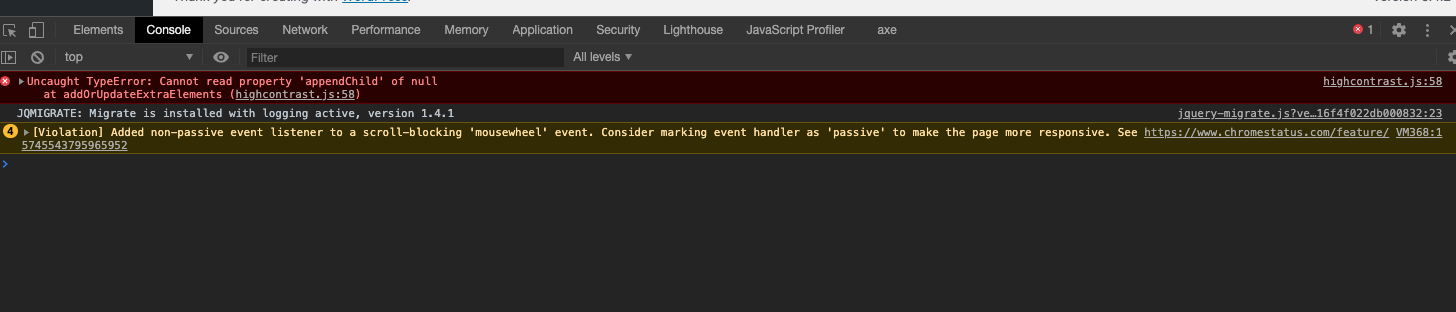
Navigating around to Analytics after seeing this error on the front end. Console shows:
cole10up
on 11 Jun 2020
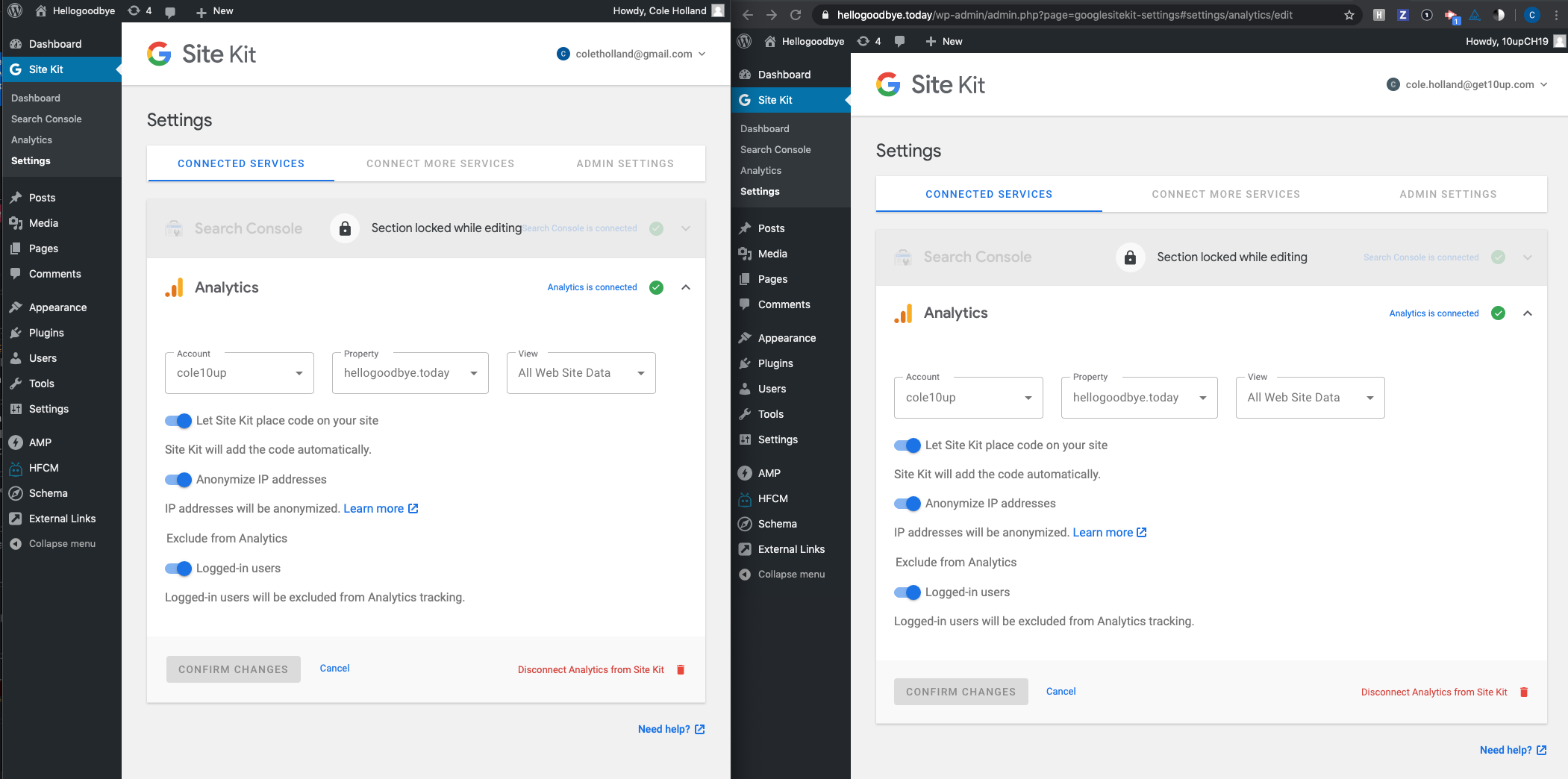
Pulling this one back into Escalations after working with @aaemnnosttv. I noticed my user's permissions on the GA site weren't set properly to edit and collaborate causing a false positive of this issue.
Adjusting both user's permissions to match - I no longer see this issue.
Sending to L2
cole10up
on 11 Jun 2020
I was really disappointed to see this issue is still not resolved in the latest release. And given the security issues that were fixed most recently it seems those security fixes were the cause. I can't roll back to an older version to even test since the plugin is blocked.
timnolte
on 19 Jun 2020
@timnolte we haven't been able to consistently reproduce the issue yet. If you have any details that you could share to help resolve this faster, that would be great.
 aaemnnosttv
on 19 Jun 2020
aaemnnosttv
on 19 Jun 2020
@aaemnnosttv What specific details would you like? Happy to share what I can as I'm having the same issue on 2 sites (reported it on the WordPress.org forums).
I've got the plugin working on ~5 sites, the 2 sites that it is not working on are both Analytics accounts that were transferred from a previous owner. Permissions have been set to exactly the same as the 5 sites that are working.
My suggested test use case: Setup an Analytics account. Transfer it to another Analytics account and try connect to Site Kit WP with the new account.
 MattGeri
on 22 Jun 2020
MattGeri
on 22 Jun 2020
Hi @MattGeri - thanks for the details!
Here's what I've done to try to reproduce your case:
- Created a new Analytics account in Google Account A
- Granted full permissions to new account to Google Account B
- Confirmed that Site Kit works with new Analytics account using Google Account B
- Disconnected Analytics in Site Kit
- Removed Google Account A from new Analytics account
- Reconnected Analytics in Site Kit and confirmed that it works with new Analytics account using Google Account B
Not sure if I'm missing something here or not but it seems to be working as expected both before and after transferring ownership.
aaemnnosttv
on 23 Jun 2020
@aaemnnosttv I have the same situation as @MattGeri however, I can confirm that many accounts that I'm using with SiteKit had also been transferred but some work and some don't. Were there any changes to the permissions required from a Google account during that last security release of the plugin? I'm not sure what more details I could provide. It's possible this could be a plugin conflict of some sort though I don't believe the site I'm having a problem with has much of a different plugin setup than those I do have working.
timnolte
on 23 Jun 2020
Edit: Ignore this, the account details are actually correct it seems.
MattGeri
on 23 Jun 2020
Thanks for sharing @MattGeri - this is very helpful. It seems that this problem is specific to properties which have been transferred between accounts. Can you confirm that this is the case for the sites where you're having a problem?
aaemnnosttv
on 23 Jun 2020
@aaemnnosttv Actually, scratch my last message, the account details coming through are correct. But overall yes, _my_ issue is only with properties that have been transferred from one account to another. I'll do some more digging by intercepting the request to the Google API and see what I can find.
What I know so far is the /wp-json/google-site-kit/v1/modules/analytics/data/accounts-properties-profiles?existingPropertyID=&_locale=user returns data, but the /wp-json/google-site-kit/v1/modules/analytics/data/properties-profiles?accountID=123100338&_locale=user does not (this is the request which returns the permissions error)
MattGeri
on 23 Jun 2020
@aaemnnosttv Some additional context on the same reported issue within another WordPress topic.
For this user the issue occurred after modifying ownership of the property, with the user providing their change history and additional screenshots. Troubleshoot ongoing.
jamesozzie
on 23 Jun 2020
@MattGeri thanks for your help. I was able to reproduce this and can see what the problem is now. As for now, you won't be able to complete the set up via the UI unfortunately. In the meantime, I'll see what we can do about a temporary workaround.
aaemnnosttv
on 23 Jun 2020
OK, so this was essentially broken a few releases ago, this would explain why the problem seemed to have just started. A large portion of the sites I manage have had GA ownership changes.
timnolte
on 23 Jun 2020
This will be fixed via #1707.
 felixarntz
on 23 Jun 2020
felixarntz
on 23 Jun 2020
Tested
Ran a series of tests around Analytics setup, switching properties and accounts while logged in as separate users on the same site. Disconnecting and reconnecting. Tried moved properties outlined in #1707
Passed QA ✅
cole10up
on 16 Jul 2020
Related issues
aaemnnosttv
·
3Comments
aaemnnosttv
·
5Comments
 tunakode
·
4Comments
tunakode
·
4Comments
 jsmshay
·
3Comments
aaemnnosttv
·
3Comments
jsmshay
·
3Comments
aaemnnosttv
·
3Comments
Most helpful comment
@MattGeri thanks for your help. I was able to reproduce this and can see what the problem is now. As for now, you won't be able to complete the set up via the UI unfortunately. In the meantime, I'll see what we can do about a temporary workaround.