Site-kit-wp: Start setup error after Sign in with Google: Unable to authenticate Site Kit. Check your client configuration is in the correct JSON format
Bug Description
Plugin setup cannot be completed after Sign in with Google because of an error with config.
Steps to reproduce
- Install plugin
- Go to "Start Setup"
- On Google's page select "Sign in with Google"
- Allow access to data
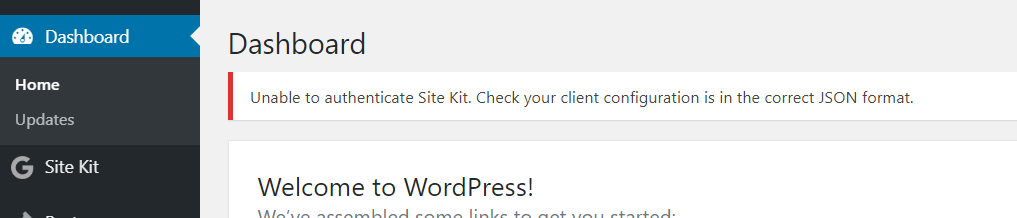
- It redirects back to /wp-admin with error:
> Unable to authenticate Site Kit. Check your client configuration is in the correct JSON format.
Screenshots
_Do not alter or remove anything below. The following sections will be managed by moderators only._
Acceptance criteria
Implementation Brief
Changelog entry
 kospl
kospl
All 10 comments
Same here. But first I was stuck on sitekit web page. Process stopped at step 2 when clicking on the button "Allow", button is disabled and nothing more happens:
1) You're a verified owner of mysite.com
2) Allow mysite.com to access Google Account data
Now that you're a verified owner of mysite.com, your site wants to access your Google Account data to display metrics on the Site Kit dashboard.You can view or remove access for mysite.com in your Site Kit dashboard at any time.
Allow Cancel
Error in console :
[amp-form] Failed to parse response JSON: SyntaxError: Unexpected end of JSON
Refreshed page, error, had to go back to wordpress and try to Reset Site Kit but that does not do anything. So I tried to re Start setup and got the same error :
Unable to authenticate Site Kit. Check your client configuration is in the correct JSON format.
Tried to Start setup again, logged in Google, allowed access again, and this time it skipped to step 3 "add site" and after clicking: button "Allow" disabled, nothing happens again... refreshed page, and got congratulations go to my dashboard.
It works now. I have no idea why. I just kept trying to redo every thing the same way, 3 times.
 Juke29
on 5 Nov 2019
Juke29
on 5 Nov 2019
Same problem here... :(
 joxerg
on 10 Nov 2019
joxerg
on 10 Nov 2019
I have the same problem.
- Sign in with google
- Log in to google
- Allow access to data
- Error 'Unable to authenticate Site Kit.Check your client configuration is in the correct JSON format.' in Dashboard
Language: Japanese
WordPress Version: WordPress 5.3.1-alpha-46728
Plugin Version: Site kit 1.0.4
Server: X-server
 lunaluna
on 16 Nov 2019
lunaluna
on 16 Nov 2019
It's working for me since yesterday 1.0.4 version :)
joxerg
on 16 Nov 2019
Still an issue with 1.0.4.
kospl
on 18 Nov 2019
same problem... 👎
 erlupacchiotto
on 21 Nov 2019
erlupacchiotto
on 21 Nov 2019
Same issue. Please fix. Nothing in console.
 marty80
on 21 Nov 2019
marty80
on 21 Nov 2019
Bug Description
Plugin setup cannot be completed after Sign in with Google because of an error with config.
Steps to reproduce
- Install plugin
- Go to "Start Setup"
- On Google's page select "Sign in with Google"
- Allow access to data
- It redirects back to /wp-admin with error:
Unable to authenticate Site Kit. Check your client configuration is in the correct JSON format.
Screenshots
_Do not alter or remove anything below. The following sections will be managed by moderators only._
Acceptance criteria
- *
Implementation Brief
Changelog entry
*
Just Turn off the Security Plugins and it will work properly.
Regards
[HOP IN DIGITAL](www.hopindigital.com)
 hopindigital
on 25 Nov 2019
hopindigital
on 25 Nov 2019
Just Turn off the Security Plugins and it will work properly.
Not for me. I deactivated the only security plugin I have, "All in one WP Security", and it fails in the same way, with same message. But, given the hint, I deactivated some others also, and it completed. I suspect it was "Coming soon by Seedprod", because I had the mode enabled (site is being built atm), wich of course could interfere with any response requisites from SiteKit. My bad!! T_T
 dote78
on 25 Nov 2019
dote78
on 25 Nov 2019
Found that "Restricted Site Access" plugin was causing this issue with Site Kit.
kospl
on 28 Nov 2019
Related issues
 felixarntz
·
5Comments
felixarntz
·
5Comments
 aaemnnosttv
·
4Comments
aaemnnosttv
·
4Comments
 jsmshay
·
3Comments
aaemnnosttv
·
5Comments
jsmshay
·
3Comments
aaemnnosttv
·
5Comments
 jamesozzie
·
3Comments
jamesozzie
·
3Comments
Most helpful comment
Still an issue with 1.0.4.