Site-kit-wp: Oauth is generating API key instead of Client Credentials
Hi,
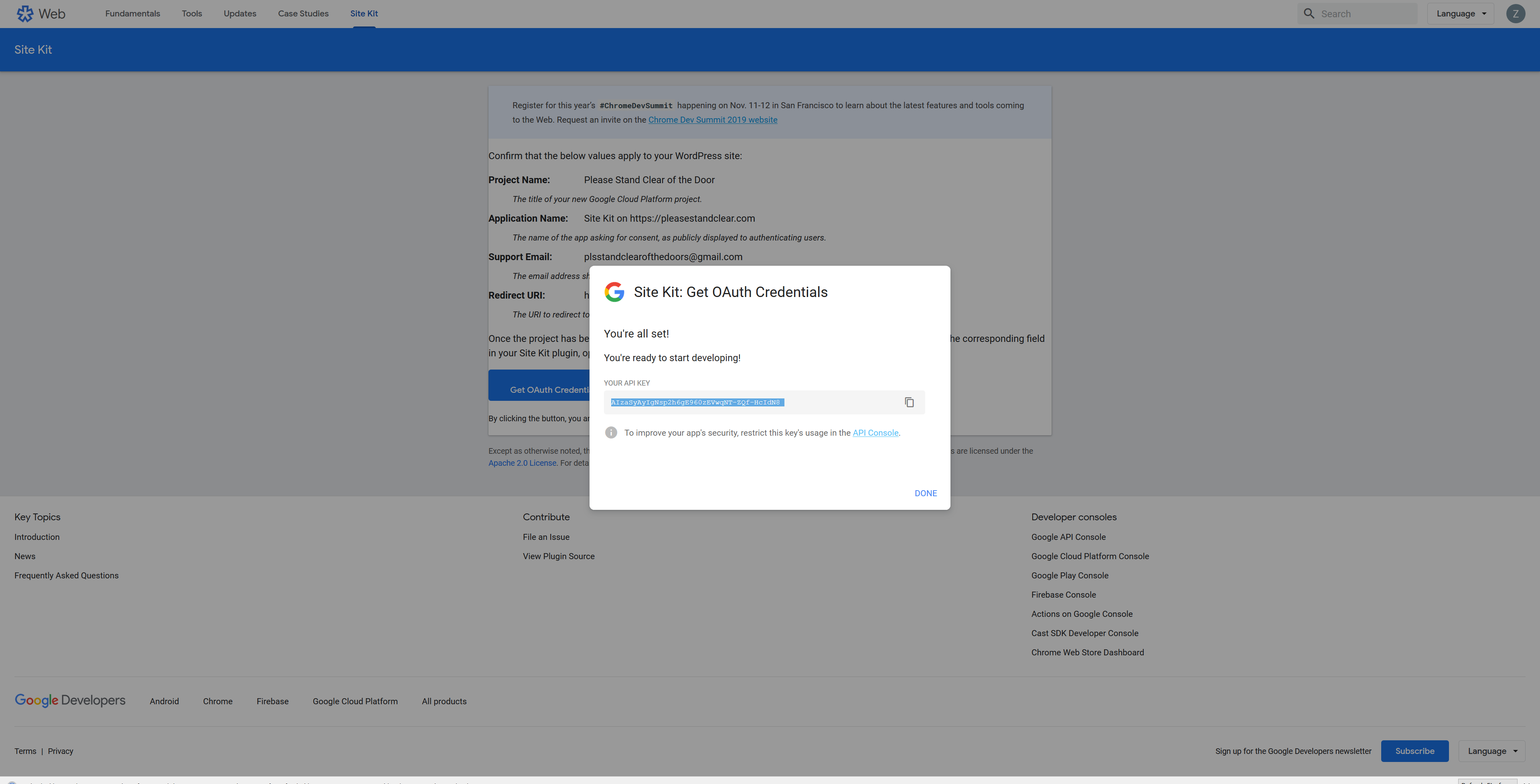
When trying to connect Site Kit to WP, On step 1 for creating new client ID, I follow the link and when I arrive at the page, I click Generate OAuth Credentials. Instead of giving me Client Credentials, It gives me an API Key. The Plug in is not wanting an API Key.
 zaadams
All 28 comments
I have the same problem help me
 vamshi428
on 20 Sep 2019
vamshi428
on 20 Sep 2019
Same here.
 enricoy
on 20 Sep 2019
enricoy
on 20 Sep 2019
same here
 fether-dev
on 20 Sep 2019
fether-dev
on 20 Sep 2019
Same here
 Sanjoy123456
on 20 Sep 2019
Sanjoy123456
on 20 Sep 2019
@zaadams @enricoy @Sanjoy123456 @fether-dev @vamshi428 We are looking into this at the moment, please bear with us while we investigate.
 jamesozzie
on 20 Sep 2019
jamesozzie
on 20 Sep 2019
I'm having this issue as well. Thanks for looking into it @jamesozzie. Let us know what you find out.
 dannydickson
on 20 Sep 2019
dannydickson
on 20 Sep 2019
@zaadams @enricoy @Sanjoy123456 @fether-dev @vamshi428 We are looking into this at the moment, please bear with us while we investigate.
I'm facing the same issue....
 usmanswift
on 20 Sep 2019
usmanswift
on 20 Sep 2019
@jamesozzie, We got the same issue as well. Thanks for working on this. I'm looking forward to working with Site Kit for the first time.
 ayohdev
on 20 Sep 2019
ayohdev
on 20 Sep 2019
same here
 michaelgenova
on 21 Sep 2019
michaelgenova
on 21 Sep 2019
i am also having this issue
 thesavvydon
on 21 Sep 2019
thesavvydon
on 21 Sep 2019
also get the same issue, i get only API key not the OAuth Client ID Conf
 genc74
on 21 Sep 2019
genc74
on 21 Sep 2019
I hope this gets fixed soon.
 AdelDima
on 21 Sep 2019
AdelDima
on 21 Sep 2019
Is there a way to manually create the client config? I already have a Google Cloud Project created, can I insert my apps credentials into a code snippet template? Maybe this could be a temporary work-around?
ayohdev
on 21 Sep 2019
Yup same issue here..
 hfrid
on 21 Sep 2019
hfrid
on 21 Sep 2019
yes the same problem even I try to get Client Credentials from API console but it didn't work
 kama003
on 21 Sep 2019
kama003
on 21 Sep 2019
@jamesozzie Any fixes yet?
 ElectronEsq
on 21 Sep 2019
ElectronEsq
on 21 Sep 2019
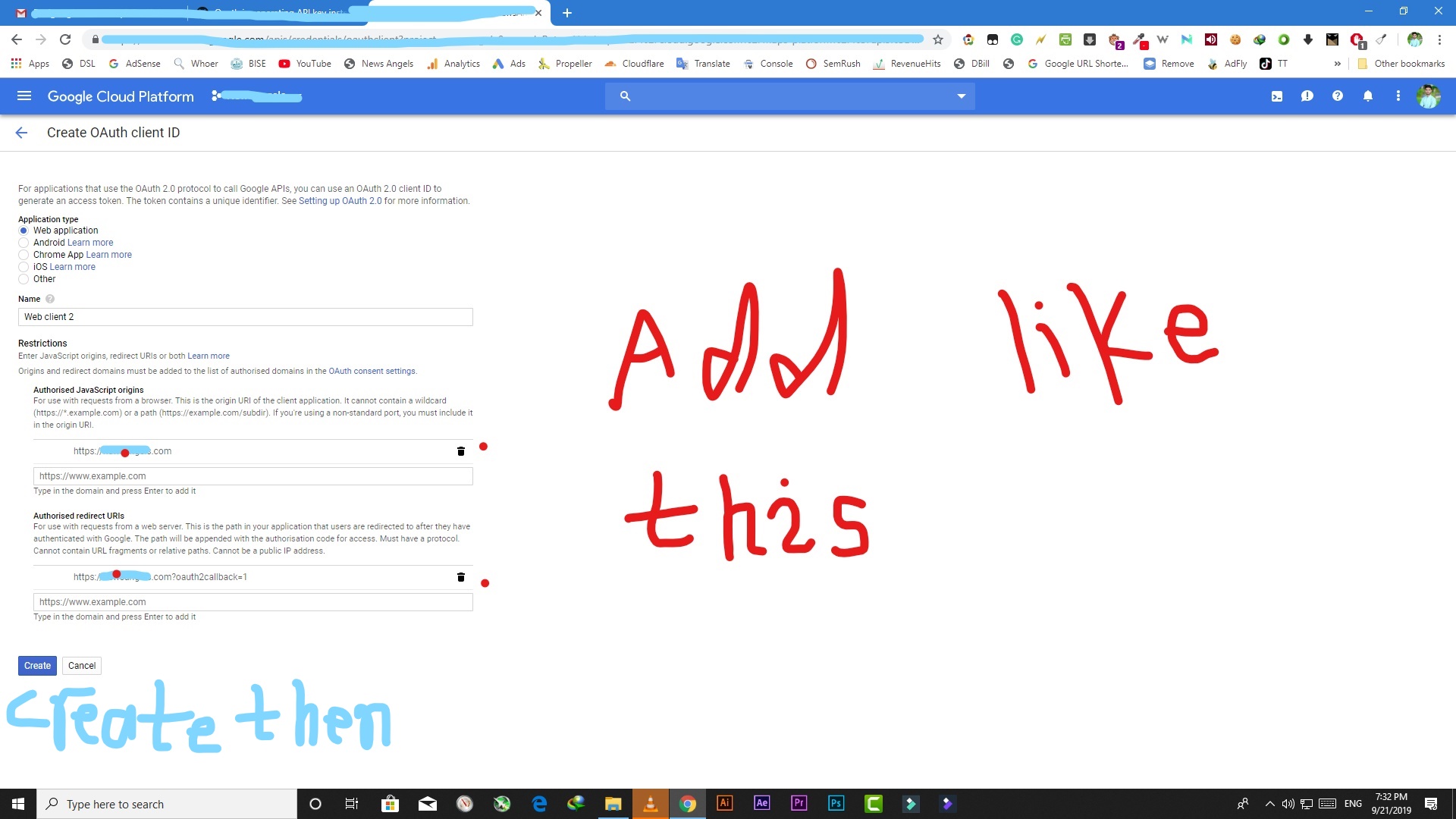
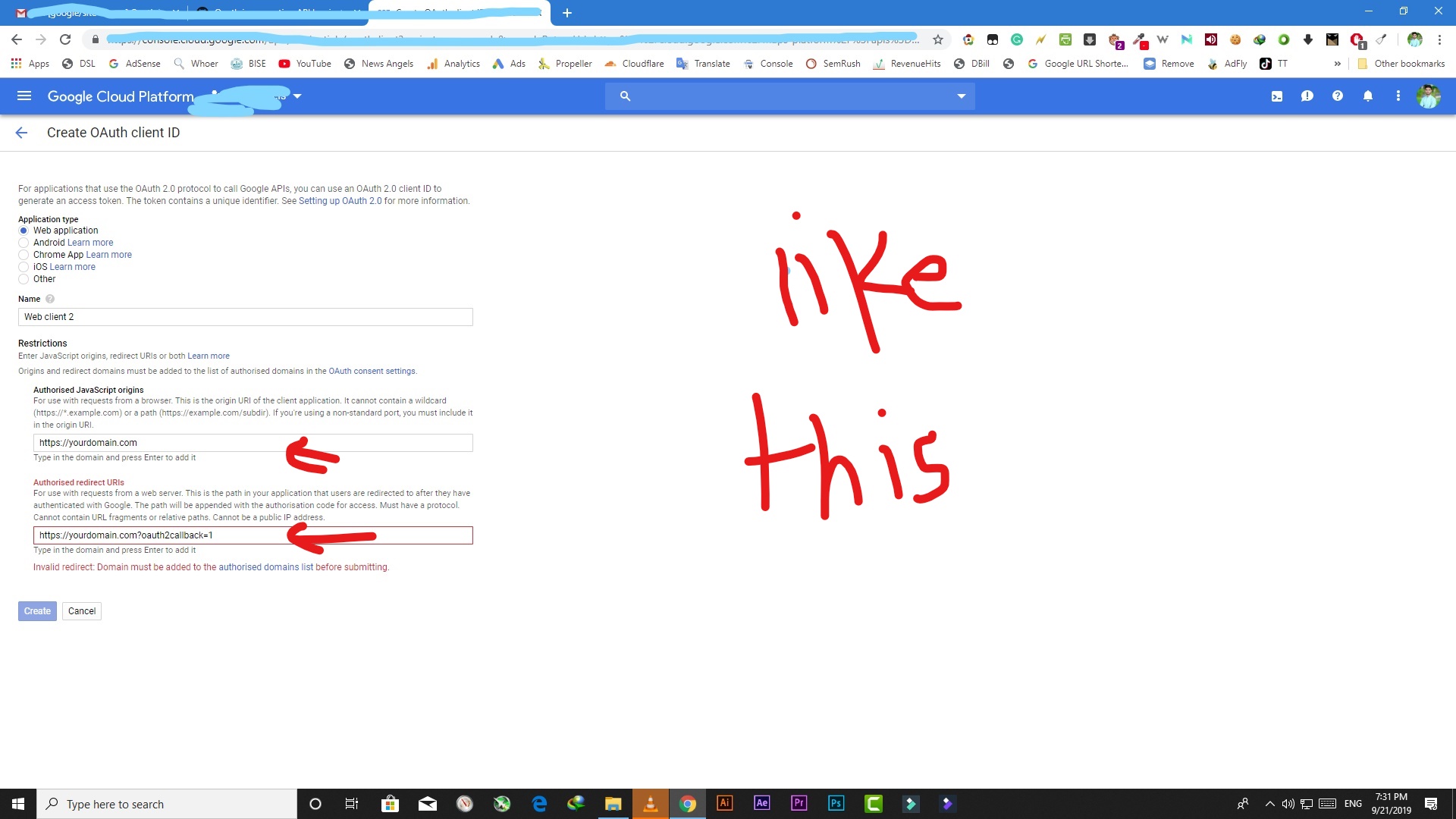
You can manually set it up by entering details in given code
{ "web": { "client_id": "Client ID Goes Here", "project_id": "Project ID Goes Here", "auth_url": "https://accounts.google.com/o/auth2/auth", "token_url": "https://oauth2.googleapis.com/token", "auth_provider_x509_cert_url": "https://www.googleapis.com/oauth2/v1/certs", "client_secret": "Client Secret Goes Here", "redirect_uris": [ "https://yourdomain.com?oauth2callback=1" ] } }
usmanswift
on 21 Sep 2019
You can manually set it up by entering details in given code
{ "web": { "client_id": "Client ID Goes Here", "project_id": "Project ID Goes Here", "auth_url": "https://accounts.google.com/o/auth2/auth", "token_url": "https://oauth2.googleapis.com/token", "auth_provider_x509_cert_url": "https://www.googleapis.com/oauth2/v1/certs", "client_secret": "Client Secret Goes Here", "redirect_uris": [ "https://yourdomain.com?oauth2callback=1" ] } }
Example is given below
{ "web": { "client_id": "1031765-a0i7j5327d40fvcmmkaug2s81eb.apps.googleusercontent.com", "project_id": "news-angels-156987741", "auth_url": "https://accounts.google.com/o/auth2/auth", "token_url": "https://oauth2.googleapis.com/token", "auth_provider_x509_cert_url": "https://www.googleapis.com/oauth2/v1/certs", "client_secret": "EHeTYxchhvuufvTlYq", "redirect_uris": [ "https://newsangels.com?oauth2callback=1" ] } }
usmanswift
on 21 Sep 2019
And do you know the client-ID and client_secret ?
hfrid
on 21 Sep 2019
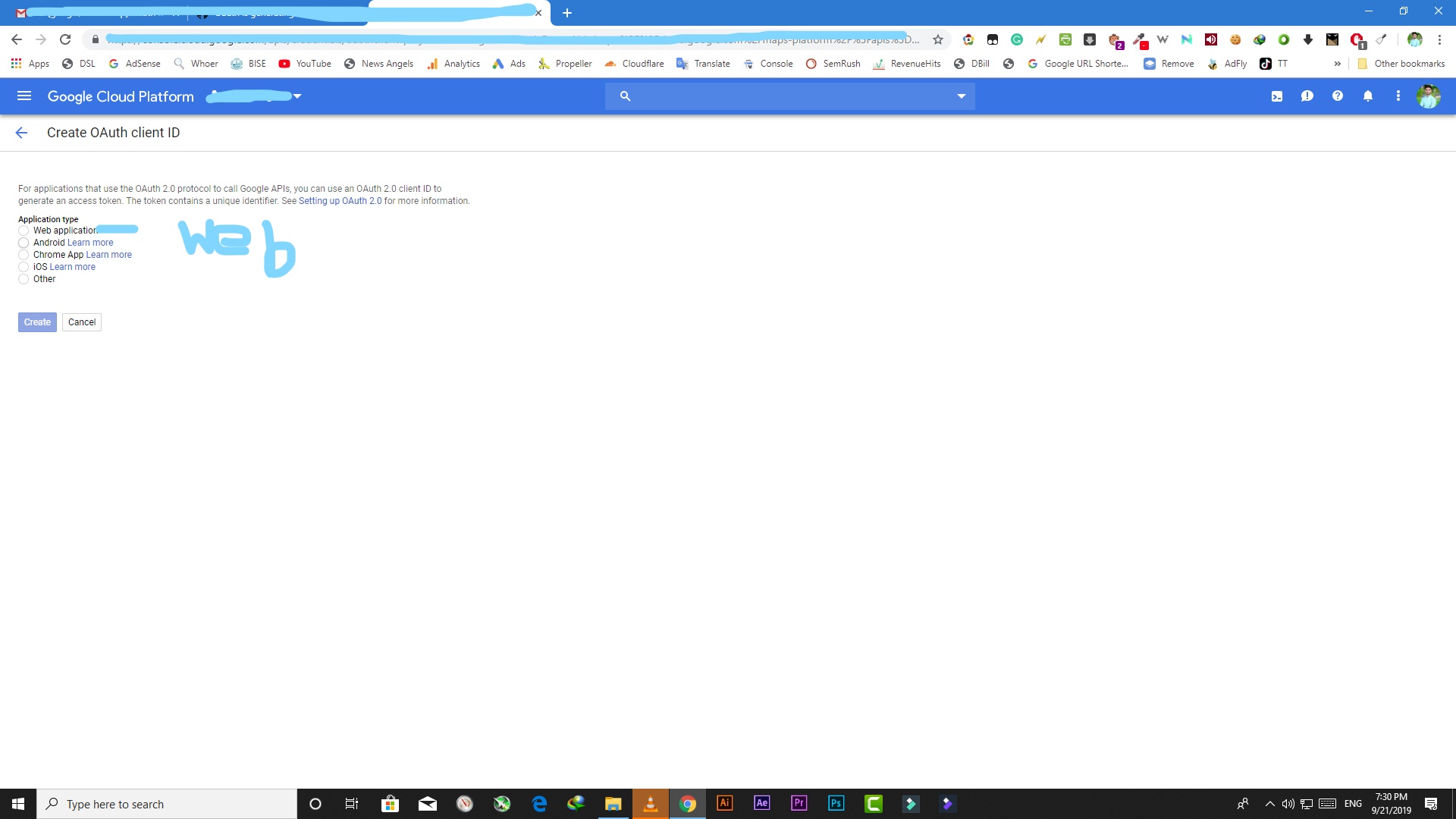
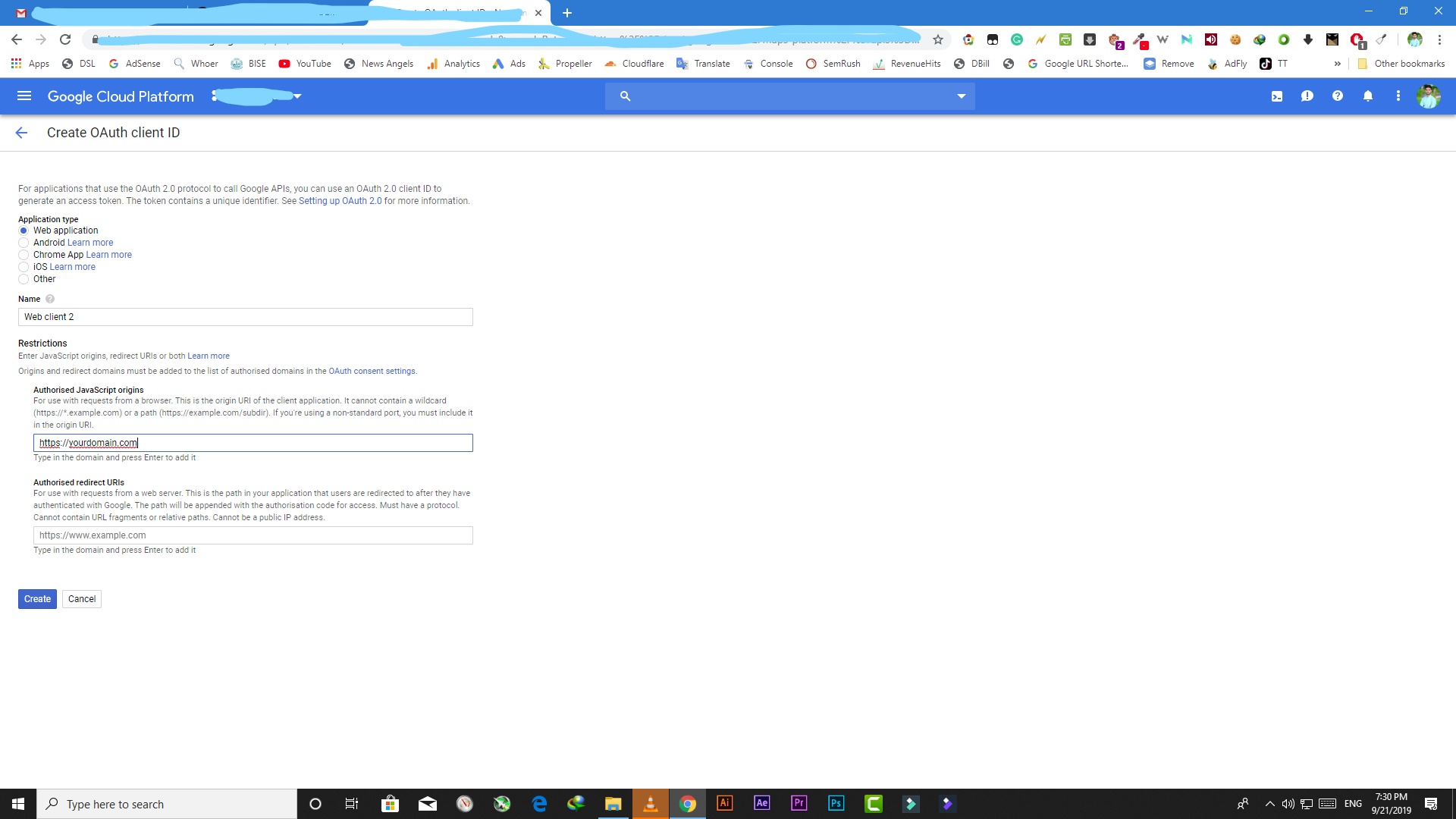
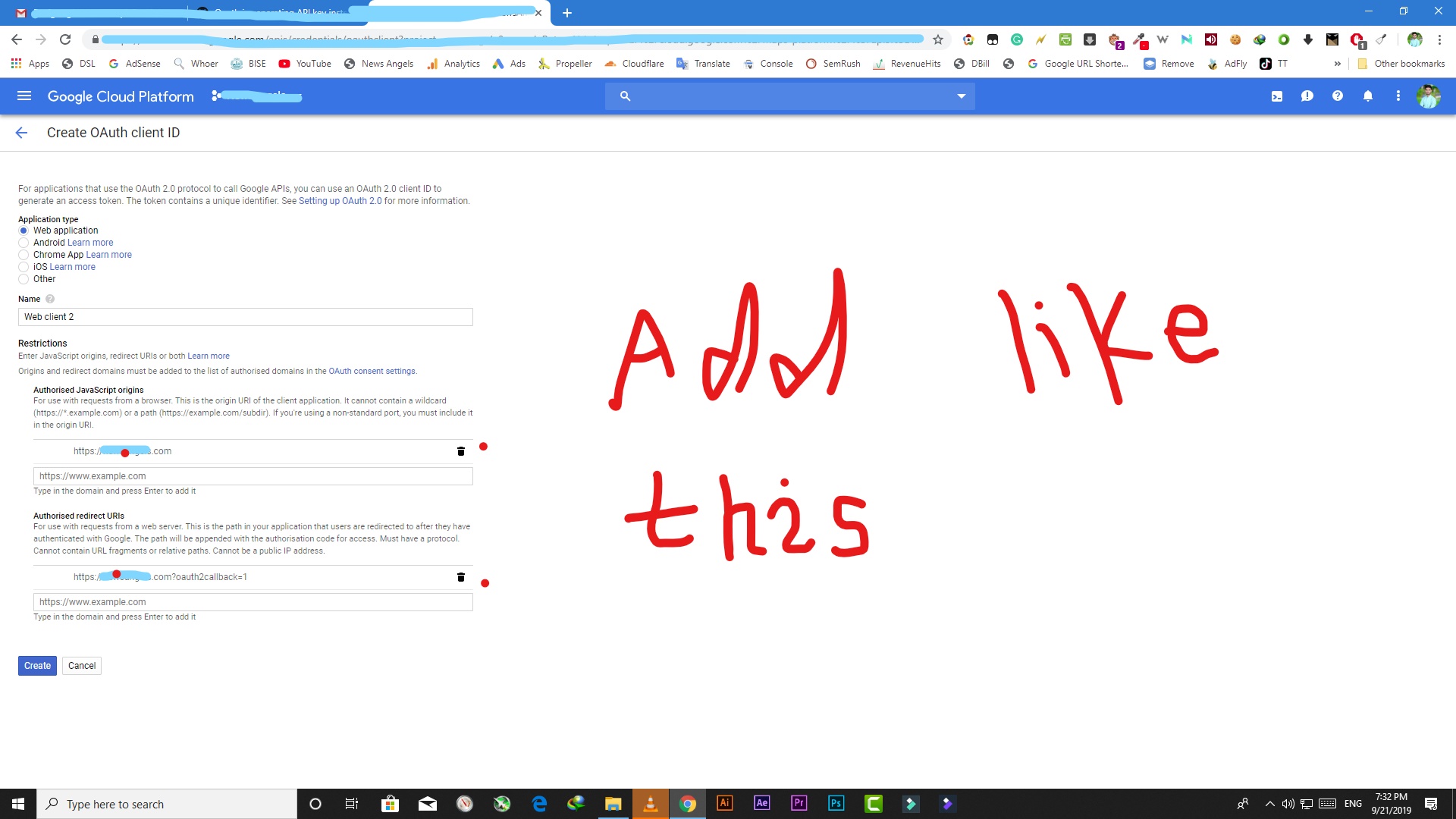
Here some Images to get Project ID, Client Secret and Client ID etc





usmanswift
on 21 Sep 2019
And do you know the client-ID and client_secret ?
usmanswift
on 21 Sep 2019
And do you know the client-ID and client_secret ?
Let me know if it works or not.
usmanswift
on 21 Sep 2019
@usmanswift , Thank you so much!! lifesaver. It worked for me. And it is also good to know how to do this manually as well. Thanks again bro!
ayohdev
on 21 Sep 2019
@usmanswift , Thank you so much!! lifesaver. It worked for me. And it is also good to know how to do this manually as well. Thanks again bro!
I'm glad, I was helpful.
usmanswift
on 21 Sep 2019
@usmanswift Thanks a lot! I Was struggling for sure.
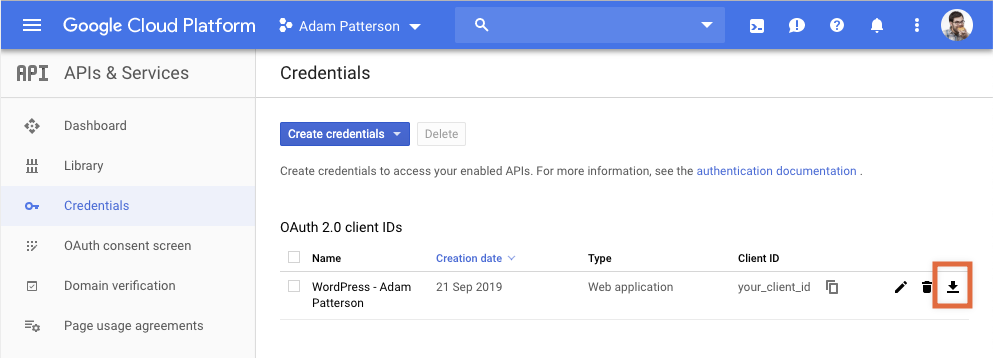
I found this which might help, Once you correctly enter your callback details you can download the JSON config here.
 adampatterson
on 23 Sep 2019
adampatterson
on 23 Sep 2019
@usmanswift Thanks a lot! I Was struggling for sure.
I found this which might help, One you correctly enter your callback details you can download the JSON config here.
Good Idea, thanks for sharing
usmanswift
on 23 Sep 2019
@usmanswift , Thank you so much!! lifesaver. It worked for me. And it is also good to know how to do this manually as well. Thanks again bro!
I'm glad, I was helpful.
Thank you very much, that made the trick!
 jpgif
on 24 Sep 2019
jpgif
on 24 Sep 2019
Good news everyone!
The issue with the client credentials generation has been resolved and you should all be able to set up Site Kit as expected.
If you still experience issues, please let us know.
 swissspidy
on 26 Sep 2019
swissspidy
on 26 Sep 2019
Related issues
 aaemnnosttv
·
4Comments
aaemnnosttv
·
5Comments
aaemnnosttv
·
4Comments
aaemnnosttv
·
5Comments
 tofumatt
·
5Comments
aaemnnosttv
·
3Comments
tofumatt
·
5Comments
tofumatt
·
5Comments
aaemnnosttv
·
3Comments
tofumatt
·
5Comments
Most helpful comment
Let me know if it works or not.