Simulator: How to get position of ego vehicle
Hi LGSVL team,
I need ego vehicle's current position information, am using rosbridge for interfacing LGSVL and ROS framework. Is there any possibility I can subscribe vehicle's current position (position and orientation) in ROS?
And for a particular map what is the default position of the ego vehicle? could you specify in which file I can modify the position value of a ego vehicle.
Note: I don't want to use autoware or Apollo, I want to use my own ROS framework.
Thanks!
 User-712
All 8 comments
@User-712 @hadiTab can confirm but as for the position and rotation, you can get this from the GPS sensor. This has lat/long/orientation/northing and easting. Is this what you are looking for?
The API can place the vehicle anywhere you need in the scene or it uses spawnInfo gameobjects to spawn. These are put in the map when we create the bundles. You can create a map and place anywhere or use our exiting open source maps and edit and re-build the asset bundle. What particular map are you referencing?
 EricBoiseLGSVL
on 22 Sep 2020
EricBoiseLGSVL
on 22 Sep 2020
@User-712 sorry for the late reply. I missed this somehow.
The easiest way to do that in ROS (1) would be to add the GPS Odometry Sensor to the vehicle. Make sure to set IgnoreMapOrigin to false otherwise all positions will be relative to the origin of the map (instead of actual GPS coordinates).
The sensor outputs a nav_msgs/Odometry message in ROS which includes xyz coordinates (easting/northing/altitude) and orientation as a quaternion.
 hadiTab
on 24 Sep 2020
hadiTab
on 24 Sep 2020
@EricBoiseLGSVL am using AutonomouStuff Map, how can we make the Ego vehicle span at a different location in the map just by making changes in the simulator without using Unity editor.
could you please specify the file where i can get spawnInfo of Maps.
Thanks!
User-712
on 28 Sep 2020
@User-712 Hi, I think if you're not using API mode, the simulator will use one of the default spawn points that's defined.
If you want to spawn Ego vehicle at any location, you'll need API mode.
 ntutangyun
on 28 Sep 2020
ntutangyun
on 28 Sep 2020
@ntutangyun am interfacing LGSVL with ROS framework through ROS bridge, how can I use API mode here? could you please explain in brief how to spawn Ego vehicle at different location without using unity editor.
Note: I don't want to use autoware or Apollo, I want to use my own ROS framework.
Thanks!
User-712
on 28 Sep 2020
you could just enter API mode, use API to spawn the EGO vehicle. and if the sensors are defined properly, they will be transferring ROS messages to your ROS framework.
ntutangyun
on 28 Sep 2020
@ntutangyun am using BorregasAve simulation environment as shown below
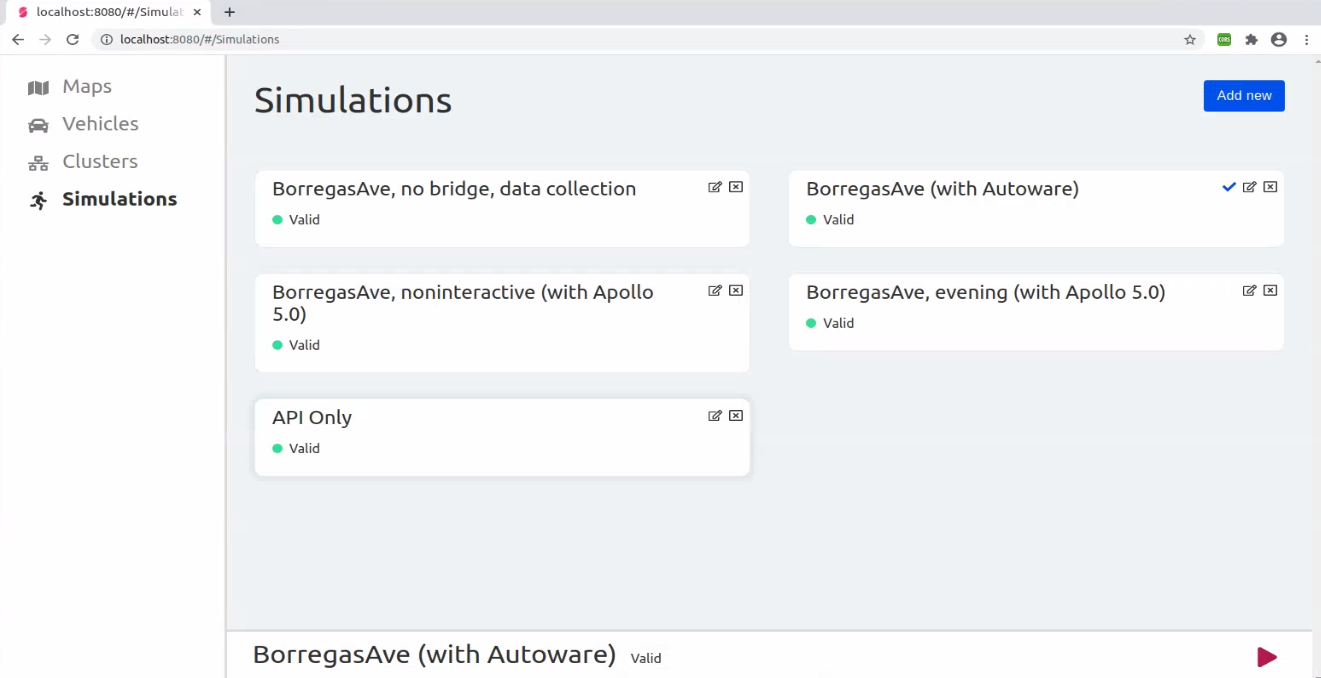
based on my understanding we can use any one of the simulation environment at a time. How can I enter API only mode at the same time?
Thanks
User-712
on 28 Sep 2020
@User-712 Basically you can just
- enter API ONLY mode
ntutangyun
on 28 Sep 2020
Related issues
 frontw
·
5Comments
frontw
·
5Comments
 qwetqwe
·
6Comments
qwetqwe
·
6Comments
 yumianhuli2
·
3Comments
yumianhuli2
·
3Comments
 kmitri-dxc
·
5Comments
kmitri-dxc
·
5Comments
 bage131
·
5Comments
bage131
·
5Comments
Most helpful comment
@User-712 Basically you can just
use API to load the Borregas Ave map (example)
spawn EGO vehicle, NPC vehicles, and/or pedestrians wherever you want. (example)
Once your EGO vehicle is spawned, you could use API to enable bridge connection. (example)