Simulator: How to use Unity scene for LGSVL simulation
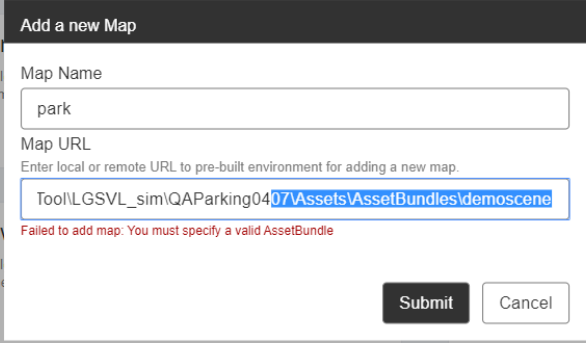
I imported "QA Modular Parking 1.01.unitypackage" to Unity3D,Then I created AssetBundles with Demo scene.There was an error "Failed to add map: You must specify a valid AssetBundle" when I added new map with Demo scene in LGSVL.But It was OK when I added new map with environment_CubeTown.Could you tell me how to solve this problem? Are there any more details about how to use the scene in Unity for LGSVL simulation? Thank you.
 bage131
All 5 comments
I dont know what's inside your scene but if you want to do something like building a new map with unity and adding it to simulator you should build it from unity--> simulator tab but there are more details about it. You can find all steps at #699 it worked for me.
EDIT: If you dont have simulator tab in your unity you have to clone or download simulator repository and open it with Unity 2019.3.3f1( as i remember but it might be changed you should check unity version from documentation)
 Erdemhan
on 15 Apr 2020
Erdemhan
on 15 Apr 2020
@bage131 yes, @Erdemhan is correct. If you correctly created a map, it will be named "environment_YourMap". YourMap will match folder in External/Environments and also match YourMap.scene file in that folder. Then Simulator -> Build... will list the map and create an Asset Bundle, not a unity package. unity package is for creating assets to distribute internally or to sell on Unity Asset Store.
We just released yesterday a tutorial video to help explain environment creation! Here
 EricBoiseLGSVL
on 16 Apr 2020
EricBoiseLGSVL
on 16 Apr 2020
Thank you very much.But I have a new problem.I have created a parking map in the Unity.The car is far from the ground when I run the simulator.As shown in the picture.How to set the position on the map.Thank you.

bage131
on 23 Apr 2020
Thank you very much.But I have a new problem.I have created a parking map in the Unity.The car is far from the ground when I run the simulator.As shown in the picture.How to set the position on the map.Thank you.
You should set SpawnInfo's position.
Erdemhan
on 23 Apr 2020
I got it.Thank you very much.
bage131
on 2 Jun 2020
Related issues
 ntutangyun
·
4Comments
ntutangyun
·
4Comments
 yumianhuli2
·
6Comments
yumianhuli2
·
3Comments
yumianhuli2
·
6Comments
yumianhuli2
·
3Comments
 qwetqwe
·
6Comments
qwetqwe
·
6Comments
 AlexandrZabolotny
·
4Comments
AlexandrZabolotny
·
4Comments