Simulator: Customized EGO vehicle in 2019.07 simulator driving very slow
Hi, we are building our own customized EGO vehicle for 2019.07 simulator.
Currently I can't find official documentation about 2019.07 version.
(There is an old article about 2019.05 version, https://www.lgsvlsimulator.com/docs/add-new-ego-vehicle/)
I had checked official Jaguar2015XE vehicle as reference.
Now we can build our vehicle assetbundle running in 2019.07 simulator.
But we have a problem when driving EGO with manual control, the vehicle is very very slow.
Looks like the vehicle always has very high braking.
I cannot understand which part goes wrong.
Can you help us to solve this issue?
Or provide useful information/tutorial on how to configure a EGO vehicle?
The gif demos our EGO driving extremely slowly (compared to another LGSVL released LincolnMKZ)
https://imgur.com/lT6VIXf
This is the vehicle assetbundle we built for simulator
https://drive.google.com/open?id=15WG5XUUb25ceyVu_eZ6k9DDGT7d5j008
 riveranb
All 11 comments
@riveranb
Yes, we are currently creating documentation and video on how to create new maps and vehicles. I put a step by step guide here in the meantime. From the gif I think that the wheel colliders are not set correctly but I will look closer.
 EricBoiseLGSVL
on 21 Oct 2019
EricBoiseLGSVL
on 21 Oct 2019
@riveranb
I have looked at the asset bundle, thanks for including, and I see what the issue is. When you add a vehicle mesh to the vehicle prefab, the transform and mesh origin point need to be zeroed out.
This is incorrect
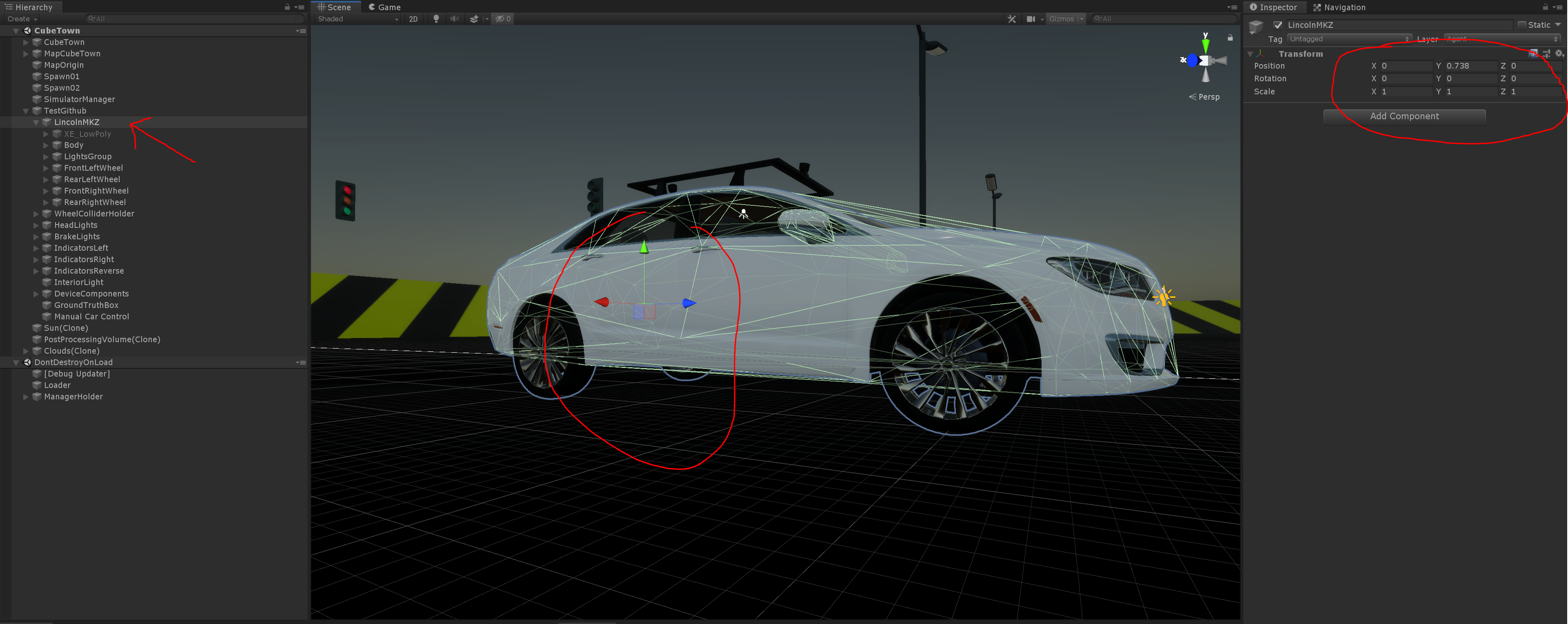
Also the wheel collider holder transform needs to be zeroed out. This is also incorrect
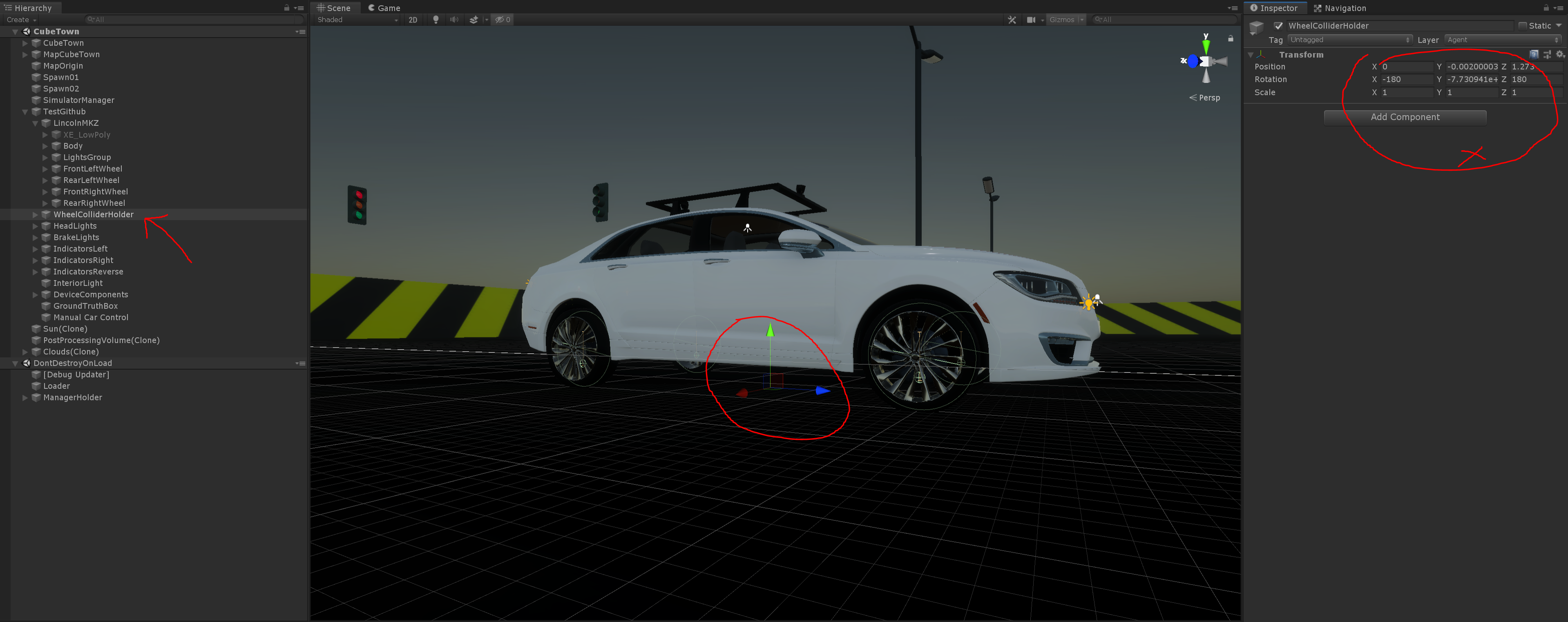
This is how it should look
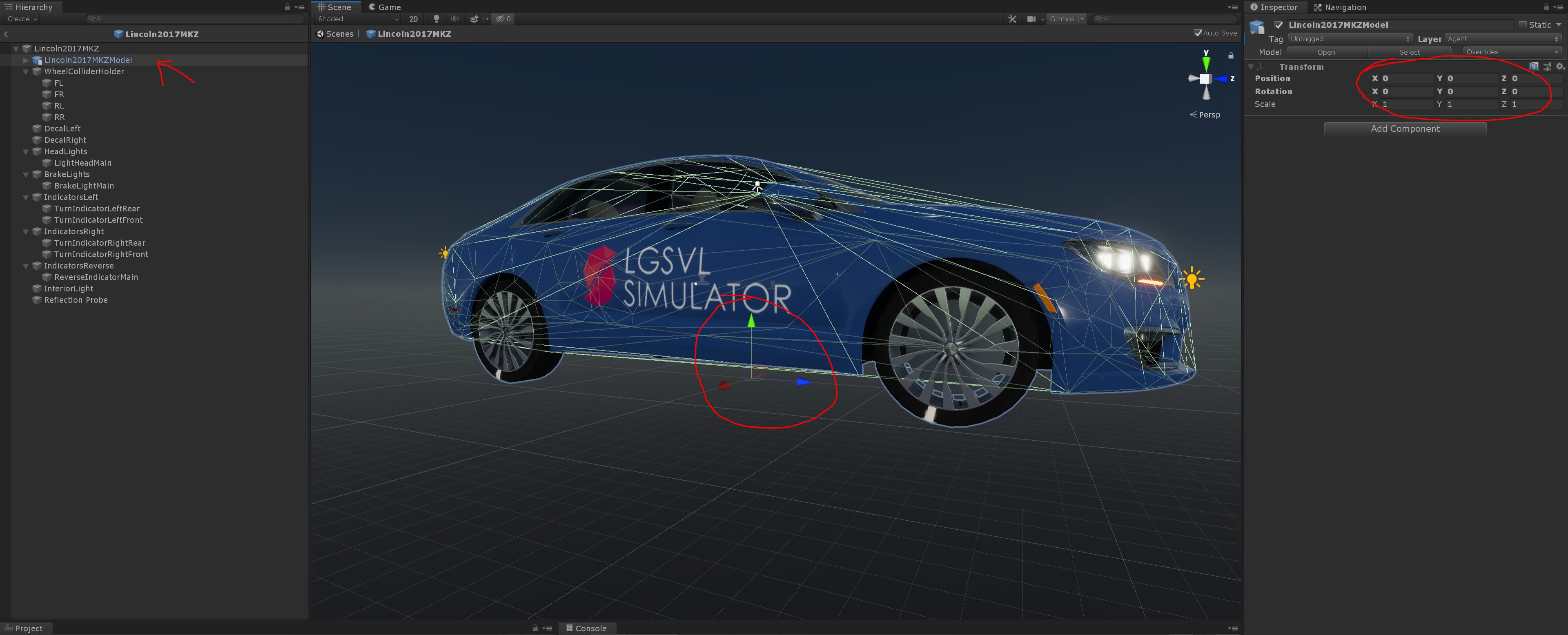
and
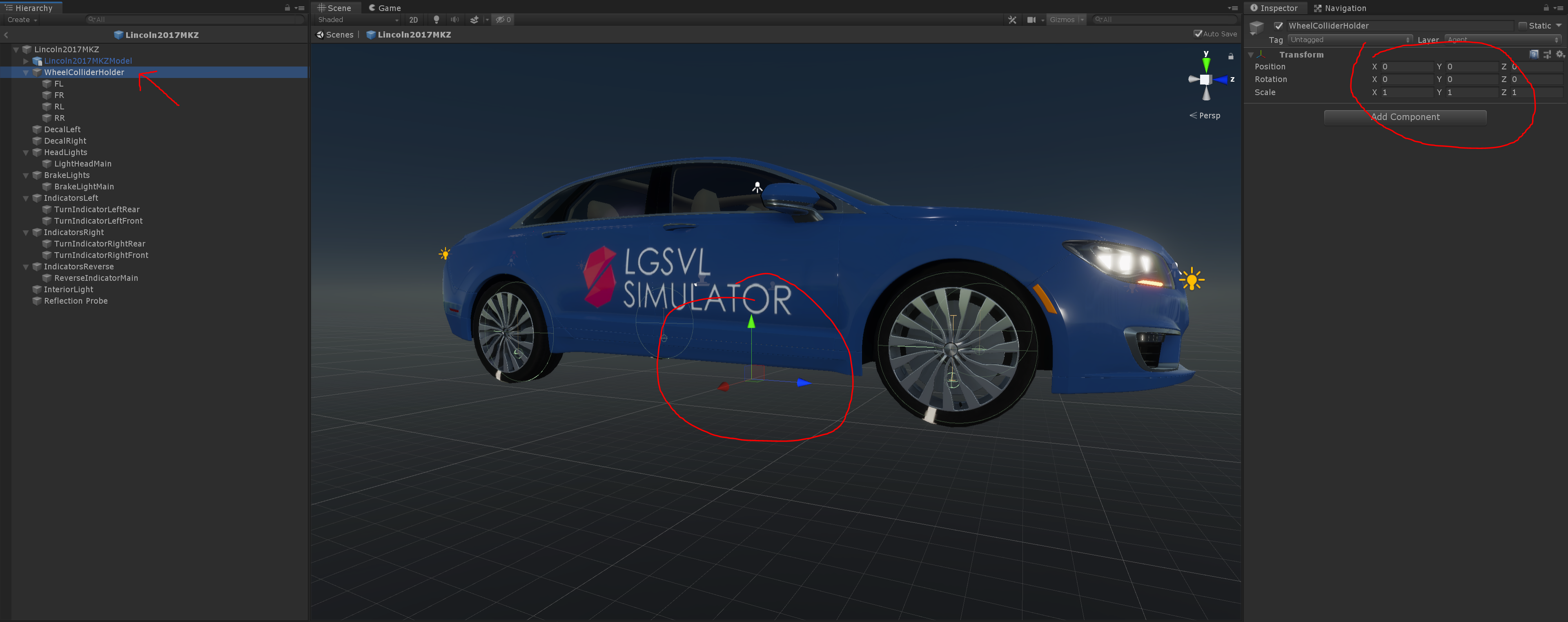
Hope this helps
EricBoiseLGSVL
on 21 Oct 2019
I have looked at the asset bundle, thanks for including, and I see what the issue is. When you add a vehicle mesh to the vehicle prefab, the transform and mesh origin point need to be zeroed out.
I have followed your suggestion, zero out car model and wheel collider holders.


Unfortunately, the same problem remains, driving very slowly... (maybe a little faster? I'm not sure)
Here is our customized vehicle repo, https://github.com/nckucar/NCKU-Lincoln-MKZ
I am stuck on trying debug this now... any help would be appreciated.
riveranb
on 22 Oct 2019
@riveranb
The child objects are still not centered, see how the transform is almost at the rear axle? This needs to be at the center. I'll clone and see if I can see the issue
EricBoiseLGSVL
on 22 Oct 2019
@riveranb
After looking at the repo, the vehicle has many problems and it's all mesh related.
1) Original mesh is an obj file that is massive! 750,000+ polygons. This is way too high for developing real-time applications. This file is more for renders in Maya for video or images. You should look at websites that will sell a realistic model but is "Game Ready" (our MKZ is 186K).
2) Original mesh root is Z up not Y up.
3) Original mesh wheels pivots are at origin and z up (only thing that does not get zeroed)
Not sure what happened to this model compared to the meshes in the prefab, but the parent child relationship of mesh nodes are very important in models. It looks like these where deleted/removed/moved improperly.
Now for the broken down vehicle parts prefab issues
1) Fbx parent node is missing and all child meshes are misaligned.
2) Odd wheel child meshes zeroed out. This is probably the main issue when rotating wheels.
So I went in and fixed the meshes and tested a bundle, driving correctly now. I have submitted a pull request. The meshes that emit light, materials and textures will need redone. Also, make another asset bundle. Please look at the zeroed pivots for the fbx's compared to your files. Hope this helps and I have the source MayaLT file if you need it.
EricBoiseLGSVL
on 23 Oct 2019
Thank you so much! I'm going to check your detailed contents,
So points are
- Original mesh is an obj file that is massive! 750,000+ polygons.
Yes, currently this is only source I got. I just utilized blender to do simple decimate modification (often quality is bad if simplify out too many faces; I'm not familiar with modelling tools).
I truly want to use game-ready version model, but I don't have one now.
- Original mesh root is Z up not Y up.
- Original mesh wheels pivots are at origin and z up (only thing that does not get zeroed)
Not sure what happened to this model compared to the meshes in the prefab, but the parent child relationship of mesh nodes are very important in models. It looks like these where deleted/removed/moved improperly.
I did break original hierarchy for my convenience to do some simplification and material grouping.
Now for the broken down vehicle parts prefab issues
- Fbx parent node is missing and all child meshes are misaligned.
- Odd wheel child meshes zeroed out. This is probably the main issue when rotating wheels.
Did you mean object space origin of original wheel meshes needs to be aligned with car-body-mesh origin? not the wheel center?
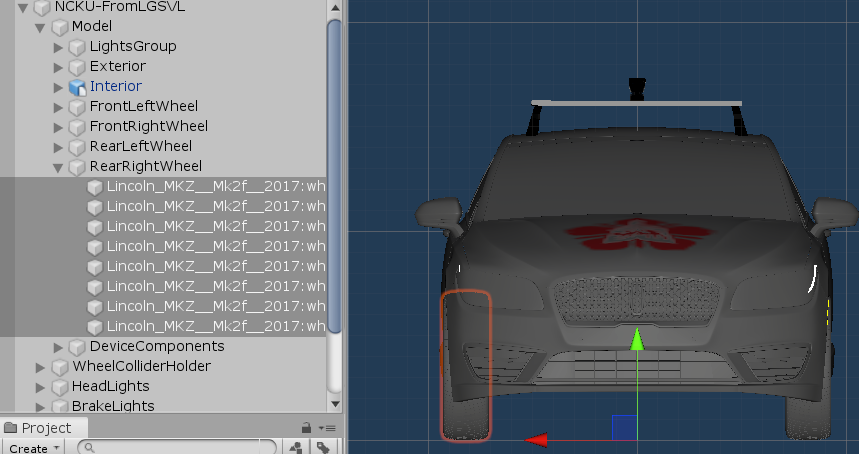
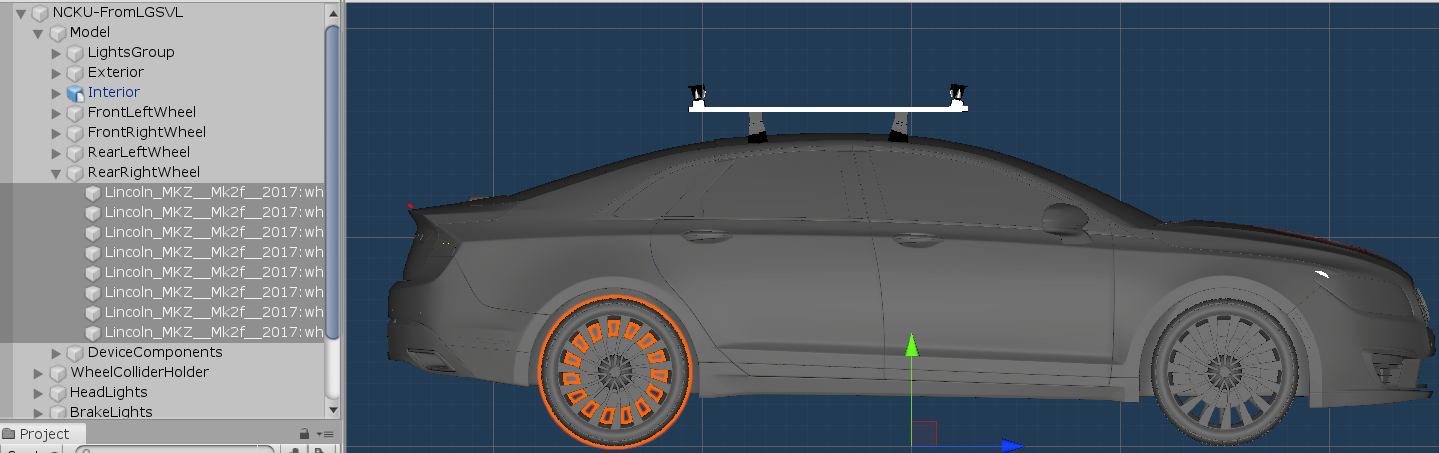
So I went in and fixed the meshes and tested a bundle, driving correctly now. I have submitted a pull request. The meshes that emit light, materials and textures will need redone. Also, make another asset bundle. Please look at the zeroed pivots for the fbx's compared to your files. Hope this helps and I have the source MayaLT file if you need it.
You really helped us a lot!
We will open these resources publicly in the future, so if you are OK with this part then of course we are happy to have the source. Appreciate!
riveranb
on 23 Oct 2019
Did you mean object space origin of original wheel meshes needs to be aligned with car-body-mesh origin? not the wheel center?
Models in Maya or other software have local and world pivots. Once you group meshes, these pivots can have incorrect values. To fix you delete all history and freeze transforms. The wheel root object will have its pivot centered to itself and I also recommend setting the child objects zeroed to the parent esp if they also have colliders or move. You notice I removed the calipers on the wheel. This is because it will be difficult to lock it's rotation but not position.
Wheels center pivot.
Body zeroed pivot.
WheelColliderHolder zeroed pivot.
Glad to help and let me know the best way to send you the MayaLT file. If it is OK we may use screen shots from the original model to show correct positions for others that are having similar issues.
EricBoiseLGSVL
on 24 Oct 2019
@riveranb
FYI the root prefab tag needs to be set to Player and the Layer set to Agent.
EricBoiseLGSVL
on 24 Oct 2019
Glad to help and let me know the best way to send you the MayaLT file. If it is OK we may use screen shots from the original model to show correct positions for others that are having similar issues.
Of course screen shots are ok to use.
Thank you for providing us maya file. You can send me email to REMOVED@gmail.com
Or if the file is too big, I prepare one google-drive location for upload,
REMOVED
Or you can also fire another pull request to our repo.
Thank you so much!
riveranb
on 24 Oct 2019
@riveranb
No problem and glad to help. MayaLT file in the gdrive you provided
EricBoiseLGSVL
on 24 Oct 2019
Got your file, really appreciate it.
We'll see what we can do with it.
riveranb
on 25 Oct 2019
Related issues
 johnny77lee
·
15Comments
johnny77lee
·
15Comments
 mm-joseph
·
14Comments
mm-joseph
·
14Comments
 ashwinsarvesh
·
22Comments
ashwinsarvesh
·
22Comments
 manonechu
·
30Comments
manonechu
·
30Comments
 frontw
·
14Comments
frontw
·
14Comments
Most helpful comment
@riveranb
I have looked at the asset bundle, thanks for including, and I see what the issue is. When you add a vehicle mesh to the vehicle prefab, the transform and mesh origin point need to be zeroed out.
This is incorrect

Also the wheel collider holder transform needs to be zeroed out. This is also incorrect

This is how it should look

and

Hope this helps