Currently, this information is provided:
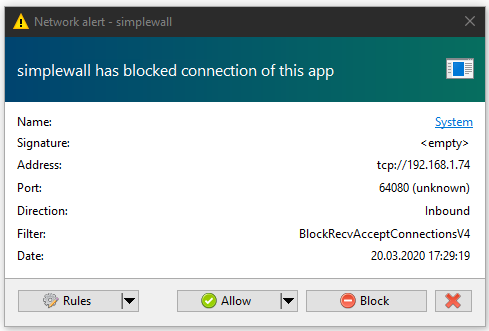
In case of inbound this just gives us the source address (and source port I _assume_) and in case of outbound it just gives the destination address and port.
- Could you please add destination ("local") information for inbound and source ("local") information for outbound?
Each network alert steals the focus which can be very annoying and interrupting.
- Could you please add an option to still show the network alerts but NOT requesting focus?
And alternative would be not showing the network alerts window but sending a Windows notification instead. Clicking the notification would then open the network alerts window with all the missed alerts.
edit:
Creating a rule based on an inbound network alert only does not fill in the local address.
- Please fill both remote and local addresses (if available) when creating a new rule.
 xnoreq
All 3 comments
I also think color wise there should be some difference between outbound and inbound connection notification.
 SeriousHoax
on 22 Mar 2020
SeriousHoax
on 22 Mar 2020
In case of inbound this just gives us the source address (and source port I _assume_) and in case of outbound it just gives the destination address and port.
Network alerts displays only remote address information, because local address are used local network ip's or empty (0.0.0.0)
Could you please add an option to still show the network alerts but NOT requesting focus?
This is UI bug and fixed now.
 henrypp
on 26 Mar 2020
henrypp
on 26 Mar 2020
Network alerts displays only remote address information, because local address are used local network ip's or empty (0.0.0.0)
The information is actually very important and it's not just the IP address but also the port.
What does "Remote: x.x.x.x, Port: 56832, Inbound" tell you? Nothing.
This could have been an inbound connection to some svchost service, a http server, a ssh server ...
Right now, to find out what the destination was, I have to enable the log, then search for the remote port and then in the log line it also gives me the local address & port.
Please add this.
Also, instead of having two fields for the address and port you could just do: "
Lastly, the local IP address is also very important. Use cases are multiple interfaces with different IPs, broadcasts, multicasts, etc.
xnoreq
on 27 Mar 2020
Related issues
 geonanorch
·
3Comments
geonanorch
·
3Comments
 ltGuillaume
·
3Comments
ltGuillaume
·
3Comments
ltGuillaume
·
3Comments
ltGuillaume
·
3Comments
 TontyTon
·
3Comments
TontyTon
·
3Comments
 pwn0r
·
3Comments
pwn0r
·
3Comments
Most helpful comment
Network alerts displays only remote address information, because local address are used local network ip's or empty (0.0.0.0)
This is UI bug and fixed now.