Simplewall: Updating internal rules (Nov. 10) - Download dialog gets stuck
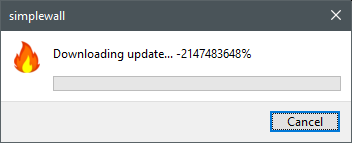
The download dialog got stuck like this. After restarting simplewall and checking for updates, there are none. profile_internal.xml seems to have been updated, though, so it may just be a GUI glitch.
 ltGuillaume
All 9 comments
@henrypp This is not fixed yet in v3.0.9. I just got the exact same thing for a language pack update.
ltGuillaume
on 18 Nov 2019
Hi again, well the img link worked for me over in the previous issue. Anyway, all good, ye, the 32 bit signed int overflows somewhere, and I don't have time right now to look into code. Out of curiosity, what connection are the updates negotiated on? tls 1.2<= or?
 lulcat
on 19 Nov 2019
lulcat
on 19 Nov 2019
Oh, then it's probably good to know that I'm using the portable x64 (on Win10 1809LTSC).
ltGuillaume
on 19 Nov 2019
I just got the same stuck dialog (v3.0.9).
A few questions:
- What are the language pack updates? Updates for the different GUI languages?
- What setting controls the checking of language pack updates? Is it "Periodically check for updates"?
- Could we have them automatically installed silently in the background?
Thanks!
 cloudgreen
on 24 Nov 2019
cloudgreen
on 24 Nov 2019
I just got the same stuck dialog (v3.0.9).
A few questions:
1. What are the language pack updates? Updates for the different GUI languages?Yes.
2. What setting controls the checking of language pack updates? Is it "Periodically check for updates"?
Yes.
3. Could we have them automatically installed silently in the background?
Would be ok _if_ we had a system notification that a language/blocklist was updated, yeah.
ltGuillaume
on 24 Nov 2019
@ltGuillaume Thanks for the replies, appreciated!
Is the automatic "silent" update (with a system notification) feasible to do? Or does it have some obstacles? Other users of my computer get a bit intimidated by the update notifications... and it doesn't seem necessary to ask for permissions - I already checked the checkbox. :)
cloudgreen
on 24 Nov 2019
This has happened to me for all update dialogs, not just the internal rules one. The last update I had to uninstall the old version and then install the new one downloaded from the site.
 Silent-Hunter
on 10 Dec 2019
Silent-Hunter
on 10 Dec 2019
I just had a successful update to v3.0.9, but then v3.0.9 itself failed to update the language pack with the problem described above.
ltGuillaume
on 10 Dec 2019
fixed
 henrypp
on 8 Feb 2020
henrypp
on 8 Feb 2020
Related issues
 callmenemo491
·
3Comments
callmenemo491
·
3Comments
 TontyTon
·
3Comments
TontyTon
·
3Comments
 xnoreq
·
3Comments
xnoreq
·
3Comments
 Jtasiu
·
4Comments
Jtasiu
·
4Comments
 shiftyshady
·
4Comments
shiftyshady
·
4Comments
Most helpful comment
fixed