Simplewall: 3.0.8 stops checking if Windows Firewall is enabled
Concerning https://github.com/henrypp/simplewall/issues/554 and https://github.com/henrypp/simplewall/commit/776bdd04dcf386f26fe520c528dc1bd84ad357c2
It looks like this means that every time a new connection becomes available for Windows, the Windows Firewall is enabled again, but simplewall will _not_ check the Windows Firewall state at start-up... thus both will be active, which allows for overrides from the Windows Firewall without any knowledge of that for simplewall users.
As far as I know, you can simply tell Windows to stop giving you the notifications about the Windows Firewall being disabled (the issue https://github.com/henrypp/simplewall/issues/554). This is far better than stopping simplewall from checking if the Windows Firewall is enabled.
In fact, I would say it's best that simplewall would check if the Windows Firewall is enabled after a new connection is made (or just periodically, _at least not just_ at start-up) and disable the Windows Firewall if necessary.
 ltGuillaume
All 11 comments
It looks like blocking rules have priority whether they are in simplewall or in Windows Firewall. So as long as you (or some program) don't add blocking rule to Windows Firewall, simplewall should have priority.
 Tester798
on 9 Nov 2019
Tester798
on 9 Nov 2019
No, there always seems to be a chance that another program creates rules that override this. See this whole thing: https://github.com/henrypp/simplewall/issues/254
ltGuillaume
on 9 Nov 2019
In that conversation I don't see how rules in Windows Firewall can have "allow" priority over simplewall.
Other programs that use WFP API - seems like they can, they can even uninstall simplewall if they want :)
Tester798
on 9 Nov 2019
That might be true, might not be. I found the documentation lacking. Better to be safe than sorry in such cases (unless someone can point us to a primary source that properly describes this).
ltGuillaume
on 9 Nov 2019
According to https://docs.microsoft.com/en-us/windows/win32/fwp/filter-arbitration#configurable-override-policy
The basic policy is as follows.
- Actions are evaluated in priority order of sub-layers from highest priority to lowest priority.
- "Block" overrides "Permit".
- "Block" is final (cannot be overridden) and stops the evaluation. The packet is discarded.
Further down it mentions a "soft block" which can be overridden by a permit, so it depends if simplewall uses "Allow override" (FWPS_RIGHT_ACTION_WRITE is set) or not.
 elesiuta
on 9 Nov 2019
elesiuta
on 9 Nov 2019
Surely Simplewall should explicity turn off Windows Firewall and check if it is disabled?
 privacyguy123
on 12 Nov 2019
privacyguy123
on 12 Nov 2019
According to https://docs.microsoft.com/en-us/windows/win32/fwp/filter-arbitration#configurable-override-policy
The basic policy is as follows.
- Actions are evaluated in priority order of sub-layers from highest priority to lowest priority.
- "Block" overrides "Permit".
- "Block" is final (cannot be overridden) and stops the evaluation. The packet is discarded.
Further down it mentions a "soft block" which can be overridden by a permit, so it depends if simplewall uses "Allow override" (FWPS_RIGHT_ACTION_WRITE is set) or not.
- Since simplewall uses a whitelist system, I figure the overall block can only be a soft block; it would otherwise be impossible to create "Allow" rules on top of it.
- I don't think anyone would benefit from Windows Firewall being active while using simplewall. It makes the whole filtering platform confusing and unpredictable to the end user.
- Pop-ups like https://github.com/henrypp/simplewall/issues/562 will keep turning up.
- Again, when new connections are made (e.g. the first time you plug in a cable into your ethernet adapter), Windows Firewall re-enables itself. Simplewall should recognize this behavior and disable Windows Firewall again.
ltGuillaume
on 12 Nov 2019
I have Windows Defender Firewall completetely disabled so my system favours Simplewall - am I misunderstanding something here?
privacyguy123
on 19 Nov 2019
As I already said, Windows Defender Firewall can re-enable itself. Simplewall used to check its status on start-up, but since 3.0.8 it doesn't do so anymore.
ltGuillaume
on 19 Nov 2019
As I already said, Windows Defender Firewall can re-enable itself.
Hmm. Proof!?
 henrypp
on 20 Nov 2019
henrypp
on 20 Nov 2019
As I already said, it happens when I plug in a network cable and Windows does not have a network profile for this connection yet.
This probably means it will also do this when connecting to a new wireless network.
This can be reproduced by disconnecting from your network, then removing that network profile from the registry in HKEY_LOCAL_MACHINE\SOFTWARE\Microsoft\Windows NT\CurrentVersion\NetworkList\Profiles and reconnecting.
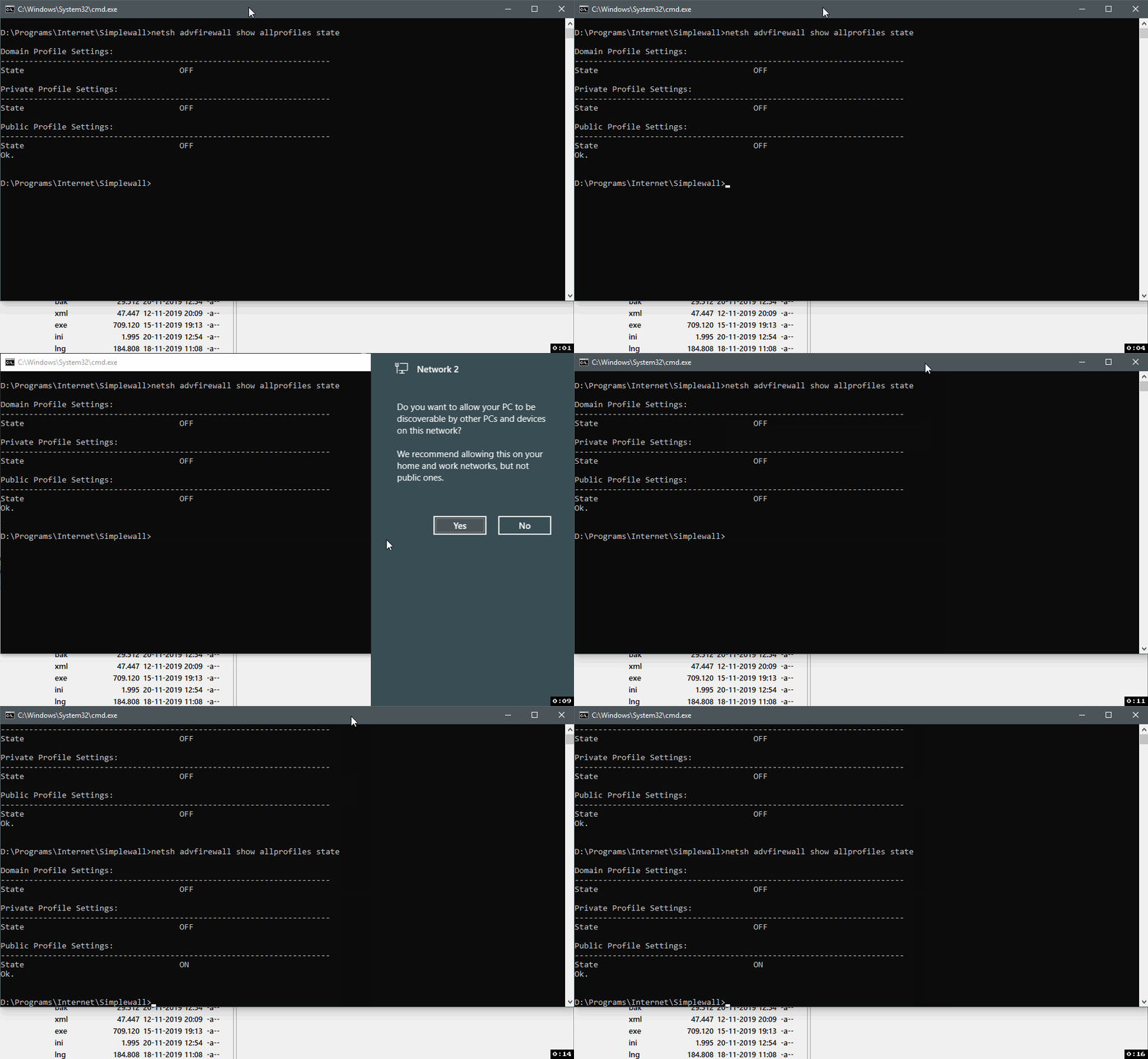
ltGuillaume
on 20 Nov 2019
Related issues
 gameb0y
·
3Comments
gameb0y
·
3Comments
 xnoreq
·
3Comments
xnoreq
·
3Comments
 shiftyshady
·
4Comments
shiftyshady
·
4Comments
 p-groarke
·
4Comments
p-groarke
·
4Comments
 pwn0r
·
4Comments
pwn0r
·
4Comments
Most helpful comment
Surely Simplewall should explicity turn off Windows Firewall and check if it is disabled?