Simplewall: Windows Firewall off notification
any way to stop this from happening? ive got nofications for security centre off but its still warning me when simplewall turns it off at startup
 privacyguy123
All 28 comments
Hi,
add this lineIs DisableWindowsFirewallChecked=false into simplewall.ini and restart SW.
 henrypp
on 6 Nov 2019
henrypp
on 6 Nov 2019
@ltGuillaume Does adding the line above in simplewall.ini prevent the Windows 10 notification below?
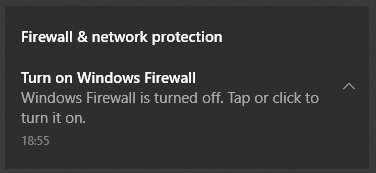
 cloudgreen
on 24 Nov 2019
cloudgreen
on 24 Nov 2019
No idea, I've never had this notification.
 ltGuillaume
on 24 Nov 2019
ltGuillaume
on 24 Nov 2019
That's Windows 10 complaining about Windows Firewall being turned off (since that's the recommended action when using Simplewall). I thought this thread was about that notification. :)
I have been wondering about how to get rid of that... :( I think I'll give one of the tips in this Serverfault thread a try...
cloudgreen
on 24 Nov 2019
Can't you just tell Windows to stop giving those messages in the Security & Maintenance dialog?
ltGuillaume
on 24 Nov 2019
@cloudgreen Sorry, I was wrong: the thing is that you can _only_ tell Windows to stop whining about the Defender Firewall's being disabled if you have removed Windows Defender altogether. Otherwise the option is greyed out, so you can't uncheck it.
ltGuillaume
on 14 Dec 2019
@cloudgreen Sorry, I was wrong: the thing is that you can _only_ tell Windows to stop whining about the Defender Firewall's being disabled if you have removed Windows Defender altogether. Otherwise the option is greyed out, so you can't uncheck it.
Thanks for following up, @ltGuillaume!
Yeah, there are a lot of different reports around the web about how to turn off the Windows Firewall warning, many include editing Group Policy settings, but many say it doesn't work. Your tip is probably the most likely one to be correct! But I would like to have the cake (Defender) and skip the warning... :)
cloudgreen
on 14 Dec 2019
Yeah, it's ridiculous. Way to go, MS....
ltGuillaume
on 14 Dec 2019
Hi,
add this lineIs
DisableWindowsFirewallChecked=falseintosimplewall.iniand restart SW.
@henrypp
I notice that the latest version of simplewall.ini already has this line IsDisableWindowsFirewallChecked Is this the same as DisableWindowsFirewallChecked you mentioned?
If I understand correctly, this is the same as the Turn off Windows Firewall checkbox when Enable Filtering.
I checked Turn off Windows Firewall, but the notification warning pops up every time I restart the system and from time to time [Turn on Windows Firewall] like https://github.com/henrypp/simplewall/issues/554#issuecomment-557918940
I found that I cannot turn off this notification in the Windows Notification Center or Security Center. I tried to turn off notifications in the windows firewall settings, but it didn't work, Any way to turn off this notifications?
It pops up often and is accompanied by sounds, very annoying, I can't disable the entire notification center because of this.
 qupig
on 8 Mar 2020
qupig
on 8 Mar 2020
I have not been able to figure out how to stop the "Windows Firewall turned off" notification, without turning of the entire Windows Defender. (You can remove the sound in System Sounds, though...)
cloudgreen
on 8 Mar 2020
@cloudgreen Do you mean to be able to delete sounds for specific app notifications, or delete all notification sounds? Obviously the latter is not the solution we need.
qupig
on 9 Mar 2020
@cloudgreen Do you mean to be able to delete sounds for specific app notifications, or delete all notification sounds? Obviously the latter is not the solution we need.
I meant no system sounds at all, by selecting the "No sounds" sound scheme. (That's how I always roll it.) But my sound comment was merely a small "afterthought", the sound is the least of this problem... :)
I am also interested in getting rid of the Firewall notification message itself.
cloudgreen
on 9 Mar 2020
Try the following (not a proper solution but ...)
Local Group Policy Editor > Local Computer Policy > Computer Configuration > Administrative Templates > All Settings
Disable the following two policies:

Edit: I think that will disable functions of the Windows Defender Firewall, without the ability to turn it back on from the Windows Security Dashboard, until of course the policies are restored.
Edit2: The red cross on the Windows Defender icon in the taskbar will turn to the green check as well. ;)
 mizzuri
on 29 Apr 2020
mizzuri
on 29 Apr 2020
@mizzuri Errr yeah that's not gonna work: it will also cause simplewall's rules to be disabled.
ltGuillaume
on 12 May 2020
@mizzuri Errr yeah that's not gonna work: it will also cause simplewall's rules to be disabled.
Not for me though. Actually isn't simplewall using its own rules?
mizzuri
on 13 May 2020
I tried to set these policies to disabled on Windows 10 19H2, then tried blocking Ungoogled-Chromium in simplewall. Result: it still opened all pages I tried. I even refreshed all the rules in simplewall (F5). It was only after resetting the two policies that Ungoogled-Chromium's access was blocked simplewall's rule.
Could you please test this in a similar way on your system?
ltGuillaume
on 13 May 2020
@ltGuillaume
Tested in the following ways while having set those two policies to disabled:
Windows version: 1909 (Build 18363.815, x86_64)
I downloaded a new, never before used, portable version of FileZilla (an FTP client). Right after I opened filezilla.exe, the usual simplewall's popup came up asking for permission to allow to connect. Possibly FileZilla is checking for available updates automatically.
I unchecked the psping.exe, which is part of the Sysinternals Suite, from the "Enabled apps" section, and also deleted it from the "Disabled apps" section. Once I started using psping, the usual simplewall's popup asked to connect. I wasn't able to ping until I clicked the "Allow" button.
Notes:
- My simplewall.ini content: https://pastebin.com/raw/7t9sunH6
- I've enabled everything under the Blocklist tab.
- There're some other rules that I've changed, but I don't think they will have any effect on the tests.
- I'm using the portable version of simplewall.
mizzuri
on 14 May 2020
That's very odd then. I'll do some more testing.
ltGuillaume
on 14 May 2020
I don't think setting those 2 policies totally disable the windows' internal firewall.
Because it seems the "Windows Defender Firewall" service is still running. Not sure if they're related though.
Edit:
And I've always thought that simplewall uses the Windows Filtering Platform, which exposes lower level APIs that both simplewall and Windows Defender Firewall depend on. So, I assume that disabling one shouldn't affect the other one at all.
I'm no expert, and I could be totally way off. But that's how I understand it from reading an article some time ago.
mizzuri
on 15 May 2020
Came here for the same thing, followed @mizzuri 's suggestion here and can confirm: Simplewall still blocks connections, and so far no warning popups (win10 18362). Now just to see how long it takes Windows to switch back on the annoying warnings.
I guess a "real solution" would be to allow windows to detect Simplewall as a custom firewall provider? Seeing as they allow custom providers for antivirus/malware/etc I would guess they have a system for firewall too. Though I do not know what effort and/or downsides are involved in that, or if it's feasible at all.
 willemduncan
on 19 May 2020
willemduncan
on 19 May 2020
I just tried again and there is some strange behavior around setting these policies:
- So, first time, it caused all traffic to be allowed, even though simplewall had its filters applied. A filter refresh from simplewall's UI didn't work either.
- This time, I got an error + red cross over the Defender tray icon (shield), and only after a reboot everything seemed to be working OK.
I'll keep tabs on whether the filters keep working, but so far this is indeed the best workaround for the notification issue.
ltGuillaume
on 19 May 2020
I just tried it on another computer, and it also went fine.
mizzuri
on 20 May 2020
An update or something might have triggered the built-in firewall to turn back on today.
My browser wasn't working in the morning, even though I have it allowed in the simplewall. Everything else seemed fine. So I checked the group policies again, and somehow the 2 Windows Defender Firewall settings were set to "Enable".
I'm not sure what might have caused it.
Something to be careful about. Weird things could happen if both simplewall and Windows Defender Firewall are on at the same time, I guess.
mizzuri
on 25 May 2020
An update or something might have triggered the built-in firewall to turn back on today.
My browser wasn't working in the morning, even though I have it allowed in the simplewall. Everything else seemed fine. So I checked the group policies again, and somehow the 2 Windows Defender Firewall settings were set to "Enable".
I'm not sure what might have caused it.
Something to be careful about. Weird things could happen if both simplewall and Windows Defender Firewall are on at the same time, I guess.
Do you mean the policies turned back on and you saw a red cross warning over Defender's tray icon again, or did Defender Firewall _actually_ get re-enabled? The last thing would be strange, since simplewall now checks again if Defender Firewall is enabled and then disables it when you ticked the checkbox to do so.
I just mean that the firewall doesn't need to be enabled if those policies are back to default.
ltGuillaume
on 25 May 2020
No red cross. But the policies got re-enabled, so did the Defender Firewall.
Maybe this was a fluke. I'll keep watch.
mizzuri
on 26 May 2020
I applied @mizzuri 's suggestion, it works, my Simplewall still blocks connections, no red cross, and no warning popups. (OS Version 1909)
 newbie337
on 9 Jun 2020
newbie337
on 9 Jun 2020
Just as a note for those of us that don't have access to gpedit/Group Policy, the Registry equivalents for those Group Policy settings are as follows:
HKLMSOFTWAREPoliciesMicrosoftWindowsFirewallDomainProfileEnableFirewall (DWORD) = 0
HKLMSOFTWAREPoliciesMicrosoftWindowsFirewallStandardProfileEnableFirewall (DWORD) = 0
Perhaps simplewall could provide an option to set these values to silence the notifications.
 Jaitsu
on 12 Aug 2020
Jaitsu
on 12 Aug 2020
No red cross. But the policies got re-enabled, so did the Defender Firewall.
Maybe this was a fluke. I'll keep watch.
Your method works perfectly mizzuri, thank you! this non-removable notification was starting to get bloody annoying.
 FischerandomONLY
on 26 Sep 2020
FischerandomONLY
on 26 Sep 2020
Related issues
 Jtasiu
·
4Comments
Jtasiu
·
4Comments
 pwn0r
·
4Comments
pwn0r
·
4Comments
 xnoreq
·
3Comments
Jtasiu
·
4Comments
xnoreq
·
3Comments
Jtasiu
·
4Comments
 gameb0y
·
3Comments
gameb0y
·
3Comments
Most helpful comment
Try the following (not a proper solution but ...)
Local Group Policy Editor > Local Computer Policy > Computer Configuration > Administrative Templates > All Settings
Disable the following two policies:
Edit: I think that will disable functions of the Windows Defender Firewall, without the ability to turn it back on from the Windows Security Dashboard, until of course the policies are restored.
Edit2: The red cross on the Windows Defender icon in the taskbar will turn to the green check as well. ;)