Simplenote-electron: Windows: After typing the text and a newline, typing a full-width space(s) in Japanese will duplicate the previous text
Expected
Full-width space(s) in Japanese are entered in a note.
The full-width space(s) in Japanese here refer to this " ".
Observed
As you can see in the GIF animation below.
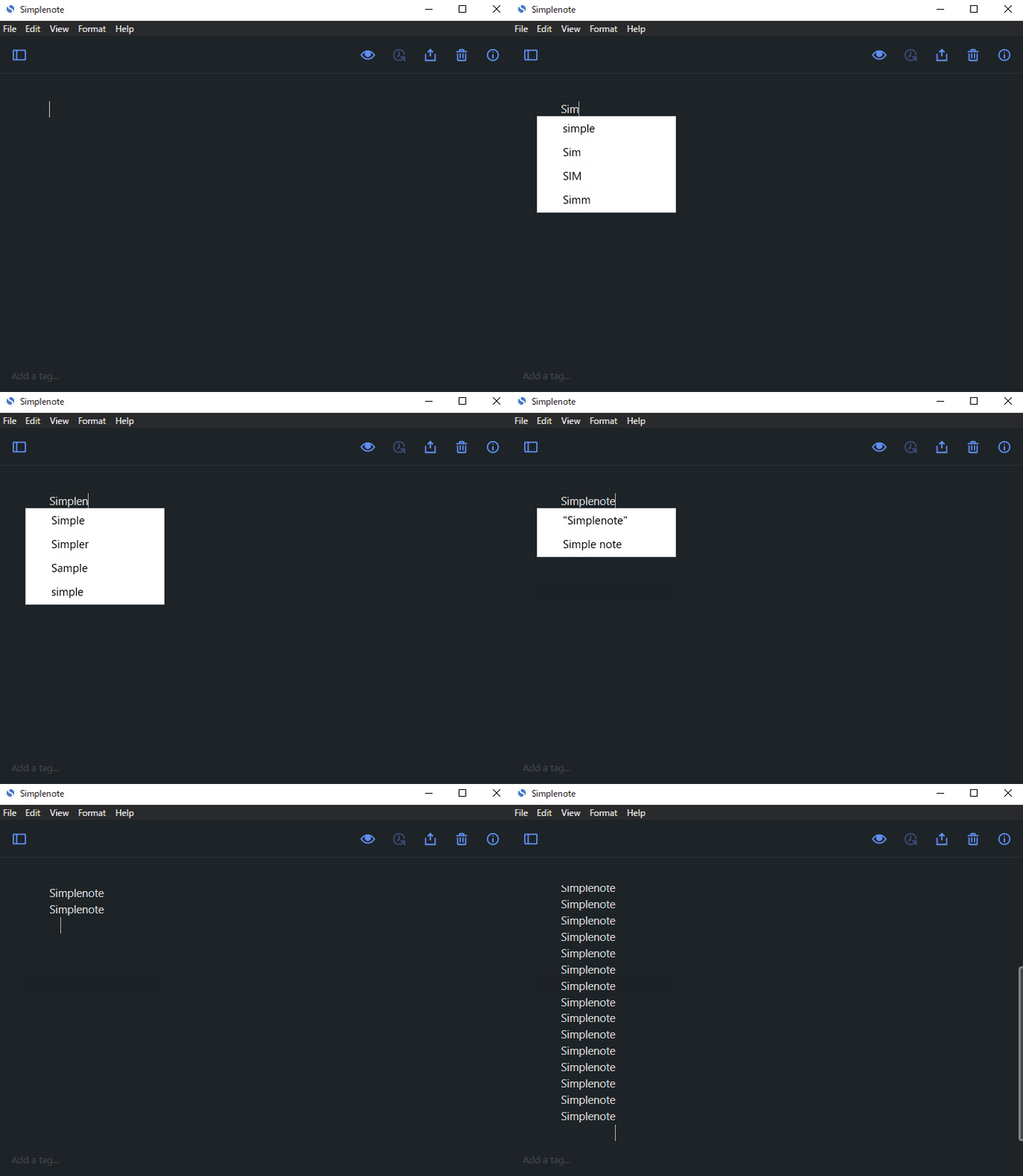
1, 2, 4, 8... you can see that the previous text is increasing.
Reproduced
- Create a new note
- Type any text
- Type a newline
- Type full-width space(s) in Japanese
Where did you see the bug
- OS: Windows 10 Pro
- OS version: 20H2 (Build: 19042.662)
(It may not be relevant, but the OS language setting is Japanese.) - Simplenote app version: 2.2.0
 nekocodeX
All 8 comments
I also find the same problem when I am using Chinese Pinyin Input Method.
OS: Ubuntu Desktop 20.04 LTS
Simplenote app version: 2.2.0
It was all right in the previous 2.1.0 version.
 czhehua
on 2 Dec 2020
czhehua
on 2 Dec 2020
Another report of this in 3532984-zen.
When I press the spacebar, it types in on its own!
Using Windows 10Pro 64bit.
Simplenote 2.2.0
Did not occur in 2.1 version.
The user has included a screenrecording of the issue which is available in the ticket and can be seen at 1:11.
They originally reported the issue mentioned in https://github.com/Automattic/simplenote-electron/issues/2501 and then added this one which they discovered on testing. I'm not sure if they are related or not.
 rezzap
on 3 Dec 2020
rezzap
on 3 Dec 2020
Another report of this in 3532984-zen.
When I press the spacebar, it types in on its own!
Using Windows 10Pro 64bit.
Simplenote 2.2.0Did not occur in 2.1 version.
The user has included a screenrecording of the issue which is available in the ticket and can be seen at 1:11.
They originally reported the issue mentioned in #2501 and then added this one which they discovered on testing. I'm not sure if they are related or not.
The user came back with more info:
The trouble occurs also when you enter English or numbers.
It's not clear if this is due to the mixture of Japanese.
 rossanafmenezes
on 7 Dec 2020
rossanafmenezes
on 7 Dec 2020
The same issue occurs in my environment with Japanese IME.
Windows 10 Pro 64bit 1909
Simplenote for Windows ver 2.2.0
The trouble occurs also when you enter English or numbers.
It's not clear if this is due to the mixture of Japanese.
I guess you are missing the point of this issue. The key is to type a full-width space after a new line which follows any text. Inputting English, Japanese or numbers before the newline is irrelevant. When you type Japanese, start a new line, and type a half-width space (equivalent to ascii space), the issue will not be reproduced.
 shizukudrops
on 8 Dec 2020
shizukudrops
on 8 Dec 2020
Another similar report in 3558612-zen for Chinese input.
Now whenever I press enter or type quotation marks there is a chance of a duplication of previous passages.
OS: Linux Mint 19.3 Tricia
App version: 2.2.0 ( Simplenote-linux-2.2.0-amd64)
Input software: fcitx-rime v1.2.9 (Chinese), but the problem exists as well while using English alone.
A video recording can be found in the ticket.
 reginabally
on 13 Dec 2020
reginabally
on 13 Dec 2020
Also in my environment.
OS: Windows 10 Home 20H2 64bit
Version: 2.2.0 (Installed via Microsoft Store)
IME: Google Japanese Input
It seems there's no relevance to the type of IME.
There is also a bug that inline input in IME fails from the time the application is launched until the window is redisplayed in some way. Simplenote App is now very awkward for users who use IME such as Japanese and Chinese...
 kamektx
on 20 Dec 2020
kamektx
on 20 Dec 2020
Another report in 3574944-zen. Windows 10 (64-bit), Simple app version 2.3, Chinese IME (Full Pinyin, Simplified Chinese). A screen recording can be found in the ticket.
reginabally
on 21 Dec 2020
Closing to track in #2522
 codebykat
on 21 Dec 2020
codebykat
on 21 Dec 2020
Related issues
 kaepuo
·
5Comments
kaepuo
·
5Comments
 guarani
·
3Comments
guarani
·
3Comments
 rbreaves
·
3Comments
rbreaves
·
3Comments
 sean185
·
4Comments
sean185
·
4Comments
 SaeedBaig
·
4Comments
SaeedBaig
·
4Comments