Simplenote-electron: Facing some issues with Preview mode
Hi, I'm using SimpleNote since 2019. My account was created in Ubuntu 18.04. There my Preview mode works fine: if I create a note there, my preview will appears just fine. But in Windows 10 the preview mode just appears for old notes (created in Ubuntu) and not for the new ones.
Expected
Discover why this is happen! I think that is a minor issue, but a trick one.
Observed
Here is what I see when I use my account in Windows 10:
- Note created in Ubuntu 18.04:
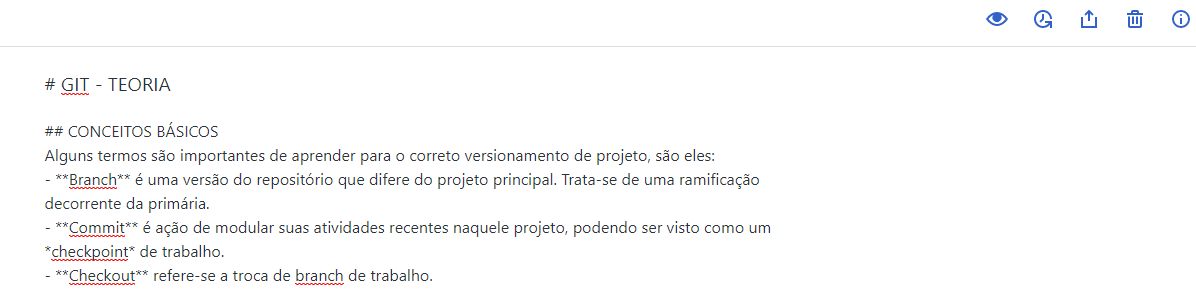
- New note created in Windows 10 (preview icon is just missing):
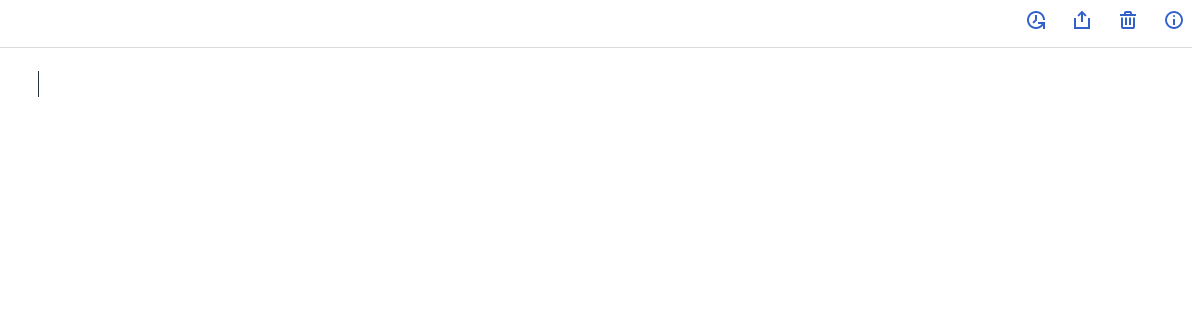
And if I use preview shortcut Ctrl + Shift + P nothing happens.
Reproduced
- Basically, have an account in Ubuntu and try to use it in Windows.
- Try to use preview in a new note
Where did you see the bug
- System Make: ---
- System Model: ---
- OS: Windows
- OS version: 10
- Browser (if applicable): Brave / Chrome
- Browser version (if applicable): ---
- Simplenote app version: 1.21
 KaikeWesleyReis
All 2 comments
Hi @KaikeWesleyReis - thanks for writing in. It looks like the new notes need to have Markdown formatting enabled. Try opening the note info panel (the ⓘ icon in the top right) and look for the Markdown toggle. If this doesn't fix your issue please reach out to our support at [email protected]
 dmsnell
on 31 Aug 2020
dmsnell
on 31 Aug 2020
@dmsnell Thanks for the answer! Now seeing the solution, I feel that I was some kind dumb hahaha
Again, thanks!
KaikeWesleyReis
on 31 Aug 2020
Related issues
 iamgabrielma
·
3Comments
iamgabrielma
·
3Comments
 gubrist
·
4Comments
gubrist
·
4Comments
 rachelmcr
·
3Comments
rachelmcr
·
3Comments
 abhijithvijayan
·
4Comments
abhijithvijayan
·
4Comments
 segeeslice
·
3Comments
segeeslice
·
3Comments