Simple-tab-groups: All tabs gone when closing window and restarting FF 76.0.1
Describe the bug
When I close the windows, and try to restart the firefox all tabs are gone.
To Reproduce
Steps to reproduce the behavior:
- Fill groups with tabs
- open a group
- close all windows and firefox
- restart.... all is gone, need to restore from backup (1hour late)
Expected behavior
I expected that the tab was there like before, I misstakely updated my firefox, so now this error comes up. please help ;(
Desktop (please complete the following information):
- OS and version: MAC OS EL CAPITAN 10.11.6 (mbp mid 2014)
- Firefox version: 76.0.1
- Simple Tab Groups version: v4.5.1
 swealpha
All 22 comments
Same. Firefox update strikes again...
Desktop (please complete the following information):
- OS and version: MAC OS Catalina 10.15.4
- Firefox version: 76.0.1
- Simple Tab Groups version: v4.5.1
 suntzuisafterU
on 14 May 2020
suntzuisafterU
on 14 May 2020
Same here. I'm on Ubuntu 20.04.
My groups still exist, but they're empty, and all the tabs are now orphaned. And I don't have a recent backup. (I would enable auto-backup, but I don't want the backups to go into my Downloads folder.)
 DavidRegev
on 15 May 2020
DavidRegev
on 15 May 2020
hmmm, it seems like it is the latest version of simple tab groups that makes this error.
allah
/a
swealpha
on 15 May 2020
I have been experiencing the same issue every now and then with FF77 beta. Luckily the backup/restore feature is a life-saver here.
 klint
on 15 May 2020
klint
on 15 May 2020
IT IS THE LATEST VERSION OF SIMPEL TAB GROUP THAT BROKE THIS, NOT FF.
swealpha
on 15 May 2020
@swealpha I am on 4.5.1 and FF 76 on Ubuntu with no loss of my groups and hundreds of tabs, so I don't think we can conclude that your problem is inherent to 4.5.1.
MacOS just had an update (this week?) that broke some other things for a colleague of mine, perhaps that is the cause for you as well.
604 might be related.
 mainmachine
on 15 May 2020
mainmachine
on 15 May 2020
@swealpha
IT IS THE LATEST VERSION OF SIMPEL TAB GROUP THAT BROKE THIS, NOT FF.
That is, you rolled back to version 4.5.0 and everything works for you?
 Drive4ik
on 15 May 2020
Drive4ik
on 15 May 2020
I just used a different Firefox profile and when i came back all of my tabs are not shown under "Other Tabs".
"Found hidden unsynchronized tabs. Click on tab to show it into current group/window or:
Move all of these tabs into current group/window
Create new group with all of these tabs
Close all of these tabs"
 R3dXIII
on 21 May 2020
R3dXIII
on 21 May 2020
Hi, I have the same issue. I would add that I don't have to quit firefox, only all windows be closed and then my groups are empty.
 a-rock-lobster
on 24 May 2020
a-rock-lobster
on 24 May 2020
This happened to me again, so now I have steps to reproduce:
- Make sure you have more than one window open and that one of them has groups.
- Close the window with the tab groups.
- Restore the window you just closed (with Ctrl+Shift+N).
- Results: all the tabs are orphaned and the groups are empty.
Expected results: the groups are properly restored as they were before.
DavidRegev
on 26 May 2020
@DavidRegev This behavior will be reproduced if the second window was private. In private windows, the addon does not work.
If the second window was normal, then after step 2, the addon will restore closed tabs in the remaining normal window, and after step 3, the restored window will remove the links between the group and the tabs, and these tabs will not be synchronized in the group. You’ll get duplicates — some tabs in groups, while others will be without groups.
Drive4ik
on 1 Jun 2020
@Drive4ik This happened to me when the second window wasn't private. When I restored the first window, not one of the 200+ tabs was associated with a group.
If you can't reproduce the issue, I can do some testing later to figure out which circumstances are needed to recreate it.
DavidRegev
on 1 Jun 2020
@DavidRegev
Try record this issue with new empty FF profile
like this app
https://www.screentogif.com/
Drive4ik
on 1 Jun 2020
@Drive4ik I did some further testing, including duplicating the steps on my current profile, but I didn't get the same results. I can't figure out why. I'll update you if I figure anything out.
DavidRegev
on 1 Jun 2020
@DavidRegev Ok. When you have the exact steps to repeat the error, please create a new issue.
Drive4ik
on 3 Jun 2020
Why is the issue closed? Is it fixed now? @Drive4ik
R3dXIII
on 3 Jun 2020
@R3dXIII I need more information. Plus I don't have a MAC to test the bug.
The only thing I know is that on linux-like systems, the browser process does not always end when the last window is closed. Although I tried to solve this problem, I still advise you to close the browser using Ctrl + Shift + Q or through the hamburger menu (top right)
Drive4ik
on 2 Oct 2020
@R3dXIII I need more information. Plus I don't have a MAC to test the bug.
The only thing I know is that on linux-like systems, the browser process does not always end when the last window is closed. Although I tried to solve this problem, I still advise you to close the browser using Ctrl + Shift + Q or through the hamburger menu (top right)
I'm on Windows not Mac personally. I stopped using the extension some months ago because of the bug. So you're saying the bug happen when using the X button in Firefox?
R3dXIII
on 2 Oct 2020
@R3dXIII
So you're saying the bug happen when using the X button in Firefox?
Yes, but only on linux systems.
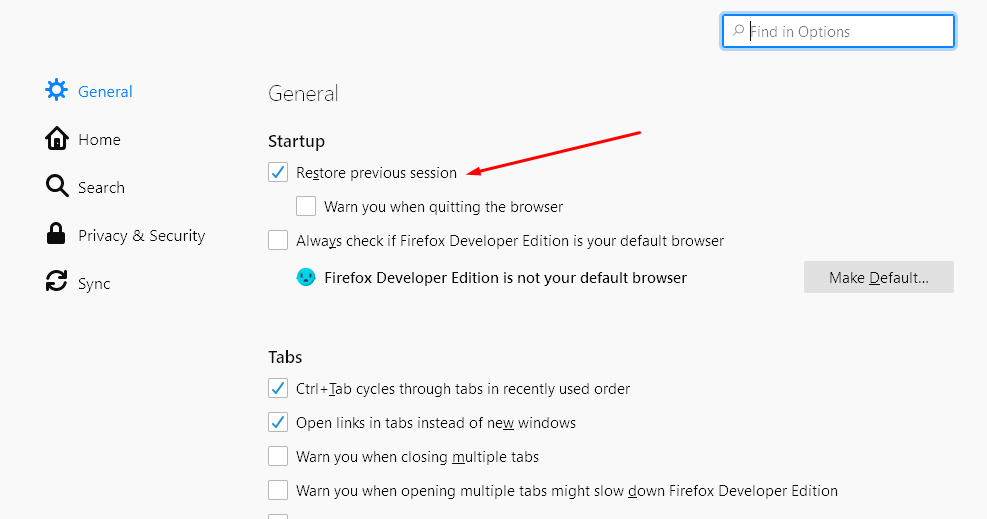
You also need to check that session recovery is enabled in the browser.
If this is already there, then check if the problem repeats in the new FF profile (clean). You can put only STG there, restore the backup, enable session recovery and check the bug.
Drive4ik
on 2 Oct 2020
@R3dXIII
So you're saying the bug happen when using the X button in Firefox?
Yes, but only on linux systems.
You also need to check that session recovery is enabled in the browser.
If this is already there, then check if the problem repeats in the new FF profile (clean). You can put only STG there, restore the backup, enable session recovery and check the bug.
OK I'll try a clean profile sometime. How do I check session recovery is on?
browser.sessionstore.resume_from_crash is set to True, I'm not sure if this is what you're referring to.
Obviously none of these steps would be possible for a novice user so long term a fix would be needed.
R3dXIII
on 2 Oct 2020
This option must be enabled. That's all.
Drive4ik
on 2 Oct 2020
This option must be enabled. That's all.
Present and correct.
R3dXIII
on 3 Oct 2020
Related issues
 ericwbailey
·
6Comments
ericwbailey
·
6Comments
 HASJ
·
6Comments
HASJ
·
6Comments
 dlobue
·
3Comments
dlobue
·
3Comments
 EstherMoellman
·
4Comments
EstherMoellman
·
4Comments
 jtagcat
·
5Comments
jtagcat
·
5Comments