Simple-tab-groups: Restoring tab groups results in append, not replace
When I attempted to restore tab groups, STG appended the backed-up tabs to the existing tab list rather than replacing the list. Tab group names were repeated. This happened a few times, resulting in long "restore" times and a very long list of tabs.
I had to resort to restoring my entire profile from backup.
I was using the latest Nightly and version 4.3.6 of simple Tab Groups.
 GIS1980
All 9 comments
I can confirm. It is still in the current release (4.3.6.1). To reproduce:
- Start firefox using a fresh profile
firefox -profile ~/firefox-simple-tab-groups-test - Install Simple Tab Groups
- Create a group or two with at least one open tab
- Create a Backup
- Restore the Backup
Result: all opened groups (and tabs inside) are duplicated (except for about: pages for sure)
I love Simple Tab Groups. Thanks for all the work and effort!
 Tobsic
on 23 Nov 2019
Tobsic
on 23 Nov 2019
I just used git bisect to check which commit introduced this behavior. The result is
8ba898e9bf11628f3bf8a13ffcfbfaebd813476d is the first bad commit
commit 8ba898e9bf11628f3bf8a13ffcfbfaebd813476d
Author: Drive4ik <[email protected]>
Date:   Wed Oct 30 20:01:29 2019 +0200

    re factored create and restore backups, now you can select wich group need to restore, other fixes
this is indeed a major problem, tab groups recently lost all my tabs, when i restored, now i have many duplicate groups.
 GonzRon
on 2 Dec 2019
GonzRon
on 2 Dec 2019
When I restored, all my groups restored properly. However, I also had a duplicate set of groups, each of which were empty. I restored again, and gained another duplicate set of empty tabs. I didn't realize that until I went into Manage Groups and scrolled down through all of them because the sets of empty duplicate groups were first in the list. I thought the restore had only brought back my groups but without tabs in them. Realize what had happened, I deleted all of the empty groups, which was was tedious, but I did end up with what I expected. This needs to get fixed.
 m60freeman
on 4 Jan 2020
m60freeman
on 4 Jan 2020
Hi guys. This is not a bug, this is a feature!
Scroll down a little bit, there is a deletion of add-on data. First you need to click there, and then start restoring backup. This is done to make it possible to restore not all the backup, but its individual parts - groups or hot keys
 Drive4ik
on 6 Jan 2020
Drive4ik
on 6 Jan 2020
I completely respect the choice to do it this way, given the features it enables, but I don't think it is how most of us would expect a "restore" function to behave. I think there are two possible ways to address this:
- Add some help text near the restore section explaining what the behavior is, and that you need to clear settings first.
- Add a checkbox or option somewhere to "Replace tabs and groups on restore," that would replace rather than append. Even if it was a "Clear Add-on data on restore" option, it would make the restore option fewer steps, and allow for the behavior that I was expecting.
Clearly option 2 will take more work, but I think is a more complete solution. However, just documenting this would clear up some confusion.
 natmey
on 6 Jan 2020
natmey
on 6 Jan 2020
@natmey Yes, I agree with you, I did not really understand it for ordinary users. I already thought about the checkbox "Clear add-on data before restoring from backup." Which will be the first in the window for selecting groups to restore.
So far I have a lot of basic work, soon I will start to work on the addon.
Drive4ik
on 6 Jan 2020
Hi Drive4ik!
Absolutely love you're work. Thanks.
Interested to know if you have a BSV bitCoin address!
I too went for the 'obvious' happy path of restoration!
Too many times.
Now my FF stretches my boxen to around 7GB to load the STG tabs.
I know I'll have to do something to get around this.
Though maybe there's a case for a loading limit?
It is a bit tricky to back out of this state.
All the best!
 paradisaeidae
on 8 Feb 2020
paradisaeidae
on 8 Feb 2020
Hi all.
Added such functional here. It will be in the next version of the addon.
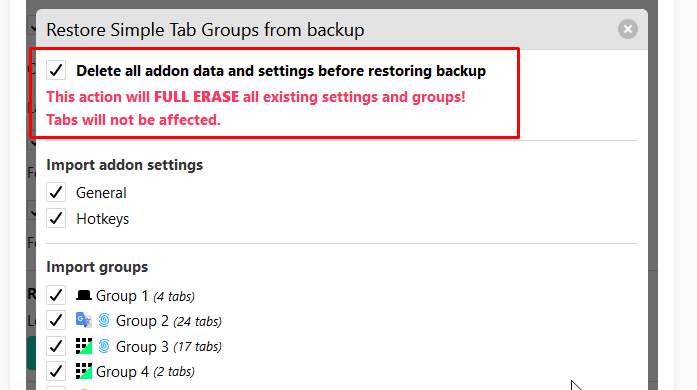
In fact, this checkmark duplicates this functionality:
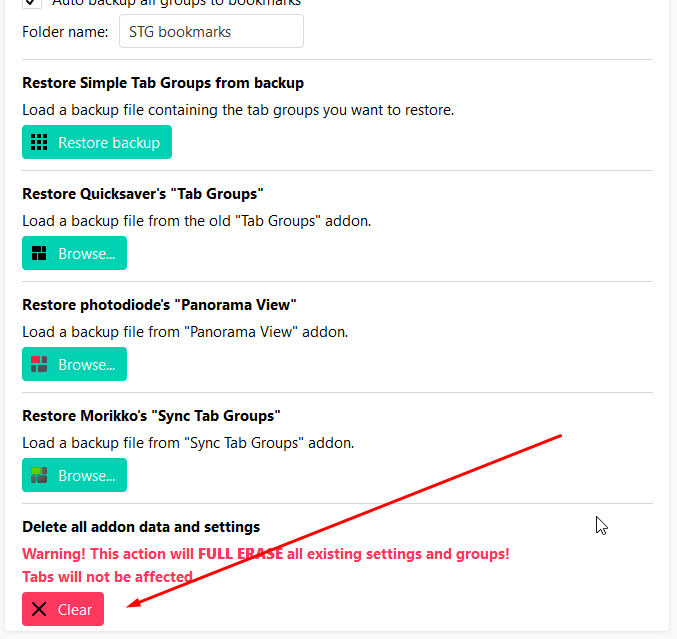
If you leave the checkmark turned on, then the recovery will be as if it were the old one, with full replacement of groups and tabs.
@paradisaeidae
Hi! Thanks, but I don’t want to accept donations yet. I am making this addon for you and for myself. Not always everything goes smoothly, but I try)
And with money I will have a duty, not an enthusiasm, as now. And as you know - the best that is done is done for free and in a good mood.
Maybe in the future)
Drive4ik
on 10 Feb 2020
Related issues
 dlobue
·
3Comments
dlobue
·
3Comments
 ddTech
·
4Comments
ddTech
·
4Comments
 ajvsol
·
6Comments
ajvsol
·
6Comments
 EstherMoellman
·
4Comments
EstherMoellman
·
4Comments
 Sophia10
·
4Comments
Sophia10
·
4Comments
Most helpful comment
@natmey Yes, I agree with you, I did not really understand it for ordinary users. I already thought about the checkbox "Clear add-on data before restoring from backup." Which will be the first in the window for selecting groups to restore.
So far I have a lot of basic work, soon I will start to work on the addon.