Simple-tab-groups: STG destroys tabs in groups, changing them to "new tab" when the group is picked
Describe the bug
I suspected STG was destroying tabs in my groups, changing them to "new tab" at some stage and causing me to lose state, because I saw lots of "new tab" in there, and in the Firefox hidden tabs menu. But I wasn't sure if it was adding more or creating them. Now I know it's destroying them: I looked in a group with 9 tabs inside the STG popup menu, and it clearly showed their titles and favicons. Then I switched to that group. The 9 tabs appeared, 8 of them had changed to "new tab" and only the foreground tab was correct.
This is obviously quite a serious problem.
To Reproduce
Steps to reproduce the behavior:
- Look in STG popup menu at groups.
- Click the right arrow of a group, see inside group titles and favicons of treasured tabs.
- Go back, bring up popup menu again, select the group to switch to it.
- See that most of the tabs visible in the tab bar are now "New Tab".
- Click on some, confirm they are new tabs and don't have a URL or history.
- Bring up STG popup menu, click right arrow of the group, see inside that group titles have been replaced by "New Tab".
- Curiously, the original favicons of the tabs are kept, in the STG group tab list, only the title has changed to "New Tab".
Expected behavior
Tabs in groups should never lose their state irreversibly just by foregrounding them like this.
Desktop (please complete the following information):
- OS is Mac OSX 10.9 (Mavericks)
- Firefox is 67.0b14 (beta channel at the time of writing)
- STG version is 3.4.4, updated 26 April 2019
Additional context
I didn't have any other add-ons enabled, at the time of the test with 9 tabs in a group described above.
 jlokier
All 38 comments
I've discovered STG might not be destroying tabs when picking a tab group to show it - instead it is creating lots of "New tab" tabs in a strange way, and storing those inside the group, moving the correct tabs (which are hidden) into a different group than the one selected!
I found this by using the add-on Export Tab URLs to get a snapshot of all tab URLs before and after picking an STG group, and I found that none of the URLs actually disappeared. Instead, the correct tabs remained hidden.
It's even a bit stranger. On picking a group of about 17 tabs, STG opened 16 "New tab" tabs that are not the active tab, and 1 tab which loads a page that's the active tab.
I had thought the active tab was being shown correctly. But when I tested this, I found the active tab was given a URL that was _not_ in the group just picked. In fact it cloned another tab's URL from inside a different group, with the result that I had two tabs with the same URL in the whole system, but previously one tab with that URL.
The 17 tabs that looked like they were destroyed, were actually moved to another group. The group it chose looks random to me.
As well as replacing the contents of a group with "New tab" tabs and one duplicate of a tab from another group, the favicons shown in the STG group menu have an interesting quirk. All of the "New tab" tabs showed the Wikipedia favicon in my test. Only the first site in the list of tabs (before they were wiped) was Wikipedia, so it looks like the favicon is copied to the other "New tab" tabs. The active tab, which was duplicated from somewhere else, seems to have the correct favicon (it was Google). I don't know if that is a coincidence, or if the tab cloned was chosen because it matched the same domain (but not URL).
This test is a bit difficult to repeat, because each time I do it, the contents of an STG group are destroyed, and that persists, even if I restore the tabs from a sessionstore file.
jlokier
on 28 Apr 2019
A bit more, from searching for tabs that are shown in groups before picking the group to display it.
I've found that rather than group-picking having a side effect of moving its tabs to another group (which seemed like a random group), this is what I see:
- The group to be picked shows some tabs and looks normal, with favicons and titles.
- But if I search for one of those tabs (using the URL bar in a new tab) and "Switch to" the tab that way, I find the tab exists in a _different_ STG group than the one seen in step 1.
- Switching to the tab picks the different STG group, seen in step 2.
- Picking the group from step 1 creates all "New tab" tabs except for one, and updates the STG group in step 1 to match these "New tab" tabs on the screen, but with strange favicons as described in my previous comment.
- The strange creation of new tabs in step 4 increases the total number of tabs in the window (including hidden tabs). It's not that the group had lots of "New tab" tabs already, but that picking the group actually creates replacement tabs, increasing the total.
Maybe the problem is that somehow, a tab has ended up in multiple STG groups.
I understand that STG finds tabs by matching the URL. (If that's true, consider looking at https://developer.mozilla.org/en-US/docs/Mozilla/Add-ons/WebExtensions/API/sessions/setTabValue). That doesn't really explain the problem though.
This doesn't happen on all STG groups, by the way. Just... most of them, for me! Most of my groups were created, after installing STG, by going through 22 windows, creating a group for the tabs in that window, and then moving the group to my new "main" window which collects all the groups together. This is different from creating new groups and opening tabs in the groups, so this might affect test results.
jlokier
on 28 Apr 2019
Hey. According to your story and test, it turns out that this add-on cannot work normally at all .. Unfortunately, I don’t have Mac OSX and can’t fully test it properly.
Yes, at the moment, the addon is looking for and matching the url of tabs and windows, but in the future I want to move away from it and save the data, which tab to which group belongs to the session. But even here there are some problems that I have to solve.
For a cleaner test, try creating a new Firefox profile and testing everything there without fear of losing data.
 Drive4ik
on 14 May 2019
Drive4ik
on 14 May 2019
I doubt it has anything to do with Mac OSX, because Firefox is much the same on all platforms.
But I could copy the Firefox profile over to Linux, if I wanted to do the same test again.
Not all groups and tabs were affected. The only tabs of mine that were affected by this behaviour, were the tabs I "imported" into STG, when I first installed and enabled STG, then visited each window to make a new group for each window, then started moving groups to the same window to tidy up.
Even after that, I think I only saw the problem after several kills and restarts of Firefox (due to other STG issues I've reported - failing to finish starting up, that sort of thing).
After the foregrounded tabs in a group had converted to "new tab" (and as comment 2 says, moving the real tab to somewhere else), I didn't see the problem happen again with the same tabs.
So it's not that it "cannot work normally", so much as there's a problem some of the time.
Anyway, I don't use STG now, because of the issues I've reported. It's a nice idea, but I put nearly 3 days effort into getting it going (it took a long time because of my large number of tabs, slowness of some operations, and uncertainty about lost tabs) and unfortunately I can't afford to risk that much time again. So this means I can't repeat a test of the kind I did when using it the first time. I might try STG again sometime, but if it's with a small number of tabs, to be honest I'm not expecting to see the same problems come up.
jlokier
on 18 May 2019
Hi
I am having exact the same issue under Linux.
Right now I cannot say for sure if my history gets killed or if I get new tabs only. Will try to reproduce the issue.
RIght now I am a bit frightend loosing my working status of projects, which I have to do on research. Usign the plugin to have a interrupt option of my work (and to go on back later at the same status of the previous task)
How can I help to reproduce the issue, since it seems to be a more common issue.
 dpalic
on 11 Jun 2019
dpalic
on 11 Jun 2019
reproduced the cases.
In my case i am loosing tabs, which is really a big pain for me.
How can I help to dig down the problem? I am somehow able to debug also code if you need some help on this. Only need some short intro what to do.
dpalic
on 11 Jun 2019
I am also seeing this, also running Linux. I am wondering if the option to save the tabs as bookmarks is interacting with the automatic backup in some weird way, such that the bookmarks are getting saved while in the bad state ("New Tab") and that on reopening FF the bookmarks are being used instead of the config stored in the extension...?
In either case, there is a correlation between the bookmark states and the tab states - I've only seen them _both_ broken, but not one or the other. I'm hoping I can catch a state where one is broken where the other is not. Presumably the one that breaks first would be closer to the source of the problem...
 mainmachine
on 8 Aug 2019
mainmachine
on 8 Aug 2019
I am not 100% certain if this is the same problem, but it seems to me to be the same root cause.
This is easy to replicate:
- Create a new tab group
- Open the new group in a new window
- Open a few tabs
- Export Group to Bookmarks
- Verify that group was added and links are populated
- Close group Window
- Open group in new Window again
- Do not click on any tabs
- Close the Window
- Open group in new window again, click on any tab and they are "New Tab" and empty
It's as if the tabs are "asleep" until you click them, so if you close the group it saves them in that state...
mainmachine
on 12 Aug 2019
I haven't put in the time to try to make this happen on purpose, but I have been victimized by this bug repeatedly, with seemingly random tabs (just two or three) seeming to change to "new tab" when I change to a group. I tend to switch back and forth between two groups, each of which has 50 - 100 tabs at any given time. I don't know how to figure out what they used to be, so I must be losing things but I don't know what. It is also possible that these "new tab" tabs scattered around the group are truly new and I'm not losing anything, but that is probably unreasonably optimistic.
I've also noticed that sometimes a tab will have moved to the right end position from wherever it was.
 m60freeman
on 13 Aug 2019
m60freeman
on 13 Aug 2019
I have compared my daily backups from STG with a tab group that currently has this "new tab" problem, and I can confirm that the total number of tabs, "new tabs" plus unaffected tabs, is the same as the number of title/URL entries in the JSON file for that tab group. So this strongly suggests that these are not actually new tabs, but rather tabs that have not been restored correctly, or else restored but then lost on the next shutdown.
@Drive4ik - I am not well versed in javascript, but I do have some debugging skills and I can provide you with detailed debugging information. I find your extension incredibly useful and I'd like to help you fix this. I am willing to assist in any way that I can, even if it's just replicating a bug for diagnostic purposes.
mainmachine
on 13 Aug 2019
@mainmachine Have you tried the same thing on a clean, new Firefox profile with only STG installed?
And what STG version you are use? and OS version?
Drive4ik
on 13 Aug 2019
I have not, although I can try that.
STG 4.0.0.2 from the FF add-ons site
FF 68.0.1
Ubuntu 18.04.3 LTS
mainmachine
on 13 Aug 2019
Please, update STG to latest version (now v4.0.1.1)
Drive4ik
on 13 Aug 2019
Just upgraded, will try my test steps from above.
mainmachine
on 13 Aug 2019
Still seeing the same problem. I tested right away after upgrading, then used the "quit" option.
Restarted FF, then ran the test again from the top and still seeing the same behavior.
There's something happening when you close then reopen a window that dumps the state of those tabs...
I would suspect it's got something to do with lazy loading or discard... :/
mainmachine
on 13 Aug 2019
I found this while looking into whether I have any "about:config" parameters set other than default witch could be conflicting with STG:
https://github.com/pwhite2/tabgroupsmanager/issues/6
I'm not sure if it's relevant or not...
mainmachine
on 13 Aug 2019
Can you go to about:config, set filter browser.sessionstore and make screenshot like this
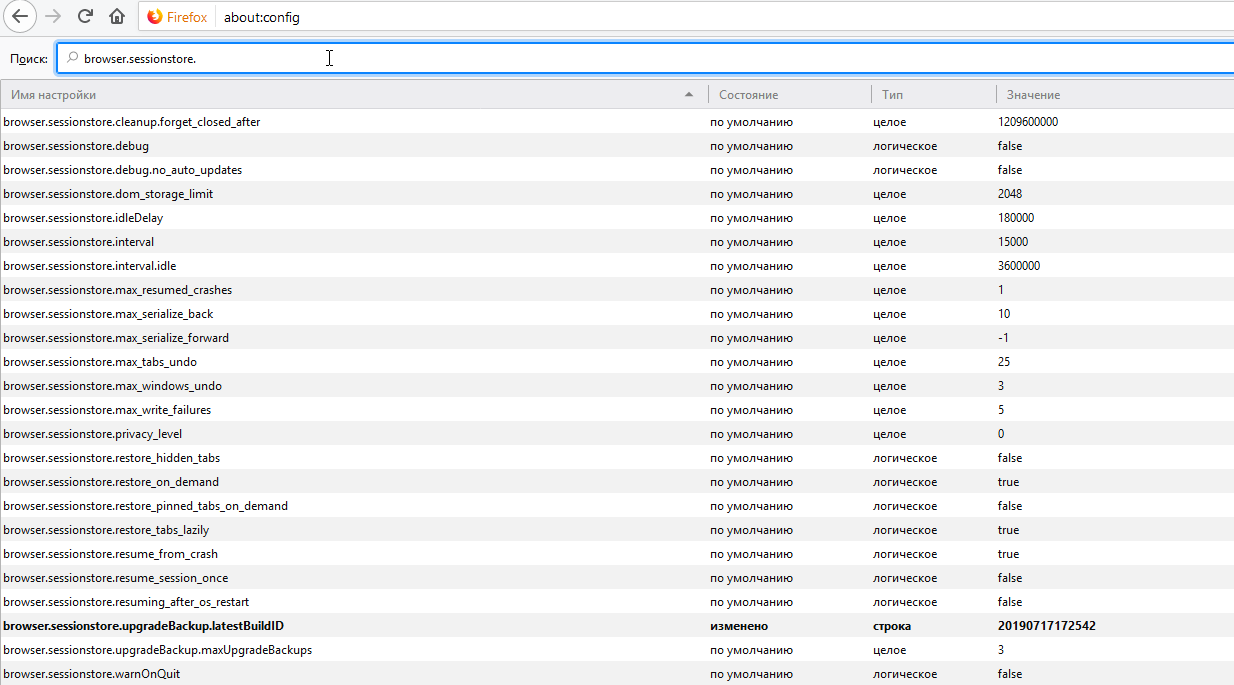
?
Drive4ik
on 14 Aug 2019
My settings are identical to yours with the exception of "browser.sessionstore.upgradeBackup.latestBuildID" however I don't think that's relevant as that looks to be a dynamic field.
I have one setting you do not, and that is "services.sync.prefs.sync.browser.sessionstore.restore_on_demand" which is at the default of "true", but again, I do not think that comes into play - it appears to be strictly tied to sync prefs.
mainmachine
on 15 Aug 2019
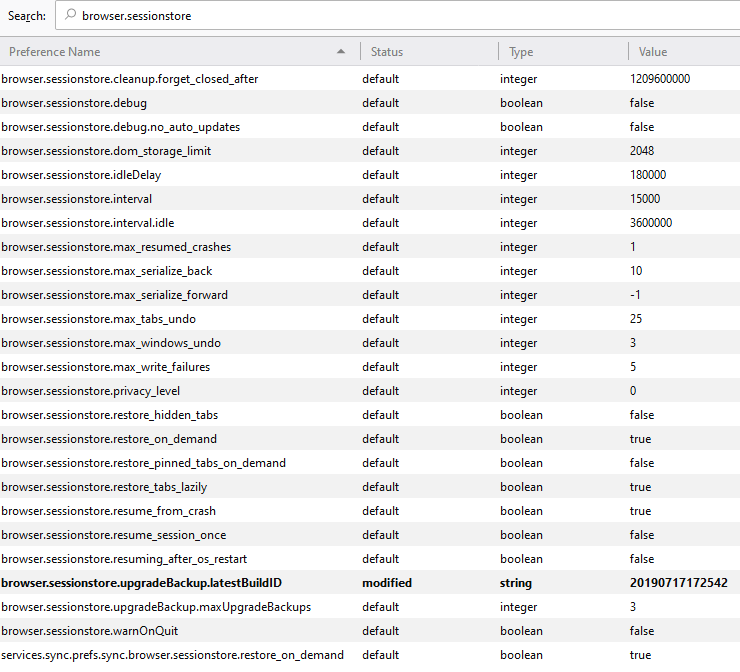
m60freeman
on 15 Aug 2019
Ok guys, now let's check one very old option browser.sessionstore.restore_hidden_tabs
It does not give me any effect, but also my problem does not repeat itself.
This option must be set to TRUE, restart the browser and try to repeat this issue.
Thank you all
Drive4ik
on 15 Aug 2019
Just FYI browser.sessionstore.restore_hidden_tabs was set to FALSE for me.
I've changed it to TRUE now.
 neuffer
on 15 Aug 2019
neuffer
on 15 Aug 2019
Changed browser.sessionstore.restore_hidden_tabs to TRUE but the behaviour is the same.
I have run a variation on my test routine above that preserves the tabs and prevents the problem, which is not a practical workaround but may provide insight into the root cause.
- Create a new tab group
- Open the new group in a new window
- Open a few tabs
- Export Group to Bookmarks
- Verify that group was added and links are populated
- Close group Window
- Open group in new Window again
Do not click on any tabsClick on EVERY tab in succession, such that the tab content is refreshed- Close the Window
- Open group in new window again, click on any tab and they are refreshed
So it appears that when you open a tab group in a new window, only the last-used tab (since it's selected) is refreshed, and since the others are not refreshed, they are not actually saved when you close the window. Maybe before the window is shut down you could refresh the tabs, or otherwise pull the URL that each tab is _supposed_ to be showing rather than the current state...?
I've noticed another strange point - when I open a group in a new window, I get an additional tab in the first tab position with my "home" page populated. It's the equivalent of adding a new tab at the start of the group (furthest left) and clicking the "home" icon.
It is definitely an additional tab, not a replacement. I tested with a tab group containing only four tabs, and all four tabs are loaded but with the new "home" tab added to the left of the other tabs.
mainmachine
on 15 Aug 2019
I am not 100% certain if this is the same problem, but it seems to me to be the same root cause.
This is easy to replicate:
...
Setting browser.sessionstore.restore_hidden_tabs to true does not solve this issue and still reproducible however.
Edit: If you have large enough amount of tabs, you will see whenever you close the window, the whole extension is reloaded (if you open too little, you may miss the effect), and all tabs are suddenly all shown but hidden back quickly. Not sure if it cause the issue or it is expected.
Btw, this issue is not reproducible in v3.4.4. Neither the reload.
 LiCybora
on 15 Aug 2019
LiCybora
on 15 Aug 2019
Guys who have the opportunity to provide me with a copy of their Firefox profile?
Just be sure to delete all passwords, history, bookmarks, cache (Ctrl+Shift+Del), other add-ons, etc. In general, delete all private data.
Create several groups of tabs, repeat the problem, and if it repeats, send me this profile in the archive.
And I will dig into it and try to understand what is the reason.
Because I can't replicate this issue...
And do not forget to write what is your OS.
Thanks.
Drive4ik
on 15 Aug 2019
@LiCybora The application does not restart, it is just a loading in order to let the user know that the application is doing something. But it does this - it creates tabs in the first window that were closed in the second window along with the second window.
Drive4ik
on 15 Aug 2019
Because I replicate this issue...
Do you mean you can or can not replicate it?
mainmachine
on 15 Aug 2019
@mainmachine Yes of course, I was wrong)
Drive4ik
on 15 Aug 2019
@Drive4ik - it looks like the update from today fixes this issue!
It is visually apparent that all tabs are being loaded when you "open group in new window", and when you close the new window and re-open, the tabs are preserved!
Well done! :D
mainmachine
on 19 Sep 2019
Drive4ik
on 26 Sep 2019
This seems to be stable after using it for several days. I've changed the backup schedule to 2 hours from the default of once a day, as I have found the need to restore a few times since I began using this extension. I think it would be valuable to see if there's any way to reduce memory usage, although I don't know how much of that is my workflow - I have accumulated 1500+ tabs in my default group from before I started using STG. My hope with STG is that I can organize this massive number of tabs into useful "buckets" and shift between them depending on what subject I'm working on. So far so good... :)
mainmachine
on 28 Sep 2019
I have accumulated 1500+ tabs in my default group from before I started using STG. My hope with STG is that I can organize this massive number of tabs into useful "buckets" and shift between them depending on what subject I'm working on. So far so good... :)
@mainmachine you may like #302
 GonzRon
on 12 Oct 2019
GonzRon
on 12 Oct 2019
Glad this issue was resolved iwas just affected by this in one window and group and lost those tabs as new tabs. I maybe have to restore STG from backup.
GonzRon
on 12 Oct 2019
Are you sure the problem is resolved? I see the same problem in Firefox 71.0a
 Dook1
on 17 Oct 2019
Dook1
on 17 Oct 2019
@Dook1 - the main problem seems to be resolved, although now I have seen a few times where an inactive tab group will "lose" it's tabs. I have the extension configured for a backup every 2 hours, and I have been able to find the deleted tabs by comparing a recent backup to an older one. Still don't understand why a tab group I am not using would be affected at all...?
mainmachine
on 17 Oct 2019
One month later and I've been running 4.2.2 and everything has been running beautifully! I no longer fear losing tabs when closing Firefox, abrupt shutdowns or reboots, even with multiple Firefox windows open! :)
Thank you @Drive4ik for responding to these reports and for creating this great add-on in the first place!
mainmachine
on 16 Nov 2019
I have found a repro case which works with STG 4.5.1, FF 79.0. It relates to tabs in Reader View.
Steps:
- Put any open tab in Reader View
- Open a new window
- Close the original window. STG will perform some kind of reloading.
- Any tabs which had previously been in Reader View are now New Tab.
 arganoid
on 6 Aug 2020
arganoid
on 6 Aug 2020
@Dook1 - the main problem seems to be resolved, although now I have seen a few times where an inactive tab group will "lose" it's tabs. I have the extension configured for a backup every 2 hours, and I have been able to find the deleted tabs by comparing a recent backup to an older one. Still don't understand why a tab group I am not using would be affected at all...?
This just happened to me as well. A tab group lost it's tabs, the tab counter in the drop down list apparently shows 0/1, (and that's because I recreated a new tab there. There was a container assigned to all the tabs in this group, as this is my work group so i need all tabs in this window / tab group to be in the work container.
GonzRon
on 6 Aug 2020
@arganoid I fixed your bug, please wait next release
Drive4ik
on 8 Oct 2020
Related issues
 HASJ
·
6Comments
HASJ
·
6Comments
 ddTech
·
4Comments
ddTech
·
4Comments
 EstherMoellman
·
4Comments
HASJ
·
3Comments
EstherMoellman
·
4Comments
HASJ
·
3Comments
 Sophia10
·
4Comments
Sophia10
·
4Comments