Simple-tab-groups: AGAIN: "Unknown Error: OP failed unrelated to DB"
Describe the bug
A clear and concise description of what the bug is.
To Reproduce
Steps to reproduce the behavior:
- Go to 'Start the latest Firefox Nightly (FFN).'
- See error message: "Unknown Error: OP failed unrelated to DB"
Expected behavior
The icon should show, not a yellow warning triangle. And tab groups should function, not giving error messages at start or when clicking it. Instead, all groups should show up.
Screenshots

Desktop (please complete the following information):
- OS and version: Windows Home Premium 64bit
- Firefox version:: FFN 68.0a1 (2019-03-27) (64-Bit)
- Simple Tab Groups version: 3.4.2.1
Additional context
If it helps, I can copy all files of STG and make them available here. Where to find all files?
 Hirnsausen
All 33 comments
I'm also encountering this issue.

Currently on:
- Firefox v67.0b6(64-bit) Developer Edition
- Windows 10 Home 1703 64-bit
- Simple Tab Groups v3.4.2.1
 japzone1
on 31 Mar 2019
japzone1
on 31 Mar 2019
Same here. I got myself educated on debugging Firefox add-ons and I discovered that browser.storage.local.get() appears to get called with null as the parameter (on line 729 of de-minified moz-extension://d5b1612f-bb2d-cf46-9278-eb78a95372e0/background.js — see screenshot)
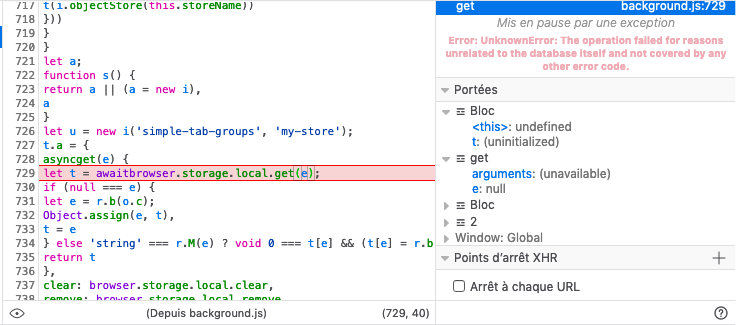
Deleting the extension state works around the issue until next time it creeps up — From the Firefox profile directory:
rm -rf storage/default/moz-extension+++d5b1612f-bb2d-cf46-9278-eb78a95372e0*
 domq
on 1 Apr 2019
domq
on 1 Apr 2019
I was able to do a development build of the extension from its sources on GitHub, rsync my defective data set from my backed up profile into the storage/default/moz-extension+++${TEMPUUID} storage/default/moz-extension+++${TEMPUUID}^userContextId=${USERCONTEXTID} directories, and reproduce the crash. Now I get the following stack trace:
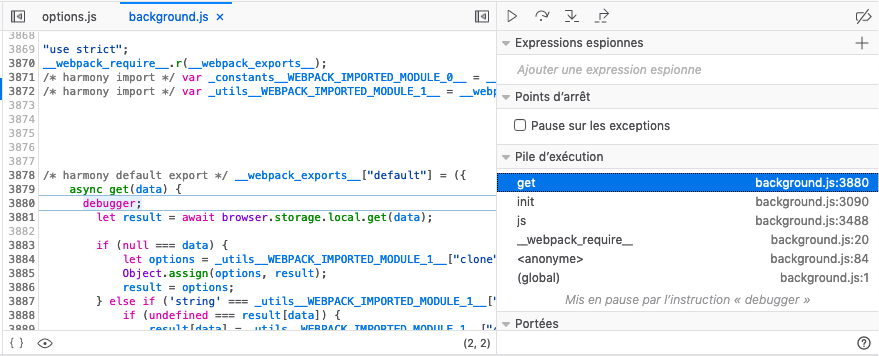
Unfortunately it looks like the null lead from my previous post is red herring:
- the STG code explicitly calls
.get(null); - Calling either
browser.storage.local.get(null),browser.storage.local.get()orbrowser.storage.local.clear()from the extension debugger produces the same error message in the debugger console, i.e.Error: UnknownError: The operation failed for reasons unrelated to the database itself and not covered by any other error code.
So it could be that my state is corrupt in a way that STG has no bearing upon.
domq
on 1 Apr 2019
Apparently, other add-on authors have run into the same problem before.
Trawling through the Mozilla Bugzilla indicates that that issue has been known for five-odd years, is correlated to browser upgrades (like in my experience and presumably @Hirnsausen's, who is using nightly builds) and is making about zero progress these days: #944918, #1017066, #1341070
I suppose that STG could try and bypass the browser.storage.local API, and use the IndexedDB API directly — But that sounds like work...
For the time being, deleting the add-on state as explained above is an effective workaround.
domq
on 1 Apr 2019
Deleting the extension state works around the issue until next time it creeps up — From the Firefox profile directory:
rm -rf storage/default/moz-extension+++d5b1612f-bb2d-cf46-9278-eb78a95372e0*
Thanks for the tip. This works, except that the Internal UUID is different for me, and maybe other people.
So people doing this should first visit about:debugging#addons first and find the Internal UUID for Simple Tab Groups. Then go and delete folders matching that UUID in Firefox Profile/storage/default/
Be warned, this deletes all your settings and tab groupings, though the tabs themselves aren't lost. They can be found under the "List all Tabs" dropdown menu. Alternatively Create a new group in STG, and then use the "Move All Tabs Into This Group" option. The "Create New Group With These Tabs" doesn't work for some reason.
You could also try restoring an automatic backup if you had that feature enabled. Haven't tried this yet so I don't know if it could lead to the same issue recurring.
japzone1
on 1 Apr 2019
@domq You are right, https://www.ghacks.net/2019/02/16/firefox-extensions-to-use-different-storage-type-in-firefox-66/
I already have so many messages from users with this error ...
The main thing is not to roll back to the browser version below.
 Drive4ik
on 1 Apr 2019
Drive4ik
on 1 Apr 2019
@domq You are right, https://www.ghacks.net/2019/02/16/firefox-extensions-to-use-different-storage-type-in-firefox-66/
I already have so many messages from users with this error ...
The main thing is not to roll back to the browser version below.
So basically, the migration borked STG's save data?
japzone1
on 1 Apr 2019
Browser migration? The STG, upon successful launch and operation, creates backup copies in the download folder. You can recover at any time. But if the browser version 65 (for example) saves the internal data in one folder, and in version 66 it moves it to another location and then the user decides to roll back to version 65, then an error is quite possible. There are also so-called recoilless releases. Ie, the browser makes changes that can not be rolled back in the profile folder.
Drive4ik
on 1 Apr 2019
Browser migration? The STG, upon successful launch and operation, creates backup copies in the download folder. You can recover at any time. But if the browser version 65 (for example) saves the internal data in one folder, and in version 66 it moves it to another location and then the user decides to roll back to version 65, then an error is quite possible. There are also so-called recoilless releases. Ie, the browser makes changes that can not be rolled back in the profile folder.
Oh I misunderstood you. I didn't do any rollbacks of versions. STG just suddenly stopped working with the error I screenshotted above. Had to clear the extension's storage in order to get it working again.
japzone1
on 1 Apr 2019
On the bright side, STG's auto backups saved everything, and after restoring the latest one I had everything back and was then able to import the new tabs I had opened since the issue back into groups using the hidden tab rescue feature.
Just wish there was an easier way of clearing the Extension's save data so I don't have to go digging through the profile folder in the future if it ever happens again.
japzone1
on 1 Apr 2019
Yes.
In https://www.ghacks.net/2019/02/16/firefox-extensions-to-use-different-storage-type-in-firefox-66/
Matt A. Tobin said
As you note, people using Mozilla-based, Mozilla-style, Mozilla-ish, and Mozilla proper software should backup their profile before ANY change in version and should almost NEVER downgrade without using a profile matching the target downgrade version.
If you didn’t make a version downgrade, then I don’t know what happened ... Apparently in Firefox, there was a mistake in migration at a certain moment and set of circumstances. Because there is a mistake but not everyone has it.
Just wish there was an easier way of clearing the Extension's save data so I don't have to go digging through the profile folder in the future if it ever happens again.
Delete addon -> restart browser (required) -> install addon -> restore backup -> profit :)
Drive4ik
on 1 Apr 2019
Just wish there was an easier way of clearing the Extension's save data so I don't have to go digging through the profile folder in the future if it ever happens again.
Delete addon -> restart browser (required) -> install addon -> restore backup -> profit :)
LOL, fair enough 😆
japzone1
on 1 Apr 2019
I was reading through all the comments, and try to get an understanding.
My situation is, that I have 6 tab groups, but in some of them are over a hundred tabs. We STG users need a way that automatically restores our tab groups. It is too much work, each time it crashes to go through over 300 tabs and assign them again to one of the six tab groups. At the moment, we cannot use most of the tabs for our work here, wothout having them grouped.
I wonder if you could develop an external EXE file that can do the trick in case of crashes. Downloadable separately from the STG extension.
Hirnsausen
on 2 Apr 2019
@domq @Hirnsausen a copy of the broken IndexedDB storage directory may be really helpful to investigate this issue, currently I can't reproduce this issue locally and so I couldn't investigate it in as much detail as I wanted to.
Is there any chance that you may be able to share it?
(e.g. by sharing it privately over email)
To identify the IDB storage directory:
- look for the extension
UUIDinabout:debugging#addons - then look for the path to the Firefox Profile Directory in
about:support - then open your file manager of the Firefox Profile Directory and look for the subdirectory named as
storage/default/moz-extension+++UUID^userContextId=4294967295/.
If you can't share the broken IndexedDB storage directory (e.g. because there are private data, like private tab urls that you can't share), an alternative approach could be describing in a new comment on Bug 944918 what is the content of the broken directory, so that Tom Tung may be able to ask you to do some additional checks on those files (e.g. on the content of the sqlite files) that could help us to get a better picture of how the issue is being triggered (and how it should be fixed).
As an example, it would be interesting to see if the sqlite file is corrupted, by running PRAGMA integrity_check; on the sqlite file that is part of the broken IndexedDb storage directory, you should be able to check that locally using the following steps:
- make a copy of the
moz-extensions+++UUID^userContextId=4294967295broken IndexedDB directory - open the
.sqlitefile from theidbsubdirectory using the sqlite3 cli tool - execute
PRAGMA integrity_check;(which will printokif sqlite3 didn't find any corruption in the sqlite file)
 rpl
on 2 Apr 2019
rpl
on 2 Apr 2019
[... A] copy of the broken IndexedDB storage directory may be really helpful
Attached to #944918 (and also to #1017066 which seems more on-target, even though it is closed)
execute
PRAGMA integrity_check;
I got an all-clear on that:
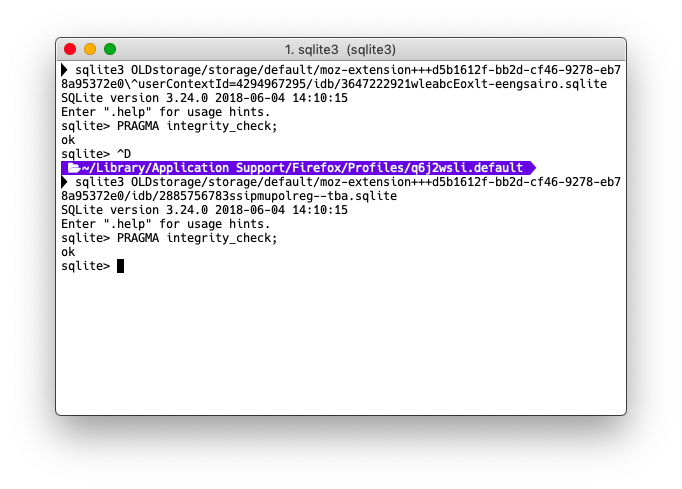
domq
on 2 Apr 2019
I am a programmer, but i use Delphi. I can't imagine that it would be so difficult to integrate some different solutions for this situation inside the programming code of this plugin. As well as to create duplicates of the database for situations the original database encounters problems. Only if saving all contents to the original DB worked, the DB copy should also be updated. From a programming aspect, not really difficult. So, where are the problems actually here (in terms of programming code)?
Hirnsausen
on 3 Apr 2019
@Hirnsausen this much more complicated than you think. Webextensions doens't have access to the hard drive, so the only way to create "backup" is using one of the available storage API. Now IndexedDB is often used because it can store a lot of data without asking for unlimited storage permission that is required for "storage.local" if you want to store >5MB. So basically there is no way to backup database at all.
Also, these is NO way to recover from this bug! This bug, once appears, it affects whole IndexedDB engine for all your add-ons. You are not able to create new DB or remove old one. Only way to fix this is by manipulating storage folder files manually. There is a Firefox storage test page that can check IndexedDB engine:
https://firefox-storage-test.glitch.me/
 Juraj-Masiar
on 3 Apr 2019
Juraj-Masiar
on 3 Apr 2019
@Hirnsausen
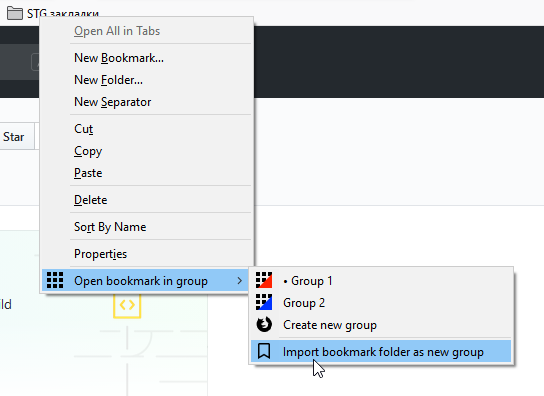
The easiest way is to export groups to bookmarks (this is done automatically by default in the settings), and then recovering from bookmarks
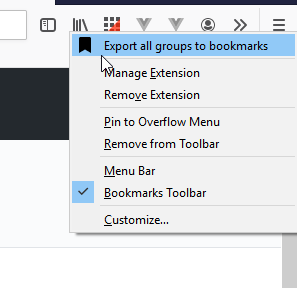
Drive4ik
on 3 Apr 2019
Interesting, so you using user bookmarks as backup space? Also how much data can you put there?
And is it working fine? No performance impact?
Juraj-Masiar
on 3 Apr 2019
Interesting, so you using user bookmarks as backup space?
Yes. And it is optional, you can disable it in the settings.
Also how much data can you put there?
As I understand it can be a lot, as the browser allows you to create bookmarks (>2500)
https://support.mozilla.org/ru/questions/932475
And is it working fine? No performance impact?
So far, there have been no problems with bookmarks.
Drive4ik
on 3 Apr 2019
Thanks for the answers! :-)
DB: all other plugins never failed to function, only this one.
Bookmark: I wonder if the BOOKMARK feature could create sub folders inside the bookmark listing, or apply some othjer sort of hierarchy, wghich then can be used to convert all those bookmarks into individual groups. If this is not possible, then it could add the group name and some underscore sign in front of each name, as a feature to restore entire groups from those underscore-bnookmarks. And it would restore only bookmarks to tabs/groups that have an underscore in the name. Can this work?
EXAMPLE:
STB_(GroupName)_(TabName)
Hirnsausen
on 5 Apr 2019
@Hirnsausen I somehow did not understand what you mean. Bookmarks already now stored in each separate folder with the group name. And one button to restore, restored in groups and tabs
Drive4ik
on 5 Apr 2019
It is just an idea how STG could restore the lost groups and tabs. Exporing them with group name as bookamrks keeps them on the harddrive of the user. Import could be the same way.
Another question. if this database is so incredibly fragile and easily corrupted, I could develop a small Windows program that creates a backup and also restores the DB from a backup. But I would need to know, where that DB is located, to create such a small gadget software.
Hirnsausen
on 10 Apr 2019
@Hirnsausen What you say about bookmarks, about saving groups and tabs with their names in bookmarks, is already done.
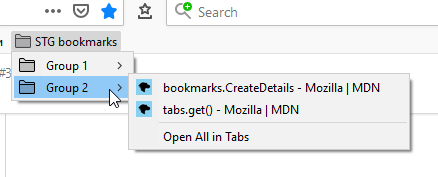
And importing from bookmarks completely restores tabs and groups with their names.
And about the program for Windows - it is easier to make a backup of the entire Firefox profile folder.
The path to it can be found here: open tab with url about:support -> profile folder
Drive4ik
on 10 Apr 2019
No, not exactly. My suggestions would enable to restore the tab groups with their accurate names, too, and not just the tabs. Did you read my previous posting? At the moment, all tabs would be restored in one new group, but the group names, to my experience, get lost. I tried it a few weeks ago. But hopefully my experience is outdated, and you are right and even the correct tab groups are correctly restored. That would be nice, and then i gladly would be wrong. :-)
Hirnsausen
on 13 Apr 2019
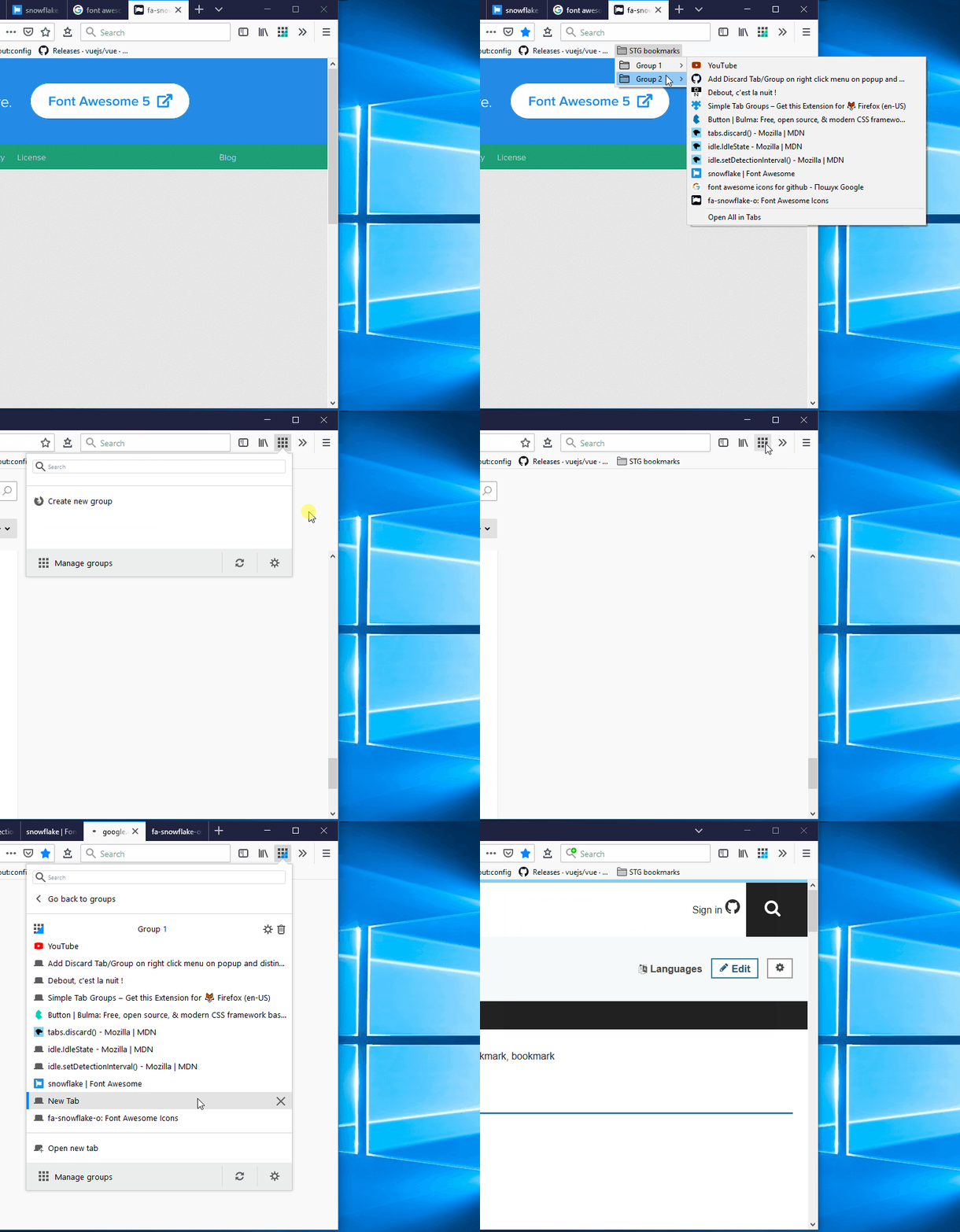
I'm talking about this:
Drive4ik
on 15 Apr 2019
Still broken ?
 ctes940008
on 18 Apr 2019
ctes940008
on 18 Apr 2019
@ctes940008
Try re-installing the addon and restoring from the backup copy will help. You can find backups in the download folder of the Firefox browser (STG-backups folder)
Drive4ik
on 18 Apr 2019
Drive4K: super, thanks! I learned something new. My previous suggestion is therefore obsolete. I am actually happy about it.
There is, by the way, an ongoing discussion about the strange DB problem at Github, too:
https://bugzilla.mozilla.org/show_bug.cgi?GoAheadAndLogIn=Log%20in&id=1522188&Bugzilla_remember=on
They are aware of a DB problem. It seems, some numerical values inside the DB are incremented by 1 for some strange reason and thus, related files cannot be found anymore.
Next question: I want to develop a Windows program that will backup (and restore) the SQLite DB of your plugin. What is the name of your own plugin folder inside (on Windows) the FF DB location folder (C:\Documents and Settings(USERNAME)\Application Data\Mozilla\Firefox\Profiles\n2vbaeyf.default\storage\default)? Once I know the location, I can see if I can protect my DB until a solution on developer level (FF) has been found.
Hirnsausen
on 19 Apr 2019
@Hirnsausen Thanks for helping and create a bug in bugzilla))
Maybe you missed it, but how to find the add-on database folder is described here:
https://bugzilla.mozilla.org/show_bug.cgi?id=1522188#c35
But the fact is that there in the folder path (id extension) was created in Firefox itself and is a random string (for example, I have 2 folders: one
moz-extension+++9816af84-d451-453b-8cc5-b23600d10152 and the other
moz-extension+++9816af84-d451-453b-8cc5-b23600d10152^userContextId=4294967295)

9816af84-d451-453b-8cc5-b23600d10152 - this is an internal random identifier.
Find out what your UUID for my addon can only open Firefox and go to the page about:debugging#addons
So if you want to make a program for backup, you need to save the entire Firefox profile folder)))
Drive4ik
on 19 Apr 2019
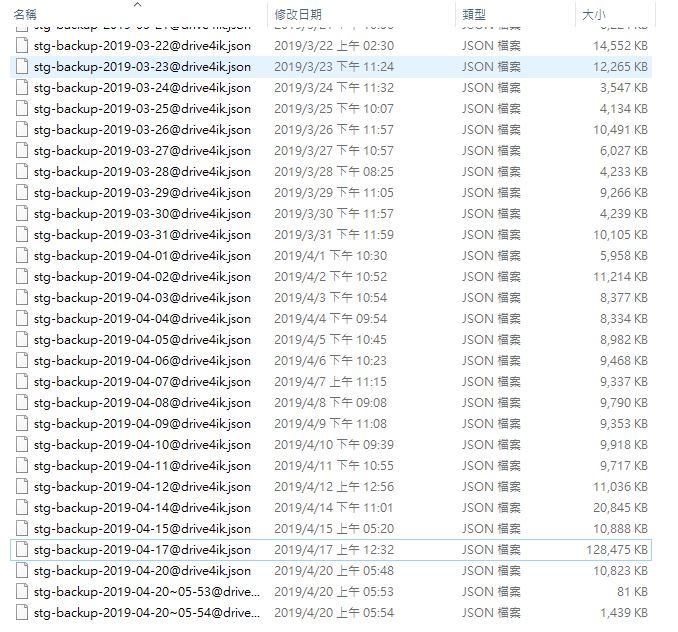
@ctes940008
Try re-installing the addon and restoring from the backup copy will help. You can find backups in the download folder of the Firefox browser (STG-backups folder)
OK. It works.
Is there anything wrong?
ctes940008
on 19 Apr 2019
Hi I have this issue aswell and was reading thru the comments to see how I can resolve this. I can reset the plugin by deleting the extension state in the Profile/storage/default/ folder.
I didnt find the "List all Tabs" option or the "Move All Tabs Into This Group", dunno where to find these.
"Be warned, this deletes all your settings and tab groupings, though the tabs themselves aren't lost. They can be found under the "List all Tabs" dropdown menu. Alternatively Create a new group in STG, and then use the "Move All Tabs Into This Group" option. The "Create New Group With These Tabs" doesn't work for some reason."
I dont got the backup files. When I go to the AddOn settings in Firefox then it says "Loading Tabs, please wait" forever. Guess its too much to load or simply the database cant be read. I have over 100 tabs saved with simple tab groups, are they lost now and I have to reset the AddOn and make sure to have a backup next time or can I recover the tabs somehow?
Thanks for any info.
 gg9943
on 18 May 2019
gg9943
on 18 May 2019
@gg9943 Hi, try to find folder STG-backups in firefox download dir.
To restore working STG addon you need delete addon, restart browser, install addon and then restore latest backup from STG-backups dir
Drive4ik
on 20 May 2019
Related issues
 joepie91
·
4Comments
joepie91
·
4Comments
 stinos
·
4Comments
stinos
·
4Comments
 lukasjuhrich
·
5Comments
lukasjuhrich
·
5Comments
 HASJ
·
6Comments
HASJ
·
6Comments
 ajvsol
·
6Comments
ajvsol
·
6Comments