Silent-hill-2-enhancements: Some more things
So, after the big one I've been playing the PC-version side by side with the PCSX2-version in SW-mode+WS-patch (literaly two 720p-windows next to each other on a 1440p-display; and using a DS4 via InputMapper, each window registers the input simultaniously), and found some more stuff (in chronological order). Haven't got twitter or any other social-media-thingy, so I can only let you know here, so my bad if they're already well known (:
-the missing wall-chunks in the opening cutscene in the restroom and elsewhere were fixed by you guys, so there's no need for the camera to be zoomed in anymore. BfaW wouldn't need it at all as far as I could tell. I know you're prolly trying to "match the original 4:3 horizontal compositions", and accomodate/compensate for the letterboxing, but it still looks weird and way too zoomed in when compared to the PS2-version. should imo only be done for the cutscenes where you would otherwise see frozen offscreen-characters (btw could they be moved via script or in-game-character-placement? you've modified character-behavior in cutscenes before...)
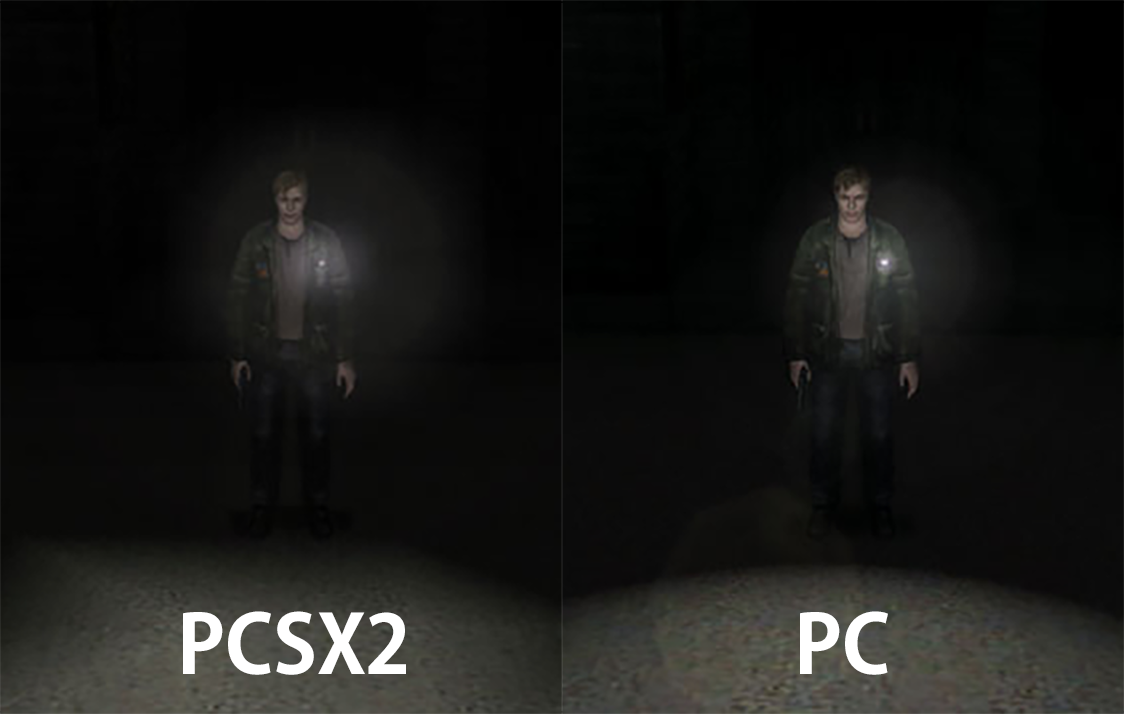
-the lens-flares from James's flashlight are smaller and less bright
-Laura doesn't fade out into the shadows properly in the key-kicking-cutscene
-James's flashlight is turned off when he enters the closet in the first cutscene with Pee-Head
-in some instances the fog moves too fast; esp. in the courtyard with the pool (it's supposed to almost stand still), and in the hallway before the meatlocker it moves from side to side through the walls as if it where outside, whereas it should come out of the spouts and just kinda lazily drift toward you (seems you fixed this with the latest update. would like to know how you did it; new code or just by tweaking the variables and upping the transparency of the 1st layer?)
-on the balcony connecting rooms 209 and 208 the fog should be exta-thick and almost totaly obscuring the doors and background
-the level/lighting-values of the cutscene in the stairway right before the RPT-bossfight, and the one right after with Laura on the wall seem to be slightly off
-before every event with the newly restored motion-blur-effects (before PH knocks YOUxFENCE down/before jumping down holes, etc...), there's a stutter
-the rain-effects in the hospital-garden are barely noticable (they kinda blend in with the noise-filter). it's better before the final boss, but it's missing a few brighter, more "thick"-looking droplets
-can you do sth about that ground-texture when James is digging? my poor glorious eyes... :-x
-after you jump down the hole and land in front of the elevator, the camera and FOV are wrong
-the lamp on the pier in the fog before the hotel doesn't shine brightly enough through it, making it harder to spot than it should be
-you gave the briefcase in the cloak-room its proper name, but the menu-description of the key to hotel-room 204 still says it came from a "bag"
-the lighting/levels of the corridor when you exit the 1st-floor-employe-elevator is too bright; so is the following in B1F; so is the Kitchen next to the bar; so is the corridor right outside the bar
-the characters in room 312 are a bit too translucent around the edges when in front of the windows
-the bed in the reading-room is too bright
-I'm assuming the flame-effect is the same or similar to the fog? either way, it's slighty toned down and not "colorful" enough
-after exiting the stairs with the flames, James is too brightly lit
-when James falls to his knees, it's like there's a spotlight on the carpet under him. and after the cutscene, the whole room is too bright
-the shadows on the walls in Maria's room in BfaW are slightly off
-although the "FixGPUAntiAliasing"-option says "Nvidia-only", in your troubleshoot-guide you suggest settings for a driver-profile for AMD-cards as well. and indeed, when I enable 8x supersampling on my 5700 XT, I get severe shadow-flickering.
-how come I can set any resolution I want when playing in borderless-mode? in fullscreen I can go as high as my VSR allows (and I'm not plagued by the slow transitions on a 5700 XT, so it RDNA-Radeons are OK), but in borderless-mode I can set even 10240x5760 without having any external downsampling-tool running. did you implement some sorta internal supersampling without telling anyone, or what other kinda magic are you using?!
other'n that the game is nearly ah-dennicle. this is all meant to be constructive ofc. you did such an amazing job... thanks for your immense effort so far!
and man, I've been playing this game so much, I swear the noise-filter is burned into my retinas...
 TommvinHuwaltzky
All 29 comments
Hi TommvinHuwaltzky,
Thanks for messaging us! There's a lot to go over, so I'll try my best to respond to them all:
the lens-flares from James's flashlight are smaller and less bright
The brightness should be around the same. We tested this pretty well. In regards to its size: Aero_, Bigmanjapan, and I discussed this in the past. On the PS2 version, the flashlight glow texture will actually "cut" into James' shoulder at certain angles.
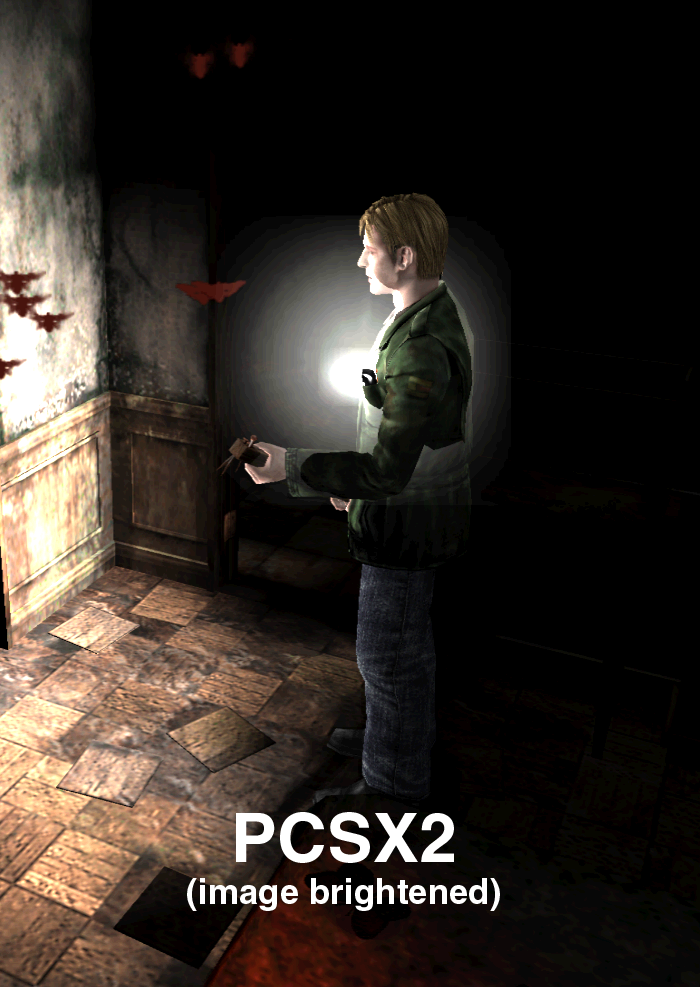
This texture size was reduced for the Xbox version (that Team Silent ported), and we believe they did this to try and address this visual error. So we made the decision to leave the size as-is. Even still, on the PC and Xbox version, this texture can still cut into James' body at very specific angles, but it's less obvious when it happens.
I know you're prolly trying to "match the original 4:3 horizontal compositions", and accomodate/compensate for the letterboxing, but it still looks weird and way too zoomed in when compared to the PS2-version.
It will look the same as PS2 version when played in 4:3. We're not going to make exceptions for certain cutscenes, in regards to the ReduceCutsceneFOV fix, as we cannot guarantee people will only play in 16:9. Some people will, against our recommendations, play in ultra wide or odd aspect ratios.
On that note: Do note that, when played in widescreen, PCSX2 incorrectly stretches the flashlight lens glow and lake light textures. That can also be another reason why they look bigger to you. Our Fix2D fix addresses this.
after you jump down the hole and land in front of the elevator, the camera and FOV are wrong
It looks correct to me. Keep in mind ReduceCutsceneFOV will change the FOV by its very nature.
Laura doesn't fade out into the shadows properly in the key-kicking-cutscene
She does. It may not be 1:1 to the PS2 version, but she fades out as intended.
James's flashlight is turned off when he enters the closet in the first cutscene with Pee-Head
This was an intended change on our end.
on the balcony connecting rooms 209 and 208 the fog should be exta-thick and almost totaly obscuring the doors and background
Thanks, we can look into fog volume for this room sometime in the future.
the rain-effects in the hospital-garden are barely noticable (they kinda blend in with the noise-filter). it's better before the final boss, but it's missing a few brighter, more "thick"-looking droplets
I'm not sure if this is something we'll look into in the near future, but noted!
you gave the briefcase in the cloak-room its proper name, but the menu-description of the key to hotel-room 204 still says it came from a "bag"
Nice catch! We'll have that updated for the next package release. Thanks.
- the level/lighting-values of the cutscene in the stairway right before the RPT-bossfight, and the one right after with Laura on the wall seem to be slightly off
- the lighting/levels of the corridor when you exit the 1st-floor-employe-elevator is too bright; so is the following in B1F; so is the Kitchen next to the bar; so is the corridor right outside the bar
- the bed in the reading-room is too bright
- I'm assuming the flame-effect is the same or similar to the fog? either way, it's slighty toned down and not "colorful" enough
- after exiting the stairs with the flames, James is too brightly lit
- the shadows on the walls in Maria's room in BfaW are slightly off
I'd consider these non-issues. Unfortunately, we cannot worry about every area that is slightly off color or off in levels to the PS2 version. We just don't have the time/resources/interest to go that detailed with it. We do try and fix the most _egregious_ of lighting differences but, if they're slightly different but still look overall good, then that's good.
Although, I will say, for several of the rooms in the alternate Hotel that you mentioned, Aero_ and I discussed these lighting conditions but I'm not sure if we ever followed through with them? There's a lot of moving parts with this project, so it's easy for us to get backtracked with things.
We are also planning to add our own shader to color-correct the game (like what ReShade is currently doing for us), to give it the slight blue tint, so that might also help with some of the color things you've mentioned.
But on that note:
when James falls to his knees, it's like there's a spotlight on the carpet under him. and after the cutscene, the whole room is too bright
I've noticed this quite a while ago, as well. However, we can't use the universal room lighting addresses we have, as there are special addresses/instructions that light this particular room. And I haven't been bothered to try and find them myself, to see if they can be dimmed some. It's another issue that isn't high on the list at this time.
before every event with the newly restored motion-blur-effects (before PH knocks YOUxFENCE down/before jumping down holes, etc...), there's a stutter
Elisha would be better to answer this, but to fix the "flicker" that happened before any post-processing event occurred, Elisha had to grab the last rendered frame before the PPFX is called, and substitute that grabbed rendered frame for the original bugged flicker frame. That might be the stuttering you're seeing; in that it's displaying that grabbed image for more than a single frame to address the original flicker.
can you do sth about that ground-texture when James is digging? my poor glorious eyes... :-x
I agree, this cutscene is really showcasing how low resolution that grass texture is. This is something we'd like to look into at a later time. Nothing high to do on the list for now, but something nice to maybe polish later on.
although the "FixGPUAntiAliasing"-option says "Nvidia-only", in your troubleshoot-guide you suggest settings for a driver-profile for AMD-cards as well. and indeed, when I enable 8x supersampling on my 5700 XT, I get severe shadow-flickering.
There's no drawback for AMD users to enable FixGPUAntiAliasing, as this fix only activates itself when it detects an Nvidia card being used. On the website, we instructed it that way just to ensure it's enabled in general, as there's no drawbacks for non-Nvidia users to enable it.
In regards to shadow flickering: Does this only happen in certain areas or in general all over?
how come I can set any resolution I want when playing in borderless-mode? [...] did you implement some sorta internal supersampling without telling anyone, or what other kinda magic are you using?!
Elisha or Aero_ might be best to answer this one! One thing I can add though, is that we plan to remove ReShade from the install process, so we could have d3d8to9 disabled by default, if we wanted to, so AMD users aren't affected by the slow transition bug. But it's good to know RDNA-based AMD cards don't seem to be affected either way!
 Polymega
on 12 May 2020
Polymega
on 12 May 2020
we could have
d3d8to9disabled by default, if we wanted to, so AMD users aren't affected by the slow transition bug.
Just to add a bit of color here, the slow comes from the GetFrontBufferData API. For some reason this API call takes between 1 to 2 seconds on an AMD but is fast on Nvidia and Intel. Also, this slowdown only happens when using exclusive fullscreen mode. I have not really looked into it yet, but there may be a way to fix this even when using d3d8to9.
 elishacloud
on 13 May 2020
elishacloud
on 13 May 2020
We are also planning to add our own shader to color-correct the game (like what ReShade is currently doing for us), to give it the slight blue tint, so that might also help with some of the color things you've mentioned.
When we add our own code here it should make it easy to change the color tones per-room if we want.
before every event with the newly restored motion-blur-effects (before PH knocks YOUxFENCE down/before jumping down holes, etc...), there's a stutter
Elisha would be better to answer this, but to fix the "flicker" that happened before any post-processing event occurred,
I am not sure what is meant by "a stutter", but if you mean that the same frame appears for too long then this may not be avoidable. First of all I skip drawing of one frame because that frame is a completely different color than the frames before and after it causing a ugly flicker. The issue is that this frame is really just a half rendered frame, meaning that the Silent Hill 2 code sends the Present() API call before finishing all the setup for the frame. So skipping it in this case, I think, is the right thing to do.
However, the bigger issue here is the sheer amount of work that the game tells DirectX to do in a single frame. When I look at it in PIX the single frame takes over 150ms to render. This is because the game is setting up a bunch of stuff and creating a bunch of resources, etc. Not really sure if there is a way to fix this since I think this is a direct design issue of the game.
-how come I can set any resolution I want when playing in borderless-mode? in fullscreen I can go as high as my VSR allows (and I'm not plagued by the slow transitions on a 5700 XT, so it RDNA-Radeons are OK), but in borderless-mode I can set even 10240x5760 without having any external downsampling-tool running. did you implement some sorta internal supersampling without telling anyone, or what other kinda magic are you using?!
There is no magic here. I am pretty sure this is either handled by Nvidia's DSR or by Windows Desktop Manager (WDM) scaling features. The game is just using standard DirectX windowed mode, and of course, removing the frame of the window. The size allowed here is whatever size Windows allows a window to be, not based on what resolutions your monitor allows. BTW: setting this to 10240x5760 may make the picture look really good but it also makes Silent Hill 2 run very slow, at least on my desktop.
elishacloud
on 13 May 2020
I tried for the first time SH2 Ps2 on PCSX2 (since it's the first time we have a PC that can easilly handle PCSX2).
I noticed that it is almost identical (both visually and about audio) to the PC EE.
However it is quite different from playing it on a ctual Ps2.
On a real Ps2 the fog is more thick and with more color gradients (I don't know if it's only a matter of different screens), but the more noticeable thing is the audio.
On PCSX2 the directionality is almost indistinguishable from the PC EE. On the real Ps2 is a complete another world.
So I wonder if PCSX2 is actually capable of faithfully render SH2, or maybe it's just a matter of audio settings?
 Badore90
on 17 May 2020
Badore90
on 17 May 2020
Once we implement an HRTF audio solution (planned to be OpenAL Soft) for the project, I think that will make a big difference.
Polymega
on 19 May 2020
Once we implement an HRTF audio solution (planned to be OpenAL Soft) for the project, I think that will make a big difference.
I did not know you were working on another audio solution! Is there more information on your progress or how high it is on the list of priorities? Specularity of certain objects, especially eye glint, and the 3D space/ realtime mixing of audio are my two dream fixes. I'm afraid that audio may never be quite the same since I'm not sure its possible to see or replicate everything going on under the hood... not to mention Akira Yamaoka is a genius (not being flippant), and audio engineering/mixing is a fulltime profession that requires a very attuned ear to do. I don't know exactly what it is, but there is something in the presentation of the audio on PS2 that's hard to put into words. Almost a spiritual feeling, especially as James first walks out of the restroom and the droning synths start to play as he approaches the railing. There's something heavy and thick to the audio... could just be placebo or bias.
 umbrellacorp53
on 20 May 2020
umbrellacorp53
on 20 May 2020
I totally understand. The audio for SH2 PC (and within our project) is still lacking, and it mostly stems from the lack of EAX/hardware accelerated audio that was discontinued after... Windows XP I think it was?
I also think that's why the game defaults back to "Stereo" if you change the sound mode; because without that hardware acceleration being detected it's probably programmed to do so.
Anyway, OpenAL Soft sounds (literally) very promising for the game. In terms of priority: We first need to create a built-in solution to alleviate the "clicking/popping" that happens when an audio sound is cut short. This is what IndirectSound currently does for us. Once we can make an integrated solution for that, we can then look into utilizing OpenAL Soft.
I've done some early, simple/basic tests with it and I was quite impressed with the audio sound stage/presentation. It was especially great when using headphones.
I'm not sure when it'll be included in the project, but rest assured, we definitely plan to do it plus restoring specularity still! I know Silent (CookiePLMonster) on our team has shown specific interest in the specularity work sometime in the future.
Polymega
on 20 May 2020
Do you have any ideas on how to implement the native audio pop fix? Are the SFX in the same 'channel'? Could the sounds be layered so that they don't clip each other? I know this is probably really farfetched but, my God would it be cool if you guys could extract the raw music data (midi sequence or whatever it is) and emulate it... like instead of extracting mp3/mp4/flac/pick-your-poison music files, you instead used the same audio reproduction method as the PCSX2 emulator. I am not a coder, just trying to think outside the box. Since you guys aren't selling the project and are just only taking donations for work, could you use open source code to emulate the audio? An emulation team may be willing to lend a hand or some in-depth knowledge as to how you could extract and emulate the data. I know building an emulator from scratch is by far the most ridiculous way to solve this problem but I was just curious if there is anything in the idea of emulation. If there were any programs floating out there in the sea of early 2000s abandonware then maybe there's some kind of EAX workaround?
Just a couple of outlandish ideas from a non-coder.
umbrellacorp53
on 24 May 2020
Building the sound architecture from the ground up would be out of scope for us, even if there might be pre-existing software out there that could help with that.
I'm in the early testing stages of DSOAL and the results are a marked improvement over the vanilla's method of delivering sound. Being on different hardware and using different APIs, our project will of course never be 1:1 to the PS2 or Xbox version, but I feel the use of HRTF audio will make a positive difference (assuming we run into no hiccups with it along the way).
Polymega
on 24 May 2020
Do you have any ideas on how to implement the native audio pop fix?
Yes, we have some ideas on how to do this. Hopeful we can do this without introducing any new issues.
Are the SFX in the same 'channel'?
Many of the SFX files play on the same 'channel', yes. But the game does use more than one SFX channel and a separate channel for voice and BGM.
I know this is probably really farfetched but, my God would it be cool if you guys could extract the raw music data
We've already extracted the raw files from PS2 and added then into this project. They have been there for the last few releases. The problem is that the PS2 has many advanced features that it uses to play the sound files which simply don't exist on the PC. I think the best bet here is what @Polymega mentioned and use DSOAL with the HRTF audio restored.
could you use open source code to emulate the audio? ... If there were any programs floating out there in the sea of early 2000s abandonware then maybe there's some kind of EAX workaround?
Yes, that is where the DSOAL with the HRTF audio comes in. Check out this GitHub project: https://github.com/kcat/openal-soft
elishacloud
on 24 May 2020
That's very interesting stuff. I even found an issue there with @Polymega lol. You guys are really on the ball. As long as you guys are enjoying what you're doing, I'm confident that you'll meet or surpass your project goals. It's been fun watching things unfold. If specularity was fixed and audio had that wide stage presence sans clipping, in my humble opinion this would be the 'no compromises/ no trade offs' definitive version of the game.
umbrellacorp53
on 25 May 2020
and audio had [...] sans clipping
We're in the final stages of testing this part and it's working beautiful so far. Elisha has really outdone himself here. While IndirectSound fixed clipping/popping for sddata.bin (SFX) only, Elisha's work fixes it for _all_ sounds.
I'm currently testing this on top of DSOAL. Remember that all versions of the game use different hardware/architecture, so one version won't sound identical to another, but with DSOAL you can hear some nice changes in noises.
For example: If you position yourself to a cockroach just right, or the "ritual" monster in the prison, it sounds really cool. Of course, you'll need to use headphones to truly benefit from HRTF.
Edit: I read that as "clicking" and not "clipping"... I'm tired! I will say that using the shotgun during the Flesh Lips boss fight in the hospital no longer shatters your ear drums when using DSOAL. :)
Polymega
on 25 May 2020
The test I do for comparing the audio surround is at the beginning, after leaving the cemetery. When walking/running in this path you can hear other footsteps aside the James ones.
I tested it with the same earphones either on Ps2, Xbox, PC EE, PC PCSX2.
Only on original Ps2 you can clearly recognize that the footsteps are behind you (not only that, I think it is even recognizable the direction, it seems behind and to the side, just off the road).
On PC EE is clear that the sound is in MONO. It's like an off-screen sound with much higher volume compared to the Ps2 version.
That said, I still remember the first time I played SH2 on PC (vanilla version), without even knowing all these differences, and I just enjoyed the game. Now the EE hugely improve the game, so it's already a great achievement also on the sound quality.
Badore90
on 26 May 2020
@elishacloud
when James falls to his knees, it's like there's a spotlight on the carpet under him. and after the cutscene, the whole room is too bright
This is for a significant room in the game. These adjustments darken the room to better match the levels seen in the PS2/Xbox version, after the cutscene plays out:
- 008C84F0 = -3000.0f
- 008C84FC = -1000.0f
These can be set on game launch. One write for both, no constant check/iteration needed.
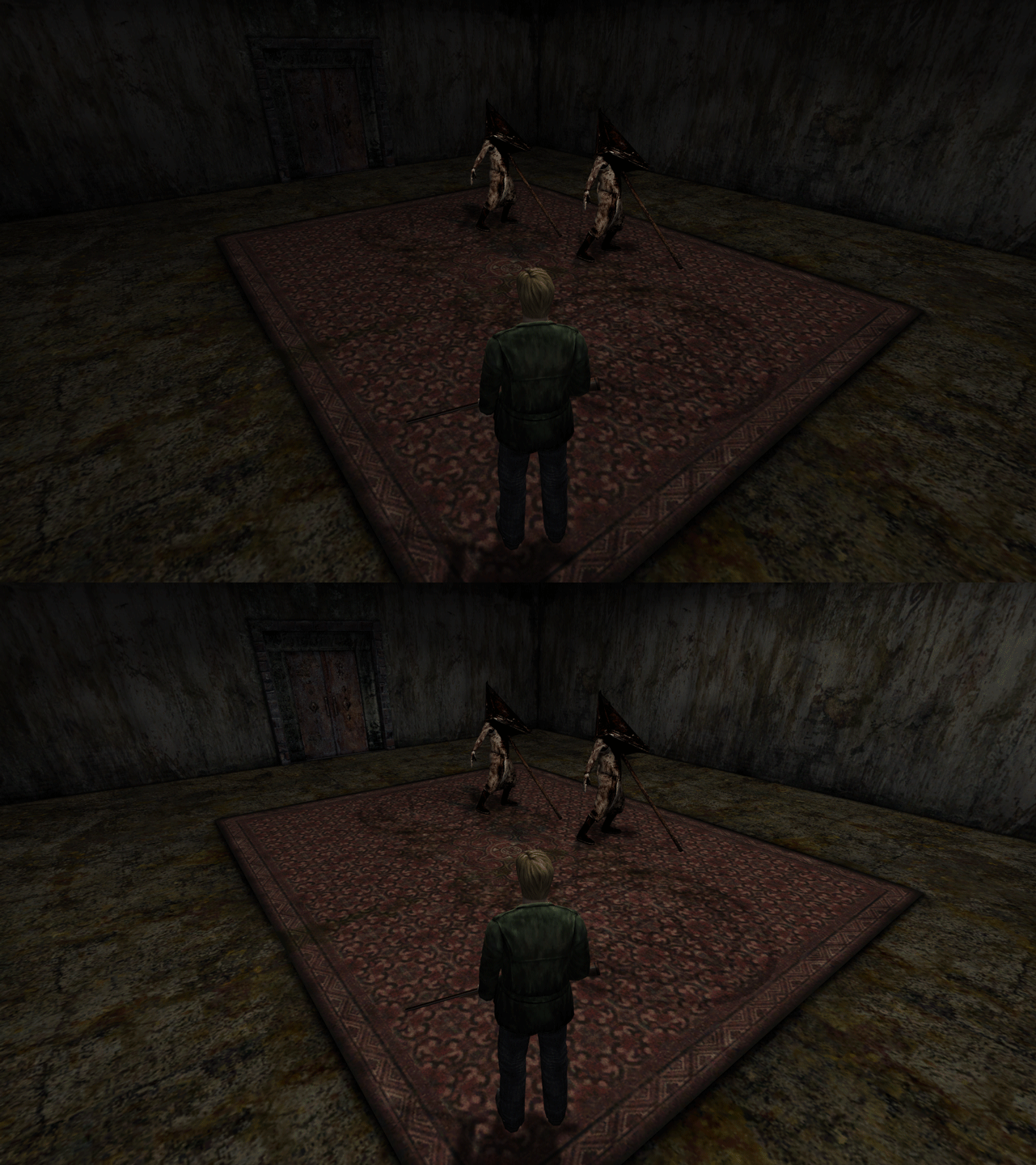
I'm not sure if you want to make this small thing its own fix, or add it to something like CemeteryLightingFix? (And maybe change its name to something generic like RoomLightingFix in case we want to add more to it later on?)
Polymega
on 26 May 2020
That said, I still remember the first time I played SH2 on PC (vanilla version), without even knowing all these differences, and I just enjoyed the game. Now the EE hugely improve the game, so it's already a great achievement also on the sound quality.
Thanks. It's nice to hear that. There will be differences still between the audio with DSOAL and PS2/Xbox/anything else.
I know the PC version inherently has a few issues with a select amount of sounds. This would be:
The squealing pig in the Hospital's basement
Only loops once per visit to the area and its random when it'll trigger. I think Creature Labs might have changed this intentionally. I kind of like the randomness to it; it makes it special when you hear it, just like the apartment whisper event.See this post.
- The Labyrinth industrial elevator
- The sound of it running can "stutter" on itself. Not sure why.
- Mary's butterfly attack
- The sound levels/direction of the butterflies ambushing you can get a little screwy.
So DSOAL or anything else won't be able to magically fix those. But by-and-large, Elisha's audio click/pop fix, along with DSOAL, makes things nicer overall.
I just hope others will have the understanding that different hardware or software will process the sounds differently.
Polymega
on 26 May 2020
I know the PC version inherently has a few issues with a select amount of sounds. This would be:
Don't forget the chainsaw sound effect in the forest that happens toward the beginning of the game after the cemetery event.
There will be differences still between the audio with DSOAL and PS2/Xbox/anything else.
The only way to fix this would be to add some kind of PS2 sound emulation to this project, which is way outside the scope of what we can do here. Also, even at that it still may not sound quite right because emulation never sounds perfect. See the MDFourier for an example.
elishacloud
on 26 May 2020
On PC EE is clear that the sound is in MONO.
Yes, this is a limitation to to the sound engine on the PC. Fixing this might require us to replace the SFX sound engine, which again it likely outside the scope of this project. Keep in mind that this is only an issue with the SFX files not the BGM or the voice files. Also, remember that this is a limitation of the original PC version and not specific to the SH2E project.
elishacloud
on 26 May 2020
Don't forget the chainsaw sound effect in the forest that happens toward the beginning of the game after the cemetery event.
This actually happens on all versions of the game! I found this out the other week testing things. So I guess it's "intentional." I can't make this work on PC anymore, but can still do it on PCSX2. Maybe my memory is fuzzy here.
To those that don't know: On a New Game +, turn off the BGM and SFX. You can faintly hear the chainsaw running in the background _the entire time_ while your in the Forest area, until you acquire the chainsaw.
On PC EE is clear that the sound is in MONO.
DSOAL will also present the SFX in a binaural fashion. For example: When you navigate your inventory, if you scroll left within your inventory, the "select" noise will be louder in the left headphone than the right.
If a cockroach is behind you and to the right, the right headphone will play a distortion of its sound (to give the illusion the sound is coming to you from behind) and barely be audible in the left headphone.
Polymega
on 26 May 2020
@Polymega
This is for a significant room in the game. These adjustments darken the room to better match the levels seen in the PS2/Xbox version, after the cutscene plays out:
I implemented this fix in the latest testing build.
Testing build: d3d8.zip
elishacloud
on 26 May 2020
Thank you! Tested on all binaries and the adjustments are working. Two times I had the game crash when I tried to quit to main menu while in this room, but I'm not sure if that might be because of the other fix you added that's currently not working as intended.
Polymega
on 26 May 2020
The other fix is not "safe" because it modifies the actual asm code dynamically. I will probably have to update that later. But that should not be causing this crash.
I made quite a few changes in the code today, if you can reproduce this can you help figure out what option is causing this crash?
elishacloud
on 26 May 2020
I made quite a few changes in the code today, if you can reproduce this can you help figure out what option is causing this crash?
I would be happy to. I think it only happened when I loaded into the room with the flashlight clock fix we're working on, while on the same game launch. I haven't been able to reproduce the crash since when I load straight into this room and immediately quit to main menu.
Polymega
on 26 May 2020
Ok, if it only happened in the room with the flashlight clock fix, then it could be because that is not a good fix. Let me build a "safe" fix and give it to you.
elishacloud
on 26 May 2020
On PC EE is clear that the sound is in MONO.
Keep in mind that this is only an issue with the SFX files not the BGM or the voice files. Also, remember that this is a limitation of the original PC version and not specific to the SH2E project.
No need to say it. I know this project is only making improvements on the game.
If a cockroach is behind you and to the right, the right headphone will play a distortion of its sound (to give the illusion the sound is coming to you from behind) and barely be audible in the left headphone.
Perfect then :D
Btw how can DSOAL convert a MONO sound in STEREO? I mean, there are some instructions in the audio files that tell it where the sound happens (left or right). Sorry I'm quite ignorant about audio interpolation programs, just curious.
Badore90
on 26 May 2020
I mean, there are some instructions in the audio files that tell it where the sound happens (left or right). Sorry I'm quite ignorant about audio interpolation programs, just curious.
No need to apologize. I don't know myself. The inner workings of OpenAL Soft/DSOAL seem mighty complicated. kcat (the project's creator) would be such a person to adequately answer how these things work.
Polymega
on 26 May 2020
Only loops once per visit to the area and its random when it'll trigger. I think Creature Labs might have changed this intentionally. I kind of like the randomness to it; it makes it special when you hear it, just like the apartment whisper event.
it's actually not random. I've been wondering about that for a while, and thought that it might be a problem with the PC-version. but if the whisper happens actually depends on whether you've been to Neely's Bar in the beginning. tested it, and it's reproducible. dunno if that also influences other sounds (like the squealing)...
This is for a significant room in the game. These adjustments darken the room to better match the levels seen in the PS2/Xbox version, after the cutscene plays out
awesome! does that also fix the weird "spotlight" beneath james (although that's _during_ the cutscene, and may be an issue with the texture? hm...)? (:
TommvinHuwaltzky
on 27 May 2020
it's actually not random.
It is... but on Xbox! I never thought to check the Xbox version before, but @elishacloud, the pig squeal in the hospitals' basement doesn't loop indefinitely here either, and is random when it triggers (unlike the PS2 version).
Since Team Silent handled the Xbox port, I think that might prove my theory that this was an intentional change... but by Team Silent instead of Creature Labs.
I still think it was a good decision, too. It makes it special when you do hear it.
but if the whisper happens actually depends on whether you've been to Neely's Bar in the beginning
It doesn't. The whisper is determined to play for you or not as soon as you start a new game. When you start a new game, a seed is made which will determine things such as the whisper happening, where the hands on the apartment clock will be sitting when you first interact with it, and so on.
does that also fix the weird "spotlight" beneath james (although that's during the cutscene, and may be an issue with the texture? hm...)?
It's supposed to be there during the cutscene. It can also be seen on the PS2/Xbox versions. PS2 looks fainter due to it use per-vertex lighting ("blocky" lighting) and also because its values might be overall lower for that spotlight.
Polymega
on 27 May 2020
It doesn't. The whisper is determined to play for you or not as soon as you start a new game.
hm, but I tested it like 5 times and it always worked that way. am I crazy? D:
It's supposed to be there during the cutscene. It can also be seen on the PS2/Xbox versions. PS2 looks fainter due to it use per-vertex lighting ("blocky" lighting) and also because its values might be overall lower for that spotlight.
ok, doesn't look like that to me, but could be. will check again after you've released the next patch with the fix implemented (:
TommvinHuwaltzky
on 28 May 2020
I'm going to close this ticket. Most of your notes have been addressed and/or fixed. Thanks for your notes, TommvinHuwaltzky!
Polymega
on 24 Mar 2021
Related issues
Polymega
·
17Comments
 yukinsaknos
·
14Comments
yukinsaknos
·
14Comments
 Ihavedepressionimsad
·
4Comments
Polymega
·
14Comments
Ihavedepressionimsad
·
4Comments
Polymega
·
14Comments
 OregonPacifist
·
15Comments
OregonPacifist
·
15Comments