Silent-hill-2-enhancements: How to add custom characters into font file?
Hi,
Firstly, I'd like to thank everyone who took part in this excellent work.
Back in time, I've made a Turkish translation for Silent Hill 2, and it was widely well received. Now, I'd like to revisit it by updating my translation and use the custom font file finally Turkish characters. Back in time, I just updated *.mes files and no special character was supported.
I've checked other issues and tried to update font000.tga file, but it didn't really work. Guess I'll need to also update fontwdata.bin? I'm not sure if it points to ASCII character map, or something else.
I'm sorry if it was explained somewhere correctly and I missed it. I just want to expand this excellent work to Turkish players once again.
By the way, the special characters I'm talking about are:
Ğ ğ ı İ Ş ş Ü ü Ö ö Ç ç
Even though Ü ü Ö ö Ç ç are visible in the font file, I'm not sure if they correspond to the same code.
I'd appreciate any pointer to achieve this.
Kind regards,
Tansel.
 Tanshaydar
All 19 comments
Hi @Tanshaydar,
Thanks for taking the time to help Turkish fans as you are doing. I'll try and answer some of your questions:
I've checked other issues and tried to update font000.tga file, but it didn't really work. Guess I'll need to also update
fontwdata.bin?
You'd only need to update fontwdata.bin if the characters ("Ğ ğ ı İ Ş ş Ü ü Ö ö Ç ç") are wider or skinnier than the characters you are replacing with them.
You can see a little bit of info about fontwdata.bin here:
https://github.com/elishacloud/Silent-Hill-2-Enhancements/issues/144#issuecomment-509044211
(Scroll down a little from that post to read more in regards to fontwdata.bin)
Otherwise, you can simply replace the characters in the font000.tga file and go from there.
In regards to the font000.tga file: I can help you make a Turkish version as I've done to help with the Russian version. You'll just need to tell me what characters you want to replace to compensate the missing Turkish characters. You can see example of this for the Russian version here.
I won't be able to help you modify the fontwdata.bin file (if you need to also update that), so you'll have to do that on your own. @HellbringerOnline and @belek666 (the creator of the high res font mod) may be able to lend assistance with this, if needed.
Lastly, if you decide to re-edit the .mes (text/language files), I highly recommend you use the new SH2MSGConvert tool. It's much safer to use than the old SH Resource Editor tool for .mes files.
And don't forget: Always play test your changes to .mes files!!
 Polymega
on 27 Feb 2020
Polymega
on 27 Feb 2020
Wow! Thanks a lot @Polymega !
I've also encountered a problem for the character Ğ in the tool you've mentioned. I've opened an issue there, too.
From what you are suggesting, I understand that best way to approach this is simply replacing a character that is supported by the game with my special character, and use it, right?
Let me elaborate. In Turkish there is no character as Ã, so if I replace this with Ğ in font file font000.tga and simply use à in the *.mes files, it would work better, right?
In the end, characters Ğ ğ Ş ş İ ı have little difference so no need to update the width/height data, so if I understand this correctly too, I won't need to play with fontwdata.bin file either, right?
Update:
Welp, I tried and no dice.
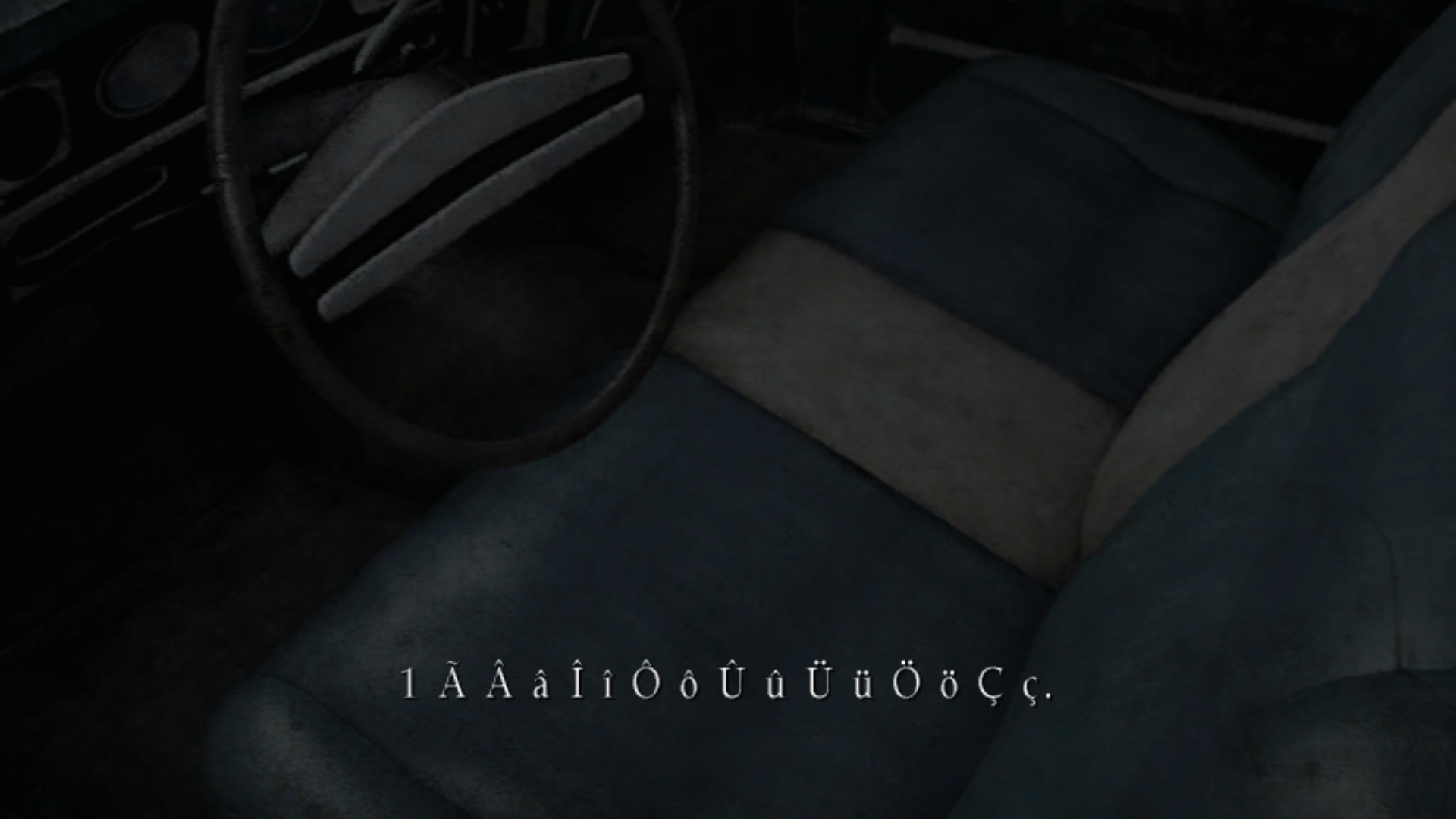
Tanshaydar
on 27 Feb 2020
From what you are suggesting, I understand that best way to approach this is simply replacing a character that is supported by the game with my special character, and use it, right?
Correct. Although, before we worry about that, another thing you can try first is to type all the special Turkish characters (Ğ ğ ı İ Ş ş Ü ü Ö ö Ç ç) in a .mes file and see what the game outputs.
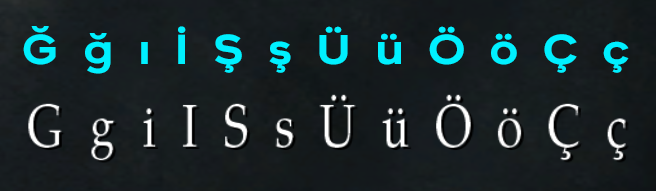
We see that Ü, ü, Ö, ö, Ç, and ç are inherently supported. And for the other special characters (Ğ ğ ı İ Ş ş), the game uses common Latin G, g, i, I, S, s letters by default.
So the question is: In the Turkish langauge, do you use common Latin G, g, i, I, S, and s characters? If not, we can simply replace these characters easily. We wouldn't even need to touch the fontwdata.bin file since the characters you are replacing would be identical in width.,
Also, you would be able to use these special characters (Ğ ğ ı İ Ş ş) within the .mes files like normal, if we can replace their common Latin equivalents in the font000.tga file.
Let me know.
Edit:
I've also encountered a problem for the character Ğ in the tool you've mentioned. I've opened an issue there, too.
For the time being, I used the old SH Resource Editor to make a test .mes file with the Ğ ğ ı İ Ş ş Ü ü Ö ö Ç ç characters (the picture above) until the new SH2MSGConvert tool is updated to properly support them.
Polymega
on 28 Feb 2020
I Googled the Turkish alphabet and it also uses G/g/I/i/S/s. So you cannot replace those characters with Ğ/ğ/ı/İ/Ş/ş.
So what you can do is replace characters in the font000.tga file. Here is an example:

I replaced Đ with Ğ. I choose Đ in particular because it's pretty close to the same width as Ğ, so hopefully you wouldn't have to touch the fontwdata.bin file for this particular character (and also because I don't believe Turkish uses Đ?).
Then, in any .mes file where you want to use the Ğ character, you would instead type Đ. And when played in the game, it will display as Ğ.
So you would pick special characters within the font000.tga file that the Turkish language would not use, and replace those with the Ğ ğ ı İ Ş ş, characters.
Ideally, you would try and choose replacement characters that have the same width as the Turkish characters (so you wouldn't have to make a custom fontwdata.bin file).
Otherwise, you run into the issue HellbringerOnline had with the Russian version:
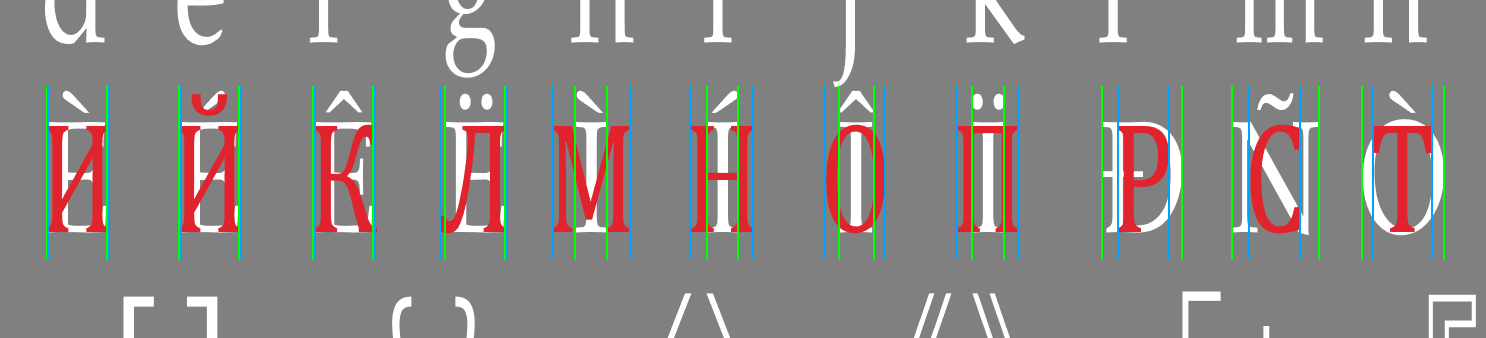
Notice the Russian characters (red) are different widths than the characters they are replacing (white). HellbringerOnline therefor had to adjust the fontwdata.bin for these particular replacement characters, otherwise the character spacing was wrong. Like this:
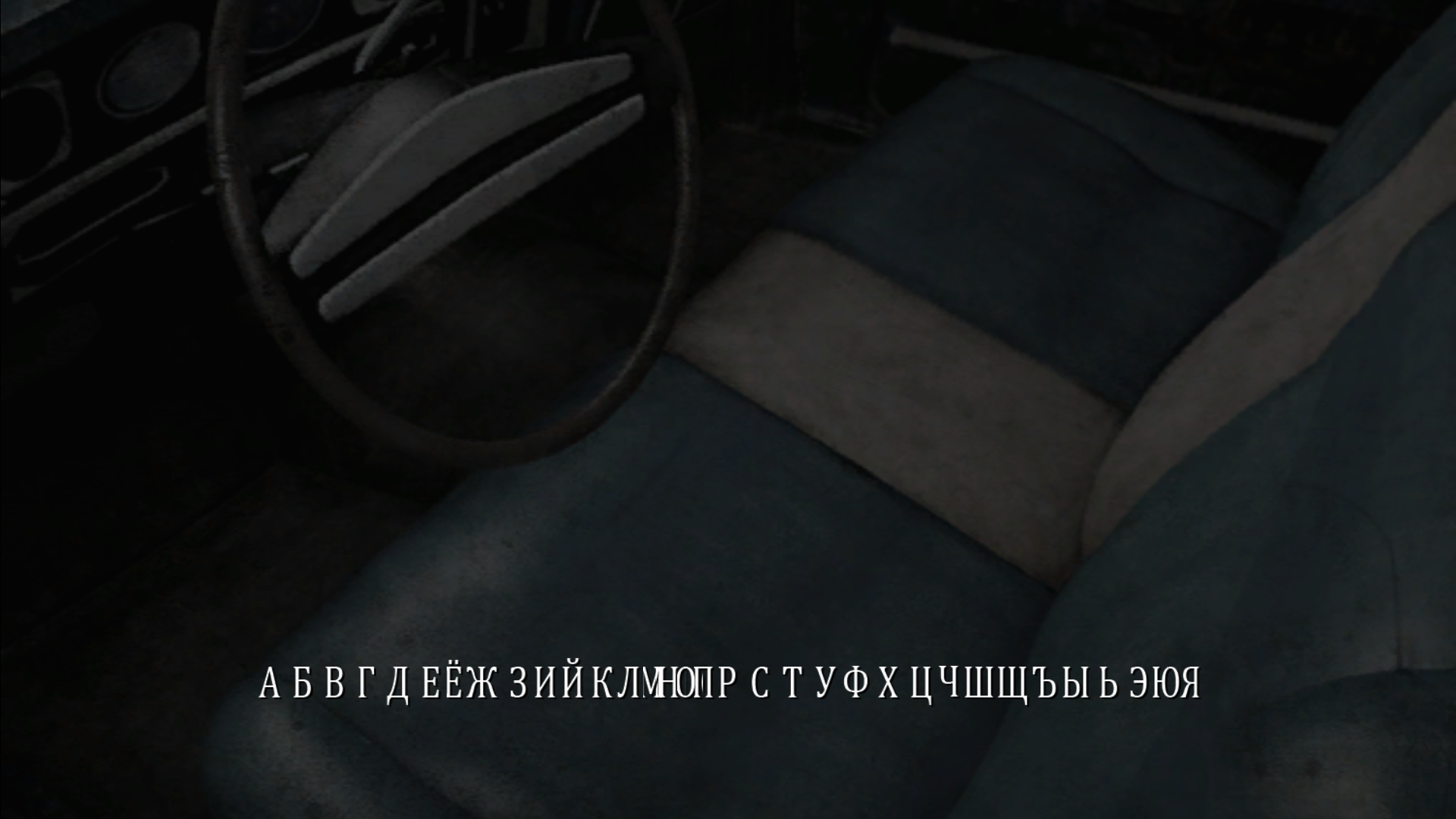
Polymega
on 28 Feb 2020
What software do you suggest to edit font000.tga file?
I open and edit it with Paint.net but when I save it the game refuses to load it and I get the old, low resolution fonts. I've tried different options when saving but no dice.
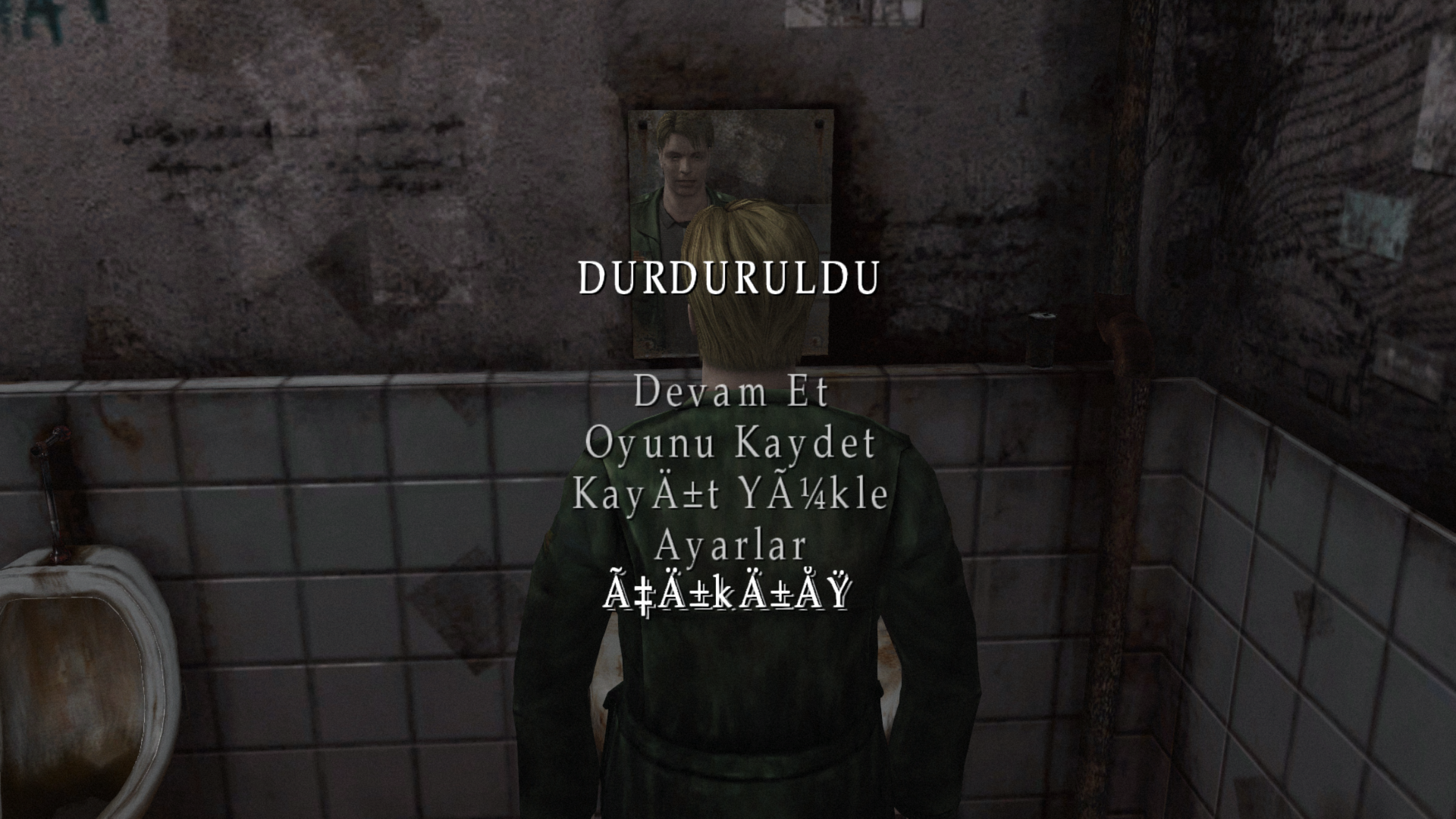
Also, the exe_str.txt file, I tried to update the translations there but looks like it doesn't read from font file because I get garbled text even for characters like Ç and Ü
I've read the Russian translation issue from start to end and I think I got the gist, overall.
For Ğ and ğ I'll use à and ã, and for Ş ş I'll use Ð and ð, and finally for İ and ı I'll use and Ñ and ñ. Those take nice placement in the font file and no need to update fontwdata.bin file . Though, as I said above, str_exe.txt does not comply with these settings.
Tanshaydar
on 28 Feb 2020
What software do you suggest to edit font000.tga file?
I can make a Turkish version for you. It won't take too much time for me to do so and it'll be easier that way. I just needed to know what characters you want to replace. Although...
for
İandıI'll use andÑandñ
These widths may be a little too noticeable in their differences. Are there any special I/i characters that could be replaced, instead? Maybe for İ and ıuse Ì and ì instead?
Polymega
on 28 Feb 2020
Sorry, forgot to comment on this one:
Though, as I said above, str_exe.txt does not comply with these settings.
I'm not sure about this one. It has to do with the encoding settings of the .txt file. If you set the encoding to UTF-8 the special Turkish characters can be pasted into the file. But then, if you convert it back to ANSI coding it changes to what's seen in your pause screen. I'm not sure what can be done about that...
Polymega
on 28 Feb 2020
These widths may be a little too noticeable in their differences. Are there any special I/i characters that could be replaced, instead? Maybe for İ and ıuse Ì and ì instead?
Yeah, I guess that would be better. I don't really want to take your time though.
For the str_exe.txt file, I'll manage with non-special characters either way, as long as I can convey the story better. Back in time, original Turkish patch used only non-special characters and it loses some of its magic.
Thanks a lot for all the support!
Tanshaydar
on 28 Feb 2020
Cool. Give me several days to get back to you with that font000.tga file. I'm currently preoccupied with other going-ons for the project.
For the str_exe.txt file, I'll manage with non-special characters either way, as long as I can convey the story better.
Here's a little backstory about the exe_str.txt file: The PC pause menu text (along with some other text) is not stored in external .mes files, but instead stored within the main binary (executable) itself. If you were to open sh2pc.exe with a hex editor you could find these strings within it.
So back in the day, if you wanted to translate these strings, you'd have to modify the actual executable. Obviously that's something that should be avoided. Belek made this fix so we can now edit the external exe_str.txt file. That way, we don't have to touch/modify the executable to achieve what we need for this.
Now, I am not a programmer by any stretch of the imagination, but I believe the issue is that you cannot use UTF-8 characters to write/compile an executable. Only things like ANSI are accepted. (I could be wrong on this.) Because of this, you cannot use characters that are not supported by ANSI for the PC pause menu (since exe_str.txt injects itself back into the executable, to modify its inner code).
Polymega
on 28 Feb 2020
@Tanshaydar
Try out this font000.tga file. I changed what characters are being replaced. This was done in the hopes of making the width of the new characters be as close to the width of the characters they are replacing, so hopefully you would not need to change the fontwdata.bin file.
Ğ replaces Ã
ğ replaces ã
Ş replaces Š
ş replaces š
İ replaces Ì
ı replaces ì
Polymega
on 1 Mar 2020
@Polymega
Thanks a lot for all the work you've done!
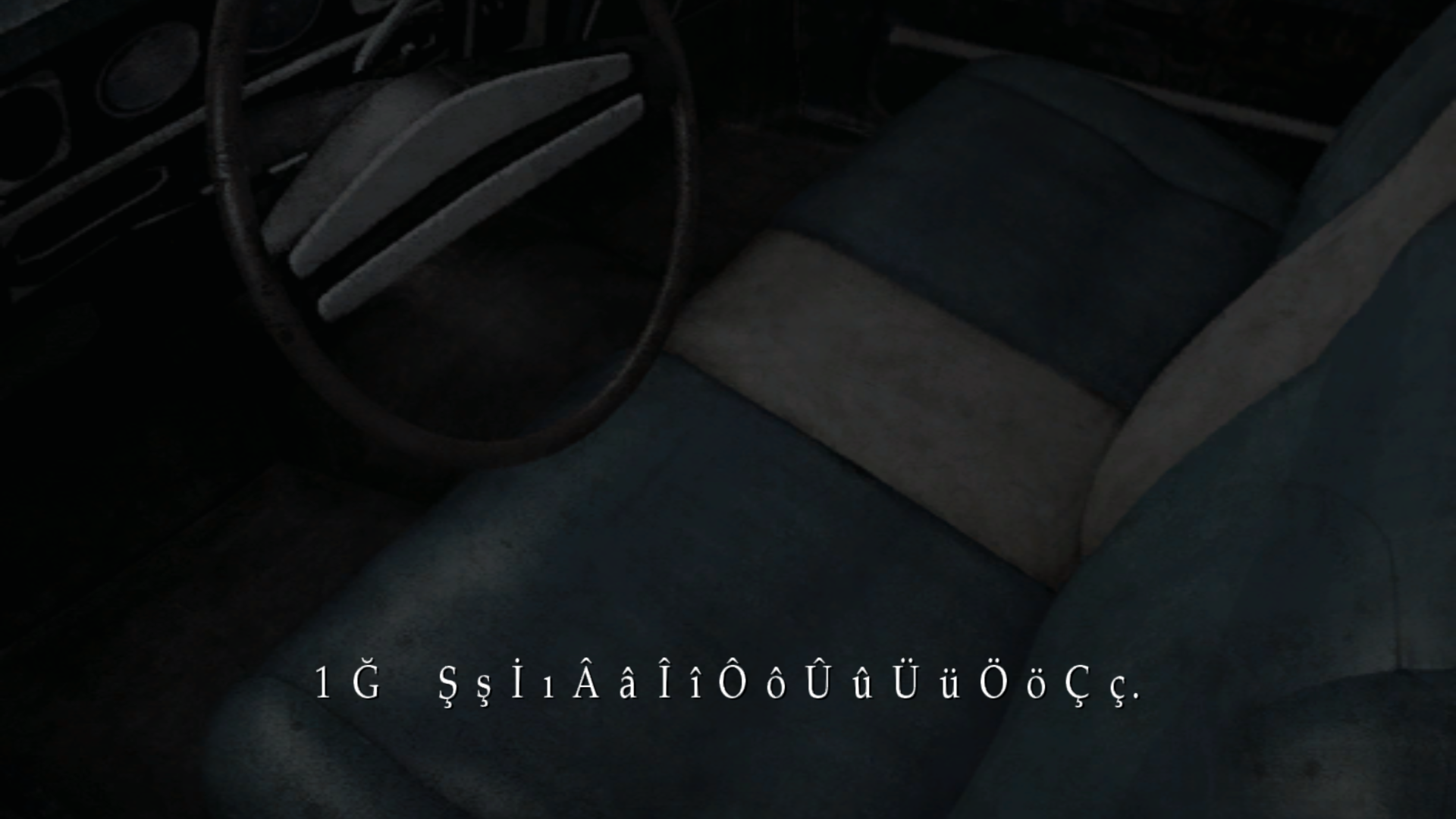
It works perfectly. I don't want to look like I'm still complaining, but looks like you've forgotten to add ğ as it's missing in the font file.
Rest is working perfectly:
Tanshaydar
on 2 Mar 2020
I don't want to look like I'm still complaining
You're not complaining at all! I completely removed a character by accident so it's absolutely worth bringing up. :) Sorry about that; they way I edit the working file for this character sheet can get a little crazy at times. Try this one:
Also, if you can translate the following for me I can make you an HD main menu in the future as well:
CONTINUE
NEW GAME
OPTIONS
MOVIES
EXIT
ACTION LEVEL
RIDDLE LEVEL
HARD
NORMAL
EASY
BEGINNER
Main Scenario: LETTER FROM SILENT HEAVEN
Sub Scenario: BORN FROM A WISH
Excellent!
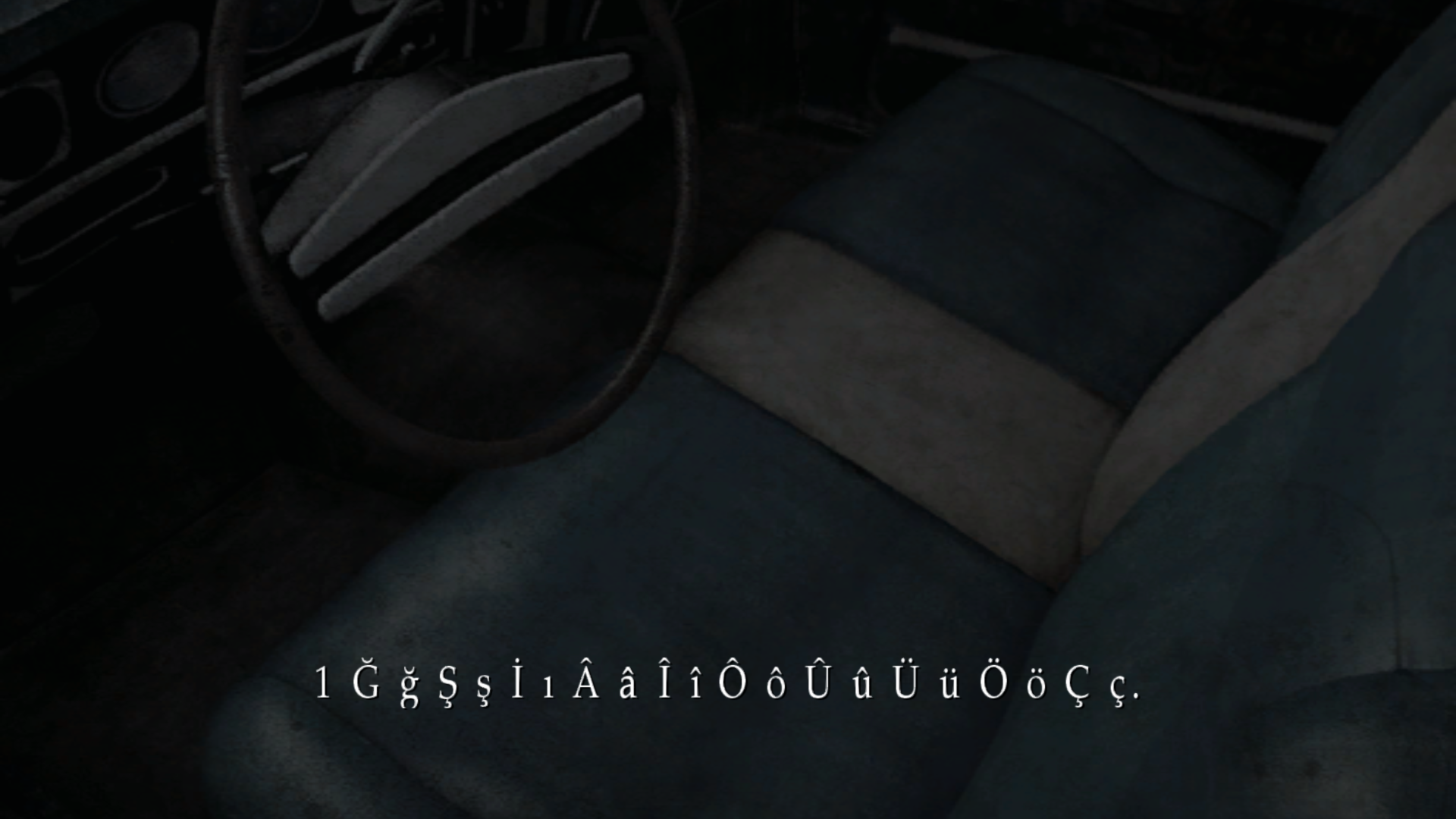
Thank you very much! This makes me excited to finally convey the meaning with more proper words!
And no, no need to be sorry my friend. Enhanced Edition is already a great work, but for me and for my countryman your willingness to help is greatly appreciated.
For the translation you want:
DEVAM ET
YENİ OYUN
AYARLAR
SİNEMATİKLER
ÇIKIŞ

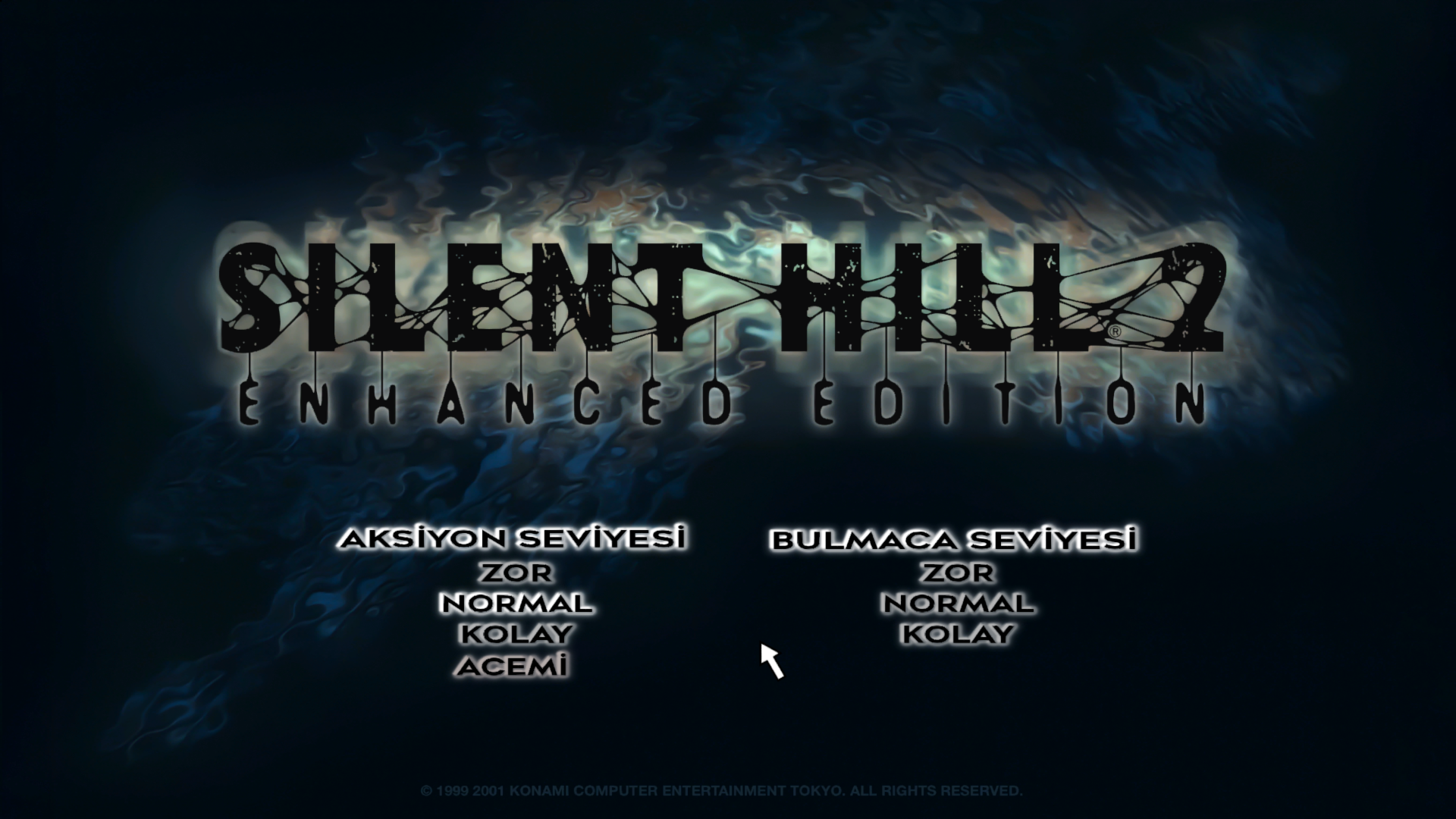
AKSİYON SEVİYESİ
BULMACA SEVİYESİ

ZOR
NORMAL
KOLAY
ACEMİ

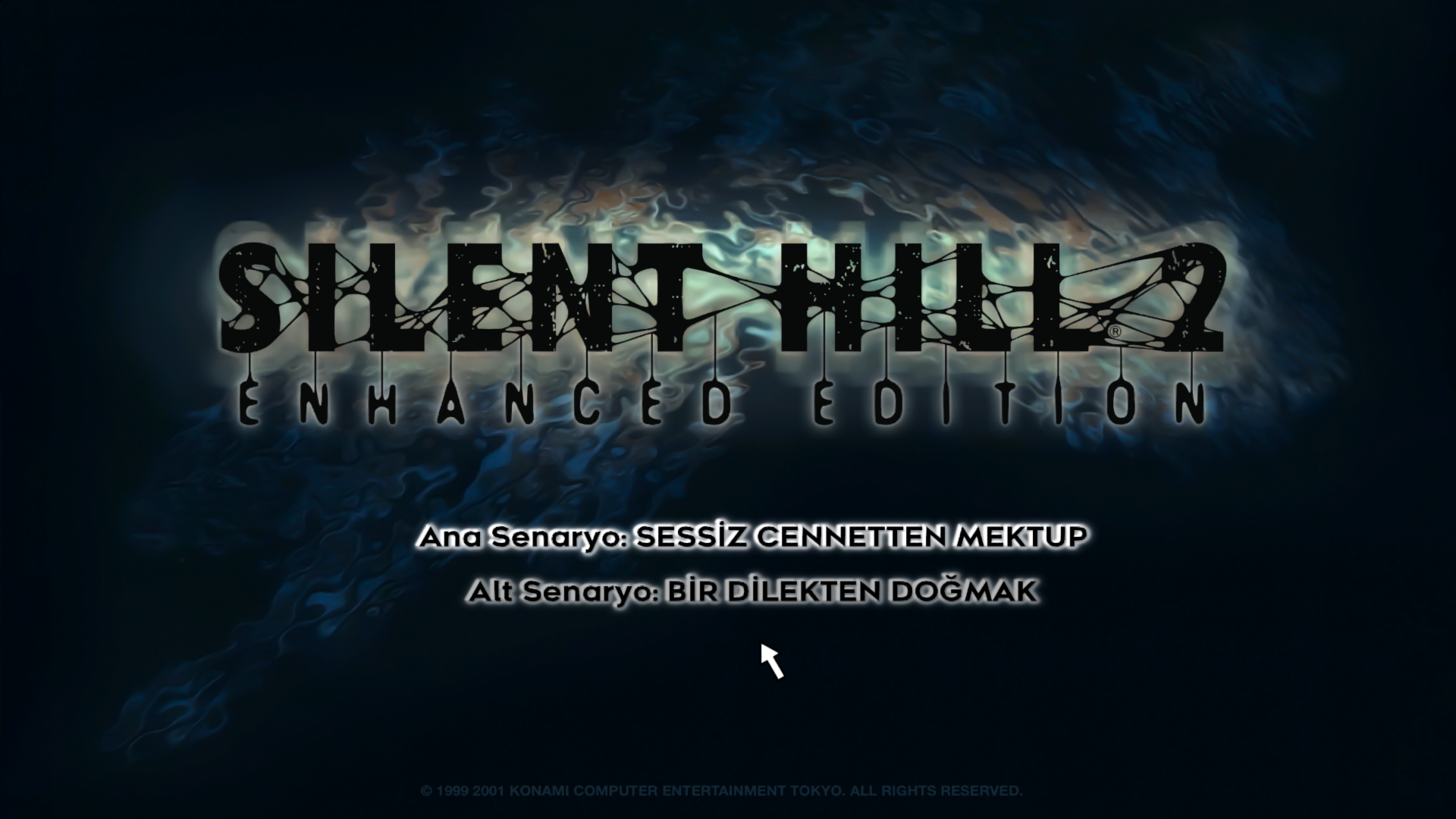
Ana Senaryo: SESSİZ CENNETTEN MEKTUP
Alt Senaryo: BİR DİLEKTEN DOĞMAK
To be honest, just the thought of seeing the menu and rest of the game with proper Turkish support makes me more excited than the first time I've kissed my girlfriend 😁
Tanshaydar
on 3 Mar 2020
Hmm... ğ is cutting cut off at the bottom. I'm guessing this is happening because the character we're replacing it with (ã) doesn't have a descender.
Hold off on beginning translation work for the moment. Hopefully we can find a solution for this.
For the translation you want:
Thanks! I'll have a main menu texture file for you in the future.
the game with proper Turkish support makes me more excited than the first time I've kissed my girlfriend
😆
Polymega
on 3 Mar 2020
Try this font000.tga file out. I'm hoping it'll fix the ğ so it is no longer cropped at the bottom:
Turkish HD Font 03.zip
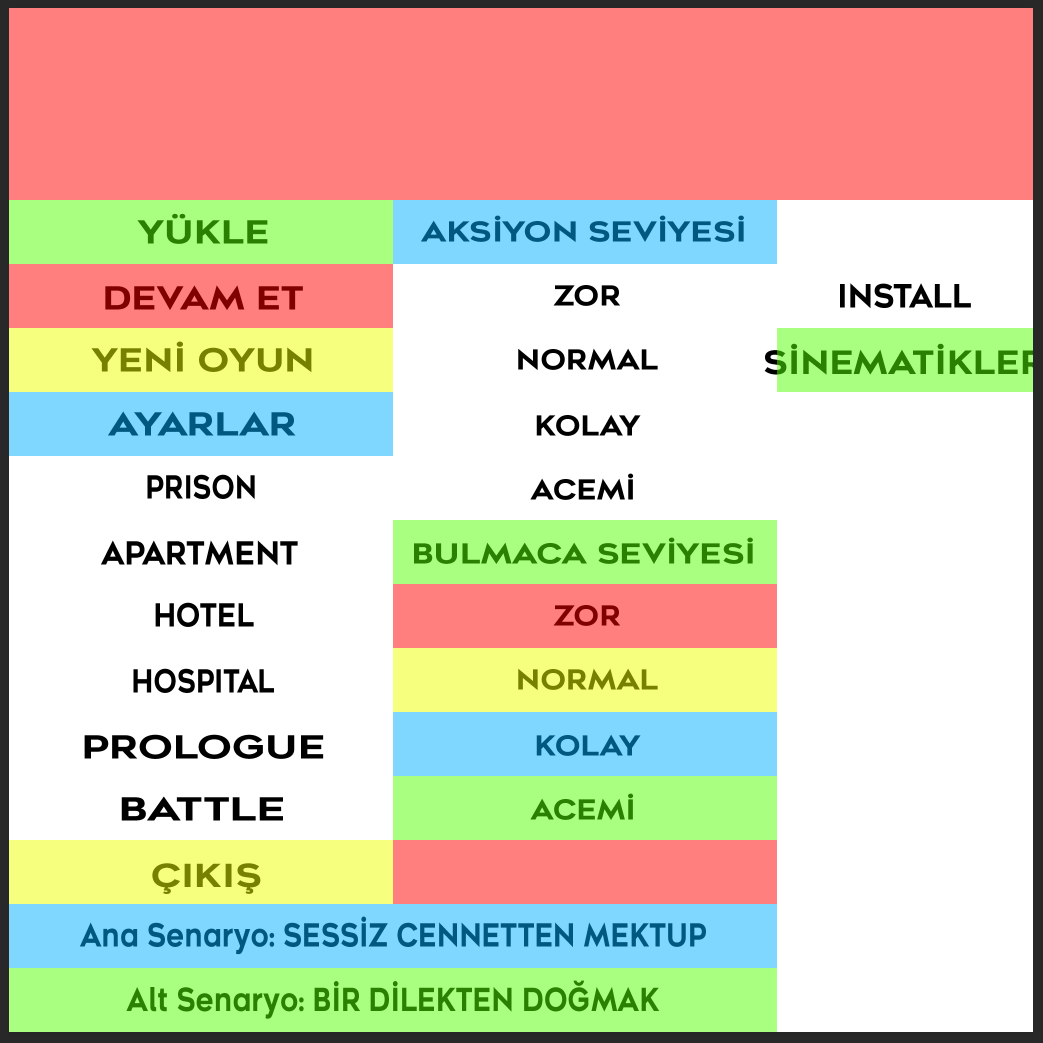
Also, can you give me a shorter version for the word "SİNEMATİKLER"? You can change it to say VIDEOS in Turkish, instead, if that's shorter.
Polymega
on 3 Mar 2020
New font works perfect in every way:
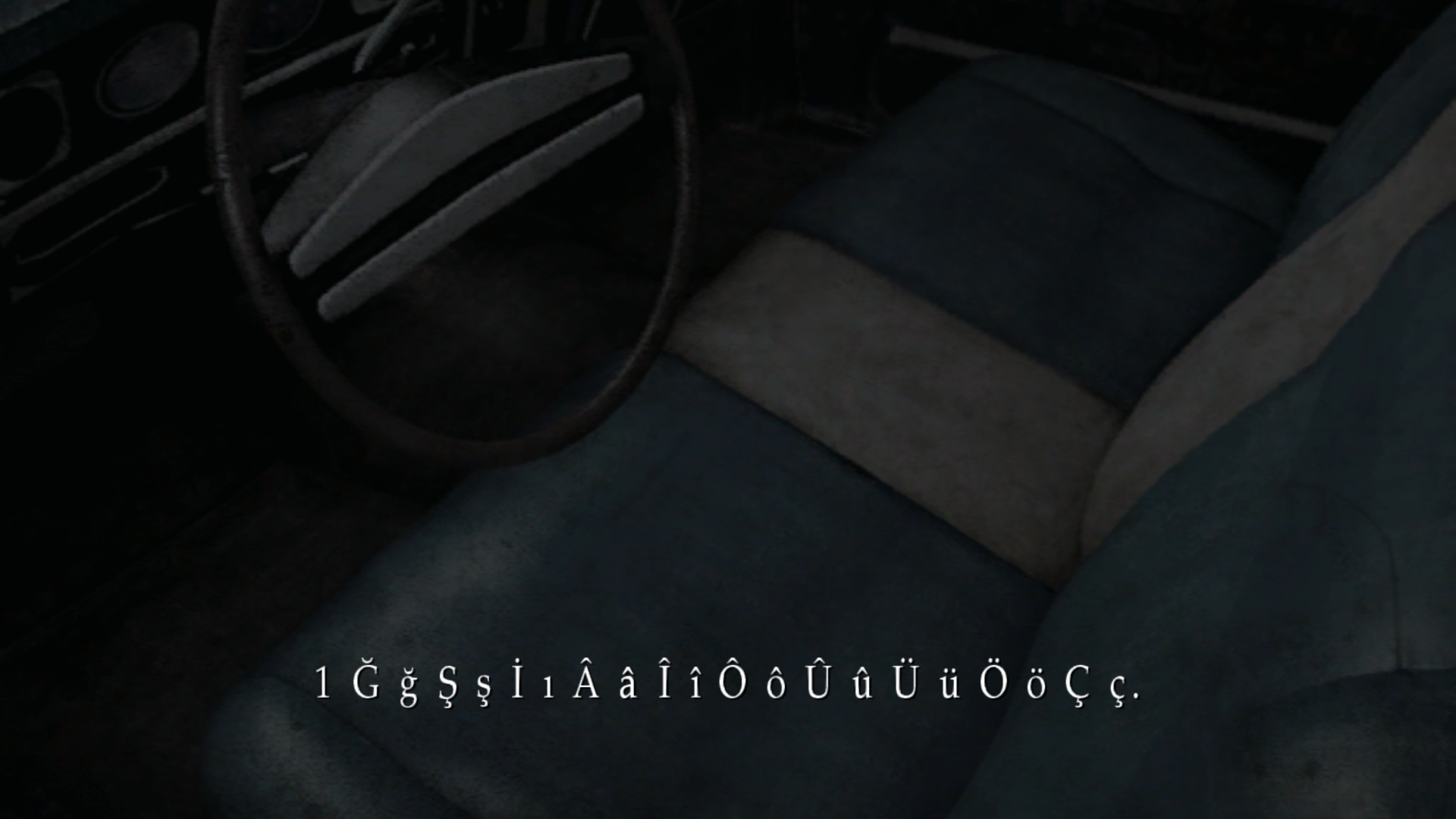
Yeah I see that SİNEMATİKLER is too long for that part, we can change it to VİDEOLAR.
Thanks a lot for everything. I'm now updating the language files to reflect this excellency.
Tanshaydar
on 4 Mar 2020
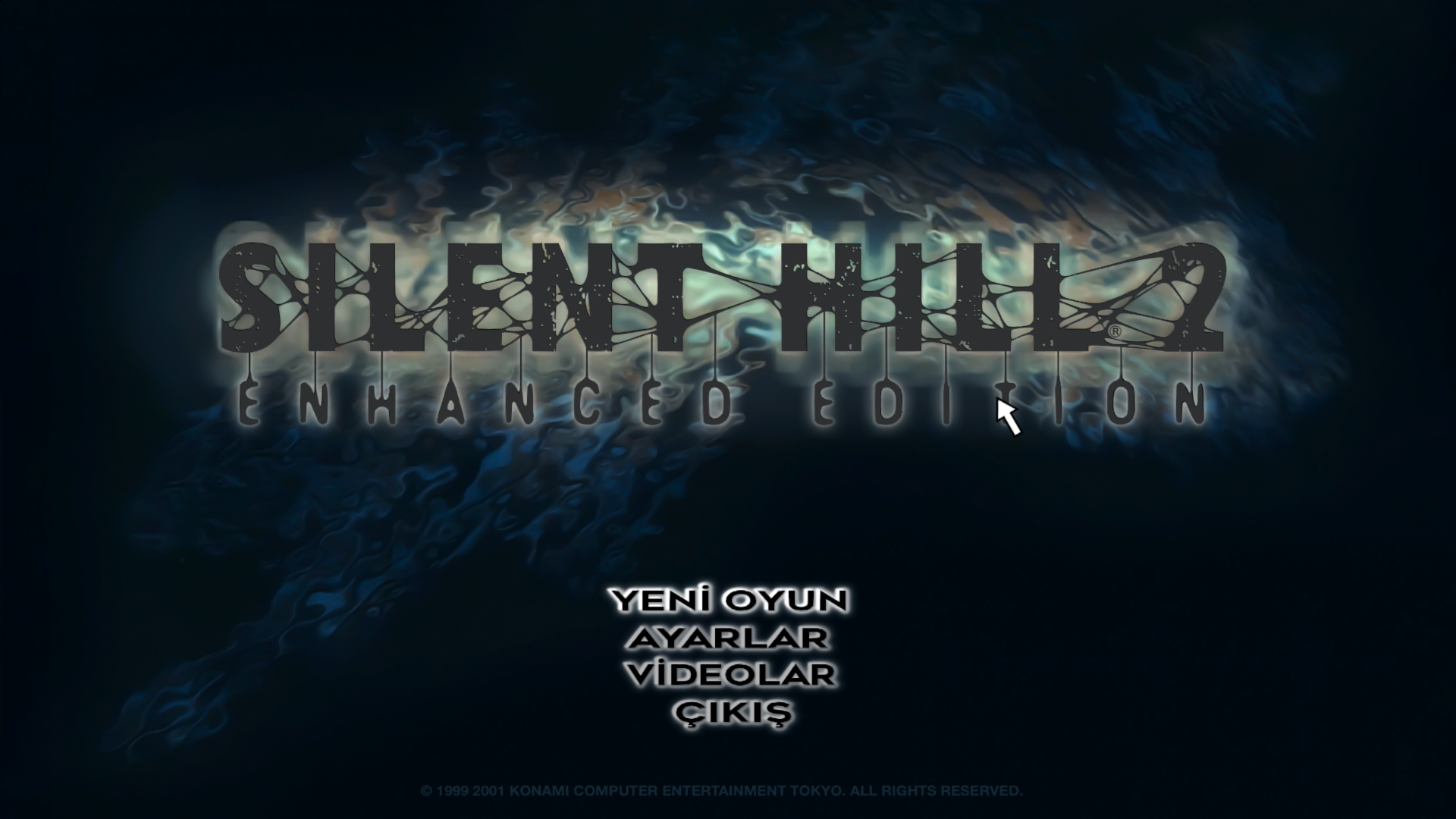
Great! And here's a Turkish main menu selection: start01t.zip
If you plan to replace the English text with Turkish, you will need to replace both sh2e\pic\etc\start01.tex and start01e.tex. Otherwise, you only need to replace the one file. The letter at the end signifies the language. For example: start01s.tex = Spanish.
Polymega
on 4 Mar 2020
OH MY GOD!
I can't thank you enough!
Tanshaydar
on 4 Mar 2020
Closing this out.
 elishacloud
on 29 Apr 2020
elishacloud
on 29 Apr 2020
Related issues
 snigelpasta
·
13Comments
snigelpasta
·
13Comments
 Storm3000
·
3Comments
Storm3000
·
3Comments
 Supernaturallll
·
13Comments
Polymega
·
14Comments
Polymega
·
10Comments
Supernaturallll
·
13Comments
Polymega
·
14Comments
Polymega
·
10Comments