Silent-hill-2-enhancements: Unable to Load, Black Screen...
Dear Team,
SH2 is in my opinion the best game ever so I was very happy to learn about your incredible optimization of the game. I have a physical PC version of Silent Hill 2 Director's Cut (European version). I carefully tried to install the game 6 times, all day long... I have the exact problem than ticket #29.
I get a blank, black screen with a small text at the top that reads:
"ReShade 3.4.0 345
Visit https://reshade.me for news, updates, shaders and discussion.
Loading (4 effects remaining) … This might take a while. The application could become unresponsive for some time."
It loads forever and I have to reboot my computer each time... So frustrating : (
I tried #29's solution (installation via USB DD) but it didn't work for me.
I use a Dell XPS computer and Windows 10.
Can you please help me? Thank you.
 JamesSunderland21
All 53 comments
If you can't get ReShade to work then you could always remove it / skip that part of the installation. It's a not a crucial thing, unlike the rest of the enhancements.
 AeroWidescreen
on 24 Feb 2019
AeroWidescreen
on 24 Feb 2019
Hi @JamesSunderland21 ,
Do me a favor and try out this new ReShade package. It's updated to v 4.1.0. Let me know if that resolves the hang-ups for you when you launch.
- Delete the following files/folders from the game's installation directory, if you haven't already done so:
\reshade-shaders\d3d9.dlld3d9.inid3d9.logReShade Filter - SH2 PC PS2.ini
- Download the new ReShade package.
- Place the files in your game's installation directory
- Ensure
d3d8to9 =is set to1in thed3d8.inifile.
- If the game still hangs on launch after updating ReShade then remove all ReShade files and try again.
- If it still hangs on launch after completely removing ReShade then please attach your
d3d8.logfile here.
The next time we release an update for SH2:EE that newer version of ReShade will also be publicly released with it; so people can download all the new updates in one go.
 Polymega
on 24 Feb 2019
Polymega
on 24 Feb 2019
Thank you @Polymega and @AeroWidescreen for your help.
@Polymega
I tried your solution but there is the same issue...
When I remove all the ReShade files, I have a black screen (only) that remains inactive.
Here is my d3d8.log file.
I'm also attaching my SH2 installation file content (I installed the SH2 Director's Cut game with the CDs, in French).
d3d8.log

Many thanks.
JamesSunderland21
on 24 Feb 2019
When I installed the SH2 Enhancements (Release v1.2.1289.0), I didn't download/touch the "source codes" and only copied & pasted the d3d8.zip content into my folder.
JamesSunderland21
on 24 Feb 2019
I tried the English application file (SH2PC_Enhanced_EXE_English_v1.0) and I get this:
JamesSunderland21
on 24 Feb 2019

(sorry I previously closed the topic by mistake)
"1 effects remaining" is displayed
JamesSunderland21
on 24 Feb 2019
Here is what I get with the Multilanguage file (SH2PC_Enhanced_EXE_Multilanguage_DC):
JamesSunderland21
on 24 Feb 2019

JamesSunderland21
on 24 Feb 2019
Try this for me:
Open the d3d8.ini file and set AutoUpdateModule = to 0.
Save changes then try relaunching the game again.
Polymega
on 24 Feb 2019
It doesn't work @Polymega 😔
JamesSunderland21
on 24 Feb 2019
Oh, did you try removing all the ReShade files and see if that works? Here are the files you will remove:
\reshade-shaders\d3d9.dlld3d9.logReShade.iniReShade Filter - SH2 PC PS2.ini
And if that doesn't work, open the d3d8.ini file and set d3d8to9 = to 0. Save changes and try re-launching the game.
Polymega
on 24 Feb 2019
When I do this, the screen is black and nothing happens, in both cases @Polymega (thank you for your help)
JamesSunderland21
on 24 Feb 2019
To confirm: Did you also set d3d8to9 = to 0 and try that?
If so, my last recommendation for now would be to launch the game and let it sit for up to 120 seconds. What we're doing here is trying to see if the game will eventually load if we wait a while.
Polymega
on 24 Feb 2019
Yes, I did (several times).
Nothing occurs after 120 seconds...
JamesSunderland21
on 24 Feb 2019
I must have done something wrong during the install... but I've been careful and even watched some videos on YouTube yesterday... I don't understand, nothing happens when I launch the game... This is so frustrating...
JamesSunderland21
on 24 Feb 2019
Is there any file missing in my folder? I installed the game in My Documents/KONAMI/Silent Hill2.
Shouldn't there be three d3d9 files?
JamesSunderland21
on 24 Feb 2019
So even when you remove ReShade it still doesn't work? Because if so then I would suggest you start over from scratch. See if the game works without any mods.
But wait for what Polymega says first. Maybe he has something else you could try.
AeroWidescreen
on 24 Feb 2019
No, still not... Yes, the game works without any mods, I tried yesterday. @AeroWidescreen
JamesSunderland21
on 24 Feb 2019
Sorry you're having so much trouble.
So this is going to be time-consuming and not fun, but, I would disable each fix inside the d3d8.ini file (by setting them to 0) one by one, launching the game each time you disable a fix.
What you would be doing here is a process of elimination until, hopefully, the game launches for you. If/when the game launches, it will tell you what fix is causing the problem.
One thing I can tell you is my Surface laptop uses Intel HD graphics (the same as your Dell XPS laptop, I believe?), and my laptop can't use Reshade with it.
Polymega
on 24 Feb 2019
OK @Polymega I am going to try that. Btw, my Computer is an XPS 8900 (i7-6700). I also have an XPS 13 Laptop but it doesn't have a CD drive.
JamesSunderland21
on 24 Feb 2019
@Polymega I've reinstalled everything and replaced each 1 by a 0 inside the d3d7.ini file... Black frozen screen again... 😔
JamesSunderland21
on 24 Feb 2019
But when you delete d3d8.dll, the game works? If so, do you have any anti-virus software running? Maybe it's being blocked by that somehow.
AeroWidescreen
on 24 Feb 2019
Looking over your directory, all your files seem to be in order.
Try @AeroWidescreen 's suggestion of ensuring your anti-virus/-malware software isn't preventing the game from running.
Also, @elishacloud , here is their d3d8.log file:
14596 10:31:49.694 Starting Silent Hill 2 Enhancements! v1.2.1298.0
14596 10:31:49.694 Dell Inc. XPS 8900 (Desktop)
14596 10:31:49.694 Dell Inc. 0XJ8C4 A00 (Desktop)
14596 10:31:49.694 "NVIDIA GeForce GTX 745"
14596 10:31:49.694 Windows 10 64-bit (10.0.17763)
14596 10:31:49.694 Running from: "C:\Users\antoi\Documents\KONAMI\Silent Hill 2\sh2pc.exe"
14596 10:31:49.695 Reading config file: "C:\Users\antoi\Documents\KONAMI\Silent Hill 2\d3d8.ini"
14596 10:31:49.695 Loading as dll: "d3d8.dll"
14596 10:31:49.697 Wrapper created for "d3d8.dll"
14596 10:31:49.999 Hooking the FileSystem APIs...
14596 10:31:50.052 Setting SingleCoreAffinity...
14596 10:31:50.052 Bypassing CD check...
14596 10:31:50.052 Finding SFX file locations...
14596 10:31:50.190 Updating SFX memory address locations...
14596 10:31:50.190 Allocating memory buffer for sddata.bin file...
14596 10:31:50.190 Setting PS2 Style Noise Filter...
14596 10:31:50.190 Increasing the Draw Distance...
14596 10:31:50.191 Setting Cemetery Lighting Fix...
14596 10:31:50.191 Setting Rowboat Animation Fix...
14596 10:31:50.191 Updating the Catacomb Meat Cold Rooms color...
14596 10:31:50.191 Hiding Red Cross health indicator during cutscenes...
14596 10:31:50.191 Loading the "Nemesis2000 Fog Fix" module...
14596 10:31:50.303 Loading the "WidescreenFixesPack and sh2proxy" module...
14596 10:31:50.741 Loading the "modupdater" module...
14596 10:31:50.741 LoadModuleFromResourceToFile Error: "modupd15052 10:31:51.514 Redirecting 'Direct3DCreate8' ---> Passing on to 'Direct3DCreate9'
15052 10:32:08.326 Unhooking library functions
15052 10:32:08.326 Reseting screen resolution
15052 10:32:08.346 Unloading Silent Hill 2 Enhancements!
--> Passi6380 10:32:08.103 Unhooking library functions
6380 10:32:08.104 Reseting screen resolution
6380 10:32:08.125 Unloading Silent Hill 2 Enhancements!
I thought the issue may have been related to the modupdater due to the line below, but that's apparently not the case:
14596 10:31:50.741 LoadModuleFromResourceToFile Error: "modupd15052 10:31:51.514 Redirecting 'Direct3DCreate8' ---> Passing on to 'Direct3DCreate9'
Polymega
on 24 Feb 2019
Thank you... I checked, the problem does not come frome my anti-virus (unfortunately)
JamesSunderland21
on 24 Feb 2019
@JamesSunderland21, Can you try the update below and let me know what happens? Just extract these files to the root of the "Silent Hill 2" folder. Don't change any settings on them yet. This should put the module into pass-through mode, with nothing enabled.
 elishacloud
on 25 Feb 2019
elishacloud
on 25 Feb 2019
Hi @elishacloud I tried your solution & files but I still have the black screen, nothing happens...
By the way, I re-installed everything in English instead of French, but still the same problem. The game works fine without the mods.
JamesSunderland21
on 25 Feb 2019
It seems that something is avoiding the game to launch but I don't know what... I've tried to launch the game with CD1 inside the CD driver, then without it. I managed to do the update but there is still the same problem. The SH2 DC physical version I bought a week ago is German, but European versions are supposed to work. Here are my d3d8 files, if needed...
Silent Hill 2.zip
JamesSunderland21
on 25 Feb 2019
And my d3d9 files...
d3d9.zip
JamesSunderland21
on 25 Feb 2019
This is a Hail Mary attempt, but try this:
First, show extensions for file types so you can know for sure what you're editing/moving/deleting.
Next, delete the following files and folders from your directory, if you haven't already done so:
\reshade-shaders\(folder)d3d9.ini(file)
Then, download this ZIP package: TEST.zip
Extract its contents to the game's directory, overwriting any previous files if prompted.
This contains my copies of the SH2 Enhancements mod, ReShade, and their config (INI) files. I'm hoping maybe there was a typo in one of the config files or the like and this will fix it. I'm doubtful this will fix it, but it's worth a try. Because here is where your d3d8.log file ends:
12848 19:41:05.518 Redirecting 'Direct3DCreate8' ---> Passing on to 'Direct3DCreate9'
I believe that's a d3d8to9 issue.
Polymega
on 25 Feb 2019
Thanks @Polymega but it freezes after showing up the same black screen
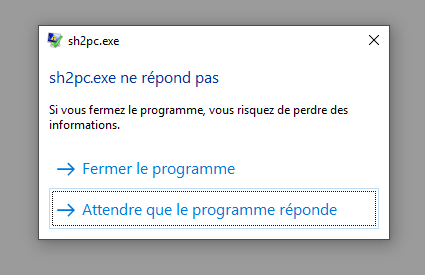
... This is so depressing...
JamesSunderland21
on 25 Feb 2019
If you temporarily remove dsound.dll from the directory does the game launch then?
Polymega
on 25 Feb 2019
Now that is interesting @Polymega It launched! It works in 4:3 format (I don't understand why). It crashed later and showed the following message.

The SH2 Menu is in French which is a bit weird because I installed it in English.
JamesSunderland21
on 25 Feb 2019
OK it seems to work. Only the Menu is in 4:3 ratio format. The game seems to work in 16:9 nicely. Thank you @Polymega What a huuuuuuuge step! I resurrected when I saw that Konami logo : )
JamesSunderland21
on 25 Feb 2019
This is progress! Okay, looking at the Troubleshooting portion of the installation guide:
Issue | OS | GPU | Recommendation
-- | -- | -- | --
Using IndirectSound freezes/hangs the game upon launch. | Any | Any | Install DirectX 9 SDK
. | Any | Any | Do not set the value for earlyStopFadeOutTime = too high in the dsound.ini file.
. | Any | Any | If using audio output from your GPU (such as Nvidia's "HD Audio" component), disable it and use your motherboard's onboard audio output instead.
So the next thing is to download and install the DirectX 9 SDK (link above) and see if the game will launch then. Keep dsound.dll removed for now from the game's installation directory. If this fixes your issue, we can then try adding dsound.dll back afterwards.
Polymega
on 25 Feb 2019
Only the Menu is in 4:3 ratio format.
Yes, we hope to make the main menu, save screens, and map screens widescreen in the future.
But install the DirectX 9 SDK and let us know if you still receive errors even after game launch that's shown from your image:
Polymega
on 25 Feb 2019
OK! I will keep you updated tomorrow. Thank you very much for your help @Polymega and everyone.
JamesSunderland21
on 25 Feb 2019
The error may also be coming from the modupdater.
Steps:
- Install DirectX 9.0c SDK from here. This is needed for both the IndirectSound and for d3d8to9.
- If the error still happens then set
AutoUpdateModule = 0
elishacloud
on 25 Feb 2019
@elishacloud @Polymega I installed DirectX 9.0c SDK and put the dsound.dll back into the SH2 folder... and it works like a charm!! Do I need to do anything else in the settings? I will play tonight (once I manage to make the digital pad of my PS4 pad work) and keep you updated : )
JamesSunderland21
on 26 Feb 2019
Great! Sorry you had so much trouble with it. If you want you use a PS4 controller you can follow these steps: https://github.com/elishacloud/Silent-Hill-2-Enhancements/issues/88#issuecomment-456726505
Polymega
on 26 Feb 2019
Thanks a lot @Polymega Yes, I tried to follow Seagull's pieces of advice this morning. I'm having a problem with the buttons compatibility right now... L1 can only serve to open the map... That button is locked, I don't know why... In addition, I can't use the same button twice despite setting the appropriate mod on 1 in the d3d8 file.
JamesSunderland21
on 26 Feb 2019
Unfortunately I can't assist with this as I don't use a PS4 controller on PC. @seagull may be able to lend advice. Looking back at seagull's original notes, he mentions to clear out all the button mappings within the game's Options menu. Did you do that?
Polymega
on 26 Feb 2019
I understand, no worries. Actually, I don't understand what it means: "clear out all button mappings"
JamesSunderland21
on 26 Feb 2019
In the game itself you can configure button mappings. You've got a grid with actions on the _y_ axis and buttons on the _x_ axis in the order of keyboard/joypad.
For each action, select the joypad mapping, hit ENTER and then ESCAPE. That'll clear out the joypad button mapping. That way the game will only accept input from the "keyboard", which you're emulating with JoyToKey/Xpadder.
 seagull
on 26 Feb 2019
seagull
on 26 Feb 2019
Thank you very much, Seagull. OK I think I understand. In the game's button configuration, I have set everything with "???". On the right of that screen, there are button numbers associated with each game action. So I need to link these numbers with the pad buttons that I chose to associate with my keyboard, within the JoytoKey program, right?
JamesSunderland21
on 26 Feb 2019
Nope, not quite.
You want the game to not recognise _any_ joypad input at all and use keyboard input only.
Map the game to use the same keyboard buttons as the ones you're mapping to joypad buttons using Xpadder/JoyToKey. Sh2.exe should not respond on its own to any joypad input.
seagull
on 26 Feb 2019
For example: in the game screen, "Button 1" corresponds to "Action". In JoyToKey, I've set Button 1 with the "X" bottom of my keyboard which is linked to my "Cross" button of my PS4 pad. Correct? Many thanks (and sorry, I never did all this before : ))
JamesSunderland21
on 26 Feb 2019
@JamesSunderland21
This is what he wants you to do. Notice how everything in the Joypad section is empty. You have to clear each one by pressing Enter key and then the Esc key.

AeroWidescreen
on 26 Feb 2019
It's fine. We'll sort it.
So we're still not hearing each other. You need to unmap _all joypad inputs_ from the game.
Like this: https://i.imgur.com/Nmpk7uy.png
Use only the keyboard section.
For example, "ACTION" might be mapped to the "E" key and read "-" for joypad.
Then in JoyToKey, map "E" to the cross button on your DS4.
seagull
on 26 Feb 2019
OK... I'm sorry guys, I feel silly : ) I didn't notice I could click on the right... Thank you.
JamesSunderland21
on 26 Feb 2019
It works perfectly. Thank you very much everyone.
JamesSunderland21
on 26 Feb 2019
I have one last question for you Seagull... Everything works fine with my PS4 pad, with the cable. I've been trying to use the PS4 pad in bluetooth mode. But JoyToKey doesn't recognize the pad anymore, except for the 2 joysticks. Do you know why? Windows 10 and DS4Windows recognize the pad's buttons but not JoyToKey.
JamesSunderland21
on 27 Feb 2019
No idea. I use a Sony USB adaptor specifically made for DS4 controllers, consider investing in one of those.
seagull
on 27 Feb 2019
Thank you so much to all the team members that helped to optimize this jewel, the best game ever... Several years ago, I bought the PS3 re-edition of the game which was disastrous (I never touched it). Your work has been honoring the Silent Team's masterpiece. Congratulations! Thank you!
JamesSunderland21
on 2 Mar 2019
Related issues
 silentdream21
·
8Comments
Polymega
·
8Comments
silentdream21
·
8Comments
Polymega
·
8Comments
 Storm3000
·
3Comments
Polymega
·
14Comments
Polymega
·
17Comments
Storm3000
·
3Comments
Polymega
·
14Comments
Polymega
·
17Comments
Most helpful comment
It works perfectly. Thank you very much everyone.