Silent-hill-2-enhancements: [Silent Hill 2] Checklist of Remaining/Wishlist Fixes
_From @Polymega on October 17, 2017 23:59_
(Note: This thread was made a few days before the creation of the SH2 Enhancements Repository)
I'm doing a play through of Silent Hill 2 again for the Enhanced Audio project and I was making mental notes of the remaining "wishlist" fixes and wanted to post them for posterity purposes.
Noted areas for improvement:
- [ ] Fix "Eddie/Laura bowling scene" black fade out regardless if Fix2D or similar is on/off
GIF example - [ ] Have the game cursor (used for interacting with full screen images) default to center of the screen each time like the console versions. This is due to the cursor being off-screen whenever Fix2D and FullScreenImages are enabled in the Widescreen Fix. FIX IN PROGRESS
Solution - [ ] Fix luminescence of James, dress, and Mannequin in Room 205. A FIX HAS BEEN FOUND
Discussion Post | Solution
Fixed!:
- [x] Integration of soft shadows
- [x] Shadows do not cast on dynamic (movable) objects (they do on the console versions)
Discussion thread - [x] Integration of PS2 quality sound files ("Enhanced Audio" project)
- [X]
Game map & save screen fix: Currently, if you're on the streets of Silent Hill during the day time the pillar boxes are grey, not black. This is true for any area where the game has set the time of day to "day" (and not "night").
Image example | Discussion post
There has been breakthrough discoveries in implementing high res, widescreen images for the game so this fix will be redundant if a HD image mod comes to fruition. - [X]
Game map & save screen fix: Currently, the markings on the maps and save file's floating, enlarged text are always visible and stay above the pillar boxes. They should be behind the pillar boxes.
Video example
There has been breakthrough discoveries in implementing high res, widescreen images for the game so this fix will be redundant if a HD image mod comes to fruition. - [X]
Game map fix: There are no pillar boxes at all whenever James transcribes notes onto his own map. (James transcribes notes onto his own map several times throughout the game.) You can see the game environment instead where the pillar boxes should be.
Video example
There has been breakthrough discoveries in implementing high res, widescreen images for the game so this fix will be redundant if a HD image mod comes to fruition. - [x] Fix Lying Figure cutscene camera "pop" and looped animation
Video example | Discussion thread - [X]
Integration of anti-aliasing (possibly done through SMAA?)
Alternate solutions have been found for anti-aliasing which have been reflected in the Installation Guide. - [x]
Integration of WineD3D's fixes without having to use WineD3D (wise to do so?)
It is no longer necessary to do this. - [x] Adjust WSF to accommodate new 16:9 FMVs (currently there are still small pillar boxes when FMVWidescreenEnhancementPackCompatibility is turned on).
Discussion thread - [x] Fix bugged lighting sources for a few areas in the game
Video Example 1 | 2 | Discussion thread - [x] Increase draw distance for either just Woodside Apt 2F Hallway or whole game
Video example | Solution - [x] Adjust fixed camera angles in several spots to hide camera clipping through wall
Discussion thread - [x] Fix camera stutter in Hospital, 3F, Rm S3
Video example | Discussion thread - [x] Remove one-frame flicker when an in-game cutscene changes to motion blur. (If not possible then have the option to disable the game's motion blur altogether then in the ini file?)
- [x] Keep hanging meat always "loaded in" during final Eddie confrontation cutscene.
Video example | Discussion posts - [x] Fix the very silly animation bug for when James gets on the rowboat.
Video example | Solution - [x] Implement language subtitle "packs" for the game?
Discussion post - [x] Fix loading zone color values for cemetery area to fix environment Quick Save load bug.
Video example | Solution
_Copied from original issue: elishacloud/dxwrapper#9_
 elishacloud
All 119 comments
_From @AeroWidescreen on October 19, 2017 19:9_
Adjust WSF to accommodate new 16:9 FMVs (currently there are still small pillar boxes when FMVWidescreenEnhancementPackCompatibility is turned on).
ThirteenAG says he's going to take a look at it, so I'm guessing this should be fixed in the upcoming stable build. I'll let you know otherwise.
16x10FMVWidescreenEnhancementPackCompatibility and 16x9FMVWidescreenEnhancementPackCompatibility in case some people prefer to use the originals still?
The issue with that idea is there are some videos you didn't change at all, so if we were to reduce the width to pillarbox them again (16:10) then those videos would get squished in the process.
Alternatively, we could simply offer different downloads. One for angular_graphics' videos, and another for your edited videos. Then nothing with our scaling would have to be changed.
Black backdrop for pillar boxes when James is transcribing notes on his map
Make map markings and save screen wording hide behind pillar boxes (possible?)
I feel like we shouldn't spend time on this kind of stuff when we could be working towards a proper solution instead. In this case, replacing the save screen background with an extended version, and fixing the pillarboxing of the maps. Both easier said than done of course.
Fix "Eddie/Laura bowling scene" black fade out regardless if Fix2D or similar is on/off
I think I understand why the developers did what they did here. I believe the black overlay is used to emphasize Eddie's last bit of dialogue "Nobody will ever forgive me." while the cutscene appears to end. My solution skips the overlay entirely and goes straight into the transition, but that means the subtitles for that last bit are not visible and some of the emphasis is lost. I'll have to find another way.
Fix camera "pop" during "blood on the road" cutscene when ReduceCutsceneFOV is on
You already know what idea I have to fix this, so I'll let you know how it turns out as soon as I have a chance to test it.
elishacloud
on 8 Jul 2018
_From @Polymega on October 19, 2017 19:23_
The issue with that idea is there are some videos you didn't change at all, so if we were to reduce the width to pillarbox them again (16:10) then those videos would get squished in the process.
True. But the only ones I didn't change were the bonus trailers for SH2 & 3 not pertaining to the game themselves. However I do see your point. But...
Alternatively, we could simply offer different downloads. One for angular_graphics' videos, and another for your edited videos. Then nothing with our scaling would have to be changed.
Good point. So long as the user's resolution is set for 16:9 then our newly edited videos should play with no black bars anywhere (after ThirteenAG adjusts things) so long as they disable FMVWidescreenEnhancementPackCompatibility. Once we get a little further along I'll update the Installation Guide to offer both video formats and the installation instructions.
I feel like we shouldn't spend time on this kind of stuff when we could be working towards a proper solution instead. In this case, replacing the save screen background with an extended version, and fixing the pillarboxing of the maps. Both easier said than done of course.
I know that it may be nearly impossible to allow for different size/resolution full screen images due to complications you mentioned. That got me wondering about an alternative solution:
Could you combine several of your full screen fixes into one? Basically doing what I did for the 16:9 FMVs? So you'd zoom in on the full screen images as you've done to remove the letter boxing _and then_ stretch the images horizontally ever-so-slightly to remove the pillar boxes. While there would be some image stretching you wouldn't crop off any of the images as what's currently being done to remove the pillar boxes, if that makes sense.
This may also fix the Hotel elevator button dilemma. But on that same note, there's no saying how the interactive full screen images would behave stretching them like that.
I think I understand why the developers did what they did here. I believe the black overlay is used to emphasize Eddie's last bit of dialogue "Nobody will ever forgive me."
You're probably right. Team Silent were masters at this. Notice how, when you first meet Eddie in the apartment bathroom, when he says, "Honest," it's extra loud compared to his other dialog? I always loved that little detail...
elishacloud
on 8 Jul 2018
_From @Bigmanjapan on March 19, 2018 18:27_
Game map & save screen fix: Currently, if you're on the streets of Silent Hill during the day time the pillar boxes are grey, not black. This is true for any area where the game has set the time of day to "day" (and not "night"). Image Example.
Since the grey pillar boxes' color is actually a loading zone color, it is possible to change the color manually.
In my sh2pc.exe these three addresses hold RGB values for loading zone color:
sh2pc.exe+542C50 (00942C50) byte = red channel
sh2pc.exe+542C51 (00942C51) byte = green channel
sh2pc.exe+542C52 (00942C52) byte = blue channel
Setting them to 0 would output pure black loading zone color and therefore black pillars on map and save screen. You could make a function that would store loading zone color values upon opening map / save screen and swap them with zeros to make it black. Then load the stored loading zone color values back upon closing map / save screen. It's not an elegant solution but it could work.
elishacloud
on 8 Jul 2018
_From @Bigmanjapan on March 19, 2018 18:45_
I also managed to investigate an issue with James' split animation during boat cutscene.
In my sh2pc.exe file this 4 byte address sh2pc.exe+4BB78C (008BB78C) holds a value of FFFFFFFF (4294967295) before the boat cutscene is triggered for the first time and it gets nullified (value is changed to 00000000) upon triggering the cutscene. It stays nulled afterwards. If you reload and manually change the value back to FFFFFFFF and then trigger the cutscene again — James animation won't be split.
I guess a solution here could be making a function that would do a conditional check of sh2pc.exe+4BB78C being 00000000 and changing it to FFFFFFFF in such case. Since I don't know if that address has any impact on the gameplay somewhere else apart from that boat scene, I would make such function based on current room index or something that could make the check work only in location after Eddie's boss arena and before the actual boat sequence (pier location).
Edit: or you could simply NOP the function during initial game launch but again, I don't know if that function is responsible for anything else in the game.
elishacloud
on 8 Jul 2018
_From @Polymega on March 19, 2018 18:52_
Mentioning @AeroWidescreen in this discussion.
@Bigmanjapan would you be able to find a way to keep the hanging meat loaded the entire time during this cutscene?
https://www.youtube.com/watch?v=XY5kRFLcYO8
Also, I didn't catch it at the time, but at the 0:35 mark in the video the meat directly behind Eddie also disappears.
elishacloud
on 8 Jul 2018
_From @mirh on March 19, 2018 19:14_
Random stupid showerthought (aside of still thinking maybe this kind of stuff should go in the SH enhancement repo): there's a point where rewriting the engine starts to feel easier
elishacloud
on 8 Jul 2018
_From @Bigmanjapan on March 19, 2018 21:18_
@jdkubiak what was the internal resolution in the game when you made that video? If I watch the cutscene in 1920x1080p internal resolution, then I won't observe the glitches you had.
https://youtu.be/Vt6zMl8aMJM (I have one glitch on 00:09 but I don't have ones you had)
Also your video is more "zoomed-in" than mine, which, I believe, is directly tied to the "meat" glitches. In SH speedrunning Discord server it was recently discovered that some camera aspects change depending on the resolution (making camera more tilted down if resolution is progressively lowered). I know how to control camera boundary boxes, trigger (switch) areas, projection, various rotations etc but I have no idea what is that dynamic parameter that is changed in accordance to resolution. Will search more.
elishacloud
on 8 Jul 2018
_From @Polymega on March 19, 2018 21:33_
The internal resolution is set to 320 x 240 on mine. I believe this is the reason why. This is in reference to how the camera wasn't positioned correctly in certain areas of the game when a higher resolution was used injunction with the Widescreen Fix. Here is one video example:
https://www.youtube.com/watch?v=Eiq3XdYot14
Edit: Yeah, I see what you mean about my cutscene being more zoomed in now. Must be directly tied to the much smaller resolution.
elishacloud
on 8 Jul 2018
_From @AeroWidescreen on March 19, 2018 21:41_
@Bigmanjapan
it was recently discovered that some camera aspects change depending on the resolution (making camera more tilted down if resolution is progressively lowered).
This was changed in the widescreen fix to have the camera always behave the way it does in 640x480. I don't know if that's the cause of this issue though.
@jdkubiak
Edit: Yeah, I see what you mean about my cutscene being more zoomed in now. Must be directly tied to the much smaller resolution.
Are you sure it's not because you have ReduceCutsceneFOV enabled?
elishacloud
on 8 Jul 2018
_From @Polymega on March 19, 2018 21:53_
Are you sure it's not because you have ReduceCutsceneFOV enabled?
Ah! So many variables! Yes, that was the issue. When I disabled ReduceCutsceneFOV my camera was zoomed the same as @Bigmanjapan .
More importantly, when ReduceCutsceneFOV was disabled the "meat glitch" didn't happen except for one quick instance that is seen in Bigmanjapan's video at the 0:09 mark:
https://youtu.be/Vt6zMl8aMJM
@AeroWidescreen is there a way to disable ReduceCutsceneFOV just for this particular cutscene whether it's enabled or not by the user?
elishacloud
on 8 Jul 2018
_From @Polymega on March 19, 2018 21:55_
*I personally think that quick glitch at the 0:09 mark is acceptable to not worry about if ReduceCutsceneFOV can be disabled for the entirety of the cutscene. That particular glitch at 0:09 is so fast, and at the edge of the screen, I wouldn't consider it to have a major impact on the tone/mood of the cutscene. And if advanced fog is enabled it would be even harder to notice.
elishacloud
on 8 Jul 2018
_From @Bigmanjapan on March 19, 2018 22:10_
@AeroWidescreen I see, that's interesting. Seems that 640x480 camera fix solves more issues than it creates, so no point in fixing meat glitches by reverting it back to default. I will just in case try to adjust camera angles' values via game files to fix that one gitch at 0:09.
elishacloud
on 8 Jul 2018
_From @Bigmanjapan on March 19, 2018 22:37_
Have the cursor (used for interacting with full screen images) default to center of the user's screen/resolution each time
Do you want to mimic a consoles' pointer which is always initially centered?
As far as I can tell on PC version mouse pointer's travel area is limited by 640x480 (512x480 visible area) size regardless of set resolution (pointer area gets "stretched" on screen area created by resolution). I guess it wouldn't be much of a problem to find a check that game engine has on entering 2D events (inventory, map, puzzles etc). Set mouse pointer coordinates to 256x240 each time the check is performed.
sh2pc.exe+541358 (00941358) = pointer horizontal position
sh2pc.exe+54135C (0094135C) = pointer vertical position
elishacloud
on 8 Jul 2018
_From @Polymega on March 19, 2018 22:55_
Do you want to mimic a consoles' pointer which is always initially centered?
That may be preferable. This fix was suggested because when both Fix2D and FullscreenImages are enabled the cursor is initially completely off screen (this is because the fullscreen images are scaled to crop the letter boxing) during the first interactible fullscreen image.
You have to start moving the cursor around randomly until it comes back into view. But if the cursor was always centered by default you wouldn't have to wonder which direction the cursor is hiding off screen.
Here was the original thread on scaling the fullscreen images:
https://github.com/ThirteenAG/WidescreenFixesPack/issues/337
elishacloud
on 8 Jul 2018
_From @AeroWidescreen on March 19, 2018 23:1_
@Bigmanjapan
By the way, I think the solution you're proposing for the boat animation is great. I gave it a look a few weeks ago, but I had no luck finding anything. If I remember correctly, each cutscene has its own number assigned to it: 00, 01, 02, 03, etc. so changing the value back for that one cutscene should be trivial.
elishacloud
on 8 Jul 2018
_From @Polymega on March 23, 2018 15:53_
@AeroWidescreen I may be completely off with my understanding of this but if you'd humor a non-programmer/-modder's thoughts:
So the internal resolution of the game's camera determines how severe the meat glitch is, yes? Meaning, if I were NOT using the WSF, and had the game's resolution set to something very small like 320 x 240, a lot of the hanging meat would disappear because it would be actually be off-camera in that tiny resolution? And so the larger the resolution the more meat will show due to the increase in camera size?
And the way the WSF works is that while the projection I'm seeing is 1920 x 1080 the game is "rendering" the environment under the pretense of 640 x 480? (Apologies for probably grossly minimizing this concept.)
You mentioned how you adjusted this to fix prevalent camera bugs while in-game here.
That fix was to alleviate "live" camera angles; ones that change on-the-fly depending on how you move James. Because the Eddie cutscene uses "pre-made" camera angles (the player can't adjust these) can you tell the WSF to temporarily change the internal resolution from 640 x 480 to something larger while this cutscene plays (by using the cutscene's unique identifier)? Then, when the cutscene ends, the WSF goes back to using 640 x 480 like before?
Again, I may be _totally_ off mark here with all of this but if any of this is remotely how the WSF works/fixes things could that be a possibility to fix the meat glitch?
EDIT: This is all under the notion of a player having ReduceCutsceneFOV activated.
elishacloud
on 8 Jul 2018
_From @Bigmanjapan on April 5, 2018 15:58_
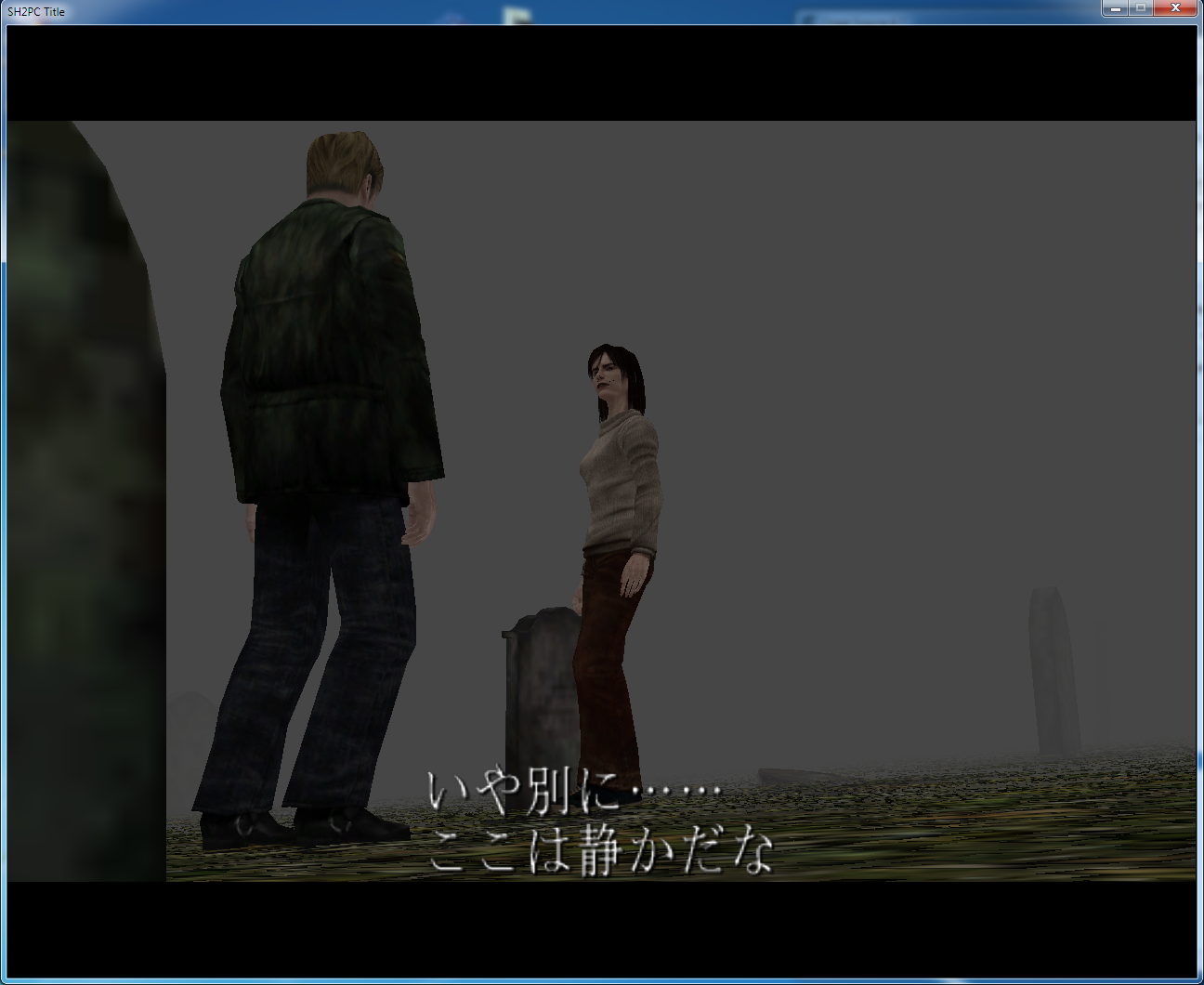
By the way it is possible to make SH2 PC builds display Japanese language if you replace .mes files with those from an Xbox original build. Could make it a part of the project.
elishacloud
on 8 Jul 2018
_From @mirh on April 5, 2018 16:17_
I don't know a thing about how this game works, but if any the target should just be have independent interface/subtitles/dubbing language.
elishacloud
on 8 Jul 2018
_From @Polymega on April 5, 2018 16:29_
By the way it is possible to make SH2 PC display japanese language if you replaced .mes files with those from Xbox ISOs. Could make it a part of the project.
Nice! If you wouldn't mind sharing the .mes file I can add this as an option to the Installation Guide at a later date.
Are there additional language options for the subtitles as well in the Xbox version? (I no longer own an original Xbox to test...) Would the European Xbox releases have more language options than the North American versions?
elishacloud
on 8 Jul 2018
_From @Bigmanjapan on April 5, 2018 19:42_
Are there additional language options for the subtitles as well in the Xbox version? (I no longer own an original Xbox to test...) Would the European Xbox releases have more language options than the North American versions?
As far as I remember Xbox versions work just like PS2 versions when it comes to language selection. NTSC-U and NTSC-J versions of both platforms have Japanese and English language available to select in Options menu. PAL versions of both patfroms have English, French, German, Italian, Spanish.
NTSC-U PC version have Japanese language "cut" and only have English available and PC PAL version have English, French, German, Italian, Spanish.
The thing is, these language selection restrictions are artificial. Every region version of every platfrom has all message files in their file structure and it is possible to select any language including Japanese by bypassing language selector restriction via memory editor.
There is an issue with PC build tho. Japanse message files in PC builds are "empty" and render Japanese text to "??? ??? ?????" signs. Transfering Japanese message files from an Xbox build solves this issue.
One additional issue with PC build is that there is no japanese text for PC menu (which appears when you press Esc button during gameplay), since there is no such menu on console versions and PC build was never released in Japan. Someone would have to make translations for menus and find a way to inject them into game's message file structure.
This video shows how easy it is to hack language selector and issues with original Japanese message files (this is done on NTSC-U version which only have English available by default): https://youtu.be/n3W73pCOZIc
Nice! If you wouldn't mind sharing the .mes file I can add this as an option to the Installation Guide at a later date.
In conclusion, first step would be unlocking language selector by modyfing sh2pc.exe to provide access to all languages, second step would be adding lacking Japanese texts in the game's message structure.
Language selector address: sh2pc.exe+19BC006 (01DBC006) byte
Values are: 0=Japanese, 1=English, 2=French, 3=German, 4=Italian, 5=Spanish
elishacloud
on 8 Jul 2018
_From @Polymega on April 5, 2018 20:4_
Thanks for this info! Accessibility to non-English speakers (Japanese in this case) would be very beneficial. With fans all around the world, inclusiveness would be great.
In conclusion, first step would be unlocking language selector by modyfing sh2pc.exe to provide access to all languages
So if this can be unlocked could users simply click the < and > arrows beside the language choice to switch? (The same as adjusting other options.) Theoretically it wouldn't crash the game or anything?
second step would be adding lacking Japanese texts in the game's message structure.
Would that be as simple as dropping the Japanese message files back into the PC game's directory? Or would there be more steps involved?
I understand now. I just saw all the different language .mes files under /data/etc/message/ . Each file ends in e (English), f (French), g (German), i (Italian), and j (Japanese).
elishacloud
on 8 Jul 2018
_From @Bigmanjapan on April 5, 2018 20:32_
So if this can be unlocked could users simply click the < and > arrows beside the language choice to switch? (The same as adjusting other options.) Theoretically it wouldn't crash the game or anything?
In theory, yes. Languages should be switchable via game's own "<" and ">" buttons without any crashes. I do that in the video via memory scanner and game doesn't crash, no reason why it would crash once language selector is "unbound".
Would that be as simple as dropping the Japanese message files back into the PC game's directory? Or would there be more steps involved?
I don't know yet. I (or someone else) would have to see from what files menu polls it's text data and try to change it as an experiment.
To confirm: Your title screen shows "Director's Cut" on the logo. Do you mean that you are using NTSC .exe with a PAL install of the game?
I always thought that if there is an aura around texts in main menu, then it is an NTSC build, if there is a plain text, then it's a PAL build.
Either way, my build have only English available by default, so it should be NTSC one regardless of logo in the main menu.
elishacloud
on 8 Jul 2018
_From @Polymega on April 5, 2018 20:50_
I always thought that if there is an aura around texts in main menu, then it is an NTSC build, if there is a plain text, then it's a PAL build.
I believe you are correct. But if you install the PAL version then swap out the .exe with the NTSC version you will keep the PAL menu background image but have the NTSC "fat" menu font. But the "fat" menu font is the only true menu font for this game. :)
@AeroWidescreen if this can be looked in to and patched in the WSF (or patching the actual .exe? But that would require people using _only_ the .exe provided) I can include the corrected Japanese message files (after they've been tested) as a packaged download with the .exe on the Installation Guide no-CD step.
elishacloud
on 8 Jul 2018
_From @Bigmanjapan on April 7, 2018 9:58_
More importantly, when ReduceCutsceneFOV was disabled the "meat glitch" didn't happen except for one quick instance that is seen in Bigmanjapan's video at the 0:09 mark:
What about increasing FOV slightly for that cutscene? Seems to solve the issue entirely: https://youtu.be/3z_9o7atcFc
It is probably possible to increase FOV even less (to stay closer to the original) than I did to solve the issue.
@jdkubiak @AeroWidescreen
elishacloud
on 8 Jul 2018
_From @Polymega on April 7, 2018 15:28_
Nice! How much could the FOV be decreased (to stay closer to the original) while preserving all the hanging meat? Is there a set threshold/limit?
elishacloud
on 8 Jul 2018
_From @Bigmanjapan on April 11, 2018 16:33_
In my tests the minimum amount of change needed for the meat to be loaded in fast enough is 12%.
Original FOV is 1.147019982.
New FOV is 1.147019982 * 0.88 =1,00937758416
elishacloud
on 8 Jul 2018
_From @AeroWidescreen on April 14, 2018 0:29_
So for the cursor starting position, how about we modify the vertical boundaries so that it can't go off-screen to begin with? I was hesitant to do it before because I wasn't able to fix the other mouse problems until now.
Original value = 240
New value = 190
Vert Mouse Boundary (fullscreen images)
006B2210 43340000 // 190.0f
004A2D6C 000000B4 // 190 integer
Vert Gamepad Boundary (fullscreen images)
006B001C C3340000 // -190.0f
004A314F C3340000 // -190.0f
004A2DD2 C3340000 // -190.0f

@Bigmanjapan
In my tests the minimum amount of change needed for the meat to be loaded in fast enough is 12%.
Original FOV is 1.147019982.
New FOV is 1.147019982 * 0.88 =1,00937758416
Sorry, I forgot all about this. Too many topics right now. I'll see about this soon.
elishacloud
on 8 Jul 2018
_From @Polymega on April 14, 2018 19:0_
how about we modify the vertical boundaries so that it can't go off-screen to begin with?
The primary purpose of centering the cursor was to help players if their cursor stayed off-screen from a previous puzzle, so if you can prevent it from going off screen to begin with then that would be an even better solution to the issue!
Never realized that could've been a solution; nice one, Aero.
elishacloud
on 8 Jul 2018
_From @Polymega on April 28, 2018 18:59_
I'm recording footage for the upcoming, updated demonstration trailer showcasing more of the game's fixes and am currently capturing how ReduceCutsceneFOV benefits the game. It especially helps with most of the ending cutscenes.
Anyways, while recording, I think I found the true monster of Silent Hill 2, lol! Pay attention to Jame's jaw, or lack thereof:
https://youtu.be/8cxeUV1ianQ
^ Ending spoilers in the video
Just sharing for laughs. :)
elishacloud
on 8 Jul 2018
_From @Bigmanjapan on April 29, 2018 14:51_
Never seen body parts disappear like that but I gotta tell you, once you skin Eddie's textures on James model — that is also a worthy nightmare material.
Does anyone here possess a physical SH2 PC NTSC copy? I mean a yellow box version, either small or big one (http://crimson-ceremony.net/lostreleases/item.php?id=shgame_sh2dc-pc-usa1 / http://crimson-ceremony.net/lostreleases/item.php?id=shgame_sh2dc-pc-usa2)
elishacloud
on 8 Jul 2018
_From @Polymega on April 29, 2018 16:22_
Does anyone here possess a physical SH2 PC NTSC copy?
I own a copy. Do you need an unmodified copy of the NTSC's .exe? Or other files from it? Just let me know.
elishacloud
on 8 Jul 2018
_From @Bigmanjapan on April 29, 2018 17:8_
I need images of all 3 CDs made via Alcohol120% with "Securom NEW 4/5/7" Datatype option selected.
elishacloud
on 8 Jul 2018
_From @AeroWidescreen on April 29, 2018 17:44_
Anyways, while recording, I think I found the true monster of Silent Hill 2, lol! Pay attention to Jame's jaw, or lack thereof:
Still not as nightmare inducing as Maria's eye teeth from the HD collection. ugh
elishacloud
on 8 Jul 2018
_From @Polymega on April 29, 2018 19:6_
@Bigmanjapan send me a message through this contact form:
http://www.igotaletter.com/siteinfo/contact/
Still not as nightmare inducing as Maria's eye teeth from the HD collection. _ugh_
lol! Indeed! One day I want to catalog _all_ the weird, dumb, and overall stupid things the HD Collection did to SH2 & 3 in website article form.
elishacloud
on 8 Jul 2018
In case you missed it, we put a fix into d3d8to9 for the red tint issue in the FMVs when using Intel GPUs.
elishacloud
on 8 Jul 2018
Issued Moved from dxwrapper / Checklist of Remaining/Wishlist Fixes
Everyone, I am moved this issue from the dxwrapper project. Not all of the comments get moved.
You can reference any of the old comments here.
@Polymega
@AeroWidescreen
@Bigmanjapan
@mirh
@lakeviewhotel
@Nisto
elishacloud
on 8 Jul 2018
@Polymega
Apparently the boat glitch is present even on PS2 builds? Was doing some research on SLPM-65098 and the glitch occured:
 Bigmanjapan
on 10 Jul 2018
Bigmanjapan
on 10 Jul 2018
Oh wow. I also noticed the "Maria" ending is glitched on SLUS-20228GH when I played it through PCSX2. I wonder if it's the emulator causing these issues or we just totally missed these growing up?

 Polymega
on 10 Jul 2018
Polymega
on 10 Jul 2018
@elishacloud So what did you want to do with the widescreen fix? Add all the non-widescreen features to this project? Completely integrate the entire thing?
I much rather keep the widescreen fix as its own thing, but I don't know how open source development works in that regard or what the proper etiquette is.
Edit: So basically Elisha is merging all the different mods into one for convenience. Widescreen Fix will continue to be it's own thing; he'll basically do a pull to keep this project up-to-date with the latest changes. OK, got it.
 AeroWidescreen
on 11 Jul 2018
AeroWidescreen
on 11 Jul 2018
Check your email when you have moment please, Aero. There's some previous messages Elisha had questions about.
Polymega
on 11 Jul 2018
I see, I had no clue, sorry. Will start reading to catch-up...
AeroWidescreen
on 11 Jul 2018
@Polymega Same issue on SLPM-65098 on PCSX2. Also Aaron confirmed that the glitch in Maria ending cutscene happens on a real PS2.
Edit: Numzombie provided a screenshot of the cutscene on Xbox:

Bigmanjapan
on 11 Jul 2018
:open_mouth: How is that something I forgot happened?! The cool news is, for the SH2 PC naysayers out there, that this is yet another great example of why the PC version is becoming the defacto way to play this game in HD then.
Polymega
on 11 Jul 2018
Apparently the boat glitch is present even on PS2 builds? Was doing some research on SLPM-65098 and the glitch occured:
@Bigmanjapan A random thought just now: While doing testing on my real PS2 I've been doing a lot of soft game resets (holding L1 + L2 + R1 + R2 + Start + Select) to save time. I wonder if you also did a soft reset after getting on the boat and, upon getting on the boat again, is how you replicated the issue? I'm not at home to test but I bet that's how it happened.
Polymega
on 13 Jul 2018
@Polymega I didn't use soft resets during my recent playthroughs on PCSX2. It's either one continuous boot or fully restarting the emulator.
Bigmanjapan
on 13 Jul 2018
Huh. Well that's even weirder then. Not that it is ultimately of concern for our purposes here (being on the PS2 version and all), but I just happened to think about your discovery again today.
Polymega
on 13 Jul 2018
Hello community! "angular graphics" here of "FMV Widescreen Enhancement Pack" fame (and my lame "modern compatibility" bundle of fixes which has since been well superseded).
Excellent work on improving the PC port! Since I made my pack, I've been checking the progress of fixes and improvements, like once or twice every year, and I've always been pleasantly surprised.. But since last time I checked, I see there has been a lot more work done. Like, A LOT MORE. And everything is super organized and people collaborate and.. WOW. Great community!
So for a long time now I've been meaning to redo my FMV pack.. I'm aware of at least 1 glitched frame in it and in general I would try to make it look better, less glitchy, maybe smaller, etc. And I think it was last year that I redid 1/3rd of it, but then I gave up for one reason or another.. One of them, I seem to remember, was that even with the improved FMVs, the PC version was still somewhat noticeably inferior to the PS2 version emulated. But now that I see the sounds have been ported among other improvements, perhaps it's time to give this another try..
My question is are there any requests you have about a v2.0?
Like, should I aim for ~720p again? (I think so.)
Should the aspect ratio be slightly stretched, as the variant which I see has been created?
Is there demand for a max file size?
Or whatever else you might be thinking.
Let me know! There's no hurry, as if I end up doing it, it will probably take me quite some time.
 angularGraphics
on 20 Jul 2018
angularGraphics
on 20 Jul 2018
Remember me why we just cannot hack in the original pristine files, rather than go the dirty recompressing way?
EDIT: as for your procedure I guess like it could be streamlined with this
 mirh
on 20 Jul 2018
mirh
on 20 Jul 2018
- PC version reads bink files, until one makes it read mpeg2 the re-compression step is necessary.
- There's potential to improve upon the PS2 source videos.
edit Regarding Vidsquish, looks like a tool that can help with resizing, stretching, and cropping, but there were far more steps than those involved in making the first version of the pack and I'd rather do everything manually anyway.
angularGraphics
on 20 Jul 2018
Hi @angularGraphics ,
Thanks for stopping by! To start:
but there were far more steps than those involved in making the first version of the pack and I'd rather do everything manually anyway.
Many thanks for all that you did for the FMV Enhancement Pack. When I was doing the 16:9 stretched variants of the videos I first took the source PS2 .mpeg files and blew them up to 720p and they looked _no where_ near as nice as yours. It's obvious you spent a lot of TLC with making them look the best they can be. I also read your notes on the matter sometime back and am thoroughly impressed at everything you did to get them looking as nice as they do.
Next up: Do you have a website and/or contact method you'd like me to include on the Installation Guide? Right now I'm linking to your defunct NeoGAF account as that was all I could find on you.
But since last time I checked, I see there has been a lot more work done. Like, A LOT MORE. And everything is super organized and people collaborate and.. WOW. Great community!
Thanks! There is a wealth of wonderful people all contributing to fixes and improvements for the game spearheaded mostly by @elishacloud , @AeroWidescreen , and @Bigmanjapan . These guys are my heroes!
I'm aware of at least 1 glitched frame in it and in general I would try to make it look better, less glitchy, maybe smaller, etc.
I actually fixed this one for you. If you download your FMV pack from the Installation Guide's page it'll have that single frame removed from the video file. It still plays fine without it.
One of them, I seem to remember, was that even with the improved FMVs, the PC version was still somewhat noticeably inferior to the PS2 version emulated. But now that I see the sounds have been ported among other improvements, perhaps it's time to give this another try..
With the exception of the PC's videos being 30 fps vs. PS2's 60 your conversions are really top notch. Both being played in-game and the comparison photos you included in your download package, they look virtually indistinguishable to their PS2 counterparts. And really, it doesn't matter how it's done or what format they're in: So long as the PC version can play them without issue and they look indistinguishable from the source files then it gets the job done.
My question is are there any requests you have about a v2.0? [...] There's potential to improve upon the PS2 source videos.
If there's any possibility for them to be at 60 fps (without cheating the process like trying to time blend source 30 fps files) that'd be my personal request. Besides that, as I said, your videos already look primo. But if you know of additional potential improvements you can do and are feeling motivated by the surge of other enhancements going on then I say do your magic once more!
Like, should I aim for ~720p again? (I think so.)
Should the aspect ratio be slightly stretched, as the variant which I see has been created?
Is there demand for a max file size?
I definitely suggest keeping them in a 16:9 ratio.
Perhaps offer variants for users to choose from? Me personally, I don't mind minor image cropping to remove pillar bars. But I wouldn't want the videos stretched. But I know others who _wouldn't_ want any cropping or stretching at all.
Or whatever else you might be thinking.
The only possible concern that came to my mind is @ThirteenAG and @AeroWidescreen made custom code in their Widescreen Fix project to accommodate displaying your current FMV Enhancement Pack correctly. I'm not sure how that would affect a newer version if size/resolution would be changed. They'd be best suited to answer this.
Polymega
on 20 Jul 2018
@Polymega apparently Maria cutscene is OK on SLES-50382 (on PCSX2 1.4.0).

And on SLES-51156.

And on SLPM-65051.

And on SLUS-20228.

Bigmanjapan
on 20 Jul 2018
@Bigmanjapan
So I wonder if SH2 PC code was derived from NA SH2GH (SLUS-20228GH) or JAP SH2 Saigo no Uta (SLPM 65098)?
I wonder if that knowledge would assist us with checking a particular PS2 version in helping with the lighting transition bugs? As in, if these PS2 versions are mirroring some of the PC bugs, maybe that's the version we should also look more into when trying to fix other future PC bugs?
Polymega
on 20 Jul 2018
@Polymega
SLUS-20228GH

SLPM-65098

I only get this glitch on SLPM-65098. Didn't change any emulator settings between the runs. I use the basic D3D11 Software plugin without any additional hacks. No Speedhacks or Game Fixes either.
What's your setup? Are you using PCSX2 1.5.0 by chance?
So I wonder if SH2 PC code was derived from NTSC SH2GH (SLUS-20228GH) or JAP SH2 Saigo no Uta (SLPM 65098)?
That is very likely.
Bigmanjapan
on 20 Jul 2018
@Polymega
SLUS-20228GH
The plot thickens...
Are you using PCSX2 1.5.0 by chance?
Yes sir, I am.
Polymega
on 20 Jul 2018
@Polymega
"Next up: Do you have a website and/or contact method you'd like me to include on the Installation Guide? Right now I'm linking to your defunct NeoGAF account as that was all I could find on you."
For now, leave it as is. I'll let you know if I change my mind.
"I actually fixed this one for you. If you download your FMV pack from the Installation Guide's page it'll have that single frame removed from the video file. It still plays fine without it."
Good! I'll be double checking everything this time around. Fun fact: When I created the first pack my monitor at the time was a 17'' 4:3 CRT. Yup, not even widescreen to properly check output :P
"If there's any possibility for them to be at 60 fps (without cheating the process like trying to time blend source 30 fps files) that'd be my personal request."
You figured my main inspiration behind doing a v2.0 ;) It's definitely technically possible for me to make them; whether the game will play them correctly remains to be seen.
And there's something more I wish to experiment with, and fix.
The videos seem to use "TV" levels: 16-235 levels of brightness. On PC world we use "PC" levels, 0-255.
What this means is the current videos are never truly dark/black (or truly white), they are just grey.
Mouse over: https://diff.pics/Q8TLN4_s1Hbw/1
It's very much evident when the video starts slowly fading in from "total black" and that "total black" is just grey. edit But maybe the game fixes this on the fly anyway.. Haven't really tested it yet.
"I definitely suggest keeping them in a 16:9 ratio.
Perhaps offer variants for users to choose from?"
I think whatever I'll end up doing, it'll be just 1 pack.
"The only possible concern that came to my mind is @ThirteenAG and @AeroWidescreen made custom code in their Widescreen Fix project to accommodate displaying your current FMV Enhancement Pack correctly. I'm not sure how that would affect a newer version if size/resolution would be changed."
I think it would be ok to break compatibility if the new pack is considerably better and it's the final revision of things. But we'll see if there is a need for that.
angularGraphics
on 20 Jul 2018
@angularGraphics Hey, good to see you here! Big fan of the work you did to the FMVs.
Should the aspect ratio be slightly stretched, as the variant which I see has been created?
I think whatever I'll end up doing, it'll be just 1 pack.
I'll share my opinion and say I prefer pillarboxing or cropping over stretching. Circles should like circles, squares should look like squares, and I personally won't have any desire to use this new version if the only choice available is a distorted one. I know some people feel differently, but again, it's only my opinion.
I think it would be ok to break compatibility if the new pack is considerably better and it's the final revision of things. But we'll see if there is a need for that.
It should be fine. I think the only thing that matters is resolution, but if it breaks we'll fix it.
AeroWidescreen
on 20 Jul 2018
It's definitely technically possible for me to make them [at 60 fps]; whether the game will play them correctly remains to be seen.
Nice! I'm sure you thought of this already but I'd do a single, simple test video at 60 fps and see what the game does when you load it up.
I'll share my opinion and say I prefer pillarboxing or cropping over stretching.
+1 for cropping for me as well. Then, barring that, pillarboxing. Stretching is a last resort for me, too. But you'll have folks like @Storm3000 who prefer stretching over the other choices.
With that said, if you do decide to do a "2.0" of the FMVs, I'd say consider the option of rendering out different versions. User choice never hurts as there are very differing preferences for this sort of thing.
Edit: Perhaps as in keep all versions at 16:9 but have one with the pillarboxes, another cropped, and the other stretched. Keeping them all at 16:9 will make the WSF patch work consistent no matter what version a user decides to use.
I think it would be ok to break compatibility if the new pack is considerably better and it's the final revision of things. But we'll see if there is a need for that.
I may be mistaken but the WSF's patch for your FMVs is required to get them displaying correctly in widescreen? But it's all good as we just got confirmation from Aero the patch can be adjusted if resolutions were to change. :)
Polymega
on 20 Jul 2018
60 fps FMVs play correctly if I go by what I just tested with toilet.bik... But that's the case only if I unlock the framerate to 60, which not everyone might want to do..
Whether the programming geniuses here can make a hybrid mode where only FMVs play at 60 and the rest of the game remains at 30, and whether these on the fly changes would work or mess up things, I don't know :P
angularGraphics
on 20 Jul 2018
You've come to the right place to have such questions looked into! What happens when you try and play toilet.bik while the game is at 30 fps though? Does it play noticeably faster or slower? Or doesn't play at all?
Polymega
on 21 Jul 2018
It plays slower - I would guess half speed - and with frequent fps drops and audio stuttering every few seconds. With unlocked framerate it plays smooth.
angularGraphics
on 21 Jul 2018
If you could upload that video, one of us could take a look at it.
AeroWidescreen
on 21 Jul 2018
I just prepared toilet.bik here
60 fps.
1280x768 resolution. For my first pack I padded the videos with pillar-boxing left and right to 1360x768 so that the game doesn't distort them. From what I see, this is no longer necessary. Running the game with the WS fix, and using:
FMVWidescreenMode = 1
FMVWidescreenEnhancementPackCompatibility = 0
adds pillar-boxes on the fly.
Disregard the video quality, it's only meant for testing of 60 fps.
angularGraphics
on 21 Jul 2018
Why is dsound.ini from IndirectSound not mentioned in the guide to be extracted as well? The guide mentions only the dll. Is there a particular reason, or is it just not necessary, or was it omitted by mistake?
edit IndirectSound's creator writes that for SH2: http://indirectsound.com/games.html
dsound.ini must be used and earlyStopFadeOutTime must be greater than 0
So, shouldn't the .ini be placed in the SH2 directory after all? And what's a good value for earlyStopFadeOutTime?
angularGraphics
on 22 Jul 2018
I last updated the guide before the release of IndirectSound v. 0.17. The reason I haven't updated it yet is that the entire process on how to install these fix packages will change soon. Because of that, I was just holding off until this large install update happens.
Two milliseconds (0.002) is a good amount to set it to.
Polymega
on 22 Jul 2018
@angularGraphics
Thanks! So I think it's technically possible to have the FMVs run at a different framerate from the rest of the game, but the videos don't play as smoothly anymore with the method I'm using: https://youtu.be/XR45qJLL1k0
Edit: I realize it might not seem so bad in that particular video. I've compared locked 30 vs unlocked before, and there _is_ a difference in the amount of stutters I experience.
I suspect the issue here is that I'm technically letting the framerate run completely unlocked when the FMVs are playing, because if I limit the framerate to 60 using RivaTuner then some of the stuttering goes away. Unfortunately, I don't know how to change the framerate limit since all my attempts have led to crashes. I'll also admit I don't fully understand how it works, so there still might be hope.
Framerate Function:
004F6CE0
FMV Framerate Function Calls:
0043DD90 call 004F6CE0
0043DDE5 call 004F6CE0
0043DE27 call 004F6CE0
@Bigmanjapan do you know of a way to "lock" an adjustable setting in the PC game's option menu? Similar to how the North American version locks the language to English only?
More specifically: Is there a way to lock the resolution adjustment to whatever it's currently set on and a user can't change it in-game?
Polymega
on 27 Jul 2018
@Polymega it sure is possible to simply NOP several instructions to prevent rotation buttons from working:
There might be a more elegant solution from a programming standpoint. I just showed that one can change how rotation buttons behave.
Bigmanjapan
on 27 Jul 2018
Great! Thank you Bigmanjapan!
Polymega
on 27 Jul 2018
I got a weird one for you, @Bigmanjapan . All these years I thought the developers simply forgot to UV/texture this lip... but that's not the case at all. It just appears white based on distance?
Polymega
on 28 Jul 2018
The entire room has some unique fogging effect that is glitching out.
This white tint on the walls:

A bottom white element of this effect also prone to glitching:
And it's definitely not a loading zone, it's some kind of a separate effect:
In your case one could say that there is some hidden camera culling that breaks the effect if it's positioned too far but in my first video when James did a shot camera remained static.
Bigmanjapan
on 28 Jul 2018
It's possible to make a white element shown in my previous video darker and mask the glitch that way:
sh2pc.exe+5428E2 (009428E2) byte
Set it to 20 or something like that.
It does break Leave ending cutscene as shown in the video (therefore needs to be put at it's original value) and it doesn't solve issue with the white element on the stair that you've shown.
Edit: Game definitely tracks camera position and switches effect once James arrives at the upper part of the room:
Edit: apparenly this white tint is what is used as a horizon fog in other locations:
sh2pc.exe+542C34 (00942C34) float
sh2pc.exe+542C30 (00942C30) float
The question is: do you want to make it look like PS2 version room? This white square looks bad even on PS2.


Bigmanjapan
on 28 Jul 2018
Hmm... yeah. There's really no good compromise between adjusting 00942C34 and 00942C30. It may solve that specific quirk but it greatly changes the effect of the surrounding area.
I then thought about what would happen if I made the texture used there transparent (alpha). Assuming no other mesh uses that same part of the texture file it could work and theoretically fix the issue.
But the problem here is that the texture used for the staircase isn't a part of ru73.map texture files:

And to be sure I also changed the colors of the metal floor in ru73.map:

I'm guessing it's part of the ru74.map file but SH Texture Explorer can't open that one. And viewing ru74.map through SH Level Viewer results in some buggy effects:

Polymega
on 28 Jul 2018
That's true, sometimes rooms use assets that belong to other rooms,
It may solve that specific quirk but it greatly changes the effect of the surrounding area.
It's possible to set custom front/back fog line values just for this camera angle.
ru74.map probably uses unnatural texture sizes therefore the explorer cannot open it. Someone would need to rewrite the software to make this solution path work.
Bigmanjapan
on 29 Jul 2018
RPCS3 emulator has a logging window that shows every file being loaded by the game engine.
After the cutscene with Maria in Rosewater Park three enemy's textures / animations get loaded: mkn (mannequin), scu (lying figure) and red (PH). I wonder if there's some leftover code of PH roaming around the town.
Also, it's possible to see what textures get loaded when entering the final stage:

On a second playthrough this was also added to the above list:
E {PPU[0x100000a] Thread (Unnamed) [0x022e2090]} 'sys_fs_open' failed with 0x80010006 : CELL_ENOENT, “/dev_hdd0/game/BLUS30810/USRDIR/sh2/data/bg/rr/rrGB.fcl” [2]
Bigmanjapan
on 11 Aug 2018
I wonder if there's some leftover code of PH roaming around the town.
That would be cool if the code is there!
https://youtu.be/NIWu6m5zYE4
(Clip at the end which is also shown on one of SH2's longer trailers.)
Also, it's possible to see what textures get loaded when entering the final stage:
I'm not at home yet to check but I didn't think there were ru75/76 files in the game?
Interesting...
Polymega
on 11 Aug 2018
No ru75/76 files in PC build. The list ends on ru74.
PS2 builds have those files and the list ends on ru76.
Xbox builds have up to ru250 files but every file starting from ru75 is empty, 0 bytes in size.
Bigmanjapan
on 11 Aug 2018
Is it possible to have the infinite stamina cheat on the game without cheat engine? Thanks!
 RenoFriends
on 13 Aug 2018
RenoFriends
on 13 Aug 2018
On PC version press quicksaving button — it will reset stamina.
Bigmanjapan
on 14 Aug 2018
@Bigmanjapan OMG hahaha Don't know that! Thanks 👍🏻
RenoFriends
on 15 Aug 2018
@Bigmanjapan is too humble to say but he knows a thing-or-two about speed running the game which utilizes the Quick Save strategy for infinite stamina. :)
Polymega
on 15 Aug 2018
First of all thank you guys for doing this great work. I feel a little bad to ask you anything after what you have done and i am not sure this is the right place to do so but i have 2 sugestions that could make this version even better. The first one would be the letter from Mary to Laura, on the final version of the game there is no audio of Mary reading the letter, but this audio was recorded and you can hear it here https://www.youtube.com/watch?v=CquVMeK7Q3g. The other one is the videotape scene, some parts of the audio of that scene have been censored, you can hear it here https://www.youtube.com/watch?v=0f1C6CckWTs. I think these 2 changes would be a nice addition to the game, i hope you guys consider putting them on the game. Thanks for everything.
 natanqb
on 28 Aug 2018
natanqb
on 28 Aug 2018
Hi @natanqb ,
Thanks for the suggestion! But because these particular audio files were intentionally removed by the developers during the game's development, we won't add them back to keep the experience as true to source as possible.
Also, because the user can read through/skip Laura's letter at their own speed, we'd be unable to implement that particular audio file regardless as it's entirely controlled by the user.
Polymega
on 28 Aug 2018
Alright @Polymega thank you for the response.
natanqb
on 28 Aug 2018
Hi guys, sorry to bother you again, but i have a doubt. Is there any way to remove the health cross that appears when we have low health? I think it wasn't on the ps2 version and it can break the immersion appearing even during cutscenes. Example at 2h 43 min and 15 seconds of this video https://www.youtube.com/watch?v=KnrnjQXkpMk&t=33s.
natanqb
on 3 Sep 2018
Hi @natanqb ,
I think it wasn't on the ps2 version and it can break the immersion appearing even during cutscenes.
The red cross was added by the PC developers due to the potential lack of controller use. If someone is playing the game with a keyboard and mouse they would have no way of knowing when they're near-death in-game unless they constantly pause to check their status, which simply isn't fun.
This is even more of an issue when using Xinput Plus as that software completely disables controller vibration when in use.
Unlike Resident Evil, James' animation doesn't change when he's injured. For the console releases, you could rely on controller vibration to indicate low health, but for the PC release, an alternative solution was made for keyboard + mouse players.
As mentioned on your YouTube playthrough, we have removed the red cross indicator during cutscenes (if you enable this via the d3d8.ini file) with the exception of one cutscene: After James comes out of unconsciousness from falling from the hospital rooftop. We kept the indicator up for that cutscene only because it makes sense and aids to the purpose of what is happening there.
Polymega
on 5 Sep 2018
Returning to the mannequin flashlight room. Dormant mannequin is still considered an enemy and on beginner / easy action difficulties James will often go into battle stance mode upon trying to pickup a flashlight if a player has a wooden plank equipped (because an enemy is behind the flashlight).
It's on all official console versions but still doesn't feel right logic wise. It should be possible to disable autoaim for this room until the mannequin is awake.
Bigmanjapan
on 11 Sep 2018
New stuff: on PC version it's not possible to use an ampoule if James HP already reached maximum. On PS2 and Xbox original versions a player can use ampoules one after another despite HP being at maximum.
Bigmanjapan
on 14 Sep 2018
There is also an issue of PC version being able to load "Game Result" savefiles during gameplay which breaks the game completely since all of the current run info gets overwritten by the info from a run made on "Game Result" savefile.
On consoles, as you remember, it's not possible to load up saves during gameplay, only from the main menu.
Should "Game Results" saves be indentified and locked to prevent a player from loading them up during gameplay?
Bigmanjapan
on 17 Sep 2018
There was one time--and as far as I remember, this was the only time--where I accidentally loaded a Game Result file while in-game instead of another file.
It loaded me onto the Observation Deck at the beginning but everything was messed up. There was no fog and the lighting values were completely wrong (everything was very dark). There was no music and I couldn't pull up the inventory screen.
I had to pull up the PC pause menu (by pressing "Esc") and exit to main menu to fix the bug.
Should "Game Results" saves be indentified and locked to prevent a player from loading them up during gameplay?
I say make a new support ticket! It can possibly be looked in to and determined from there.
Polymega
on 17 Sep 2018
It loaded me onto the Observation Deck
That means that the "Game Result" save you've loaded from has Maria ending in it. Rebirth ending puts a player somewhere around the church island, In Water is pure black etc
Bigmanjapan
on 17 Sep 2018
Oh wow, I never realized how easy it is to accidentally produce this bug. I guess, throughout all these years, I was just careful not to load a Game Result file in-game.
But hey, now I can make James attack himself with the Great Knife!

Polymega
on 17 Sep 2018
Hello @natanqb,
Hi guys, sorry to bother you again, but i have a doubt. Is there any way to remove the health cross that appears when we have low health? I think it wasn't on the ps2 version and it can break the immersion appearing even during cutscenes. Example at 2h 43 min and 15 seconds of this video https://www.youtube.com/watch?v=KnrnjQXkpMk&t=33s.
I added this feature into the mod. It will be in the next release. See check-in: 3954b2a
elishacloud
on 27 Sep 2018
@Bigmanjapan do you have the address on-hand that enables/disables the "Advanced Filters" found in the game's Options menu?
Polymega
on 19 Oct 2018
@Polymega
Should be these two:
sh2pc.exe+633404 (00A33404) byte
sh2pc.exe+633408 (00A33408) byte
Bigmanjapan
on 23 Oct 2018
Thank you, sir.
Oh, and @AeroWidescreen I learned that the Advanced Filters option in the game is what toggles things like DoF, motion blur, and pseudo lighting bloom on/off. Just an FYI and for your records.
Polymega
on 23 Oct 2018
Should this list be updated? A lot of these have been outright fixed.
 Bullsquiddy
on 28 Oct 2018
Bullsquiddy
on 28 Oct 2018
@angularGraphics are you still around these parts?
Polymega
on 15 Dec 2019
You summoned me :)
angularGraphics
on 15 Dec 2019
Hey!
So I believe I owe you an apology over my ditziness with the FMVs and their framerate. Allow me to explain:
For nearly two decades I believed the PS2's FMVs were 60 fps and that's... not technically true. The other month, when I opened a PSS (PS2 video) file on my computer and looked at its codec, it said it was actually 29.97 fps.
Then it dawned on me: The PS2 videos are at ~30p fps, and the PS2 plays them back at ~60i fps. Of course, and as you know, if you deinterlace 60i it turns into 30p.
My apology to you is that you've known this for years. As, in your ReadMe file for your FMV pack, you clearly wrote that the PS2 PSS videos are at 29.9X fps. For whatever silly reason, I never put two-and-two together that the PS2 console would play them back at 60i, which was never truly 60 full frames of video per second.
What does all that mean? Well, there isn't a true 60 (progressive) fps version of the FMVs out there, so making a true 60 fps enhanced FMV pack isn't technically possible.
Now, is there any truth/merit to all the gibberish I just wrote?
Polymega
on 15 Dec 2019
I believe you got that wrong.
https://en.wikipedia.org/wiki/NTSC#Lines_and_refresh_rate
https://en.wikipedia.org/wiki/DVD-Video#Video_data
NTSC TV and DVD formats are 29.97i, that's how all common interlaced video is recorded, and that's how SH2 should be as well (which it is). As https://en.wikipedia.org/wiki/480i shows, 480i60 and 480i30 are different names for the same thing, so perhaps that's part of the confusion.
My understanding of it is that the interlacing part can be observed by seeing the "jaggies" or "mice teeth" in a frame which carries objects during motion. Which proves that a single frame of 29.97i actually consists of two "subframes", put together. Therefore a ~30i video actually carries information of 60 unique frames per second... interlaced together.
Therefore, there's nothing wrong with or missing from the 29.97i PS2 videos, they are exactly as they should have been.
What _is_ missing, is another 30p from the original PC release, the Xbox release, the PS360 releases, and even my pack. Smoothly deinterlacing 30i produces a reconstruction of sorts of the original two "subframes" buried within, i.e. 60p output. This is how I did it, but then I proceeded to discard every other frame to halve the output to 30p for compatibility -if no other- reasons, as you know.
angularGraphics
on 15 Dec 2019
I love being wrong and learning new things. I'm very amateur when it comes to videography and video editing, so I'd like to ask about interlacing in a little more detail, if you don't mind:
Therefore a ~30i video actually carries information of 60 unique frames per second... interlaced together.
The way I've always understood it, and from what I've read elsewhere, is that an interlaced frame has half the data of two different frames that makes up a single frame. Because there's only half data for two different frames on a full frame at any given frame, I thought it can't be possible to turn something like 30i into 60p?
From what I've read:
60i on the other hand, can’t just be dropped into a 24p timeline and slowed down because it takes two fields to create one frame, meaning you really only have 30 frames to start with, not 60.
A 60i video camera recording leads to effective 30 frames per second because 2 fields are required for one full image frame.
What makes this more confusing for me then is that you said the videos are actually ~30i. So, from my understanding, to turn interlaced into progressive you'd need to halve the previous frame rate. (So something like 60i = 30p, 30i = ... 15p?)
... but then you said 480i60 and 480i30 are different names for the same thing! What a mind twist!
Smoothly deinterlacing 30i produces a reconstruction of sorts of the original two "subframes" buried within, i.e. 60p output.
I think my confusion lies in here, with how it's possible to turn 30i into 60p with having each frame's data fully restored, and not using half the data from a previous frame to make up/carry over to the next frame? Seriously... what a mind-bender!
Polymega
on 15 Dec 2019
If for each interlaced frame, you take its odd fields to form subframe1 (line 1, 3, 5, ...) and its even fields (line 2, 4, 6, ...) to form subframe2, you now have twice as many frames as what you started with. And then you let your PC or device do (hopefully) smart things to them. :)
angularGraphics
on 15 Dec 2019
Asking for clarification; not to be argumentative or anything:
So for subframe1 that uses odd lines (1, 3, 5), where do you obtain the even lines to complete the frame? Because the even lines on that particular frame make up subframe2 now?
If you grab the even lines from the previous (or) next frame to complete the full frame image of subframe1, and grab the odd lines from the previous (or) next frame to complete the full frame image of subframe 2, you've duplicated a frame's worth of data because you had to use that data from a previous (or) next frame to complete the full, deinterlaced frame image, correct? And because you've duplicated that data, you'd drop that previous/next frame from the deinterlacing process, which ought to halve the framerate when deinterlacing?
Unless...
And then you let your PC or device do smart things to them. :)
Do you mean let software "fill in the blanks," so to speak, through something like interpolation?
If so, instead of cutting the frame rate in half to create true, full frames from the data, you preserve the frame rate and use half-frames with interpolation to fill in the blanks? And at that point the question would become which of those two scenarios is the better outcome?
Sorry for the dumb questions here. I'll probably admit defeat after this one if I'm still scratching my head over the whole process. :-p
Polymega
on 16 Dec 2019
mirh
on 16 Dec 2019
Most deinterlacing techniques fall under three broad groups:
- Field combination deinterlacing
- Field extension deinterlacing
- Motion compensation deinterlacing
I think I understand my own confusion now, if someone can confirm this for me:
I was always under the impression that interlaced footage actually contained a full frame, but was split in half over two frames. For example: Frame 3's odd lines and frame 4's even lines could restore a full, true, complete frame.
But that's not the case? A single interlaced frame contains half of two different frames, _but the previous or proceeding frame is not the other (alternating lines) half of that frame, but instead an entirely new/different frame?_ Meaning, there are only half frames of all given frames, and combining the previous/next frame's alternating lines wouldn't create the true other half of that frame?
I hope that made sense. If that's the case, then that's where my confusion has always lied.
Polymega
on 16 Dec 2019
Yes, I think that was my confusion the whole time. As an example, for 30i, it'd be something like:
1.  First field (1/60s) + second field (2/60s) = 1st interlaced frame
2.  First field (3/60s) + second field (4/60s) = 2nd interlaced frame
...
30. First field (59/60s) + second field (60/60s) = 30th interlaced frame
From the above, no two fields share the same time (X/60s), so you cannot take fields from one frame and alternating fields from another frame to create a "true," full frame as the times aren't the same.
So angularGraphics you would instead strip the alternating fields, make them their own frames (doubling the count), and fill in the blanks using a method like interpolation. I think I got it now.
My incorrect, preconceived notions that the next frame's alternating fields held the same time stamp as the previous frame's fields for interlaced footage is what was throwing me off.
Polymega
on 16 Dec 2019
Should this list be updated? A lot of these have been outright fixed.
@Polymega, let me know which ones are fixed and I can mark them as fixed. I believe the Room 205 items have been fixed?
Also, I can close this one out if we are tracking these somewhere else.
elishacloud
on 18 Dec 2019
Also, I can close this one out if we are tracking these somewhere else.
We can close this one if need be. I've mitigated the list to an Excel sheet to make things easier, but honestly, I haven't been keeping that Excel sheet as up-to-date as needed, either. (Although I have been updating a personal text document tracking all the new features that are finished, which will be arriving in the next update.)
@angularGraphics
If/when you'd like to discuss more about a "version 2.0" of your wonderful FMV pack, please feel free to open a dedicated ticket/post on the subject. I know we all have been waiting to try and make the game switch from 30 FPS (in-game) to 60 FPS (FMVs) correctly. We haven't made any strides on that yet, but it's still on the back-burner.
An ETA for it is undetermined at this time, but if you've been wanting to look back into this, perhaps the WIP files can be created for 60 FPS, but saved out as 30 FPS again in the meantime. Then, once we can get the game to switch to 60 for FMVs without issue, the 60 FPS versions can be readily swapped out? Only suggested if you've been itching to look back into it.
Polymega
on 18 Dec 2019
Thanks @Polymega. Closing this one. We can track the remaining issues separately.
_For the 60 fps videos, we can open a new issue to track those. It would be great to support 60 fps for this game!_
elishacloud
on 18 Dec 2019
Putting aside I don't personally mind framerate..
I'd just like to share with you the state of art as of "FMV revamp"
https://www.nexusmods.com/masseffect/mods/144?tab=description
mirh
on 3 Jan 2020
Putting aside I don't personally mind framerate..
I'd just like to share with you the state of art as of "FMV revamp"
https://www.nexusmods.com/masseffect/mods/144?tab=description
That does remind me @angularGraphics: I have a copy of GigaPixel AI. So if you'd ever want to pass the video images through this at any point of an upscale process, I can do that and send them back to you.
Polymega
on 3 Jan 2020
I'm playing around with this a little and I think the default 640 x 384 playback that's used on all versions is actually... stretched? Check these out when I change them to 600 x 384; it looks more correct (I'm using the demuxed PS2 PSS videos as a base here):


^ Look at Maria's necklace pendant. It's more circular on 600 x 384.


^ James' face is more long than wide at 600 x 384, which looks more natural/accurate.
EDIT: It should be AssumeTFF() (top field first), not BFF.
EDIT 2: Here's the final script I used:
    SetFilterMTMode ("QTGMC", 2)
    FFMPEGSource2("movie.m2v", atrack=-2)
    /*Levels(16, 1, 235, 0, 255, coring=false)*/
    AssumeTFF()
    QTGMC(preset="Slower", EdiThreads=1)
    Spline64Resize(600,384)
    Prefetch(2)
The line that's commented out would change the levels to 0-255.
Change EdiThreads and Prefetch based on your PC specs, going off this person's suggestions. For me, I did this conversion on my weak laptop, so I used low values.
Polymega
on 3 Jan 2020
Posting these things for shits n' giggles. After using avisynth to extract a deinterlaced, lossless image sequence (folks are saying QTGMC is one of the best deinterlacers), I ran some of the frames from the intro cutscene through ESRGAN and Gigapixel, and Gigapixel produced much more desirable results:

It was upscaled to 1280 x 819 (from 600 x 384, which was originally 512 x 384) and then vertically cropped down to 720. This also hides the weird upscale line you see at the bottom right (at the sink tile).

_(Posting for posterity)_
There may be even better adjustment settings within Gigapixel; right now I'm just fooling around with it. I've ran all the frames for the intro cutscene through this just to see what the full, end result would look like.
Cropped the image sequence in After Effects, re-saved out sequence, then used Bink's recommended settings for PS3 720 HD videos for the conversion/encoding.

_(Posting for posterity)_
Those settings could also be changed to be better, of course.
Anyway, here's that movie at 59.94 FPS upscaled (didn't both with inserting the audio):
https://drive.google.com/file/d/1kMEaXhIaCz7P5BSWeouJsCESJ96e2fIt/view?usp=sharing
(You can play it with VLC Player)
Again: I need to stress I'm just playing around with this (mostly because I just built a new, faster PC and want to run it through its paces). Not trying to step on any toes or anything.
Polymega
on 4 Jan 2020
After AI upscaling various FMVs I don't think it's ideal to use this approach/method for Silent Hill 2's videos. I think a big part of the problem is that the videos are natively a little too small (512x384) and the _style_ of the FMVs doesn't lend well to AI upscaling.
What I mean by that is the FMVs are naturally soft-looking by artistic design, so the AI upscaler struggles on certain FMVs/scenes to make the images sharper. Whenever the AI upscaler _does_ make a scene look sharper, things like a character's eye lid or mouth will become "shifty" as it plays out in motion... it's a rather unsettling effect, but not in a good way.
Here's some test files I did using Gigapixel AI:
http://www.igotaletter.com/temp/sh2pc/FMV_AI_Upscale_Test.zip
Here are my notes on the test videos.
I recommend viewing the test videos on an LCD monitor to see all the details I'm about to mention:
deai
Doesn't even look like it went through an AI upscaler at all. The video is still surprisingly soft-looking, considering it came from AI upscaling. Visually it doesn't look any different than what's currently provided in the FMV Enhancement Pack.
hei & hakaba
Just like deai, there are certain camera cuts where it doesn't even look like it was AI upscaled. But other camera cuts it looks decent. I think FMVs that take place outside during the day don't bode well to AI upscaling. Again: I think this is because all of the FMVs are naturally soft-looking by default/by design.
knife
Looks pretty good.
toilet
Looks good, but this is where the AI upscaler really starts to fall short. The AI upscaler cannot consistently produce uniform levels for dark backgrounds. Once James starts to bend over to look at himself in the mirror, look at the wall to the right of James. The black levels start to go crazy. This is because Gigapixel works on a _per-image_ basis; it doesn't understand that all of these upscaled images are meant to be uniformally played out in video form.
gero & korosu_a
Looks... okay. But pay attention to black levels around things like the toilet bowl or the overall background. The levels of these areas just go crazy as the video plays out. Again: This is because the AI upscaler doesn't know to keep these levels consistent for video usage, as it only knows to upscale on a per-image basis.
korosu_b & saikai
These two are the worst. In korosu_b, whenever the camera is on James, there's a "halo" of faint light going all around James' body. This again is a result of the AI upscaler's process. It's very bad looking (and very noticeably on LCD displays). The same goes for saikai: The background behind James is all over the place with constantly shifting levels.
After doing these tests I don't think using an AI upscaler is the way to go for SH2's FMVs. I think the nature of how these FMVs were made and presented doesn't lend them well to an AI approach.
While AI upscaling can make _some_ FMVs (or portions within FMVs) look really good, it does not make _all_ of the FMVs look good. And, to keep the visual presentation consistent across the board, I think we shouldn't do the AI upscaler. I think the more simple resize method with some conservative filters applied to them is the lesser of two evils.
Topaz Labs has released a beta version of Gigapixel meant for videos:
https://videoai.topazlabs.com/
There isn't a lot of reviews out for it yet but, from the ones I've read:
- It does horribly on interlaced footage (which could be deinterlaced prior without problem).
- It does bad on natively small videos (under 480 is no good, from what I've read, and the PS2 videos are 512x384 natively).
- It does poorly on inherently noisy/lowish bitrate videos, which the SH2 FMVs are.
In the meantime, I took a deep dive into avisynth and made a version of the FMVs where they're scaled to horizontally fit a 16:9 aspect ratio, and vertically cropped. This removes the pillarboxing and doesn't stretch the FMVs. This method of scaling/cropping the FMVs is also used in the latest development builds of PCSX2, when playing the game using its Widescreen Patch feature, by the way.
I also partially remade the ending credits to make the text within them much more legible at higher resolutions.
The approach/methodology angularGraphic's used is what I took as well, with this revisit to the FMVs.
http://www.enhanced.townofsilenthill.com/SH2/files/SH2PC_Enhanced_FMV_Pack_1.5.0.zip
I made this version 1.5 so, if in the future whenever angularGraphics is ready, the 2.0 version number for the FMVs will be reserved for his work. I'll include this updated version of the FMVs with the next update release, but if you want, you can go ahead and download it now from the link right above.
Polymega
on 19 Jan 2020
I haven't seen how they look yet, but very nice that you experimented!
I imagine the archive has Bink encoded files, right?
Unlike your above screenshot, I hope you used 64 allocated frames and 0 for audio compress level (max possible values).
If not, if you still have the source files, I would highly recommend re-encoding them with these settings. Bink is an old codec, and every bit helps.
angularGraphics
on 19 Jan 2020
I did 0 for the audio compression, but I did not do 64 for the allocated frames (I used 12 based on Bink's recommendation for CGI videos). I have all the working files saved so I can redo them at 64 allocated frames. Give me a day or two and I'll update/replace the current download for it with the bumped allocated frames. 👍
Edit:
I imagine the archive has Bink encoded files, right?
Yes sir. The working files on my PC amount to many, many gigs worth of data, so only the download has the final Bink files. :)
Data rate: 2200000 (credits, end/ending, end_dog, end_wish, and water use 1200000 to keep their file sizes down)
Keep peak data rate: Under a multiple of 3.0
Allocated frames: 12 64
Frame rate: 29.97
Audio compression: 0
Polymega
on 19 Jan 2020
I updated the videos to have 64 allocated frames. Same link as before:
http://www.enhanced.townofsilenthill.com/SH2/files/SH2PC_Enhanced_FMV_Pack_1.5.0.zip
Polymega
on 20 Jan 2020
I wouldn't dismiss AI upscaling the videos just yet. The strength of ESRGAN and similar open source technology is that anyone (at least anyone with a very powerful GPU and lots and lots of free time) can train it to create custom models for exactly the kind of image they want to upscale.
In this case, the basic process would be something like a) find some HD video of very high quality in the same style as the Silent Hill 2 videos, b) take screenshots of this, shrink and compress them to give them the same size and kind of artefacts as the original SH2 videos, and c) let ESRGAN train on them (by comparing the compressed low-quality images to their high-quality counterparts) for a couple of days or more. Of course, each step has many pitfalls.
If anyone is interested, here is a good place to start: https://upscale.wiki
The field of image upscaling is obviously in heavy development, so the technology will likely be vastly more powerful and easy to use in a couple of years. Things like this look very promising.
 angstsmurf
on 20 Jan 2020
angstsmurf
on 20 Jan 2020
I should've worded my previous post better on the matter of AI upscaling. I personally haven't dismissed the method/process as a whole, but I did dismiss it through the use of Gigapixel (the AI upscaler tool I have at my disposal).
Aero_ and I tried ESRGAN as well, but, as you've mentioned, without properly training it to make a model to suit your specific needs, you won't get results you're happy with. I'd love to try and attempt to train such an algorithm, but I personally don't have the knowledge, nor can I currently devote any amount of serious time to learn more about it at this point, to do anything beneficial and worthwhile on this front.
The field of image upscaling is obviously in heavy development, so the technology will likely be vastly more powerful and easy to use in a couple of years. Things like this look very promising.
I think you said it best here. :) I'm excited to see how far the entire field of neural networking progresses as time goes on. It can only get better, easier, and faster to use for the common user which is nothing but a win, win, win.
Polymega
on 20 Jan 2020
Related issues
 Storm3000
·
3Comments
Storm3000
·
3Comments
 OregonPacifist
·
15Comments
Polymega
·
18Comments
Storm3000
·
10Comments
OregonPacifist
·
15Comments
Polymega
·
18Comments
Storm3000
·
10Comments
 snigelpasta
·
13Comments
snigelpasta
·
13Comments
Most helpful comment
Hello community! "angular graphics" here of "FMV Widescreen Enhancement Pack" fame (and my lame "modern compatibility" bundle of fixes which has since been well superseded).
Excellent work on improving the PC port! Since I made my pack, I've been checking the progress of fixes and improvements, like once or twice every year, and I've always been pleasantly surprised.. But since last time I checked, I see there has been a lot more work done. Like, A LOT MORE. And everything is super organized and people collaborate and.. WOW. Great community!
So for a long time now I've been meaning to redo my FMV pack.. I'm aware of at least 1 glitched frame in it and in general I would try to make it look better, less glitchy, maybe smaller, etc. And I think it was last year that I redid 1/3rd of it, but then I gave up for one reason or another.. One of them, I seem to remember, was that even with the improved FMVs, the PC version was still somewhat noticeably inferior to the PS2 version emulated. But now that I see the sounds have been ported among other improvements, perhaps it's time to give this another try..
My question is are there any requests you have about a v2.0?
Like, should I aim for ~720p again? (I think so.)
Should the aspect ratio be slightly stretched, as the variant which I see has been created?
Is there demand for a max file size?
Or whatever else you might be thinking.
Let me know! There's no hurry, as if I end up doing it, it will probably take me quite some time.