Signal-ios: Registration PIN has to be entered twice when using FaceID
- [x] I have searched open and closed issues for duplicates
- [x] I am submitting a bug report for existing functionality that does not work as intended
- [x] This isn't a feature request or a discussion topic
Bug description
When opening Signal with the Registration PIN enabled and using FaceID to unlock the app it sometimes shows a prompt asking for the PIN. This prompt appears twice (it looks like one is shown before the FaceID gets activated and after it unlocked the App another is shown). Thus if one wants to dismiss the prompt it has to be closed twice or the code entered twice.
The zip below contains a short screen video I took which shows the behavior described above.
UI_Bug.MP4.zip
(As a small update: the last time when I then actually entered the correct code I had to enter it four times)
Steps to reproduce
- using version 2.43.3.1 make sure you are asked for the Registration PIN the next time you open the app (I don't now how to do this I am not able to after I typed in the correct PIN the prompt does not show up anymore)
- make sure the app is locked before opening it to reproduce the bug
- make sure you can unlock the App via FaceID
- open the app and let it unlock via FaceID
- dismiss the prompt via the x in the upper left corner of the screen or enter the correct PIN
Actual result:
When the App starts it is unlocked via FaceID. Then a prompt for the Registration PIN slides into view (bottom to top) but there is already one shown (so the new one slides in above the one already shown). If dismissed only the first prompt is dismissed and the second one has to be dismissed as well. The same holds if one enters the correct PIN; it has to be entered twice.
Expected result:
After either dismissing the prompt or entering the correct PIN once the prompt should disappear.
Device info
Device: iPhone 11 Pro
iOS version: 13.1.2
Signal version: 2.43.3.1
Link to debug log
https://debuglogs.org/d1f1f484087cba226e75a9d55fbe3c6fab2827ba69ff7d9de3b0f6cce2cf280d.zip
 wucas
wucas
All 6 comments
Don't really want to open a new ticket since the issue seems to be quite related.
When the Signal app is unlocked with Touch ID and the Registration PIN screen shows up
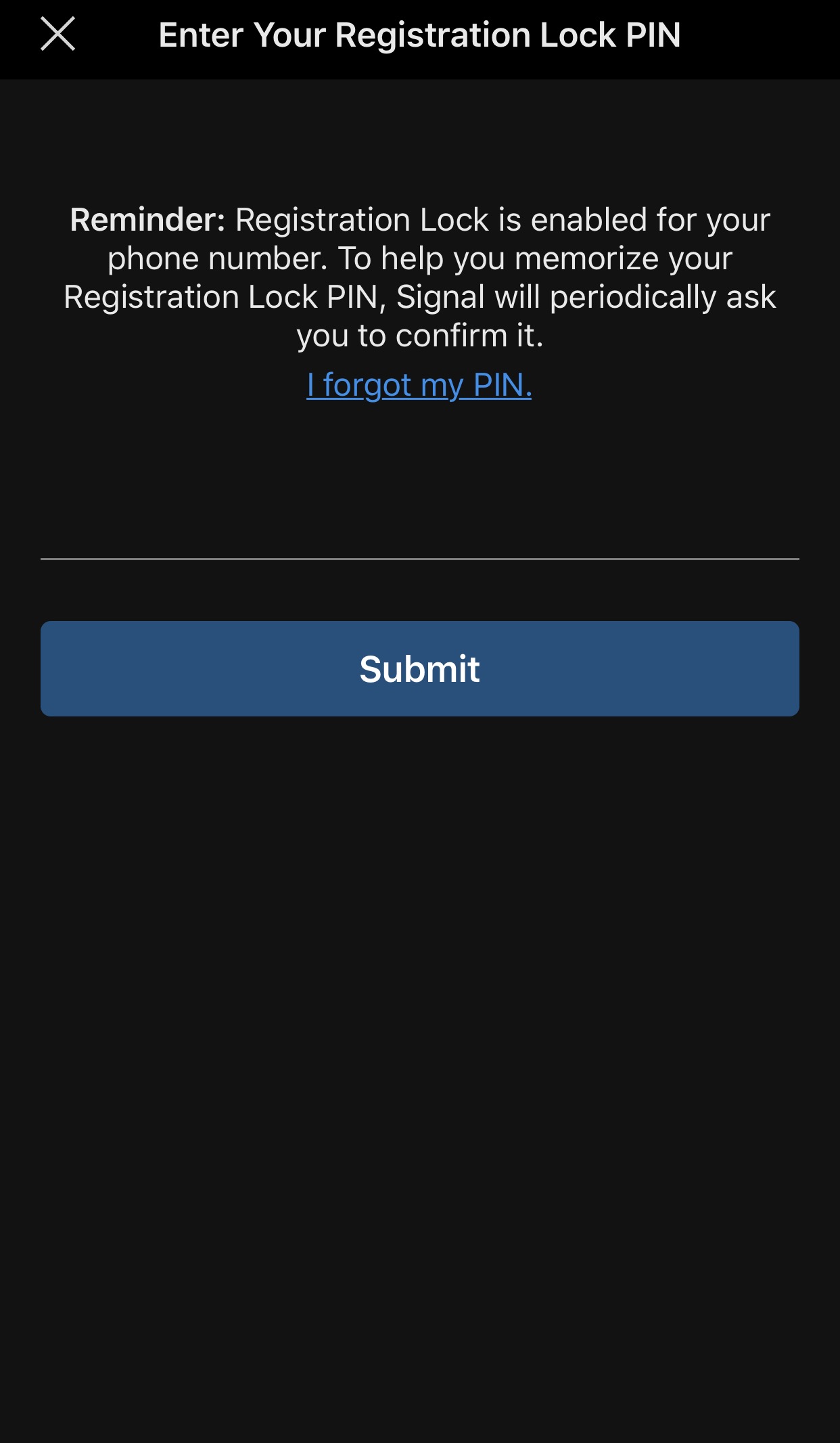
The user can dismiss the prompt and proceed with using Signal. Is this an intended behavior?
Seems like typing the PIN is an additional security measure and failing to provide it (or typing the invalid PIN) should lock the user out of accesing the dialogues screen.
 gdmka
on 11 Dec 2019
gdmka
on 11 Dec 2019
@gdmka No that is intended. The PIN is for registering a device with the signal service, I.e. when you install/reinstall signal on a device. So if you take another phone install signal there and try to register with your phone number you must enter the code correctly to proceed. This is as a security measure so that no one who knows your phone number and is somehow able to intercept the validation code you receive when registering can register with your number.
When you already have signal installed and your number registered this PIN entry is only so you remember it. It is nothing more than memory training so that the user does not accidentally forget the PIN.
tl;dr it’s perfectly okay for you to be able to skip it.
wucas
on 12 Dec 2019
Thank you
On Dec 12, 2019, at 2:37 AM, Lucas Wollenhaupt notifications@github.com wrote:
@gdmka No that is intended. The PIN is for registering a device with the signal service, I.e. when you install/reinstall signal on a device. So if you take another phone install signal there and try to register with your phone number you must enter the code correctly to proceed. This is as a security measure so that no one who knows your phone number and is somehow able to intercept the validation code you receive when registering can register with your number.
When you already have signal installed and your number registered this PIN entry is only so you remember it. It is nothing more than memory training so that the user does not accidentally forget the PIN.
tl;dr it’s perfectly okay for you to be able to skip it.—
You are receiving this because you are subscribed to this thread.
Reply to this email directly, view it on GitHub, or unsubscribe.
 paskalem
on 12 Dec 2019
paskalem
on 12 Dec 2019
To clarify: this issue is not about the possible bypass (which is legitimate as this serves only as reminder as explained before). This issue is about the PIN dialogue being shown twice or even more often. This can be seen in the video attached to the original post of this issue. Apparently this is not only tied to FaceID only but also to TouchID as can be seen in the following GIF:
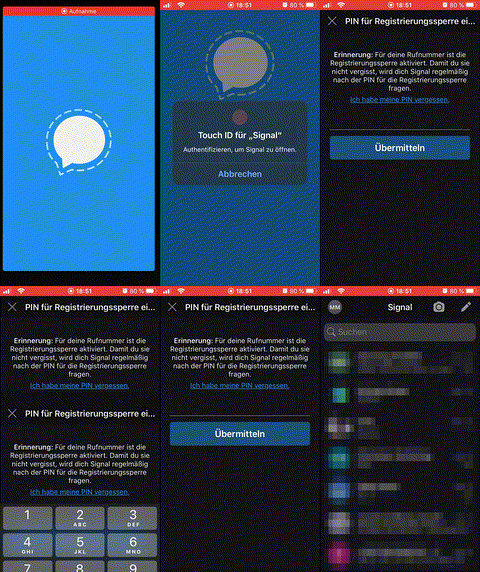
Note that the PIN dialogue and input does not get recorded by iOS, but the button states can be seen upon submission.
 muellermartin
on 10 Jan 2020
muellermartin
on 10 Jan 2020
I suspect that this Issue is nonexistent anymore with the change of how the PIN reminder is shown since the latest update. If no one objects within the next few days I will close this Issue.
wucas
on 19 Feb 2020
Closing this since the redesign solved the issue.
wucas
on 11 Mar 2020
Related issues
 loki187
·
3Comments
loki187
·
3Comments
 maxbrandes
·
4Comments
maxbrandes
·
4Comments
 michaelkirk
·
4Comments
michaelkirk
·
4Comments
 diegode
·
5Comments
diegode
·
5Comments
 zero77
·
3Comments
zero77
·
3Comments
Most helpful comment
@gdmka No that is intended. The PIN is for registering a device with the signal service, I.e. when you install/reinstall signal on a device. So if you take another phone install signal there and try to register with your phone number you must enter the code correctly to proceed. This is as a security measure so that no one who knows your phone number and is somehow able to intercept the validation code you receive when registering can register with your number.
When you already have signal installed and your number registered this PIN entry is only so you remember it. It is nothing more than memory training so that the user does not accidentally forget the PIN.
tl;dr it’s perfectly okay for you to be able to skip it.