Signal-ios: Interactions with the CDN in iOS 13 fail
- [x] I have searched open and closed issues for duplicates
- [x] I am submitting a bug report for existing functionality that does not work as intended
- [x] This isn't a feature request or a discussion topic
Bug description
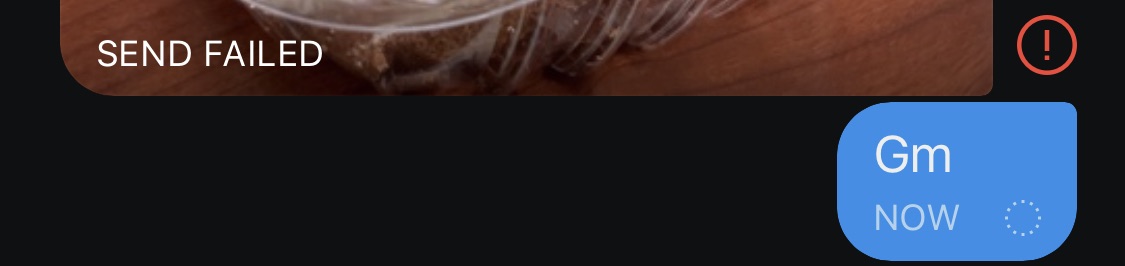
Since I've updated iOS 13 (Signal Version: 2.40.0.21) Attachments (Images, Videos, or Docs) failed to be sent.
Steps to reproduce
- Use iOS 13 Beta 1/2 and update signal
- Try sending an image.
- The circle keeps going round and round
Actual result: As soon as I hit the send button Signal tries to upload the image and eventually gives up and fails. It then blocks the next set of messages from being sent. After a minute or two once you the red box appears and you delete that message (or actually still don't know or understand) the queue of messages clears up and starts sending texts at least. Once I try to upload any media it loops through the whole thing again.
Expected result: You shouldn't have a dead queue of messages.
Screenshots
Device info
Device: iPhone XS
iOS version: iOS 13 beta 1
Signal version: 2.40.0.21
Link to debug log
https://debuglogs.org/611436c5e4ebf2ead72cb3945825547e8f799a1ced2155d728126ba92d132540.zip
Temp Fix
Re-posting for more visibility, as suggested by
, the current workaround or temp fix is mentioned
- Remember to clean up certificates once Signal has officially issued a fix for this.
 vivekpatani
All 14 comments
Same issue...
 n4nd0br
on 20 Jun 2019
n4nd0br
on 20 Jun 2019
Also having this issue.
 jasonborchardt
on 21 Jun 2019
jasonborchardt
on 21 Jun 2019
@n4nd0br @jasonborchardt Please do not bump issues like that. From CONTRIBUTING.md:
Don’t bump issues
Every time someone comments on an issue, GitHub sends an email to hundreds of people. Bumping issues with a “+1” (or asking for updates) generates a lot of unnecessary email notifications and does not help anyone solve the issue any faster. Please be respectful of everyone’s time and only comment when you have new information to add.
If you just want to say that you have the same issue, you can add the :+1: reaction to the original issue post, which does not send useless notifications.
 u32i64
on 22 Jun 2019
u32i64
on 22 Jun 2019
For me, even plaintext fails.
 rex4539
on 23 Jun 2019
rex4539
on 23 Jun 2019
In addition to this, receiving images also seems broken for me in iOS 13 beta. The image fails to load (progress bar stays empty) and the retry arrow appears, repeat.
 batu-one
on 25 Jun 2019
batu-one
on 25 Jun 2019
Same issues persist in iOS 13 beta2. Sending and receiving fail as well as uploading own profile image.
 ksg23
on 28 Jun 2019
ksg23
on 28 Jun 2019
So this was cross posted in the Android tracker with details and a solution and I’ve been waiting for this to update. Here is the information from reddit cause and temporary solution.
Why does signal use a self-signed cert in the first place?
 Stromos
on 28 Jun 2019
Stromos
on 28 Jun 2019
A self-signed cert is not bad in itself. It doesn't weaken the cryptography between client and server. But without signature from a publicly trusted CA, it leads to failure modes described in this issue.
Also technically, the cert isn't selfsigned. It appears that TextSecure (a.k.a Whisper Systems) are maintaining their own PKI, and the cert is signed by them.
 Alphakilo
on 28 Jun 2019
Alphakilo
on 28 Jun 2019
This is resolved in the latest beta release of our app. If you're running the iOS 13 beta, we encourage you to install this update from TestFlight.
If you haven't used the beta version of Signal before you can join here: https://testflight.apple.com/join/8FHtd1Jq
 Imperiopolis-Signal
on 1 Jul 2019
Imperiopolis-Signal
on 1 Jul 2019
Fixed for me at 2.40.2.0.
 TCB13
on 1 Jul 2019
TCB13
on 1 Jul 2019
Thanks for fixing the issue, people who added a cert by themselves (according to , consider removing the added cert now that Signal shipped the solution in 2.40.2.0.
vivekpatani
on 1 Jul 2019
2.40.2.0 fixed sending and receiving images and voice messages and also setting a profile picture.
 Duckbilled
on 1 Jul 2019
Duckbilled
on 1 Jul 2019
Running newest Beta version (2.43.0.7) and iOS 13.0 and still having issues sending/receiving images as well as setting a profile picture.
Trying to resend gives this error "SSL error has occurred and a secure connection to the server cannot be made."
 chicagocyb3r
on 16 Sep 2019
chicagocyb3r
on 16 Sep 2019
@jmmiller60601 what version of iOS 13 are you running? This issue was fixed by Apple in 13.0 beta 6, it will not work on earlier versions.
Imperiopolis-Signal
on 16 Sep 2019
Related issues
 echarlie
·
5Comments
echarlie
·
5Comments
 andyggg
·
4Comments
andyggg
·
4Comments
 fracture-point
·
3Comments
fracture-point
·
3Comments
 diegode
·
5Comments
diegode
·
5Comments
 gabridome
·
4Comments
gabridome
·
4Comments
Most helpful comment
In addition to this, receiving images also seems broken for me in iOS 13 beta. The image fails to load (progress bar stays empty) and the retry arrow appears, repeat.