Signal-desktop: Desktop version - cannot connect to server
- [x] I have searched open and closed issues for duplicates
Bug Description
"Failed to connect to server" on a clean desktop install
Steps to Reproduce
- Clean installation of Signal Desktop (from signal.org) on Windows 10 with Windows Defender (latest build)
- Attempt to launch Signal (normal OR with Admin rights OR after manually adding Signal to Firewall list of execeptions)
Actual Result:
Signal is "stuck" at the "Something went wrong! Failed to connect to the server" message. Retries to connect to server periodically with the same result.
Expected Result:
Prompt to link to Signal via phone.
Screenshots
Platform Info
Signal Version: v 1.39.5
Operating System: Windows 10 (Enterprise v 1909, build 18363.1256)
Linked Device Version: iOS 14.2
Link to Debug Log
Unable to submit log file: "Something went wrong with the upload". Pastebin link: https://pastebin.com/7m2aEGTa
#
 pebuha
All 34 comments
same here!
 lucasff
on 15 Jan 2021
lucasff
on 15 Jan 2021
I am also experiencing server issues at the moment (central europe, of that matters):
https://debuglogs.org/60c789537c30952e0c8b38f9cbb8b6d333d2ebc51886c0ab06595100f8cb7f0e
 Trolldemorted
on 15 Jan 2021
Trolldemorted
on 15 Jan 2021
same here... moreover, I started experiencing network issues right after updating to version 1.39.5.
however, I reinstalled version 1.39.4 and it's also experiencing network issues.
seems as if Signal is getting DDoSed 😕
 sir-skipper
on 15 Jan 2021
sir-skipper
on 15 Jan 2021
Same. Just updated to 1.39.5 now met with "Disconnected. Check your network connection". Messages cannot be sent or received. South Eastern US.
 JP1021-1
on 15 Jan 2021
JP1021-1
on 15 Jan 2021
This comes and goes every few seconds:
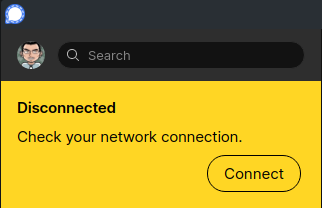
I tried to restart the application ("turn it off and on again") but no difference!
My system information:
Operating System: Manjaro Linux
KDE Plasma Version: 5.20.4
KDE Frameworks Version: 5.77.0
Qt Version: 5.15.2
Kernel Version: 5.9.16-1-MANJARO
OS Type: 64-bit
Processors: 20 × Intel® Core™ i9-10900K CPU @ 3.70GHz
Memory: 31.1 GiB of RAM
Graphics Processor: Mesa Intel® UHD Graphics 630
My location
🇫🇮 Finland
I also checked the https://downdetector.com/status/signal/ and it showed:

 mmahmoudian
on 15 Jan 2021
mmahmoudian
on 15 Jan 2021
I am also facing problems, in east EU. Desktop gets disconnected again and again. Android has HUGE delays. More than 5 minutes to send a message.
I had started a thread that I believe is relevant.
I fear the surge of new users has brought its toll on quality of service. For the past week I am facing issues relevant to messaging delays any time of the day, and I have gotten similar feedback from a contact in the US. So it can't be my country/network/phone.
 Chuhtra
on 15 Jan 2021
Chuhtra
on 15 Jan 2021
Can confirm
"The server rejected our query, please file a bug report. (original: promiseAjax: invalid response; code: 502)"
https://debuglogs.org/87e18678ea2f4e5ee46e6a771566697e9784ad1a66401b2e46a5f8b7ae8aa4b7
macOS 11.1
Linked device: iOs 14.3
 IT-VBFK
on 15 Jan 2021
IT-VBFK
on 15 Jan 2021
I'm hit by this as well. When I restart the desktop application several times, I do get through sometimes. I just was able to send one message to a contact. The second one however was directly stuck again (it shows as sent in the deskop app, but not as delivered and it doesn't show on my phone either).
I'm seeing this on Linux (Debian Testing) with a KDE desktop on a kernel 5.10.7. Before the update to 1.39.5 of the Signal desktop application everything worked.
 TheRealCuran
on 15 Jan 2021
TheRealCuran
on 15 Jan 2021
Same issue here. For what it's worth, https://textsecure-service.whispersystems.org/ (found in other troubleshooting guides) returns 404
Edit to add: USA user here
 bsavells
on 15 Jan 2021
bsavells
on 15 Jan 2021
I am getting the same errors both using my companies VPN and when not. Occasionally it works, but mostly not.
 andyfore
on 15 Jan 2021
andyfore
on 15 Jan 2021
Same issue.
Log: https://debuglogs.org/47d87d383a206041f3c1bb31226241b9311cad46d548152e722e3d44f1ea107c
Today is when I started seeing/noticing this.
Also, quite often the message won't be sent. I would receive a message from my contact (who is on a phone) right then, I would also be seeing typing indicators from that person, but I won't be able to send my messages (from Desktop, succeeded from my phone). Often it takes too many manual retries to be able to send the messages.
Error: The server rejected our query, please file a bug report. (original: promiseAjax: error response; code: 502). (Could be #4858)
OS: Mac Catalina 10.15.7
Signal desktop: 1.39.5
No VPN. Phone works smooth on the same Wi-Fi network. (edit: facing issue from phone as well but haven't used phone enough today to say for sure)
 justauserid
on 15 Jan 2021
justauserid
on 15 Jan 2021
Rolling back to version 1.39.4 allows me to communicate.
andyfore
on 15 Jan 2021
No VPN. Phone works smooth on the same wifi network.
Phone seems to work partially here: i can send and the messages seem to go to the server ("sent" icon is there too). But they don't appear on other linked devices and take sometimes very long to get delivered to the contacts. On one message I'm now waiting for around 10 minutes.
TheRealCuran
on 15 Jan 2021
Rolling back to version 1.39.4 allows me to communicate.
False alarm. THis did not actually work.
andyfore
on 15 Jan 2021
@andyfore I am using version 1.39.4-1 from Arch community repo and still have the problem
mmahmoudian
on 15 Jan 2021
Same issue. Happens both when using VPN and when not using. Intermittently connects.
 milhouse34521
on 15 Jan 2021
milhouse34521
on 15 Jan 2021
No VPN. Phone works smooth on the same wifi network.
Phone seems to work partially here: i can send and the messages seem to go to the server ("sent" icon is there too). But they don't appear on other linked devices and take sometimes very long to get delivered to the contacts. On one message I'm now waiting for around 10 minutes.
You are right. I didn't really use phone a lot today. I just checked now, and I am facing that issue from phone as well. I will edit my comment.
justauserid
on 15 Jan 2021
Same Issue Unable to connect,
New Issue:
After that uninstall the signal app but now unable to install Signal Desktop version 1.39.5 with OS Mac Big Sur

 nayeeenaa
on 15 Jan 2021
nayeeenaa
on 15 Jan 2021
Same issue on Signal Desktop Linux (Ubuntu)
 Edru2
on 15 Jan 2021
Edru2
on 15 Jan 2021
Signal is having some server issues right now, which we're actively working on.
 EvanHahn-Signal
on 15 Jan 2021
EvanHahn-Signal
on 15 Jan 2021
Signal is having some server issues right now, which we're actively working on.
Happy to hear that. I hope the Signal service will be stable soon.
nayeeenaa
on 15 Jan 2021
Signal is having some server issues right now, which we're actively working on.
May I suggest, that one of the next development goals becomes: decentralise message delivery as much as possible: ie. add a "online discovery" feature and if my phone/desktop application has a contact online, try to open a direct connection for messages, skipping the central servers for most traffic. Different schemes like what Freenet are doing could also be explored, though it might be really tough to do in an anonymity preserving way?
In any case: thanks for looking into this!
TheRealCuran
on 15 Jan 2021
Good to know! Services status page would be helpful.
Btw win10 east Europe same issue
 szemy
on 15 Jan 2021
szemy
on 15 Jan 2021
Good to know! Services status page would be helpful.
Btw win10 east Europe same issue
there is a status page
 Sevyls
on 15 Jan 2021
Sevyls
on 15 Jan 2021
Interestingly, only problems in the desktop app (either 'Cannot connect to server' or 'Message sent failed'), whereas on Android Signal seems to work normally as far as sending is concerned.
 sirius-c
on 15 Jan 2021
sirius-c
on 15 Jan 2021
Interestingly, only problems in the desktop app (either 'Cannot connect to server' or 'Message sent failed'), whereas on Android Signal seems to work normally as far as sending is concerned.
still got problems sending messages in macOS desktop app and iOS mobile app
Sevyls
on 15 Jan 2021
yeah, as said above by the developer: it's a server issue. So everything is affected. And if you are not, you're just lucky. In my Signal app on the phone it shows the message with the technical difficulties and I have trouble sending messages sometimes.
TheRealCuran
on 15 Jan 2021
Good to hear that the status is now on "technical difficulties".
When I first looked at it when I had problems a few hours ago it was green which was disappointing.
 corneliusroemer
on 15 Jan 2021
corneliusroemer
on 15 Jan 2021
I cannot connect to Signal from my macOS (Big Sur) desktop with the latest version downloaded from the website. Mobile app appears to work OK
 ericstephens
on 15 Jan 2021
ericstephens
on 15 Jan 2021
Signal is experiencing technical difficulties. We are working hard to restore service as quickly as possible. I'll post something here once it's resolved.
EvanHahn-Signal
on 15 Jan 2021
SSL Root Cert is no longer valid.
see: #4794 (comment)
Issue seems to be DNS, not the root cert. Signal uses pinned self signed cert, so it wont show as valid in Curl.
As you noticed in your comment. textsecure-service.whispersystems.org is resolving to 127.0.0.1
I was able to get my signal desktop version working after I hardcoded the IP of textsecure-service.whispersystems.org in my local hosts file
 vasuballa
on 15 Jan 2021
vasuballa
on 15 Jan 2021
And status.signal.com now goes to digimedia.com.
EDIT: Never mind.
 lnicola
on 15 Jan 2021
lnicola
on 15 Jan 2021
@lnicola You should try status.signal.org instead, signal.com belongs to Digimedia. So status.signal.com must have never worked, and isn't meant to.
corneliusroemer
on 15 Jan 2021
Signal's service was restored a few days ago. Closing and locking this issue because I think it's all dealt with.
Feel free to open a new issue if you encounter other bugs!
EvanHahn-Signal
on 19 Jan 2021
Related issues
 McLoo
·
3Comments
McLoo
·
3Comments
 fredaas
·
3Comments
fredaas
·
3Comments
 hanzei
·
3Comments
hanzei
·
3Comments
 demux4555
·
3Comments
demux4555
·
3Comments
 shaaati
·
3Comments
shaaati
·
3Comments
Most helpful comment
Signal is having some server issues right now, which we're actively working on.