Signal-desktop: Devanagari input - issue in typing consonantal conjuncts
- [X] I have searched open and closed issues for duplicates
Bug Description
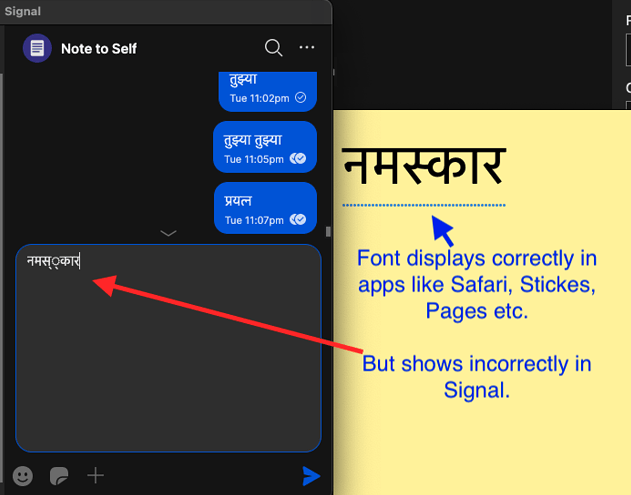
- I am trying to use Devanagari input for typing in Signal, but the input fails when using conjuncts (meaning joint characters). See below screenshot for the exact behaviour.
The स्क in the middle of नमस्कार is the conjunction of the 2 characters स and क and should ideally be displayed as “स्क” but for some reason it gets shown as “स् ्क”.
This issue does not occur in other apps (Safari, Pages etc.) where I use the same input method.
- This issue also does not occur in the Signal iOS app when using a similar input method.
Steps to Reproduce
- Enable "Devanagari - QWERTY" keyboard from macOS Settings > Keyboard > Input Sources
- Switch to this newly enabled input source from the top menu bar input source selection icon or by pressing Ctrl-Space.
- In Signal app, start typing in any of the message text box (say in "Note to Self").
- Try typing a conjunct character sequence as shown here.
- Example, typing
tfvwill attempt to typeत(ta) + ्(f) + व(va) = त्व(tva) - Or typing
sfkshould ideally result inस्क, which is actually स + ् + क fis the character which does the conjunction.
Actual Result:
sfk results in स््क
tfv results in त््व
Expected Result:
sfk should ideally result in स्क
tfv should ideally result in त्व
Screenshots
Platform Info
Signal Version: v1.39.4
Operating System: macOS 11.1
Linked Device Version: 5.0.3.0
Link to Debug Log
https://debuglogs.org/8c53837f30a52b94b38c4d6fb5c0db8aa5b053dfbf90be06b6faf031fb2d2c83
 svadhyay
All 20 comments
Thanks for this bug report @svadhyay. Can you test Chrome/Chromium for us? That's what Signal Desktop is based on, and if it works in Chrome, then it should work in Signal Desktop, or at least when we upgrade to that version.
 scottnonnenberg-signal
on 6 Jan 2021
scottnonnenberg-signal
on 6 Jan 2021
@scottnonnenberg-signal I'm sorry I didn't understand you. Are you saying to test whether this issue also occurs in Google chrome browser?
svadhyay
on 6 Jan 2021
@svadhyay Yes.
scottnonnenberg-signal
on 6 Jan 2021
@svadhyay fwiw, I don't have this issue on Linux (Debian, to be exact). I wonder if Chrome (and thus Signal) is using different font rendering libraries than the rest of the system (and thus you're running into this issue).
Because assuming all of the programs are using the same Devanagari font, then the glyphs clearly exist and the problem is that the font renderer isn't selecting the correct one.
 chiraag-nataraj
on 6 Jan 2021
chiraag-nataraj
on 6 Jan 2021
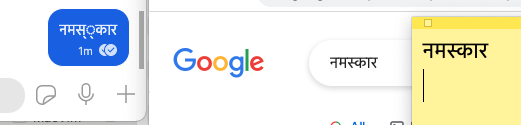
@scottnonnenberg-signal I tested on Chrome. It works fine there.
Here is a screenshot for reference.
L to R : Signal -- Chrome -- Stickes
svadhyay
on 7 Jan 2021

So it's interesting that Chrome doesn't have this problem but Signal does. By any chance, do you have multiple Devanagari fonts installed on your computer?
chiraag-nataraj
on 7 Jan 2021
This is what I have. @chiraag-nataraj
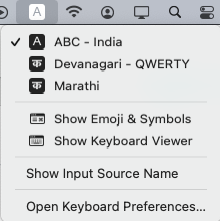
Also I have tried by both input methods, the "Devanagari" as well as the "Marathi" one. Issue is the same.
svadhyay
on 7 Jan 2021
@svadhyay That looks like your input method settings. What I asked is if you have multiple _fonts_ for Devanagari (e.g. Lohit Devanagari, Noto Sans Devanagari, etc). You can check this by opening up e.g. Pages, scrolling through the available fonts, and seeing if there are multiple Devanagari fonts.
Just looking at your screenshot, it seems like the kerning (e.g. the spacing between का and र) is different between the different programs. The 'म' also looks slightly different, but I can't tell if that's just due to pixellation from the screenshot or if there is actually a difference. This is why I'm asking if there are multiple Devanagari fonts, since it might be the case that Signal picks one and Chrome picks another. I've actually encountered this in the past on my laptop (different OS, different program, similar issue), which is one reason I suspect that's what's going on here.
chiraag-nataraj
on 7 Jan 2021
Also @svadhyay, can you check if the same thing happens with another Indic script (e.g. Kannada, Bangla, Gurmukhi, etc)? It would be interesting to know if you're _only_ encountering this with Devanagari.
chiraag-nataraj
on 7 Jan 2021
@scottnonnenberg-signal @chiraag-nataraj
I also have found a workaround to this. See below video.
Basically after the conjunction fails, you hit backspace till only the virama (conjunct marker) is left below the स and then continue typing the rest of the word.
I am not sure but it may mean that the issue is more during the inputing of the characters and lesser in rendering (because using the workaround and also messages sent from iOS appear correctly.)
@chiraag-nataraj
I checked regarding the fonts and yes there are quite a lot of Devanagari and Indic fonts available.
https://user-images.githubusercontent.com/8301787/103832964-06ed6c80-50c3-11eb-9a48-8ec7678b08dc.mov
__
svadhyay
on 7 Jan 2021
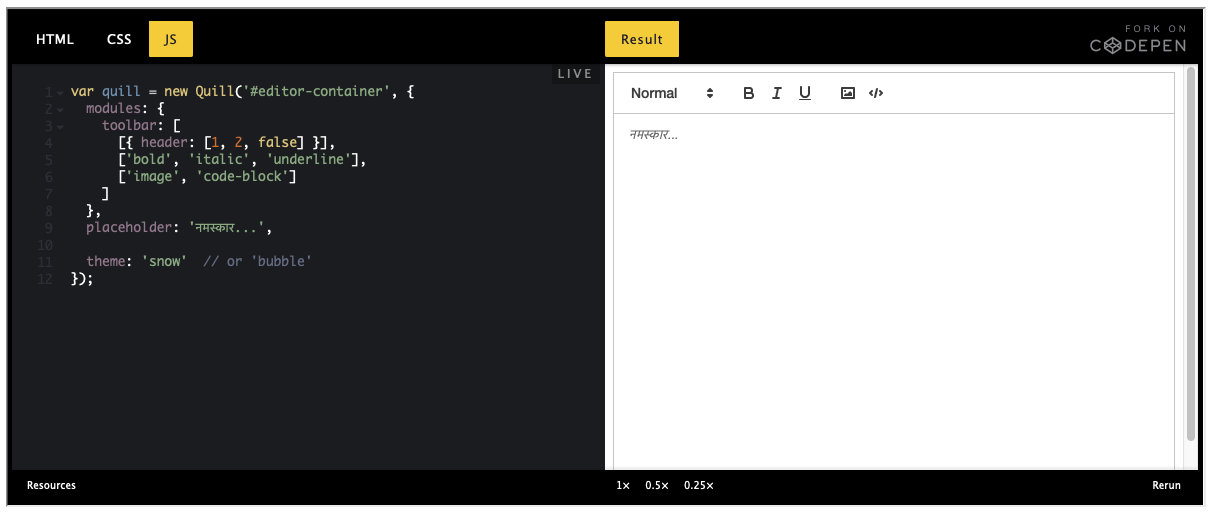
As one final test, you can try it here: https://quilljs.com/playground/
That's the library we use for the composition area, and it's likely the one breaking input.
scottnonnenberg-signal
on 7 Jan 2021
@svadhyay Never mind, I don't know how I didn't see it before. In all of your screenshots (and in your video), I see two viramas inserted, not just one. This is why your workaround works, since it deletes the extra one and allows the character joining to work as normal.
As @scottnonnenberg-signal suggested, there is probably something going on in the composition area. Taking a page from Scott's suggestion on another issue: Does this issue happen in the 'Developer Tools' (you can open Developer Tools by going to View -> Developer Tools, I think)?
chiraag-nataraj
on 7 Jan 2021
It was the Debug Log window that I was suggesting, which is another input box. It's different because it doesn't have Quill enabled.
scottnonnenberg-signal
on 7 Jan 2021
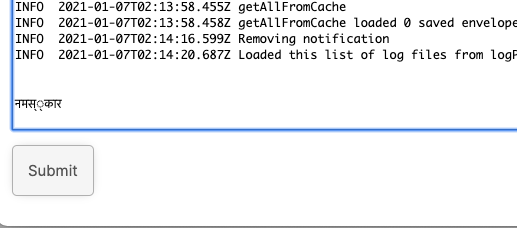
@scottnonnenberg-signal I tried the link you gave. It works fine there. See below image.
I tried both the JS window as well as directly typing into the Result window. Both results are same.
In the Signal Debug Log box it breaks! See below.
@chiraag-nataraj
What exactly should I check in the Developer tools?
svadhyay
on 7 Jan 2021
@svadhyay Thanks for that investigation. The check in the debug log window suggests that this behavior will be fixed when we upgrade Electron, thereby updating to a new version of Chrome.
scottnonnenberg-signal
on 7 Jan 2021
@svadhyay
So right now, we have the following data:
- The issue occurs in the composition area.
- The issue occurs in the debug log area.
- The issue does not occur in the online version.
This would suggest that it has something to do with Signal Desktop or Electron (or the way the composition library is embedded within Signal Desktop). It also is probably platform-specific, since Linux doesn't seem to be affected, and input method-specific, since there would probably be many more bugs opened if all input methods (other than QWERTY) were broken on macOS.
If this issue doesn't occur in the developer tools, this might suggest that the problem lies with Signal Desktop specifically. Otherwise, this might be a more general Electron issue.
So I have two questions for you that may help narrow this down:
- Does the same issue occur in the Developer Tools?
- Does the same issue occur in other Electron apps (e.g. Slack)?
[edit] Ignore this. It seems @scottnonnenberg-signal already knows what's going on :slightly_smiling_face:
chiraag-nataraj
on 7 Jan 2021
@scottnonnenberg-signal any idea when that upgrade will happen?
So that I can recheck it after that.
svadhyay
on 7 Jan 2021
@chiraag-nataraj
just to answer your question, I face this same issue in another app called "JOSM".
svadhyay
on 7 Jan 2021
@svadhyay Seems like JOSM is a Java program, not Electron. So that's probably a distinct, but related, problem.
chiraag-nataraj
on 7 Jan 2021
I too am facing this exact same issue. Glad it is being looked into!
 sanketgarade
on 7 Jan 2021
sanketgarade
on 7 Jan 2021
Related issues
 fredaas
·
3Comments
fredaas
·
3Comments
 ProactiveServices
·
3Comments
ProactiveServices
·
3Comments
 McLoo
·
3Comments
McLoo
·
3Comments
 bcsga
·
3Comments
bcsga
·
3Comments
 jeremymasters
·
3Comments
jeremymasters
·
3Comments