Signal-desktop: Signal stuck at blank blue screen after upgrade on MacOS 10.10.5
- [X] I have searched open and closed issues for duplicates
Bug Description
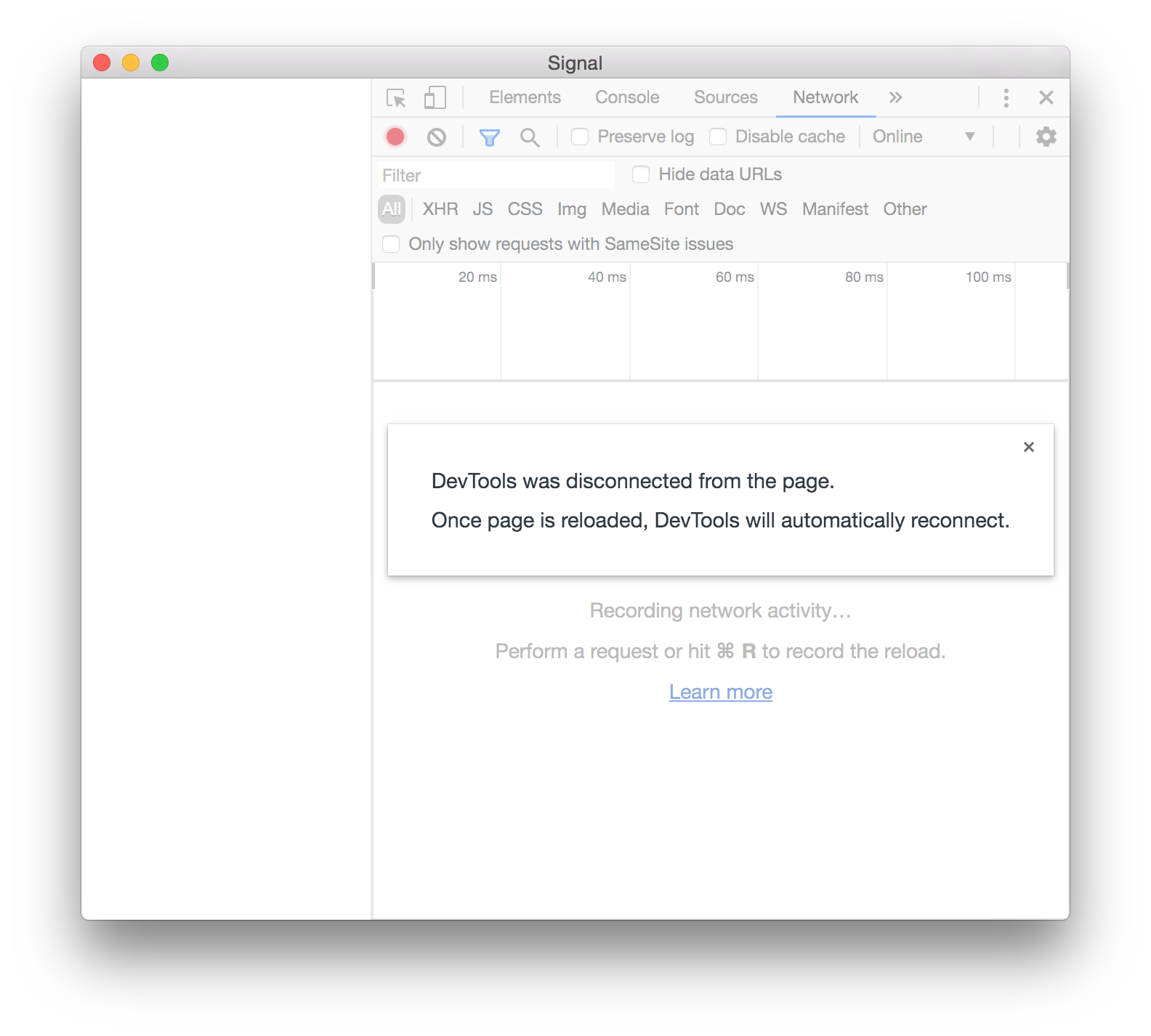
After accepting an auto-update to version 1.35.1 (from 1.34.5, if memory serves), Signal "launches" to a window with a blank blue screen. Bringing up the developer console shows "DevTools was disconnected from the page" error, logs seem uninformative (though see below for details and more interesting startup message when run from the command-line).
Note: This seems similar to issue #3281, but since the OS is different, and that issue is marked closed, I don't actually know if it's the same issue, so filing a new one.
Steps to Reproduce
- Launch Signal
Actual Result:
- Get a blank window, with title bar that says Signal, filled with the blue color, and nothing else.
- Selecting "File -> Quit" closes the window, but doesn't quit the app (3rd screenshot shows activity monitor after doing this).
Expected Result:
- (Normal behavior.)
Screenshots


Platform Info
Signal Version:
1.35.1
Operating System:
MacOS 10.10.5
Linked Device Version:
iOS 3.8.3.5 [not actively used]
Link to Debug Log
As described, unavailable... View -> Debug Log does nothing, that I can see. So, instead, I'm attaching (redacted) versions of ~/Library/Application Support/Signal/logs/log.log (filtered for a single run), and "commandline.log", which I copy/pasted (and redacted) from running things in Terminal, to capture the output. That latter has error messages that I presume are the most interesting bits.
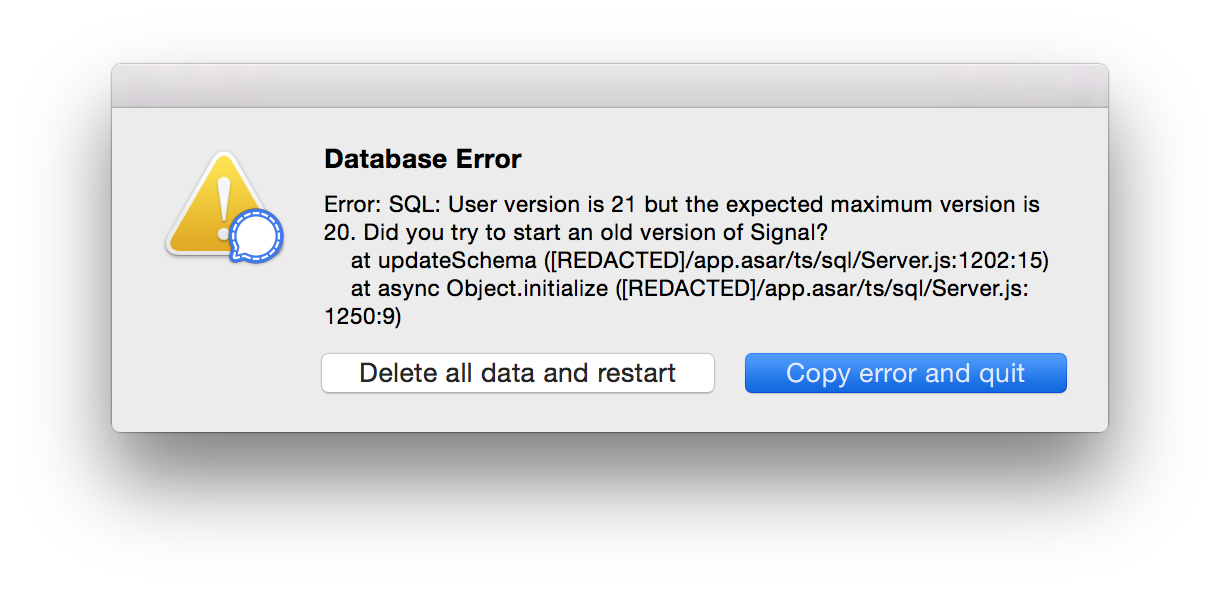
Would of course love a fix, but if there's a useful workaround to get me up and running again, that would also be appreciated. I tried downgrading back to 1.34.5, but that was using a prior db schema... I'm unsure whether deleting the database and restarting will lose important data, or just a cache, and I'd prefer not to lose old message data. Here's what I get when I try that (using the "Copy error and quit" button):
And just in case this is helpful, here's the screenshot of that:
 lindes
All 15 comments
Experiencing the same issue.
 iros
on 3 Sep 2020
iros
on 3 Sep 2020
The same issue, OSX 10.11.6
 caha813
on 3 Sep 2020
caha813
on 3 Sep 2020
Thank you we're looking into this.
 josh-signal
on 3 Sep 2020
josh-signal
on 3 Sep 2020
Same for me on OS X 10.11.6
Incidentally cannot just quit Signal - have to go into Activity Monitor and Force Quit
 Rufus-The-Dog
on 3 Sep 2020
Rufus-The-Dog
on 3 Sep 2020
Same here OS X 10.11.6. Tried a reinstall, same results.
log.log
 ToolZz
on 3 Sep 2020
ToolZz
on 3 Sep 2020
Attempted reinstall, Beta install, same problem.
Attempted to access logs and developer tools through the view menu - dev. tools show empty, no response when selecting logs.
OS X 10.10.5
Is it possible to provide a stable old version to download while this is investigated?
 janchristopherson
on 3 Sep 2020
janchristopherson
on 3 Sep 2020
The latest version of Signal Desktop currently requires macOS 10.12 (“Sierra”) or higher. We are working on a possible fix for users on legacy versions of macOS now.
In the meantime, if you are in a position to upgrade macOS on your machine, Signal will start working again. Given the fact that macOS 10.11 (“El Capitan”) was released almost four years ago on September 30, 2015, we recognize that this solution will not work for many of you due to incompatible hardware, older software, etc.
Unfortunately, downgrading the Signal version isn’t a quick fix because the database schemas are not compatible.
We apologize for the inconvenience, and we are working on it. This issue was not discovered during the beta period because it appears as though everyone in the beta community is running more current versions of macOS. If any legacy macOS users are willing to join the beta, that will help us catch things like this earlier. However, we do recommend that Signal users keep their operating systems up-to-date.
josh-signal
on 3 Sep 2020
Thanks for the update - I bought my MacBook Pro in November 2009 and have kept it alive and well with new batteries, SSDs and a DVD drive since but it can go no further than El Capitan so would be grateful for a fix and would be quite prepared to Beta test on my legacy machine for as long as it keeps going.
Rufus-The-Dog
on 3 Sep 2020
Also appreciate the update!
I'm not necessarily looking to have the newer version running on my old hardware - supporting that much legacy hard/software is an unreasonable ask, I'm just looking for the install files to whichever old version (which I of course didn't document) of Signal I had running before I clicked "Ok - Update" on the prompt, and perhaps a request to block autoupdate to incompatible versions.
I'm not sure if your comment about incompatible db schemas refer to this or not.
[EDIT:] Happy to join the Beta, will go and look for it now
janchristopherson
on 3 Sep 2020
The cause of the problem appears to be this:
dyld: lazy symbol binding failed: Symbol not found: _dispatch_queue_create_with_target$V2
Referenced from:
 /Applications/Signal.app/Contents/Resources/app.asar.unpacked/node_modules/ringrtc/build/darwin/libringrtc.node
Expected in: /usr/lib/libSystem.B.dylib
A bit more info in #4485 .
 jtoomim
on 4 Sep 2020
jtoomim
on 4 Sep 2020
i accidentally forced downgrade just clicked esc and lost all my datas... to Signal-Desktop-1.34.5
 sh4w2019
on 4 Sep 2020
sh4w2019
on 4 Sep 2020
Thanks for your patience everyone, please upgrade to Signal Desktop 1.35.2
josh-signal
on 4 Sep 2020
Thanks for your patience everyone, please upgrade to Signal Desktop 1.35.2
Very thx, success :) !!! I've the same problem, MacBook Pro (17-inch, Mid 2009) with last operating system, I can't upgrade system. And hardware I don't want. Now Apple make MacBooks with smaller display :) ...
caha813
on 4 Sep 2020
We are working on a possible fix for users on legacy versions of macOS now.
Thanks! And I see that it's out, and I just tried it and can confirm it fixed the problem for me. Much appreciated!
This issue was not discovered during the beta period because it appears as though everyone in the beta community is running more current versions of macOS. If any legacy macOS users are willing to join the beta, that will help us catch things like this earlier.
I'd be open to joining, if you like... though I notice that the beta page (am I on the right page? It was the first hit on a google search) seems also to require MacOS 10.12 or later... is that a genuine requirement?
However, we do recommend that Signal users keep their operating systems up-to-date.
Understood. :-/ Thanks for working with those of us stuck in the past.
lindes
on 5 Sep 2020
@lindes That page appears to be incorrect. You can go ahead and install the beta - right now it's exactly the same as production.
 scottnonnenberg-signal
on 6 Sep 2020
scottnonnenberg-signal
on 6 Sep 2020
Related issues
 github-cygwin
·
3Comments
github-cygwin
·
3Comments
 petcap
·
3Comments
petcap
·
3Comments
 PanderMusubi
·
3Comments
PanderMusubi
·
3Comments
 fredaas
·
3Comments
fredaas
·
3Comments
 lokesh-krishna
·
3Comments
lokesh-krishna
·
3Comments
Most helpful comment
The same issue, OSX 10.11.6