Signal-desktop: Dissapearing Sticker packs on Signal Desktop
- [X] I have searched open and closed issues for duplicates
Bug Description
Certain sticker packs dissapear from the list of installed sticker packs on signal desktop (Mac)
Steps to Reproduce
Install a sticker pack on signal desktop (the one I saw dissapearing the most is: https://signalstickers.com/pack/1dbd1b05e9789b351884862bceb34ce1)
Same packs are installed on signal mobile (android)Wait, use as usual. After some point the pack and all associated stickers will dissapear from the list
Actual Result:
Sticker packs dissapear randomly (only on Signal desktop, no problem with signal on android)
Expected Result:
Installed packs on signal desktop should stay until uninstalled
Platform Info
Signal Version: v1.34.1
Operating System: Mac OS
Linked Device Version: Android signal 4.60.9
Link to Debug Log
I'll post one here as soon as I notice the next bug (got swallowed in long debug logtrace)
 kodsama
All 22 comments
I'll post one here as soon as I notice the next bug (got swallowed in long debug logtrace)
Hi, @MaralAfris. Debug logs for Signal are available under View > Debug Log. Is what you were doing somehow disabling that functionality? If not, you should be able to upload a debug log from that menu.
 kenpowers-signal
on 5 Jun 2020
kenpowers-signal
on 5 Jun 2020
Hi,
Yes I know, I am trying to pinpoint a time where it happens, it is kind of random and I haven't found any triggers yet. Many messages go through so the debug logs are gigantic.
I attach here the gigantic one (starting with reinstalling the stickers until I noticed that one of the packs dissapeared and reinstall it)
gigantic_signal_log.log
and continue to try to locate a cause for the disappearance. Thanks for the fast reply ;) Stay tuned!
kodsama
on 9 Jun 2020
Hi again,
I managed to get a smaller debug trace. Couldn't see what the problem is from there. This time 3 packs dissapeared.
I noticed it when I took the mac out of sleep this morning, which might be a trigger.
Here is the log:
signal_debug_log.log
kodsama
on 10 Jun 2020
Hi again,
Now it happened during a shorter period. I reinstalled the stickers in the morning and they just dissapeared again and reinstalled. No sleep of the computer in between. I clipped the logs between the 2 reinstall events. Hope it helps!
signal_log2.log
kodsama
on 10 Jun 2020
@MaralAfris Please don't 'clip' the logs. To get a complete picture of what's going on, we may need to see things which don't look like install or uninstall events to you.
I spent some time trying to get your described behavior to happen with that large sticker pack, but I could not.
Next time it happens, please provide a full debug log. Please also provide a debug log from your mobile device along with a description of what you see there. Does it still show up on your mobile device, or does it disappear from there as well?
 scottnonnenberg-signal
on 12 Jun 2020
scottnonnenberg-signal
on 12 Jun 2020
I am experiencing this exact same issue on Linux (Debian Buster). Some Sticker Packs keep vanishing from Signal Desktop. On Android the same Sticker Packs are present at all times. The stickers were installed directly on the desktop app. I can't pinpoint exactly when it is disappearing, but it doesn't take long.
Another thing that I've noticed is that if I click on a sticker someone sent me from this same pack, the sticker context menu opens up offering me to save this pack of stickers. After the pack loads, but before I click on install, it says it is installed already and magically reappears on my list with all the expected behavior for when you install a new sticker pack, even the dialog "installed" on the lower left corner.
 absort0
on 20 Jun 2020
absort0
on 20 Jun 2020
Hello again,
As @absort0 described I have no problem over android and packs installed there stay. Installing packs from signal desktop also get installed there and stay.
I attach a full log, noticed this time that many packs dissapeared, not sure when either.
Sorry to not be more precise but I haven't observed any specific behavior that triggers this so far.
Here is the complete log:
signal_full_log.log
EDIT: Happened again. I attach another log
signal_full_log2.log
kodsama
on 23 Jun 2020
Something that you might try when installing on Desktop is opening up the sticker pack dialog, and then waiting maybe a minute (wait for a bit after all the stickers within the pack have been downloaded), and _then_ select to install the sticker pack. Does that change things?
scottnonnenberg-signal
on 24 Jun 2020
I tried that earlier thinking that installing an incomplete pack could be the source but it does not change the problem. Even if all stickers are loaded before installing the pack, installation goes fine (I get a installation complete message) but after some time it dissapears from the installed packs.
EDIT: Maybe it would help, if I send a sticker from a previously installed pack on desktop from my phone it still seems that the pack isn't installed on desktop. I can thus reinstall the pack on signal desktop from my sticker sent from the phone.
kodsama
on 24 Jun 2020
I can confirm that this is an issue on Windows 10 too, my sticker packs get deleted all the time. So this is definitely a bug in the client, and not a platform specific issue.
This sounds a bit strange, but is it possible that the issue somehow stems from disappearing convos? Like if the sticker pack is sourced from a convo with someone who you have disappearing messages enabled for, is there a bug that is somehow (unintentionally) tying the lifetime of the sticker packs to those messages?
The default packs have never gotten deleted for me (Bandit, Zozo) but others seem to get deleted intermittently.
 gaasedelen
on 26 Jun 2020
gaasedelen
on 26 Jun 2020
@gaasedelen It is intentional that non-installed packs are deleted when all messages which reference them are deleted from your local client. But it sounds like you're saying that you install a pack and it shows in the sticker picker, for example, and then later when a disappearing message is deleted, the pack is also deleted?
scottnonnenberg-signal
on 26 Jun 2020
Yes, that is correct. Our explicitly installed sticker packs are getting deleted on the desktop client. I don't have this issue on the mobile app.
Within @MaralAfris's log signal_log2.log you can see the only 'sticker' event that occurs between him having to reinstall the stickers is the following:
...
INFO  2020-06-10T09:28:40.754Z destroyExpiredMessages: Loading messages...
INFO  2020-06-10T09:28:40.756Z Message expired {"sentAt":1591176519829}
INFO  2020-06-10T09:28:41.033Z Remove expired message from collection {"sentAt":1591176519829}
INFO  2020-06-10T09:28:41.081Z destroyExpiredMessages: complete
INFO  2020-06-10T09:28:41.096Z SQL channel job 24232 (getNextExpiringMessage) succeeded in 15ms
INFO  2020-06-10T09:28:41.097Z next message expires 2020-06-10T09:39:59.553Z
INFO  2020-06-10T09:28:41.107Z SQL channel job 24233 (deleteStickerPackReference) succeeded in 12ms
...
The issue has been annoying enough that I took a quick look at the code last night to see if there was an easy fix. Based on the log/context abouve, this is the 'callstack' which the installed stickers are getting improperly deleted:
 - onExpired()
 -- cleanup()
 --- deleteData()
 ---- deletePackReference()
 ----- deleteStickerPackReference()
I didn't study the code long enough to determine if it is a frontend (client) or backend (local server/db) issue. My initial thoughts were that sticker packs that are marked as 'installed' should simply return early from the ref counting / deletion code like blessed packs do, but I am not sure if that would conflict with the manual 'uninstall' flow.
I didn't want to try and submit a fix unless I was confident that it was correct, and free of regressions, but hopefully this is enough information for you to determine the correct course of action here.
gaasedelen
on 26 Jun 2020
Calling deleteStickerPackReference() by itself isn't enough to cause the problem. That function only deletes a given pack if its status wasn't 'installed' when we delete the last reference to it: https://github.com/signalapp/Signal-Desktop/blob/fd6358ac9dca839ad5fc15f4692c035b4275c41a/ts/sql/Server.ts#L3318-L3412
Really, what we need is the state of the sticker packs right before that function is called. And you can very easily grab that by running this in the developer tools console: window.reduxStore.getState().stickers
scottnonnenberg-signal
on 26 Jun 2020
I just watched one of my packs get deleted again, a few minutes ago.
I asked a friend to re-send me a sticker from the pack. After reinstalling the pack, the status field showed 'installed' but attemptedStatus shows 'downloaded':
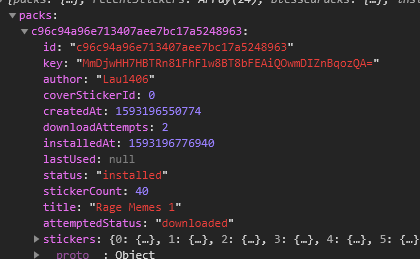
These conflicting (?) status fields persist across multiple restarts of the client.
I don't know if this helps any, but I assume this sticker pack will get deleted again as our messages expire in a day or two. Surely there is enough here to at least tag this issue as a bug.
gaasedelen
on 26 Jun 2020
@gaasedelen It's most certainly a bug! It would help us if you posted another update like that after the pack is deleted. I think I've found something which contributes to this behavior, but it doesn't fully explain things.
scottnonnenberg-signal
on 26 Jun 2020
I can reproduce this pretty easily, but after a sticker pack gets deleted, it is no longer in the 'packs' dict so I can't get an 'after' snapshot for you.
Here's the repro steps:
- Set message timer to 30 seconds
- Receive a message that includes non-default sticker
- Install the non-default sticker pack from the message
- Wait for the non-default sticker message to delete itself.
- The installed sticker pack will be deleted.
GIF:
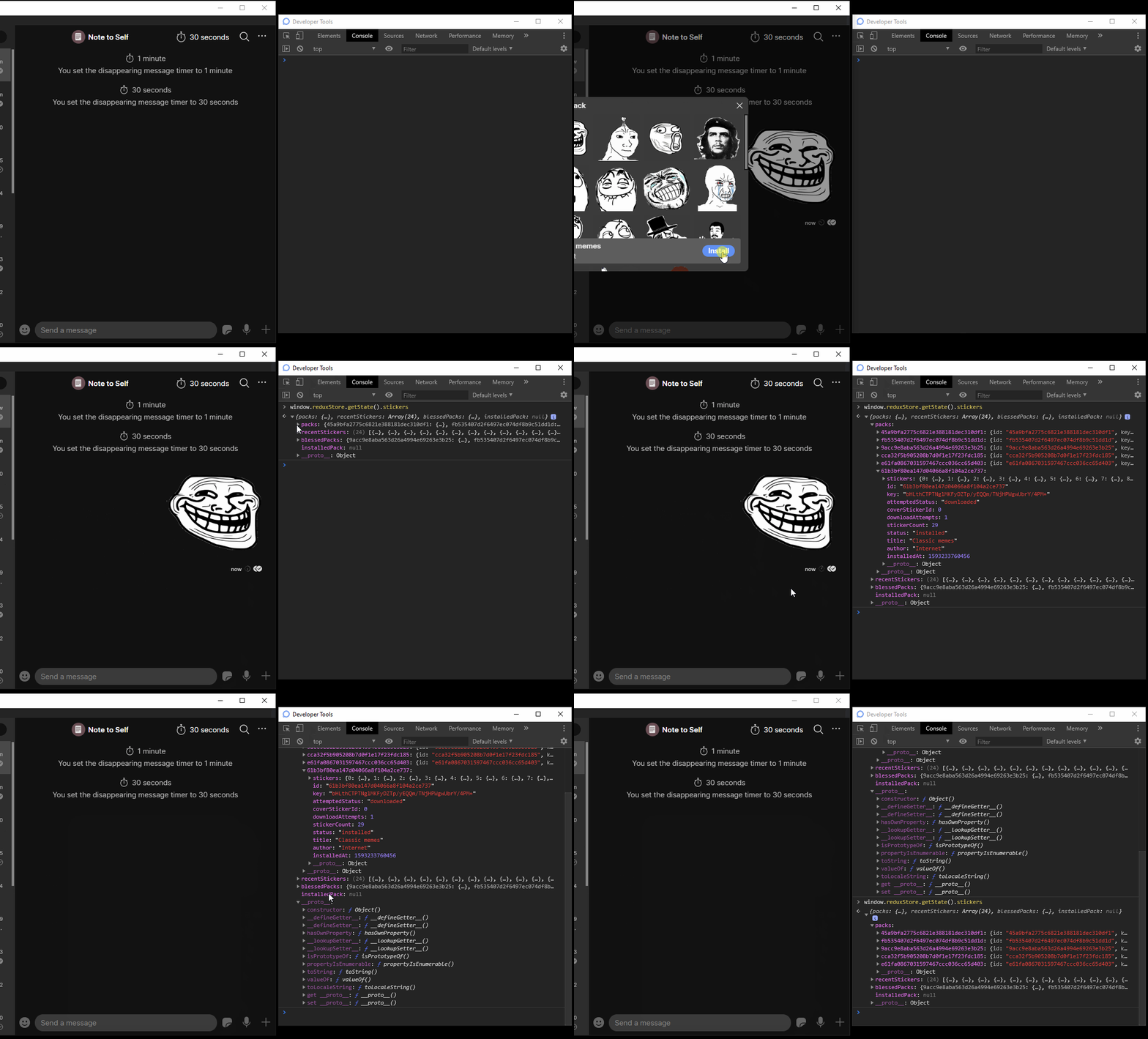
I simply used a 'Note to self' and sent the disappearing message from the mobile app. This gif shows it pop up on the desktop app, I install it, and then it disappears.
gaasedelen
on 27 Jun 2020
Thanks for the additional detail. We have a small change ready that will address at least part of what you're seeing.
Can someone confirm something for me? I re-read this thread, but I'm not finding any discussion of what happens to a disappeared sticker pack when you restart Signal Desktop. Does it come back?
scottnonnenberg-signal
on 29 Jun 2020
Can someone confirm something for me? I re-read this thread, but I'm not finding any discussion of what happens to a disappeared sticker pack when you restart Signal Desktop. Does it come back?
Hi Scott, not for me it doesn't. The only way to get the stickers pack back again is reinstalling it. I'm glad to hear you are very near to fixing this :)
absort0
on 29 Jun 2020
Can someone confirm something for me? I re-read this thread, but I'm not finding any discussion of what happens to a disappeared sticker pack when you restart Signal Desktop. Does it come back?
Same as @absort0 for me, the only way to get it back is to reinstall it.
They are also brought back if reinstalling signal desktop, but it is because they are pulled from the phone I suppose.
kodsama
on 1 Jul 2020
Yeah it's hard to say. I did a test with the above steps again, and the 'deleted' packs re-appeared on restart, but they get deleted again some time later.
I also have one pack that disappears far less frequently than the two I cited above. It also 'reappears' without me having to reinstall it. Not totally sure what the deal is with it, but I rarely use that one, and I installed it from a different disappearing conversation (1 week duration) way back when stickers first came out.
gaasedelen
on 1 Jul 2020
I just wanted to say that I haven't had my sticker packs disappear since you pushed out a14936451eef4892f373e236ae0d8460caf1e6bb in the new beta.
I think this issue can be marked as fixed. Thanks!
gaasedelen
on 19 Jul 2020
Thanks for confirmation. If anyone sees this again, please enter a new bug.
scottnonnenberg-signal
on 21 Jul 2020
Related issues
 demux4555
·
3Comments
demux4555
·
3Comments
 halb9
·
3Comments
halb9
·
3Comments
 McLoo
·
3Comments
McLoo
·
3Comments
 petcap
·
3Comments
petcap
·
3Comments
 gesus14
·
3Comments
gesus14
·
3Comments
Most helpful comment
I just wanted to say that I haven't had my sticker packs disappear since you pushed out a14936451eef4892f373e236ae0d8460caf1e6bb in the new beta.
I think this issue can be marked as fixed. Thanks!