Signal-desktop: Signal RAM usage is too high (memory leak)
- [X] I have searched open and closed issues for duplicates
Bug Description
Steps to Reproduce
- step one Open Signal 1.32.1 for Windows
- step two Open Task Manager
- step three Check Ram usage
Actual Result:
Expected Result: Signal use more as 350 MB of RAM, This is crazy. I have programs who provide me more features and they use under 10mb of RAM.
Screenshots
Platform Info
Signal Version: 1.32.1
Operating System: Windows 7 SP1 (Dont spam me, i know W7 is out of Date)
Linked Device Version: Android 4.?????
Link to Debug Log
 Ohrwerk
All 29 comments
If you tell us a little bit about your usage patterns, we might be able to help you out: how much RAM does Signal Desktop use if it doesn't download any message on startup? And then how does that change when you open one small conversation? How about a large conversation? Then how does that change as you use Signal Desktop normally for a half-hour?
 scottnonnenberg-signal
on 18 Mar 2020
scottnonnenberg-signal
on 18 Mar 2020
I just popped by because I've also noticed much, much higher reported RAM usage this past week (perhaps longer, can't say). I have 18GB and have seen Signal using more than 2GB. I closed/restarted it 5 minutes ago and it's currently a reasonable 220MB. It keeps climbing as I watch, though. (2 minutes later) It's 230MB+ now.

The CPU usage is constant too, ballpark 2% to 4%, just sitting there idle.
Edit: It's now 50 minutes after restarting Signal Desktop and it's rapidly approaching 1GB:
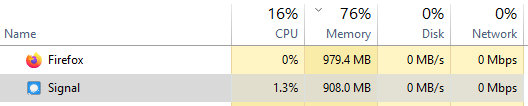
My usage pattern is talking to 3-6 people throughout any given day. This install has about 2 years' of chat log history. My AppData/Roaming/Signal folder is an unhappy 7.82GB with 12491 files. It's another topic, but I really feel Signal Desktop should allow users to relocate this data folder (for many people the C: drive can be pressed for space) and have some mechanism to trim down old media, which probably accounts for a lion's share of the high disk usage.
 seascape
on 20 Mar 2020
seascape
on 20 Mar 2020
That is because the desktop client is built using Electron which is a very bloated/heavy framework but popular these days for some reason. It's resource heavy by default.
 Constant-ine
on 24 Mar 2020
Constant-ine
on 24 Mar 2020
I'm seeing higher CPU usage just in the last week after recent updates. Until this past week, I've never seen signal running consistently at the top since I started using it 6 months ago. I'm using Windows 10 Pro.

Last lines from the log.log file:
{"name":"log","hostname":"ahec-cookie","pid":28080,"level":30,"time":"2020-03-27T15:43:25.725Z","msg":"SQL channel job 376 (updateConversations) succeeded in 37ms","v":0}
{"name":"log","hostname":"ahec-cookie","pid":28080,"level":30,"time":"2020-03-27T15:43:25.726Z","msg":"SQL channel job 377 (getMessagesBySentAt) succeeded in 30ms","v":0}
{"name":"log","hostname":"ahec-cookie","pid":28080,"level":30,"time":"2020-03-27T15:43:25.754Z","msg":"SQL channel job 378 (saveMessage) succeeded in 24ms","v":0}
{"name":"log","hostname":"ahec-cookie","pid":28080,"level":30,"time":"2020-03-27T15:43:26.219Z","msg":"SQL channel job 380 (createOrUpdateSessions) succeeded in 22ms","v":0}
{"name":"log","hostname":"ahec-cookie","pid":28080,"level":30,"time":"2020-03-27T15:43:26.231Z","msg":"SQL channel job 381 (updateUnprocessedsWithData) succeeded in 34ms","v":0}
{"name":"log","hostname":"ahec-cookie","pid":28080,"level":30,"time":"2020-03-27T15:43:26.244Z","msg":"SQL channel job 382 (removeUnprocessed) succeeded in 47ms","v":0}
{"name":"log","hostname":"ahec-cookie","pid":28080,"level":30,"time":"2020-03-27T15:43:26.493Z","msg":"SQL channel job 383 (updateConversations) succeeded in 18ms","v":0}
{"name":"log","hostname":"ahec-cookie","pid":28080,"level":30,"time":"2020-03-27T15:43:27.871Z","msg":"PUT https://textsecure-service.whispersystems.org/v1/messages/+[REDACTED]729 (unauth)","v":0}
{"name":"log","hostname":"ahec-cookie","pid":28080,"level":30,"time":"2020-03-27T15:43:27.903Z","msg":"PUT https://textsecure-service.whispersystems.org/v1/messages/+[REDACTED]729 200 Success","v":0}
{"name":"log","hostname":"ahec-cookie","pid":28080,"level":30,"time":"2020-03-27T15:43:28.383Z","msg":"SQL channel job 386 (createOrUpdateSessions) succeeded in 19ms","v":0}
 jamisonkirk
on 27 Mar 2020
jamisonkirk
on 27 Mar 2020
@jamisonkirk Please provide, at a minimum, version number and platform when you report issues. Thanks!
scottnonnenberg-signal
on 30 Mar 2020
Windows 10 Pro with Signal v1.32.3
However, not doing anything different today with it but it's cpu usage is now staying low.
jamisonkirk
on 1 Apr 2020
There is definitely a new memory leak, I've been a heavy Signal user for years and lately have been noticing it using far more RAM on occasion than is typical - on the order of 800MB to 1GB after it's been open a while. It appears to slowly consume more memory over time. Been noticing it for at least a week or two.
Ubuntu 18.04, Linux 4.15.x, Signal 1.32.3 installed from the official .deb repo.
 deutrino
on 1 Apr 2020
deutrino
on 1 Apr 2020
Same here. Currently Signal uses 2.8GB of RAM, which seems to grow with usage.
I'm using Arch Linux with Signal 1.33.1 from the official repositories.
 daniel-sch
on 18 Apr 2020
daniel-sch
on 18 Apr 2020
I'm having the same issue. MacOS 10.15.3, Signal 1.33.1. I'm seeing at least 600MB of RAM, really hurting my 4GB MacBook Air. Ouch.
 PimpinPumpkin
on 19 Apr 2020
PimpinPumpkin
on 19 Apr 2020
macOS 10.15.4upd1, Signal 1.33.1 - currently sitting at 1.3GB. Been open since the start of my workday ten hours ago, usage has climbed steadily (and I send maybe 100 messages a day across four or five conversations)
while I'm lucky enough to afford 32GB of RAM on my laptop, no matter the circumstance, 1GB+ of RAM usage for a chat app is pretty gnarly. Even Slack, once the darling of the Electron-dissing crowd, is only using ~700MB with six workspaces.
I understand that the ease of cross-platform development is likely the reason Electron was selected for Signal when it transitioned away from a Google Chrome app.
Are there any plans to revisit cross-platform native clients at any point in the near future, or are we stuck with yet another copy of Chromium and all of its attendant bloat and attack surface and non-native interface forever, if we wish to keep using Signal Desktop?
 ideologysec
on 21 Apr 2020
ideologysec
on 21 Apr 2020
@ideologysec They definitely won't go back to using something more reasonable for a simple encrypted messaging client now that they opted for Electron and the whole code base is in JS. Unfortunately, the number of people who are able and willing to use something like Qt for efficient cross-platform development is shrinking by the day. But even Electron apps do not have to be a total mess (look at Visual Studio Code or Atom). Unfortunately, coding with Electron seems to be especially inviting to using resource-wasting techniques.
 Sethur
on 1 May 2020
Sethur
on 1 May 2020
@Sethur @ideologysec I understand your frustration, but the best place to discuss that kind of large-scale architecture change is the forums: https://community.signalusers.org/
I'll also encourage you to consider that things might be important, even being actively worked on, but may not see any updates here.
Regarding memory usage, current releases of Signal Desktop have a known memory leak, and we're working with Electron maintainers to track it down.
scottnonnenberg-signal
on 1 May 2020
Hi,
Similar observation here:
Debian bullseye/testing
Signal 1.34.3
Signal uses 300MB+ of memory on startup, and >2.5GB after a couple days.
 sob727
on 2 Aug 2020
sob727
on 2 Aug 2020
Anything resolved on the memory leak issue by the way? I still see high memory usage
 yafm
on 17 Oct 2020
yafm
on 17 Oct 2020
@Sethur @ideologysec I understand your frustration, but the best place to discuss that kind of large-scale architecture change is the forums: https://community.signalusers.org/
I'll also encourage you to consider that things might be important, even being actively worked on, but may not see any updates here.
Regarding memory usage, current releases of Signal Desktop have a known memory leak, and we're working with Electron maintainers to track it down.
Is there an issue number regarding the discussion with Electron maintainers?
We are also experiencing Electron memory issue since Electron 8, and doesn't looks like they have fixed the issue in their latest major release, 10
Thanks.
 ruoxijiang
on 4 Nov 2020
ruoxijiang
on 4 Nov 2020
@ruoxijiang
We are also experiencing Electron memory issue since Electron 8, and doesn't looks like they have fixed the issue in their latest major release, 10
So you're still seeing memory problems in Electron v10?
scottnonnenberg-signal
on 4 Nov 2020
I'm also experiencing this bug, RAM usage often grows to the size of multiple gigabytes over several days.
What can I do to help pinpoint the memory leak?
 stegomon
on 7 Nov 2020
stegomon
on 7 Nov 2020
Indeed, seeing ~1Gb RAM consumption for a chat application is abnormal.
Signal v1.38.1
Windows 2004
What can I do to help pinpoint the memory leak?
@scottnonnenberg-signal, is there a way to help with debugging here?
 savchenko
on 23 Nov 2020
savchenko
on 23 Nov 2020
@savchenko If you're really interested in trying to help, can say that the last time we really tried to investigate this, the leak appeared to be in Electron itself. Perhaps when we upgrade Electron things may get better here. You could try those upgrades, see if it changes anything for you.
scottnonnenberg-signal
on 2 Dec 2020
@scottnonnenberg-signal , could you please elaborate on "try those upgrades"? What updates are we talking about, Beta channel of Signal or manually replacing bundled libraries?
savchenko
on 2 Dec 2020
I mean upgrading electron, one of Signal Desktop's dependencies, then using that development version to see if it still has memory leaks. This is a good resource for running the development version: https://github.com/signalapp/Signal-Desktop/blob/development/CONTRIBUTING.md
scottnonnenberg-signal
on 2 Dec 2020
Some more detail: on Debian sid, with Signal 1.39.4, just minutes after startup Signal was using 5GB of RAM (RSS, not VSZ) and 400% CPU (4 cores fully utilized).
I attached strace and saw just futex, madvise, getpid and epoll calls. I tried to quit Signal and CPU usage dropped to 100%, but memory usage increased until eventually it ran out of memory, printing "[36271:0116/120915.421332:FATAL:memory_linux.cc(37)] Out of memory.".
Since this is an order of magnitude higher resource usage than reported in this issue previously, it may not actually be the same issue?
 akorn
on 16 Jan 2021
akorn
on 16 Jan 2021
I've just killed Signal desktop at 2GB RAM usage, restarted it and it's back down to 140MB.
Using version 1.39.4 on Kubuntu 18.04.
I've got ~10 VSCode instances running too, but they're using 108-230MB each, despite running for days.
 flyte
on 29 Jan 2021
flyte
on 29 Jan 2021
I am on ArchLinux and Signal-Desktop 1.40.1.
When I manage to open the app, it's 420MB at the startup raising up to 1GB after 2 hours.
However, starting up the app, frequently results in such a CPU/RAM hog that I have to restart the desktop.
 msalini
on 4 Mar 2021
msalini
on 4 Mar 2021
I just came across this ticket after a Signal Desktop instance (version v1.40.1) just ate up 46GB RAM on my Windows 10 machine (which has 64GB all in all). This also was an instance up for days. No issues with other apps that AFAIK are also Electron apps: VS Code, Discord, Slack. After a reboot (the system became unusable) and a restart memory now looks fine-ish again at around 330MB.
I only use it with two people, infrequently. One had just messaged me right before I noticed the issue (and had to reboot), however it was only a link and two chat messages. However, as I said, the instance was open for a couple days now, with the PC sent to sleep after each day. It sat completely idle for pretty much all of that time.
 foosel
on 6 Mar 2021
foosel
on 6 Mar 2021
When adding your experience, please ensure you add debug logs, else the devs have nothing more to analyse.
 ProactiveServices
on 7 Mar 2021
ProactiveServices
on 7 Mar 2021
https://debuglogs.org/8c964bcf211d1cadcbd2351543a6c4d36fae44d534d2d5c83994c732fb2949b4
There you go. Issue was noticed and reboot triggered right before 2021-03-06T16:29:55.576Z.
As a side note, I looked for information on what data to provide in bug reports before posting here but sadly found it in neither README nor CONTRIBUTING.md. I'll send a PR to add the request for a debug log (and how to create that) to the README. I fully understand that such log files are needed (I run an OSS project myself), but that can only work if information on what to provide and where to find that is also be readily available.
foosel
on 7 Mar 2021
I'll provide logs but there is indeed a huge memory leak on macOS as well: almost 4 GB if you look at all processes.

 mthld
on 15 Mar 2021
mthld
on 15 Mar 2021
Here it is, going as far as 3 days prior the screenshot of the last comment: https://debuglogs.org/eed8ddf46314f3cb1aec8b1529999c2f6da35403caf52a7ddc603353f042e888
mthld
on 15 Mar 2021
Related issues
 halb9
·
3Comments
halb9
·
3Comments
 lokesh-krishna
·
3Comments
lokesh-krishna
·
3Comments
 ploum
·
3Comments
ploum
·
3Comments
 gesus14
·
3Comments
ProactiveServices
·
3Comments
gesus14
·
3Comments
ProactiveServices
·
3Comments
Most helpful comment
That is because the desktop client is built using Electron which is a very bloated/heavy framework but popular these days for some reason. It's resource heavy by default.