Signal-desktop: Clicking on quoted replies to attachments opens up the file saver dialog
- [x] I have searched open and closed issues for duplicates
Bug Description
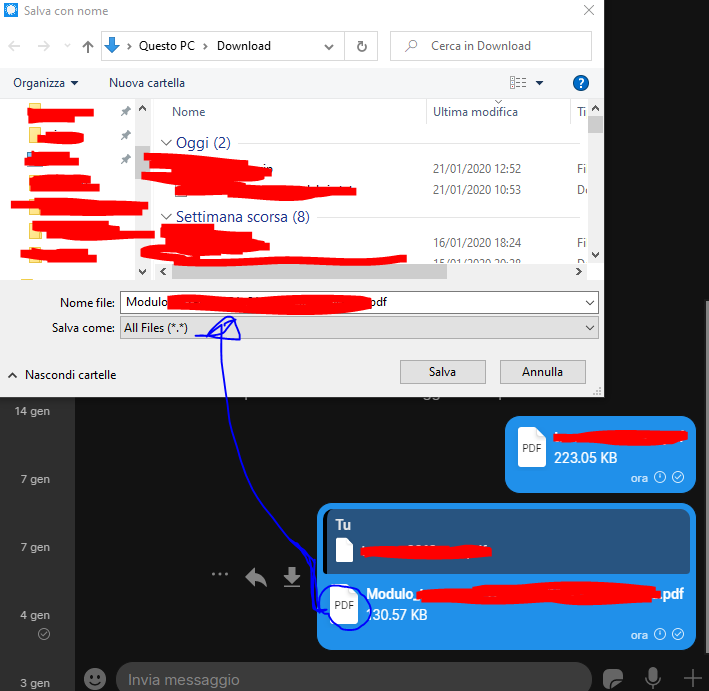
Clicking on replies to attachments brings up the file chooser/saver dialogue.
Steps to Reproduce
- reply to an attachment
- click on the reply
- see file saver pops up
Actual Result:
Unnecessary dialogue pops up.
Expected Result:
Unnecessary dialogue is avoided.
Platform Info
Signal Version: 1.30.0-beta.6
 Xashyar
All 7 comments
Where exactly are you clicking to make this happen? I'm not seeing it. Maybe a screenshot might be useful?
 scottnonnenberg-signal
on 21 Jan 2020
scottnonnenberg-signal
on 21 Jan 2020
Hm. Again, not seeing it. I have the same setup, replying to a non-visual attachment with another non-visual attachment. When I click on the reply, the original message is highlighted.
scottnonnenberg-signal
on 21 Jan 2020
I can reproduce the bug!
- Sent a random PDF (A) on my PC
- Replied to it with another different PDF (B)
- Clicking on the replied message A shows the download window for document B
This is probably because all the message B area is clickable for download (like when you click on the filename you get the "Save in..." window).
 denver-s
on 21 Jan 2020
denver-s
on 21 Jan 2020
So, if I'm following: in that screenshot, you clicked on the dark blue reply part of the message, and instead of the original message right above it being highlighted, you got the 'Save As' dialog for the attachment in that second message. Is that correct?
scottnonnenberg-signal
on 22 Jan 2020
you clicked on the dark blue reply part of the message, and instead of the original message right above it being highlighted, you got the 'Save As' dialog for the attachment in that second message. Is that correct?
Yes.
Xashyar
on 22 Jan 2020
Thanks for your help on this - a fix will be released shortly!
scottnonnenberg-signal
on 22 Jan 2020
Unable to reproduce as of https://github.com/signalapp/Signal-Desktop/commit/bfa76b05d29dbb97683ba87818cd9b3d2f6d9f61
Xashyar
on 23 Jan 2020
Related issues
 McLoo
·
3Comments
McLoo
·
3Comments
 TarkanY
·
3Comments
TarkanY
·
3Comments
 fredaas
·
3Comments
fredaas
·
3Comments
 petcap
·
3Comments
petcap
·
3Comments
 github-cygwin
·
3Comments
github-cygwin
·
3Comments