Signal-desktop: Signal Desktop loses messages
Signal Desktop randomly looses messages.
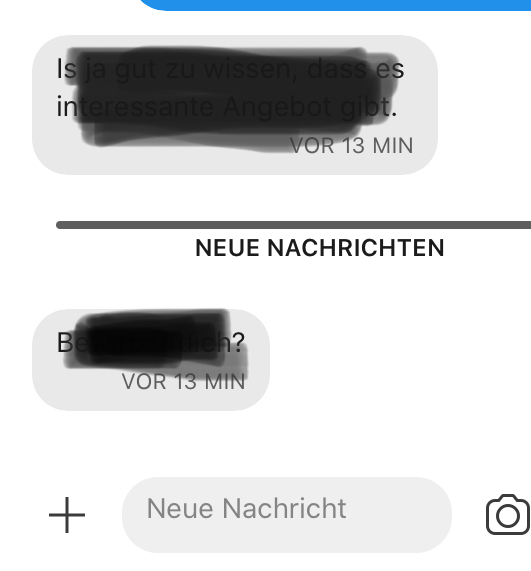
I am running Signal on my iPhone and on my Ubuntu Desktop. From the last two messages I received both are visible on the iPhone but only one on the Desktop, the last one is missing. This happens only sometimes.
- View messages on Signal on iPhone
- View messages on Signal Desktop
- Wonder about the difference.
Actual Result:
One message missing on Desktop.
Expected Result:
All messages visible.
Screenshots

Platform Info
Signal Version: Desktop 1.27.4 iPhone 2.45.2.0
Operating System:
Ubuntu 19.10 & iOS 13.2.2
Link to Debug Log
https://debuglogs.org/53ddacdf53db433fd6ebf5d099532136e83deb46b0c3a8c4615e3c78dfa97bf7
In most cases, a log from your other devices is also useful:
https://debuglogs.org/e65bfb639dd6283d032ecea18ac1b61d757f83a8195d04c1ba98c480ffd33f8b.zip
 gonsolo
All 38 comments
I have noticed this as well a few times(also linked to Signal iOS). It usually happens when messages are received while Signal Desktop is still busy starting.
 Geblaat
on 18 Nov 2019
Geblaat
on 18 Nov 2019
Have you searched for the missing messages? Usually when this happens, the messages are present in the conversation, just not where you expect them to be.
 scottnonnenberg-signal
on 18 Nov 2019
scottnonnenberg-signal
on 18 Nov 2019
I have noticed this as well a few times(also linked to Signal iOS). It usually happens when messages are received while Signal Desktop is still busy starting.
Ok. But then it's still a bug, right?
Have you searched for the missing messages? Usually when this happens, the messages are present in the conversation, just not where you expect them to be.
No. But I scrolled up a bit, still no message. And the messages should clearly have been that latest ones.
gonsolo
on 18 Nov 2019
Yes, still a bug, however something that only the server can rectify.
Instead of scrolling up, you might consider using the search box to look for the message text.
scottnonnenberg-signal
on 18 Nov 2019
It happened for me too. I opened Signal Desktop after 3 days, just a few minutes after receiving a video from a friend on a group chat on iOS.
Desktop log:
https://debuglogs.org/a7fc867a740b322fd3023d3e3c4555feb4408f71124973eedc8ea04204587771
And iOS debug log. Clicking on "More info" on iOS I cannot see the message ID but I think the timestamp should be 1574099274954:
https://debuglogs.org/57f3b3d734ddac9d6af147ab3ba070ee6c173da3a2b3ccf055cea0d8f6abb6f7.zip
 denver-s
on 18 Nov 2019
denver-s
on 18 Nov 2019
Experienced the same issue on Windows
Android - received a message on Nov 7: https://debuglogs.org/2046499ad8c67df92cdfb3f82bc85fa685b3e531f92edd31b129461bc5b3fde5
Windows - still not there on Nov 19: https://debuglogs.org/b7dda9bf25fec760e705aff98a81ba2ff63cd9ab51f69fcb076c6ea75bfc5950
Messages do come through now, but some were lost in the meantime
 dagguh
on 19 Nov 2019
dagguh
on 19 Nov 2019
@denver-s @dagguh When you say "it also happened for me" did you search for the missing message and find it like the original bug reporter?
scottnonnenberg-signal
on 19 Nov 2019
Like the original. It's missing. Searching for it does not find it.
The logs are from today, because I only noticed the message being missing today. The message I received on Android is still missing on Windows. It was sent on Nov 7.
dagguh
on 19 Nov 2019
@dagguh Please go into the message details for that message on your mobile device, and long-press on the sent timestamp. The 'sent id' will be copied to your clipboard, and will help us better analyze your log.
scottnonnenberg-signal
on 20 Nov 2019
Here's the sent id: 1573108294517
dagguh
on 20 Nov 2019
@dagguh That 'sent id' is not present in your desktop log. Potentially it wasn't decrypted properly? Do you see any error messages in that thread? Or, was that message sent too long ago? Desktop only keeps three days of entries in the log.
scottnonnenberg-signal
on 20 Nov 2019
I do not see any error messages in that thread. It must have been sent too long ago. I'll try to be more vigilant and react quickly to such occurrences, so I can submit a more helpful debug log.
dagguh
on 20 Nov 2019
It happened for me too. I opened Signal Desktop after 3 days, just a few minutes after receiving a video from a friend on a group chat on iOS.
Desktop log:
https://debuglogs.org/a7fc867a740b322fd3023d3e3c4555feb4408f71124973eedc8ea04204587771And iOS debug log. Clicking on "More info" on iOS I cannot see the message ID but I think the timestamp should be 1574099274954:
https://debuglogs.org/57f3b3d734ddac9d6af147ab3ba070ee6c173da3a2b3ccf055cea0d8f6abb6f7.zip
I finally found how to copy the ID from iOS and it is 1574099272883, which is present in the desktop log.
denver-s
on 20 Nov 2019
@denver-s And you've searched through your desktop history and couldn't find the message? If you haven't done that, and it's in your log, it's likely there, just sorted incorrectly.
scottnonnenberg-signal
on 21 Nov 2019
Now, incredibly, it's there! But the reply (made by another member of the group chat) has now disappeared, but I am sure there was.
ID 1574100957483. I cannot find it neither in desktop log. I'm confused.
Edit: I sent another desktop log (https://debuglogs.org/3e638785f66f8b4496e544e71fe79996fdd9a72de5b0be307e2092c47e4eb6b5) and the ID 1574100957483 is present.
denver-s
on 21 Nov 2019
Have you searched for the missing messages? Usually when this happens, the messages are present in the conversation, just not where you expect them to be.
I also thought messages were missing from Signal Desktop (using v1.28.0), but indeed, they can be found in the conversation, but at the wrong position. It seems like the sorting by 'time received' is wrong. This is very inconvenient.
 rubcap
on 24 Nov 2019
rubcap
on 24 Nov 2019
i have this same problem! I've lost many, many messages in the past year
 Rik44444
on 24 Nov 2019
Rik44444
on 24 Nov 2019
Also when i install Signal on a new phone by the way, my old messages are also not automatically synced. But that's a separate issue, there are also syncing problems between desktop and phone where messages get lost
Rik44444
on 24 Nov 2019
my old messages are also not automatically synced. But that's a separate issue
It's definitely separate. See https://github.com/signalapp/Signal-Desktop/issues/3706
dagguh
on 24 Nov 2019
@Rik44444 This seems to happen to you very frequently. Next time it does, please:
- First search for the missing message using the top-left search box. It might simply be sorted incorrectly.
- Next, think back to the counter you saw when loading messages on Desktop startup - did it go above 1000? If so, you might be losing old messages because only 1000 messages are stored for you on the server between launches of Signal Desktop.
- Lastly, if that doesn't seem to apply, please extract that message's 'sent id' from the Message Details screen for that message in your phone (long-press on the sent timestamp), and then provide that along with your debug log.
Thanks!
scottnonnenberg-signal
on 2 Dec 2019
@scottnonnenberg alright will do. can i already say that the 1000 limit seems really low - i almost always have more than a 1000 messages on my phone! Very possible this is a large part of the problem.
Rik44444
on 2 Dec 2019
I sent a message from Android: sent id 1576706217594.
It's missing from the macOS client: Signal Desktop v1.29.1 Debug log.
I sent it 16 minutes ago, so the debug log should be fresh enough this time.
dagguh
on 18 Dec 2019
I also have messages seemingly lost, but after reading this thread I found them sorted in the wrong place (ca. 12 hours earlier in the thread).
The time given in the message is correct, however, so I wonder why signal desktop uses a wrong sorting order?
 Larx
on 2 Jan 2020
Larx
on 2 Jan 2020
I am experiencing this bug. I didn't think to search for the missing messages, but sure enough, they're in the convo! ...just not where they're supposed to be.
So, it looks like the Desktop app is ordering them by when they were "received" (which it is saying is the date/time I opened the Desktop app) instead of when they were "sent" by the sender. For example, I'll be on my phone all day, using Signal just fine. But then when I get home, I open the Desktop app and it has to "catch up" all the messages I'd sent on my phone all day. Instead of it ordering the messages by when the sender sent them to me, it's ordering them by when I opened the Desktop app. Hopefully this makes sense. I can send logs or whatever else is needed, just let me know.

 djl09h
on 26 Feb 2020
djl09h
on 26 Feb 2020
I also experience this, and it is really annoying, to the point that I stopped reading on the desktop client and rather use it to "write only". This happens as frequent as, let's say, 1/20 messages being eaten.
What I have found though is that the messages indeed seem to be present. I can find them in the search box if I search for the text. However, it seems to show multiple messages in the same spot in the history. It works like this:
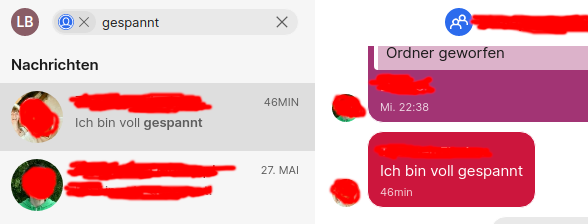
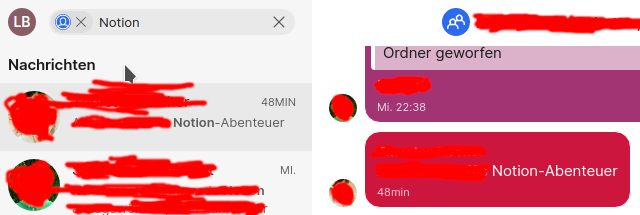
Both messages occupy the same place in the history! Maybe they overwrite each other when being shown?
The first message is the one shown in the normal group message.
Now that I explicitly searched for both messages and clicked a bit back and forth in the application, both messages are shown in the history of the group chat.
UPDATE: This is signal-desktop app version 1.34.1 on Kubuntu 20.04.
 lenalebt
on 4 Jun 2020
lenalebt
on 4 Jun 2020
It feels like this is getting worse and worse, and to me it now also happens when the desktop app has been running for a while. Someone just sent me two messages in a row. The first on is being shown at the bottom of the chat window where it's supposed to be. The second one was sent a minute later and is shown higher up in the chat history, between two messages which were sent an hour ago.
How does this even happen?
I'm using Signal Desktop v1.34.1 on Ubuntu 20.04.1.
 Sturmflut
on 14 Aug 2020
Sturmflut
on 14 Aug 2020
happened to me too, a message sent to me on desktop client startup was thrown way up in the convo history
 harvito
on 19 Aug 2020
harvito
on 19 Aug 2020
@harvito can you please post the debug logs as well as the sent ID of the message?
 josh-signal
on 20 Aug 2020
josh-signal
on 20 Aug 2020
This is also a continual problem for me. The way I found it was chatting on desktop and mobile client, then had to restart my computer. Upon opening the desktop client everything from the last day from multiple contacts has disappeared. Searching for messages doesn't reveal anything, nor does searching for message IDs in the log. The only kind of feedback I see is I usually get a message in my Note To Self conversation saying there was an error receiving a message, which is impossible in Note To Self because I haven't sent myself anything there in months. Disappearing messages is disabled.
Centos 7
Kernel 4.4.247
Signal 1.39.4 latest/edge
Snap 2.47.1
 italic-r
on 20 Dec 2020
italic-r
on 20 Dec 2020
@italic-r Can you provide a little more detail? Are you saying that messages which were already in Signal Desktop were actually removed, but without being disappearing messages? Or are you saying that Signal Desktop never got those messages because there was some sort of problem as they were downloaded and processed?
scottnonnenberg-signal
on 4 Jan 2021
The messages were already there on both desktop and phone client, then vanished from the desktop client after restarting. Disappearing messages are disabled. I was chatting using both clients throughout the day with multiple people, then rebooted the computer and everything from that day vanished.
I also have a horrible time with messages becoming corrupted (desktop client replaces _existing_ messages with "Error handling incoming message") and I have to reset the secure session to receive anything new. I don't think the two problems are related, but they're both excruciatingly annoying.
italic-r
on 5 Jan 2021
@italic-r By chance do you ever restore from backups, or copy Signal Desktop data around on your machine, perhaps even using the same desktop data on multiple computers? If so, that could be the source of the errors.
scottnonnenberg-signal
on 5 Jan 2021
I'm doing nothing else to touch or access signal or its data. I have a weekly backup, but I've never restored. My phone signal is set to make backups (which I just checked to make sure; seems it was turned off without my intervention :thinking: ), but again, no restores.
italic-r
on 6 Jan 2021
@italic-r I just noticed that you've installed via Snap. I have to imagine that snap has done something with the filesystem out from under Signal desktop. I'd suggest you look into that with the snap maintainers. We don't officially support Snap-installed Desktop instances.
scottnonnenberg-signal
on 7 Jan 2021
Same issue here. Messages simply don't get synced right (missing messages on my phone from my desktop).
iOS14 + Windows 10. Fresh install.
For now stopped using signal all together since this is unusable. Hope this gets fixed soon.
 RobHofmann
on 19 Jan 2021
RobHofmann
on 19 Jan 2021
Same here and a friend of mine also complained. Group messages are missing from windows client.
 jorisa
on 28 Jan 2021
jorisa
on 28 Jan 2021
@RobHofmann @jorisa Please consider providing a debug log and the 'sent id' of the missing messages, which you can find in the message details screen - long-press on the 'sent' header. That will greatly help us determine what happened with the message that didn't show up in Desktop.
scottnonnenberg-signal
on 29 Jan 2021
same problem here. missing message ID: 1615912210163
signal.log
duplicate of #2527
 pille
on 17 Mar 2021
pille
on 17 Mar 2021
Related issues
 hanzei
·
3Comments
hanzei
·
3Comments
 ProactiveServices
·
3Comments
ProactiveServices
·
3Comments
 McLoo
·
3Comments
McLoo
·
3Comments
 ploum
·
3Comments
ploum
·
3Comments
 github-cygwin
·
3Comments
github-cygwin
·
3Comments