Signal-desktop: Install instructions for Linux: Some improvements
- [x] I have searched open and closed issues for duplicates
Bug Description
Observing a user trying to install the Linux version with the following instructions (from the official website)
curl -s https://updates.signal.org/desktop/apt/keys.asc | sudo apt-key add -
echo "deb [arch=amd64] https://updates.signal.org/desktop/apt xenial main" | sudo tee -a /etc/apt/sources.list.d/signal-xenial.list
sudo apt update && sudo apt install signal-desktop
I saw the following:
curlis not installed on a default Ubuntu 20.04 system. [added 2020-05-6]- If
sudoprompts for a password, copying all 3 lines into the terminal will make the other 2 lines be pasted into thesudopassword prompt. - If running the command several times, the same line is duplicated in
sudo tee -a /etc/apt/sources.list.d/signal-xenial.list. This causes warnings from APT. - No text or warnings are given about this being a 64bit only release. This means that 32 bit users are stranded.
- The
sudo apt update && sudo apt install signal-desktopwill fail to run in a way that's perhaps a little hard to understand whenapt updatefails.
Steps to Reproduce
Edit: 2020-05-16 instructions with wget instead of curl.
Expected Result:
I think all this should be elaborated a bit, perhaps with a few comments. Proposing the following structure:
# NOTE: These instructions only work for 64 bit Debian-based Linux distributions
# such as Ubuntu, Mint etc.

# 1. Install our official public software signing key
wget -O- https://updates.signal.org/desktop/apt/keys.asc | sudo apt-key add -

# 2. Add our repository to your list of repositories
echo "deb [arch=amd64] https://updates.signal.org/desktop/apt xenial main" |\
  sudo tee /etc/apt/sources.list.d/signal-xenial.list

# 3. Update your package database
sudo apt update

# 4. Finally, install signal
sudo apt install signal-desktop
 benjaoming
All 9 comments
Thanks for a comprehensive recommendation here. It makes it far more likely that we'll do it. :0)
 scottnonnenberg-signal
on 29 Oct 2019
scottnonnenberg-signal
on 29 Oct 2019
Oh another little thing about expanding the instructions vertically: Getting used to blindly copy-pasting commands into the terminal is dangerous. Consider the case of ignoring invalid SSL certificates some years back.
In this case, the official Signal website kind of tells a user to copy-paste command line instructions that are hard to read on the screen (horizontal scrollbar):
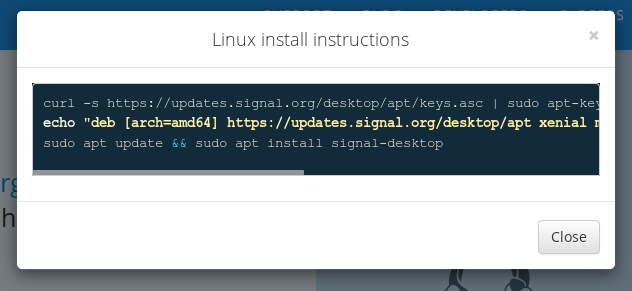
I'd really like to add an escaped line break for this exact reason. I'm unsure if it would have unintended consequences (but it works for me). It looks like this:
# NOTE: These instructions only work for 64 bit Debian-based Linux distributions
# such as Ubuntu, Mint etc.

# 1. Install our official public software signing key
curl -s https://updates.signal.org/desktop/apt/keys.asc | sudo apt-key add -

# 2. Add our repository to your list of repositories
echo "deb [arch=amd64] https://updates.signal.org/desktop/apt xenial main" |\
  sudo tee /etc/apt/sources.list.d/signal-xenial.list

# 3. Update your package database
sudo apt update

# 4. Finally, install signal
sudo apt install signal-desktop
It might be of use to state in the pop-up clearly that signal-desktop is only for debian-based systems on amd64 architecture, and not for example the debian-based system of a raspberry pi using raspabian (armhf). A newbie might miss the arch=amd64 string, or if they don't, might miss its significance.
 ivr588
on 2 Nov 2019
ivr588
on 2 Nov 2019
Agreed @ivr588 - my instruction notes show it as if it would be a bash instruction... but it's better to say "Signal for 64 bit DebianUbuntu-based Linux"
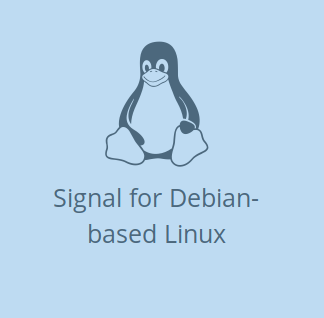
Maybe it could be elaborated just before the command line:

benjaoming
on 2 Nov 2019
I have a secondary improvement. curl is not installed on a blank Ubuntu 18.04, so I think wget should be preferred:
# NOTE: These instructions only work for 64 bit Debian-based Linux distributions
# such as Ubuntu, Mint etc.

# 1. Install our official public software signing key
wget -q -O- https://updates.signal.org/desktop/apt/keys.asc | sudo apt-key add -

# 2. Add our repository to your list of repositories
echo "deb [arch=amd64] https://updates.signal.org/desktop/apt xenial main" |\
  sudo tee /etc/apt/sources.list.d/signal-xenial.list

# 3. Update your package database
sudo apt update

# 4. Finally, install signal
sudo apt install signal-desktop
Newbie perspective: this look good. I had trouble trying to install signal on my raspberry, so I searched for this post here, to realize it's not 32 bit compatible. Please consider updating the website with the improve set of instructions.
 amadouderza
on 20 Apr 2020
amadouderza
on 20 Apr 2020
The new Signal website didn't update the Linux install instructions. On a default Ubuntu 20.04, there is no curl command (description updated).
user@host:~$ curl -s https://updates.signal.org/desktop/apt/keys.asc | sudo apt-key add -

Command 'curl' not found, but can be installed with:

sudo apt install curl

gpg: no valid OpenPGP data found.
Thank you all for your feedback this has been addressed.
 josh-signal
on 5 Oct 2020
josh-signal
on 5 Oct 2020
It might be of use to state in the pop-up clearly that signal-desktop is only for debian-based systems on amd64 architecture, and not for example the debian-based system of a raspberry pi using raspabian (armhf). A newbie might miss the arch=amd64 string, or if they don't, might miss its significance.
The significance I was trying to point out wasn't (directly) of 32 or 64 bit, but that it is not for arm64 processors, like the rpi3 or 4. So it cannot be used on 64-bit arm based system. 64 bit DebianUbuntu-based Linux exists for both arm processors and amd/intel.
ivr588
on 6 Oct 2020
Related issues
 McLoo
·
3Comments
McLoo
·
3Comments
 hanzei
·
3Comments
hanzei
·
3Comments
 ploum
·
3Comments
ploum
·
3Comments
 bcsga
·
3Comments
bcsga
·
3Comments
 halb9
·
3Comments
halb9
·
3Comments
Most helpful comment
Newbie perspective: this look good. I had trouble trying to install signal on my raspberry, so I searched for this post here, to realize it's not 32 bit compatible. Please consider updating the website with the improve set of instructions.