Signal-desktop: --start-in-tray --use-tray-icon is not working anymore
* [X ] I have searched open and closed issues for duplicates
Bug Description
--start-in-tray --use-tray-icon is not working anymore
Steps to Reproduce
- modify shortcut target: ...\Signal.exe --start-in-tray --use-tray-icon
- start Signal
Actual Result:
Signal starts on task bar
Expected Result:
Signal should start in tray
Platform Info
Signal Version:
v1.27.2
Operating System:
Windows 7
 fnordson
All 15 comments
Could be related to https://github.com/signalapp/Signal-Desktop/issues/2368?
 Cerberus0
on 23 Sep 2019
Cerberus0
on 23 Sep 2019
Nah, I already got used to the fact that the update requires me to start the app again with my arguments but those have stopped working.
fnordson
on 23 Sep 2019
Interesting. We did upgrade Electron from v4 to v6 with v1.27, so that is likely the problem.
I don't see any bugs in the Electron repository about this, though. I wonder if the upcoming end of life for Windows 7 (January 14th, 2020) is causing people to focus on it less.
 scottnonnenberg-signal
on 23 Sep 2019
scottnonnenberg-signal
on 23 Sep 2019
I did the usual circle of going around and cleaning up temp files, C:, etc. Restarted several times over in the process.
Reinstalled Signal and it works now.
No idea what it was but from what you frote I assume it was my fault.
fnordson
on 23 Sep 2019
I did the usual circle of going around and cleaning up temp files, C:, etc. Restarted several times over in the process.
Reinstalled Signal and it works now.
No idea what it was but from what you frote I assume it was my fault.
Stopped working for me as well around the time you created this issue. Reinstalled Signal but "start in tray" still does not work, altough i can send it to tray afterwards. Can you tell me what temp files you did clean up?
 malteme
on 1 Oct 2019
malteme
on 1 Oct 2019
Nevermind, it started working again today without any further action from me.
malteme
on 3 Oct 2019
That's interesting @xTMxTM
Did you restart your computer? If yes: how many times (I tried restarting once before I started cleaning up and it didn't help)?
fnordson
on 3 Oct 2019
@fnordson I reinstalled yesterday but did not reboot until today, so maybe that did the trick.
malteme
on 3 Oct 2019
I am seeing this issue under linux (X11 with xfce) with signal-desktop version 1.27.3.
Downgrading to 1.27.2 helps.
Starting with:
signal-desktop --start-in-tray
 Eusebius1920
on 9 Oct 2019
Eusebius1920
on 9 Oct 2019
I am seeing this issue under linux (X11 with xfce) with signal-desktop version 1.27.3.
Downgrading to 1.27.2 helps.Starting with:
signal-desktop --start-in-tray
still affects 1.27.4
 minj
on 27 Oct 2019
minj
on 27 Oct 2019
With today's update to v1.32.2 it stopped working:

I am using:
Operating System: Kubuntu 19.04
KDE Plasma Version: 5.15.4
KDE Frameworks Version: 5.56.0
Qt Version: 5.12.2
Kernel Version: 5.0.0-38-generic
OS Type: 64-bit
 athanoid
on 26 Mar 2020
athanoid
on 26 Mar 2020
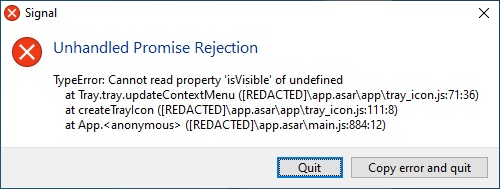
This is also happening in Windows 10 Pro 64-bit 18362
Signal 1.32.2
 lburtts
on 26 Mar 2020
lburtts
on 26 Mar 2020
@athanoid @lburtts This is the bug tracking the issue you both reported: https://github.com/signalapp/Signal-Desktop/issues/4085
scottnonnenberg-signal
on 26 Mar 2020
This bug should be reopened, based on my experience the past few days on Arch Linux using the latest Signal.
 jlanzobr
on 20 Oct 2020
jlanzobr
on 20 Oct 2020
@jlanzobr We don't support Arch Linux officially. Are you (or anyone else reading) able to reproduce this on Windows, macOS, or with the .deb installation?
 EvanHahn-Signal
on 20 Oct 2020
EvanHahn-Signal
on 20 Oct 2020
Related issues
 TarkanY
·
3Comments
TarkanY
·
3Comments
 muellermartin
·
3Comments
muellermartin
·
3Comments
 vincenzopalazzo
·
3Comments
vincenzopalazzo
·
3Comments
 jeremymasters
·
3Comments
jeremymasters
·
3Comments
 github-cygwin
·
3Comments
github-cygwin
·
3Comments
Most helpful comment
still affects 1.27.4