Signal-desktop: Windows: No notifications appear
signal desktop do not work notifications
 Lino1960
All 22 comments
On what OS?
 scottnonnenberg-signal
on 20 Sep 2019
scottnonnenberg-signal
on 20 Sep 2019
Windows 7
Il ven 20 set 2019, 01:53 Scott Nonnenberg notifications@github.com ha
scritto:
On what OS?
—
You are receiving this because you authored the thread.
Reply to this email directly, view it on GitHub
https://github.com/signalapp/Signal-Desktop/issues/3607?email_source=notifications&email_token=ANH5EV3KN75UP2UHW3MF6YDQKQGHTA5CNFSM4IYQYZUKYY3PNVWWK3TUL52HS4DFVREXG43VMVBW63LNMVXHJKTDN5WW2ZLOORPWSZGOD7FEPWY#issuecomment-533350363,
or mute the thread
https://github.com/notifications/unsubscribe-auth/ANH5EVZGZKTWK3TKFDGL3VLQKQGHTANCNFSM4IYQYZUA
.
Lino1960
on 20 Sep 2019
I experience a similar issue on Mojave 10.14.6. Since the latest update, desktop notifications will only work about 50% of the time when app is in the background. The other times, I'll receive new messages but there won't be an alert and no badge on the app icon. Only after clicking over to the app do I see that I have new messages.
 witcheries
on 4 Oct 2019
witcheries
on 4 Oct 2019
Same notification bug - mentioned by witcheries - on Windows 10 Pro N 1903 after last update to v1.27.3. However, it's probably unrelated to the original bug by Leno1960, how opened this issue prior to the new version.
Worked a lot better on the prior version. There are at least two cases:
Writing a message, switch to another open application by Alt + Tab and if your chat partner answers quite fast, there will be no real notification. The (1) + app icon badge will be shown one second and be removed rightaway. The message is officially marked as read.
Signal App is open and in the foreground. After writing a message and getting the hand of mouse and computer, new message will be - after some time (20? 30 seconds?) - shown as new and marked as unread although the message is in the foreground.
Not sure how to investigate it or what kind of information / diagnostic report you need, @scottnonnenberg-signal
 SigBugWin
on 8 Oct 2019
SigBugWin
on 8 Oct 2019
@SigBugWin Your #1 is known and will be fixed soon. #2 is expected. We introduced an idle timer - messages won't be marked read if you are considered 'idle.'
scottnonnenberg-signal
on 8 Oct 2019
Thanks for your response!
Regarding No. 1: I haven't found an #issue to be honest, but I'm glad it will be fixed - and hopefully published - soon.
Regarding No. 2: Yes, afterwards I went through the commit list and found the new feature - forgot to edit. Not sure if I like it though, but let's see. Backlink for feature commit: https://github.com/signalapp/Signal-Desktop/commit/8ccb89310be34b85cad8950e5d1e65a7a4ad270d
SigBugWin
on 8 Oct 2019
Any progress (or issue number to track) on bug No 1 regarding "messages get marked as read although window has been in background" ? More and more people with phone client only are getting angry with me, because I fail to answer. It's quite uncomfortable.
SigBugWin
on 4 Nov 2019
@SigBugWin You can expect in v1.28. If you install the beta, you can get that behavior right now. https://github.com/signalapp/Signal-Desktop#install-the-beta
scottnonnenberg-signal
on 4 Nov 2019
Thank you!
SigBugWin
on 4 Nov 2019
Hi, I can't get notifications working both on stable and beta on Windows 10 (ver. 1909). Focus Assist is turned off. I asked some of my friends and the notifications are working for some of them and they don't for others on their win10's.
 Gieted
on 3 Mar 2020
Gieted
on 3 Mar 2020
@Gieted Sorry, can you be just a little bit more specific about what your investigation uncovered?
scottnonnenberg-signal
on 3 Mar 2020
There is a bug, possibly not yet described in any other issue, that causes notifications to never show up in any circumstances on some Windows 10 systems. This is probably due to some specific system settings/configuration. It has been confirmed to happen on two different win10 computers.
Gieted
on 3 Mar 2020
@Gieted You can really help us out by looking for unique configuration on the two Windows 10 computers where you saw no notifications. When we try this, we see notifications.
scottnonnenberg-signal
on 12 Mar 2020
It's a shame the app doesn't do this automatically, I've tried following these steps with both commands but it makes no difference for some reason, it won't move to system tray. Any idea why? Also how to autorun on startup? Am I the only person who can't get it to move to system tray?
To set --use-tray-icon or --start-in-tray
as a command line parameter for Signal so that it uses a tray icon by default, follow the following steps:
Press the Windows key to open the start menu, and search for Signal
When you see the Signal
menu entry appear, right click on it to open up the context menu, then click Open file location
.
In the Explorer window that opens, right click on the Signal
shortcut to open the context menu, and click on Properties
In the Signal Properties window that opens, change the Target field to C:\Users\Admin\AppDataLocal\Programs\signal-desktop\Signal.exe --use-tray-icon
then click OK.
Now exit Signal if it's already running and start it again, and you should see it use the tray icon.
 Bagels1
on 18 Feb 2021
Bagels1
on 18 Feb 2021
@Bagels1 you probably got the wrong issue item because this one is regarding to notifications and not to tray icons.
Nevertheless: --use-tray-icon works fine for me, although I use a desktop icon instead of the Windows menu entry. Keep in mind: the feature is "close to tray" not "minimize to tray".
You should probably open a new issue or search for existing issues regarding tray icons to keep this one clean.
SigBugWin
on 18 Feb 2021
Nevertheless: --use-tray-icon works fine for me, although I use a desktop icon instead of the Windows menu entry. Keep in mind: the feature is "close to tray" not "minimize to tray".
What does this mean? I just followed the instructions and can't get it to work, could you expand?
Bagels1
on 18 Feb 2021
Can you make screenshots before you changed values and afterwards of the properties window? But I'm not a signal developer, just a user.
SigBugWin
on 19 Feb 2021
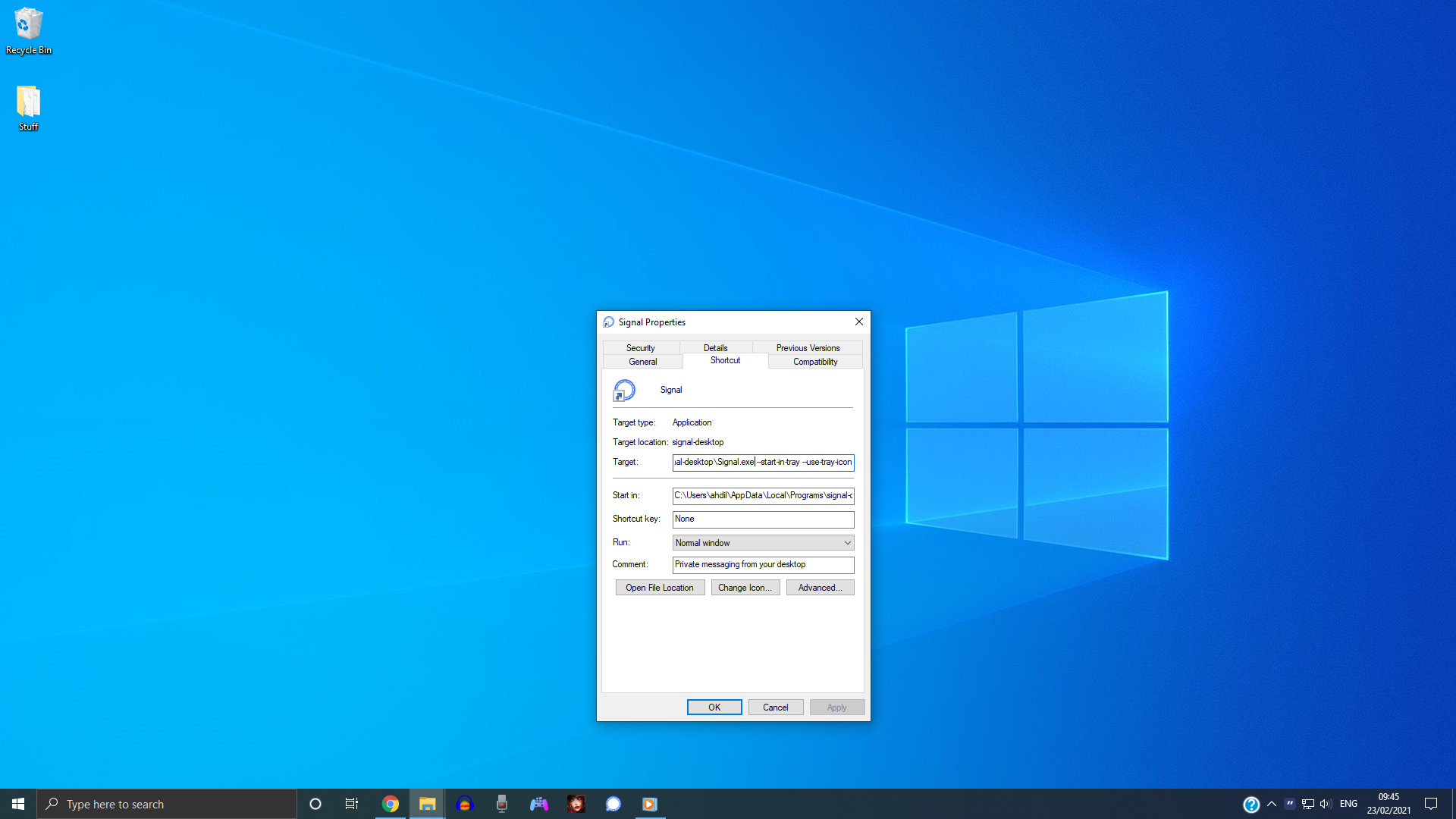
Hi sorry for the delay, Before was the exact same without the extra command I pasted. I also tried them both individually one at a time instead of both together.
Bagels1
on 23 Feb 2021
Yes, but stay with a single command like "path\Signal.exe --use-tray-icon" .
Are you sure, that you're editing the right shortcut? I see that you have a Signal shortchut on your taskbar, but above you were talking about the Windows menu list shortcut, which is available via the Windows logo on the left lower corner. These are two separate shortcuts.
If you only edit the shortcut on the Windows menu, it won't affect the shortcut on your taskbar right next to the Windows Media Player.
You can see the difference for both shortcuts on the "General" tab > Location. If you use them both, edit both. I only edited the one on my desktop, Windows menu item is still without any --option.
SigBugWin
on 23 Feb 2021
Wow that's it! I opened it from the start menu and it worked lol. But how do I edit the shortcut on the taskbar, it doesn't give the option when right clicking it?
Also how can I get it to auto run on startup?
Bagels1
on 23 Feb 2021
Glad that it works!
Right click on the task bar icon > right click on the program name on the appearing "menu" > properties.
Autostart: https://support.microsoft.com/en-us/windows/add-an-app-to-run-automatically-at-startup-in-windows-10-150da165-dcd9-7230-517b-cf3c295d89dd (first hit on google)
SigBugWin
on 24 Feb 2021
Glad that it works!
Right click on the task bar icon > right click on the program name on the appearing "menu" > properties.Autostart: https://support.microsoft.com/en-us/windows/add-an-app-to-run-automatically-at-startup-in-windows-10-150da165-dcd9-7230-517b-cf3c295d89dd (first hit on google)
Thanks so much!
Bagels1
on 24 Feb 2021
Related issues
 ProactiveServices
·
3Comments
ProactiveServices
·
3Comments
 vincenzopalazzo
·
3Comments
vincenzopalazzo
·
3Comments
 mawed
·
3Comments
mawed
·
3Comments
 petcap
·
3Comments
petcap
·
3Comments
 demux4555
·
3Comments
demux4555
·
3Comments
Most helpful comment
Glad that it works!
Right click on the task bar icon > right click on the program name on the appearing "menu" > properties.
Autostart: https://support.microsoft.com/en-us/windows/add-an-app-to-run-automatically-at-startup-in-windows-10-150da165-dcd9-7230-517b-cf3c295d89dd (first hit on google)