Signal-desktop: Signal Desktop for Mac is not updating to a new version
Bug Description
I keep getting a message that a new version of signal is available and I can select 'restart' or 'later'. If I select 'later', the message will pop up again after a while - usually an hour or so. If I select 'restart', Signal is shut down and not restarted. Also, next time I start Signal, the message will appear again.
This has been going on for quite a while. Some time ago I 'solved' the issue by deleting Signal and then downloading and installing a new version, but after a while (I'm guessing when the next update came out) the behaviour started again
Platform Info
This is Signal Desktop app for Mac.
Signal Version:
v1.23.1
Operating System:
Mac osx Mojave
10.14.3
Linked Device Version:
Link to Debug Log
https://debuglogs.org/638c5ad47f7078043b04f85ea8174a4f387032b5c965af2ce9c96d1fdf1e9a58

 RikkeHamilton
All 32 comments
Sadly, your log isn't very useful. But we may be able to get some error messages if you open Terminal and start the app with /Applications/Signal.app/Contents/MacOS/Signal - update-related error messages may show up there which we can help you with.
 scottnonnenberg-signal
on 8 Apr 2019
scottnonnenberg-signal
on 8 Apr 2019
Hi again.
I started Signal from the terminal as per instructions, and I have attached the output. Signal opened with the message 'There's a new version of Signal available...'. Clicking 'restart' just shut Signal down as usual, and the message appears again when I reopen Signal 'manually'.
Best regards
Rikke
Den 8. april 2019 klokken 18:25 skrev Scott Nonnenberg notifications@github.com:
Sadly, your log isn't very useful. But we may be able to get some error messages if you open Terminal and start the app with
/Applications/Signal.app/Contents/MacOS/Signal- update-related error messages may show up there which we can help you with.--
You are receiving this because you authored the thread.
Reply to this email directly or view it on GitHub:
https://github.com/signalapp/Signal-Desktop/issues/3302#issuecomment-480902732
RikkeHamilton
on 9 Apr 2019
Looks like the attachment didn't come through - Github doesn't allow you to attach documents via email. You'll need to come to the github site to attach that log output.
scottnonnenberg-signal
on 9 Apr 2019
I've been having the same issue for several months now. It looks like it downloads the new version fine but never launches a process to extract the new version and replace the existing. Here is my terminal output:
Set Windows Application User Model ID (AUMID) { appUserModelId: 'org.whispersystems.signal-desktop' }
NODE_ENV production
NODE_CONFIG_DIR /Applications/Signal.app/Contents/Resources/app.asar/config
NODE_CONFIG {}
ALLOW_CONFIG_MUTATIONS undefined
HOSTNAME undefined
NODE_APP_INSTANCE undefined
SUPPRESS_NO_CONFIG_WARNING undefined
userData: /Users/papabigwolf/Library/Application Support/Signal
config/get: Successfully read user config file
config/get: Successfully read ephemeral config file
making app single instance
(electron) 'app.makeSingleInstance(cb)' is deprecated. Use 'app.requestSingleInstanceLock() and app.on('second-instance', cb)' instead.
{"name":"log","hostname":"Ernests-iMac-27.local","pid":21517,"level":30,"msg":"app ready","time":"2019-04-11T02:28:59.934Z","v":0}
{"name":"log","hostname":"Ernests-iMac-27.local","pid":21517,"level":30,"msg":"updateSchema: Current schema version: 11; Most recent schema version: 11; SQLite version: 3.20.1; SQLCipher version: 3.4.2;","time":"2019-04-11T02:28:59.944Z","v":0}
GVA info: Successfully connected to the Intel plugin, offline Gen95
{"name":"log","hostname":"Ernests-iMac-27.local","pid":21517,"level":30,"msg":"Ensure attachments directory exists","time":"2019-04-11T02:28:59.975Z","v":0}
{"name":"log","hostname":"Ernests-iMac-27.local","pid":21517,"level":30,"msg":"Initializing BrowserWindow config: {\"show\":true,\"width\":800,\"height\":610,\"minWidth\":640,\"minHeight\":360,\"autoHideMenuBar\":false,\"backgroundColor\":\"#2090EA\",\"webPreferences\":{\"nodeIntegration\":false,\"nodeIntegrationInWorker\":false,\"preload\":\"/Applications/Signal.app/Contents/Resources/app.asar/preload.js\",\"nativeWindowOpen\":true},\"icon\":\"/Applications/Signal.app/Contents/Resources/app.asar/images/icon_256.png\",\"maximized\":false,\"x\":1751,\"y\":96}","time":"2019-04-11T02:29:00.033Z","v":0}
Checking for update
Found version 1.23.2 (url: signal-desktop-mac-1.23.2.zip)
Downloading update from signal-desktop-mac-1.23.2.zip
/ requested
/app.zip requested
app.zip requested by Squirrel.Mac, download https://updates.signal.org/desktop/signal-desktop-mac-1.23.2.zip
download-progress listener count: 0
{"name":"log","hostname":"Ernests-iMac-27.local","pid":21517,"level":30,"msg":"Using OS-level spell check API with locale en_US.UTF-8","time":"2019-04-11T02:29:01.028Z","v":0}
{"name":"log","hostname":"Ernests-iMac-27.local","pid":21517,"level":30,"msg":"pre-main prep time: 1 ms","time":"2019-04-11T02:29:01.243Z","v":0}
{"name":"log","hostname":"Ernests-iMac-27.local","pid":21517,"level":30,"msg":"Build expires:  2019-05-22T01:30:43.000Z","time":"2019-04-11T02:29:01.264Z","v":0}
{"name":"log","hostname":"Ernests-iMac-27.local","pid":21517,"level":30,"msg":"background page reloaded","time":"2019-04-11T02:29:01.291Z","v":0}
{"name":"log","hostname":"Ernests-iMac-27.local","pid":21517,"level":30,"msg":"environment: production","time":"2019-04-11T02:29:01.291Z","v":0}
{"name":"log","hostname":"Ernests-iMac-27.local","pid":21517,"level":30,"msg":"Storage fetch","time":"2019-04-11T02:29:01.497Z","v":0}
{"name":"log","hostname":"Ernests-iMac-27.local","pid":21517,"level":30,"msg":"Cleanup: starting...","time":"2019-04-11T02:29:01.514Z","v":0}
{"name":"log","hostname":"Ernests-iMac-27.local","pid":21517,"level":30,"msg":"SQL channel job 3 (getOutgoingWithoutExpiresAt) succeeded in 232ms","time":"2019-04-11T02:29:01.746Z","v":0}
{"name":"log","hostname":"Ernests-iMac-27.local","pid":21517,"level":30,"msg":"Cleanup: Found 0 messages for cleanup","time":"2019-04-11T02:29:01.746Z","v":0}
{"name":"log","hostname":"Ernests-iMac-27.local","pid":21517,"level":30,"msg":"Cleanup: complete","time":"2019-04-11T02:29:01.746Z","v":0}
{"name":"log","hostname":"Ernests-iMac-27.local","pid":21517,"level":30,"msg":"Starting background data migration. Target version: 10","time":"2019-04-11T02:29:01.746Z","v":0}
{"name":"log","hostname":"Ernests-iMac-27.local","pid":21517,"level":30,"msg":"ConversationController: starting initial fetch","time":"2019-04-11T02:29:01.747Z","v":0}
{"name":"log","hostname":"Ernests-iMac-27.local","pid":21517,"level":30,"msg":"SQL channel job 6 (getAllIdentityKeys) succeeded in 11ms","time":"2019-04-11T02:29:01.759Z","v":0}
{"name":"log","hostname":"Ernests-iMac-27.local","pid":21517,"level":30,"msg":"SignalProtocolStore: Finished caching identityKeys data","time":"2019-04-11T02:29:01.759Z","v":0}
{"name":"log","hostname":"Ernests-iMac-27.local","pid":21517,"level":30,"msg":"ConversationController: done with initial fetch","time":"2019-04-11T02:29:01.763Z","v":0}
{"name":"log","hostname":"Ernests-iMac-27.local","pid":21517,"level":30,"msg":"SignalProtocolStore: Finished caching sessions data","time":"2019-04-11T02:29:01.764Z","v":0}
{"name":"log","hostname":"Ernests-iMac-27.local","pid":21517,"level":30,"msg":"SignalProtocolStore: Finished caching preKeys data","time":"2019-04-11T02:29:01.770Z","v":0}
{"name":"log","hostname":"Ernests-iMac-27.local","pid":21517,"level":30,"msg":"SignalProtocolStore: Finished caching signedPreKeys data","time":"2019-04-11T02:29:01.771Z","v":0}
{"name":"log","hostname":"Ernests-iMac-27.local","pid":21517,"level":30,"msg":"listening for registration events","time":"2019-04-11T02:29:01.772Z","v":0}
{"name":"log","hostname":"Ernests-iMac-27.local","pid":21517,"level":30,"msg":"Next signed key rotation scheduled for 2019-04-13T02:26:09.270Z","time":"2019-04-11T02:29:01.774Z","v":0}
{"name":"log","hostname":"Ernests-iMac-27.local","pid":21517,"level":30,"msg":"refreshSenderCertificate: Getting new certificate...","time":"2019-04-11T02:29:01.774Z","v":0}
{"name":"log","hostname":"Ernests-iMac-27.local","pid":21517,"level":30,"msg":"GET https://textsecure-service.whispersystems.org/v1/certificate/delivery","time":"2019-04-11T02:29:01.775Z","v":0}
{"name":"log","hostname":"Ernests-iMac-27.local","pid":21517,"level":30,"msg":"connect","time":"2019-04-11T02:29:01.786Z","v":0}
{"name":"log","hostname":"Ernests-iMac-27.local","pid":21517,"level":30,"msg":"getAllFromCache","time":"2019-04-11T02:29:01.787Z","v":0}
{"name":"log","hostname":"Ernests-iMac-27.local","pid":21517,"level":30,"msg":"opening message socket https://textsecure-service.whispersystems.org","time":"2019-04-11T02:29:01.787Z","v":0}
{"name":"log","hostname":"Ernests-iMac-27.local","pid":21517,"level":30,"msg":"Start idle detector","time":"2019-04-11T02:29:01.790Z","v":0}
{"name":"log","hostname":"Ernests-iMac-27.local","pid":21517,"level":30,"msg":"open inbox","time":"2019-04-11T02:29:01.790Z","v":0}
{"name":"log","hostname":"Ernests-iMac-27.local","pid":21517,"level":30,"msg":"SQL channel job 18 (getNextExpiringMessage) succeeded in 55ms","time":"2019-04-11T02:29:01.828Z","v":0}
{"name":"log","hostname":"Ernests-iMac-27.local","pid":21517,"level":30,"msg":"SQL channel job 19 (getUnprocessedCount) succeeded in 42ms","time":"2019-04-11T02:29:01.828Z","v":0}
{"name":"log","hostname":"Ernests-iMac-27.local","pid":21517,"level":30,"msg":"SQL channel job 20 (resetAttachmentDownloadPending) succeeded in 40ms","time":"2019-04-11T02:29:01.829Z","v":0}
{"name":"log","hostname":"Ernests-iMac-27.local","pid":21517,"level":30,"msg":"SQL channel job 21 (getAllUnprocessed) succeeded in 28ms","time":"2019-04-11T02:29:01.856Z","v":0}
{"name":"log","hostname":"Ernests-iMac-27.local","pid":21517,"level":30,"msg":"getAllFromCache loaded 0 saved envelopes","time":"2019-04-11T02:29:01.857Z","v":0}
{"name":"log","hostname":"Ernests-iMac-27.local","pid":21517,"level":30,"msg":"SQL channel job 22 (getNextAttachmentDownloadJobs) succeeded in 28ms","time":"2019-04-11T02:29:01.857Z","v":0}
{"name":"log","hostname":"Ernests-iMac-27.local","pid":21517,"level":30,"msg":"GET https://textsecure-service.whispersystems.org/v1/certificate/delivery 200 Success","time":"2019-04-11T02:29:02.111Z","v":0}
{"name":"log","hostname":"Ernests-iMac-27.local","pid":21517,"level":30,"msg":"Next sender certificate refresh scheduled for 2019-04-12T02:29:02.113Z","time":"2019-04-11T02:29:02.114Z","v":0}
{"name":"log","hostname":"Ernests-iMac-27.local","pid":21517,"level":30,"msg":"GET https://textsecure-service.whispersystems.org/v1/profile/+[REDACTED]206 (unauth)","time":"2019-04-11T02:29:02.117Z","v":0}
{"name":"log","hostname":"Ernests-iMac-27.local","pid":21517,"level":30,"msg":"websocket open","time":"2019-04-11T02:29:02.121Z","v":0}
{"name":"log","hostname":"Ernests-iMac-27.local","pid":21517,"level":30,"msg":"got request PUT /api/v1/queue/empty","time":"2019-04-11T02:29:02.124Z","v":0}
{"name":"log","hostname":"Ernests-iMac-27.local","pid":21517,"level":30,"msg":"MessageReceiver: finished processing messages after 'empty', now waiting for application","time":"2019-04-11T02:29:02.127Z","v":0}
{"name":"log","hostname":"Ernests-iMac-27.local","pid":21517,"level":30,"msg":"MessageReceiver: emitting 'empty' event","time":"2019-04-11T02:29:02.127Z","v":0}
{"name":"log","hostname":"Ernests-iMac-27.local","pid":21517,"level":30,"msg":"GET https://textsecure-service.whispersystems.org/v1/profile/+[REDACTED]206 200 Success","time":"2019-04-11T02:29:02.446Z","v":0}
{"name":"log","hostname":"Ernests-iMac-27.local","pid":21517,"level":30,"msg":"Setting sealedSender to ENABLED for conversation +[REDACTED]206","time":"2019-04-11T02:29:02.447Z","v":0}
{"name":"log","hostname":"Ernests-iMac-27.local","pid":21517,"level":30,"msg":"GET https://cdn.signal.org/profiles/nbtpoh4Zg4FEIxkfBY8wVQ","time":"2019-04-11T02:29:02.448Z","v":0}
{"name":"log","hostname":"Ernests-iMac-27.local","pid":21517,"level":50,"msg":"GET https://cdn.signal.org/profiles/nbtpoh4Zg4FEIxkfBY8wVQ 403 Error","time":"2019-04-11T02:29:02.946Z","v":0}
{"name":"log","hostname":"Ernests-iMac-27.local","pid":21517,"level":30,"msg":"Update notifications: {\"shouldClearNotifications\":false,\"shouldPlayNotificationSound\":false,\"shouldShowNotifications\":false,\"type\":\"noNotifications\",\"isNotificationGroupingSupported\":true}","time":"2019-04-11T02:29:03.130Z","v":0}
{"name":"log","hostname":"Ernests-iMac-27.local","pid":21517,"level":30,"msg":"Upgrade message schema (with index): {\"done\":true,\"numProcessed\":0,\"fetchDuration\":4,\"upgradeDuration\":0,\"saveDuration\":0,\"totalDuration\":4}","time":"2019-04-11T02:29:06.875Z","v":0}
{"name":"log","hostname":"Ernests-iMac-27.local","pid":21517,"level":30,"msg":"Background migration complete. Stopping idle detector.","time":"2019-04-11T02:29:06.875Z","v":0}
{"name":"log","hostname":"Ernests-iMac-27.local","pid":21517,"level":30,"msg":"Stop idle detector","time":"2019-04-11T02:29:06.875Z","v":0}
2019-04-10 22:29:19.338 Signal[21517:533703] Download completed to: file:///Users/papabigwolf/Library/Caches/org.whispersystems.signal-desktop.ShipIt/update.to8lWwW/app.zip
New version 1.23.2 has been downloaded
Proxy server for native Squirrel.Mac is closed (was started to download https://updates.signal.org/desktop/signal-desktop-mac-1.23.2.zip)
{"name":"log","hostname":"Ernests-iMac-27.local","pid":21517,"level":30,"msg":"close event {\"shouldQuit\":true}","time":"2019-04-11T02:29:24.294Z","v":0}
{"name":"log","hostname":"Ernests-iMac-27.local","pid":21517,"level":30,"msg":"requestShutdown: Requesting close of mainWindow...","time":"2019-04-11T02:29:24.296Z","v":0}
{"name":"log","hostname":"Ernests-iMac-27.local","pid":21517,"level":30,"msg":"Remove all notifications","time":"2019-04-11T02:29:24.298Z","v":0}
{"name":"log","hostname":"Ernests-iMac-27.local","pid":21517,"level":30,"msg":"MessageReceiver: stopProcessing requested","time":"2019-04-11T02:29:24.299Z","v":0}
{"name":"log","hostname":"Ernests-iMac-27.local","pid":21517,"level":30,"msg":"MessageReceiver.close()","time":"2019-04-11T02:29:24.300Z","v":0}
{"name":"log","hostname":"Ernests-iMac-27.local","pid":21517,"level":30,"msg":"WebSocketResource.close()","time":"2019-04-11T02:29:24.301Z","v":0}
{"name":"log","hostname":"Ernests-iMac-27.local","pid":21517,"level":30,"msg":"drained","time":"2019-04-11T02:29:24.301Z","v":0}
{"name":"log","hostname":"Ernests-iMac-27.local","pid":21517,"level":30,"msg":"data.shutdown: starting process. 0 jobs outstanding","time":"2019-04-11T02:29:24.301Z","v":0}
{"name":"log","hostname":"Ernests-iMac-27.local","pid":21517,"level":30,"msg":"requestShutdown: Response received","time":"2019-04-11T02:29:24.309Z","v":0}
{"name":"log","hostname":"Ernests-iMac-27.local","pid":21517,"level":30,"msg":"before-quit event {\"readyForShutdown\":true,\"shouldQuit\":true}","time":"2019-04-11T02:29:24.309Z","v":0}
{"name":"log","hostname":"Ernests-iMac-27.local","pid":21517,"level":30,"msg":"close event {\"readyForShutdown\":true,\"shouldQuit\":true}","time":"2019-04-11T02:29:24.309Z","v":0}
{"name":"log","hostname":"Ernests-iMac-27.local","pid":21517,"level":30,"msg":"Update notifications: {\"shouldClearNotifications\":false,\"shouldPlayNotificationSound\":false,\"shouldShowNotifications\":false,\"type\":\"noNotifications\",\"isNotificationGroupingSupported\":true}","time":"2019-04-11T02:29:24.311Z","v":0}
 PapaBigWolf
on 11 Apr 2019
PapaBigWolf
on 11 Apr 2019
Also I'm at Mojave 10.14.4 and I'm an administrator on the system. If I manually extract the downloaded app and replace what's in /Applications then it works fine until the next release. I have no problems on my MacBook Pro though, so something's weird. I've completely uninstalled the app and reinstalled it but there's no change in behavior. Maybe I should try installing it to ~/Applications.
PapaBigWolf
on 11 Apr 2019
@PapaBigWolf Thanks for that log. Hm. Looks like we're handing everything to the underlying layers properly, things just aren't happening. What if you select 'Later', then close Signal Desktop, then wait for a bit, then restart it yourself? Does that allow the new version to be installed? It could be some sort of delay...
scottnonnenberg-signal
on 11 Apr 2019
At least for me the new version is never installed. Not if I select ‘later’ and restart manually, not if I select ‘restart’ an restart manually and not if I close Signal at another time and start it manually. As @PapaBigWolf said, this has been going on for months, and I have tried every conceivable combination, including force quitting and restarting the computer.
Rikke Hamilton
iPhone delivery
Den 11. apr. 2019 kl. 18.03 skrev Scott Nonnenberg notifications@github.com:
@PapaBigWolf Thanks for that log. Hm. Looks like we're handing everything to the underlying layers properly, things just aren't happening. What if you select 'Later', then close Signal Desktop, then wait for a bit, then restart it yourself? Does that allow the new version to be installed? It could be some sort of delay...
—
You are receiving this because you authored the thread.
Reply to this email directly, view it on GitHub, or mute the thread.
RikkeHamilton
on 11 Apr 2019
@RikkeHamilton Okay, thanks for that additional detail. The next thing to start thinking about is the history of your computer. What makes it different from my MacBook Pro laptops, for example? What have you installed on it? Are you an administrator user? Do other people user that computer?
scottnonnenberg-signal
on 11 Apr 2019
These are the specs for my Macbook Pro, in case that is useful to you:
Model Name: MacBook Pro
Model Identifier: MacBookPro11,4
Processor Name: Intel Core i7
Processor Speed: 2,8 GHz
Number of Processors: 1
Total Number of Cores: 4
L2 Cache (per Core): 256 KB
L3 Cache: 6 MB
Memory: 16 GB
Boot ROM Version: 187.0.0.0.0
SMC Version (system): 2.29f24
I am an administrator user, and this is my computer at work, so only I, and occasionally our internal IT department, ever lays hands on it. I use it primarily for software development. For the same reason I am not allowed (or inclined) to publicly share everything that is installed on the computer, but if it helps I can provide a list of many of the things that are installed.
Also, I am attaching the console output that didn't get attached when I replied by email. It is similar to the one provided by @PapaBigWolf, but not exactly the same.
RikkeHamilton
on 12 Apr 2019
@RikkeHamilton In that log it looks like you didn't select to restart when the dialog popped up. Is that true? If so, another log where you choose to restart now would be helpful - if the auto-install logic is having trouble putting that new update in place, that's where we might see the error.
Another thought I had is your system console - it could perhaps have some errors of use for us.
scottnonnenberg-signal
on 12 Apr 2019
I am fairly certain that I did select restart, but the log is from a couple of days ago, so just to be sure I did it again. To be precise:
1) I started Signal from the terminal with the command /Applications/Signal.app/Contents/MacOS/Signal
2) Signal opened with the message 'There's a new version of Signal...' already showing
3) I selected Restart
4) Signal shut down and did not restart.
I have attached the output on the terminal as well as the console log starting right before I started signal and ending right after it shot down.
Console.txt
terminal.txt
RikkeHamilton
on 12 Apr 2019
Thanks for that... The stuff from your Terminal looks as expected, but the stuff from your Console resulted in some interesting things (pasted below). getpwuid failed with result Not Found is particularly interesting - according to this documentation something is looking for a user that doesn't exist. Do you have sudo access on your mac? Is there anything else strange about the users have been set up on your mac?
default 19:35:56.833526 +0200   Terminal    27366555: RECEIVED OUT-OF-SEQUENCE NOTIFICATION: 5139 vs 10188, 512, <private>
default 19:35:56.835489 +0200   contextstored   27366555: RECEIVED OUT-OF-SEQUENCE NOTIFICATION: 0 vs 194, 513, <private>
default 19:35:57.038584 +0200   CommCenter  27366555: RECEIVED OUT-OF-SEQUENCE NOTIFICATION: 3393 vs 5135, 258, <private>
default 19:35:57.039188 +0200   loginwindow 27366555: RECEIVED OUT-OF-SEQUENCE NOTIFICATION: 331 vs 11043, 258, <private>
default 19:35:57.039280 +0200   CommCenter  #I handleLSNotitifcation_sync: Application exited: <private>
default 19:35:57.039793 +0200   loginwindow -[PersistentAppsSupport applicationQuit:] | for app:Signal, _appTrackingState = 2
default 19:35:57.039836 +0200   loginwindow -[PersistentAppsSupport applicationQuit:] | App: Signal, quit, updating active tracking timer
default 19:35:57.039861 +0200   loginwindow -[PersistentAppsSupport(Internal) updateActiveTrackingTimer] | Creating timer
default 19:35:57.047708 +0200   opendirectoryd  getpwuid failed with result Not Found
default 19:35:57.256092 +0200   trustd  could not enable test hierarchy: no UAT pinning preferences set
error   19:35:57.351207 +0200   cfprefsd    rejecting write of key _DKThrottledActivityLast_DKKnowledgeStorageLogging_DKKnowledgeStorageDidInsertEventsNotification:/app/usageActivityDate in { com.apple.contextstored, root, kCFPreferencesAnyHost, no container, managed: 0 } from process 202 because setting preferences outside an application's container requires user-preference-write or file-write-data sandbox access
error   19:35:57.352142 +0200   contextstored   Couldn't write value for key _DKThrottledActivityLast_DKKnowledgeStorageLogging_DKKnowledgeStorageDidInsertEventsNotification:/app/usageActivityDate in CFPrefsPlistSource<0x7fd339d03ca0> (Domain: com.apple.contextstored, User: kCFPreferencesCurrentUser, ByHost: No, Container: (null), Contents Need Refresh: No): setting preferences outside an application's container requires user-preference-write or file-write-data sandbox access
error   19:35:57.353080 +0200   cfprefsd    rejecting write of key _DKThrottledActivityLast_DKKnowledgeStorageLogging_DKKnowledgeStorageDidInsertLocalEventsNotification:/app/usageActivityDate in { com.apple.contextstored, root, kCFPreferencesAnyHost, no container, managed: 0 } from process 202 because setting preferences outside an application's container requires user-preference-write or file-write-data sandbox access
error   19:35:57.353272 +0200   contextstored   Couldn't write value for key _DKThrottledActivityLast_DKKnowledgeStorageLogging_DKKnowledgeStorageDidInsertLocalEventsNotification:/app/usageActivityDate in CFPrefsPlistSource<0x7fd339d03ca0> (Domain: com.apple.contextstored, User: kCFPreferencesCurrentUser, ByHost: No, Container: (null), Contents Need Refresh: No): setting preferences outside an application's container requires user-preference-write or file-write-data sandbox access
default 19:35:57.576064 +0200   kernel  Sandbox: 1 duplicate report for contextstored deny(1) file-write-data /private/var/root/Library/Preferences/com.apple.contextstored.plist
error   19:35:57.576082 +0200   kernel  Sandbox: storedownloadd(974) deny(1) mach-lookup com.apple.dock.server
default 19:35:57.632921 +0200   kernel  ARPT: 1991221.542620: txpkt (MPDU) Complete
default 19:35:57.632935 +0200   kernel  ARPT: 1991221.542636: FrameID: 0x4c0b
default 19:35:57.632938 +0200   kernel  Seq: 0x0590
default 19:35:57.632941 +0200   kernel  TxStatus: 0x010b
default 19:35:57.632944 +0200   kernel
default 19:35:57.632948 +0200   kernel  ARPT: 1991221.542650: ACK 0 IM 0 PM 1 Suppr 0 (None)
default 19:35:57.632954 +0200   kernel  ARPT: 1991221.542655: CNT(rts_tx)=0 CNT(frag_tx_cnt)=15 CNT(cts_rx_cnt)=0
default 19:35:57.632959 +0200   kernel  ARPT: 1991221.542661: DequeueTime: 0xa4b02000
default 19:35:57.632963 +0200   kernel  LastTxTime: 0x95e9d55c
default 19:35:57.632966 +0200   kernel  PHYTxErr:   0x0000
default 19:35:57.632969 +0200   kernel  RxAckRSSI: 0x0000
default 19:35:57.632972 +0200   kernel  RxAckSQ: 0x0000
default 19:35:57.632975 +0200   kernel
default 19:35:57.632978 +0200   kernel  ARPT: 1991221.542679: Raw
default 19:35:57.632981 +0200   kernel  [0]    1 Valid
default 19:35:57.632984 +0200   kernel  ARPT: 1991221.542686: [2]    0 IM
default 19:35:57.632987 +0200   kernel  ARPT: 1991221.542690: [3]    1 PM
default 19:35:57.632992 +0200   kernel  ARPT: 1991221.542693: [7-4]  0 Suppr
default 19:35:57.632995 +0200   kernel  ARPT: 1991221.542697: [14:8] 1 Ncons
default 19:35:57.632999 +0200   kernel  ARPT: 1991221.542701: [15]   0 Acked
default 19:35:57.633004 +0200   kernel  ARPT: 1991221.542705: txpktpend AC_BK 0 AC_BE 0 AC_VI 0 AC_VO 1 BCMC 0 ATIM 0
default 19:35:58.372013 +0200   Console 27366555: RECEIVED OUT-OF-SEQUENCE NOTIFICATION: 5140 vs 10186, 512, <private>
default 19:35:58.373171 +0200   ARDAgent    27366555: RECEIVED OUT-OF-SEQUENCE NOTIFICATION: 0 vs 11046, 512, <private>
default 19:35:58.372738 +0200   WindowServer    SetFrontProcessInternal(0x0,0xd1cd1c pid70673) Posting kCGSEventResume to application, allWindows=0 noWindows=0 userGenerated=0.
default 19:35:58.372765 +0200   contextstored   27366555: RECEIVED OUT-OF-SEQUENCE NOTIFICATION: 0 vs 136, 513, <private>
default 19:35:58.385866 +0200   diagnostics_agent   27366555: RECEIVED OUT-OF-SEQUENCE NOTIFICATION: 0 vs 3230, 516, <private>
I do have sudo access. There are two other user accounts on the machine, both admins. One belongs to the IT department, so I don't know if there's something strange about that one, the other one is my own, and is a 'bare' account with nothing exiting going on.
RikkeHamilton
on 12 Apr 2019
I have the exact same annoying problem. I also updated twice manually already, still same behaviour.
To me it seems that this issue and #3325 are duplicates. I'm adding my info here as well, sorry if spammy.
- Signal version v1.25.1-beta.1
- Hardware MacBook Pro running Mojave 10.14.5
- Debug Log
 bbinoy
on 6 Jul 2019
bbinoy
on 6 Jul 2019
@bbinoy Please reach out to [email protected]. We're unable to reproduce your behavior, so we'll need to do a deeper investigation with you.
scottnonnenberg-signal
on 8 Jul 2019
I have the same problem. For a long time already...
 hkroger
on 8 Jul 2019
hkroger
on 8 Jul 2019
@hkroger Please consider reaching out to [email protected]. At the very least, please think about how you've changed your macOS install compared to a fresh install of macOS - have you locked certain things down? Changed certain settings? Where is Signal.app on your computer?
scottnonnenberg-signal
on 8 Jul 2019
Is an investigation ongoing or has it stalled?
 troldmand
on 27 Aug 2019
troldmand
on 27 Aug 2019
@troldmand If you have more information to provide, please chime in! We absolutely don't understand the root cause here yet. Seems like Squirrel, our underlying update mechanism for macOS, sometimes has problems. But we don't know when that happens - it doesn't show up in our logs.
scottnonnenberg-signal
on 4 Sep 2019
Had the same issue for a long time. Looks like the update directory was corrupted. Removing the directory fixed it for me. Maybe it could help others as well.
This is what I did:
- Close Signal
rm -r ~/Library/Caches/org.whispersystems.signal-desktop.ShipIt(maybe you need root permissions)- Start Signal
- Update
Not sure if this is a permanent fix, but after the update, I replaced the app with an older version and tried the update again without removing this folder and it worked. So hopefully this is resolved. We'll see.
Version before update: 1.27.1
Version after update: 1.27.2
More information:
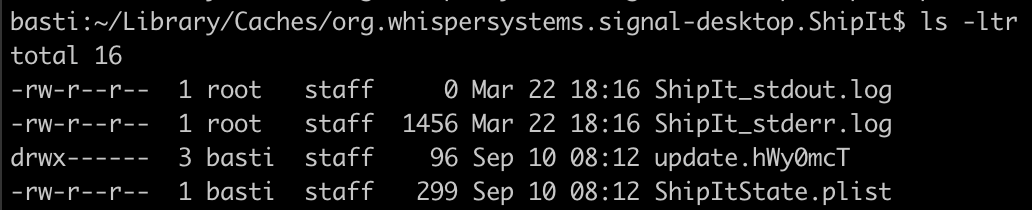
I guess the problem was that the logs were not writeable for the updater (maybe because I installed signal-desktop via brew at some point). The logs were written as owner root in the past. See attached screenshot:
 splagemann
on 10 Sep 2019
splagemann
on 10 Sep 2019
I also have the same problem since eternity!
My all tries are futile...
 kshitijyadav01
on 30 Sep 2019
kshitijyadav01
on 30 Sep 2019
@kshitijyadav01 Have you switched back and forth between being an admin user and non-admin user on your computer? What OS are you on? Do you see error messages?
scottnonnenberg-signal
on 30 Sep 2019
I have the same issue on one of my computers (but not the other). I'm now on the latest version of Signal (v1.29.3) and macOS 10.13.6.
I tried the fix outlined by @splagemann, but somehow I'm unable to remove the directory. It is re-created immediately after removal even though Signal.app is not running:
$ sudo rm -rfv ~/Library/Caches/org.whispersystems.signal-desktop.ShipIt
Password:
/Users/millerdev/Library/Caches/org.whispersystems.signal-desktop.ShipIt/ShipIt_stdout.log
/Users/millerdev/Library/Caches/org.whispersystems.signal-desktop.ShipIt/ShipItState.plist
/Users/millerdev/Library/Caches/org.whispersystems.signal-desktop.ShipIt/ShipIt_stderr.log
/Users/millerdev/Library/Caches/org.whispersystems.signal-desktop.ShipIt
$ ls -lah ~/Library/Caches/org.whispersystems.signal-desktop.ShipIt/
$ ls -lhd ~/Library/Caches/org.whispersystems.signal-desktop.ShipIt/
drwxr--r--  2 root  staff    64B Dec 25 10:36 /Users/millerdev/Library/Caches/org.whispersystems.signal-desktop.ShipIt/
What is creating this directory? I cannot find any running processes named ShipIt or anything related. Some logs are written if I change permissions to my user.
$ sudo chown millerdev ~/Library/Caches/org.whispersystems.signal-desktop.ShipIt
$ tail -n2 ~/Library/Caches/org.whispersystems.signal-desktop.ShipIt/ShipIt_stderr.log
2019-12-25 10:42:17.727 ShipIt[78641:1097480] Installation error: Error Domain=SQRLShipItRequestErrorDomain Code=2 "Could not read update request" UserInfo={NSLocalizedDescription=Could not read update request, NSUnderlyingError=0x7fcb7d501a30 {Error Domain=NSCocoaErrorDomain Code=260 "The file “ShipItState.plist” couldn’t be opened because there is no such file." UserInfo={NSFilePath=/Users/millerdev/Library/Caches/org.whispersystems.signal-desktop.ShipIt/ShipItState.plist, NSUnderlyingError=0x7fcb7d501540 {Error Domain=NSPOSIXErrorDomain Code=2 "No such file or directory"}}}}
2019-12-25 10:42:17.727 ShipIt[78641:1097480] ShipIt quitting
The error changes if I touch the missing file:
$ touch ~/Library/Caches/org.whispersystems.signal-desktop.ShipIt/ShipItState.plist
$ tail -n10 ~/Library/Caches/org.whispersystems.signal-desktop.ShipIt/ShipIt_stderr.log
2019-12-25 10:45:58.715 ShipIt[78863:1099302] Installation error: Error Domain=SQRLShipItRequestErrorDomain Code=2 "Could not read update request" UserInfo={NSLocalizedDescription=Could not read update request, NSUnderlyingError=0x7fd484515600 {Error Domain=NSCocoaErrorDomain Code=3840 "No value." UserInfo={NSDebugDescription=No value.}}}
2019-12-25 10:45:58.715 ShipIt[78863:1099302] ShipIt quitting
2019-12-25 10:46:00.759 ShipIt[78868:1099319] Installation error: Error Domain=SQRLShipItRequestErrorDomain Code=2 "Could not read update request" UserInfo={NSLocalizedDescription=Could not read update request, NSUnderlyingError=0x7ff6d1e1fe80 {Error Domain=NSCocoaErrorDomain Code=3840 "No value." UserInfo={NSDebugDescription=No value.}}}
2019-12-25 10:46:00.759 ShipIt[78868:1099319] ShipIt quitting
2019-12-25 10:46:02.803 ShipIt[78869:1099327] Installation error: Error Domain=SQRLShipItRequestErrorDomain Code=2 "Could not read update request" UserInfo={NSLocalizedDescription=Could not read update request, NSUnderlyingError=0x7fce9d4071b0 {Error Domain=NSCocoaErrorDomain Code=3840 "No value." UserInfo={NSDebugDescription=No value.}}}
2019-12-25 10:46:02.803 ShipIt[78869:1099327] ShipIt quitting
2019-12-25 10:46:04.849 ShipIt[78871:1099380] Installation error: Error Domain=SQRLShipItRequestErrorDomain Code=2 "Could not read update request" UserInfo={NSLocalizedDescription=Could not read update request, NSUnderlyingError=0x7ff09ff00250 {Error Domain=NSCocoaErrorDomain Code=3840 "No value." UserInfo={NSDebugDescription=No value.}}}
2019-12-25 10:46:04.849 ShipIt[78871:1099380] ShipIt quitting
2019-12-25 10:46:06.893 ShipIt[78872:1099388] Installation error: Error Domain=SQRLShipItRequestErrorDomain Code=2 "Could not read update request" UserInfo={NSLocalizedDescription=Could not read update request, NSUnderlyingError=0x7fb6d8705b70 {Error Domain=NSCocoaErrorDomain Code=3840 "No value." UserInfo={NSDebugDescription=No value.}}}
2019-12-25 10:46:06.893 ShipIt[78872:1099388] ShipIt quitting
It's disconcerting that something is continuously writing new log messages to that file every 2 seconds, even when Signal is not running. What's going on here?
 millerdev
on 25 Dec 2019
millerdev
on 25 Dec 2019
More information about the daemon running every two seconds: https://discuss.atom.io/t/how-do-i-get-rid-of-shipit/46784
scottnonnenberg-signal
on 6 Jan 2020
@millerdev Has your user account been an admin in the past, and is no longer? Initial installation as an admin then later running Signal without those privileges seems to be a way you can get these kinds of errors.
scottnonnenberg-signal
on 6 Jan 2020
@scottnonnenberg-signal My user account has not been an admin, but the Applications directory where Signal.app was located required and admin password to write into. Not sure if that's relevant.
My main concern (other than the annoying app update popups that do not work) is that somehow signal appears to be spawning a process that is able to write files owned by root (privilege escalation?). That seems a little scary.
millerdev
on 7 Jan 2020
This is what I did:
Close Signal
rm -r ~/Library/Caches/org.whispersystems.signal-desktop.ShipIt (maybe you need root permissions)
Start Signal
Update
@splagemann Thank you. This fixed v1.29.4 to v1.29.5
One note, for us it was easier to head over to ~/Library/Caches/ and delete the org.whispersystems.signal-desktop.ShipIt _(possibly due to root permissions, as you noted. I was doing support._)
 PrinceSerna
on 16 Jan 2020
PrinceSerna
on 16 Jan 2020
I was able to resolve my issue, and updates are now working. It's been a while since I did these steps, but I think the incantation to get it working was:
- Reboot the machine and ensure that Signal is NOT opened before executing the next step.
sudo chown -R $USER:staff ~/Library/Caches/org.whispersystems.signal-desktop.ShipIt- Ensure that
$USERis able to write to the directory where Signal.app is installed.
A reboot is pretty extreme. It may be good enough to simply logout and login again. However, since I did not know the name of the ShipIt process I could tell when it had stopped, but I noticed that it was no longer writing to the log file after a reboot.
millerdev
on 17 Jan 2020
Had the same issue for a long time. Looks like the update directory was corrupted. Removing the directory fixed it for me. Maybe it could help others as well.
This is what I did:
- Close Signal
rm -r ~/Library/Caches/org.whispersystems.signal-desktop.ShipIt(maybe you need root permissions)- Start Signal
- Update
Not sure if this is a permanent fix, but after the update, I replaced the app with an older version and tried the update again without removing this folder and it worked. So hopefully this is resolved. We'll see.
Version before update: 1.27.1
Version after update: 1.27.2More information:
I guess the problem was that the logs were not writeable for the updater (maybe because I installed signal-desktop via brew at some point). The logs were written as ownerrootin the past. See attached screenshot:
This has helped me resolve the problem as well.
 ranpergamin
on 19 Apr 2020
ranpergamin
on 19 Apr 2020
I also had this issue, and only removing ~/Library/Caches/org.whispersystems.signal-desktop.ShipIt was able to resolve it.
 rjroch
on 18 May 2020
rjroch
on 18 May 2020
Can confirm as per @scottnonnenberg-signal note... I had this issue. The permissions were set as per @splagemann, changing the log files to be writable by my user account allowed the update to complete.
I think I too installed Signal via homebrew, however wouldn't these files only be created when the app is run? Not installed? I'll do some testing.
 fishd72
on 21 May 2020
fishd72
on 21 May 2020
@splagemann splagemann's answer worked for me. I don't believe I used homebrew. I downloaded and installed from the website.
 TommyTwoTap
on 29 Jun 2020
TommyTwoTap
on 29 Jun 2020
Related issues
 McLoo
·
3Comments
McLoo
·
3Comments
 jeremymasters
·
3Comments
jeremymasters
·
3Comments
 ploum
·
3Comments
ploum
·
3Comments
 PanderMusubi
·
3Comments
PanderMusubi
·
3Comments
 hanzei
·
3Comments
hanzei
·
3Comments
Most helpful comment
Had the same issue for a long time. Looks like the update directory was corrupted. Removing the directory fixed it for me. Maybe it could help others as well.
This is what I did:
rm -r ~/Library/Caches/org.whispersystems.signal-desktop.ShipIt(maybe you need root permissions)Not sure if this is a permanent fix, but after the update, I replaced the app with an older version and tried the update again without removing this folder and it worked. So hopefully this is resolved. We'll see.
Version before update: 1.27.1
Version after update: 1.27.2
More information:

I guess the problem was that the logs were not writeable for the updater (maybe because I installed signal-desktop via brew at some point). The logs were written as owner
rootin the past. See attached screenshot: