Signal-desktop: MacOS v1.23.1: crash (errno=13) when running as non-owner user
- [X] I have searched open and closed issues for duplicates
Bug Description
After being prompted to upgrade from 1.22.0 to 1.23.0 by the periodic update check and selecting "Restart Signal" after the upgrade, the app crashes on startup.
From the problem details:
Dyld Error Message:
  Library not loaded: @rpath/Electron Framework.framework/Electron Framework
  Referenced from: /Applications/Signal.app/Contents/MacOS/Signal
  Reason: no suitable image found.  Did find:
    /Applications/Signal.app/Contents/MacOS/../Frameworks/Electron Framework.framework/Electron Framework: stat() failed with errno=13
Actual Result:
MacOS window with the following text: "The application “Signal.app” can’t be opened."
Expected Result:
Startup of Signal Desktop.
Platform Info
Signal Version:
1.23.0
Operating System:
Mac OS X 10.14.3 (18D109)
Linked Device Version:
2.37.2.0
Problem Details and System Configuration
Process:               Signal [335]
Path:                  /Applications/Signal.app/Contents/MacOS/Signal
Identifier:            Signal
Version:               1.23.0 (1)
Code Type:             X86-64 (Native)
Parent Process:        ??? [1]
Responsible:           Signal [335]
User ID:               502

Date/Time:             2019-03-21 23:06:14.075 +0100
OS Version:            Mac OS X 10.14.3 (18D109)
Report Version:        12
Anonymous UUID:        A0F54031-F8EB-C482-5FB7-EB8F8B57CEBF


Time Awake Since Boot: 54 seconds

System Integrity Protection: enabled

Crashed Thread:        0

Exception Type:        EXC_CRASH (SIGABRT)
Exception Codes:       0x0000000000000000, 0x0000000000000000
Exception Note:        EXC_CORPSE_NOTIFY

Termination Reason:    DYLD, [0x1] Library missing

Application Specific Information:
dyld: launch, loading dependent libraries

Dyld Error Message:
  Library not loaded: @rpath/Electron Framework.framework/Electron Framework
  Referenced from: /Applications/Signal.app/Contents/MacOS/Signal
  Reason: no suitable image found.  Did find:
    /Applications/Signal.app/Contents/MacOS/../Frameworks/Electron Framework.framework/Electron Framework: stat() failed with errno=13

Binary Images:
       0x10fcaf000 -        0x10fcafffb +org.whispersystems.signal-desktop (1.23.0 - 1) <6E272AEB-51ED-363B-B2D0-1E8B0C094EDF> /Applications/Signal.app/Contents/MacOS/Signal
       0x113a61000 -        0x113adfa87  dyld (655.1) <3EBA447F-A546-366B-B302-8DC3B21A3E30> /usr/lib/dyld
    0x7fff379d2000 -     0x7fff379d2fff  com.apple.Cocoa (6.11 - 23) <3F281295-3B16-359C-AE0C-5B4181DE1579> /System/Library/Frameworks/Cocoa.framework/Versions/A/Cocoa
    0x7fff3a57a000 -     0x7fff3a948fff  com.apple.Foundation (6.9 - 1562) <83D4A12B-EA5A-3C62-8D93-95E64F0A256B> /System/Library/Frameworks/Foundation.framework/Versions/C/Foundation
    0x7fff3ac6f000 -     0x7fff3ad02fff  com.apple.framework.IOKit (2.0.2 - 1483.240.1) <241690BB-8AFA-3B6A-A210-67874197CB59> /System/Library/Frameworks/IOKit.framework/Versions/A/IOKit
    0x7fff43c91000 -     0x7fff43fb9ff7  com.apple.security (7.0 - 58286.240.4) <91A03FF2-2EE9-36A7-AC4F-169E11FE7846> /System/Library/Frameworks/Security.framework/Versions/A/Security
    0x7fff4443c000 -     0x7fff444acff3  com.apple.SystemConfiguration (1.17 - 1.17) <A8FD596E-C858-397F-836C-978038B97AC0> /System/Library/Frameworks/SystemConfiguration.framework/Versions/A/SystemConfiguration

Model: MacBookAir7,2, BootROM 182.0.0.0.0, 2 processors, Intel Core i5, 1,6 GHz, 8 GB, SMC 2.27f2
Graphics: Intel HD Graphics 6000, Intel HD Graphics 6000, Built-In
Memory Module: BANK 0/DIMM0, 4 GB, DDR3, 1600 MHz, 0x80CE, 0x4B3445364533303445452D45474345000000
Memory Module: BANK 1/DIMM0, 4 GB, DDR3, 1600 MHz, 0x80CE, 0x4B3445364533303445452D45474345000000
AirPort: spairport_wireless_card_type_airport_extreme (0x14E4, 0x117), Broadcom BCM43xx 1.0 (7.77.61.1 AirPortDriverBrcmNIC-1305.2)
Bluetooth: Version 6.0.10f1, 3 services, 18 devices, 1 incoming serial ports
Network Service: Wi-Fi, AirPort, en0
Serial ATA Device: APPLE SSD SM0128G, 121,33 GB
USB Device: USB 3.0 Bus
USB Device: BRCM20702 Hub
USB Device: Bluetooth USB Host Controller
Thunderbolt Bus: MacBook Air, Apple Inc., 27.2
 oliviermichaelis
All 33 comments
We've previously seen this, but it was limited to new installations and unzips via tools other than the MacOS built-in unzip functionality: https://github.com/signalapp/Signal-Desktop/issues/3128
What file decompression tools do you have installed on your machine? Or did you go download the update for v1.23.0 manually?
 scottnonnenberg-signal
on 22 Mar 2019
scottnonnenberg-signal
on 22 Mar 2019
Windows automatic update broken too: https://pbs.twimg.com/media/D2OLZlIWoAAVpLQ.png:large
Not opening a new bug as it looks like this is the same problem. Reverting to 1.22 got me up and going again.
I tried reinstalling 1.23 direct off the site and it was still broken. Thankfully the old build was hosted with same filename structure.
 joecool1029
on 22 Mar 2019
joecool1029
on 22 Mar 2019
@joecool1029 v1.23 is broken for you, during a fresh install? What exactly did you use to unzip it?
scottnonnenberg-signal
on 22 Mar 2019
Same scenario, Signal 1.23 broke during self-upgrade on Mac OS 10.14.3
I was able to upgrade manually, by "open"-ing the zip file. Zip file cannot be unzipped with /usr/bin/unzip, since there is data after central directory:
% zipdetails signal-desktop-mac-1.23.0.zip | tail
6426A6A Number of this disk 0000
6426A6C Central Dir Disk no 0000
6426A6E Entries in this disk 0142
6426A70 Total Entries 0142
6426A72 Size of Central Dir 00009BE4
6426A76 Offset to Central Dir 0641CE82
6426A7A Comment Length 0000
6426A7C TRAILING DATA
Done
vs
% zipdetails signal-desktop-mac-1.22.0.zip | tail
5E0C2B3 END CENTRAL HEADER 06054B50
5E0C2B7 Number of this disk 0000
5E0C2B9 Central Dir Disk no 0000
5E0C2BB Entries in this disk 0155
5E0C2BD Total Entries 0155
5E0C2BF Size of Central Dir 0000A515
5E0C2C3 Offset to Central Dir 05E01D9E
5E0C2C7 Comment Length 0000
Done
% unzip -tq signal-desktop-mac-1.23.0.zip
[signal-desktop-mac-1.23.0.zip]
End-of-central-directory signature not found. Either this file is not
a zipfile, or it constitutes one disk of a multi-part archive. In the
latter case the central directory and zipfile comment will be found on
the last disk(s) of this archive.
unzip: cannot find zipfile directory in one of signal-desktop-mac-1.23.0.zip or
signal-desktop-mac-1.23.0.zip.zip, and cannot find signal-desktop-mac-1.23.0.zip.ZIP, period.
% unzip -tq signal-desktop-mac-1.22.0.zip
No errors detected in compressed data of signal-desktop-mac-1.22.0.zip.
% ls -lan signal*
-rw-r--r--@ 1 1 1 98616009 Mar 21 16:59 signal-desktop-mac-1.22.0.zip
-rw-r--r--@ 1 1 1 105127397 Mar 21 13:59 signal-desktop-mac-1.23.0.zip
% shasum signal-desktop-mac-1.2*
69d058fba5a54700009692b591d13a7025cc3e64 signal-desktop-mac-1.22.0.zip
34cfc7a9db4ced8010383479ab2888a6dd819ea5 signal-desktop-mac-1.23.0.zip
 isviridov
on 22 Mar 2019
isviridov
on 22 Mar 2019
@joecool1029 v1.23 is broken for you, during a fresh install? What exactly did you use to unzip it?
I ran the exe installer off the site (here: https://updates.signal.org/desktop/signal-desktop-win-1.23.0.exe ) after the in-place upgrade broke my install. I don't know what your packer uses to unzip the installer. I did not do a fresh install because I don't really want to lose my messages on this system.
Installing https://updates.signal.org/desktop/signal-desktop-win-1.22.0.exe over the broken install got me up and going again.
joecool1029
on 22 Mar 2019
@scottnonnenberg-signal
What file decompression tools do you have installed on your machine? Or did you go download the update for v1.23.0 manually?
I only have the MacOS built-in extraction tool installed.
So far the only thing I did was to auto-update and restart. I haven't tried to manually install or reinstall with the binaries for 1.23.0 in case I need to provide additional information.
oliviermichaelis
on 22 Mar 2019
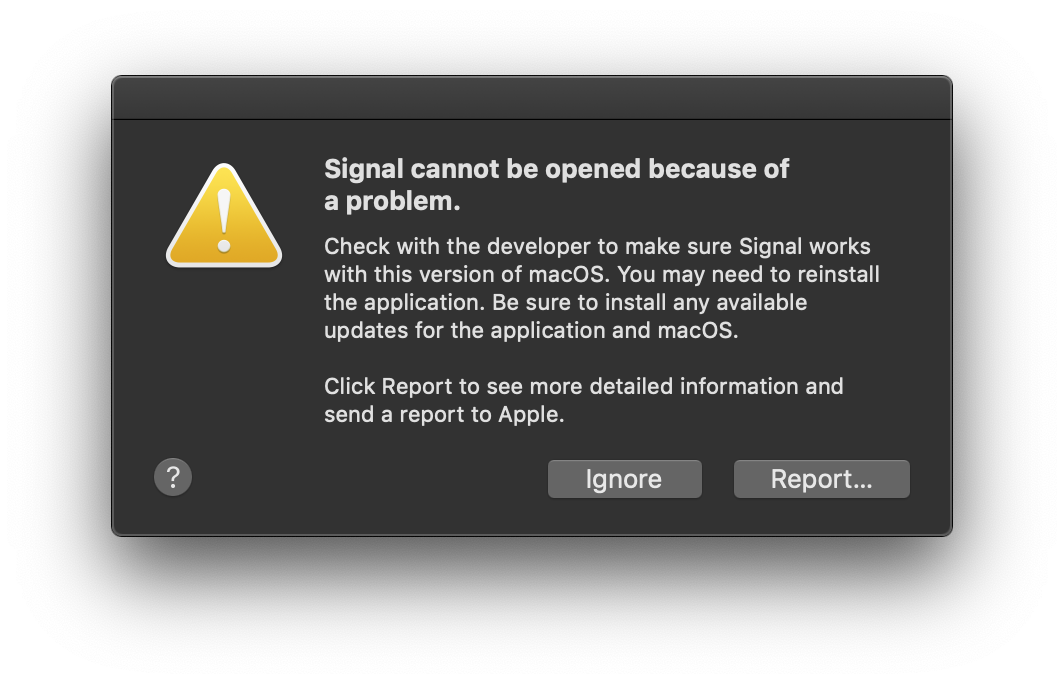
Same. The latest auto-upgrade applied yesterday broke Signal Desktop on macOS 10.14.3:
 artob
on 22 Mar 2019
artob
on 22 Mar 2019
v1.23.1-beta.1 was just released, and it should fix this. Please give it a try (you can install the beta alongside the production version): https://updates.signal.org/desktop/signal-desktop-beta-mac-1.23.1-beta.1.zip
scottnonnenberg-signal
on 22 Mar 2019
v1.23.1 was just promoted to production. You can test this out by installing v1.22.0, and then letting it update to v1.23.1 automatically.
scottnonnenberg-signal
on 22 Mar 2019
I was 1.23 after it failed to auto update itself. I was just prompted for an update, which I assume was 1.23.1. That also broke, and I had to download 1.23.1 and unzip it. I use The Unarchiver for zip files.
 Chrismarsh
on 22 Mar 2019
Chrismarsh
on 22 Mar 2019
v1.23.1 was just promoted to production. You can test this out by installing v1.22.0, and then letting it update to v1.23.1 automatically.
I replaced the 1.23.0 Signal.app package with version 1.22.0. I then let it update automatically to 1.23.1 but faced the the same error again.
Please find the Problem Details and System Configuration below:
Process:               Signal [7506]
Path:                  /Applications/Signal.app/Contents/MacOS/Signal
Identifier:            org.whispersystems.signal-desktop
Version:               1.23.1 (1)
Code Type:             X86-64 (Native)
Parent Process:        ??? [1]
Responsible:           Signal [7506]
User ID:               502

Date/Time:             2019-03-22 23:47:45.906 +0100
OS Version:            Mac OS X 10.14.3 (18D109)
Report Version:        12
Anonymous UUID:        A0F54031-F8EB-C482-5FB7-EB8F8B57CEBF

Sleep/Wake UUID:       1C399049-5167-4583-9C9B-6E588815F486

Time Awake Since Boot: 36000 seconds
Time Since Wake:       270 seconds

System Integrity Protection: enabled

Crashed Thread:        0

Exception Type:        EXC_CRASH (SIGABRT)
Exception Codes:       0x0000000000000000, 0x0000000000000000
Exception Note:        EXC_CORPSE_NOTIFY

Termination Reason:    DYLD, [0x1] Library missing

Application Specific Information:
dyld: launch, loading dependent libraries

Dyld Error Message:
  Library not loaded: @rpath/Electron Framework.framework/Electron Framework
  Referenced from: /Applications/Signal.app/Contents/MacOS/Signal
  Reason: no suitable image found.  Did find:
    /Applications/Signal.app/Contents/MacOS/../Frameworks/Electron Framework.framework/Electron Framework: stat() failed with errno=13

Binary Images:
       0x10befc000 -        0x10befcffb +org.whispersystems.signal-desktop (1.23.1 - 1) <6E272AEB-51ED-363B-B2D0-1E8B0C094EDF> /Applications/Signal.app/Contents/MacOS/Signal
       0x1142e9000 -        0x114367a87  dyld (655.1) <3EBA447F-A546-366B-B302-8DC3B21A3E30> /usr/lib/dyld
    0x7fff379d2000 -     0x7fff379d2fff  com.apple.Cocoa (6.11 - 23) <3F281295-3B16-359C-AE0C-5B4181DE1579> /System/Library/Frameworks/Cocoa.framework/Versions/A/Cocoa
    0x7fff3a57a000 -     0x7fff3a948fff  com.apple.Foundation (6.9 - 1562) <83D4A12B-EA5A-3C62-8D93-95E64F0A256B> /System/Library/Frameworks/Foundation.framework/Versions/C/Foundation
    0x7fff3ac6f000 -     0x7fff3ad02fff  com.apple.framework.IOKit (2.0.2 - 1483.240.1) <241690BB-8AFA-3B6A-A210-67874197CB59> /System/Library/Frameworks/IOKit.framework/Versions/A/IOKit
    0x7fff43c91000 -     0x7fff43fb9ff7  com.apple.security (7.0 - 58286.240.4) <91A03FF2-2EE9-36A7-AC4F-169E11FE7846> /System/Library/Frameworks/Security.framework/Versions/A/Security
    0x7fff4443c000 -     0x7fff444acff3  com.apple.SystemConfiguration (1.17 - 1.17) <A8FD596E-C858-397F-836C-978038B97AC0> /System/Library/Frameworks/SystemConfiguration.framework/Versions/A/SystemConfiguration

Model: MacBookAir7,2, BootROM 182.0.0.0.0, 2 processors, Intel Core i5, 1,6 GHz, 8 GB, SMC 2.27f2
Graphics: Intel HD Graphics 6000, Intel HD Graphics 6000, Built-In
Memory Module: BANK 0/DIMM0, 4 GB, DDR3, 1600 MHz, 0x80CE, 0x4B3445364533303445452D45474345000000
Memory Module: BANK 1/DIMM0, 4 GB, DDR3, 1600 MHz, 0x80CE, 0x4B3445364533303445452D45474345000000
AirPort: spairport_wireless_card_type_airport_extreme (0x14E4, 0x117), Broadcom BCM43xx 1.0 (7.77.61.1 AirPortDriverBrcmNIC-1305.2)
Bluetooth: Version 6.0.10f1, 3 services, 18 devices, 1 incoming serial ports
Network Service: Wi-Fi, AirPort, en0
Serial ATA Device: APPLE SSD SM0128G, 121,33 GB
USB Device: USB 3.0 Bus
USB Device: BRCM20702 Hub
USB Device: Bluetooth USB Host Controller
Thunderbolt Bus: MacBook Air, Apple Inc., 27.2
Please let me know if you need any additional information. Thanks!
oliviermichaelis
on 22 Mar 2019
v1.23.1 was just promoted to production. You can test this out by installing v1.22.0, and then letting it update to v1.23.1 automatically.
Works on Windows now.
joecool1029
on 23 Mar 2019
I experienced this same issue as a non-admin macOS user when allowing the app to upgrade itself from 1.22.0 to 1.23.1. I then deleted the app from my user-specific applications directory, manually downloaded and installed 1.23.1 into my user-specific applications directory, but again got the same error. Using an admin login, I then deleted the app from the global applications directory. For some reason, I am now able to launch the app (version 1.23.1) successfully from my user-specific applications directory without any error.
@oliviermichaelis, @artob, etc: Are you also non-admin users on your macOS computers?
 Cerberus0
on 24 Mar 2019
Cerberus0
on 24 Mar 2019
@Cerberus0 Yes, non-admin, but I'm not sure that's relevant, since I know somebody who has the same prob despite being an admin user. Still, any clue is helpful, probably.
artob
on 24 Mar 2019
@Cerberus0 @artob I had this problem but I'm the admin user.
Chrismarsh
on 24 Mar 2019
To me it looks like the issue is, that the update installs in the wrong Applications folder. Instead of installing in general App folder /Applications/ (root) it's installed in the user specific Applications folder ~/Applications (/Users/NAMEOFUSER/Applications).
And because you install it as Admin (as you are prompted to) you cant reach the application as non-Admin user.
 FlorianAlexander
on 24 Mar 2019
FlorianAlexander
on 24 Mar 2019
It appears that this is the underlying issue: https://github.com/electron-userland/electron-builder/issues/3779
scottnonnenberg-signal
on 25 Mar 2019
Everyone who is getting the Dyld Error "no suitable image found" - I've done some research and I have some tests for you to run. First, download these two packages:
- https://updates.signal.org/desktop/signal-desktop-mac-1.23.1.zip
- https://updates.signal.org/desktop/signal-desktop-mac-1.22.0.zip
Then, in a Terminal.app instance in the directory with those files, run these commands:
which ditto
shasum /usr/bin/ditto

/usr/bin/ditto -xk signal-desktop-mac-1.23.1.zip v1.23.1
/usr/bin/ditto -xk signal-desktop-mac-1.22.0.zip v1.22.0

ls -lha v1.23.1/Signal.app/Contents/Frameworks/Electron\ Framework.framework/*
ls -lha v1.22.0/Signal.app/Contents/Frameworks/Electron\ Framework.framework/*

ls -lha /Applications/Signal.app/Contents/Frameworks/Electron\ Framework.framework/*
For example, this is what I get when I run all that:
$ which ditto
/usr/bin/ditto
$ shasum /usr/bin/ditto
46572995006ababdab91186f494c5f21726edd0a  /usr/bin/ditto

$ /usr/bin/ditto -xk signal-desktop-mac-1.23.1.zip v1.23.1
$ /usr/bin/ditto -xk signal-desktop-mac-1.22.0.zip v1.22.0

$ ls -lha v1.23.1/Signal.app/Contents/Frameworks/Electron\ Framework.framework/*
lrwxr-xr-x  1 scott  staff    35B Mar 26 17:23 v1.23.1/Signal.app/Contents/Frameworks/Electron Framework.framework/Electron Framework -> Versions/Current/Electron Framework
lrwxr-xr-x  1 scott  staff    26B Mar 26 17:23 v1.23.1/Signal.app/Contents/Frameworks/Electron Framework.framework/Libraries -> Versions/Current/Libraries
lrwxr-xr-x  1 scott  staff    26B Mar 26 17:23 v1.23.1/Signal.app/Contents/Frameworks/Electron Framework.framework/Resources -> Versions/Current/Resources

v1.23.1/Signal.app/Contents/Frameworks/Electron Framework.framework/Versions:
total 0
drwxr--r--@ 4 scott  staff   128B Mar 26 17:23 .
drwxr-xr-x@ 6 scott  staff   192B Mar 26 17:23 ..
drwxr--r--@ 6 scott  staff   192B Mar 22 14:26 A
lrwxr-xr-x  1 scott  staff     1B Mar 26 17:23 Current -> A

$ ls -lha v1.22.0/Signal.app/Contents/Frameworks/Electron\ Framework.framework/*
lrwxr-xr-x  1 scott  staff    35B Mar 26 17:23 v1.22.0/Signal.app/Contents/Frameworks/Electron Framework.framework/Electron Framework -> Versions/Current/Electron Framework
lrwxr-xr-x  1 scott  staff    26B Mar 26 17:23 v1.22.0/Signal.app/Contents/Frameworks/Electron Framework.framework/Libraries -> Versions/Current/Libraries
lrwxr-xr-x  1 scott  staff    26B Mar 26 17:23 v1.22.0/Signal.app/Contents/Frameworks/Electron Framework.framework/Resources -> Versions/Current/Resources

v1.22.0/Signal.app/Contents/Frameworks/Electron Framework.framework/Versions:
total 0
drwxr-xr-x@ 4 scott  staff   128B Mar 26 17:23 .
drwxr-xr-x@ 6 scott  staff   192B Mar 26 17:23 ..
drwxr-xr-x@ 6 scott  staff   192B Feb 20 17:11 A
lrwxr-xr-x  1 scott  staff     1B Mar 26 17:23 Current -> A

$ ls -lha /Applications/Signal.app/Contents/Frameworks/Electron\ Framework.framework/*
lrwxr-xr-x  1 scott  staff    35B Mar 21 13:15 /Applications/Signal.app/Contents/Frameworks/Electron Framework.framework/Electron Framework -> Versions/Current/Electron Framework
lrwxr-xr-x  1 scott  staff    26B Mar 21 13:15 /Applications/Signal.app/Contents/Frameworks/Electron Framework.framework/Libraries -> Versions/Current/Libraries
lrwxr-xr-x  1 scott  staff    26B Mar 21 13:15 /Applications/Signal.app/Contents/Frameworks/Electron Framework.framework/Resources -> Versions/Current/Resources

/Applications/Signal.app/Contents/Frameworks/Electron Framework.framework/Versions:
total 0
drwxr--r--  4 scott  staff   128B Mar 21 13:15 .
drwxr-xr-x  6 scott  staff   192B Mar 21 13:15 ..
drwxr--r--  6 scott  staff   192B Mar 21 12:43 A
lrwxr-xr-x  1 scott  staff     1B Mar 21 13:15 Current -> A
here are my results
requested command output
$ wget https://updates.signal.org/desktop/signal-desktop-mac-1.23.1.zip
$ wget https://updates.signal.org/desktop/signal-desktop-mac-1.22.0.zip

$ which ditto
/usr/bin/ditto
$ shasum `which ditto`
d6167bd606bd87efc007ac13625caccb9b3ee846  /usr/bin/ditto

$ /usr/bin/ditto -xk signal-desktop-mac-1.23.1.zip v1.23.1
$ /usr/bin/ditto -xk signal-desktop-mac-1.22.0.zip v1.22.0

$ ls -lha v1.23.1/Signal.app/Contents/Frameworks/Electron\ Framework.framework/*
lrwxr-xr-x  1 alex  staff    35B Mar 27 08:40 v1.23.1/Signal.app/Contents/Frameworks/Electron Framework.framework/Electron Framework -> Versions/Current/Electron Framework
lrwxr-xr-x  1 alex  staff    26B Mar 27 08:40 v1.23.1/Signal.app/Contents/Frameworks/Electron Framework.framework/Libraries -> Versions/Current/Libraries
lrwxr-xr-x  1 alex  staff    26B Mar 27 08:40 v1.23.1/Signal.app/Contents/Frameworks/Electron Framework.framework/Resources -> Versions/Current/Resources

v1.23.1/Signal.app/Contents/Frameworks/Electron Framework.framework/Versions:
total 0
drwxr--r--  4 alex  staff   128B Mar 27 08:40 .
drwxr-xr-x  6 alex  staff   192B Mar 27 08:40 ..
drwxr--r--  6 alex  staff   192B Mar 22 14:26 A
lrwxr-xr-x  1 alex  staff     1B Mar 27 08:40 Current -> A

$ ls -lha v1.22.0/Signal.app/Contents/Frameworks/Electron\ Framework.framework/*
lrwxr-xr-x  1 alex  staff    35B Mar 27 08:40 v1.22.0/Signal.app/Contents/Frameworks/Electron Framework.framework/Electron Framework -> Versions/Current/Electron Framework
lrwxr-xr-x  1 alex  staff    26B Mar 27 08:40 v1.22.0/Signal.app/Contents/Frameworks/Electron Framework.framework/Libraries -> Versions/Current/Libraries
lrwxr-xr-x  1 alex  staff    26B Mar 27 08:40 v1.22.0/Signal.app/Contents/Frameworks/Electron Framework.framework/Resources -> Versions/Current/Resources

v1.22.0/Signal.app/Contents/Frameworks/Electron Framework.framework/Versions:
total 0
drwxr-xr-x  4 alex  staff   128B Mar 27 08:40 .
drwxr-xr-x  6 alex  staff   192B Mar 27 08:40 ..
drwxr-xr-x  6 alex  staff   192B Feb 20 17:11 A
lrwxr-xr-x  1 alex  staff     1B Mar 27 08:40 Current -> A

$ ls -lha /Applications/Signal.app/Contents/Frameworks/Electron\ Framework.framework/*
lrwxr-xr-x@ 1 alex  staff    35B Mar 25 09:27 /Applications/Signal.app/Contents/Frameworks/Electron Framework.framework/Electron Framework -> Versions/Current/Electron Framework
lrwxr-xr-x@ 1 alex  staff    26B Mar 25 09:27 /Applications/Signal.app/Contents/Frameworks/Electron Framework.framework/Libraries -> Versions/Current/Libraries
lrwxr-xr-x@ 1 alex  staff    26B Mar 25 09:27 /Applications/Signal.app/Contents/Frameworks/Electron Framework.framework/Resources -> Versions/Current/Resources

/Applications/Signal.app/Contents/Frameworks/Electron Framework.framework/Versions:
total 0
drwxr--r--@ 4 alex  staff   128B Mar 25 09:27 .
drwxr-xr-x@ 6 alex  staff   192B Mar 25 09:27 ..
drwxr--r--@ 6 alex  staff   192B Mar 21 12:43 A
lrwxr-xr-x@ 1 alex  staff     1B Mar 25 09:27 Current -> A
 alexdean
on 27 Mar 2019
alexdean
on 27 Mar 2019
@scottnonnenberg hi! thanks for looking into this.
your debugging steps include
which ditto
shasum /usr/bin/ditto
in case someone has ditto installed somewhere else, i suggest changing this to
which ditto
shasum `which ditto`
All: I've been able to reproduce the errno=13 error pasted above by launching Signal as a different user than the one who installed it. Is anyone seeing that error when NOT in that scenario? (installing and then using it as the same user) Or are you getting different error text, without that specific error errno=13 in the error body?
scottnonnenberg-signal
on 27 Mar 2019
Okay workarounds for folks:
1) Download, install and use the app all with the same user
2) If you must use the app with multiple users on the same machine, install into your account-specific ~/Applications directory instead of /Applications to make it a per-user installation (instead of a machine-wide installation).
scottnonnenberg-signal
on 27 Mar 2019
I've been able to reproduce the errno=13 error pasted above by launching Signal as a different user than the one who installed it.
Ahhh, yup that must be it, totally makes sense for my scenario!
If you must use the app with multiple users on the same machine, install into your account-specific ~/Applications directory instead of /Applications to make it a per-user installation (instead of a machine-wide installation).
That did the trick 😄! I just copied the app from ~/Applications to my user specific /Applications folder and Signal opened without issue right away.
This bug has been so annoying for me. Thank you @scottnonnenberg-signal for the dedicated troubleshooting, fixes, and workarounds 🙏!
 jallen92
on 27 Mar 2019
jallen92
on 27 Mar 2019
v1.23.2 was just released, and should fix this. Please try it out and let us know.
scottnonnenberg-signal
on 29 Mar 2019
i've updated to v1.23.2 and Signal Desktop no longer crashes. thank you @scottnonnenberg-signal!
alexdean
on 29 Mar 2019
I updated from 1.22.0 to 1.23.2 flawlessly. Thanks!
oliviermichaelis
on 30 Mar 2019
The update to 1.23.2 worked for me. Thanks!
Chrismarsh
on 1 Apr 2019
I have this problem now with Signal 1.25.3 and OS X 10.14.6 (18G84) but ONLY when I unpacked it with Archiver instead of the system tool. Interesting here is, that Little Snitch complains, that the app is not properly installed ("App is running in App translocation") and so I cannot create permanent rules. So there seems to be a installation problem in the app package. - Hope this helps for a permanent fix.
 afiller
on 4 Aug 2019
afiller
on 4 Aug 2019
@afiller The app is running in translocation due to a quarantine attribute put there by macOSX because it was downloaded from the internet. If you remove that, it should run properly. I should also note that until you address that, app auto-updates will also fail.
scottnonnenberg-signal
on 5 Aug 2019
Thank you for your reply @scottnonnenberg-signal! I was asked by the Gatekeeper if it's ok to run this app which has been downloaded from signal.org as usual. So I am wondering that it is still in this state. How can I change it? I never had to change this manually for an app. Thanks in advance.
afiller
on 6 Aug 2019
Where are you running it from? Usually when you move a file out of /Downloads with Finder, that attribute will automatically be removed.
scottnonnenberg-signal
on 7 Aug 2019
That's the weird thing: I'm running it from /Applications - Is there a way to check if the attribute is really still set?
afiller
on 7 Aug 2019
You can use the xattrcommand.
scottnonnenberg-signal
on 7 Aug 2019
Related issues
 McLoo
·
3Comments
McLoo
·
3Comments
 github-cygwin
·
3Comments
github-cygwin
·
3Comments
 petcap
·
3Comments
petcap
·
3Comments
 shaaati
·
3Comments
shaaati
·
3Comments
 mawed
·
3Comments
mawed
·
3Comments
Most helpful comment
v1.23.2 was just released, and should fix this. Please try it out and let us know.