Signal-desktop: Error Handling Incoming Message - Bad MAC
- [x] I have searched open and closed issues for duplicates
Bug description
I get this message coming from my own phone number when I turn on my Signal app after a day or so of not using it.
Steps to reproduce
- Use Signal
- Open Desktop App
- Receive bad MAC warnings from my own cell phone number for some reason.
Actual result:
I receive many bad MAC messages from my own phone number for some reason.
Expected result:
I shouldn't receive bad MAC messages from my own phone number.
Screenshots

Platform info
Signal version:
v1.18.0
Operating System:
Win 10 Pro
Linked device version:
Android - Signal 4.29.7
Link to debug log
https://debuglogs.org/41dd3284e4fb475b51df336ff525c5fe46627940baa0d40a8ad5f5e45c964f22
 Bit4BitForensics
All 69 comments
Messages are sent between your devices to share information like 'was this message read?' In this case, it looks like those sync messages from your phone to your desktop instance had some sort of problem. Were sync messages happening successfully before that? Were messages showing up as read on your desktop if you had already read them on your phone?
 scottnonnenberg-signal
on 19 Nov 2018
scottnonnenberg-signal
on 19 Nov 2018
I've been having the same issue recently. I reset the session, then messages I sent from my phone began showing up properly on the desktop client, but messages received still showed up with the "Bad MAC" error. I use multiple computers with the desktop client, and they all exhibit the same behavior.
The mobile client appears to work fine, and at least before I reset the session I had to use the mobile client to send messages otherwise I would get an error when attempting to send.
 AlecRosenbaum
on 20 Nov 2018
AlecRosenbaum
on 20 Nov 2018
Yes, sync messages were happening just fine before that. I even disconnected and reconnected my desktop app to see if that would fix the issues, but it doesn't appear to. I recently was told that several people aren't receiving my messages sent from my desktop app, even after resetting the session. My phone also isn't showing some of the messages I have sent using my desktop app on one of my computers. I use the signal desktop app on multiple computers, so I am not sure if that causes issues or not, but I assume it shouldn't.
I also ran into the same issue AlecRosenbaum listed, where I had to send messages using the mobile client, because I would get an error when attempting to send from my desktop app.
Bit4BitForensics
on 20 Nov 2018
i experienced this today and only on my mac desktop client. my ios client didnt display the errors.
here are the debug logs (thx scott): https://debuglogs.org/532fc1e430c2605df28ef2181bf36706a7e84ca13d75e5a05575259b6080bb7d
Also some info about one of the three errors I received.
Error | Bad MAC
-- | --
Sent | Monday, December 31, 2018 9:47 AM (1546278468124)
Received | Thursday, January 3, 2019 6:31 PM (1546569112078)
 yshuman1
on 4 Jan 2019
yshuman1
on 4 Jan 2019
@yshuman1 Please, when you report issues, include the debug log (View -> Debug Log).
scottnonnenberg-signal
on 4 Jan 2019
@yshuman1 Please, when you report issues, include the debug log (
View -> Debug Log).
sorry about that @scottnonnenberg-signal, thanks for the reminder. I've updated the prior comment with a link to the logs.
yshuman1
on 4 Jan 2019
@yshuman1 Another key bit of data would be some information about which conversations have these errors. Do you message with these people often? When was the last successful message from that person? Did they happen to have switched devices (moving from mobile to desktop?). It would really help to get a log from the device(s) that produced these Bad Mac errors.
scottnonnenberg-signal
on 4 Jan 2019
I am having the same issue.
here are my logs:
https://debuglogs.org/2c15ec92619f3eac60de4a6f079cf2465e35fa9761577dde006fba94f91cc1fc
 AdrGeorgescu
on 9 Jan 2019
AdrGeorgescu
on 9 Jan 2019
Also experiencing this. Only bit of useful information to share is that it happened the day after I sent messages to myself. Yes, I do that. Desktop > Mobile sharing.
Signal Desktop: v1.19.0
Signal iPhone: v2.33.0.12
Mac OS: 10.14.2
 AMHUSTLE
on 10 Jan 2019
AMHUSTLE
on 10 Jan 2019
@AdrGeorgescu @AMHUSTLE Which of your contacts are generating these errors to you? Do they message you often? What change has happened on their or your side recently?
scottnonnenberg-signal
on 10 Jan 2019
@AdrGeorgescu @AMHUSTLE Which of your contacts are generating these errors to you? Do they message you often? What change has happened on their or your side recently?
This error showed in a message to ME, from ME today. Desktop Signal to Mobile Signal.
The odd thing is that the errors show a timestamp of last Saturday/Friday and there are roughly 20 notifications that show the same "Error handling incoming message" with the Friday/Saturday timestamp. I just got what seems like a random purge of error messages today.
There isn't a 1:1 relationship between messages I sent to myself and error notifications either. I sent myself 3 messages, and got at least 20 of these error messages.
Worth noting: I only see the "Error handling incoming message" error messages on my Desktop Signal app. Mobile shows the conversation with myself as it should, error-free.
This same thing happened in one other thread between a friend and I. I confirmed with him that he didn't see any errors on his side. To answer your question, yes, I message this contact on a daily basis, 100+ times a day. There was no 1:1 relationship between messages and error messages in this thread either.
My only theory is a version mismatch between my desktop Signal and Mobile signal. Maybe my mobile version was running a newer version than desktop or something, but I'm obsessive about updates, so I'd be surprised if I wasn't running the latest version on both mobile & desktop. Can't confirm though.
AMHUSTLE
on 10 Jan 2019
Having the issue again now.
Here is a link to the debug logs for Signal Desktop:
https://debuglogs.org/34e44ac36e9cbf9c54fadfce24f33a1a245651fefc9aa04d905a429924fe8dc9
Signal Desktop - v1.19.0
Here is a link to the debug logs for Signal Android:
https://debuglogs.org/e59ac299f741a33bab0f6d5d25991a4b4bffcc5668ed05a430c39a43bd185fac
Signal Android - v4.31.8
Has there been any progress made on this?
Bit4BitForensics
on 16 Jan 2019
@scottnonnenberg-signal hey sorry for the delayed response. the thread updates were in the wrong email folder...fixed now
It's happening again and I can answer those questions as well as provide new logs.
it's primarily with one other signal user. It's happened a few times since my initial post but todays errors have been the most in occurrence. The errors appear to be dated tuesday the 15th (that is the correct date). and i have successfully been communicating with that person throughout the week. I'm not sure about the other person but i do switch between desktop and mobile often. here are the logs:
desktop: https://debuglogs.org/9ebfdc59dce1d8808b394dd97fc57d5b6e2d5d2939379196cca26564bf7a554e
mobile: https://debuglogs.org/5806191fe076b1eea77456f9455a7b89b96606ac3330dbfc0f985756401261b3.zip
I dont know if it helps but i have the delete timer set to 12hrs and i know on the tuesday, we sent several pics to each other as well as text that all went through okay. its only now that i log into desktop that i see the errors. they do not appear on my mobile.
@yshuman1 Another key bit of data would be some information about which conversations have these errors. Do you message with these people often? When was the last successful message from that person? Did they happen to have switched devices (moving from mobile to desktop?). It would really help to get a log from the device(s) that produced these Bad Mac errors.
yshuman1
on 17 Jan 2019
MacOS X 10.13.6
iOS 12.1.2
Just completed a restore from Time Machine.
When I launch Signal, I get many error messages from many other discussions "Error Handling Incoming Message - Bad MAC". Most of these messages are ones that were sent while the desktop machine was down and restoring (took over a day to complete the restore).
I've attached a copy of the debug log.
The messages appear correctly on my iPhone.
Thanks.
-- Mark
2019-01-30-SignalLog.txt
 marquedej
on 31 Jan 2019
marquedej
on 31 Jan 2019
First, the workaround is to use 'Reset Secure Session' in the conversations with errors.
Second, given your scenario, restoring an old snapshot of SIgnal data, Bad MAC errors are expected. When you exchange messages with a contact on SIgnal, information is updated on both sides, and subsequent messages are encrypted with that information. In those conversations with errors, you vert likely sent a message from the Signal Desktop you erased and replaced with the backup-sourced older data. So data necessary for encryption and decryption was lost in that case.
The good news: You didn't end up with a corrupted database, which can happen sometimes if the database backup happens at the wrong time!
scottnonnenberg-signal
on 31 Jan 2019
First, the workaround is to use 'Reset Secure Session' in the conversations with errors.
I chose "Reset Session" ... but, nothing changed.
Second, given your scenario, restoring an old snapshot of SIgnal data, Bad MAC errors are
The backup was a snapshot from a day ago -- not really an "old" snapshot. :-)
expected. When you exchange messages with a contact on SIgnal, information is updated on both sides, and subsequent messages are encrypted with that information. In those conversations with errors, you vert likely sent a message from the Signal Desktop you erased and replaced with the backup-sourced older data. So data necessary for encryption and decryption was lost in that case.
The good news: You didn't end up with a corrupted database, which can happen sometimes if the database backup happens at the wrong time!
Yeah. Thanks for the quick response.
Also, I'm noticing that my desktop app and iPhone are no longer "synced".
And, I'm getting continued errors on the desktop.
-- Mark
marquedej
on 31 Jan 2019
@marquedej Old is subjective. It can be weeks or just a day - it's about the amount of lost data, really the number of people you sent to.
Reset session won't fix the old messages - it will allow future messages to go through successfully. Are you saying that messages are still failing?
scottnonnenberg-signal
on 31 Jan 2019
@scottnonnenberg Heh. True!
Yes, receiving messages are still failing.
[UPDATE]
I might have spoken too soon. It looks like new messages are coming in.
Thank you for your help!
marquedej
on 31 Jan 2019
I kept receiving bad mac errors after choosing reset secure session as well.
Jared Burr
jared.[email protected]
801.472.9538
On Thu, Jan 31, 2019 at 10:48 AM marquedej notifications@github.com wrote:
@scottnonnenberg https://github.com/scottnonnenberg Heh. True!
Yes, receiving messages are still failing.
—
You are receiving this because you authored the thread.
Reply to this email directly, view it on GitHub
https://github.com/signalapp/Signal-Desktop/issues/2912#issuecomment-459439459,
or mute the thread
https://github.com/notifications/unsubscribe-auth/ANNq0zANjcDh8Yq6YB4IeQ8VYg7FIiAFks5vIyx-gaJpZM4YnOjM
.
Bit4BitForensics
on 31 Jan 2019
@Bit4BitForensics When did that happen? The last three days? If so, please enter a new bug and provide a debug log.
Conceptually, you're sending a message to that user and telling their device to reset some cryptography information. Any message they send you before they receive and process that reset session message will continue to show errors.
scottnonnenberg-signal
on 31 Jan 2019
I got some of these Bad MAC errors today on a device that is used regularly (almost every day), so to the best of my knowledge, there should not have been any message counter overflow etc.
However, I put the device to standby while it has been fetching messages. So maybe could it be related to fixing https://github.com/signalapp/Signal-Desktop/issues/3102?
Version: 1.21.1-beta.1
Debug log: https://debuglogs.org/adafecf0d58c88d6e2d2ac3d9e448d154cf6ba4ea026295503f6f9c41f278c72
One example message ID is 1549632241839.
Edit: It happened again, yet again for the same contact. This time I did not interrupt the message fetching process. It just happened right after I woke the device from standby and it fetched all the new messages (only having trouble for this specific contact).
Version: 1.21.2-beta.1
Debug log: https://debuglogs.org/28f723bf258489bacdbc2ad3f76c9f861fc08fb2e08279c9f1a9a5b98d28a39e
Example message ID: 1550061571874
 minnmann
on 9 Feb 2019
minnmann
on 9 Feb 2019
When starting a Desktop client after being offline for a while, my contacts are flooded with Bad Encrypted messages
Android with Bad messages: https://debuglogs.org/5fd52659b974018f936a8f0731795a16ccbf8e0edb704b6e3f0bc12b44f76529
My desktop client on Linux: https://debuglogs.org/15a8259c72b726c5a7ccf18ea3935abf1786c67686da70eccd90879efd479098
This happened using Signal desktop 1.21 on a Linux and Mac with a contact on Android
 skulumani
on 1 Mar 2019
skulumani
on 1 Mar 2019
@skulumani That's an Android log. Did you mean to upload a desktop log?
scottnonnenberg-signal
on 1 Mar 2019
@skulumani That's an Android log. Did you mean to upload a desktop log?
Thanks for the heads up. I've updated the original comment
skulumani
on 1 Mar 2019
@skulumani Oh, it was your contacts that got hit with a lot of errors. I see. What you've described is probably this bug: https://github.com/signalapp/Signal-Desktop/issues/2806
Please comment there and give full details about the history of your Desktop instance. We have fixed on reason that behavior can happen, but as you've experienced, there are potentially other avenues to the bug.
scottnonnenberg-signal
on 1 Mar 2019
Also getting error, but only with only one person on one channel. using windows 10, desktop v1.26.2. Also, android 4.45.2.

 chocolatekitkat
on 20 Aug 2019
chocolatekitkat
on 20 Aug 2019
Same problem as chocolatekitkat with the same screen, and also limited to a single contact. I'm running W10 Pro fully updated, Signal desktop V1.26.2, iOS 12.3.1, Signal 2.41.1.2. The problem does not occur when I use the desktop app to send a message to the problem contact. It does occur when I use the iOS app to send messages to that contact.
The problem began when I received a series of "Received message was out of sync" messages on Signal iOS in the message stream with the problem contact. Each of these messages offered a Reset Session button. I clicked on one of these buttons, I think the last but I'm not sure. After that, I received an "Error handling incoming message" notification on Signal desktop each time I sent a message to the problem contact using Signal iOS.
 SEE-ICT
on 2 Sep 2019
SEE-ICT
on 2 Sep 2019
I wanted to add that I uninstalled my desktop app on windows 10 and reinstalled it and it seemed to fix the problem. It also happened for a friend who was traveling out of the country and didn't have good wifi and cell. The person who had the problem originally with me also was in a place that had bad wifi and no cell.
chocolatekitkat
on 2 Sep 2019
@SEE-ICT @chocolatekitkat Debug logs. View -> Debug Log is the only way we can make progress on a given issue. Your descriptions are useful, but we need the details as well.
scottnonnenberg-signal
on 4 Sep 2019
I also have this issue. Conversation with one other person. OSX laptop / Signal Desktop client coming back from sleep reports "Error handling incoming message", bad MAC in the info.
Note I had been communicating with this contact fine. Got the two error messages, and asked them in the same chat if they had sent anything since the last successful message. They had not. So two spurious messages it seems, communication before/after them works just fine with this contact.
Debug logs: https://debuglogs.org/a5a92cc4a158db260099e7d23eb03000d6b5194c785dbea599e7fcaffeb8032f
 ogreface
on 13 Dec 2019
ogreface
on 13 Dec 2019
when i tried from mac with this error: Error handling incoming message, i could not do anything, but once i did it from my android phone, desktop also started working, strange...
 wenotine
on 24 May 2020
wenotine
on 24 May 2020
Same problem
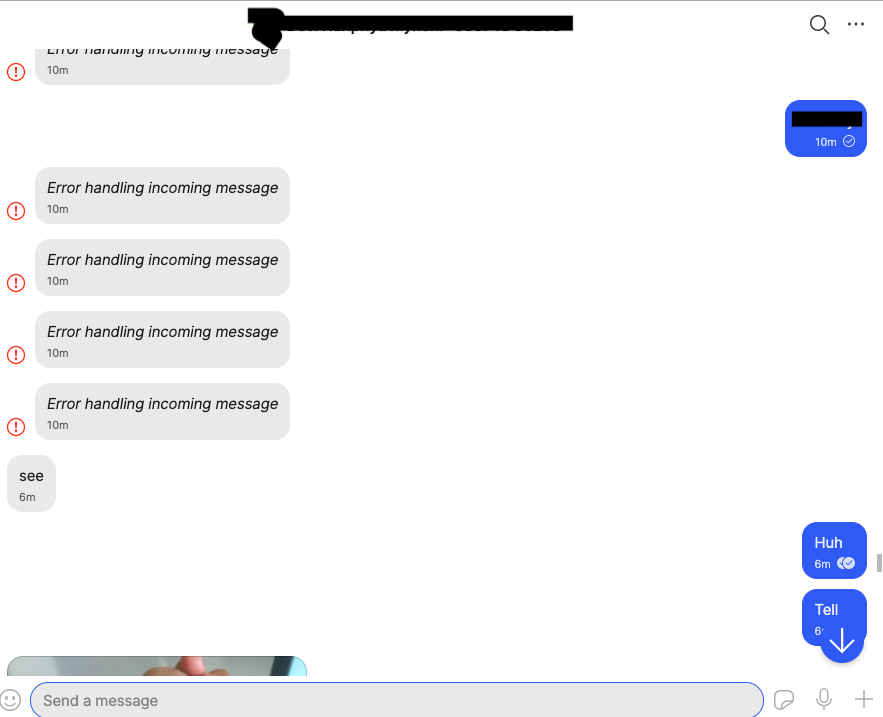
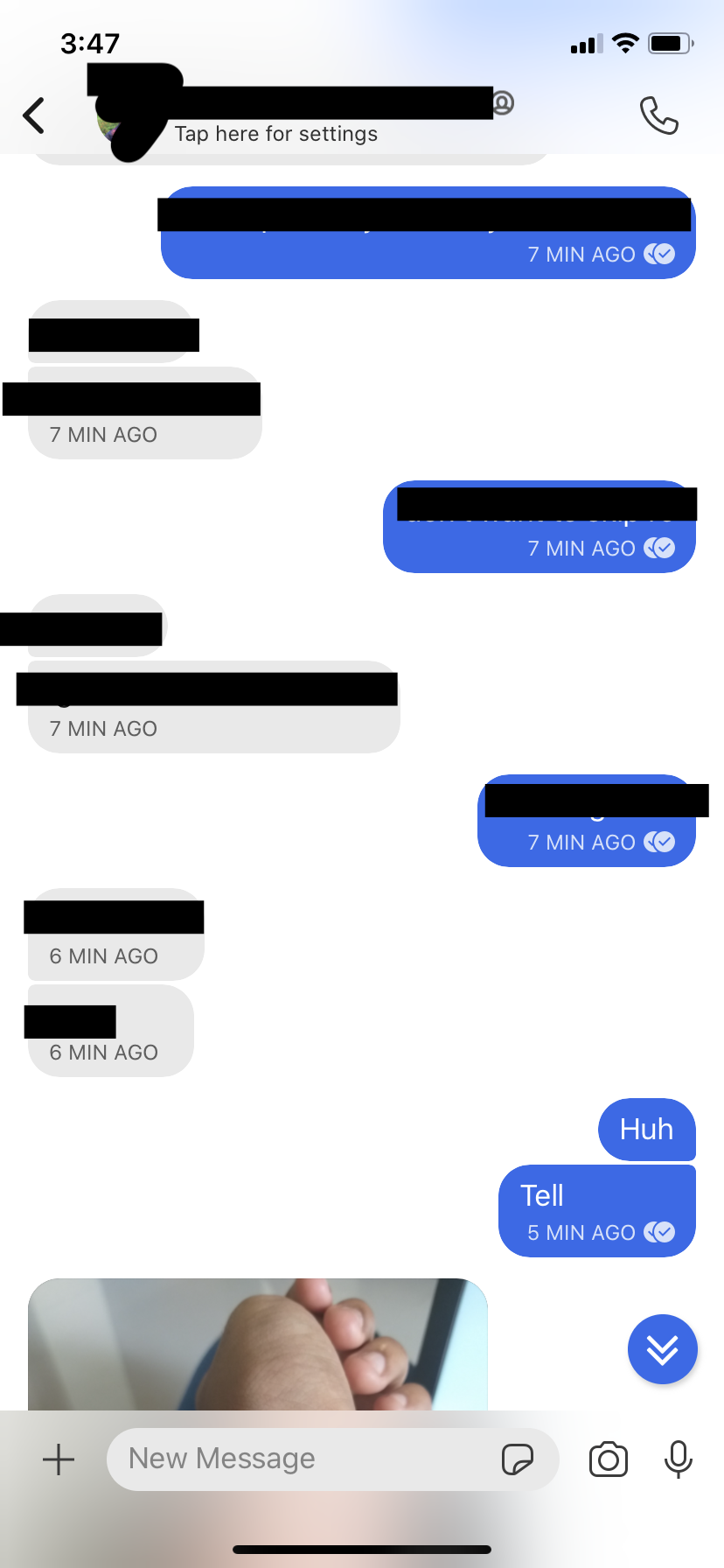
Mac OS debug log:
https://debuglogs.org/30d9a5ddb02ff35b61bc98726db5fc13e5ce2d1ba87c0f4f12f98f53da074ead
iOS Debug Log:
https://debuglogs.org/f981f44f1b67f1d07a7c8c5ea4fcd81bc61e2fb97e9e336ac4805b0ec9bfd983.zip
 harikrishnasdp-n
on 22 Jun 2020
harikrishnasdp-n
on 22 Jun 2020
Getting the exact same msg as @chocolatekitkat on Linux Signal-Desktop v1.34.4 .
Was working before just fine.
Edit: I noticed that those messages with MAC errors are not present on my phone's Signal. They're just not there, no error, nada.
 corbolais
on 25 Jul 2020
corbolais
on 25 Jul 2020
I had the same/a similar problem a few days ago. With only 2 of my contacts. And then only for a few messages.
Several error messages from one contact, all with the same "More info":
Error | Bad MAC
-- | --
Sent | Monday, July 20, 2020 9:46 AM (1595231198740)
Received | Monday, July 20, 2020 1:29 PM (1595244578277)
And from a second contact. Again all bad messages from that contact had the same "More info":
Error | Bad MAC
-- | --
Sent | Monday, July 20, 2020 9:46 AM (1595231198842)
Received | Monday, July 20, 2020 12:30 PM (1595241015997))
Note that the Sent time for both sets of bad messages was the same, while the Received time was different, although in each case much later than the Sent time.
The problem occurred only on the desktop (W10; Signal 1.34.4). Phones did not have problems.
SEE-ICT
on 25 Jul 2020
@corbolais @SEE-ICT Please provide your debug logs. The specific message details are really important to help us better analyze the logs, but we need the logs!
scottnonnenberg-signal
on 27 Jul 2020
Good point! Log is here:
https://debuglogs.org/094b7ad91ede144c5840ec191aae26529ac136f4953281c17e9ef657ea60bc1e
SEE-ICT
on 27 Jul 2020
@SEE-ICT Unfortunately that log has neither your two listed messages from above, nor any mention of 'Bad MAC.' Desktop only saves three days of log data, so all of that useful information has scrolled out of the log.
Next time you report problematic behavior, please do it ASAP and include the logs so the important parts are still in the log!
scottnonnenberg-signal
on 27 Jul 2020
Understood and will do.
SEE-ICT
on 27 Jul 2020
Hi, I just started getting this issue.
My Mac (27" iMac, Catalina) crashed right in the middle of a conversation. On relaunch, it started to spit out the "Error handling incoming message" message. iPhone app is still working fine.
https://debuglogs.org/8d82d268de6e727c4199c66f570d3d163ba225bb08a0918bfc8341792a0cf312
Edit: A session reset fixed the issue for incoming messages, but as others have said, the old ones are not fixed. Not a big deal for me, but might be for others.
 shuchow
on 27 Jul 2020
shuchow
on 27 Jul 2020
@shuchow Your computer crashed, or Signal Desktop did?
scottnonnenberg-signal
on 27 Jul 2020
Just after opening Signal today i was getting the Bad Mac error for one contact aswell. It was working fine yesterday and i exchanged plenty of messages. no Crash noted before.
Here is the debug log: https://debuglogs.org/20f03627a35d41c509d0d9eb321dfefd88c75746c5496d44d9d1f9f8df939bef
 FlorianAlexander
on 31 Jul 2020
FlorianAlexander
on 31 Jul 2020
@shuchow Your computer crashed, or Signal Desktop did?
Computer did. I occasionally get a kernel panic with a problematic app. Signal was open at the time.
shuchow
on 3 Aug 2020
I have the same issue with one of my contacts only in one of my Signal desktop-apps. No problem with the app on my iPhone, no problem with the desktop apps on my Windows-10-machine and on one of my Ubuntu-20.04-machines. Currently I have no access to these machines so I can't verify the isntalled app versions.
On a second Ubuntu-machine, running under version 18.04.06 I get the error Bad MAC for received messages of one of my contacts. The same messages are readable on all other installations. The version is 1.36.3. I received readable messages from this contact until july the first 2019. Since then all received messages are unreadable in this installation of the desktop app.
https://debuglogs.org/4597fdee8bd2eaed0103ec52aaeea4bddcf34e76fedbd2731b2ce05affa6363f
 auge8472
on 29 Sep 2020
auge8472
on 29 Sep 2020
I'm also getting this error on a bunch of messages I received yesterday. I only just installed and linked the desktop app (Windows 10 64 bit) yesterday, to be able to write with this friend. Older messages don't seem to be loaded, which I think is by design ("For your security, conversation history isn't transferred to new linked devices").
Here are my debug logs:
https://debuglogs.org/cc26c6c12aa50d7d68e65a12408e876c32c9e30f9b3c4c9e02a525af1da4b6ab
Edit: Messages received after starting the app are fetched/display all right.
Edit 2: Now (the day after the above) I opened the desktop app again, and the old broken messages are still broken, but the messages that arrived yesterday are still visible. Not sure if that's just because they're cached...
 svenddpc
on 30 Sep 2020
svenddpc
on 30 Sep 2020
The availability of one of several devices which are used by the same Signal user seems to be the source of this problem. The user solution (just worked for me) is to reset the session. The solution in the code may be to send NON-encrypted notification from a device that receives the "Bad MAC" error to the device that sent the message so that the two of them can re-synchronize their handling of encryption keys. If I understand correctly, one device gets the message and shares it with the others, because exactly one of them must update the conversation key. Anyway, here's why I came up with that:
Signal on my phone often stalls or crashes (https://github.com/signalapp/Signal-Android/issues/9292). Today I thought I lost my phone so my daughter placed a Signal call to it and it didn't ring (even though it was hiding right next to me). When I finally found it, I noticed new messages from a new contact. On my phone, all those messages were fine, but on my Desktop, they were all "Bad MAC" errors. I concluded that Signal stalled long enough for it to timeout on its attempt to communicate the updated crypto keys to the desktop, and that's why resetting the session fixed the problem (for new messages, not the old ones). If you have questions, please ask. Debug log: https://debuglogs.org/d24338d9e773f18749ab385e09f709143f7ba27efc65b1607051df7e779f24da
 dscotese
on 3 Oct 2020
dscotese
on 3 Oct 2020
@dscotese Looks like Desktop had some difficulty with that contact - at one point only knowing about the phone number, and then at one point only knowing about that contact's UUID. What is Desktop's history with that contact?
WARN  2020-10-02T21:48:49.394Z ensureContactIds: Found a split contact - UUID [REDACTED]0b5 and E164 +[REDACTED]614. Merging.
...
ERROR 2020-10-02T22:02:21.658Z queueEnvelope error handling envelope [REDACTED]0b5.1 1601676141549 (3d819f35d2294236b0b5f12dc78afef0) : Error: Bad MAC
ERROR 2020-10-02T22:02:31.656Z queueEnvelope error handling envelope [REDACTED]0b5.1 1601676151554 (7eaf7785321f4d5e99f23a35e34c18a8) : Error: Bad MAC
Good find. There was no history. The very first message was a "Bad MAC" error.
dscotese
on 6 Oct 2020
Hm... Might have been known to desktop via your contacts?
scottnonnenberg-signal
on 6 Oct 2020
I'm seeing the same error, but the circumstances causing it might be different:
- I sent a message from my phone using Signal to another Signal user.
- The sent message indicates it was received but not read.
- On the desktop only, I immediately receive the BAD MAC error message, even though the recipient apparently hasn't read or replied to the message sent on my phone.
History: I initially contacted the recipient using the desktop app for windows, then later messaged the recipient using my phone. Both of these initial attempts worked fine. When I logged back into the desktop app, all of the messages I had received during the prior day's phone app conversation were missing, and only the messages I had sent appeared on desktop. The missing messages were each replaced with two bad MAC errors.
It looks like messages I had sent generated a single BAD MAC error, while messages I should have received generated two BAD MAC errors. All the messages I sent on mobile, which were sent, received, and read, only indicate that they were sent on desktop, not that they were received and read (which they were).
I'm not seeing any errors on the phone app.
Now, to test I just sent a message from the desktop app. No BAD MAC error was generated on desktop or android app, but both apps only indicate that the message was sent but not received. No messages sent from the desktop app indicate received or read status.
bad MAC.txt
 dostillevi
on 18 Oct 2020
dostillevi
on 18 Oct 2020
@dostillevi Thanks for providing your log. We have a theory as to what happened to you, and a fix to go along with that. Please tell us if you still see periodic Bad MACs on our next build, when that comes out.
scottnonnenberg-signal
on 31 Oct 2020
@dostillevi Thanks for providing your log. We have a theory as to what happened to you, and a fix to go along with that. Please tell us if you still see periodic Bad MACs on our next build, when that comes out.
Thanks, I haven't seen the issue since. Glad you were able to identify the cause!
dostillevi
on 31 Oct 2020
I just got this same error on Signal for Mac (macOS Big Sur). I use Signal on my Mac, Android and iOS Device but I see the Bad MAC error messages only on the Mac app in my "Personal notes" chat (the conversation with myself) even if I don't use it.
 MEPoss
on 5 Jan 2021
MEPoss
on 5 Jan 2021
@MEPoss Your debug log would be really useful; it would allow us to investigate your situation further. Please always include it when reporting problems.
scottnonnenberg-signal
on 5 Jan 2021
I reset my Mac Signal app disconnecting It from my phone and reconnecting It again, I don't know if the log can still be useful or not.
Il 5 gen 2021, 18:59 +0100, Scott Nonnenberg notifications@github.com, ha scritto:
@MEPoss Your debug log would be really useful; it would allow us to investigate your situation further. Please always include it when reporting problems.
—
You are receiving this because you were mentioned.
Reply to this email directly, view it on GitHub, or unsubscribe.
MEPoss
on 5 Jan 2021
I freshly installed signal on my Linux desktop. Whenever I send a message from my phone I get a "Note to self":

 apoorvkhurasia
on 10 Jan 2021
apoorvkhurasia
on 10 Jan 2021
Just installed Signal yesterday and I already have 16 message exactly like the one from @apoorvkhurasia in the message above.
Running it on Windows 10 and also using it without problems on my iPhone.
 skerkewitz
on 12 Jan 2021
skerkewitz
on 12 Jan 2021
@skerkewitz: please attach debug log, otherwise developers can not find the root cause of the issue.
On desktop client: View menu - Debug Log - (wait until it loads) - Submit
Then copy the URL and paste here. Also the debug log from iPhone would be useful too.
Setting - Advanced - Submit Debug Log - Copy link (paste it here)
 kaktusztea
on 12 Jan 2021
kaktusztea
on 12 Jan 2021
Desktop app logs: https://debuglogs.org/1679bd93f86a5b5d0f2003993dce2ca72642959f68d525cbd06ab5561021e324
iPhone app logs: https://debuglogs.org/f6872faf8c1b01718d00ce738a739035b7444dba349f0bc60f9f439439caa012.zip
apoorvkhurasia
on 12 Jan 2021
Since few days I have a lot of "bad mac" error only in the "message to me" feed.
It only appears in my macOS Signal Desktop client which is correctly send and receive messages to/from any contact including my notes redacted to "message to me" ... so I do not understand to what this error is referring.
The only thing I can see is that the received/read flags of past messages (no the latest send for test) in my "message to me" feed are not synchronized : all flags are ok on my android device but not on my macOS Signal Desktop.
Signal 1.39.4
macOS 10.15.7
I've send the same message by the "send debug log" function available into the app.

46a92fc1861811863c0faf5ad15d03a17218235d45ee06654e12737e39d121eb.gz
 Lat31320
on 13 Jan 2021
Lat31320
on 13 Jan 2021
I'm getting the same. Lots of these....

 solares
on 15 Jan 2021
solares
on 15 Jan 2021

Happens a lot for me too. All of them are in my Note to Self section.
Windows desktop client only. My ios app does not have them.
 offero
on 25 Jan 2021
offero
on 25 Jan 2021
I'm not sure why this message does not show up here, but I've got this email notification from GitHub a couple of days ago:
I've been running into this as well and it looks like hitting the "Reset Session" option for the chat that was spamming this message was enough to make it go away -- I haven't seen the message since yesterday (after receiving it for days).
I tried it and indeed it fixed the problem for me!
skerkewitz
on 25 Jan 2021
I've run into the same issue immediately after installing Signal on iOS and Ubuntu. "Reset Session" (on the only conversation I had) makes no difference.
What worked for me is:
Deleting the linked device from phone, hitting "Clear Data" in the Ubuntu-App preferences and re-linking (by QR-code just as I've done previously).
 schauerte
on 26 Jan 2021
schauerte
on 26 Jan 2021
@offero @skerkewitz @schauerte v1.39.6, release last week, should have resolved this issue. I'm going to close this; please open a new bug if you're still encountering this. Thanks!
scottnonnenberg-signal
on 29 Jan 2021
Hi There,
Also running into this on my mac desktop client. I am running 1.39.6. Reset secure session workaround listed earlier in the thread did appear to fix it for now.
 msmollin-community
on 9 Feb 2021
msmollin-community
on 9 Feb 2021
Same error with the desktop client (v1.40.0) on Ubuntu 20.04. No problems on Android.
I received an error message for every message the other person sent, but also when they were typing, so apparently the "Typing Notification" also triggers this error message.
"Reset secure session" worked for now, but the missing messages have not been restored on my desktop client, and messages I sent from my desktop have not been received.
 zhao-nan
on 25 Feb 2021
zhao-nan
on 25 Feb 2021
Same error with desktop client (v1.40.1) on Fedora 32. No problems on Android. Same experience as above,
before resetting the session. After that it works fine, though the previous messages will not appear, obviously.
 zolkis
on 25 Feb 2021
zolkis
on 25 Feb 2021
Iam using Signal on multiple Clients, Android and Windows. I got these "Bad MAC" Problems too on Windows. Android is fine. Windows Version 1.40.1.
 mrpurpledev
on 6 Mar 2021
mrpurpledev
on 6 Mar 2021
Same messages on Arch Linux with 1.40.1
 seblu
on 25 Mar 2021
seblu
on 25 Mar 2021
Related issues
 ProactiveServices
·
3Comments
ProactiveServices
·
3Comments
 McLoo
·
3Comments
McLoo
·
3Comments
 TarkanY
·
3Comments
TarkanY
·
3Comments
 jeremymasters
·
3Comments
jeremymasters
·
3Comments
 fredaas
·
3Comments
fredaas
·
3Comments
Most helpful comment
I freshly installed signal on my Linux desktop. Whenever I send a message from my phone I get a "Note to self":