Signal-desktop: Signal Linux takes very long time to start
- [ ] I have searched open and closed issues for duplicates
Bug description
When you start the Linux app, it takes long time to start because of loading messages. It may last as long as 15 minutes that draws the app pretty inconvenient to use.
Steps to reproduce
- Start the Linux app after some large conversation on your phone app.
- Grab a popcorn, visit a bar, grow a kid.
- Now you can use it.
Actual result:
You got too old to use Signal Linux while waiting for it to actually start.
Expected result:
It should start immediately as Android/iOS apps do.
Screenshots
Platform info
Signal version:
1.16.0
Operating System:
Debian Buster, XFCE, 4.18.0-1-amd64 #1 SMP Debian 4.18.6-1 (2018-09-06) x86_64 GNU/Linux
Linked device version:
iOS 2.29.2.3
Link to debug log
 ethylmorphine
All 51 comments
Without a debug log, we can do very little about this issue. It may be due to large attachments downloading in the background, or it may be something else. Without the log, we don't know.
 scottnonnenberg-signal
on 13 Sep 2018
scottnonnenberg-signal
on 13 Sep 2018
I was able to circumvent the problem by enabling an ssd cache for the drive where my signal data is stored. The startup time increased from ~15min to 1min max.
What kind of data/logs can I contribute to tackle the problem down. How do I activate the logs and where do I find them or alternatively: What should I read to be able to help?
 tvannahl
on 15 Sep 2018
tvannahl
on 15 Sep 2018
Me too. I'd really love to help because it's making signal for desktop almost unusable. I seem to get the same problem when resuming from suspend to disk, also. Please let me know how I can help.
Archlinux, installed signal-desktop-bin from AUR: https://aur.archlinux.org/packages/signal-desktop-bin/
 rpdelaney
on 16 Sep 2018
rpdelaney
on 16 Sep 2018
@tvannahl @rpdelaney Regarding the logs we need: After a slow startup, go to View -> Debug Log and either provide the resultant uploaded debug log URL here or directly to me or [email protected].
scottnonnenberg-signal
on 17 Sep 2018
@scottnonnenberg-signal I removed my ssd cache now but I was not able to reproduce the problem anymore. Even after a reboot I was not able to verify the problem.
@rpdelaney does the problem still persist on your machine using an up to date version?
tvannahl
on 19 Sep 2018
@tvannahl After a recent update the version in the AUR currently is 1.16.1. After a couple tries I'm not able to reproduce this problem now.
Edit: I forgot to test resuming from suspend to disk, since that caused issues too. Stand by.
Edit2: Seems fine now. Nicely done.
rpdelaney
on 19 Sep 2018
Signal Desktop took nearly ~30 mins to start. Load time seems to be relative to the number of messages. If I close and reopen, it still reloads every message from scratch.
My debug log:
https://debuglogs.org/6812d76f78ebe48f17b32025abc5aa61028a782c3582fbdd0fc0790b0f86174a
OS: Fedora 28 / Kernel 4.18 x64
 nirvinm
on 9 Oct 2018
nirvinm
on 9 Oct 2018
@nirvinm How long had it been since you last started Signal Desktop? And how high did the counter go as it loaded up? Finally, what kind of internet connection were you on while you started up?
scottnonnenberg-signal
on 9 Oct 2018
@scottnonnenberg-signal
@nirvinm How long had it been since you last started Signal Desktop? And how high did the counter go as it loaded up? Finally, what kind of internet connection were you on while you started up?
I think it should be two/three days ago when I started Signal Desktop. Recipient and I shared a lot of messages in these two days. There was no unread messages.
My internet connection is fair and provides 2~3 Mbps speed.
nirvinm
on 9 Oct 2018
@nirvinm Something for you to know is that all messages (and attachments) are downloaded during that startup time. So the more messages (up to 1000) that you have in your server queue, and the larger the attachments, the longer it will take to load.
scottnonnenberg-signal
on 9 Oct 2018
@nirvinm Something for you to know is that all messages (and attachments) are downloaded during that startup time. So the more messages (up to 1000) that you have in your server queue, and the larger the attachments, the longer it will take to load.
But how Android client is so faster? Where it takes such long time that nearly makes desktop client unusable?
Is it that fetching messages from the network makes it slower or processing/decryption in the client?
nirvinm
on 9 Oct 2018
@nirvinm One major difference is that the Android client is online almost all the time. I'd recommend that you look for some of the other performance issues/threads in this repository to get more background.
scottnonnenberg-signal
on 9 Oct 2018
How about either caching the data locally or loading old data only after some time?
 genodeftest
on 9 Oct 2018
genodeftest
on 9 Oct 2018
On one of my desktops, loading the messages during start up takes also extreme long at this very moment. Currently 370 messages have been read, and the number is increasing very slowly. This is a debug log:
https://debuglogs.org/a3d212a8638e05fa7cee6b859822a4a35865b867aabf7519b583becb8ffa5709
 janvlug
on 11 Oct 2018
janvlug
on 11 Oct 2018

Screenshot from top
janvlug
on 11 Oct 2018
Now, seven hours later, Signal desktop is still not started. It is still at message 370. So it looks that Signal desktop is not going to start at all. Here is a current debug log: https://debuglogs.org/47fe631d33ce16015082997fa330420667e857b9f10efe03b69d5a56ea118a52
janvlug
on 11 Oct 2018
I closed Signal desktop, and started it again. It was ready for use in a short time. Debug log: https://debuglogs.org/216c9158a176723c72794922ac518b721b791b7e805ee65b5f3fdf7c3086f90d
janvlug
on 11 Oct 2018
Hello,
Here Signal Desktop and Signal Android are my debug logs related to this.
My issue is a bit different.
Steps to reproduce
- Open Signal desktop(linux), wait for it to load messages
- Send/receive some messages on desktop client
- Close computer
- Wait until next day
- Send/receive 100 messages at most , using signal android
- A few hours later open signal (This step could be optional, not sure)
- It loads around 900-1000 messages
It is impossible for me to send/receive that many messages in less then 24 hours, but it always loads that many messages. And I have been experiencing this for weeks.
 ozgurakyazi
on 27 Oct 2018
ozgurakyazi
on 27 Oct 2018
I keep having the same problem, since about a month or so the startup under linux takes quite some time (this time about 6 minutes, other times up to 20 minutes) while it runs smoothly under windows.
I have to say, that I doesn't use Signal Desktop quite a lot, on linux even fewer - but the number of messages sent between the current and last usage (of the linux desktop version) via the android app isn't as high as the count goes, while starting the desktop application ...
I sent the debug log url to your eMail @scottnonnenberg-signal
 Trazer
on 27 Oct 2018
Trazer
on 27 Oct 2018
@ozgurakyazi If you're in big groups, simply the delivery/read receipts will add a lot of messages to your queue. You send one message to the group, and get N responses.
@Trazer I looked at your log, and there don't seem to be any big outliers taking a large chunk of that time. One thing to note when comparing Linux and Windows performance is how often you run each of them, or more specifically how high the count gets when you start up. If they count up to the same number, then it would be very interesting to note the performance differences between them. Otherwise, opening the app more often on one platform will make each startup substantially faster, because the count is lower.
scottnonnenberg-signal
on 29 Oct 2018
I certainly have not sent or received 1000 messages on android app since last opening my linux client (Maybe 30 MAX) and my messages all have disappear times. This would suggest signal is storing weeks worth of messages which have already been read on both devices and are not disappearing as suggested. This is a serious security risk!
 mikeh21
on 30 Oct 2018
mikeh21
on 30 Oct 2018
@mikeh21 I would recommend digging a little deeper into the protocol before proclaiming what is or isn't a security risk. The message count you see, and the 1000-limit queue on the server, count more than just the visible messages. Sync messages telling your other devices which messages you've read, sync messages from the server telling you which of your uploads were successfully delivered. And so on.
scottnonnenberg-signal
on 30 Oct 2018
Signal desktop is extremely slow starting again at the moment.
It is doing a lot of disk access:

v1.17.2
debug log:
https://debuglogs.org/145535b2efa3352ed8c87926a07f0346c4c2cd0b37498084775b13b3c6bffd27
janvlug
on 1 Nov 2018
Here is a snippet: systemlog.txt.
edit: removed incorrect statement.
janvlug
on 1 Nov 2018
I'm pretty sure that the performance issues are caused by excessive logging. I see sometimes more that 50 messages per second logged to my system logs. Signal desktop is writing 10 M/s to disk and the whole systems becomes unresponsive. Using Fedora 29.
janvlug
on 6 Nov 2018
For me on linux it starts about 15-20 secs, depending on amount of message it needs to synchronize. However I've been looking for similar issue to report a feature request - these 15-20 secs is still too long and they cause the application almost useless, because I cannot just start it and send a message without this synchronization lag. This makes me recently to use phone because it's faster to send mesage there, even with awkward mobile keyboard, than to start desktop app and do it, what otherwise would be much more convenient.
Can't you start the app quickly and then do synchronization in the background?
 l0co
on 9 Nov 2018
l0co
on 9 Nov 2018

iotop -a gives the accumulated disk access. The screenshot above shows the accumulation during a part of the time when starting Signal desktop. BTW this time the start time was acceptable. Interestingly enough, I see the slow start time only on one of my three desktops (all fully updated Linux Fedora 29), running Signal Desktop as a flatpak.
This is the amount of data in the Signal directory:
$ du -hs ./.var/app/org.signal.Signal
2.0G ./.var/app/org.signal.Signal
So the total amount of data written to the disk during start-up is way higher than the total data from Signal on the disk.
janvlug
on 15 Nov 2018
The latest version (1.18.0) wrote 40G to disk in 202 minutes, while I only exchanged around 50 text messages.
janvlug
on 16 Nov 2018
@janvlug
We should call this release the SSD-Killer.
(I use it on Linux, too)
 MartinX3
on 18 Nov 2018
MartinX3
on 18 Nov 2018
@janvlug @MartinX3 I have to admit, I've been only somewhat paying attention to this thread because the numbers seem so outlandish to me. For example, when I go look at my logs directory for my Beta and development installs, they are under 10 megabytes. Writing 40 gigabytes to disk in one startup just seems impossible.
So, you can help me out by figuring out where those writes are going - is it just logs? Or does it include something else? Once we figure that out, then we can start looking at the log entries which are repeated the most frequently.
At a high level, v1.18 introduces a move to SQLCipher for 100% of our data operations. That might result in more disk access by itself, but we also have additional logging around those operations like we did with our first steps into the SQLCipher world. I can also point to this code regarding that SQL operation logging - if things are a little slower on Linux compared to Windows/Mac (seems to be the case, based on what I've seen), then more logging might happen on Linux: https://github.com/signalapp/Signal-Desktop/blob/7d54f7928d83c49b273e658b64f39096d8061abf/js/modules/data.js#L243-L247
Still, the scale is unexpected.
scottnonnenberg-signal
on 19 Nov 2018
On the topic of logging, would it be possible to disable logging to console? On Linux with journald, it tends to pollute the system logs:
Nov 19 19:24:37 maru.home signal-desktop.desktop[2450]: {"name":"log","hostname":"maru.home","pid":2978,"level":30,"msg":"Remove all notifications","time":"2018-11-19T17:24:37.900Z","v":0}
Nov 19 19:24:38 maru.home signal-desktop.desktop[2450]: {"name":"log","hostname":"maru.home","pid":2978,"level":30,"msg":"SQL channel job 51762 (getUnreadByConversation) succeeded in 554ms","time":"2018-11-19T1>
Nov 19 19:24:38 maru.home signal-desktop.desktop[2450]: {"name":"log","hostname":"maru.home","pid":2978,"level":30,"msg":"SQL channel job 51764 (updateConversation) succeeded in 28ms","time":"2018-11-19T17:24:3>
Nov 19 19:24:38 maru.home signal-desktop.desktop[2450]: {"name":"log","hostname":"maru.home","pid":2978,"level":30,"msg":"Update notifications: {\"shouldClearNotifications\":false,\"shouldPlayNotificationSound\>
Nov 19 19:24:40 maru.home signal-desktop.desktop[2450]: {"name":"log","hostname":"maru.home","pid":2978,"level":30,"msg":"SQL channel job 51765 (getUnreadByConversation) succeeded in 547ms","time":"2018-11-19T1>
Nov 19 19:24:40 maru.home signal-desktop.desktop[2450]: {"name":"log","hostname":"maru.home","pid":2978,"level":30,"msg":"SQL channel job 51767 (updateConversation) succeeded in 52ms","time":"2018-11-19T17:24:4>
Nov 19 19:24:43 maru.home signal-desktop.desktop[2450]: {"name":"log","hostname":"maru.home","pid":2978,"level":30,"msg":"Sending a keepalive message","time":"2018-11-19T17:24:43.794Z","v":0}
Nov 19 19:25:38 maru.home signal-desktop.desktop[2450]: {"name":"log","hostname":"maru.home","pid":2978,"level":30,"msg":"Sending a keepalive message","time":"2018-11-19T17:25:38.998Z","v":0}
Nov 19 19:26:34 maru.home signal-desktop.desktop[2450]: {"name":"log","hostname":"maru.home","pid":2978,"level":30,"msg":"Sending a keepalive message","time":"2018-11-19T17:26:34.143Z","v":0}
Nov 19 19:27:29 maru.home signal-desktop.desktop[2450]: {"name":"log","hostname":"maru.home","pid":2978,"level":30,"msg":"Sending a keepalive message","time":"2018-11-19T17:27:29.378Z","v":0}
Nov 19 19:28:24 maru.home signal-desktop.desktop[2450]: {"name":"log","hostname":"maru.home","pid":2978,"level":30,"msg":"Sending a keepalive message","time":"2018-11-19T17:28:24.980Z","v":0}
Nov 19 19:29:20 maru.home signal-desktop.desktop[2450]: {"name":"log","hostname":"maru.home","pid":2978,"level":30,"msg":"Sending a keepalive message","time":"2018-11-19T17:29:20.175Z","v":0}
Nov 19 19:30:15 maru.home signal-desktop.desktop[2450]: {"name":"log","hostname":"maru.home","pid":2978,"level":30,"msg":"Sending a keepalive message","time":"2018-11-19T17:30:15.446Z","v":0}
Nov 19 19:31:10 maru.home signal-desktop.desktop[2450]: {"name":"log","hostname":"maru.home","pid":2978,"level":30,"msg":"Sending a keepalive message","time":"2018-11-19T17:31:10.593Z","v":0}
Nov 19 19:31:49 maru.home signal-desktop.desktop[2450]: {"name":"log","hostname":"maru.home","pid":2978,"level":30,"msg":"trimming conversation +[REDACTED]350 of 118 old messages","time":"2018-11-19T17:31:49.08>
Nov 19 19:31:52 maru.home signal-desktop.desktop[2450]: {"name":"log","hostname":"maru.home","pid":2978,"level":30,"msg":"Next sender certificate refresh scheduled for 2018-11-20T17:31:52.743Z","time":"2018-11->
Nov 19 19:32:06 maru.home signal-desktop.desktop[2450]: {"name":"log","hostname":"maru.home","pid":2978,"level":30,"msg":"Sending a keepalive message","time":"2018-11-19T17:32:06.282Z","v":0}
Nov 19 19:33:01 maru.home signal-desktop.desktop[2450]: {"name":"log","hostname":"maru.home","pid":2978,"level":30,"msg":"Sending a keepalive message","time":"2018-11-19T17:33:01.476Z","v":0}
Nov 19 19:33:56 maru.home signal-desktop.desktop[2450]: {"name":"log","hostname":"maru.home","pid":2978,"level":30,"msg":"Sending a keepalive message","time":"2018-11-19T17:33:56.674Z","v":0}
Though that might be annoying for developers.
 lnicola
on 19 Nov 2018
lnicola
on 19 Nov 2018
60MB writings for 2 incomming messages and 1 outgoing.
Is that normal?
https://debuglogs.org/a7e1af1946cc1f80439dfe94eea218952a09f072a84f38de0f4d9466e1768415
MartinX3
on 19 Nov 2018
@MartinX3 No, it definitely doesn't seem normal. What can you tell me about what is written, exactly? Is it all within the SQLCipher database? Logs? Something else?
scottnonnenberg-signal
on 19 Nov 2018
Same problem like all of you:
Start up with Linux ~6-10 minutes, on Windows a few seconds
My debug log: https://debuglogs.org/2872522f14227c2f644c5f100900f408fde4b59f61ea9bc64d809dbff25c26b7
 Caliandroid
on 19 Nov 2018
Caliandroid
on 19 Nov 2018
@scottnonnenberg-signal
How can I measure it? :)
I use Linux Mint and can see the written data size in the task manager from each process.
(2 signal desktop processes and one consumes this high amount.)
MartinX3
on 19 Nov 2018
Today after I woke up my laptop from resume, Signal Desktop started to do a lot of disk io again.
Here you have the journalctl content that I created with the commands below when Signal Desktop was working normal again:
journalctl | grep org.signal.Signal.desktop > signal_journalctl.txt
grep -i 'Nov 26' signal_journalctl.txt > signal_journal_nov_26.txt
the size of signal_journal_nov_26.txt is 1.8M
This is an iotop -a screenshot (note, I started iotop only after that I noticed that Signal Desktop was slow again, so the numbers are higher in reality). Notice that there are four signal-desktop threads.
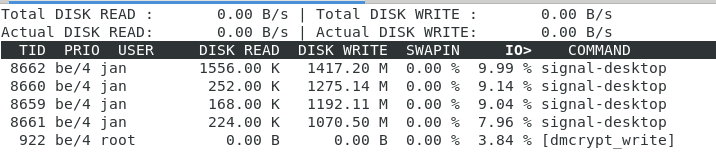
And here the debug log as submitted by Signal Desktop.
janvlug
on 26 Nov 2018
@janvlug Thanks for providing the log along with your trace. One more thing you can do to round out your reports is talk about what the app did during that time. What did you see? About how many messages did it download? Was the app responsive during that time?
What I see is some very slow singular operations. It doesn't necessarily seem like too many things are happening to cause this, but instead some sort of delay. Here are two examples. Completion timings go from 16s (way too long to start), all the way to 68s in this first instance:
INFO  2018-11-26T17:27:09.871Z SQL channel job 1152 (getConversationById) succeeded in 1010ms
INFO  2018-11-26T17:27:09.872Z SQL channel job 1285 (getConversationById) succeeded in 962ms
INFO  2018-11-26T17:27:11.831Z SQL channel job 1288 (updateConversation) succeeded in 615ms
INFO  2018-11-26T17:27:11.831Z got verified sync for +[REDACTED]041 DEFAULT via contact sync
INFO  2018-11-26T17:27:26.671Z SQL channel job 1292 (updateConversation) succeeded in 2022ms
INFO  2018-11-26T17:27:26.671Z got verified sync for +[REDACTED]623 DEFAULT via contact sync
INFO  2018-11-26T17:27:26.672Z SQL channel job 1293 (updateConversation) succeeded in 2540ms
INFO  2018-11-26T17:27:26.673Z got verified sync for +[REDACTED]530 DEFAULT via contact sync
INFO  2018-11-26T17:27:26.673Z SQL channel job 1289 (updateConversation) succeeded in 2545ms
INFO  2018-11-26T17:27:26.674Z got verified sync for +[REDACTED]040 DEFAULT via contact sync
INFO  2018-11-26T17:27:26.674Z Sending a keepalive message
INFO  2018-11-26T17:27:26.675Z SQL channel job 1290 (updateConversation) succeeded in 4316ms
INFO  2018-11-26T17:27:26.675Z got verified sync for +[REDACTED]387 DEFAULT via contact sync
INFO  2018-11-26T17:28:18.495Z SQL channel job 1291 (updateConversation) succeeded in 16867ms
INFO  2018-11-26T17:28:18.495Z got verified sync for +[REDACTED]843 DEFAULT via contact sync
INFO  2018-11-26T17:28:18.496Z Sending a keepalive message
INFO  2018-11-26T17:28:18.496Z SQL channel job 1294 (updateConversation) succeeded in 67439ms
INFO  2018-11-26T17:28:18.497Z got verified sync for +[REDACTED]012 DEFAULT via contact sync
INFO  2018-11-26T17:28:18.497Z SQL channel job 1295 (updateConversation) succeeded in 68646ms
INFO  2018-11-26T17:28:19.671Z got verified sync for +[REDACTED]586 DEFAULT via contact sync
Here we see it go from 10s to 16s, then all the way up to 98s. The log also has a lot of these 'task took too long' messages, which means that something took over two minutes.
INFO  2018-11-26T17:31:41.473Z SQL channel job 2024 (updateConversation) succeeded in 10026ms
INFO  2018-11-26T17:31:41.473Z got verified sync for +[REDACTED]586 DEFAULT via contact sync
INFO  2018-11-26T17:31:41.474Z SQL channel job 2023 (updateConversation) succeeded in 10940ms
INFO  2018-11-26T17:31:41.474Z got verified sync for +[REDACTED]012 DEFAULT via contact sync
INFO  2018-11-26T17:31:41.474Z Update notifications: {"shouldClearNotifications":false,"shouldPlayNotificationSound":false,"shouldShowNotifications":false,"type":"disabled","isNotificationGroupingSupported":true}
INFO  2018-11-26T17:31:41.474Z SQL channel job 2022 (updateConversation) succeeded in 15995ms
INFO  2018-11-26T17:31:41.475Z got verified sync for +[REDACTED]843 DEFAULT via contact sync
INFO  2018-11-26T17:31:41.475Z Sending a keepalive message
ERROR 2018-11-26T17:31:41.475Z queueEnvelope +[REDACTED]176.1 1543251908120 (0d4aeb75-9129-4a7c-8bb4-56313e001350) task did not complete in time. Calling stack: Error: for stack
    at Object.window.textsecure.createTaskWithTimeout (file://[REDACTED]/app.asar/js/libtextsecure.js:41386:27)
    at MessageReceiver.queueEnvelope (file://[REDACTED]/app.asar/js/libtextsecure.js:38853:40)
    at addToCache.then (file://[REDACTED]/app.asar/js/libtextsecure.js:38580:18)
    at <anonymous>
ERROR 2018-11-26T17:31:41.475Z queueEnvelope error handling envelope +[REDACTED]176.1 1543251908120 (0d4aeb75-9129-4a7c-8bb4-56313e001350) : Error: queueEnvelope +[REDACTED]176.1 1543251908120 (0d4aeb75-9129-4a7c-8bb4-56313e001350) task did not complete in time. Calling stack: Error: for stack
    at Object.window.textsecure.createTaskWithTimeout (file://[REDACTED]/app.asar/js/libtextsecure.js:41386:27)
    at MessageReceiver.queueEnvelope (file://[REDACTED]/app.asar/js/libtextsecure.js:38853:40)
    at addToCache.then (file://[REDACTED]/app.asar/js/libtextsecure.js:38580:18)
    at <anonymous>
    at setTimeout (file://[REDACTED]/app.asar/js/libtextsecure.js:41398:27)
INFO  2018-11-26T17:31:41.475Z message from +[REDACTED]176.1 1543251936577 (46b873f9-a12a-4939-bc73-a32c54c69118)
INFO  2018-11-26T17:31:42.796Z SQL channel job 2034 (updateConversation) succeeded in 98486ms
INFO  2018-11-26T17:31:42.796Z got verified sync for +[REDACTED]173 DEFAULT via contact sync
INFO  2018-11-26T17:31:42.796Z SQL channel job 2035 (updateConversation) succeeded in 99777ms
INFO  2018-11-26T17:31:42.797Z got verified sync for +[REDACTED]687 DEFAULT via contact sync
This is not reasonable or expected. What else do you see on your machine when this happens? Is it some sort of resource contention? Disk/CPU/other?
scottnonnenberg-signal
on 26 Nov 2018
@scottnonnenberg-signal Signal Desktop was not, or very, very slowly responding during the time when these logs were created. The rest of the system was still usable, but a bit laggy. I could for example still browse, start iotop, access the journal, and take screenshots. But Signal Desktop itself was very, very close to non-responsive. Gnome Shell gave warnings that the application was not responding when I switched Signal Desktop in the foreground.
I was not starting Signal Desktop this time. Signal Desktop was running when I closed the laptop this morning (so it went to suspend), this afternoon I opened the laptop, it resumed, and Signal Desktop was extremely slow. During the day when the laptop was suspended, I sent/received only a very limited number of messages via Signal (less than five I guess). I received one message in a group with ten members, and one message in a group with seven members. Around 17:53 I started a relative long Signal Android phone call. For completeness is here also the debug log of my Android phone.
Usually, I see similar behaviour when I start Signal Desktop. In that case I see very, very slowly the number of processed messages increasing. I cannot use Signal Desktop at that time.
I run Fedora 29 on a relative powerful laptop with an SSD. The disk space is for 93% used. I use disk encryption.
system info:
inxi_info.txt
I did not encounter any network issues during the slowness. Also the CPUs are relatively at ease. It is really the io that slows Signal Desktop down. Here is another screen shot that I took at 18:38 from iotop (the one in my previous comment was taken at 18:51):
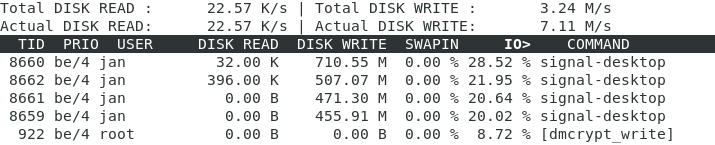
In this screen shot you can see that Signal Desktop takes around 90% of io.
It might be that I was also doing a dnf updateinfo info at the time that Signal Desktop was so slow. But I'm not sure about that. However iotop and top did not show any other very busy processes during the Signal Desktop slowness, if I remember correctly.
I have Signal Desktop running on two other machines, where I did never encounter this slowness if I remember correctly. One of these systems was suspended today, the other one was awake. These systems also run Fedora 29.
janvlug
on 26 Nov 2018
I run Fedora 29 on a relative powerful laptop with an SSD. The disk space is for 93% used. I use disk encryption.
A filesystem which is 93% full is almost broken. Seeking for remaining blocks in the right size may break your I/O performance to floppy disk level I/O rates. I hope your filesystem(s) do not cover all of the SSD, otherwise the SSD I/O performance will degrade massively due to wear leveling protection. An SSD should never be filled more than 80%.
Maybe this bad I/O performance is the reason why you (and some people with older hardware) can reproduce the bug but others can't.
genodeftest
on 26 Nov 2018
A filesystem which is 93% full is almost broken. Seeking for remaining blocks in the right size may break your I/O performance to floppy disk level I/O rates. I hope your filesystem(s) do not cover all of the SSD, otherwise the SSD I/O performance will degrade massively due to wear leveling protection. An SSD should never be filled more than 80%.
OK, didn't know that. At the moment Signal Desktop seems the only application that might be impacted. I will increase the free space and report the results.
janvlug
on 27 Nov 2018
I cleaned up my disk to 78% usage. No slowness until now (but it is less than a day, and the slowness did not always happen). Disk usage is still very high in my opinion. This is iotop -a running for roughly 2 hours:
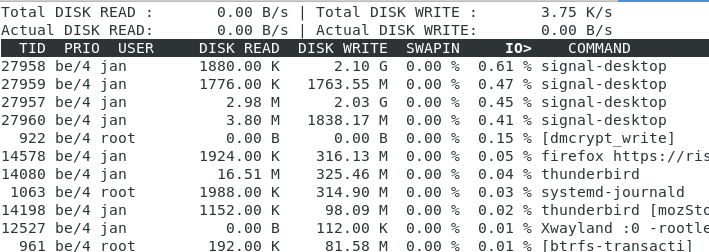
janvlug
on 28 Nov 2018
@janvlug As I've mentioned before, we're going to need a lot more information about where those writes are going if we're going to make any progress on this. It could be just logging. Or it could be a feature of our encrypted database, writing more information than expected to securely delete, etc.
scottnonnenberg-signal
on 28 Nov 2018
Using signal desktop for some time, never had a problem. But it started about 5 days ago, and it's killing me...
Latest version of antergos KDE, 6-core Intel i5 8400 CPU, 8 GB RAM, NVMe SSD. Starting signal takes a few minutes now (it took a few seconds in the past).
I only have 2 conversations in Signal (because I don't store tons of old junk on my PC/phone), and these 2 conversations only have less than 100 plain-text messages total. Despite that, starting signal desktop takes a few minutes every time.
Was running iotop during signal start, everything seems normal (no excessive writing, signal wasn't even in the list of processes). Still, "_Loading..._" message was displayed for a few minutes. If you need any other info/logs, let me know.
 toxpal
on 8 Dec 2018
toxpal
on 8 Dec 2018
@toxpal We always need more information! To start, the versions involved (some recent versions have done database migrations on startup), and debug logs. It's always important to submit debug logs as soon as you see an error, since they only include the last three days of data.
scottnonnenberg-signal
on 10 Dec 2018
Same here using currently v1.18.1
Run Signal on Kubuntu 18.10, every time when I start the Desktop app is starts utilizing my harddisk (no ssd). I takes a few minutes for about 100 messages. ~10min for 1000 messages to load.
Then it runs without any IO load. The IO load cannot be caused from the messages alone. For me it seems, that same encryption with some scripts are running message by message.
Don't know your running background tasks.
 djtulan
on 10 Dec 2018
djtulan
on 10 Dec 2018
@scottnonnenberg if you need a log, here we go: https://debuglogs.org/ac00427ee9a11d425913d8b4d1e0d4fa8c77d2b32e8d3c9dc05d0bdf63237aba
djtulan
on 10 Dec 2018
I'm running into the same problem. Signal-desktop on Ubuntu 18.04 took half an hour to start up, loading some 500 messages. I started signal desktop earlier the same day but I killed it before it finished starting up because it was taking so long. I had not opened signal-desktop before that in some time, though I don't think I really had 500 new messages.
I had a look at what Signal was doing all that time, and according to iotop it was writing to disk all that time. With strace I saw that it was accessing its own sql files (although I only straced a short time in the middle of what it was doing, but it seems to be doing the same thing the entire time.)
Signal was opening and fsyncing Signal/sql, and opening, writing, and then fsyncing Signal/sql/db.sqlite-journal repeatedly. My drive is btrfs on a magnetic hard drive, so the repeated fsyncs might explain some of the slowness.
On a different computer with an SSD drive I never noticed it taking so long to start.
My debuglog is at https://debuglogs.org/52e1bb0129da6abd1bdc0d43006e2a88bbf80a8f0c88a78a1928b2aea473895d, it confirms that it is doing sql related things for the first half hour.
 JanKanis
on 11 Dec 2018
JanKanis
on 11 Dec 2018
My Signal 1.19 on Xubuntu 18.10 desktop loaded 980 messages and took over 10 minutes to load... This is not convenient to use... I tried deleting all messages so they wouldnt have to load in future but that didnt work... What gives ???
Signal should appear immediately and ONLY load messages when you click on a name, and even then it should only be the last 5 messages unless you scroll upwards to read history...
 tenplus1
on 12 Dec 2018
tenplus1
on 12 Dec 2018
What else can we provide to debug this issue? Versions of dependent packages etc?
For starters, here the debug log (i have not started signal-desktop for some weeks, and just use it on android with 2-3 people): https://debuglogs.org/070d8c990969d0ab652c4d67724e1272f51ba5064d6c7104bc2b96ad7394d3cb
System is Xubuntu 18.04, signal is installed via apt:
$ apt-cache policy signal-desktop
signal-desktop:
  Installed: 1.18.1
  Candidate: 1.18.1
  Version table:
 *** 1.18.1 500
        500 https://updates.signal.org/desktop/apt xenial/main amd64 Packages
        100 /var/lib/dpkg/status
I'm happy to help debugging if someone can point me in the right direction.
 tbruckmaier
on 15 Dec 2018
tbruckmaier
on 15 Dec 2018
I could also observe the whole problem on Windows PCs. As mentioned above, the problem seems to be caused by downloading large amounts of data after a long absence. But maybe I got the thread wrong and my problem is a completely other.
One suggestion would be to change the behavior of Signal Desktop. For example, you could download the text messages first, then start the client and load the media last. In the Android version there is a setting possibility that you can download media manually afterwards. The representation could be implemented in the time until the media are loaded as in the Android app.
I really hope that Signal Desktop will be faster. Personally I can endure longer waiting times, but for many other users such restrictions are reasons to use alternatives.
 StarPicard
on 16 Dec 2018
StarPicard
on 16 Dec 2018
This is our central startup performance issue: https://github.com/signalapp/Signal-Desktop/issues/3010
scottnonnenberg-signal
on 2 Jan 2019
Related issues
 ProactiveServices
·
3Comments
ProactiveServices
·
3Comments
 halb9
·
3Comments
halb9
·
3Comments
 cmdrogogov
·
3Comments
cmdrogogov
·
3Comments
 lokesh-krishna
·
3Comments
lokesh-krishna
·
3Comments
 github-cygwin
·
3Comments
github-cygwin
·
3Comments
Most helpful comment
I'm running into the same problem. Signal-desktop on Ubuntu 18.04 took half an hour to start up, loading some 500 messages. I started signal desktop earlier the same day but I killed it before it finished starting up because it was taking so long. I had not opened signal-desktop before that in some time, though I don't think I really had 500 new messages.
I had a look at what Signal was doing all that time, and according to
iotopit was writing to disk all that time. WithstraceI saw that it was accessing its own sql files (although I only straced a short time in the middle of what it was doing, but it seems to be doing the same thing the entire time.)Signal was opening and
fsyncingSignal/sql, and opening, writing, and thenfsyncingSignal/sql/db.sqlite-journalrepeatedly. My drive is btrfs on a magnetic hard drive, so the repeated fsyncs might explain some of the slowness.On a different computer with an SSD drive I never noticed it taking so long to start.
My debuglog is at https://debuglogs.org/52e1bb0129da6abd1bdc0d43006e2a88bbf80a8f0c88a78a1928b2aea473895d, it confirms that it is doing sql related things for the first half hour.