Signal-desktop: Signal Relies on Old Version of OpenSSL (v1.0.0)
- [x] I have searched open and closed issues for duplicates
Bug description
Running signal-desktop causes a JavaScript error, and cannot run.
Steps to reproduce
- Install signal-desktop
- Open a command line terminal
- Run signal-desktop.
Actual result:
Running signal-desktop never opens, but crashes with the following JavaScript error:
A JavaScript error occurred in the main process
Uncaught Exception:
Error: /usr/lib64/libcrypto.so.1.0.0: version `OPENSSL_1.0.0' not found (required by /tmp/.org.chromium.Chromium.LWRavQ)
    at process.module.(anonymous function) [as dlopen] (ELECTRON_ASAR.js:172:20)
    at Object.Module._extensions..node (module.js:671:18)
    at Object.module.(anonymous function) [as .node] (ELECTRON_ASAR.js:186:18)
    at Module.load (module.js:561:32)
    at tryModuleLoad (module.js:504:12)
    at Function.Module._load (module.js:496:3)
    at Module.require (module.js:586:17)
    at require (internal/module.js:11:18)
    at Object.<anonymous> (/usr/lib64/signal-desktop/resources/app.asar/node_modules/@journeyapps/sqlcipher/lib/sqlite3.js:4:15)
    at Object.<anonymous> (/usr/lib64/signal-desktop/resources/app.asar/node_modules/@journeyapps/sqlcipher/lib/sqlite3.js:190:3)
[1]    20332 segmentation fault (core dumped)  signal-desktop
Expected result:
signal-desktop should start and run without any seg faults.
Screenshots
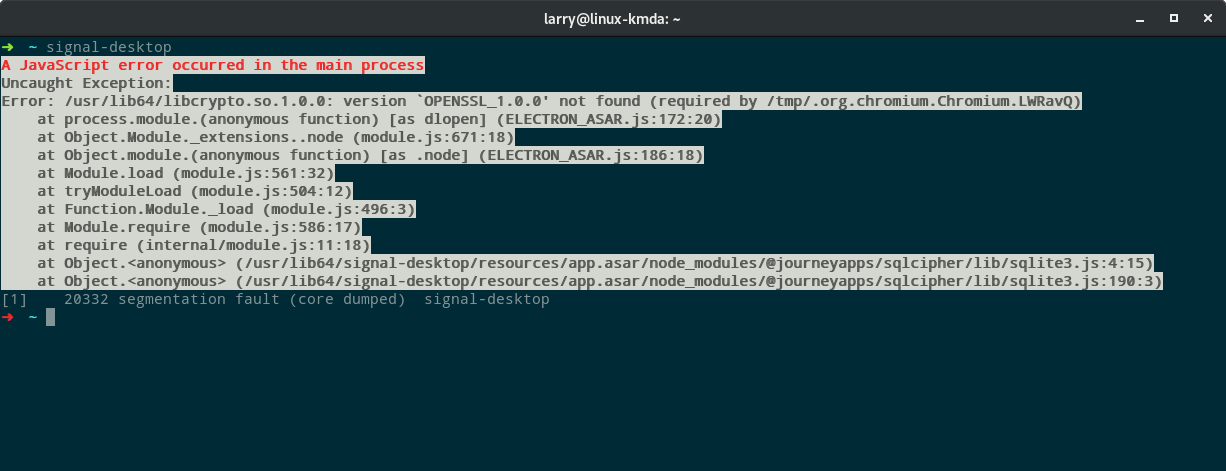
Platform info
Signal version: 1.15.5-1.1
Information for package signal-desktop:
---------------------------------------
Repository     : network:im:signal
Name           : signal-desktop
Version        : 1.15.5-1.1
Arch           : x86_64
Vendor         : obs://build.opensuse.org/network
Installed Size : 194.5 MiB
Installed      : Yes
Status         : up-to-date
Source package : signal-desktop-1.15.5-1.1.src
Summary        : Private messaging from your desktop
Description    :
    Signal Private Messenger for the Desktop
Operating System:
openSUSE Tumbleweed 20180831. See below for additional information.
System:
  Host: linux-kmda Kernel: 4.18.5-1-default x86_64 bits: 64
  Desktop: Gnome 3.28.3 Distro: openSUSE Tumbleweed 20180831
Machine:
  Type: Laptop System: System76 product: Lemur v: lemu6
  serial: <root required>
  Mobo: System76 model: Lemur v: lemu6 serial: <root required>
  UEFI: American Megatrends v: 1.05.06RS76 date: 11/29/2015
Battery:
  ID-1: BAT0 charge: 33.0 Wh condition: 33.0/45.3 Wh (73%)
CPU:
  Topology: Dual Core model: Intel Core i7-6500U bits: 64 type: MT MCP
  L2 cache: 4096 KiB
  Speed: 738 MHz min/max: 400/3100 MHz Core speeds (MHz): 1: 528 2: 539
  3: 583 4: 541
Graphics:
  Card-1: Intel Skylake GT2 [HD Graphics 520] driver: i915 v: kernel
  Display: x11 server: X.org 1.20.1 driver: i915
  resolution: <xdpyinfo missing>
  OpenGL: renderer: Mesa DRI Intel HD Graphics 520 (Skylake GT2)
  v: 4.5 Mesa 18.1.6
Audio:
  Card-1: Intel Sunrise Point-LP HD Audio driver: snd_hda_intel
  Sound Server: ALSA v: k4.18.5-1-default
Network:
  Card-1: Realtek RTL8111/8168/8411 PCI Express Gigabit Ethernet
  driver: r8169
  IF: enp1s0f1 state: down mac: 80:fa:5b:25:1e:d1
  Card-2: Intel Wireless 8260 driver: iwlwifi
  IF: wlp2s0 state: up mac: a4:34:d9:44:13:99
Drives:
  Local Storage: total: 471.36 GiB used: 30.57 GiB (6.5%)
  ID-1: /dev/nvme0n1 vendor: Samsung model: SSD 950 PRO 256GB
  size: 238.47 GiB
  ID-2: /dev/sda vendor: Crucial model: CT250MX500SSD1 size: 232.89 GiB
Partition:
  ID-1: / size: 40.00 GiB used: 22.38 GiB (55.9%) fs: btrfs dev: /dev/dm-2
  ID-2: /home size: 24.99 GiB used: 8.19 GiB (32.8%) fs: xfs dev: /dev/dm-3
  ID-3: /opt size: 40.00 GiB used: 22.38 GiB (55.9%) fs: btrfs
  dev: /dev/dm-2
  ID-4: /tmp size: 40.00 GiB used: 22.38 GiB (55.9%) fs: btrfs
  dev: /dev/dm-2
  ID-5: /var size: 40.00 GiB used: 22.38 GiB (55.9%) fs: btrfs
  dev: /dev/dm-2
  ID-6: swap-1 size: 15.59 GiB used: 0 KiB (0.0%) fs: swap dev: /dev/dm-1
Sensors:
  System Temperatures: cpu: 54.0 C mobo: N/A
  Fan Speeds (RPM): N/A
Linked device version:
| Name | Details |
| --------------- | ---------- |
|LG-G6|LG-LS993|
|Android Version|8.0.0|
|Android Security Patch Level|May 1, 2018|
|Kernel|3.18.71|
|Build Number|OPR1.170623.032|
|Software Version|LS993ZVB|
|Security Software Version|MDF v3.1 Release |
 ghost
ghost
All 11 comments
As additional information, it is not a valid solution to install the package openssl-1_0_0, as it causes a great deal of breakage with just about everything else.
ghost
on 4 Sep 2018
How did you install the product?
 scottnonnenberg-signal
on 5 Sep 2018
scottnonnenberg-signal
on 5 Sep 2018
@scottnonnenberg-signal It was installed via yast2. I downloaded the package from the openSUSE Build Service. Same issue exists when I try to download, extract, and run it from a directory, though.
ghost
on 5 Sep 2018
The OpenSSL version we statically build SQLCipher against is currently 1.0.2h. It appears that people who are building their own (we only ship via apt right now) packages of Signal desktop are defaulting to a downloaded version of SQLCipher which is indeed linked against OpenSSL 1.0.0. Anything you can tell me about the yast2 package would be helpful.
scottnonnenberg-signal
on 5 Sep 2018
All of the details about how it is packaged, built, and installed can be found here:
https://build.opensuse.org/package/show/network%3Aim%3Asignal/signal-desktop
ghost
on 5 Sep 2018
How confident is https://software.opensuse.org/package/signal-desktop package ? It seems not to be the official version. How can you trust the build is not malicious?
 pmoya-in-the-web
on 5 Sep 2018
pmoya-in-the-web
on 5 Sep 2018
@larrydewey You'll also need to let me know a little bit more about what you did to get the development build running on your machine if you want to turn this into an issue about dev builds instead. As it stands, I'm probably going to close it since the yast-provide package is not ours.
scottnonnenberg-signal
on 5 Sep 2018
@pmoya-in-the-web
How confident is https://software.opensuse.org/package/signal-desktop ?
I am confident in packages coming from the openSUSE Build Service, and that they are safe.
How do I know it is not malicious?
I downloaded the source rpm, extracted it, and examined the source code myself.
@scottnonnenberg-signal
As it stands, I'm probably going to close it since the yast-provide package is not ours.
The package is not yast provided. It was built and packaged by a member of the community. You may close this if you like. If I submitted a pull request containing a .spec file, would you be willing to officially release an RPM build through the openSUSE Build Service?
ghost
on 6 Sep 2018
@larrydewey Only if we have some community members step up to help support it. We have just one developer devoted to Signal Desktop right now. Me. I'm going to close this.
scottnonnenberg-signal
on 6 Sep 2018
@scottnonnenberg-signal I am willing to provide the support and maintenance of a RPM based install.
 larrydewey
on 6 Sep 2018
larrydewey
on 6 Sep 2018
Please reach out to me directly and we can talk through how that might work.
scottnonnenberg-signal
on 6 Sep 2018
Related issues
 lokesh-krishna
·
3Comments
lokesh-krishna
·
3Comments
 ProactiveServices
·
3Comments
ProactiveServices
·
3Comments
 github-cygwin
·
3Comments
github-cygwin
·
3Comments
 mawed
·
3Comments
mawed
·
3Comments
 halb9
·
3Comments
halb9
·
3Comments
Most helpful comment
@scottnonnenberg-signal I am willing to provide the support and maintenance of a RPM based install.