Signal-desktop: Signal > Settings > Hide menu bar option has no effect on macOS
- Yes, I have searched open and closed issues for duplicates
Bug description
Enabling the option to "Hide menu bar" has no effect. Somewhat uncertain what is even meant by "Hide menu bar". On macOS the menu bar is the top bar. But since signal does not have a menu bar icon, there is nothing that could be hidding in that regard. So I am assuming this is about hiding the title bar instead?
Steps to reproduce
Enable the "Hide menu bar" option.
Actual result: nothing, title bar is still there.
Expected result: title bar should be hidden.
Screenshots
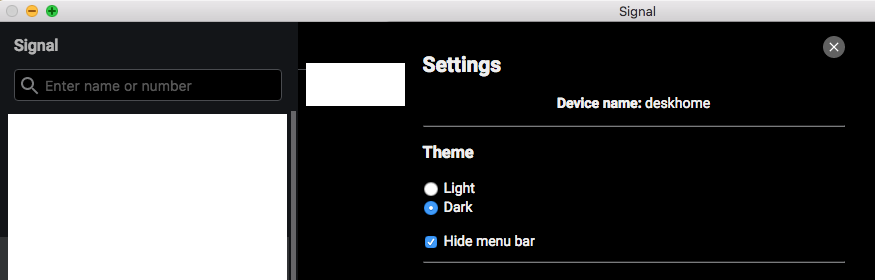
Platform info
Signal version: 1.15.5
Operating System: macOS 10.13.6
Linked device version: iOS 12b11, Signal 2.29.0.17
 foss-
foss-
All 2 comments
No, it's something specific to Windows and some Linux distros, where the menu bar is attached to the Signal window. It might be good to hide this on macOS.
 scottnonnenberg-signal
on 30 Aug 2018
scottnonnenberg-signal
on 30 Aug 2018
This is still an issue. Looks like it was addressed in the PR https://github.com/signalapp/Signal-Desktop/pull/2716, but that appears closed and not merged.
Any way I can help land this?
 jsatk
on 14 Nov 2018
jsatk
on 14 Nov 2018
Related issues
 lokesh-krishna
·
3Comments
lokesh-krishna
·
3Comments
 hanzei
·
3Comments
hanzei
·
3Comments
 McLoo
·
3Comments
McLoo
·
3Comments
 github-cygwin
·
3Comments
github-cygwin
·
3Comments
 muellermartin
·
3Comments
muellermartin
·
3Comments
Most helpful comment
No, it's something specific to Windows and some Linux distros, where the menu bar is attached to the Signal window. It might be good to hide this on macOS.