Signal-desktop: Missing messages in desktop app
- [x] I have searched open and closed issues for duplicates
Bug description
Desktop app does not show / sync new messages.
Steps to reproduce
- Send message to my account
- Check if message is received on Android app: OK
- Check if message is received on desktop app: FAIL
- Wait 10 minutes
- Check desktop app again: FAIL
- Restart desktop app
- Check one more time: FAIL
- Reboot machine
- Check: FAIL
Actual result: Message is displayed in Android app but not in desktop app.
Expected result: Message should be displayed in both Android and desktop app.
Screenshots


Platform info
Signal version: v1.14.0
Operating System: macos 10.13.5 (17F77)
Linked device version: Android 4.23.4
Link to debug log
https://debuglogs.org/eca4afb0072f357f428e73fd0a33d3abd89ac8156f40491c65d5399c9ec8b37d
 p3k
p3k
All 117 comments
Have you tested that this happens with every single message all the time in all conversations, or is there some sort of specific situation causing it? What happens if you restart Signal Desktop? Do new messages start showing up?
Also, you might consider trying a Reset Session (in the top-right menu) in this conversation, since Signal Desktop does seem to be encountering an error handling those messages.
 scottnonnenberg-signal
on 13 Jul 2018
scottnonnenberg-signal
on 13 Jul 2018
- Messages frequently go missing when my desktop is asleep (suspend / hibernate) or turned off.
- Sometimes after waking my desktop the messages are synced.
- Sometimes after I restart Signal on my desktop, messages will be synced (very slowly).
- Sometimes after messages are synced to my desktop they are out of order until I restart Signal.
Generally with Signal I expect not to receive messages on desktop unless it is turned on at the time the message is sent (based on when it arrives on my phone). However, they sometimes show up later on my desktop anyway.
As a user of any _other_ messaging platform, I expect to have consistent message history regardless of which device I am using. Just about every other messaging platform works this way. However, Signal's behavior is extremely inconsistent here so I don't even know what Signal is _supposed_ to do in these circumstances.
The blog implies that Signal should have continuity between devices:
Your contacts don’t have to guess where to message you, and when you switch devices the conversation you started will already be there.
However, this has never been the case in my experience.
 cbednarski
on 19 Jul 2018
cbednarski
on 19 Jul 2018
@scottnonnenberg it happened with one account, no matter whether i reset the session or restarted signal (or even the os – pls see the issue description).
today the messages arrived, finally.
as @cbednarski wrote, it’s sometimes not easily reproducible but overall the desktop experience is in fact cumbersome at max.
p3k
on 19 Jul 2018
I'm having the same issue, and an additional issue where the Android App will sometimes lag behind with message sync and I'll receive dozens of messages once I run it after chatting a bunch in the (Windows 10) desktop app. I've noticed that it mostly happens in a group chat where 1 person uses the beta Signal apps (both the Android app and the Linux desktop client).
 tpavicic
on 19 Jul 2018
tpavicic
on 19 Jul 2018
I also have this issue. A friend of mine does as well. This problem started during the last few days, so most likely an update broke something. I use Android and my friend uses iOS, suggesting that the problem is originating in the desktop client or possibly the signal server code.
I'll try and see if I can reliably recreate the issue, but from what I've seen so far this problem occurs when my laptop goes to sleep or when I switch networks from WiFi to ethernet.
 petcap
on 21 Jul 2018
petcap
on 21 Jul 2018
I just had this situation myself, and I looked deeper and realized that the missing message had just been sorted higher in the conversation than I expected. To track this problem down, we need to get into the super-detailed specifics.
 scottnonnenberg
on 22 Jul 2018
scottnonnenberg
on 22 Jul 2018
Clock Ordering Issues
I dual-boot Windows and Linux on my desktop. By default, Windows sets the hardware clock to local time while Linux uses UTC. Linux syncs the time with NTP at boot but Windows may use the wrong time for several hours.
Signal appears to tag and order messages using the OS's local time, rather than UTC, and as a result messages received while the clock is wrong will be permanently out of order, even after the clock is corrected and the desktop client is restarted.
I have since discovered a registry setting that fixes this problem, so I don't know if it persists in the latest version of Signal Desktop.
Sync Ordering Issues
On my Mac laptop (no dual-boot) I have also noticed messages appear out of order. It appears that the message log is ordered based on the _order in which the messages were received on a specific device_ rather than the _order in which they were sent_.
Messages that are delayed in syncing to my laptop are ordered improperly, but, they are ordered correctly _after restarting Signal Desktop_.
When waking my laptop from sleep I can send and receive _new_ messages right away. However, some recent messages will be missing from the message log, and may suddenly appear in the ongoing conversation. I guess this means syncing has finally caught up.
Non-Delivery / Delayed Delivery Problem
On my mac laptop, Windows, and Linux desktops since applying the registry change, I have also observed that messages are not delivered to my desktop when they are delivered on my phone. At these times I am using my desktop, receive a notification of a new message on my phone, and _do not_ see a new message on the desktop client, though it does appear on my phone.
I looked through my message history on three devices, but I cannot find an example where this happened. It's possible that these messages are _delayed_ rather than never delivered. This delay in receipt seems to span from minutes to hours.
Again, please note that both the phone and desktop clients were online at the time the message was sent.
With this sort of delay, the message is essentially "lost" because by the time it arrives the context for the conversation is lost. Imagine having a face-to-face conversation with somewhere where they randomly don't reply to certain things, or reply in seemingly nonsensical ways, or are constantly annoyed that you are not responding to them.
Summary
Clock Issues
- Messages appear to be ordered using local time instead of UTC, which sometimes places them in the wrong order
- Messages that are ordered incorrectly because the local clock is wrong will be permanently out of order
Sync Ordering Issues
- The message log is sometimes temporarily ordered by most-recently-synced last
- Messages that are ordered incorrectly because of syncing will be re-ordered correctly when Signal Desktop is restarted
Delivery Issues
- Some messages are delivered to my Desktop after a long delay (perhaps hours later), typically when my desktop is asleep when the message is received on my phone
- After review of _some_ older messages in several clients, all of them appear to have the same messages, though this is not always the case for more recent messages
Questions
Sync Architecture ??
Is there a document that explains how the sync architecture works in Signal? My inference is that messages and contacts are synced or _relayed_ from my phone to my Desktop, and the Desktop does not receive messages independently. I'd like to understand what the failure modes are here.
Logs
Is there some way to programmatically compare message logs from different devices? I noticed a general log in a general that fetchMessages events are several hours apart, but I don't think I see timestamps for individual messages that I can compare between my phone and desktop.
$ grep fetch ~/.config/Signal/logs/log.log.1
{"name":"log","hostname":"[REDACTED]","pid":2928,"level":30,"msg":"Storage fetch","time":"2018-07-19T05:56:46.549Z","v":0}
{"name":"log","hostname":"[REDACTED]","pid":2928,"level":30,"msg":"ConversationController: starting initial fetch","time":"2018-07-19T05:56:46.571Z","v":0}
{"name":"log","hostname":"[REDACTED]","pid":2928,"level":30,"msg":"ConversationController: done with initial fetch","time":"2018-07-19T05:56:46.580Z","v":0}
{"name":"log","hostname":"[REDACTED]","pid":2928,"level":30,"msg":"fetchMessages","time":"2018-07-19T21:05:25.314Z","v":0}
{"name":"log","hostname":"[REDACTED]","pid":2928,"level":30,"msg":"fetchMessages","time":"2018-07-19T21:05:25.790Z","v":0}
{"name":"log","hostname":"[REDACTED]","pid":2928,"level":30,"msg":"done with status fetch","time":"2018-07-19T21:05:26.001Z","v":0}
{"name":"log","hostname":"[REDACTED]","pid":2928,"level":30,"msg":"done with status fetch","time":"2018-07-19T21:05:27.070Z","v":0}
{"name":"log","hostname":"[REDACTED]","pid":2928,"level":30,"msg":"fetchMessages","time":"2018-07-20T01:48:34.722Z","v":0}
{"name":"log","hostname":"[REDACTED]","pid":2928,"level":30,"msg":"done with status fetch","time":"2018-07-20T01:48:35.274Z","v":0}
{"name":"log","hostname":"[REDACTED]","pid":2928,"level":30,"msg":"fetchMessages","time":"2018-07-20T02:10:47.938Z","v":0}
{"name":"log","hostname":"[REDACTED]","pid":2928,"level":30,"msg":"done with status fetch","time":"2018-07-20T02:10:48.543Z","v":0}
I should note that my phone is an iPhone, and I have observed similar out-of-order syncing issues with iMessage between my phone and laptop. I don't know if this is an idiosyncrasy of the iOS platform, or simply similar bugs in both iMessage and Signal.
cbednarski
on 22 Jul 2018
I've tried to replicate this issue by cutting off the websocket right before sending a message to the desktop client and waiting for it to reconnect, but so far I haven't been able to replicate the behavior. I will keep trying and report back here if I find a reliable way.
@cbednarski Great observation, but I don't think it relates to this issue. My clocks are always correct and I still get some (very few) messages missing.
petcap
on 23 Jul 2018
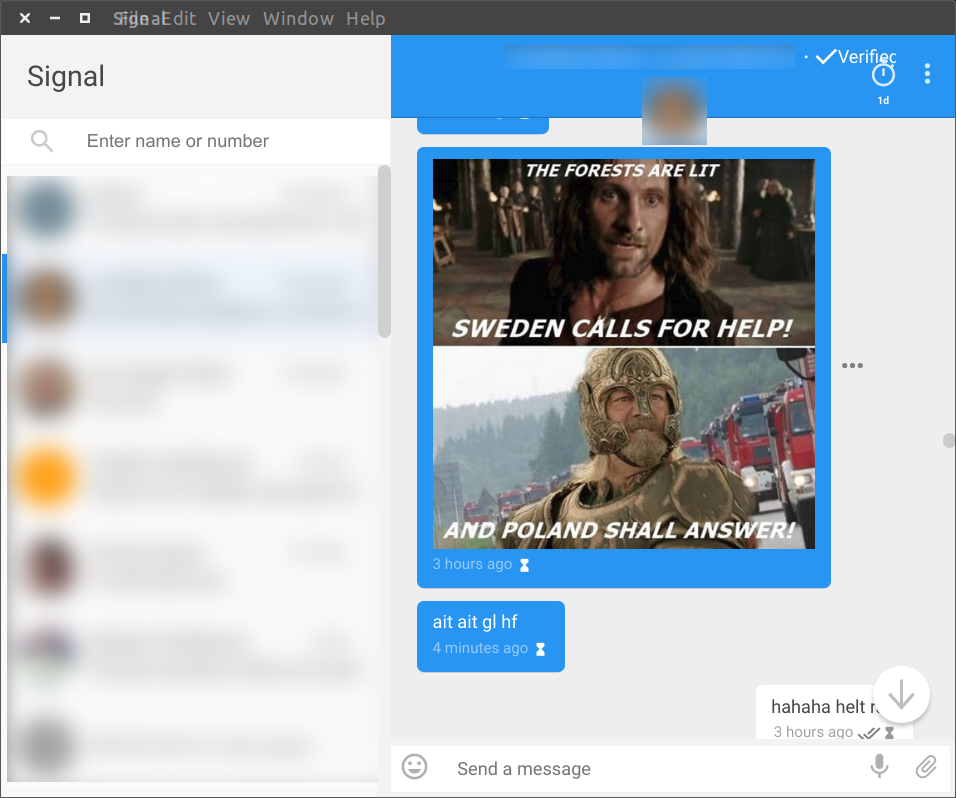
I ran into this issue again. As @scottnonnenberg suggested, I found the missing message way up as shown in the screenshot. Debug log available here.
This is what I did:
1) Start my laptop and open Signal without any active internet connection
2) Once Signal had been started and fully initialized, I connected to my WiFi
3) All previous messages (a lot, 500+) were synced to the client and the single last message (the one with the 4 minute timestamp) of the particular conversation were ordered higher up in the conversation. I believe the displaced message was sent after the client had been started, if that makes any difference.
petcap
on 23 Jul 2018
This issue may be related to #2424.
cbednarski
on 26 Jul 2018
This happened to a friend of mine and she can't find the message anywhere.
https://debuglogs.org/a1bc2c0de041f0e837207fb734b5a5e9bdd2e2e746d66456ea2f126abfd21f38
The missing message should have arrived be 45 minutes or so before the log was made.
Probably coincidentally, both me and the person I'm chatting with are both Swedish, just like petcap above me.
Probably not coincidentally, my friend has a horrible connection. She lives out in the county.
Funny enough this happened again while I was writing this report. She sent me a picture of where the missing message should be and that picture never arrived on her desktop
https://debuglogs.org/51bb0f233d6111db1ed111dc35bd3d568857f38e9d6ed3048a02836217b8c576
^ The image that never arrived was sent ~7 min before the log was taken
 Dyras
on 26 Jul 2018
Dyras
on 26 Jul 2018
@Dyras It would really help us track down the bug if you could grab the 'sent at' date and last three digits of the sender for the missing messages. Then we could correlate it with what we see in the log.
scottnonnenberg-signal
on 26 Jul 2018
@scottnonnenberg-signal
My last three digits: 275
Her last three digits: 323
Sent time for the missing message: 1532611887480 (2018-07-26 15:31)
Sent time for the missing picture: 1532611887480 (2018-07-26 16:32)
I also want to clarify that the picture was sent from her phone and did not arrive on her desktop, I got the picture on both my W10 computer and my Pixel XL.
She uses a Huawei P20 Pro if that matters.
Dyras
on 26 Jul 2018
@Dyras I do see something interesting at about the right time in the log: queueEnvelope +[REDACTED]323.1 1532615579257 task did not complete in time.. This suggests to me that her desktop attempted to download the attachment, but it took longer than two minutes, maybe eventually failed. If she restarts desktop, it should try to re-download that message with the image.
scottnonnenberg-signal
on 26 Jul 2018
@scottnonnenberg-signal Sadly she had disappearing messages enabled and I forgot to check if they re-downloaded :(
However, it's happened for me now so feel free to guinea pig me all you want.
Signal-Desktop: https://debuglogs.org/55f2aeed3b2ffabd776d5a83bfbc6b111a2d7e0ac066694ce2a76cdb2e87e44f
Signal-Android: https://debuglogs.org/8ba7bfc6582577cf418e25428e0c6ec3f8eee582dd45edb13adf7432ecd4ecc4
Might be a different issue though, as the messages appear in the notification field, but not in the chat. 5 messages in total aren't showing:
Swedish time, all today
Sent 15:48:19
Sent 15:49:02
Sent 15:55:51
Sent 15:56:37
Sent 15:57:31
Example:
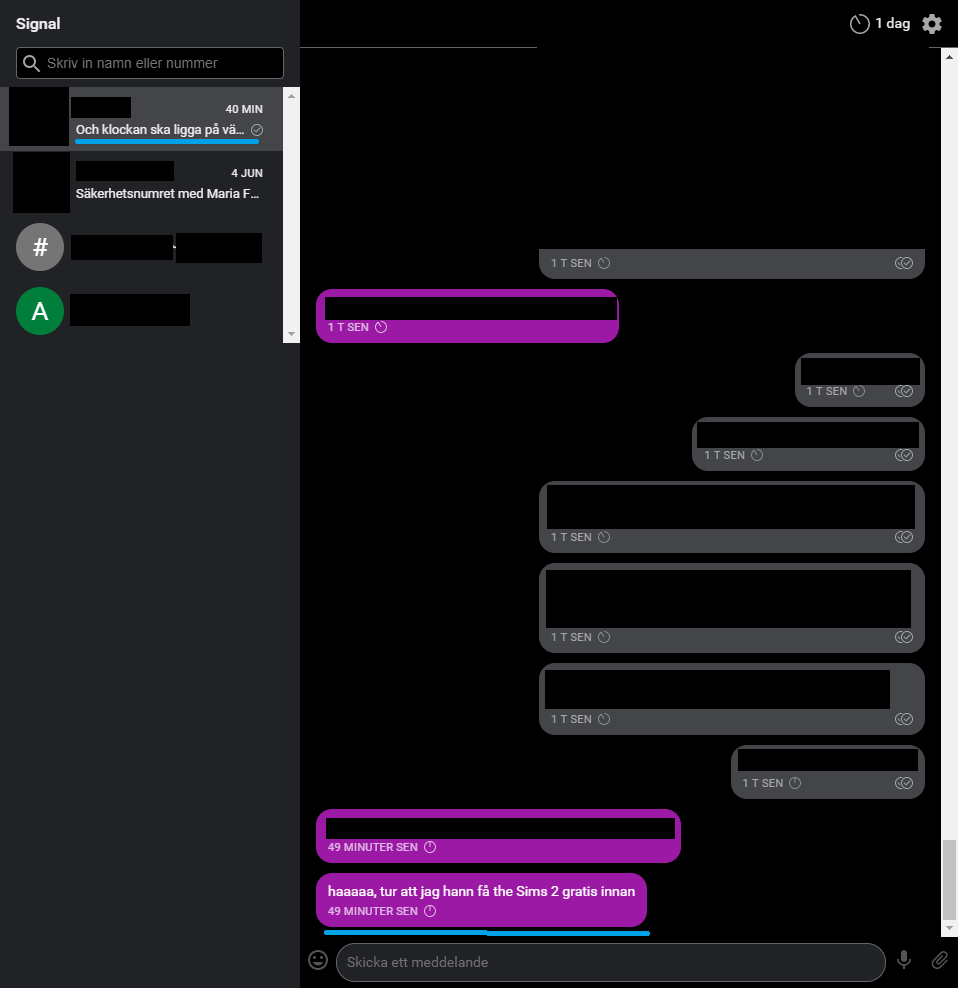
If you want it as a different issue, just say the word.
I currently haven't tried switching to another contact or restarting, in case there's anything you want me to do while it's "broken".
Edit: Another image sent from my phone is missing on my desktop. No internet problems all day.
https://debuglogs.org/d5aed6ba34722a665b6d7371164cf1b9491fa6064db848f2d55a5d32552b0a56
Today
Sent 20:22:49
Dyras
on 28 Jul 2018
I think Signal Desktop is ordering messages by the time it received them instead of the time they were sent.
When you start it up, it downloads a bunch of messages that happened while it was off. Sometimes the messages are downloaded out of order, causing them to get mixed back into the older messages that are being downloaded at the same time.
Restarting Signal Desktop does not fix this display issue.
Example:
My phone beeped because it received a message.
I started Signal Desktop to view the new message. I hadn't used it (on this computer) for 2 days.
Signal Desktop downloaded a bunch of old messages and the new message.
I found that the message I had just received, "What if we try this", was way back in the middle of yesterday's messages. Observe the timestamps (which are "sent" timestamps, not "received" timestamps).

"It makes the contrast" -- an old message from yesterday
Sent | Wednesday, August 1, 2018 11:05 AM -- sent yesterday
Received | Thursday, August 2, 2018 10:05 AM -- received now when I started up Signal Desktop
"What if we try this" -- this was the new message
Sent | Thursday, August 2, 2018 10:04 AM -- sent 1 minute ago
Received | Thursday, August 2, 2018 10:05 AM -- received now
"good idea" -- an old message from yesterday
Sent | Wednesday, August 1, 2018 11:06 AM -- sent yesterday
Received | Thursday, August 2, 2018 10:05 AM -- received now
(Times are PST)
Weirdly, this only happened to the first of two new incoming messages. The second one worked as expected (not shown in screenshot). It had these timestamps:
Sent | Thursday, August 2, 2018 10:05 AM
Received | Thursday, August 2, 2018 10:05 AM
OS X 10.12
Signal Desktop v1.14.4
Both people in this chat are also using Android
This is a "group chat" containing only 2 people, not a normal person-to-person chat.
 cinnamon-bun
on 2 Aug 2018
cinnamon-bun
on 2 Aug 2018
Hey y'all. Would love to hear how v1.15.0 changes things here; some improvements were made on the order the incoming messages are processed.
scottnonnenberg-signal
on 3 Aug 2018
@scottnonnenberg-signal today this happened to me:
Got a message in the iOS app (can't remember if I opened the message in the app or just read the preview on the lock screen)
Started the Windows desktop app.
The desktop app wanted to update so I let it do that.
Once the update was complete (v1.15.0) and the desktop app had restarted I didn't see the new message at first. Then I scrolled up through previous messages and found this new message together with older messages.
When I look at the sent/received messages (in the desktop app) next to this new message it looks like this:
Sent | Wednesday, August 1, 2018 10:11 PM
Received | Monday, August 6, 2018 2:04 PM
When I look at the same message in the iOS app it says:
Sent 2018-08-01 22:11
Received 2018-08-01 22:11
Is that of any help?
 edroszcz
on 6 Aug 2018
edroszcz
on 6 Aug 2018
@edroszcz By itself that doesn't really help track this down. What I'd need is a debug log from your desktop device, and then the id of the message that is sorted incorrectly. You can get that ID from the More Info screen available from the triple-dot menu - it's the large number right after the 'sent at' date.
scottnonnenberg-signal
on 6 Aug 2018
@scottnonnenberg-signal Of course!
Debug log from the desktop client:
https://debuglogs.org/a98e442d8a342f24d721658a4bf97fdbce01ec764541e71b5f5398d2f4f2fabb
Message ID:
Sent | Monday, August 6, 2018 2:02 PM (1533556970649)
Received | Monday, August 6, 2018 2:04 PM (1533557077975)
edroszcz
on 7 Aug 2018
Just throwing my hat in also. This is happening to me. v1.16.2. I have two laptops linked to my phone app.
Messages from either of my laptops show up in my Android app, but messages from my Android app never arrive to the linked devices. Ever. Not misordered or any other way. They just never appear, even after restarting the application on the laptops, phone, etc... Please advise. Thank you!!
 efayadspecific
on 23 Sep 2018
efayadspecific
on 23 Sep 2018
@efayadspecific It sounds like you're talking about messages to yourself. If you start a conversation with yourself, Android and Desktop have different behaviors. Desktop will send those messages to your other devices, and Android will not. If you're sending to other people, additional detail would be useful to help us track down the issue (message send ids, debug logs from all affected devices).
scottnonnenberg-signal
on 24 Sep 2018
The bus is present. I send messages to another person and some linux
clients do not catch the ne messages. It happens mainly when there are
active more linux client Signal applications and the message is sent from
one of these.
Il giorno lun 24 set 2018 alle ore 18:13 Scott Nonnenberg <
[email protected]> ha scritto:
@efayadspecific https://github.com/efayadspecific It sounds like you're
talking about messages to yourself. If you start a conversation with
yourself, Android and Desktop have different behaviors. Desktop will send
those messages to your other devices, and Android will not. If you're
sending to other people, additional detail would be useful to help us track
down the issue (message send ids, debug logs from all affected devices).—
You are receiving this because you are subscribed to this thread.
Reply to this email directly, view it on GitHub
https://github.com/signalapp/Signal-Desktop/issues/2527#issuecomment-424032642,
or mute the thread
https://github.com/notifications/unsubscribe-auth/AJXswD-GimM1GhIM6xc4gYlL3zwGVchhks5ueQTGgaJpZM4VOwoz
.
--
Think Marco, think different
 marcorighi
on 24 Sep 2018
marcorighi
on 24 Sep 2018
Confirming this issue is still present on 1.16.3 desktop version on linux with 4.29.7 on android. after not using the desktop version for a few days, messages that arrived earlier on the android are not sent/synced onto the desktop. while the application is running all is good.
 maysara
on 1 Nov 2018
maysara
on 1 Nov 2018
FWIW I'm just seeing this issue now. Literally days of messages have gone missing from desktop; also a small number of messages sent from desktop are missing from Android phone.
Can we get a backup that sync's between phone and desktop?
 Grunthos
on 5 Nov 2018
Grunthos
on 5 Nov 2018
@Grunthos Can you talk a little bit more about your app usage recently? Were the missing messages the most recent or a bit older? What had happened right before you noticed them missing?
scottnonnenberg-signal
on 5 Nov 2018
@scottnonnenberg
Re: missing messages, they were recent. I reported the problem on monday when I started the desktop app and noticed that messages from Sunday 4.40pm onwards were missing. The messages are missing from 4:41pm Sunday (Oz time) to 10:17 pm Monday from a single person (approx 30 hours worth; dozens of messages and many images).
Now I have investigated a little more I am also missing messages from another person. They are still missing; these are from Oct 30 onwards (only a couple of dozen messages).
I first noticed them missing when I started the signal desktop app and went to review some older messages and realized they were not there.
I usually use the app quite a lot, especially to one or two people, mostly on the phone but sometimes on desktop.
I am pretty sure I upgraded signal, and probably signal desktop, in this time period (not sure). The desktop machine is usually booted every day, the signal app is almost always running, but signal desktop may or may not be started; often not started.
Grunthos
on 6 Nov 2018
Interesting... I started the desktop client (on Linux) after not having started it for a couple of weeks and I also noticed that the messages seem to be synced until (and including) October 30th. Once I started sending messages those new ones appear directly in the desktop client but the ones from Nov 1 till today are still missing.
Another thing also popped up (not sure if it is related): when sending messages from signal-desktop, they result in a badly encrypted message on my contact's phone and on my own phone I get the same message (sent to me). Messages sent from my phone appear correctly in the desktop app and on my contact's phone.
 lckarssen
on 6 Nov 2018
lckarssen
on 6 Nov 2018
Happened to a friend of mine just now. About six hours of messages missing from Signal-Desktop
https://debuglogs.org/b8d2d62381e31cb5aa3d166b76048294b57ef1531990adb4bea744c57cd95b21
Dyras
on 13 Nov 2018
@Dyras What can you tell us about how Signal Desktop was being used during the time before and around the message loss?
scottnonnenberg-signal
on 14 Nov 2018
@scottnonnenberg-signal
The computer was turned off when the messages were sent, while the connected Android phone was turned on. When my friend started the computer, the messages were never downloaded.
She last opened the app about 12 hours before, so I don't think she reached the 1k messages limit. Seeing as I'm the only one she chats with on Signal.
Dyras
on 15 Nov 2018
@Dyras If, when this user opened the desktop app, the 'new version is available' dialog popped up and she immediately selected 'restart,' we had a pre-v1.18.0-beta.7 bug where a lot of outstanding database requests might be lost. But if that wasn't the case, there was no restart, then we'd need to look deeper.
scottnonnenberg-signal
on 15 Nov 2018
@scottnonnenberg-signal She said she doesn't remember if that popped up or not. Will try to capture another log if it happens again though!
Dyras
on 15 Nov 2018
Signal Desktop is missing messages for me every few weeks or so. The messages show up on my Android phone.
I do not know where to find specific message IDs in the Android app.
Android Signal: https://debuglogs.org/a93a87d70e1ab43a2feaef043cdd95fd84c4f80b28b0e302b90b823c4de34ec5
Signal Desktop: https://debuglogs.org/cf10631e8c5c48d7249db966b96ef1a63d2e2a3cd08c49b7dfb7c72fc2084292
 jayschwa
on 28 Nov 2018
jayschwa
on 28 Nov 2018
@jayschwa You can go into message details on Android, then long-press on the 'Sent' heading. That should copy the 'Sent Id' to your clipboard.
scottnonnenberg-signal
on 28 Nov 2018
First message to not arrive: 1543259015858
Sample of a few more:
1543358632767
1543363771605
1543364554943
jayschwa
on 28 Nov 2018
The previous example was from my Windows machine. Signal Desktop on my Linux machine is also missing some messages:
Signal Desktop: https://debuglogs.org/1f514453df8c223a6e673ad54fefb595aa7183aacaf7161b04997a5339733be7
Missing message ID from phone 1543445472067
jayschwa
on 29 Nov 2018
Similar issues here--only messages sent after I installed the desktop client on Ubuntu Mate 18.04.1 are showing up. Previous messages (history) do NOT show.
 vmorgo
on 22 Dec 2018
vmorgo
on 22 Dec 2018
I’m facing the same issue with my Windows 10 laptop that I use not very often. The other PC which is always on received every message.
 denver-s
on 26 Dec 2018
denver-s
on 26 Dec 2018
I'm in a similar boat. I contact the same person with Signal using three different devices, two of which are always on:
- Android phone (Pixel 2) -- always on
- Linux PC (Ubuntu) -- always on at home
- MacBookPro laptop
My laptop is not always on and since it's my work machine I usually don't have the Signal app running.
My phone is currently in the shop and I'm at work right now, so I launched Signal on the Mac laptop for the first time in a while to see if I could use it for messaging. Signal updated itself and restarted, so it's currently running v1.19.0.
The most recent message is from December 19, though I know I have dozens of newer messages than that. Here are the details from the currently "newest" message showing on my laptop.
Sent | Wednesday, December 19, 2018 4:58 PM (1545260333815)
Received | Friday, December 28, 2018 11:44 AM (1546019098851)
I'll keep Signal open on the laptop while I'm at work and update if any more messages ever finally show up, but in my previous experiences they never do.
Edit: I don't know if it's relevant but maybe I should add that none of these machines are ever on the same network. I don't know if the devices need to talk directly to each other somehow.
At home, my always-on Linux PC is connected to one network with an Ethernet cable and my always-on Android phone is connected to a separate WiFi network. (This is because I use Google's mesh WiFi access points at home, and they can't bridge the wired network.)
At work, my MacBook Pro is connected with WiFi to the secure corporate network and that same phone connects to the unsecured "guest" network via WiFi.
I guess _occasionally_ I use my work laptop at home, in which case both it and my phone are on the same wireless subnet.
Again, in case that matters. Happy to provide any other diagnostic info that would be helpful.
 grahammitchell
on 28 Dec 2018
grahammitchell
on 28 Dec 2018
@vmorgo @tzs1 @grahammitchell Please, whenever reporting an issue, include your debug log. Sadly we only keep three days of log data, and it's been longer than that since you've commented here. So we've lost key information important to help us track down these issues.
scottnonnenberg-signal
on 2 Jan 2019
Interesting... I started the desktop client (on Linux) after not having started it for a couple of weeks and I also noticed that the messages seem to be synced until (and including) October 30th. Once I started sending messages those new ones appear directly in the desktop client but the ones from Nov 1 till today are still missing.
Another thing also popped up (not sure if it is related): when sending messages from signal-desktop, they result in a badly encrypted message on my contact's phone and on my own phone I get the same message (sent to me). Messages sent from my phone appear correctly in the desktop app and on my contact's phone.
Same issues here, except my seldom used instance is Windows 10, and when its been off for a while, it doesn't sync. I doubt it hit the 1000 message limit, and even if it did, I'd expect old stuff to be missing - instead, its always the newest messages that are missing. Happy to provide logs if its helpful, but there are about 10 bugs open about this issue already, with many logs reported... Mostly commenting so I get notification if it gets fixed :)
 darmbrust
on 5 Jan 2019
darmbrust
on 5 Jan 2019
Same here. Looks like we have some issues
 NuclearMachine
on 7 Jan 2019
NuclearMachine
on 7 Jan 2019
I experience the same issue once in a while - typically when the Windows App has been closed for several days. I just startet the App today and I noticed the two newest messages were missing - all other messeges were synced correctly.
Here is the debug-log from the Windows App: https://debuglogs.org/2ad1e3fe9b72947a2b8244355109012c386ee09157f57b4b3ee48e5f269e1a7e
Here is the debug-log from the Android App: https://debuglogs.org/8c3b838401321cedeeaa38e5a26b8e432a94e29c0b7ea7a779dc080467749727
The missing messages were received on my Android phone at 2019-01-08 11:14:15 and at 2019-01-08 11:16:26.
I hope this provides data to trace the issue.
 epsen
on 8 Jan 2019
epsen
on 8 Jan 2019
Similar issue for me, messages not syncing between Mac and Android apps.
On Mac, the app has been closed for several weeks. I opened it up today, upgraded to the latest version, and several messages sent and received on my Android yesterday aren't showing up on my Mac.
Mac: https://debuglogs.org/12f0bf4981b720befe54642f4b0b332e310485cfb12f25a2c9d5806bbe727541
Android:
https://debuglogs.org/425725d9588b8706f286be120f9d54259f02ad424f02ca4e5de301287555ca53
A few messages that seem to be on my Android but not on Mac:
1547087882059
1547087855210
1547087854281
 smarbin
on 10 Jan 2019
smarbin
on 10 Jan 2019
@smarbin Hm... None of those three ids are included in your Mac debug log - are you sure those are the 'sent id'? Also, there's a 'read only volume' warning from our update subsystem, so you may need to move it to your /Applications directory using Finder (moving it from downloads from the command line fails to remove a MacOS 'untrusted' tag).
scottnonnenberg-signal
on 10 Jan 2019
Just opened the Mac app for the first time in a few weeks. It loaded many of the messages but is missing four messages (two I sent and two I received) that had been delivered by the Android client.
Mac: https://debuglogs.org/5ba914d5a2f7c219d52ead34553a45c1f474ce1a653bcba64b5697ed570a2875
Android: https://debuglogs.org/0233425a2ffb716834badfa8b486f21c955a4234e12be30eb8ecdc009d6ee8a0
The four missing messages as Android client sees them:
Message 1
- sent by me; showing two checkmarks in the Android UI, missing from Mac
Sent: Jan 29, 2019, 11:38:15 AM CST (1548783495845)
Via: Data (Signal)
Message 2:
- received by me; missing from Mac
Sent: Jan 29, 2019, 11:38:29 AM CST (1548783509681)
Received: Jan 29, 2019, 11:38:29 AM CST (1548783509946)
Via: Data (Signal)
Message 3:
- received by me; missing from Mac
Sent: Jan 29, 2019, 11:38:35 AM CST (1548783515538)
Received: Jan 29, 2019, 11:38:35 AM CST (1548783515881)
Via: Data (Signal)
Message 4:
- sent by me; showing two checkmarks in the Android UI, missing from Mac
Sent: Jan 29, 2019, 11:39:39 AM CST (1548783579048)
Via: Data (Signal)
Edit: added the timestamps.
There are four more Android messages after that (two sent, two received) that DID replicate to Signal on the Mac.
Sent Tuesday, January 29, 2019 11:39 AM (1548783591286)
Received Tuesday, January 29, 2019 11:43 AM (1548783807107)
^ That's the first one that did successfully replicate.
And finally, here's the last message before the four-message gap:
Sent Tuesday, January 29, 2019 11:36 AM (1548783362592)
Received Tuesday, January 29, 2019 11:43 AM (1548783806552)
I paused the conversation I was having to post this, so I haven't sent or received any messages on either Android or the Mac app since launching the Mac version and discovering the bug had trigged again.
Hope this is helpful.
To give a clearer summary: on my phone, I was chatting.
- Received A
- Sent B
- Received C
- Sent D
- Received E
- Sent F
- Received G
- Sent H
- Received I
- Received J
- Sent K
- Received L
- Sent M
- Received N
- Sent O
Then opened Signal on my Mac laptop, which hadn't been opened in a long time. Once opened, messages H, I, J and K never showed up, though all the others did. They still aren't there an hour later.
grahammitchell
on 29 Jan 2019
You can get the specific id for each missing message in Android by going to the message details screen on your phone, and then long-pressing on the timestamp next to 'Sent.' You'll feel a vibration, and then the message's ID will be in your clipboard.
I will say that I'm seeing some errors like this - did all of your missing messages happen to have attachments?
ERROR 2019-01-29T17:40:48.320Z queueEnvelope error handling envelope +[REDACTED]110.1 1547328937067 (83a0f1b9-8654-42c5-a9cf-25311e2e3638) : HTTPError: promiseAjax: error response; code: 404
No, none of the missing messages had attachments. They're all just words, nothing outside of ASCII as far as I can tell; not even "smart-quotes" or emoji.
You can get the specific id for each missing message in Android by going to the message details screen on your phone, and then long-pressing on the timestamp next to 'Sent.'
Cool. I painstakingly added them above.
I'm using Google's Project Fi as my cell phone carrier on the Android device. The phone is also connected to WiFi. The Mac laptop is wired to my corporate network, which is isolated from the WiFi network, in case any of that matters.
grahammitchell
on 29 Jan 2019
Well here's a new one: https://i.imgur.com/SyFW8JC.png
- Laptop: https://debuglogs.org/1ca327b4fd651f114a12417ca9ef33267a7248be3857cd8b48e34a2cdf610287
- Phone: https://debuglogs.org/93bfacad77d0677832fba87b177f430a76912265da260539b1d8837e469e888c
Missing message IDs:
- 1551463561017
- 1551463601895
- 1551465124784
The five "error handling incoming message" messages in the screenshot are only three messages: two "text" messages and one image.
grahammitchell
on 1 Mar 2019
Just wanted to chime in that I stumbled across this Issues page because I'm experiencing the same thing.
Android, Pixel 2, latest OS security patch and version, latest Signal app on Android and Windows 10, Project Fi (though currently on WiFi). My PC and phone are using the same WiFi network.
Got 3 messages from my wife, saw the first 2 on my phone and checked the 3rd on desktop. The first two messages are completely missing on desktop, but the 3rd is visible on both. No attachments.
Message IDs:
- 1552330637313
- 1552330646945
Cheers.
 polarizeme
on 11 Mar 2019
polarizeme
on 11 Mar 2019
I am missing a whole bunch of messages is a conversation on Signal Desktop. I suspend and resume my system without closing Signal Desktop. Debug log is here. I had been using disappearing messages recently in this conversation, but this was turned off again. Messages are missing between the message that was sent at 1557331190778 and received at 1557349309890, and the message that was sent at 1557395473450 and received at 1557395473390.
On Android is stated: "
Here is the corresponding Signal Android debug log.
Edit: after restarting Signal Desktop, the missing messages appeared. This is a debug log taken after the restart when the missing messages were added to the conversation.
 janvlug
on 9 May 2019
janvlug
on 9 May 2019
I just installed Signal-Desktop v1.24.1 on Ubuntu 16.04 and I do _not_ see _any_ messages!
The issues is labelled "Need information", however I do not know where to start. Any pointers?
 sm8ps
on 14 May 2019
sm8ps
on 14 May 2019
@sm8ps Sounds like you expected messages to be sync'd from your mobile device right after you linked it. Only new messages to and from Signal users (not SMS-only users) will show up in Signal Desktop.
scottnonnenberg-signal
on 14 May 2019
Thanks for the clarification, @scottnonnenberg-signal! This is indeed what I had expected and from an outside point of view this seems like a reasonable demand. Looking at it now, it does make sense the way it is. -- Maybe this could be added to some kind of FAQ (that I am not aware of) to avoid similar confusion to novice users in the future.
Thanks everybody involved for making Signal available on the different plattforms!
sm8ps
on 14 May 2019
Any updates on this issue? I am in the process of evaluating Signal as a replacement to Google Hangouts but I am experiencing the same issue. Few messages (with no attachments) received in the Android application that don't show up on the desktop app. Already reset the session on desktop, restart the app and nothing. For a messaging application this problem is a big deal imo and should be looked into. Thanks.
 rlcintra
on 31 May 2019
rlcintra
on 31 May 2019
@rlcintra Can you provide us with a debug log and the "sent ids" of the missing messages? You can upload a debug log from desktop by going to View > Debug Log and you can get the sent ids of the missing messages by going to the message detail screen (long press on the message) and then long press on the "sent" header -- that will place the sent id on your clipboard.
 kenpowers-signal
on 31 May 2019
kenpowers-signal
on 31 May 2019
@kenpowers-signal Thanks for looking into it. I've uploaded the report log as requested (link). Missing message ID: 1559257599984. The other two missing messages were more than two weeks ago and I can't find them in the middle of all other messages.
rlcintra
on 1 Jun 2019
It just happened to me that three messages are missing on one Desktop instance (B). This device has been offline during that time. If I am not mistaken, it fetched around ~500-700 messages on startup.
Desktop A has been online all the time.
The sent IDs of the lost messages are 1559653330276 (incoming message); 1559653447741 and 1559653403405 (both sent from Desktop A to different contacts).
These three missing messages are the most recent ones.
Restarting the application does not solve the problem.
Debug logs:
Desktop A:
https://debuglogs.org/6287944d5a9918272207ebc618ff71c875f0a9805fd6bb9b431fccd83acb9024
Desktop B:
https://debuglogs.org/cb0c8fc4e84b2d80cc024f2e3b07a130bd3849a3787fb34f2f692b5577e43677
If you need any more information or logs from my Android device, please let me know. I am happy to help!
 minnmann
on 4 Jun 2019
minnmann
on 4 Jun 2019
@minnmann You can get a layer deeper on this investigation if you take a look at the database. According to the log, that first appears to have been processed properly:
INFO 2019-06-04T13:08:43.103Z Starting handleDataMessage for message +[REDACTED]473.1 1559653330276 in conversation +[REDACTED]473
It could be that these messages are received, but aren't being rendered properly. So, let's go to the development tools with View -> Toggle Developer Tools, then run this to query the database:
window.Signal.Data.getMessagesBySentAt(1559653330276, { MessageCollection: Whisper.MessageCollection }).then(result => console.log(result));
What you'll be able to expand in the console is an object representing all the messages in the database with that sent id. You're looking for the 'models' key, and then the 'attributes' key within each of those.
scottnonnenberg-signal
on 7 Jun 2019
This has now started to happen to me as well after I updated my Signal Desktop client (which I had not done for a while... and maybe I shouldn't have). Both messages and delivery notifications (the double-checkbox; I have disabled read notifications) from certain contacts do not appear in Signal Desktop. In a group chat, messages by those contacts are also missing but messages by other contacts go through. I tried entirely deleting the Signal Desktop settings (by deleting the folder in .config), to no avail. I also tried re-starting the secure session with that contact, again to no avail. I also tried re-start the secure session with those contacts, to no avail.
Is there a way I can send you the log in private? I see plenty of partially redacted phone numbers in there that I am not comfortable uploading to a public site.
 RalfJung
on 9 Jun 2019
RalfJung
on 9 Jun 2019
Oh actually turns out most of that was old stuff. So I deleted the logs, restarted Signal-Desktop, and reproduced the issue to keep the logs as small as possible. The result is at https://debuglogs.org/b7c1398755f9113dc9391d2d16f5cc47b3057c27b630d0cc913182ee5f670b40. One of the missing message IDs is 1560071845375.
I find this particularly curious:
ERROR 2019-06-09T09:17:57.491Z background onError: Error: Invalid signature
    at Curve25519Worker.<anonymous> (file://[REDACTED]/Signal-Desktop/js/libtextsecure.js:25467:25)
ERROR 2019-06-09T09:17:57.491Z queueEnvelope error handling envelope e4d7277e-fc81-4f58-8cd6-ad4e510a897d : Error: Invalid signature
    at Curve25519Worker.<anonymous> (file://[REDACTED]/Signal-Desktop/js/libtextsecure.js:25467:25)
ERROR 2019-06-09T09:17:57.492Z Message.saveErrors: null Error: Invalid signature
    at Curve25519Worker.<anonymous> (file://[REDACTED]/Signal-Desktop/js/libtextsecure.js:25467:25)
In case that helps, I asked my friend who sent that message which Signal version they use, and they said "iOS version 2.39.2.0". The other contact with whom I have issues uses the Android version 4.40.4.
RalfJung
on 9 Jun 2019
Turns out that the majority of my contacts are affected, this basically makes Signal-Desktop unusable currently.
RalfJung
on 10 Jun 2019
@RalfJung How are you installing/running Signal Desktop? Invalid Signature is something we developers sometimes run into when going between staging and production. It has to do with trusting incoming sealed sender messages.
You should probably enter a new bug. The first thing you can do to start collecting more information from us is opening up your Note to Self conversation, and sending messages from both your phone and your desktop. You can also restart Desktop and grab all the log entries generated as it sets up.
scottnonnenberg-signal
on 10 Jun 2019
I am compiling Signal myself. I don't add foreign Debian repos to my system for security reasons (I do trust you, but not enough to give you root on my system) and there is no binary tarball being distributed, so that's the only way I can use this software.
However, I am not moving between staging and production. I have not touched that config since the initial setup.
You should probably enter a new bug.
Okay, will do.
The first thing you can do to start collecting more information from us is opening up your Note to Self conversation, and sending messages from both your phone and your desktop.
I don't follow. Those messages work fine.
RalfJung
on 10 Jun 2019
Ah, turns out that something changed about how one has to set up the local-development.json for production use, and I still used the old thing... thanks for the hint, and sorry for the noise!
RalfJung
on 10 Jun 2019
@scottnonnenberg-signal Sorry for the late reply, I didn't manage to access the device until now.
This is the output (with some attributes expanded):
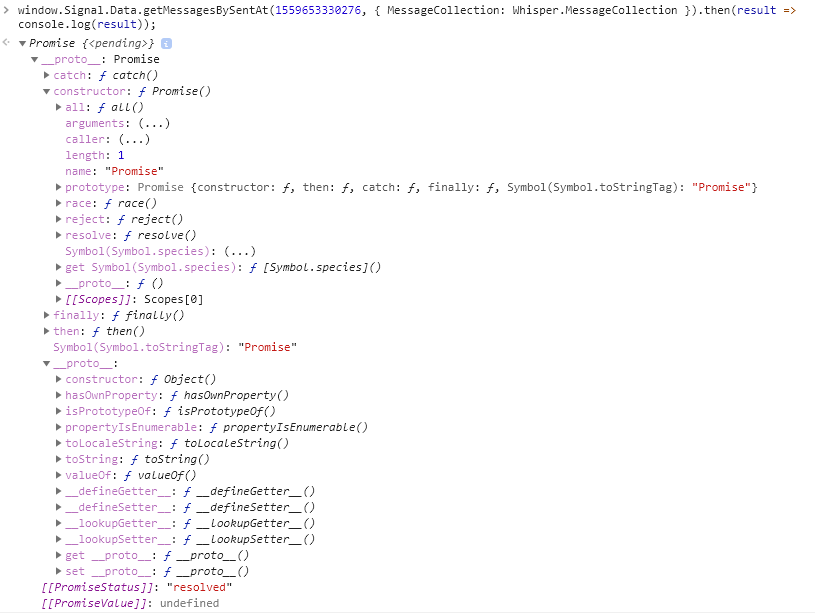
Unfortunately, I couldn't really find the 'models' key, even though I expanded many different attributes. Maybe you could give me some hints or the path, where to find it exactly? Thanks for the assistance!
Edit: OK, so I played around a little bit and used the following command, which gives an output that looks more reasonable to me.
window.Signal.Data.getMessagesBySentAt(1559653330276, { MessageCollection: Whisper.MessageCollection });
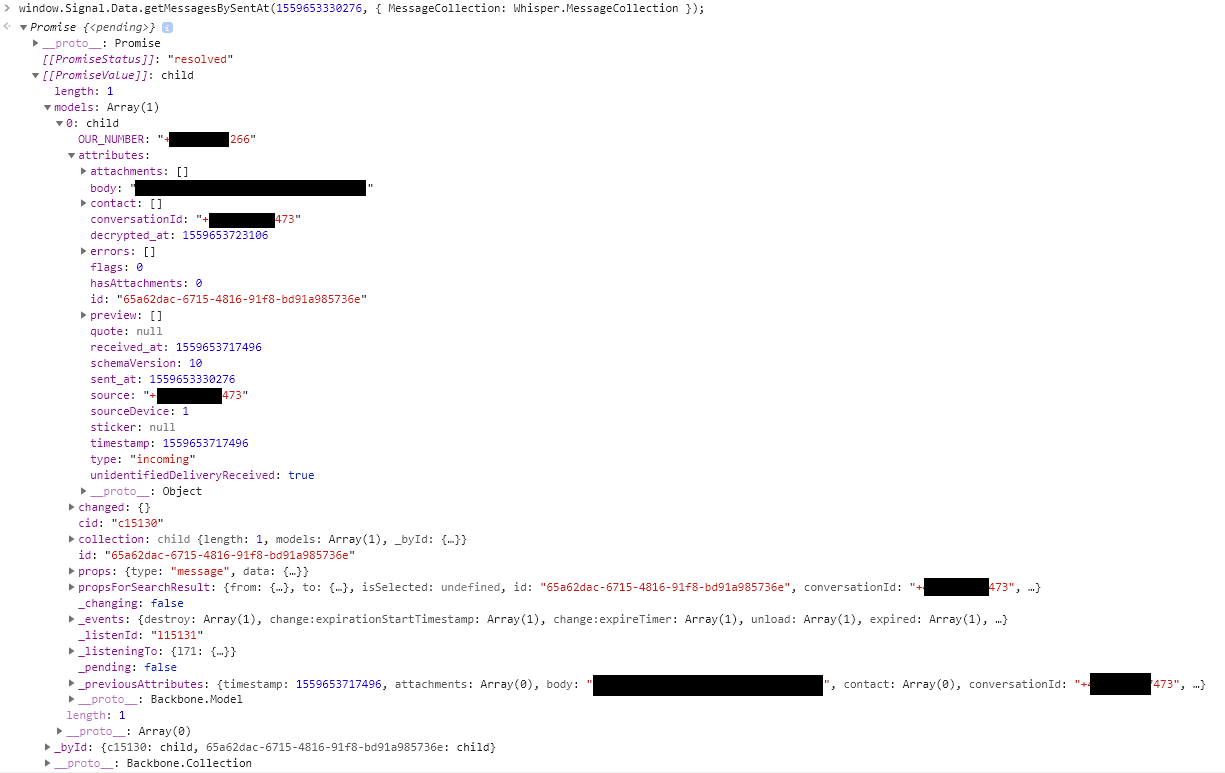
From having a quick look and comparing the output to the one of the other linked device, which correctly shows the message, I could not identify any differences - apart from some (unique?) IDs, i.e. 'id', 'cid' and '_listenId'.
The message still does not show up in the conversation. Should I try something else?
Edit2:
Based on the discussion and suggestions in https://github.com/signalapp/Signal-Desktop/issues/3332#issuecomment-500589135 and since it seems to me that my missing message is also correctly stored in the database, I did some investigation of the spot where the message should be.
Unfortunately,
(a) I could not trigger any error message in the console by scrolling to that place and
(b) the HTML code looks correct to me, it just misses that one message. There is no empty tag whatsoever at that position: One <li> tag is the message before, the next <li> tag is the message after the missing one.
minnmann
on 11 Jun 2019
@minnmann Do you see anything odd about the items before or after it?
scottnonnenberg-signal
on 12 Jun 2019
@scottnonnenberg-signal
No there is nothing odd about any item.
But after doing some more investigation, copying and searching the whole HTML content, I have to correct myself: The messages are not missing, they are simply placed out-of-order (and since this conversation is pretty long and busy, I did not find them in the first place, but only now).
The displayed order for the incoming message (15596533330276) is:
sent_id / received_id
...
1559562003929 / 1559653715901 (June 3rd, 13:40 / June 4th, 15:08)
1559653330276 / 1559653717496 (June 4th, 15:02 / June 4th, 15:08)
1559570312044 / 1559653719742 (June 3rd, 15:58 / June 4th, 15:08)
...
For the outgoing message sent from device B (1559653403405), it is:
...
1559643368494 / 1559653772218 (June 4th, 12:16 / June 4th, 15:09)
1559653403405 / 1559653773036 (June 4th, 15:03 / June 4th, 15:09)
1559643380087 / 1559653773126 (June 4th, 12:16 / June 4th, 15:09)
...
So, the order based on the received_id is indeed correct. Is this the intended behavior? It still seems odd to me that a newer message gets a lower received timestamp.
In any case, it seems my issue is not about missing, but out-of-order messages. Should I rather take part in the discussion it at https://github.com/signalapp/Signal-Desktop/issues/3332?
minnmann
on 13 Jun 2019
Because we doesn't trust the timestamps coming in on messages (the sender could have a clock that's wrong), we process messages in order of receipt from the server, and then keep them in that order. But we display the order the sender originally claimed. That's why things can be quite confusing. Especially when messages are retried.
It might be interesting to compare all the clients which are part of that conversation and see what they did with that message.
scottnonnenberg-signal
on 13 Jun 2019
we process messages in order of receipt from the server, and then keep them in that order. But we display the order the sender originally claimed.
I am not sure, if I understand everything correctly. But the confusing thing to me is that my other Desktop instance (device B) that has been online during all that time, displays the messages in correct order as well as my Android device and their Android device. It's only device A that got woken up with a queue of ~700 messages that has these issues.
So to me this sounds like there has happend something during the (batch) message fetching/processing on starting Signal.
It might be interesting to compare all the clients which are part of that conversation and see what they did with that message.
I will try to collect all the information. It might, however, take some time as it is ~5-6 devices in total.
minnmann
on 13 Jun 2019
Ive only started using signal on both my phone and my MacOS computer. Last night i installed it on my phone and set it up and set up a group with some friends, and then a couple minutes ago i tried to set it up on my mac. I have everything set up and connected however i'm running into a few issuers like others in this thread.
For some reason, the group on my computer is called "Unknown Group" but on my phone it has a name.
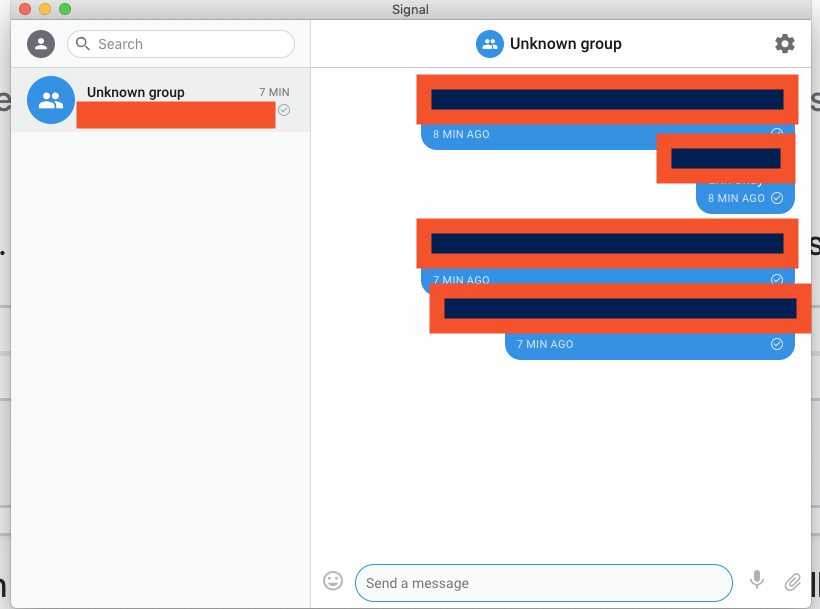
When i send a message from my computer, it shows in the app for my phone, but if i send messages from my phone, it doesn't show on my computer.
If i receive messages it only shows on my phone.
I installed signal by using homebrew. brew cask install signal
 ChadTaljaardt
on 6 Aug 2019
ChadTaljaardt
on 6 Aug 2019
Private messages between contacts for me works completely fine on the desktop app, so for me its only the group which is the issue.
ChadTaljaardt
on 6 Aug 2019
After downgrading to IOS 12.4 from IOS 13, these issues have been resolved for me.
ChadTaljaardt
on 9 Aug 2019
I just noticed a missing message in Signal Desktop that is present on the phone.
It is a message I sent from my phone, not a received message.
Used software:
Signal on Android 9, version 4.49.18 (5652)
Signal on Desktop v1.28.0, running on macOS 10.14.6
I wanted to submit the debug log on the Android app, but it's several thousand lines long and because of the length I would need hours to assess whether it contains sensitive information. I also couldn't find a way to export it to a file, and deleting lots of lines with my phone would take a long time.
 johannes87
on 18 Nov 2019
johannes87
on 18 Nov 2019
@johannes87 You could send your logs to [email protected] then, if you don't want to post them here. You can also find the 'sent id' for the message by going to message details on Android, and then long-pressing on the sent timestamp (on my phone, I get a little vibration confirmation) - the sent id will be in your clipboard.
scottnonnenberg-signal
on 19 Nov 2019
@johannes87 You could send your logs to [email protected] then, if you don't want to post them here. You can also find the 'sent id' for the message by going to message details on Android, and then long-pressing on the sent timestamp (on my phone, I get a little vibration confirmation) - the sent id will be in your clipboard.
The message id is 1574114321634
johannes87
on 19 Nov 2019
@johannes87 Just to confirm, you sent the log to our support email address?
scottnonnenberg-signal
on 19 Nov 2019
@johannes87 Just to confirm, you sent the log to our support email address?
No. In the "Submit debug log" view on Android, I tried to select all lines in order to copy the log into the clipboard, but only could select one line at a time (I tried long press -> select all). I want to get this log onto my computer for further inspection and don't see how to do that. An export to file function or copy to clipboard function would be useful.
johannes87
on 19 Nov 2019
@johannes87 If the issue is that a message is missing on Desktop but appearing on Android, then we need your Desktop log (View -> Debug Log) much more than the Android log.
scottnonnenberg-signal
on 19 Nov 2019
@johannes87 If the issue is that a message is missing on Desktop but appearing on Android, then we need your Desktop log (
View->Debug Log) much more than the Android log.
Update: while looking more closely, I realised the message is not missing on Signal Desktop. What confused me is that the messages aren't sorted in a chronographical order. In the screenshot, the first message is at 9:59pm, the second at 10:58pm, and the third message at 10:24pm.

johannes87
on 20 Nov 2019
@scottnonnenberg-signal I'm experiencing the same issue as everyone else here, though for me dozens of messages are missing (and they're also not just being sorted in a different way). It's really hit or miss when it comes to whether the desktop app will end up showing a particular message or not.
I just realized, though, that it might have something to do with the fact that the desktop app gets unlinked from my mobile app quite frequently – without the mobile app getting notified, that is: Upon opening the desktop app, it would often instruct me to reestablish the link while the mobile app would still show the desktop app as linked. I've now had to re-link the desktop app pretty much every other time I opened it (which is not that often, maybe every other month), so from that perspective it makes sense that some messages have gotten lost.
What could be the issue of the link breaking all the same? I've searched for people experiencing similar issues but haven't been able to find anything.
 codethief
on 24 Nov 2019
codethief
on 24 Nov 2019
@codethief Devices unlink automatically after 30 days. A device must be linked in order to receive messages. Furthermore, the server will only store a limited number of messages to deliver to devices which haven't connected in a while before it starts dropping messages. Since Signal clients operate as standalone devices (not syncing messages with each other but receiving messages from the server) it would be best to connect to the service on a more frequent basis, otherwise you can expect to have missing messages.
kenpowers-signal
on 25 Nov 2019
@kenpowers-signal Oh, I didn't know that. Kind of unfortunate but it does make sense from a technical point of view. Maybe it would be good if the desktop app mentioned this somewhere?
codethief
on 25 Nov 2019
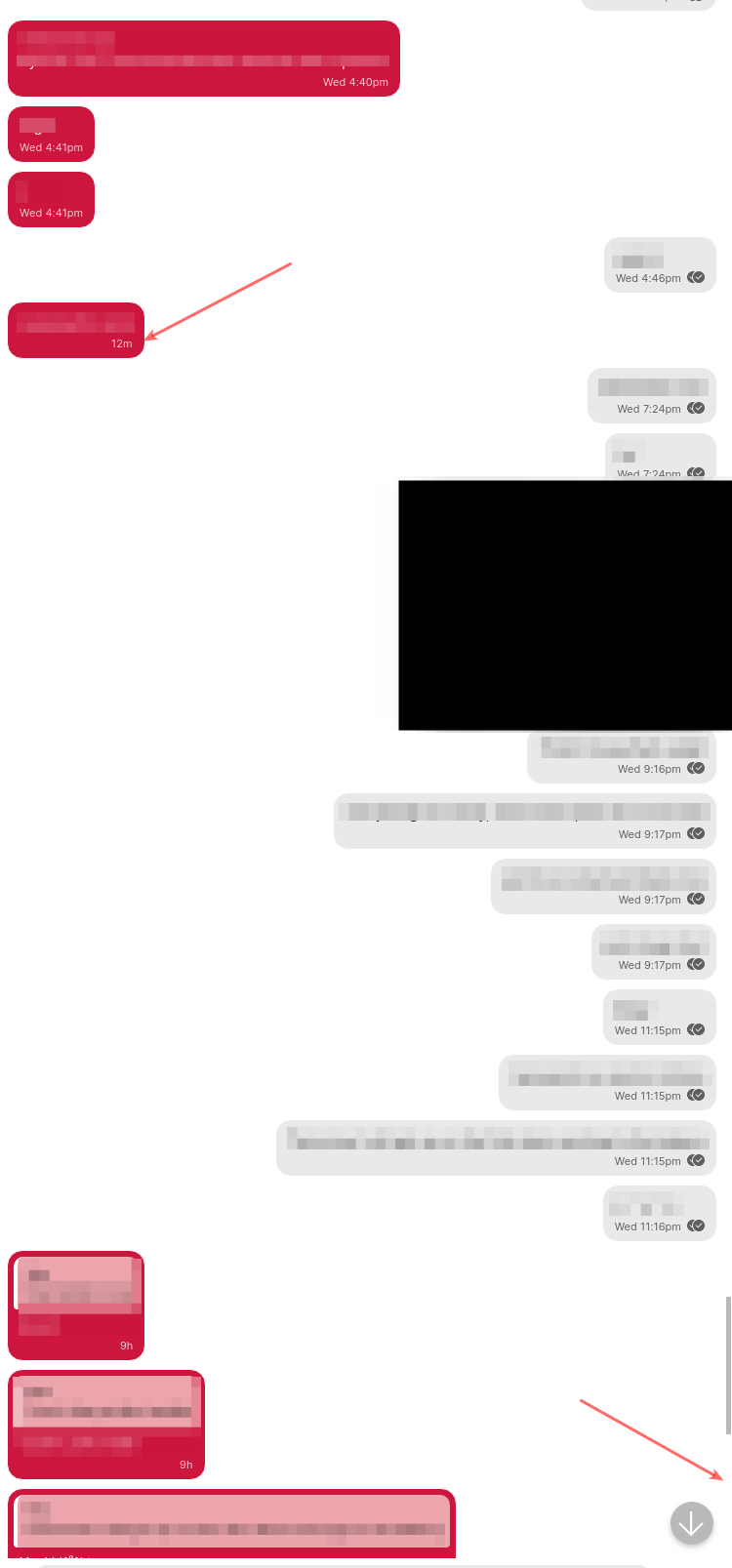
Experienced this, too. Using the app on Android 10 and two Linux desktop clients.
On my laptop the last two messages went missing, on my desktop the last message arrived but the message before is missing.
Actually, the messages are still there when I search for them. But they are ordered in a completely wrong location on the desktop apps, see my picture. The timestamp showing in the app is correct, though.
 albsch
on 5 Dec 2019
albsch
on 5 Dec 2019
I got the same problem with the phone: I have all the messages on my laptop and recieved them correct days later on my desktop when went online. On the same day I went online with my phone (tablet) and got a few messages. After a restart I got a few more. Still the last week is missing on the phone. Quoting one of the missing messages on desktop produces a quoted message on the phone (tablet) with "original message missing".
 jaypemu
on 4 Jan 2020
jaypemu
on 4 Jan 2020
I am having the same issue. Seems to be that the desktop app is not importing all of my contacts, and therefore any messages with those contacts do not get imported either. In fact, a LOT (more than half) of my contacts, have not been imported into the desktop app, despite just doing a manual import (clicked 'import', the app updated the 'last import' date to the current time, but still missing lots of contacts and messages). It's also not a recency issue - there are messages from many days and weeks ago that still haven't synced.
Apps and contacts are definitely missing, and not just out of order (can't find them by searching). Am using linux desktop client v1.29.3 and android v4.52.4.
This makes the desktop app unusable for me, as the contacts and messages are not just a bit out of sync, but massively so, so I don't have any confidence that what I'm seeing reflects my actual message status in any meaningful way.
Logs:
-desktop logs
-android logs
 gdcutting
on 12 Jan 2020
gdcutting
on 12 Jan 2020
The other thing that's odd here is that all my contacts are under one Google account, and some of them are importing and not others. I started digging around because I thought maybe it was an account issue, and without realizing it some of my contacts were stored to different accounts, but that's not the case.
Another weird thing I just noticed: there are some contacts being imported without any message history. Initially I thought that this was only a contacts issue, because the messages that weren't importing into the desktop version seemed all to be ones whose associated contacts weren't importing either. But now I find at least one contact that was imported into the desktop app, but whose associated message history is missing completely...
Also, no archived conversations show up in the desktop app (on my phone there are 17).
gdcutting
on 13 Jan 2020
@gdcutting You're using Signal Android, and likely using it as your SMS device. SMS-only contacts will not show up in Signal Desktop - only contacts with full Signal accounts will be sync'd.
scottnonnenberg-signal
on 13 Jan 2020
I see, thanks @scottnonnenberg-signal
gdcutting
on 29 Jan 2020
I'm also having this issue, but the messages are seemingly synced but not displayed - usually the last one or two messages if I'm in the middle of an active conversation on my phone, and want to open the desktop client to start using a full keyboard.
The last message or two is not displayed in the conversation, but the conversation preview on the side shows the latest message (I'm not skilled enough to go diving into the message database to see if it's actually synced down to disk or not).
iOS 13.3, latest release of both Signal iOS and macOS Desktop.
Has been happening for... a good six months, possibly longer.
Is there debugging or logging that I can do in the desktop to provide more helpful/technical information?
 ideologysec
on 18 Feb 2020
ideologysec
on 18 Feb 2020
The last message or two is not displayed in the conversation, but the conversation preview on the side shows the latest message
this also just happened to me. I received two messages on mobile, but on the desktop app, I can see the first message ( older ) but not the second ( last message ).
weirdly, the preview below the contact shows that missing message.
both messages received were 1 minute apart according to mobile.
upon closing signal (desktop) and reopening, the missing message appears!
 alexjp
on 19 Feb 2020
alexjp
on 19 Feb 2020
@ideologysec You can upload a debug log from desktop by going to View > Debug Log.
@alexjp Can you provide us with a debug log as well? You can upload a debug log from desktop by going to View > Debug Log.
kenpowers-signal
on 19 Feb 2020
@alexjp Can you provide us with a debug log as well? You can upload a debug log from desktop by going to View > Debug Log.
here it is ( sending full log, that ok ? ) : https://debuglogs.org/3a979d48112c1e97e168bf696c53d110eed9e879324c075f1a9c956e3fb0fb9d
alexjp
on 19 Feb 2020
@alexjp Full debug log is perfectly okay. I also forgot to mention that if we could have the message ids from your mobile device that would also help us debug anything going on in your specific situation. You can get the sent ids of the missing messages by going to the message detail screen on your primary mobile device (long press on the message) and then long press on the "sent" header -- that will place the sent id on your clipboard.
kenpowers-signal
on 20 Feb 2020
@kenpowers-signal
I am not sure if its this number: "1582116034747" since there is no feedback, but that number was copied to the clipboard when I long pressed the sent header.
alexjp
on 21 Feb 2020
@alexjp Unfortunately I don't see any hints in your debug log, it looks like the message was handled correctly. You've also said that the message appeared when you restarted Signal -- so it's a little late to try this, but next time you see this issue can you try searching for the message and see if it's rendering in the conversation out of order?
kenpowers-signal
on 21 Feb 2020
@kenpowers-signal no need for next time, the message is in order.
so to summarize, after a restarting of the app, the message was correct like if no problem happened.
if this happens again I will try to send debug log and message id's before i restart the app, so that maybe the problem is visible.
alexjp
on 22 Feb 2020
I've encountered many message ordering issues and lost messages in the desktop app, too.
Here is a screenshot to demonstrate that 3 out of the 4 unread messages do not appear:

Restarting the app solved this issue.
Another observation: the message preview at the contact list does show the last message of the four.
 oridov
on 28 Feb 2020
oridov
on 28 Feb 2020
@oridov What happens if you send a message in a conversation at that point, without switching away from that conversation first? Does your message show up, or does it also not appear until you switch away and come back to that conversation?
scottnonnenberg-signal
on 28 Feb 2020
@scottnonnenberg-signal I have the same issue as @oridov, and messages I send in the affected conversations show up normally without the need to switch to another conversation.
 HelloNoel
on 8 Mar 2020
HelloNoel
on 8 Mar 2020
Also having issues with desktop sync. I received a message and sent 2 messages via the mobile app. Within around 15 mins I opened the desktop app, messages started syncing, however my most recent (1 received and 2 sent) were not showing up. I sent a message from desktop, closed and opened the app again and it's still not showing those messages.
See screenshots below from mobile app and desktop app.
https://i.imgur.com/tTJDTT1.png
https://i.imgur.com/3fMs7b1.png
 0anth
on 21 Mar 2020
0anth
on 21 Mar 2020
I logged in because I'm having this problem too- some group messages don't show on the desktop. Is the issue for me that all in the group are not signal users?
 garyspencerlaw
on 25 Mar 2020
garyspencerlaw
on 25 Mar 2020
@garyspencerlaw Signal desktop will only show Signal messages.
kenpowers-signal
on 30 Mar 2020
@0anth Can you search for "How did the
kenpowers-signal
on 30 Mar 2020
@kenpowers-signal You are correct, I found the missing messages on desktop, but out of order.
https://i.imgur.com/Kk1b0bU.png
https://i.imgur.com/BuLxlsm.png
https://i.imgur.com/7P73SGN.png
0anth
on 31 Mar 2020
@0anth, that would be separate known issue (#3332).
kenpowers-signal
on 31 Mar 2020
This also just happened to me. After searching for the missing message like some of the comments here suggested, I found it. The message I thought went missing was in-between messages of a conversation I had 8 days ago. The timestamp on that message in the UI says "45m" (that's correct -- it was sent around 45m ago), while the messages surrounding it are dated July 30 (today is August 7th).
Why isn't this being prioritized as a security issue? If the buggy behavior can somehow be controlled by one of the conversation parties or even someone external to the conversation, then there could be an attack that corrupts the history of your old conversations (unless you're really careful to check all the timestamps), or that could cause someone to miss an important message.
 defuse
on 7 Aug 2020
defuse
on 7 Aug 2020
@defuse your issue sounds related to #3332 and we're currently working on a fix.
 josh-signal
on 8 Aug 2020
josh-signal
on 8 Aug 2020
Just installed desktop on Linux. I have one chat on my phone but no chats on the desktop app. Relaunch doesn't help and can't see an option to force a sync.
 wjdp
on 8 Jan 2021
wjdp
on 8 Jan 2021
Just installed desktop on Linux. I have one chat on my phone but no chats on the desktop app. Relaunch doesn't help and can't see an option to force a sync.
Only messages which are sent/received since linking will be displayed on Desktop. There is no sync of previous messages.
 ProactiveServices
on 8 Jan 2021
ProactiveServices
on 8 Jan 2021
@ProactiveServices Ah, that's not great. Are there plans to fix this?
wjdp
on 9 Jan 2021
@ProactiveServices Ah, that's not great. Are there plans to fix this?
Best to discuss on the forums to avoid polluting this issue.
ProactiveServices
on 9 Jan 2021
I am still experiencing this issue with random messages, links or pictures not showing up in the middle of a conversation on the signal desktop app! You keep forcibly pushing idiotic useless updates pretty much weekly, but you haven't fixed an issue of this magnitude in almost three years?
 navdotnetreqs
on 2 Feb 2021
navdotnetreqs
on 2 Feb 2021
I'm also experiencing this issue. Messages i send and receive are from time to time not showing up in the signal desktop client (1.39.6) installed using snap packages on Ubuntu 20.04.
I can see the messages in the android app just fine.
 Wholteza
on 14 Feb 2021
Wholteza
on 14 Feb 2021
@navdotnetreqs @Wholteza The way to report missing messages is with two bits of information: 1) a debug log (View -> Debug Log) and 2) the 'sent id' of the missing message, which you can get from your mobile device by going to the message details screen and long-pressing the 'sent' header. The 'sent id' will be copied to your clipboard.
Then we can see what went wrong with that specific message in your log.
scottnonnenberg-signal
on 18 Feb 2021
Related issues
 gesus14
·
3Comments
gesus14
·
3Comments
 demux4555
·
3Comments
demux4555
·
3Comments
 McLoo
·
3Comments
ProactiveServices
·
3Comments
McLoo
·
3Comments
ProactiveServices
·
3Comments
 shaaati
·
3Comments
shaaati
·
3Comments
Most helpful comment
Generally with Signal I expect not to receive messages on desktop unless it is turned on at the time the message is sent (based on when it arrives on my phone). However, they sometimes show up later on my desktop anyway.
As a user of any _other_ messaging platform, I expect to have consistent message history regardless of which device I am using. Just about every other messaging platform works this way. However, Signal's behavior is extremely inconsistent here so I don't even know what Signal is _supposed_ to do in these circumstances.
The blog implies that Signal should have continuity between devices:
However, this has never been the case in my experience.