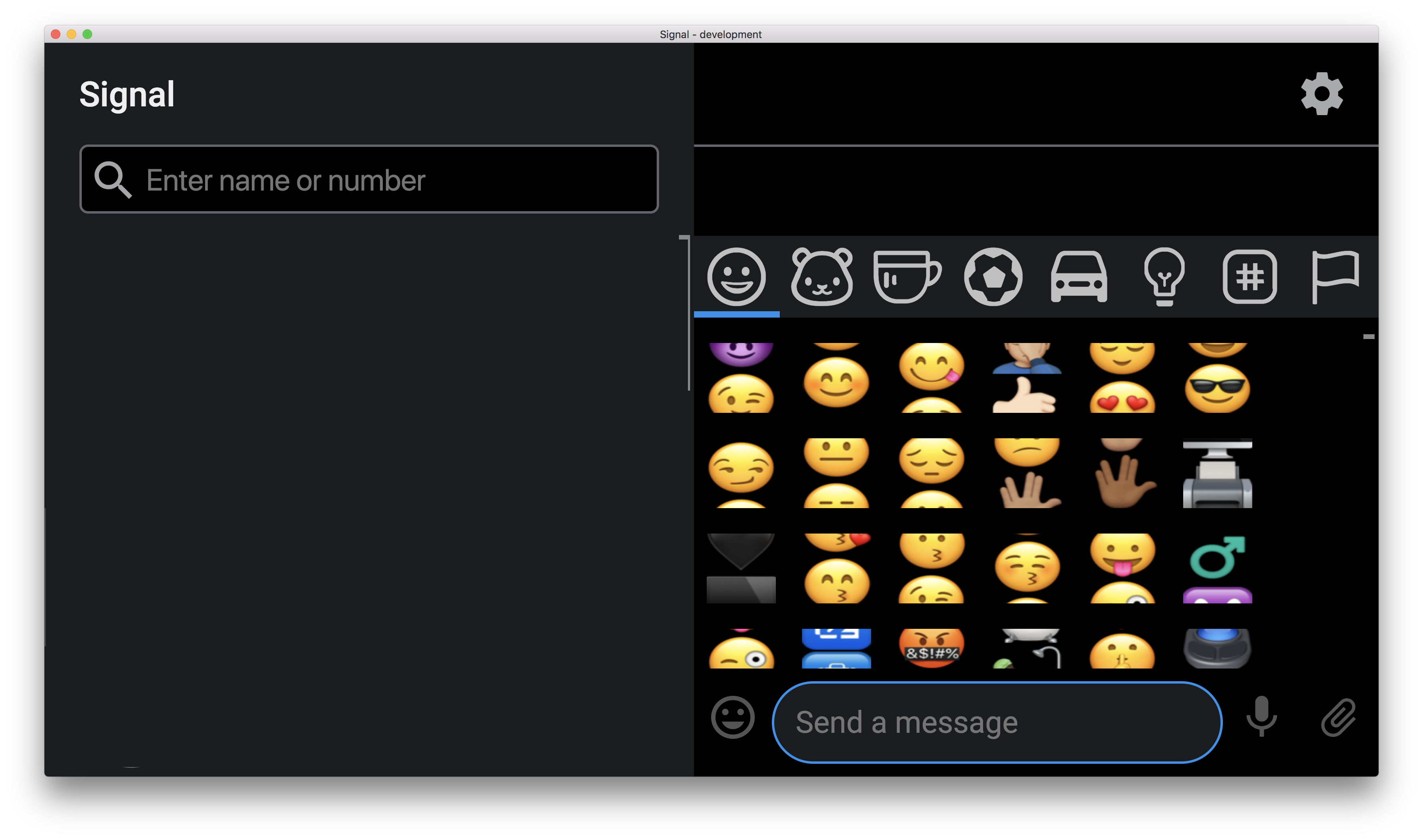
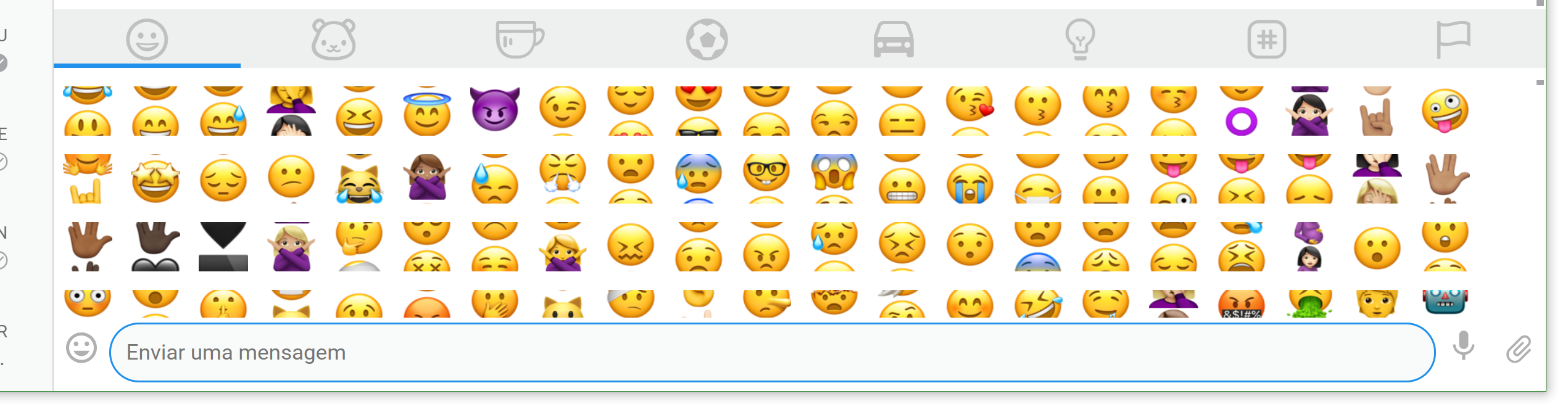
Signal-desktop: Emoji-Panel Looks Broken on 4K
- [x] I have searched open and closed issues for duplicates
Screenshots

Platform info
Operating System: Windows 10 (Latest)
Signal version: 1.1.0-beta.6
 Xashyar
All 15 comments
If you lower the resolution in Windows to 1080p, does the emoji drawer go back to normal?
 Dyras
on 30 Dec 2017
Dyras
on 30 Dec 2017
Yeah! it goes back to normal, but the attachment save/open, window becomes ridiculously enlarged in proportion to the whole UI of the app.
Xashyar
on 30 Dec 2017
@khashyarkh Can you open the drawer to trigger the bug, then upload and post a debug log?
View-> Debug Log -> Send -> Post the link here
Dyras
on 30 Dec 2017
Xashyar
on 30 Dec 2017
@khashyarkh Thanks for the log. Sadly, there's nothing useful there.
At a high level, it looks like system display/text scaling settings are causing our sprite math to go awry.
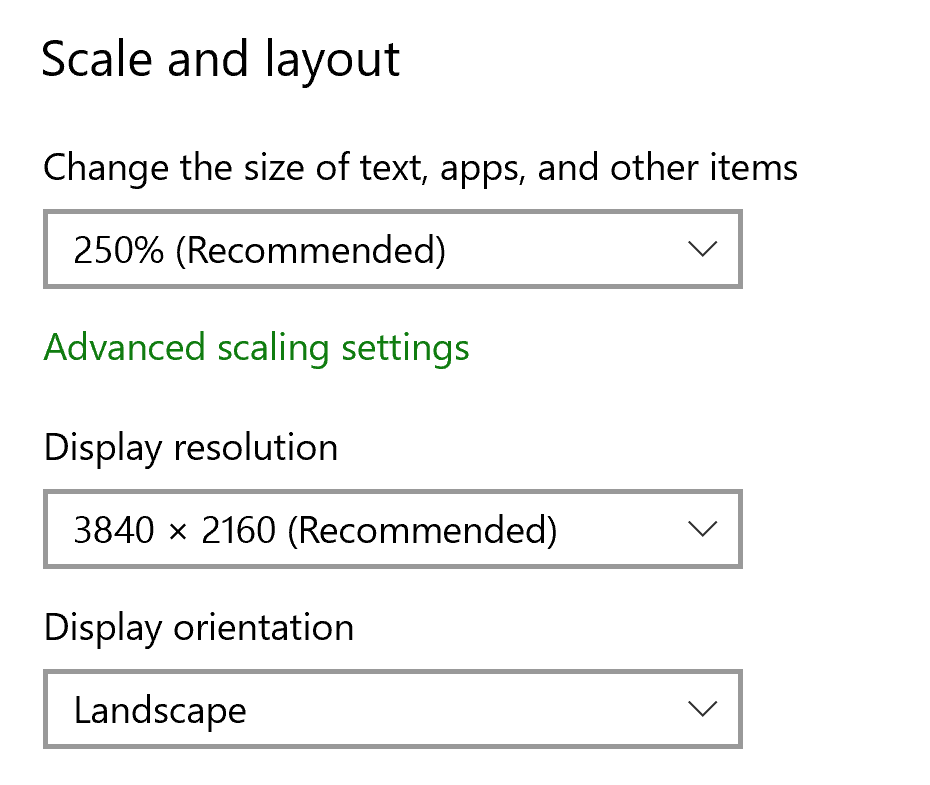
Can you go into your windows resolution/zoom level settings screens and provide all the details you see there? Some guidance about those system settings are here: https://www.thurrott.com/windows/windows-10/4597/windows-10-feature-focus-display-scaling
 scottnonnenberg
on 2 Jan 2018
scottnonnenberg
on 2 Jan 2018
Diagonal: 15.6"
Resolution: 3840 x 2160
Scale: 250%
Xashyar
on 4 Jan 2018
Also seeing this issue with the same settings as khashyarkh, on Signal v1.3.0
 guiweber
on 21 Feb 2018
guiweber
on 21 Feb 2018
@guiweber
Hi, Sorry for the Delay.
yes and it is the same with the current version (1.6.0-beta.2)
Xashyar
on 6 Mar 2018
Seeing this same issue on Signal v1.11.0 Desktop (Windows 10)
15 inch-
Resolution: 3840 x 2160
Scale: 250%
 Vectis99
on 27 May 2018
Vectis99
on 27 May 2018
I have a Mac which does not let me set my display resolution manually but I could recreate this issue with Cmd++ (Zoom In). @scottnonnenberg is correct it's related to the sprite math. When each emoji div size is scaled the underlying background image holding all the emoji images does not scale proportionally.
In short the fix is to move to individual images. If you look at FB, Twitter and Linkedin have all built their emoji picker using individual images for each emoji. This would also make it easier to incorporate other emoji related feature requests like inline emoji, typehead, tooltips, etc.
 dosco
on 18 Aug 2018
dosco
on 18 Aug 2018
Signal v1.16.0
Windows 10 Build 17134.254
Device: HP Spectre 15.6"
Screen Resolution: 3840x2160
Scaling: 250%
Can confirm the issue on this Version with this setup.
 Hannnsen
on 7 Sep 2018
Hannnsen
on 7 Sep 2018
Zooming out one step is a workaround for me.
 wormeyman
on 3 Oct 2018
wormeyman
on 3 Oct 2018
Took a dive down this yesterday. The issue seems to lie in the background-position CSS attribute for all the individual emojis being selected from the full 50x50 emoji PNG, when zoomed in by 250%, which only becomes available as a zoom option on larger resolution displays.
I haven't found a solution yet. Does anyone know of a more reliable way to to either use background-position, or another CSS attribute to guarantee the position?
 JaredPotter
on 12 Mar 2019
JaredPotter
on 12 Mar 2019
Also have the same issue:
Windows resolution detail:
 brunobola
on 14 Apr 2019
brunobola
on 14 Apr 2019
Beautifully Fixed in 0e9d549cf336df6d74de327593f1ea165d39d769 :)
Xashyar
on 30 May 2019
Related issues
 ProactiveServices
·
3Comments
ProactiveServices
·
3Comments
 demux4555
·
3Comments
demux4555
·
3Comments
 mawed
·
3Comments
mawed
·
3Comments
 McLoo
·
3Comments
McLoo
·
3Comments
 lokesh-krishna
·
3Comments
lokesh-krishna
·
3Comments
Most helpful comment
Zooming out one step is a workaround for me.