Signal-desktop: Emoji picker white on dark theme
[ x ] I have searched open and closed issues for duplicates
Bug description
The Emoji picker's background is white with the dark theme enabled
Steps to reproduce
- enable dark theme
- open emoji picker in any conversation
Actual result: white background
Expected result: dark background
Screenshots
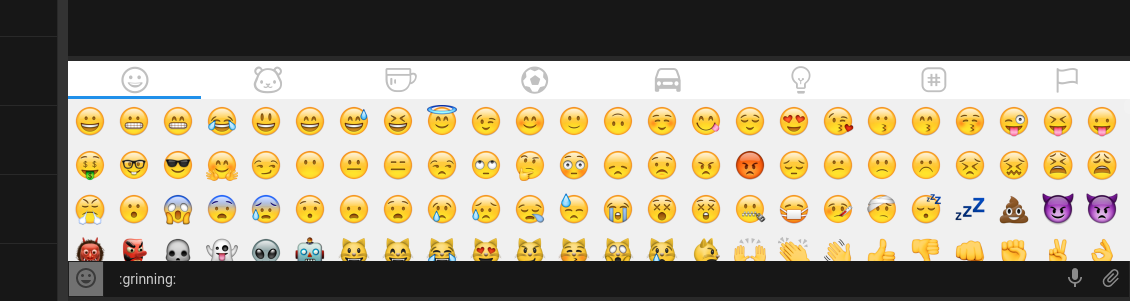
Also, is it supposed to show the emojis as text in the message field?
Platform info
Kubuntu 17.10
Signal-Desktop v1.1.0-beta.1
 mpsdskd
All 2 comments
Thanks for the report.
Yes, it is supposed to show text, because that's how you can type in emoji for yourself when composing messages.
 scottnonnenberg
on 14 Nov 2017
scottnonnenberg
on 14 Nov 2017
Speaking of the dark theme, am I the only one who thinks the emoji drawer icon sticks out like a sore thumb? It's gray and everything else in the dark theme is black, so... Maybe change the drawer background to black and change the emoji itself to the same color as the attachment icon?

Here's something I threw together in Paint in 30 sec, I think it looks so much better:

 Dyras
on 15 Nov 2017
Dyras
on 15 Nov 2017
Related issues
 demux4555
·
3Comments
demux4555
·
3Comments
 vincenzopalazzo
·
3Comments
vincenzopalazzo
·
3Comments
 jeremymasters
·
3Comments
jeremymasters
·
3Comments
 muellermartin
·
3Comments
muellermartin
·
3Comments
 TarkanY
·
3Comments
TarkanY
·
3Comments
Most helpful comment
Speaking of the dark theme, am I the only one who thinks the emoji drawer icon sticks out like a sore thumb? It's gray and everything else in the dark theme is black, so... Maybe change the drawer background to black and change the emoji itself to the same color as the attachment icon?
Here's something I threw together in Paint in 30 sec, I think it looks so much better:
