Signal-desktop: [Wish] Option to start / boot with system startup
- [X] I have searched open and closed issues for duplicates
Bug description
I want a option to start the signal app when i start my pc and login.
Platform info
Operating System: Ubuntu Mate x64 17.10
 MartinX3
All 18 comments
Also, a run in background option would be nice. This way I can get notifications without having the program open.
Just like skype and many other applications has it.
 TheMegaDriver
on 1 Nov 2017
TheMegaDriver
on 1 Nov 2017
Yes, it would be nice to have such an option in Signal. However, you can make any program start on system startup even if the program doesn't provide that option.
AFAIK on Ubuntu-MATE you go to Control Centre > Personal > Startup Applications and add a command in Startup Programs tab:
Name: Signal
Command: signal-desktop
On Windows you add a program to autostart by adding a shortcut of a program in a hidden "Startup" folder that is located in %APPDATA%\Microsoft\Windows\Start Menu\Programs\Startup
To open the “Startup” folder, hit Windows+R to open the "Run" box, type shell:startup, and press Enter. Then create a shortcut of Signal Desktop and put that shortcut into the "Startup" folder.
If devs don't plan to implement that preference in Signal options then it would be nice to write a post in FAQ explaining how to add Signal to programs launched on system startup.
 pkorba
on 1 Nov 2017
pkorba
on 1 Nov 2017
You could also have a look at https://askubuntu.com/questions/663187/how-can-i-run-a-program-on-startup-minimized to see how you can start it minimized so that the window doesn't show up on startup.
 christianfl
on 1 Nov 2017
christianfl
on 1 Nov 2017
This is pretty easy using node-auto-launch. Implemented the same in zulip-electron.
 akashnimare
on 23 Nov 2017
akashnimare
on 23 Nov 2017
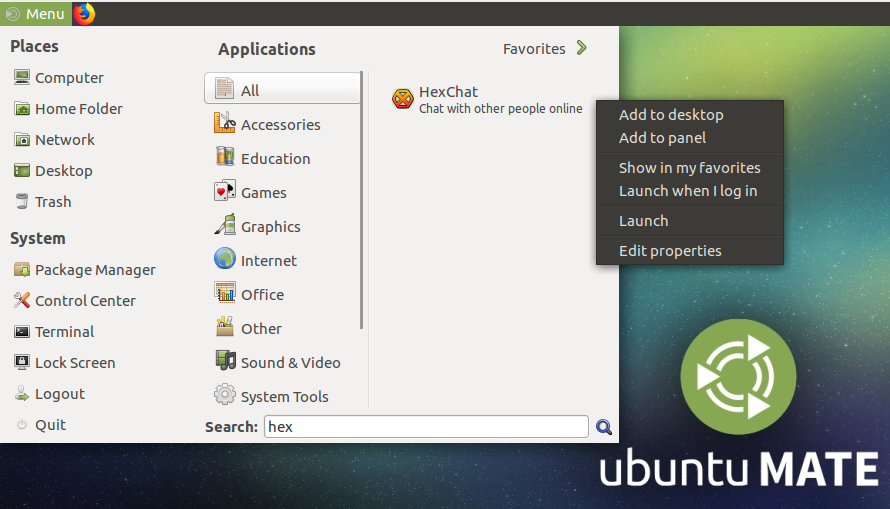
@MartinX3 and @ondondil, auto launch is pretty straightforward in MATE when the app provides a launcher in the menu:
- menu
- search "signal"
- right-click on launcher
- auto-launch (or something like this)
 alindt
on 23 Dec 2017
alindt
on 23 Dec 2017
@alindt
I have a regular startmenu on Ubuntu MATE 17.10, no "search" input field.
The only "search" input field I get is while using "synapse" (mac spotlight clone).
And when I right-click I can only add it to the panel or the desktop, there is no auto-launch option.
MartinX3
on 29 Dec 2017
@MartinX3, true, it seems you need to enable the advanced menu first:
Control Center > MATE Tweak > Interface > Enable advanced menu
...and then:
alindt
on 29 Dec 2017
@alindt You are right, but the, in my opinion, important question is:
Why should I modify the Linux-GUI I chosed on my own, because of a single app?
I work as an informatics engineer and can set the autostart on my own, even without MATE.
I can write startup scripts for init, systemV and systemd.
But most of the user doesn't want to mess with their system or search a way to set the autostart on their own.
They want a easy way, they don't want to be an informatics engineer, don't want t change their system gui layout.
They want an easy way, like in the windows world, where in app options exist to let the app autostart with the system boot.
I prefer my own menu with the 3 fields "Applications, Places, System" in combination with 'synapse' over the advanced menu.
And I prefer a option inside the app, which make an entry into the system auto start list.
PS:
Thank you for your help. :)
MartinX3
on 29 Dec 2017
Any updates on this issue? This has been open for more than a year now.
 justinkterry
on 10 Feb 2019
justinkterry
on 10 Feb 2019
I'm interested in implementing this feature. Though my implementation would only work on OSX and Windows. I'd use this API: https://electronjs.org/docs/api/app#appsetloginitemsettingssettings-macos-windows
 Xaeroxe
on 20 May 2019
Xaeroxe
on 20 May 2019
How does slack do it? They're also electron based and theirs works on Linux
as well. The user base on Linux for something like this is really big and
shouldn't be ignored.
On Mon, May 20, 2019 at 4:33 PM Jacob Kiesel notifications@github.com
wrote:
I'm interested in implementing this feature. Though my implementation
would only work on OSX and Windows. I'd use this API:
https://electronjs.org/docs/api/app#appsetloginitemsettingssettings-macos-windows—
You are receiving this because you commented.
Reply to this email directly, view it on GitHub
https://github.com/signalapp/Signal-Desktop/issues/1653?email_source=notifications&email_token=AEUF33COWL7EEOZHALUKYMDPWMDJ5A5CNFSM4EBY6KP2YY3PNVWWK3TUL52HS4DFVREXG43VMVBW63LNMVXHJKTDN5WW2ZLOORPWSZGODVZ7WXA#issuecomment-494140252,
or mute the thread
https://github.com/notifications/unsubscribe-auth/AEUF33GIW5E4D52JYVZ6PQ3PWMDJ5ANCNFSM4EBY6KPQ
.>
Thank you for your time,
Justin Terry
justinkterry
on 21 May 2019
I found this: https://www.npmjs.com/package/auto-launch
Which seems to work great for our use case, so I'll go with it.
Xaeroxe
on 21 May 2019
Awesome, God speed
On Mon, May 20, 2019 at 7:57 PM Jacob Kiesel notifications@github.com
wrote:
I found this: https://www.npmjs.com/package/auto-launch
Which seems to work great for our use case, so I'll go with it.
—
You are receiving this because you commented.
Reply to this email directly, view it on GitHub
https://github.com/signalapp/Signal-Desktop/issues/1653?email_source=notifications&email_token=AEUF33BWIGLHI724DJRSNPTPWM3FZA5CNFSM4EBY6KP2YY3PNVWWK3TUL52HS4DFVREXG43VMVBW63LNMVXHJKTDN5WW2ZLOORPWSZGODV2L5UQ#issuecomment-494190290,
or mute the thread
https://github.com/notifications/unsubscribe-auth/AEUF33AINYZDH5VJAG7CHQLPWM3FZANCNFSM4EBY6KPQ
.>
Thank you for your time,
Justin Terry
justinkterry
on 21 May 2019
Implemented in #3355
Xaeroxe
on 21 May 2019
I ended up using windows task scheduler to launch
%userprofile%\AppData\Local\Programs\signal-desktop\signal.exe --start-in-tray
on log on to solve this for me (windows only of course). Not having this by default will hinder people switching from other apps.
 t-makaro
on 1 Jun 2020
t-makaro
on 1 Jun 2020
t-makaro's workaround can be slightly shortened, thought it was worth posting as it fits better (readable at a glance) in a task's action box.
%LocalAppData%\Programs\signal-desktop\signal.exe --start-in-tray
 JamieMBragg
on 25 Jul 2020
JamieMBragg
on 25 Jul 2020
Scoop version
%UserProfile%\scoop\apps\signal\current\Signal.exe --start-in-tray
 trajano
on 22 Mar 2021
trajano
on 22 Mar 2021
My last PR for this was closed because it added a dependency which was deemed impractical to audit for security problems.
Since then Electron has added their own API for accomplishing this: https://www.electronjs.org/docs/api/app#appsetloginitemsettingssettings-macos-windows
So it seems like this could probably be implemented pretty quickly now.
Xaeroxe
on 22 Mar 2021
Related issues
 gesus14
·
3Comments
gesus14
·
3Comments
 McLoo
·
3Comments
McLoo
·
3Comments
 TarkanY
·
3Comments
TarkanY
·
3Comments
 muellermartin
·
3Comments
muellermartin
·
3Comments
 jeremymasters
·
3Comments
jeremymasters
·
3Comments
Most helpful comment
Also, a run in background option would be nice. This way I can get notifications without having the program open.
Just like skype and many other applications has it.