Signal-desktop: Electron Alpha import fails after appearing to succeed
- [X] I have searched open and closed issues for duplicates
Bug description
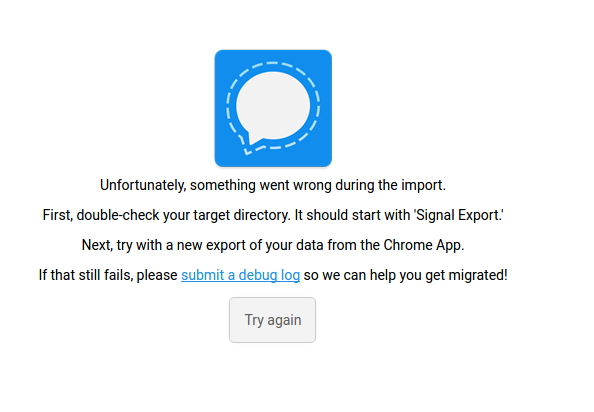
Following directions to migrate to new ALPHA desktop app. Successfully exported messages from Chrome to a directory. After installing Signal-Desktop and following prompts to import, the app states that messages are correctly imported. When prompted to restart the app runs into an issue.
Steps to reproduce
- Export from Chrome
- Install Electron app
- Migrate from Chrome backup
- Successfully load messages
- Restart Electron and notice that there is an error message
Actual result: Failure after Chrome migrated data is imported
Expected result: Messages should import and app should run. Also at this point it's impossible as I can tell to start the Electron app from a clean state. I don't really care about the messages and just want to use Signal again, but I'm forced to try again with the import.
Screenshots
Platform info
Operating System: XUbuntu 16.04
Browser: Chrome/56.0.2924.87
Signal version: Electron/1.6.7
Link to debug log
Debug 1 - First attempt to import Chrome messages
Debug 2 - Second attempt to re-export and then try again with the import
 skulumani
All 4 comments
Hi there, @skulumani, sorry that you're running into trouble. Based on the log, the import process is interrupted in the middle. But you mention that it looks like it succeeds.
Can you try it again and wait 5-10 minutes on the 'import succeeded' screen before restarting the app? I suspect that the database is behind and needs to catch up on all the data we're trying to add.
 scottnonnenberg
on 29 Aug 2017
scottnonnenberg
on 29 Aug 2017
@scottnonnenberg Thanks for all the great work. That fixed the issue. The new app is working great now!
For anyone else who stumbles upon this, you just need to be patient and leave it alone for a while.
skulumani
on 29 Aug 2017
Glad to see it helped! Though I do think we need to put some sort of fix in place to make sure this doesn't happen to other users!
scottnonnenberg
on 29 Aug 2017
Should be fixed by #1401
scottnonnenberg
on 30 Aug 2017
Related issues
 jeremymasters
·
3Comments
jeremymasters
·
3Comments
 ProactiveServices
·
3Comments
ProactiveServices
·
3Comments
 ploum
·
3Comments
ploum
·
3Comments
 shaaati
·
3Comments
shaaati
·
3Comments
 TarkanY
·
3Comments
TarkanY
·
3Comments
Most helpful comment
Glad to see it helped! Though I do think we need to put some sort of fix in place to make sure this doesn't happen to other users!