Signal-desktop: Multiple errors: Error handling incoming message - Missing Signed PreKey for PreKeyWhisperMessage
- [x] I have searched open and closed issues for duplicates
Bug description
After a conversation with a Signal user (who is on iOS), I am seeing multiple "Error handling incoming message." notifications in the Desktop app that I'm not seeing in the Android app.
E.g., there is one message I can see in the Android app that I don't see in the Desktop app. There are 3 "Error handling incoming messages" showing up in the Desktop app that are time stamped around the time of that missing message.
3 hours earlier, there is another single message in the Android app that in the Desktop app corresponds to 20 "Error handling incoming message" errors.
Additionally, the Desktop app is missing a chunk of texts/notifications (and have no corresponding errors) from March 30 through part of April 4 that are all showing in the Android app.
The screenshot below is the tail of the conversation in the Desktop app and in the Android app it corresponds to 3 items: me calling that person, that person sending a message, and that person calling me.
After commenting +1 in issue 1121 I was told to create a new ticket and submit debug logs.
Steps to reproduce
Not easily reproducible. It so far is only happening in the conversation thread of one contact. I'm not sure when it began messing up, but it didn't always exhibit this behavior.
- Have a contact send a message; call or receive call from contact.
Actual result: Error message in UI and debug log.
Expected result: Similar conversation thread in both Desktop & Mobile apps.
Screenshots

Platform info
Operating System: Windows 7 Pro
Browser: Chromium 59.0.3060.0
Signal version: 0.34.0
Link to debug log
https://gist.github.com/anonymous/8cf393c74378cec1434b5f1f66cb9e4c
Multiple errors in log
2017-04-06T16:47:02.124Z Error: Missing Signed PreKey for PreKeyWhisperMessage
2017-04-06T16:47:02.125Z Error: Missing Signed PreKey for PreKeyWhisperMessage
    at SessionBuilder.<anonymous> (chrome-extension://bikioccmkafdpakkkcpdbppfkghcmihk/js/libtextsecure.js:36036:23)
    at <anonymous>
 earthsound
All 35 comments
This may likely be a bug in the iOS client, could you ask your conversation partner to submit their debug log from this time?
 michaelkirk
on 7 Apr 2017
michaelkirk
on 7 Apr 2017
Does the iOS client only keep the most recent debug logs? If so, I'll try to reproduce this and attach debug logs from both clients.
earthsound
on 10 Apr 2017
iOS keeps debug logs for the last 3 days.
On Apr 10, 2017, at 16:25, earthsound notifications@github.com wrote:
Does the iOS client only keep the most recent debug logs? If so, I'll try to reproduce this and attach debug logs from both clients.
—
You are receiving this because you commented.
Reply to this email directly, view it on GitHub, or mute the thread.
michaelkirk
on 11 Apr 2017
I just got some of the same error messages on desktop Linux Chrome.
It was a new signin to an existing account, and as it tried to sync down all my old messages, it choked on what looked like every single one of them.
See https://gist.github.com/anonymous/a23a0bee952ab764c0b57768cc8170fa
It's still in that state now. In case anyone wants to talk me through doing any other experimentation or logging, I'll leave it that way for a day or two before nuking it and trying again.
In case it's relevant, most of my conversations are also with an IOS user, with my side being Android much of the time and desktop Linux Chrome the rest.
 ericu
on 2 Jun 2017
ericu
on 2 Jun 2017
@ericu. Can you provide a little bit more information about what you mean by 'new signin to an existing account?' How long had it been since you last started Chrome Desktop? Had you reinstalled Signal on your primary phone since?
 scottnonnenberg
on 2 Jun 2017
scottnonnenberg
on 2 Jun 2017
I was setting up a brand new laptop. I installed Chrome, turned on
sync, and it pulled in Signal. I went through the QR code setup, and
then boom.
ericu
on 2 Jun 2017
Same issue here.
Signal App on Google Chrome Version 59.0.3071.86 (Official Build) (64-bit) on Ubuntu
The issue started recently. Can't recall any reason why this one is went south.
Uninstalled and reinstalled with new QR code the Signal App in Chrome. Used my Android phone for verification still no joy.
My debug log is similar to ericu's one. See here https://gist.github.com/grreeen/5039b641f73c948bdbe2cca1fa9d1230
 grreeen
on 9 Jun 2017
grreeen
on 9 Jun 2017
Logs from your Android device might also be helpful here.
 liliakai
on 9 Jun 2017
liliakai
on 9 Jun 2017
It's now been a while since the error happened, but just in case, here's a current Android debug log.
https://gist.github.com/anonymous/0b5a19956d1f292ec67660cc00ea02eb
ericu
on 9 Jun 2017
Yeah too late now. Next time someone gets this on a new install please post both android and desktop logs.
liliakai
on 9 Jun 2017
@liliakai, ask and you shall receive. :-)
Same thing here.
Had been using Signal on Android and Signal Chrome on host A for a while. With one contact something happened and all my messages to him starting from 4/23 through 6/7 he never could read. We reset keys and then we could chat back and forth.
A couple of weeks ago I joined a group.
Powered off Host A last night due to problem w/PSU and switched to Host B and used QR code to link.
The group I joined a couple of weeks ago never synced - doesn't show it in my contacts / chat list.
All messages with my friend end 4/23. I can't read his messages ("Error handling incoming message."). Click Red Warning icon,
Error Missing Signed PreKey for PreKeyWhisperMessage
 bboerner
on 16 Jun 2017
bboerner
on 16 Jun 2017
Hi, found this issue trough google.
I had the same error message "Error handling incoming message - Missing Signed PreKey for PreKeyWhisperMessage" on Signal Desktop (58.0.3029.110 Fedora Project (64-bit)) for all my messages with all my contacts. I previously had Signal connected to another computer (not used for about 2 month). Then went into the Android app (old PC was listed as a connected device), hit the plus button and connected the new PC. The syncing took longer than usual (maybe 30 seconds) and then the errors occured.
I then uninstalled Signal desktop app, and removed the connected device in the android app (so no device left here). After that i reinstalled Signal desktop app without errors but also without any messages synced.
I saved a copy of the desktop app log but don't know if posting it has any privacy implications (there are a lot of "Our MAC" / "Their MAC" numbers in it)?
DK
 Daniel-Krebs
on 24 Jun 2017
Daniel-Krebs
on 24 Jun 2017
I experience the same error. At first only with one contact A. But now the error is gone for A. Today for another contact B the issue started to happen. Debug log for B can be found here:
https://gist.github.com/anonymous/380ecacb837b18ea4a4527bb68df924f
 mlsxlist
on 26 Jun 2017
mlsxlist
on 26 Jun 2017
Alright, it looks like there are two different issues being discussed here. Let's split them up:
- No change to your install situation, just random "Error handling incoming conversation" messages appearing for some conversations. We'll keep tracking this behavior with this issue, #1124
- On re-linking of a desktop instance, or setting up a new desktop instance to replace an old one, a number of new messages will come in right afterwards, which probably shouldn't have been cached and provided to this new device. This behavior will be tracked in #1273.
Before adding your additional data, make sure you're commenting on the right GitHub issue. Thanks!
scottnonnenberg
on 27 Jun 2017
The log https://gist.github.com/anonymous/380ecacb837b18ea4a4527bb68df924f is from Signal Desktop without any change to installation. It belongs to this ticket.
mlsxlist
on 27 Jun 2017
Greetings all! I just experienced this.
https://gist.github.com/anonymous/a4f34a35b37a29f09b77d7caa26713c1
Backstory: I was out walking with Signal-Desktop open at home, chatting with a friend on my phone. Everything went well until I came home and saw that every inc message from my friend after I sent a picture from the grocery store is marked as "Could not receive message"
Also, there is this...
 Dyras
on 21 Jul 2017
Dyras
on 21 Jul 2017
@Dyras any chance you could get a log from your friend, the sender?
Looks like it's from their non primary device.
Also, FYI there's a phone number in the screenshot you included.
michaelkirk
on 21 Jul 2017
I got this same error. It's only happening with messages from one person and only on Signal Desktop (the messages come through without errors on my phone). My friend is traveling so I don't think she'll be able to send a log, but here are mine.
Desktop: signal_log_08012017.txt
Mobile: signal_log_08012017_android.txt
OS: Windows 7 (desktop), Android 6.0.1 (mobile)
Browser: Chrome 59.0.3071.115 (Official Build) (64-bit)
Signal version: 0.41.3 (desktop), 4.8.1 (mobile)
 sarahbrand
on 2 Aug 2017
sarahbrand
on 2 Aug 2017
I'm having the issue where attempting to relink brings up hundreds of errors. What's more, every few hours, the same hundreds of messages appear as new messages, making Signal Desktop unusable.
Resetting the session doesn't fix anything. Removing Signal Desktop and reinstalling it didn't fix anything. This is a new desktop machine that used migration assistant to pull data off an old machine in case there's any hardware/software mismatch that might be causing this issue?
Desktop: https://gist.github.com/anonymous/87cd8edadfb30105d6562740f84b68cf
Mobile: https://gist.github.com/08042830201621bdb63b6788da4d1874
OS: OSX 10.12.16, iOS 10.3.3
Browser: Chrome 60
Signal Version: 0.42.6, 2.15.3.2
 Shalmanese
on 22 Aug 2017
Shalmanese
on 22 Aug 2017
I am also effected by this problem.
Android client is unaffected.
Newly installed chrome addon, and synced using "linked devices" from the android client.
Chrome addon client took longer than usual to sync, and then when it was finished, I was left with many messages 'Error handling incoming message" in all conversations.
Subsequent new messages coming in succeed on both chrome and android.
 svaens
on 24 Aug 2017
svaens
on 24 Aug 2017
Same here on MacOS 10.11.6 (Signal 0.44.0, Chrome 61.0.3163.100). My debug log has two screen shots too and a few more details.
 ckujau
on 24 Oct 2017
ckujau
on 24 Oct 2017
I experienced this for the first time today.
Debug log
Some of the relevant logs:
INFO  2017-11-27T14:53:05.662Z prekey message from +[REDACTED]298.1 1511743154219
INFO  2017-11-27T14:53:05.664Z Failed to load signed prekey: 6
INFO  2017-11-27T14:53:05.664Z {}
INFO  2017-11-27T14:53:05.664Z Error: Missing Signed PreKey for PreKeyWhisperMessage
    at SessionBuilder.<anonymous> (file:///Applications/Signal.app/Contents/Resources/app.asar/js/libtextsecure.js:36022:23)
INFO  2017-11-27T14:53:05.664Z {}
INFO  2017-11-27T14:53:05.665Z  Error: Missing Signed PreKey for PreKeyWhisperMessage
    at SessionBuilder.<anonymous> (file:///Applications/Signal.app/Contents/Resources/app.asar/js/libtextsecure.js:36022:23)
INFO  2017-11-27T14:53:05.670Z adding notification
INFO  2017-11-27T14:53:05.671Z updating notifications - count: 15 focused: false enabled: false
INFO  2017-11-27T14:53:05.671Z queueEnvelope error handling envelope +[REDACTED]298.1 1511743154219 : Error: Missing Signed PreKey for PreKeyWhisperMessage
    at SessionBuilder.<anonymous> (file:///Applications/Signal.app/Contents/Resources/app.asar/js/libtextsecure.js:36022:23)
INFO  2017-11-27T14:53:05.672Z prekey message from +[REDACTED]842.4 1511743158880
INFO  2017-11-27T14:53:05.674Z Duplicate PreKeyMessage for session
I use a MacBook and a MacPro (Trash can) both running OSX 10.12.6 and a Windows 10 PC. All systems are running Signal Desktop 1.0.39. My phone is a Pixel 2 XL running the latest Oreo with November security patch.
I had not used the MacPro in about 5 days and when I started Signal (wasn't previously running), it started loading messages and all of a sudden I get the "Error handling incoming message" notifications. Screenshot
 b0urb0n
on 27 Nov 2017
b0urb0n
on 27 Nov 2017
@b0urb0n Thanks for reporting the issue. Can you tell me about your prior conversations with +[REDACTED]298.1? In particular, when was the last time you sent a message to that contact? When was the last time you sent a message to that contact from desktop?
scottnonnenberg
on 27 Nov 2017
@scottnonnenberg, the last time I sent that user a message was via my phone (Pixel 2 XL; Android Oreo) the night before opening Signal on my freshly booted MacPro (OSX 10.12.6; Signal 1.0.39).
The last time I sent that user a message via desktop was about a week prior but from my MacBook Pro (OSX 10.12.6; Signal 1.0.39). I have just sent a few from desktop for science. I will report back later with results.
I have since sent that user several messages from my phone. And this morning, all of his messages to me are marked "Error handling incoming message" with "Missing Signed PreKey for PreKeyWhisperMessage". All of my outgoing messages to him show up just fine in the desktop app.
This user is on the Android platform but I'm not sure which. I have reached out for that info.
b0urb0n
on 28 Nov 2017
@scottnonnenberg , +[REDACTED]298.1 is using Signal 2.18.2.1 on iOS 11.1.2 (these messages came through just fine on Desktop)
b0urb0n
on 29 Nov 2017
@b0urb0n Have you been able to receive any messages from this contact since? Have you tried to reset the session?
Also: You might consider going and disabling or uninstalling the old Chrome app you exported from - I just released a fix for it which will keep it from interfering with your standalone desktop, but if it's no longer needed you should get rid of it.
scottnonnenberg
on 30 Nov 2017
I have been able to receive messages recently. The chrome app was disabled and removed long ago.
b0urb0n
on 1 Dec 2017
All: v1.0.40, released earlier this week, has fixes for these PreKey problems. Please let me know and provide logs if you continue to run into them!
scottnonnenberg
on 7 Dec 2017
I haven't seen this issue since the update (currently using desktop 1.0.41 and android 4.13.6). I will report back if the issue comes up again.
b0urb0n
on 11 Dec 2017
This issue just showed up again for me.
A friend of mine added me to a Signal group.
That action along with a single message in the group generated:
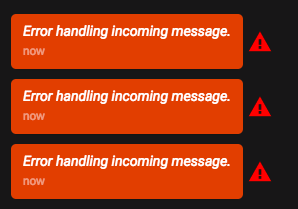
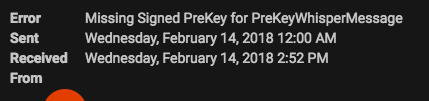
The group doesn't show up in the Desktop app (though other groups do). The group shows up and behaves as expected on the Android app.
Debug log: https://gist.github.com/d36b9c5941951324c1c25628a69db8c7
Desktop version: v1.3.0
Android version: 4.15.5
b0urb0n
on 14 Feb 2018
@b0urb0n Hey there, looked through your log, and those incoming failed errors are trying to use an extremely old (low id) signed prekey. Have you exchanged messages with that friend lately? What kind of device are they using?
This is from your log entries up-thread:
INFO 2017-11-27T14:53:05.664Z Failed to load signed prekey: 6
And this is from your most recent log:
INFO 2018-02-14T20:51:43.228Z Failed to fetch signed prekey: 6
Somebody really, really likes signed prekey number 6.
scottnonnenberg
on 14 Feb 2018
@scottnonnenberg The last time I messaged that person directly was Jan 30th, 2018.
He's on Signal v4.14.10 for Android.
b0urb0n
on 15 Feb 2018
It's time to do a Reset Session with that contact; that should fix this conversation. You can find that command in the top-right menu when you have that conversation open.
We'd love any additional information you can provide about that other client, and about the history of this desktop's interactions with that client. When did you message that contact from _this desktop instance?_ When did they last successfully send a message to _this desktop instance_?
I'm going to close this issue to encourage people enter new bugs, but we can continue talking about your problematic contact.
scottnonnenberg
on 15 Feb 2018
Resetting the session seems to have done the trick.
b0urb0n
on 16 Feb 2018
Hi, this error message happens to me dozens of times on 2 different devices. I'm running Signal on my iOS desktop, laptIop, and phone. All running up-to-date versions.
I do not get the error on my iPhone.
I get the errors on both my laptop and desktop.
The error occurs repeatedly with countless people on Signal, several of which I have never spoken to, ever- their numbers are getting pulled from a group thread. I have tried resetting sessions several times, no avail. Removed and reset everything, did not fix. Debugged log no fix.
https://debuglogs.org/186e9ba0ff29b544663e4cd35c269354443f7e2328a6ebdf451ab0ad9ed6c97c
 signaluser3
on 28 Oct 2018
signaluser3
on 28 Oct 2018
Related issues
 demux4555
·
3Comments
demux4555
·
3Comments
 shaaati
·
3Comments
shaaati
·
3Comments
 vincenzopalazzo
·
3Comments
vincenzopalazzo
·
3Comments
 bcsga
·
3Comments
bcsga
·
3Comments
 lokesh-krishna
·
3Comments
lokesh-krishna
·
3Comments