Shelly-homekit: 2.6.0-beta testing
In this issue we will be collecting feedback from testing 2.6.0 beta.
Changes in this release:
- Shelly 1L support (#192)
- Improved noise filtering (should fix #288)
- Inverted input mode (#220)
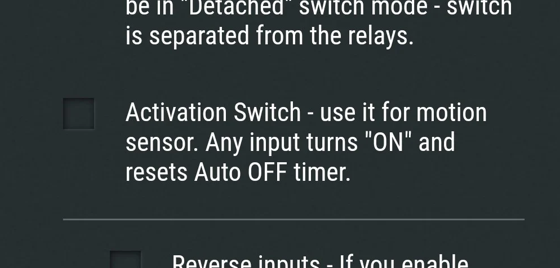
- Activation switch mode (#278)
- Failsafe mode (documented here)
- Shelly Plug S: enable physical button, use blue LED instead of red for status, change default type to outlet.
- Shelly Plug: change default type to outlet.
Updating from 2.5.0: Please download and install the beta from here: https://rojer.me/files/shelly/2.6.0-beta2/
Updating from earlier beta: Use the "check for update" function in the web UI
Updating from stock (for Shelly1L): http://a.b.c.d/ota?url=http://rojer.me/files/shelly/2.6.0-beta2/shelly-homekit-Shelly1L.zip
 rojer
rojer
All 22 comments
regarding 'Failsafe' mode for Shelly1 could we boot shelly and if switch in NOT ON and then if within 60 seconds you do following:
Switch turned ON - held ON for 2 secs
Switch turned OFF - held OFF for 2 secs
Switch turned ON - held ON for 2 secs
Switch turned OFF - held OFF for 2 secs
enable fail safe.
 andyblac
on 25 Nov 2020
andyblac
on 25 Nov 2020
too fiddly...
rojer
on 25 Nov 2020
OK
andyblac
on 25 Nov 2020
Activation switch mode: the timer auto off delay start at every status toggle change (on to off, off to on). It have to start timering only when toggle go to off, because when toggle is on I want relay stay in on without auto off!
 lucaspinelli85
on 25 Nov 2020
lucaspinelli85
on 25 Nov 2020
Activation switch mode: the timer auto off delay start at every status toggle change (on to off, off to on). It have to start timering only when toggle go to off, because when toggle is on I want relay stay in on without auto off!
this needs to be optional, as it is not normal behaviour. normally timer is trigger at ON with auto off, as sensor normally tigger a ON.
andyblac
on 25 Nov 2020
Yes, but in "activation switch mode" it reset auto off at on and set at off
lucaspinelli85
on 25 Nov 2020
yes, at ON, ie very time the sesor activates, it turns ON the relay and starts auto off timer, IF already ON it resets the auto off count down, there is no OFF for a switch or sensor. It only turn OFF when auto off timer is reached.
andyblac
on 25 Nov 2020
Ok, the problem is the sensor is still "active" while the countdown turns off the relay, despite the sensor being active. Pratically if I'm in front off a motion sensor and I keep moving, the output instead of staying on, it turns off. Although I am in front of the sensor and I am moving! But the output (turned off by countdown) makes me believe that there is no one.
Hope u understand me
lucaspinelli85
on 25 Nov 2020
Ok, the problem is the sensor is still "active" while the countdown turns off the relay, despite the sensor being active. Pratically if I'm in front off a motion sensor and I keep moving, the output instead of staying on, it turns off. Although I am in front of the sensor and I am moving! But the output (turned off by countdown) makes me believe that there is no one.
Hope u understand me
i dont have a wired motion sensor to test with, @rojer will have to confirm how he has implimented this, but , I assume it has to do with the motion sensor time out (not the auto off timeout), but this i mean, the motion sensor should be activated for a period of time ie closed (ON) this would need to be allowed to be OPEN (OFF) before it can reaction the relay. ie if you do not allow the motion sensor to OPEN it would never get the chance to switch the relay again.
andyblac
on 25 Nov 2020
ok, i get it. yes, @lucaspinelli85 is right - if there are no state transitions but the input is activated, auto off timer will turn off the output. will fix.
rojer
on 25 Nov 2020
IMO this is a common miss conception of a motion sensor it is NOT a occupancy sensor, ie if you keep moving all that does is keep the motion sensor open, and does NOT allow the relay to be reset, to use. motion senosr correctly you neeed to do something like
1: move around
2: this activates the switch on the shelly1
3: this turns on the relay, and starts auto off timer
4: allow the motion sensor to reset (ie no motion detected) whatever this set to.
5: move again will restart the auto off timer.
so auto off timer has to be longer than the motion sensor reset timer.
andyblac
on 25 Nov 2020
after a length discussion on Gitter (thanks @andyblac ), we agreed that what @lucaspinelli85 suggests makes sense.
i should not that this is _not_ how stock firmware currently behaves, but i'm willing to deviate here because it's more intuitive.
@lucaspinelli85 i pushed beta2, please update and give it a go.
rojer
on 26 Nov 2020
Ok, thanks for giving me straight, i also think it is better than the original, this is perfect for my needs, but I understand that if I am the one and that everyone else wants it as original, then so be it...
I'll give you other examples: stairwell with pir sensor that cannot cover the entire stair area, I start climbing the stairs, the light comes on, the auto-off allows me to have the light on to complete the stairs where the sensor does not cover. Speculates that for some reason i takes longer to climb, the auto-off since I started climbing would turn off the light when I'm still moving in the stairs.
In my specific example I have the rain sensor that turns off grass cutting and irrigation,. Normally, as soon as the sun is out, it will start again immediately, but the grass is still wet to be cut and does not need irrigation right away, so i use auto shutdown to increase the "rain duration" by 24 hours. Assumes that the rain lasts 2 days, after 24 hours, even though it is still raining, the auto shut-off from the beginning would make me start irrigating and cutting grass...
With this switch activation mode, I avoid putting an additional timed relay taking advantage of auto shutdown.
I hope I have helped many people in this way.
lucaspinelli85
on 26 Nov 2020
Hi @lucaspinelli85. I do exactly hat you want to do using motion sensors and a DelaySwitch (plugin on Homebridge).
My motion sensor in the kitchen fires many times when people move. The DelaySwitch timer gets reset at every motion sensor event. So the light stays on for up to 15min after the last motion.
And my hallway: stays on for 2min after the last motion.
And my GeoFence Entry Alert: stays on for 30min after the last crossing.
All done with the Homebridge DelaySwitch plugin.
Of course, I understand that you may not have or want Homebridge.
 jsiegenthaler
on 26 Nov 2020
jsiegenthaler
on 26 Nov 2020
stock behavior has been confirmed as a bug and will be fixed in an upcoming version (1.10), so there will be no conflict there.
i'd like feedback on 1L. good / no good? @Tomer51m, perhaps?
rojer
on 26 Nov 2020
Installed beta-2 on 1pm and 2.5 and so far so good...
I don't own a 1L so I can't help there
 pivale
on 26 Nov 2020
pivale
on 26 Nov 2020
2.6.0 beta2 installed and inverted input tested on Shelly1, all good.
jsiegenthaler
on 26 Nov 2020
Today I setup a build environment on my Big Sur MacBook and compiled the latest Shelly1 firmware locally with Docker and tested the new "Activation" input mode. I simulated the motion sensor with a switch and set the auto off to 10sec for testing. What should I say... it works absolutely fantastic. Timer was always resetet after a switch signal comes in. Can't wait to receive my new Shelly to implement them to my wired motion sensors from Berker. Would be cool in Future if Shelly switches can act as real Motion Sensors to HomeKit to integrate them into Automations. Battery driven sensors like Hue or Eve sucks. Great work Rojer!!!
 jobl1978
on 27 Nov 2020
jobl1978
on 27 Nov 2020
thanks Josef, good to hear!
Would be cool in Future if Shelly switches can act as real Motion Sensors to HomeKit to integrate them into Automations
please file a separate issue for this.
rojer
on 27 Nov 2020
ok, i'm going to call this done. pushing 2.6.0 now
rojer
on 27 Nov 2020
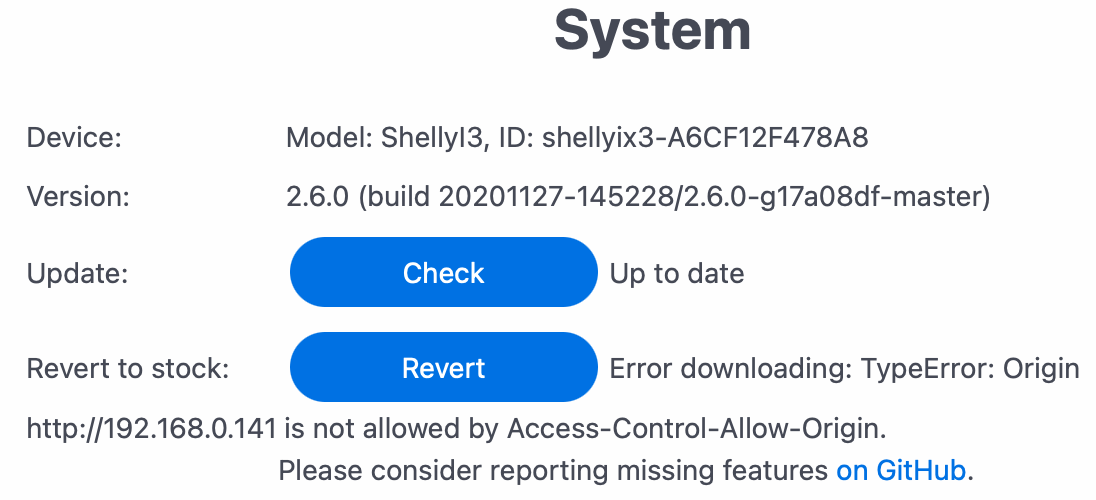
Shelly i3 can't revert to stock firmware
lucaspinelli85
on 28 Nov 2020
fixed in 2.6.1
rojer
on 28 Nov 2020
Related issues
 joe210599
·
7Comments
andyblac
·
12Comments
andyblac
·
9Comments
joe210599
·
7Comments
andyblac
·
12Comments
andyblac
·
9Comments
 Makaba05
·
6Comments
Makaba05
·
6Comments
 Jaguaza
·
11Comments
Jaguaza
·
11Comments