Shelly-homekit: HAP Type Garagedoor
It would be nice if the garagedoor HAP Type could be integrated for a Shelly 2.5, then the second input can be used for detecting a closed garagedoor (with an magnetic sensor).
 Pixel-Chris
All 373 comments
You can do this already with the Shelly 1, just use the L for mass, the N for the neutral, connect I and O to the garage door, the switch goes to the magnetic sensor and feed also the magnetic sensor with L.
configure the Shelly 1 as detached
 Ludelag
on 21 Sep 2020
Ludelag
on 21 Sep 2020
 ursusHU
on 21 Sep 2020
ursusHU
on 21 Sep 2020
@Ludelag
Thanks!!
That works for now!
So when HAP type „Garage“ is implemented, the user should be able to use 1 sensor with Shelly 1 and 2 sensors with shelly 2.5
(If you also want a sensor for an completely opened door)
Some Tips :
The most Hörmann Garagedoor openers have an implemented door closed output! And the Shelly can be powered with 24V from the board.
Pixel-Chris
on 23 Sep 2020
@Ludelag
Thanks!!
That works for now!
So when HAP type „Garage“ is implemented, the user should be able to use 1 sensor with Shelly 1 and 2 sensors with shelly 2.5
(If you also want a sensor for an completely opened door)
Some Tips :
The most Hörmann Garagedoor openers have an implemented door closed output! And the Shelly can be powered with 24V from the board.
@Pixel-Chris good to read it has worked! Thanks for the tips as well, I will check it out.
Ludelag
on 23 Sep 2020
@rojer
Is it possible to use the „serial port“ gpios for a second sensor/Input ?

Pixel-Chris
on 23 Sep 2020
in principle yes, in practice - unlikely. once you go up to any significant length of wires, noise becomes an issue and you will get false triggering all the time. you are better off just buying shelly 2.5.
correct me if i'm wrong, but garage door functionality sounds more like #5, no?
 rojer
on 23 Sep 2020
rojer
on 23 Sep 2020
in principle yes, in practice - unlikely. once you go up to any significant length of wires, noise becomes an issue and you will get false triggering all the time. you are better off just buying shelly 2.5.
correct me if i'm wrong, but garage door functionality sounds more like #5, no?
yes, but normally garage door, only operate on one button that does (OPEN, STOP, CLOSE, STOP, OPEN, etc)
 andyblac
on 23 Sep 2020
andyblac
on 23 Sep 2020
ok. i don't own and have never used a motorized garage door, i'll need detailed description of the operation and available inputs and outputs.
rojer
on 23 Sep 2020
ok. i don't own and have never used a motorized garage door, i'll need detailed description of the operation and available inputs and outputs.
on mine, and I think the vast majority operate on a single push button type, each time you press the button it cycles through the above function list.
andyblac
on 23 Sep 2020
The problem is, that most garagedoor openers have only one button (direction 1 -> stop -> direction 2 -> stop -> direction 1 and so on)
So no separate buttons for up an down
And for the end positions normally magnetic sensors are used, Some of them have an door closed sensor included, some of them have also the open sensor included)
For my Hörmann promatic 2 (with included garage door closed sensor/output) it would be possible I use the serial gpio in the garagedoor opener (so short cables are possible) for garage door closed and the SW port with a magnetic sensor for garage door open.
Pixel-Chris
on 23 Sep 2020
The problem is, that most garagedoor openers have only one button (direction 1 -> stop -> direction 2 -> stop -> direction 1 and so on)
So no separate buttons for up an down
And for the end positions normally magnetic sensors are used, Some of them have an door closed sensor included, some of them have also the open sensor included)For my Hörmann promatic 2 (with included garage door closed sensor/output)
I use iSmartGate on mine, but the original opener, did not even have sensors, just end points where if no button was pressed to stop the motor it just stopped by itself as it hit the endpoint, as it did not care if door was open or closed, as the next press was stop, then close.
andyblac
on 23 Sep 2020
can you find and link here some documentation for popular garage door systems that we'd be integrating with?
rojer
on 23 Sep 2020
Hörmann promatic 2
https://www.tor7.de/media/pdf/e2/59/13/hoermann-promatic-2-anleitung.pdf
Pixel-Chris
on 23 Sep 2020
um... in english, if possible :)
rojer
on 23 Sep 2020
https://www.auto-roll.com/sites/default/files/AR433-%20plus%20instructions%20-%20updated.pdf
momentary button on 11 & 13 on board. so in this case you would have to use a shelly1 as a dry contact is required O would go to 11 on main board, and 13 to I, or vice versa would not really matter, as a dry contact.
and with auto off with 500ms,
you would need to link a Door Contact sensor to shelly to complete it as HomeKit garage door
I currently use this on mine https://ismartgate.com
andyblac
on 23 Sep 2020
In English Hörmann Promatic 2
https://cdn.hoermann-cloud.de/fileadmin/_country/dok/Promatic_v2_Fitting_Instructions.pdf?v=1520493487
Pixel-Chris
on 23 Sep 2020
So for my Hörmann garagedoor opener I connected the Shelly as follows:
L(-) goes to 20
N(+) goes to 5
So the Shelly is powered with 24V
0 and I goes to the momentary switch input
SW to the 0V R- (where normally the optional Relais is connected)
(Detached mode, Auto off after 2 seconds)
Pixel-Chris
on 23 Sep 2020

Pixel-Chris
on 23 Sep 2020
And if the Gpio pins can be used:
L(-) goes to 20
N(+) goes to 5
0 and I goes to the momentary switch input
SW to a magnetic door sensor (fully opened)
GPIO to the 0V R- (where normally the optional Relais is connected) (door closed)
Pixel-Chris
on 24 Sep 2020
Found a thread where they used the gpio pins:
https://community.openhab.org/t/setting-up-a-garage-door-opener-with-shelly-and-espeasy/98749
Pixel-Chris
on 24 Sep 2020
Found a thread where they used the gpio pins:
https://community.openhab.org/t/setting-up-a-garage-door-opener-with-shelly-and-espeasy/98749
Why do you need 2 sensors? One magnetic or inside signal for closed door is sufficient. Sensor is active = door is close, inactive door is open.
 vkingxxx
on 24 Sep 2020
vkingxxx
on 24 Sep 2020
The HAP Type „Garagedoor“ can show the actually states:
Door opened
Door closing
Door closed
Door opening
So both end positions would be nice
And when the opener provides an internal output for one of them why not use the gpio for that and an external magnetic switch for the other end position.
And when there are two recognised endpositions, and after x seconds none of them is the actual state - you know that there is a problem
(Maybe there is a state „door failure“ or something like that)
The Hörmann supramatic Series has two build in (internal) endposition outputs. So why not use these?
Pixel-Chris
on 24 Sep 2020
And I found something:
let HMCharacteristicTypeObstructionDetected: String
An indicator of whether an obstruction is detected, as when something prevents a garage door from closing.
(https://developer.apple.com/documentation/homekit/hmcharacteristic/characteristic_types)
Pixel-Chris
on 24 Sep 2020
@Pixel-Chris my HomeKit opener only has 1 sensor and all 4 conditions are supported, when Closed and it start opening it show "Opening.." till the motor stops (no current) then it shows "Open" (from as the sensor is open, and same in reverse. So only 1 sensor is required. IMO.
andyblac
on 24 Sep 2020
Yes you are right
One sensor is normally enough
But when you have two sensors... why not use both? The Shelly can do it (an when not the gpio pins of an Shelly one - then an Shelly 2.5 can do it)
Motor stops because of an obstacle? Or what after an power loss? In which position is the door (open? Or in the middle?)
Pixel-Chris
on 24 Sep 2020
I have too 4 states with one sensor with another firmware. In this firmware is defined time to close XY seconds, when door is not in XY seconds closed/sensor activated = obstruction. I don't need detect obstruction for opening.
Is possible with @rojer firmware switch door status on SW contact?
vkingxxx
on 24 Sep 2020
Yes you are right
One sensor is normally enoughBut when you have two sensors... why not use both? The Shelly can do it (an when not the gpio pins of an Shelly one - then an Shelly 2.5 can do it)
shelly 2.5 is not dry contact, so can't always be used. ie I couldn't use it on mine, as NO VOLTAGE can go through to garage circuit.
Motor stops because of an obstacle? Or what after an power loss? In which position is the door (open? Or in the middle?)
yes. my garage opener board has a sensor on it, thats disconnect the opener circuit if blocked, and iSmartGarage detects this and reports "Obstruction". on an obstruction or after a power loss, the door reset to "open" position (unless was in a closed state).
andyblac
on 24 Sep 2020
vkingxxx
on 24 Sep 2020
IMO
It should be possible to choose
- no sensor
- one sensor
- two sensors
and where there are connected
SW, GPIO x
Maybe rojer can include the new calibration mode form the roller shutter type (https://github.com/mongoose-os-apps/shelly-homekit/issues/5#issuecomment-698174092)
to define the times
Pixel-Chris
on 24 Sep 2020
i'm not super excited about the idea of making header gpios available for stuff, because they are not properly isolated.
rojer
on 24 Sep 2020
i'm not super excited about the idea of making header gpios available for stuff, because they are not properly isolated.
Shelly 2.5 ?
Pixel-Chris
on 24 Sep 2020
i mean the additional GPIOs available on the programming header on any type of device.
shelly 2.5 provides 2 proper inputs, so yes, those can be used for remote sensing.
rojer
on 24 Sep 2020
Ok,
Perfect !
Pixel-Chris
on 24 Sep 2020
You can do this already with the Shelly 1, just use the L for mass, the N for the neutral, connect I and O to the garage door, the switch goes to the magnetic sensor and feed also the magnetic sensor with L.
configure the Shelly 1 as detached
The reed switch (magnetic) .... does it have to be on by default or off?
 hfagelnour
on 27 Sep 2020
hfagelnour
on 27 Sep 2020
The reed switch (magnetic) .... does it have to be on by default or off?
The sensor contact should be closed, when the garagedoor is closed / when the sensor is near the magnet.
Pixel-Chris
on 28 Sep 2020
NC = normally close
Pixel-Chris
on 28 Sep 2020
Can tests be done with current firmware for Shelly 1 ? (I have a garage door with 1 sensor, open/close).
What setup should I use?
 juancitomadrid
on 28 Sep 2020
juancitomadrid
on 28 Sep 2020
Yes
Testing is possible with the stock firmware.
The closed door is visualised with a blue line in the power button:

Pixel-Chris
on 28 Sep 2020
My garagedoor opener can power the Shelly with 24v
And the closed sensor is included....
https://github.com/mongoose-os-apps/shelly-homekit/issues/142#issuecomment-697941414
Pixel-Chris
on 28 Sep 2020
You can do this already with the Shelly 1, just use the L for mass, the N for the neutral, connect I and O to the garage door, the switch goes to the magnetic sensor and feed also the magnetic sensor with L.
configure the Shelly 1 as detached
Hello Ludelag, if i do this what happens in the HomeKit App? Will i see a Counter or a garagedoor? If i see the normal Counter how does it work? Is the Counter active while Door is open and inactive while the door is closed?
 Stundenplan7b
on 28 Sep 2020
Stundenplan7b
on 28 Sep 2020
Actually it works only with the stock firmware, no HomeKit!
Pixel-Chris
on 29 Sep 2020
@rojer should I close this ticket https://github.com/mongoose-os-apps/shelly-homekit/issues/105 in favour of this one ?
andyblac
on 30 Sep 2020
Yes
Testing is possible with the stock firmware.
The closed door is visualised with a blue line in the power button:
When I just updated to the last version of the Shelly 1 immediately came to my mind this blue bottom that works when the switch Shelly is detached, with the new version you actually got more o less the same when detached you get the input 1 which could be use to connect a door sensor abs detect if the door is open or close. Even can be coded to appear in HomeKit as garage door showing the open or close position.
Like shows on this video: https://youtu.be/P5mQADnZXOI
Ludelag
on 30 Sep 2020
With the stock firmware the sensor is connected to the detached switch.
And the input and output is wired the the momentary switch input of the garage door opener.
So the switch must be in detached mode and the auto-off needs to be set (for example „2 seconds“).
So you can control the garagedoor over the Shelly App or an url
And you can see the state of the door in the Shelly app
Now the HAP Type „garage door“ must be implemented in the HomeKit Firmware, so that it is displayed as an garage door in the home app and an external sensor wired to the detached switch port must be recognized.
Optional, when there are two sensors for opened and closed state, the Shelly 2.5 must be supported (I think this will only work, when the Shelly is powered over the garage door opener with 24V).
Pixel-Chris
on 1 Oct 2020
@rojer
Sorry I have to ask again ;-) (GPIOs)
When you add an option to the Shelly 1 webui... for example:
„Has the opener an integrated sensor?“
„Is the Shelly powered with 24V from the garage door opener“
or can the Shelly recognise on its own, how it is powered? 12v/24v/230v ???
When that would be possible... and the Shelly 1 is powered over 12v or 24v - and only then - the option to use the gpios is given to use one of them for an additional sensor.
What would you say about this?
As additional info:
When the opener has an integrated sensor and the Shelly can be powered over the opener,
The Shelly can be integrated in the opener housing - so cables can be very short for the gpios.
Pixel-Chris
on 1 Oct 2020
@Pixel-Chris we'll have some UI options for sure.
wrt power - i don't think it matters how shelly is powered, as long as it works and input works as well.
again, i am not a fan of allowing pin header GPIOs to be used as inputs, it can damage internal circuitry and absence of proper input noise suppression will cause issues with false triggers that will be difficult to debug.
as far as i'm concerned, if you need more than one input - get a shelly 2.5.
please keep updating this issue with relevant information, i'm not focusing on it right now but it will come in handy when the time comes.
in particular, i'd like to know how much garage door control is different from roller shutter control that we're discussing on #5, and whether it makes sense to share some code internally.
rojer
on 1 Oct 2020
IMO
It is not the same like an Roller shutter, because you only send an signal to the motor that it should start or stop (the complete cycling process is controlled by the opener itself)
the garagedoor opener is not powered over the Relais of the Shelly.
Pixel-Chris
on 2 Oct 2020
Would it be possible to do something with a wireless sensor ?
I’m using a Shelly 1 to control my garage door.
To get the door status I’ve installed a Xiaomi wireless sensor. When door is closed, Xiaomi sensor is closed, when door is opened, Xiaomi sensor is opened (I have a Xiaomi gateway to get sensor status in Homekit).
So my question is: is there any way to link the Xiaomi sensor status to the Shelly 1 ?
 Whiterabbit64
on 2 Oct 2020
Whiterabbit64
on 2 Oct 2020
or the Shelly Door Window sensor ?
Pixel-Chris
on 2 Oct 2020
@rojer the garage door needs most of them usually needs only trigger for 1 or 2 seconds to operate is quiet simple. The same action wired all the same action the door to open trigger again stops trigger again opens. If the door is open when trigger food closes or vicevers
Ludelag
on 3 Oct 2020
so what additional support is needed? isn't a switch with auto-off after 1-2 seconds enough?
rojer
on 3 Oct 2020
To open and close the garage door is perfect ! Thank you, only that in detached mode with the input 1 switch could be use to detect the position of the door, if it is open or closed using a wire sensor door detector like for example this one:
Gebildet 5pcs Cableado Empotrado Seguridad de Ventana/Puerta Sensor de Contacto Alarma,Interruptor de Láminas Magnético (Blanco),Normalmente Cerrado Sensor de Puerta Magnético https://www.amazon.es/dp/B082PNPWFZ/ref=cm_sw_r_cp_api_fab_-eeEFb4362THW
Ludelag
on 3 Oct 2020
The switch with auto off is enough to drive the garage door through cycles (open, stop, close, open, etc.)
But this does not allow you to get the garage door status (opened, closed). To achieve this some of us add a wireless sensor.
But to make all of this working perfectly, Shelly 1 and wireless sensor should work together in order to:
- « Hey Siri open the garage door » will open it only if it’s closed
- « Hey Siri close the garage door » will close it only if it’s already opened.
And the we also know the garade door status, opend or closed.
Whiterabbit64
on 3 Oct 2020
IMO
It should be possible to choose how many wired sensors
0, 1 or 2
and if they are NO or NC
Optional wireless sensors
0 and I goes to the momentary switch input
Pixel-Chris
on 3 Oct 2020
With two sensors:
You can exactly say in which status the door is:
Closed sensor is active: the door is closed
Open sensor is active: the door is open
No sensor is active: The door is moving
No sensor is active for a longer period: Door failure/obstruction
So the drive times should be editable or there is a calibration mode for this (like roller shutters #5 )
I think the minimum is one sensor, because you can control the door with your remote or an extra push/key/fingerprint button (connected to the opener board). If someone uses one of these, HomeKit would not know, that there is an status change.
With an calibration mode, the user can be asked if the door is closed or opened, so the connection of the sensor(s) is known.
Pixel-Chris
on 3 Oct 2020
You can do this already with the Shelly 1, just use the L for mass, the N for the neutral, connect I and O to the garage door, the switch goes to the magnetic sensor and feed also the magnetic sensor with L.
configure the Shelly 1 as detached
@Ludelag I used the above but i am using 12V to power the shelly. i thus connected L to -ve and N to +ve, I and O to the garage door. the NC magnetic sensor is connected to the SW and L (-ve) Detached
The sensor status on Stock shows the little I inside the power logo as it should but no matter what i do in HomeKit using the firmware here it only flickers the Input icon for second while it doesn't show if the magnetic circuit is closed or opened!
any thoughts pls
hfagelnour
on 4 Oct 2020
@hfagelnour
Actually the HomeKit Firmware is not compatible with garagedoor openers!
Pixel-Chris
on 4 Oct 2020
Oh ok thx a million, I believe I will go for the meross solution then. It does all what we want and more. It is not expensive and compatible with HomeKit, Amazon Alexa and smart things. Will feed back here when I try it.
Sent from my iPhone
On Oct 4, 2020, at 2:29 AM, Pixel-Chris notifications@github.com wrote:
@hfagelnour
Actually the HomeKit Firmware is not compatible with garagedoor openers!—
You are receiving this because you were mentioned.
Reply to this email directly, view it on GitHub, or unsubscribe.
hfagelnour
on 4 Oct 2020
@rojer
What will be you next project ? ;-)
Pixel-Chris
on 5 Oct 2020
You can do this already with the Shelly 1, just use the L for mass, the N for the neutral, connect I and O to the garage door, the switch goes to the magnetic sensor and feed also the magnetic sensor with L.
configure the Shelly 1 as detached@Ludelag I used the above but i am using 12V to power the shelly. i thus connected L to -ve and N to +ve, I and O to the garage door. the NC magnetic sensor is connected to the SW and L (-ve) Detached
The sensor status on Stock shows the little I inside the power logo as it should but no matter what i do in HomeKit using the firmware here it only flickers the Input icon for second while it doesn't show if the magnetic circuit is closed or opened!
any thoughts pls
Yes, exactly this is what we have been talking about and trying to explain to @rojer, there is no real use for the detached Shelly 1, is just input and useless for garage door. If you get back to the stock firmware you get better results in detached mode for garage door.
Probably in future @rojer will have the will to get a look to the detached in Shelly 1 make it work with a wire sensor which will show the real state of the door, if open or close as the Shelly you can find in Amazon
https://www.amazon.es/HomeKit-kompatibel-Shelly-Garage-Door/dp/B07WN8YXGP/ref=sr_1_1?__mk_es_ES=ÅMÅŽÕÑ&dchild=1&keywords=shelly+garage+door&qid=1601933229&sr=8-1
Ludelag
on 5 Oct 2020
@rojer @Pixel-Chris @hfagelnour this what you were writing about? https://www.youtube.com/watch?v=yDa-hZJ6dlQ
Ludelag
on 5 Oct 2020
@Ludelag thanks, this helps.
however, the garage door HAP service requires that we detect fully open _and_ fully close states:
0 ”Open. The door is fully open.”
1 ”Closed. The door is fully closed.”
2 ”Opening. The door is actively opening.”
3 ”Closing. The door is actively closing.”
4 ”Stopped. The door is not moving, and it is not fully open nor fully
closed.”
so looks like we'll need two sensors, for fully open and fully closed positions
@Pixel-Chris the plan was to make dimmer support next. but if garage door support is as easy as an output with an input (or two), i might go for it.
rojer
on 6 Oct 2020
Yes it is .... just got it installed today and it works very well. Open close opening closing and status on Siri
Sent from my iPhone
On Oct 5, 2020, at 2:33 PM, Ludelag notifications@github.com wrote:
@rojer @Pixel-Chris @hfagelnour this what you were writing about? https://www.youtube.com/watch?v=yDa-hZJ6dlQ—
You are receiving this because you were mentioned.
Reply to this email directly, view it on GitHub, or unsubscribe.
hfagelnour
on 6 Oct 2020
It works on meross with one sensor only. It detects the “Closed” and not “Closed” position while the opening closing and opened is reported by setting up the time to fully open or fully close the door. Hope this explains things. I will attach here the setting page of it. This screen capture is from the meross app which controls the door beside the HomeKit, Alexa, google assistant and smart things. Am very impressed.
Sent from my iPhone
On Oct 5, 2020, at 3:46 PM, Deomid Ryabkov notifications@github.com wrote:
@Ludelag thanks, this helps.
however, the garage door HAP service requires that we detect fully open and fully close states:0 ”Open. The door is fully open.”
1 ”Closed. The door is fully closed.”
2 ”Opening. The door is actively opening.”
3 ”Closing. The door is actively closing.”
4 ”Stopped. The door is not moving, and it is not fully open nor fully
closed.”so looks like we'll need two sensors, for fully open and fully closed positions
—
You are receiving this because you were mentioned.
Reply to this email directly, view it on GitHub, or unsubscribe.
hfagelnour
on 6 Oct 2020
Shelly 2.5 with two sensors:
You can exactly say in which status the door is:
Closed sensor is active: the door is closed
Open sensor is active: the door is open
No sensor is active: The door is moving
No sensor is active for a longer period: Door failure/obstruction
So the drive times should be editable or there is a calibration mode for this (like roller shutters #5 )
I think the minimum is one sensor (Shelly 1), because you can control the door with your remote or an extra push/key/fingerprint button (connected to the opener board). If someone uses one of these, HomeKit would not know, that there is an status change. So here the drivetimes are very useful !
With an calibration mode, the user can be asked if the door is closed or opened, so the connection of the sensor(s) is known.
I can test both version
(Shelly 1 ist installed with one sensor, Shelly 2.5 is on the way and a second sensor also)
Pixel-Chris
on 6 Oct 2020
I have two meross installed and with iOS shortcuts I have used them without problems for about a year.
A month ago I have been testing them with homebridge and the operation is perfect.
They only have one sensor and homekit recognizes all states: open, closed, opening, closing.
My idea is to replace it with a shelly when it is compatible with homekit (thanks to your work) to stop running homebridge (I only have it for that).
If I can contribute something, I am fully available.
juancitomadrid
on 6 Oct 2020
Shelly 2.5 with two sensors:
You can exactly say in which status the door is:
Closed sensor is active: the door is closed
Open sensor is active: the door is open
No sensor is active: The door is moving
No sensor is active for a longer period: Door failure/obstruction
So the drive times should be editable or there is a calibration mode for this (like roller shutters #5 )
I think the minimum is one sensor (Shelly 1), because you can control the door with your remote or an extra push/key/fingerprint button (connected to the opener board). If someone uses one of these, HomeKit would not know, that there is an status change. So here the drivetimes are very useful !
With an calibration mode, the user can be asked if the door is closed or opened, so the connection of the sensor(s) is known.
I can test both version
(Shelly 1 ist installed with one sensor, Shelly 2.5 is on the way and a second sensor also)
@Pixel-Chris witj Shelly 2.5 You can fry your opener PCB connection since you will output 230V to the garage port button connection. Shelly 1 has dry (potential free) output. Needs to be able to use it like L mass N neutral wire and plug or power connecting to the garage door 12 v
@rojer when Shelly 1 is trigger needs only 1 or 2 seconds to send the pulse to the garage motor to make it works, I think just calibrating the time to control the opening garage action. When closing the food sensor will tell you the position closed and won't be closing any more since with the input 1 will detect the contact of the two parts of the door sensor are detecting each other
Ludelag
on 6 Oct 2020
I agree with Ludelag.
For a garage door the way to go is Shelly 1, for safety and ease of use.
I imagine 2 options to get door status:
1- with a wired magnetic sensor
2- with a wireless sensor instead of the wired sensor.
In any of the 2 possibilities, the sensor is used to detect the closed status of the door.
So when the door is closed (sensor is in closed status) only an « open » action can be done. And when the door is open (i.e. the sensor is in open status) only a « close » action can be done.
Whiterabbit64
on 6 Oct 2020
Many garagedoor openers have built-in status sensors for closed and opened !
So why not use them.
Yes, you are right - the Shelly 2.5 can only be used, when the Shelly can be powered over the board of the door opener for example with 24V (like Hörmann openers can provide)
Pixel-Chris
on 6 Oct 2020
I think the user must be able to choose if he wants to use a Shelly 1 with one wired sensor (optional with up to two wireless sensors) or a Shelly 2.5 with one or two wired or wireless sensors (or a mix of both).
Pixel-Chris
on 6 Oct 2020
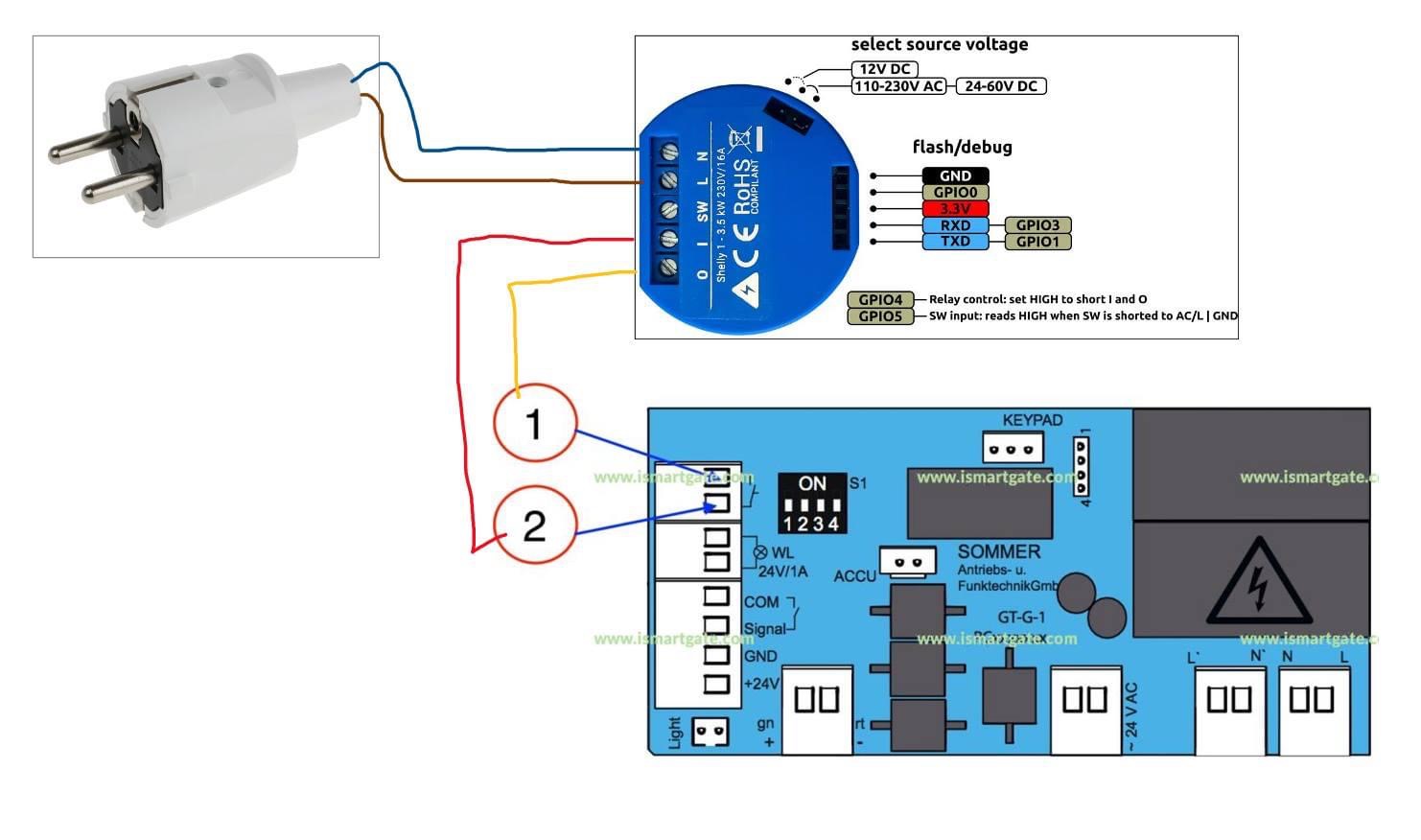
This is an schema of a garage door I did with Shelly 1, may it help, the garage door it selfs is practically for most of the garage doors.
Ludelag
on 6 Oct 2020
This is an schema of a garage door I did with Shelly 1, may it help, the garage door it selfs is practically for most of the garage doors.
Why don’t you power the Shelly over the opener board? The board can provide 24V!
Pixel-Chris
on 6 Oct 2020
This is an schema of a garage door I did with Shelly 1, may it help, the garage door it selfs is practically for most of the garage doors.
Where you connect the sensor?
juancitomadrid
on 6 Oct 2020
@Pixel-Chris , actually I had it so, but then I split it, mor for convenience to use the Shelly in future in some other devices and make it easier to plug in or out. But of course It could be connected and integrated even the box of the garage door.
@juancitomadrid in the sw, you connect one of the wires of the sensor and second wire you power with the L of the shelly. But with the actual firmware Homekit of @rojer is not showing the status of the sensor.
Ludelag
on 6 Oct 2020
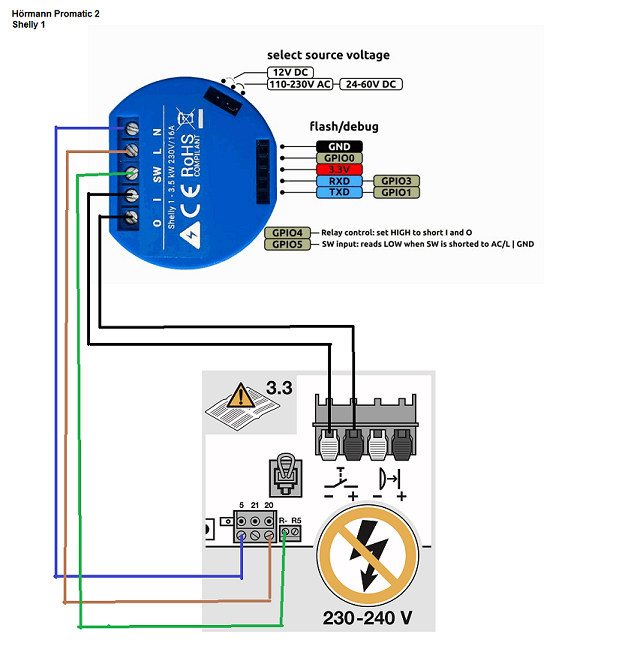
so i can put the Shelly in the housing of the garage door opener
Pixel-Chris
on 6 Oct 2020
@Ludelag
i would check if the board can provide the closed sensor status, it can be that it is provided over this section:
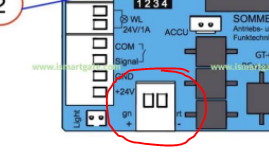
BUT !! then the shelly must be powerd over the board !!! (when i'm right.... the switch port is not potential free / dry !?)
Pixel-Chris
on 6 Oct 2020
@Pixel-Chris detached should be potential free, but I am not sure, any way the firmware won't work to indicate in homekit the status because the is not yet build to do so. In the key pad I upload you can read up to the right keypad then to the right a connection 1 - 4 where can be connected a relay with according to the instruction will indicate the status of the door but you need then to buy the whole system and suscribe to a anual or monthly fee.
Ludelag
on 6 Oct 2020
@Pixel-Chris detached should be potential free, but I am not sure, any way the firmware won't work to indicate in homekit the status because the is not yet build to do so. In the key pad I upload you can read up to the right keypad then to the right a connection 1 - 4 where can be connected a relay with according to the instruction will indicate the status of the door but you need then to buy the whole system and suscribe to a anual or monthly fee.
Ludelag
on 6 Oct 2020
The new meross I bought and currently using is native HomeKit. No need for homebridge. Maybe u can email the manufacturer for upgrade at a minimal charge.
Sent from my iPhone
On Oct 5, 2020, at 11:38 PM, juancitomadrid notifications@github.com wrote:
I have two meross installed and with iOS shortcuts I have used them without problems for about a year.
A month ago I have been testing them with homebridge and the operation is perfect.
They only have one sensor and homekit recognizes all states: open, closed, opening, closing.My idea is to replace it with a shelly when it is compatible with homekit (thanks to your work) to stop running homebridge (I only have it for that).
If I can contribute something, I am fully available.
—
You are receiving this because you were mentioned.
Reply to this email directly, view it on GitHub, or unsubscribe.
hfagelnour
on 6 Oct 2020
The new meross I bought and currently using is native HomeKit. No need for homebridge. Maybe u can email the manufacturer for upgrade at a minimal charge.
…
where did you purchase it? if it is not a secret. maybe you have a link?
Ludelag
on 6 Oct 2020
@hfagelnour
actually it is only availabe in the US
Pixel-Chris
on 6 Oct 2020
Can someone check my wirings for the Shelly 2.5 connection ....
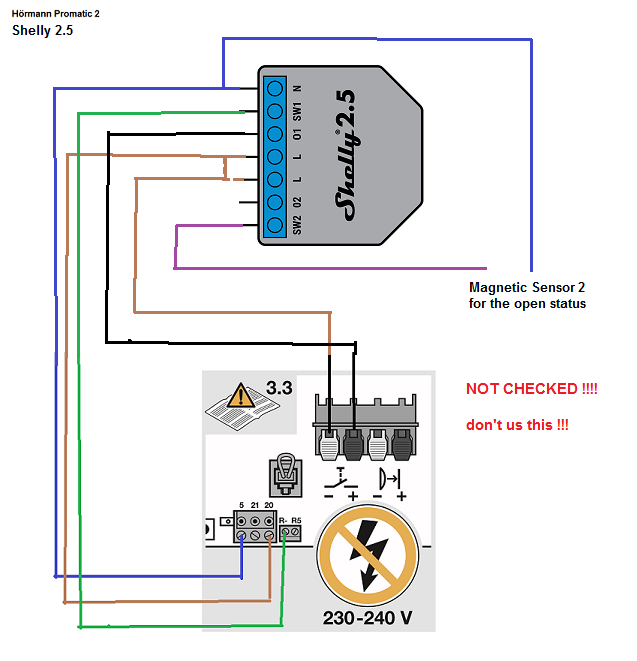
Pixel-Chris
on 6 Oct 2020
@hfagelnour
I found it here in this link amazon, but it looks like there are 2 versions of it, this version is not supported by homekit.
https://www.amazon.es/gp/product/B084P2MZMB/ref=as_li_tl?ie=UTF8&camp=3638&creative=24630&creativeASIN=B084P2MZMB&linkCode=as2&tag=merosses-21&linkId=737e7b11cc99b6b2b5f88412474dad71
Ludelag
on 6 Oct 2020
Meross:
https://www.meross.com/product/29/article/
Amazon (Germany):
https://www.amazon.de/meross-Garagentor%C3%B6ffner-Fernbedienung-Benachrichtigungsmodi-erforderlich/dp/B084Z5QZR2
(but not available yet)
Pixel-Chris
on 6 Oct 2020
Amazon .... do search for meross HomeKit.
Sent from my iPhone
On Oct 6, 2020, at 3:18 AM, Ludelag notifications@github.com wrote:
The new meross I bought and currently using is native HomeKit. No need for homebridge. Maybe u can email the manufacturer for upgrade at a minimal charge.
…where did you purchase it? if it is not a secret. maybe you have a link?
—
You are receiving this because you were mentioned.
Reply to this email directly, view it on GitHub, or unsubscribe.
hfagelnour
on 6 Oct 2020
this is what I use https://ismartgate.com as I have a roller garage door (not up and over) I used the iSmartGate LITE
https://shopeurope.ismartgate.com/47-ismartgate-lite
andyblac
on 6 Oct 2020
Only the new version of Meross work with Homekit.
I have the old ones MSG100
The new one is MSG100HK
juancitomadrid
on 6 Oct 2020
@Ludelag
Which garagedoor opener do you have?
Why do you connect the Shelly not directly to the board of the garage door opener?
Pixel-Chris
on 6 Oct 2020
@Ludelag
Which garagedoor opener do you have?
Why do you connect the Shelly not directly to the board of the garage door opener?
The garage door is the Sommer base +, I don't integrate it because I am just tasting the Shelly1 in garage door,I find Shelly one of the best devices. Is easier to remove and change the firmware via usb wired, this is the only reason, but to tell the truth if @rojer could help to fit the firmware to use for a garage door with input 1 detached sw to see the status of the door, this could be one of the most reliable devices on the market.
Ludelag
on 6 Oct 2020
@rojer
if you have time for this issue...
That would be great! 🎉
Pixel-Chris
on 6 Oct 2020
@rojer
if you have time for this issue...That would be great! 🎉
pretty sure he said the dimmer or RGBW2 is next in the todo list.
andyblac
on 6 Oct 2020
He said:„ the plan was to make dimmer support next. but if garage door support is as easy as an output with an input (or two), i might go for it.“
😉
So it is up to him
Pixel-Chris
on 6 Oct 2020
yup, hehe for me I hope it dimmer, as I have 3 of them and 3 more on order. :smile:
andyblac
on 6 Oct 2020
I vote for garage door. I have three of them 😁
Whiterabbit64
on 6 Oct 2020
I vite for garage door. I have three of them 😁
- 1 👍
juancitomadrid
on 6 Oct 2020
I vote for garage door as well! ;)
Ludelag
on 6 Oct 2020
Instead of voting
Donate him some money 😉
Pixel-Chris
on 6 Oct 2020
Money war!!!
juancitomadrid
on 6 Oct 2020
Sure!
Ludelag
on 6 Oct 2020
Can someone have a look at my Schema above for the Shelly 2.5? Thanks!
Pixel-Chris
on 6 Oct 2020
Can someone check my wirings for the Shelly 2.5 connection ....
I am not so sure about if it will safe for the garage door board, due to the voltage of the Shelly 2.5, I would suggest to ask in the support group Shelly, there are a couple of electricians who can tell us if this could be safe, also the people of Shelly are very active there. I am more worry about the safe of the boar and motor it's self, here is the link:
Ludelag
on 6 Oct 2020
It‘s all 24V
Pixel-Chris
on 6 Oct 2020
I have an idea for the second output of the Shelly 2.5:
Some garage door openers have an extra function to open the door just a little bit (for an airflow).
Pixel-Chris
on 6 Oct 2020
I have an idea for the second output of the Shelly 2.5:
Some garage door openers have an extra function to open the door just a little bit (for an airflow).
Yes! mine has it.
Ludelag
on 6 Oct 2020
I have an idea for the second output of the Shelly 2.5:
Some garage door openers have an extra function to open the door just a little bit (for an airflow).Yes! mine has it.
But how can that be displayed in HomeKit ?
That will not work -> status will be „obstruction detected“, because no sensor will recognise a magnet
Pixel-Chris
on 6 Oct 2020
The problem with the Shelly 2.5 is, that when it is powered with mains (230V) than it will output this over all connectors
So a connected board with 24v will be 🔥 burned
So the only way to use a Shelly 2.5 is to power it with the power of the board.
But is the way the second sensor is connected correct? And the switch (sw1)?
Pixel-Chris
on 6 Oct 2020
The problem with the Shelly 2.5 is, that when it is powered with mains (230V) than it will output this over all connectors
So a connected board with 24v will be 🔥 burnedSo the only way to use a Shelly 2.5 is to power it with the power of the board.
But is the way the second sensor is connected correct? And the switch (sw1)?
from where will you take the neutral wire?
Ludelag
on 6 Oct 2020
Let me ask to the Shelly Group using your schema
Ludelag
on 6 Oct 2020
Connected to port 5 of the board
In 24v Modus it is plus (+)
And Minus (-) is L -> Port 20
Pixel-Chris
on 6 Oct 2020
N and L
and the SW1 (integrated closed sensor)
Should be correct
Pixel-Chris
on 6 Oct 2020
ok, how about we start with something simple:
shelly1, 1 sensor (fully open or fully closed, selectable), opposite position detection with time only and no obstruction detection. how does that sound?
rojer
on 6 Oct 2020
ok, how about we start with something simple:
shelly1, 1 sensor (fully open or fully closed, selectable), opposite position detection with time only and no obstruction detection. how does that sound?
It sounds like music for me!!!!
Ludelag
on 6 Oct 2020
ok, how about we start with something simple:
shelly1, 1 sensor (fully open or fully closed, selectable), opposite position detection with time only and no obstruction detection. how does that sound?
Closed sensor is standard
Pixel-Chris
on 6 Oct 2020
ok, how about we start with something simple:
shelly1, 1 sensor (fully open or fully closed, selectable), opposite position detection with time only and no obstruction detection. how does that sound?Closed sensor is standard
Yes, but selectable is a great idea, you could have a wide range of possibilities of installations
Ludelag
on 6 Oct 2020
Do you think it’s possible to implement that with a wireless sensor ?
Whiterabbit64
on 6 Oct 2020
Do you think it’s possible to implement that with a wireless sensor ?
Right now with the actual firmware Homekit of Rojer in home you can creat room (Garage) add the wireless sensor and will be integrated, if the wireless door/windows sensor you have has support for homekit.
Ludelag
on 6 Oct 2020
@Pixel-Chris getting back to your schema, talking with one colleague, we would not recommend to use a Shelly2.5 in this situation it has wet relay and you do not know the internal connection of the garage controller.
The recommendation is to use a Shelly1 with the upcoming garage door add-on. You then get a dry relay, low voltage door reed sensor connection and also integrated in a nice way in the app... with the help of @rojer
Ludelag
on 6 Oct 2020
@Whiterabbit64 maybe eventually, but we'll start with a simple setup.
rojer
on 6 Oct 2020
What a silence in here !
Ludelag
on 7 Oct 2020
I’m preparing myself to the new garage door firmware 😁
24VDC power supplies and wired magnetic sensors ordered 😉
Thanks rojer 👍😁
Whiterabbit64
on 7 Oct 2020
My magnetic sensor has arrived today.
So I can Test with a Shelly 1, integrated sensor and external magnetic sensor.
Pixel-Chris
on 7 Oct 2020
An update to my Schema !!! I think the magnetic sensor is wrong:
The second wire of the magnetic sensor should connected to L and not to N !
Pixel-Chris
on 7 Oct 2020
An update to my Schema !!! I think the magnetic sensor is wrong:
The second wire of the magnetic sensor should connected to L and not to N !
Yes should be connected to L mass and to the switch the other cable
Ludelag
on 7 Oct 2020
hello I use the Shelly 1 from HomekitBG. I also bought a 250V limit switch, it is contacted with SW and N on the Shelly. A garage door is then displayed to me in the home app. Unfortunately, this Shelly is often not available. My wifi is very good. All Shellys with the software from @rojer work very well for me. HomekitBG does not provide any software updates. Therefore I would prefer a software from @rojer, because he gets a very good accessibility of the Shelly in his software. When I press the softkey in the home app the gate opens, when I press it again it stops and when I press it again the gate closes. In the Home app, the gate is displayed as open as soon as it has moved up a little. Otherwise it only shows closed. When opening it is displayed with OpenOffice. When I close the Garage I see closeing.
Stundenplan7b
on 7 Oct 2020
i started writing code, skeleton for the service is in place, should have something for testing soon.
rojer
on 7 Oct 2020
i started writing code, skeleton for the service is in place, should have something for testing soon.
Perfect!!!👍🏻
Imho: there should be an option, where the user can choose the sensor type (NC or NO)
Pixel-Chris
on 8 Oct 2020
ok everyone, first cut that is worth testing: http://rojer.me/files/shelly/2.3.0-alpha1/
shelly1 and shelly1pm are supported, close sensor only but with NC/NO configurable.
movement time and output pulse time are also configurable.
please test and let me know.
branch: https://github.com/mongoose-os-apps/shelly-homekit/tree/garage_door
rojer
on 8 Oct 2020
Hello, today i order a new shelly 1. i will test the software After delivery of my new shelly. I think this will be on monday or thusday next week.
Stundenplan7b
on 8 Oct 2020
ok everyone, first cut that is worth testing: http://rojer.me/files/shelly/2.3.0-alpha1/
shelly1 and shelly1pm are supported, close sensor only but with NC/NO configurable.
movement time and output pulse time are also configurable.
please test and let me know.branch: https://github.com/mongoose-os-apps/shelly-homekit/tree/garage_door
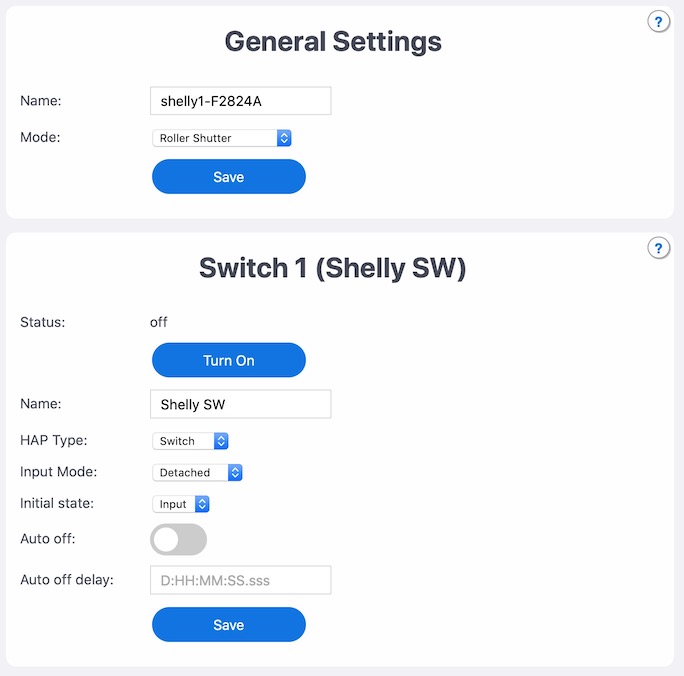
bug in alpha1 'Roller Shutter' option is shown in Mode options, I think it only should show Switch & Garage Door ???, as when selecting Roller Shutter, it shows 'Switch 1 (Shelly SW)'
andyblac
on 9 Oct 2020
hm, it's not supposed to be shown, yeah. but it doesn't repro here - my alpha 1 web ui only shows switch and garage door opener.
can you reload the page? we've had problems with web page caching before (also supposed to be fixed in 2.3.0-a1 and onwards)
rojer
on 9 Oct 2020
hm, it's not supposed to be shown, yeah. but it doesn't repro here - my alpha 1 web ui only shows switch and garage door opener.
can you reload the page? we've had problems with web page caching before (also supposed to be fixed in 2.3.0-a1 and onwards)
I have several times, no difference, I just tried I different browser and it fine there, so it is a web caching issue, hmmm.
andyblac
on 9 Oct 2020
yeah, nasty. but fixed by https://github.com/mongoose-os-apps/shelly-homekit/commit/6a1cfb987ed85b50f64cca4ccb4bf084eacffa68 so shouldn't be happening from now on.
meanwhile, you can avoid caching by adding ?something at the end of the address, i.e. http://a.b.c.d/?foo.
also shift-f5 is a forced reload with no caching.
rojer
on 9 Oct 2020
yeah, nasty. but fixed by 6a1cfb9 so shouldn't be happening from now on.
meanwhile, you can avoid caching by adding
?somethingat the end of the address, i.e.http://a.b.c.d/?foo.
also shift-f5 is a forced reload with no caching.
not in alpha1 ?
andyblac
on 9 Oct 2020
it's fixed in alpha1, but you are getting content cached from fetching previous version
rojer
on 9 Oct 2020
so how do we clear cache ?
andyblac
on 9 Oct 2020
restarting broswer may help... i mean, it fetches the page eventually. not sure when. adding cache-busting ?querystring is a sure way to bypass it.
rojer
on 9 Oct 2020
tried restarting, same tried http://shelly1-f2824a.local/?querystring same still there.
andyblac
on 9 Oct 2020
odd... can you post output of http://shelly1-f2824a.local/rpc/Shelly.GetInfo?
rojer
on 9 Oct 2020
{"id": "shelly1-F2824A", "app": "switch1", "model": "Shelly1", "stock_model": "SHSW-1", "host": "shelly1-F2824A.local", "version": "2.3.0-alpha1", "fw_build": "20201008-201748/2.2.1-12-gd7ff019-garage_door", "uptime": 3343, "wifi_en": true, "wifi_ssid": "ABFi-IoT-2.4", "wifi_pass": "***", "wifi_rssi": -58, "wifi_ip": "192.168.3.17","hap_cn": 7, "hap_running": false, "hap_paired": false, "hap_ip_conns_pending": 0, "hap_ip_conns_active": 0, "hap_ip_conns_max": 9, "sys_mode": 0, "rsh_avail": false, "gdo_avail": true, "debug_en": true, "components": [{"id": 1, "type": 0, "name": "Shelly SW", "svc_type": 0, "in_mode": 3, "initial": 3, "state": false, "auto_off": false, "auto_off_delay": 0.000}, {"id": 1, "type": 3, "name": "Input", "in_mode": 0, "last_ev": 0, "last_ev_age": -1.000}]}
looks normal. in fact with this data even previous version should not be showing the system mode dropdown. hmm...
and you say it doesn't repro from a different machine? what if you open it in an incognito window on this one?
rojer
on 9 Oct 2020
different browser aka Brave on same Mac, that has never open the hostname before.
andyblac
on 9 Oct 2020
what if you open it in an incognito window on this one?
opening in private page, issue still there.
andyblac
on 9 Oct 2020
ok, what device and browser it is?
rojer
on 9 Oct 2020
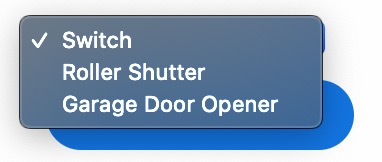
does it show both garage door opener snd roller shutter or just the shutter?
rojer
on 9 Oct 2020
MacBook Pro Safari 14, Shelly1
andyblac
on 9 Oct 2020
does it show both garage door opener snd roller shutter or just the shutter?
andyblac
on 9 Oct 2020
ok, that's a subtle difference in how chrome and safari handle invisible select elements.
i'll fix it in a future alpha, for now just ignore the roller shutter setting, it won't do anything on shelly1.
rojer
on 9 Oct 2020
👍 np.
andyblac
on 9 Oct 2020
Wuau! I will taste later on, today I am on my way back home
Ludelag
on 9 Oct 2020
Great!
Thanks @rojer !
Is it possible that someone put here the configuration that should be followed for the connections?
Thanks! I will test today.
juancitomadrid
on 9 Oct 2020
Great!
Thanks @rojer !Is it possible that someone put here the configuration that should be followed for the connections?
Thanks! I will test today.
It depends on your opener, power wiring and what kind of sensor do you have (integrated or not).
Pixel-Chris
on 9 Oct 2020
This will be the wiring for me:
24V from the board of the opener
Integrated Sensor
L(-) goes to 20
N(+) goes to 5
So the Shelly is powered with 24V
0 and I goes to the momentary switch input
SW to the 0V R- (where normally the optional Relais is connected)
Pixel-Chris
on 9 Oct 2020
First, are you sure your garage board delivers 24V DC and not 24V AC ?
Mine, from NICE, delivers 24V AC.
Second, SW input should be looped on L input though magnetic sensor or onboard relay. On your drawing I can’t find a such loop.
See here : https://www.savjee.be/2020/06/make-garage-door-opener-smart-shelly-esphome-home-assistant/
Whiterabbit64
on 9 Oct 2020
The integrated sensor is internally looped.
(That works, because I powered the Shelly over the opener board)
Yes, it‘s DC
I works with the stock firmware already.
Pixel-Chris
on 9 Oct 2020
So...
What can I say...
It works!!!!!!
@rojer Big thank you!!!!
Can I test something else?
Pixel-Chris
on 9 Oct 2020
So...
What can I say...
It works!!!!!!@rojer Big thank you!!!!
Can I test something else?
Can you make a screen shot, how does it looks? please
Ludelag
on 9 Oct 2020
It works here too 👍
The only thing : my sensor is NC but I had to put NO in the settings 😲
Maybe the info given on Amazon is wrong and sensor is NO...
Another point: close and open working times might be different. In my case it’s only a difference of 1s. But depending on manufacturers it could be more.
Whiterabbit64
on 9 Oct 2020
It works here too 👍
The only thing : my sensor is NC but I had to put NO in the settings 😲
Maybe the info given on Amazon is wrong and sensor is NO...
Another point: close and open working times might be different. In my case it’s only a difference of 1s. But depending on manufacturers it could be more.
Screen shots please, how did you wired ? I still cannot taste because I order a new sensor for that, is coming only tomorrow, but I am already so curious.
Ludelag
on 9 Oct 2020
I’ve wired as indicated here:
https://www.savjee.be/2020/06/make-garage-door-opener-smart-shelly-esphome-home-assistant/
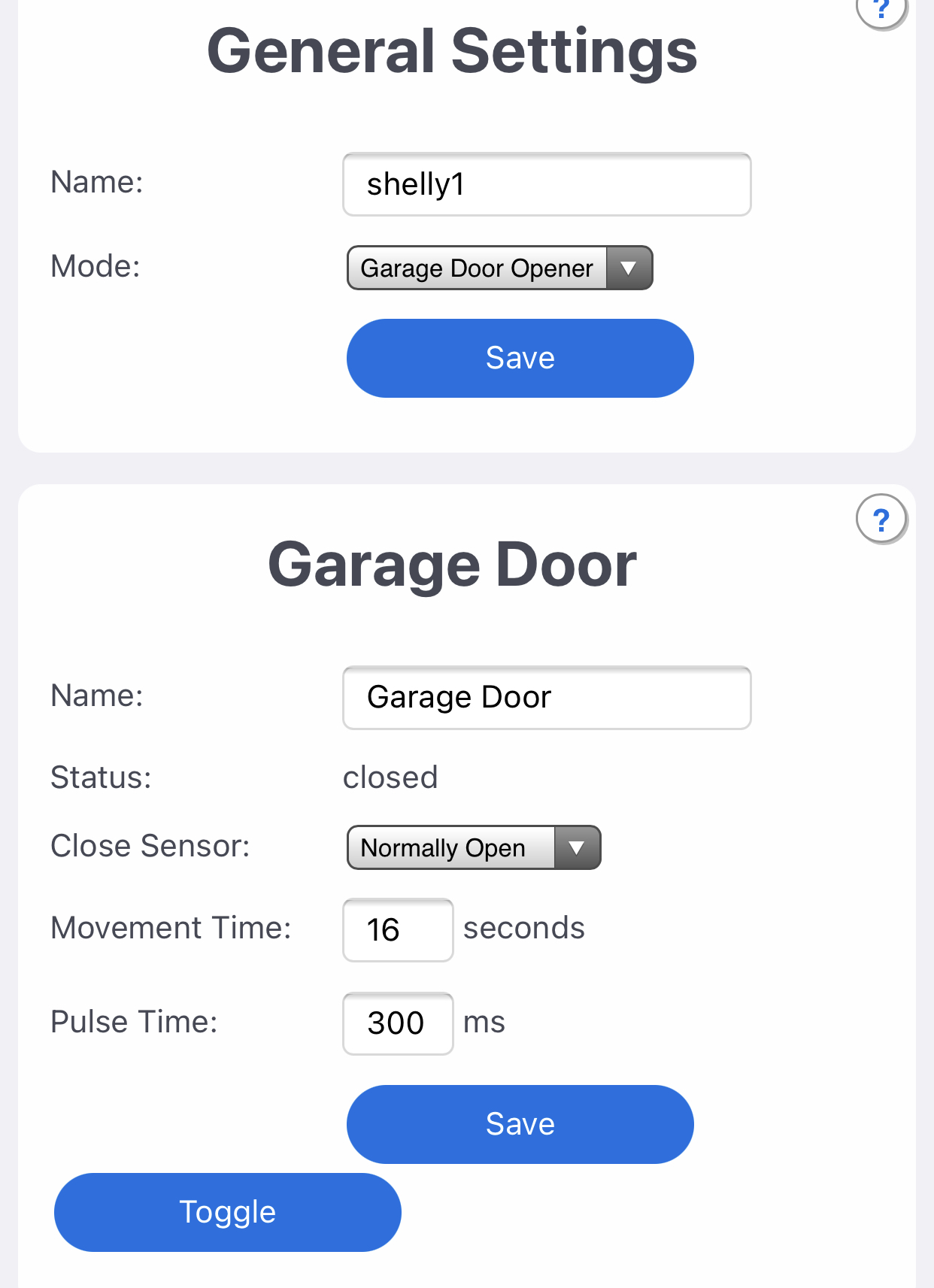
Mode: garage door opener
Close sensor: NO (but mine is NC, strange)
Movement time: 17s
Pulse time: 500ms
Whiterabbit64
on 9 Oct 2020
It works here too 👍
The only thing : my sensor is NC but I had to put NO in the settings 😲
Maybe the info given on Amazon is wrong and sensor is NO...Another point: close and open working times might be different. In my case it’s only a difference of 1s. But depending on manufacturers it could be more.
I think here it is the same....
But I don’t know exactly if the internal sensor is really NO
@rojer
NO = normally open = when the magnet moves away it closes = it is an closer
NC = normally closed = when the magnet moves away it opens = it is an opener
Pixel-Chris
on 9 Oct 2020
Pixel-Chris
on 9 Oct 2020
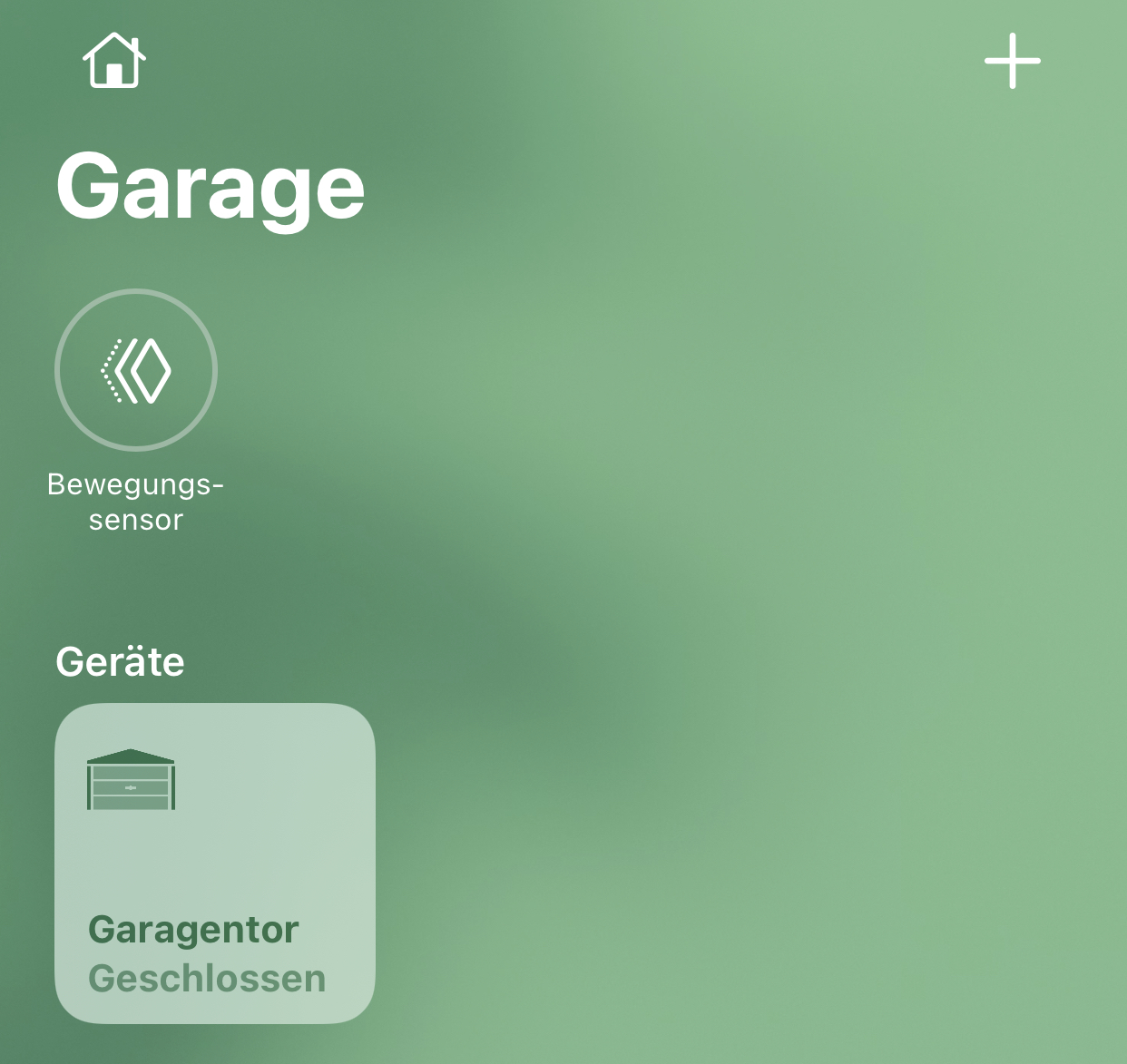
Pixel-Chris
on 9 Oct 2020
Sorry
Pixel-Chris
on 9 Oct 2020
@rojer
NO = normally open = when the magnet moves away it closes = it is an closer
NC = normally closed = when the magnet moves away it opens = it is an opener
heh, that's not my definition of "normal" :)
normally = without external force/influence.
i.e. a "normally open" relay contact is the one that is open when no current is flowing through the coil.
by the same principle, a normally open contact switch is one where contacts are open when no external force or magnetic field is present. a reed switch is normally open by that definition, since it closes and becomes conductive when in a magnetic field.
rojer
on 9 Oct 2020
Like whiterabbit64 mentioned, opening and closing time should be editable individually
And still I would go for a second sensor for the closed state
When someone/-thing gets in the photocell/lightbarrier then it gets confusing
But that‘s normal with one sensor - I think
What also works:
When the door is open and you close it, but It reaches not the door closed sensor (becaus of an stop or photocell activity) than HomeKit says that there is an obstruction 👍🏻
But with one sensor that will only work in one direction.
Pixel-Chris
on 9 Oct 2020
@rojer
NO = normally open = when the magnet moves away it closes = it is an closer
NC = normally closed = when the magnet moves away it opens = it is an openerheh, that's not my definition of "normal" :)
normally = without external force/influence.
i.e. a "normally open" relay contact is the one that is open when no current is flowing through the coil.
by the same principle, a normally open contact switch is one where contacts are open when no external force or magnetic field is present. a reed switch is normally open by that definition, since it closes and becomes conductive when in a magnetic field.
The normal state is the state where the magnet is near the sensor
Pixel-Chris
on 9 Oct 2020
Pixel-Chris
on 9 Oct 2020
second sensor for the closed state
um... you mean open, right?
yes, with just one sensor we are limited in what we can say about the door, we can only assume.
as i said, i don't want to add support for pin-header GPIOs. i can add support for 2 sensors with shelly 2 or 2.5 that have 2 proper external inputs, but someone raised a concern about them here.
The normal state is the state where the magnet is near the sensor
https://knowledgebase.absoluteautomation.com/what-is-the-difference-between-your-no-and-nc-door-switches/
hm. i guess that's industry terminology then. ok, you convinced me, i'll change the definition and also link this from the wiki.
rojer
on 9 Oct 2020
Sorry yes „Open“ 😉
The Shelly 2.5 is only a problem when you can not power it with the same power like the opener board / with the opener board power.
So the problem is, when you must use power from mains.
Pixel-Chris
on 9 Oct 2020
ok. i'll need connection diagrams for the wiki, which ones should i use?
https://www.savjee.be/2020/06/make-garage-door-opener-smart-shelly-esphome-home-assistant/ - from here for shelly 1, is there a good one for 2.5?
rojer
on 9 Oct 2020
ok. i'll need connection diagrams for the wiki, which ones should i use?
https://www.savjee.be/2020/06/make-garage-door-opener-smart-shelly-esphome-home-assistant/ - from here for shelly 1, is there a good one for 2.5?
Yes, this is perfect for the Shelly 1 and an external sensor.
give me some minutes, than i check, if i can make one for the Shelly 2.5
Pixel-Chris
on 9 Oct 2020
so..
one version:
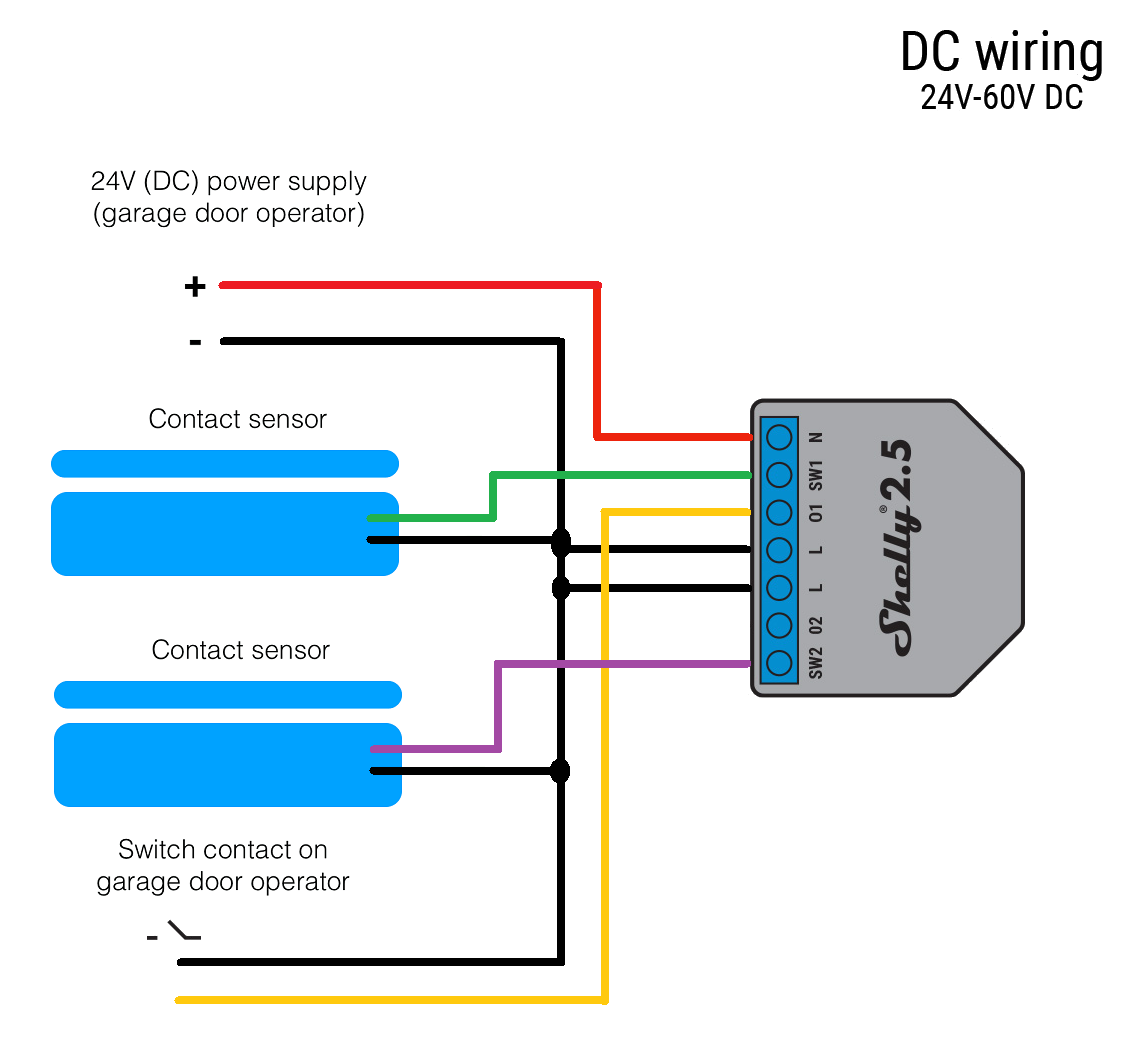
Pixel-Chris
on 9 Oct 2020
Sorry again...
is the switch so correct?
Pixel-Chris
on 9 Oct 2020
it must be wrong
the switch must connected to +
Pixel-Chris
on 9 Oct 2020
@Pixel-Chris can you perhaps do shelly1 and shelly 2.5 both in the same style?
rojer
on 9 Oct 2020
so, for alpha2 i'll do shelly 2.5 with 2 inputs.
regarding this comment by @Whiterabbit64
Another point: close and open working times might be different. In my case it’s only a difference of 1s. But depending on manufacturers it could be more.
do we care? can it really be vastly different? i mean, even if it's like 20 vs 15, set it to 20 and that's fine, no big deal.
rojer
on 9 Oct 2020
@Pixel-Chris also, let's mark sensors explicitly close (1) and open (2).
rojer
on 9 Oct 2020
@Pixel-Chris also, let's mark sensors explicitly close (1) and open (2).
like this?
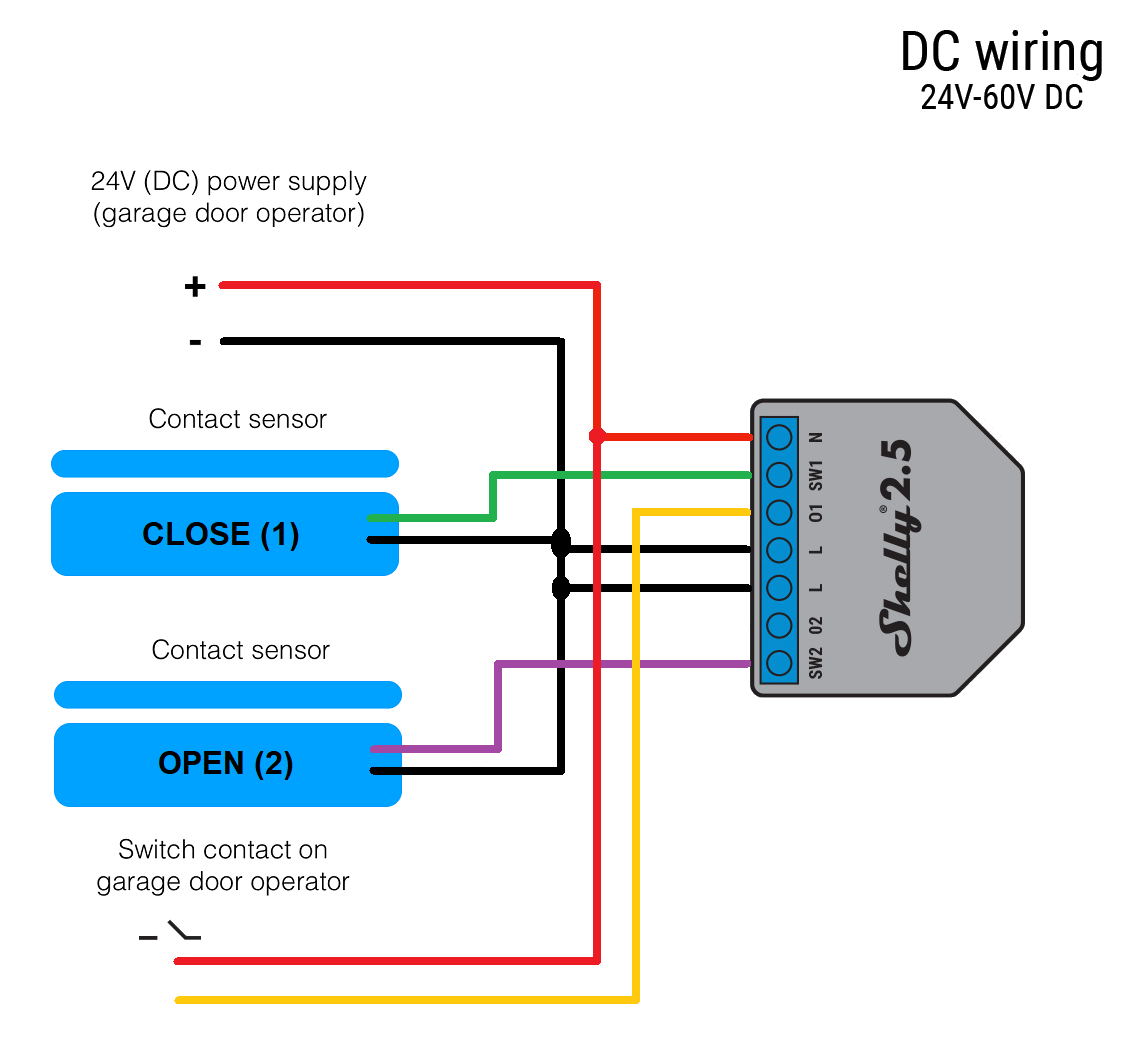
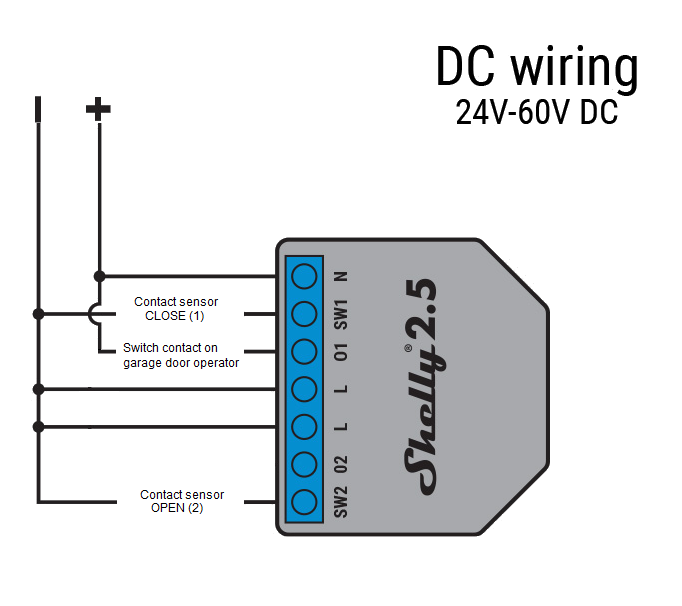
Pixel-Chris
on 9 Oct 2020
so, for alpha2 i'll do shelly 2.5 with 2 inputs.
regarding this comment by @Whiterabbit64
Another point: close and open working times might be different. In my case it’s only a difference of 1s. But depending on manufacturers it could be more.
do we care? can it really be vastly different? i mean, even if it's like 20 vs 15, set it to 20 and that's fine, no big deal.
If the timer is too long, then Home Application shows the door is opening/closing while its already opened/closed.
Whiterabbit64
on 9 Oct 2020
If the timer is too long, then Home Application shows the door is opening/closing while its already opened/closed.
true, but if it's just a few seconds... meh. not worth the added complexity and clutter in the ui, imo.
rojer
on 9 Oct 2020
Shelly 1 is in work...
Pixel-Chris
on 9 Oct 2020
@Pixel-Chris also, let's mark sensors explicitly close (1) and open (2).
like this?
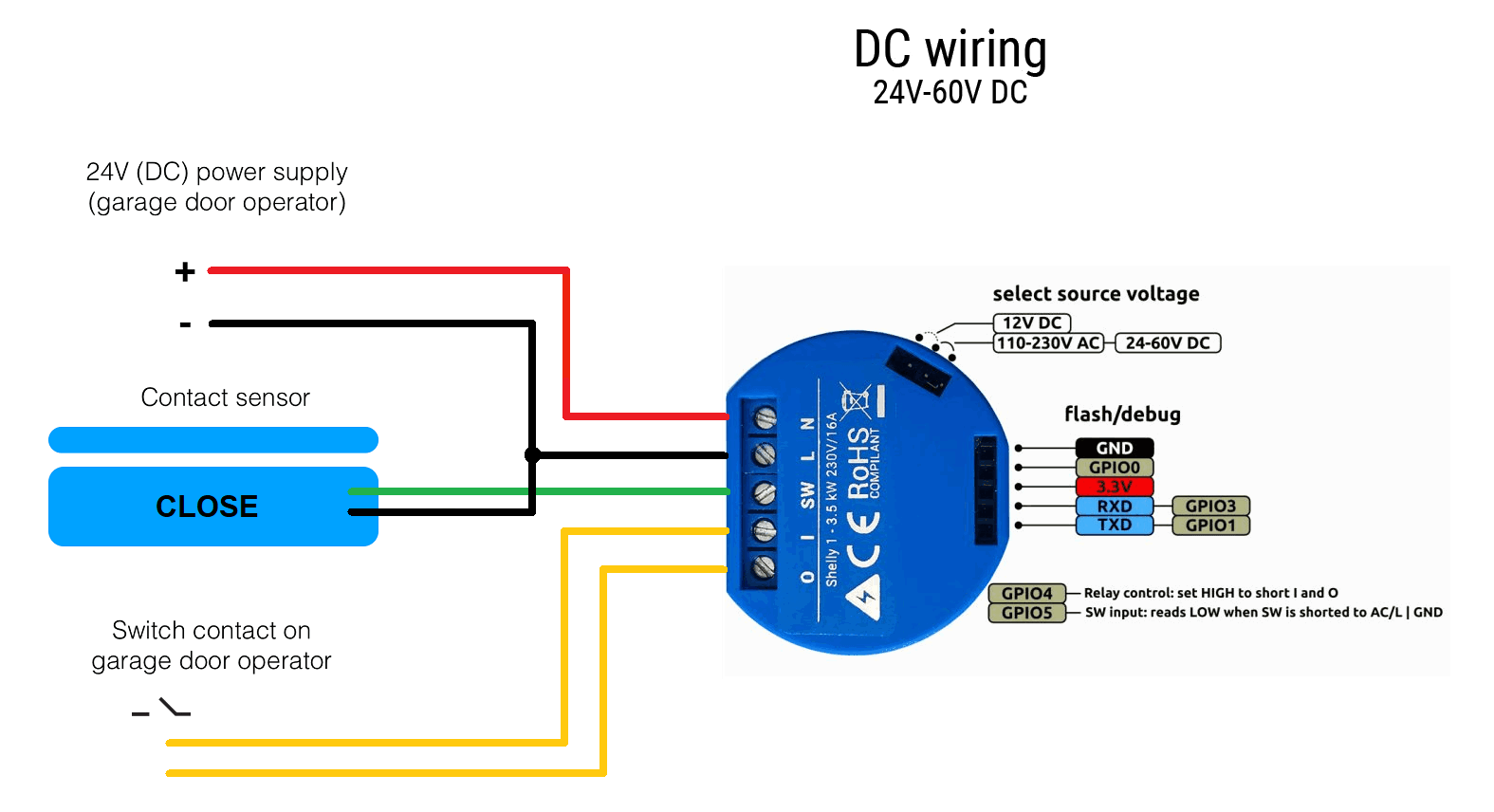
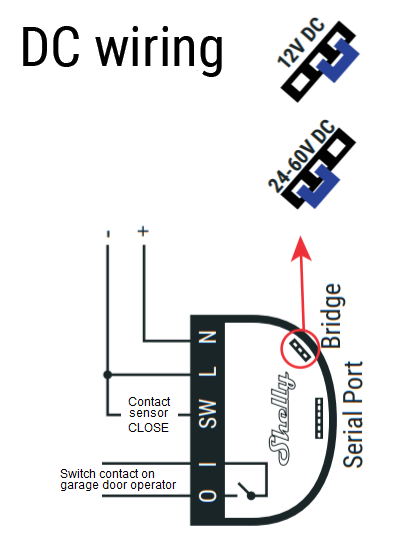
"operator" -> "controller"? english is not my native though, i could be wrong.
rojer
on 9 Oct 2020
operator seems to be the right
Pixel-Chris
on 9 Oct 2020
Pixel-Chris
on 9 Oct 2020
Pixel-Chris
on 9 Oct 2020
@Pixel-Chris also, let's mark sensors explicitly close (1) and open (2).
like this?
"operator" -> "controller"? english is not my native though, i could be wrong.
in UK we call the main board the Controller 😄
andyblac
on 9 Oct 2020
yeah, let's go with "controller". "operator" is usually a human.
rojer
on 9 Oct 2020
Finally I decided to update and wire the garage, it works !!! @rojer thank you very much!!!
I wired in the way when there is magnetic contact the door is fully open and when no contact the door is fulle closed. But the time works the other way around, when I open shows for 5 seconds opening then shows this status closed but when reaches the magnet shows again opening..... I've reduced this time to 10 seconds but the door is already open and as I said shows opening then open. When closing again shows 5 seconds closing then shows status closed but is still in movement the door and is not real closed. To open and closed takes around 18 seconds.
Ludelag
on 9 Oct 2020
Finally I decided to update and wire the garage, it works !!! @rojer thank you very much!!!
I wired in the way when there is magnetic contact the door is fully open and when no contact the door is fulle closed. But the time works the other way around, when I open shows for 5 seconds opening then shows this status closed but when reaches the magnet shows again opening..... I've reduced this time to 10 seconds but the door is already open and as I said shows opening then open. When closing again shows 5 seconds closing then shows status closed but is still in movement the door and is not real closed. To open and closed takes around 18 seconds.
The Movement Time must be set to the longest time it takes to open/close the door, so 18s in your situation.
Does the status in Home App matches the real door status once it’s opened or closed ?
Whiterabbit64
on 9 Oct 2020
doesn't sound like the input is working correctly. opening -> 5 seconds -> closed suggests that the closed switch remains active.
when in opening state, we allow 5 seconds for motion to start but after that, if "closed" sensor is active, we force state to "closed", because sensor says so.
please enable and post debug log.
rojer
on 9 Oct 2020
doesn't sound like the input is working correctly. opening -> 5 seconds -> closed suggests that the closed switch remains active.
when in opening state, we allow 5 seconds for motion to start but after that, if "closed" sensor is active, we force state to "closed", because sensor says so.
please enable and post debug log.
Enabled debug log, how to post?
Ludelag
on 9 Oct 2020
2960323973 mgos_sys_config.c:232 Loading conf2.json
2960357873 mgos_sys_config.c:232 Loading conf3.json
2960549173 mgos_sys_config.c:174 Saved to conf9.json
2960635546 mg_rpc.c:292 Shelly.GetInfo via HTTP 192.168.1.46:62143
2961701677 shelly_main.cpp:471 Uptime: 2961.69, conns 0/3/9 ns 3, RAM: 38928, 22492 free
2966346200 shelly_input.cpp:72 Input 1: change (state 1)
2966386831 shelly_hap_garage_d:201 GDO 1: Tgt State: closed -> open (1 -> 0) (ext)
2966401450 shelly_hap_garage_d:176 GDO 1: Cur State: closed -> opening (1 -> 2)
2967359689 shelly_input.cpp:72 Input 1: long (state 1)
2969701657 shelly_main.cpp:471 Uptime: 2969.69, conns 0/3/9 ns 3, RAM: 38928, 22492 free
2976486818 shelly_hap_garage_d:176 GDO 1: Cur State: opening -> open (2 -> 0)
2977701713 shelly_main.cpp:471 Uptime: 2977.69, conns 0/3/9 ns 3, RAM: 38928, 22492 free
2985701958 shelly_main.cpp:471 Uptime: 2985.69, conns 0/3/9 ns 3, RAM: 38928, 22492 free
2993701770 shelly_main.cpp:471 Uptime: 2993.69, conns 0/3/9 ns 3, RAM: 38928, 22984 free
3001701709 shelly_main.cpp:471 Uptime: 3001.69, conns 0/3/9 ns 3, RAM: 38928, 22984 free
3009701818 shelly_main.cpp:471 Uptime: 3009.69, conns 0/3/9 ns 3, RAM: 38928, 22984 free
3017701673 shelly_main.cpp:471 Uptime: 3017.69, conns 0/3/9 ns 3, RAM: 38928, 22984 free
3025701731 shelly_main.cpp:471 Uptime: 3025.69, conns 0/3/9 ns 3, RAM: 38928, 22984 free
3033701812 shelly_main.cpp:471 Uptime: 3033.69, conns 0/3/9 ns 3, RAM: 38928, 22984 free
3036865108 mgos_http_server.c:180 0x3fff5e34 HTTP connection from 192.168.1.46:62172
3036891982 mg_rpc.c:292 Shelly.SetConfig via HTTP 192.168.1.46:62172
3036906660 shelly_output.cpp:56 Output 1: off -> on (GDO:close)
3036923126 shelly_hap_garage_d:201 GDO 1: Tgt State: open -> closed (0 -> 1) (RPC)
3036937598 shelly_hap_garage_d:176 GDO 1: Cur State: open -> closing (0 -> 3)
3036985697 mgos_sys_config.c:232 Loading conf2.json
3037020221 mgos_sys_config.c:232 Loading conf3.json
3037213566 mgos_sys_config.c:174 Saved to conf9.json
3037271959 shelly_output.cpp:56 Output 1: on -> off (pulse_off)
3037520752 shelly_input.cpp:72 Input 1: change (state 0)
3037571696 shelly_hap_garage_d:176 GDO 1: Cur State: closing -> closed (3 -> 1)
3038411316 mg_rpc.c:292 Shelly.GetInfo via HTTP 192.168.1.46:62172
3041701792 shelly_main.cpp:471 Uptime: 3041.69, conns 0/3/9 ns 3, RAM: 38928, 22492 free
3049701865 shelly_main.cpp:471 Uptime: 3049.69, conns 0/3/9 ns 3, RAM: 38928, 22444 free
3057701937 shelly_main.cpp:471 Uptime: 3057.69, conns 0/3/9 ns 3, RAM: 38928, 22444 free
3065701814 shelly_main.cpp:471 Uptime: 3065.69, conns 0/3/9 ns 3, RAM: 38928, 22444 free
3073701695 shelly_main.cpp:471 Uptime: 3073.69, conns 0/3/9 ns 3, RAM: 38928, 22936 free
3081701731 shelly_main.cpp:471 Uptime: 3081.69, conns 0/3/9 ns 3, RAM: 38928, 22936 free
3089701759 shelly_main.cpp:471 Uptime: 3089.69, conns 0/3/9 ns 3, RAM: 38928, 22936 free
3097701683 shelly_main.cpp:471 Uptime: 3097.69, conns 0/3/9 ns 3, RAM: 38928, 22936 free
3105701785 shelly_main.cpp:471 Uptime: 3105.69, conns 0/3/9 ns 3, RAM: 38928, 22936 free
3113702158 shelly_main.cpp:471 Uptime: 3113.69, conns 0/3/9 ns 3, RAM: 38928, 22936 free
3121702144 shelly_main.cpp:471 Uptime: 3121.69, conns 0/3/9 ns 3, RAM: 38928, 22916 free
3129701784 shelly_main.cpp:471 Uptime: 3129.69, conns 0/3/9 ns 3, RAM: 38928, 22916 free
3137701797 shelly_main.cpp:471 Uptime: 3137.69, conns 0/3/9 ns 3, RAM: 38928, 22916 free
3145701643 shelly_main.cpp:471 Uptime: 3145.69, conns 0/3/9 ns 3, RAM: 38928, 22916 free
3153701609 shelly_main.cpp:471 Uptime: 3153.69, conns 0/3/9 ns 3, RAM: 38928, 22916 free
3161701603 shelly_main.cpp:471 Uptime: 3161.69, conns 0/3/9 ns 3, RAM: 38928, 22916 free
3169701675 shelly_main.cpp:471 Uptime: 3169.69, conns 0/3/9 ns 3, RAM: 38928, 22916 free
3177701833 shelly_main.cpp:471 Uptime: 3177.69, conns 0/3/9 ns 3, RAM: 38928, 22916 free
3185702041 shelly_main.cpp:471 Uptime: 3185.69, conns 0/3/9 ns 3, RAM: 38928, 22792 free
3193701708 shelly_main.cpp:471 Uptime: 3193.69, conns 0/3/9 ns 3, RAM: 38928, 22916 free
3201701723 shelly_main.cpp:471 Uptime: 3201.69, conns 0/3/9 ns 3, RAM: 38928, 22916 free
3209701778 shelly_main.cpp:471 Uptime: 3209.69, conns 0/3/9 ns 3, RAM: 38928, 22916 free
3217701739 shelly_main.cpp:471 Uptime: 3217.69, conns 0/3/9 ns 3, RAM: 38928, 22936 free
3225701666 shelly_main.cpp:471 Uptime: 3225.69, conns 0/3/9 ns 3, RAM: 38928, 22960 free
3233701801 shelly_main.cpp:471 Uptime: 3233.69, conns 0/3/9 ns 3, RAM: 38928, 22960 free
3241319204 mgos_http_server.c:180 0x3fff5e34 HTTP connection from 192.168.1.46:62197
3241715624 shelly_main.cpp:471 Uptime: 3241.69, conns 0/3/9 ns 3, RAM: 38928, 23820 free
3249702017 shelly_main.cpp:471 Uptime: 3249.69, conns 0/3/9 ns 3, RAM: 38928, 22772 free
3257701661 shelly_main.cpp:471 Uptime: 3257.69, conns 0/3/9 ns 3, RAM: 38928, 22964 free
3265701762 shelly_main.cpp:471 Uptime: 3265.69, conns 0/3/9 ns 3, RAM: 38928, 22964 free
3273701759 shelly_main.cpp:471 Uptime: 3273.69, conns 0/3/9 ns 3, RAM: 38928, 22964 free
3281005066 mgos_http_server.c:180 0x3fff5e34 HTTP connection from 192.168.1.46:62203
3281715600 shelly_main.cpp:471 Uptime: 3281.69, conns 0/3/9 ns 3, RAM: 38928, 23820 free
3289701679 shelly_main.cpp:471 Uptime: 3289.69, conns 0/3/9 ns 3, RAM: 38928, 22772 free
3294340215 mgos_http_server.c:180 0x3fff5e34 HTTP connection from 192.168.1.46:62204
3297715596 shelly_main.cpp:471 Uptime: 3297.69, conns 0/3/9 ns 3, RAM: 38928, 23820 free
3301652523 mgos_http_server.c:180 0x3fff5ef4 HTTP connection from
Ludelag
on 9 Oct 2020
@rojer Again... great job!!!
For me is working perfectly!
Here is how it is connected to keep the original remote (Mine comes with the transmitter outside).
Thanks again Rojer.
juancitomadrid
on 9 Oct 2020
@Ludelag ok, so what i see in the log is:
3036891982 mg_rpc.c:292 Shelly.SetConfig via HTTP 192.168.1.46:62172
3036906660 shelly_output.cpp:56 Output 1: off -> on (GDO:close)
3036923126 shelly_hap_garage_d:201 GDO 1: Tgt State: open -> closed (0 -> 1) (RPC)
3036937598 shelly_hap_garage_d:176 GDO 1: Cur State: open -> closing (0 -> 3)
3036985697 mgos_sys_config.c:232 Loading conf2.json
3037020221 mgos_sys_config.c:232 Loading conf3.json
3037213566 mgos_sys_config.c:174 Saved to conf9.json
3037271959 shelly_output.cpp:56 Output 1: on -> off (pulse_off)
3037520752 shelly_input.cpp:72 Input 1: change (state 0)
3037571696 shelly_hap_garage_d:176 GDO 1: Cur State: closing -> closed (3 -> 1)
3038411316 mg_rpc.c:292 Shelly.GetInfo via HTTP 192.168.1.46:62172
you pressed the "toggle" button in the ui, shelly pulsed output and the input changed from 1 to 0 immediately, which was interpreted as "closed". in fact, i think it should be the opposite. try changing input mode.
note that in alpha1 they are mislabeled (as we established in https://github.com/mongoose-os-apps/shelly-homekit/issues/142#issuecomment-706262628).
rojer
on 9 Oct 2020
ok everyone, please update to alpha2 (via web ui or here).
- Relabeled input modes NO <-> NC
- Shelly2 and 2.5 support, with optional "fully open" sensor
- Fix device mode selection dropdown, hide roller shutter option on shelly 1
- Check for updates from web UI automatically once a week
rojer
on 9 Oct 2020
@rojer,
NO = normally open = when the magnet moves away it closes = it is an closer
NC = normally closed = when the magnet moves away it opens = it is an opener
This is in the 142 comment, I have wired the other side around. It means when the two parts of the sensor are together the door is open, and when moves away it closes. But if I configure the shelly to NO with my wired confirguration shows as open, but when I configure the Shelly as normal NC shows closed when is real closed but behaives as described in my previous post. Should I change the wiring ?
Ludelag
on 9 Oct 2020
@Ludelag ok, i'm confused... anyway, please update to alpha2, try both input modes and if neither works, post log from both.
rojer
on 9 Oct 2020
For Shelly 1
The sensor is only for the side, when the door is closed!
I think you connect it to your garage door, that way, that it should show an opened door, correct?
Pixel-Chris
on 9 Oct 2020
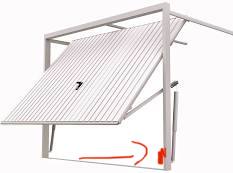
The sensor needs to be here:
Not here:
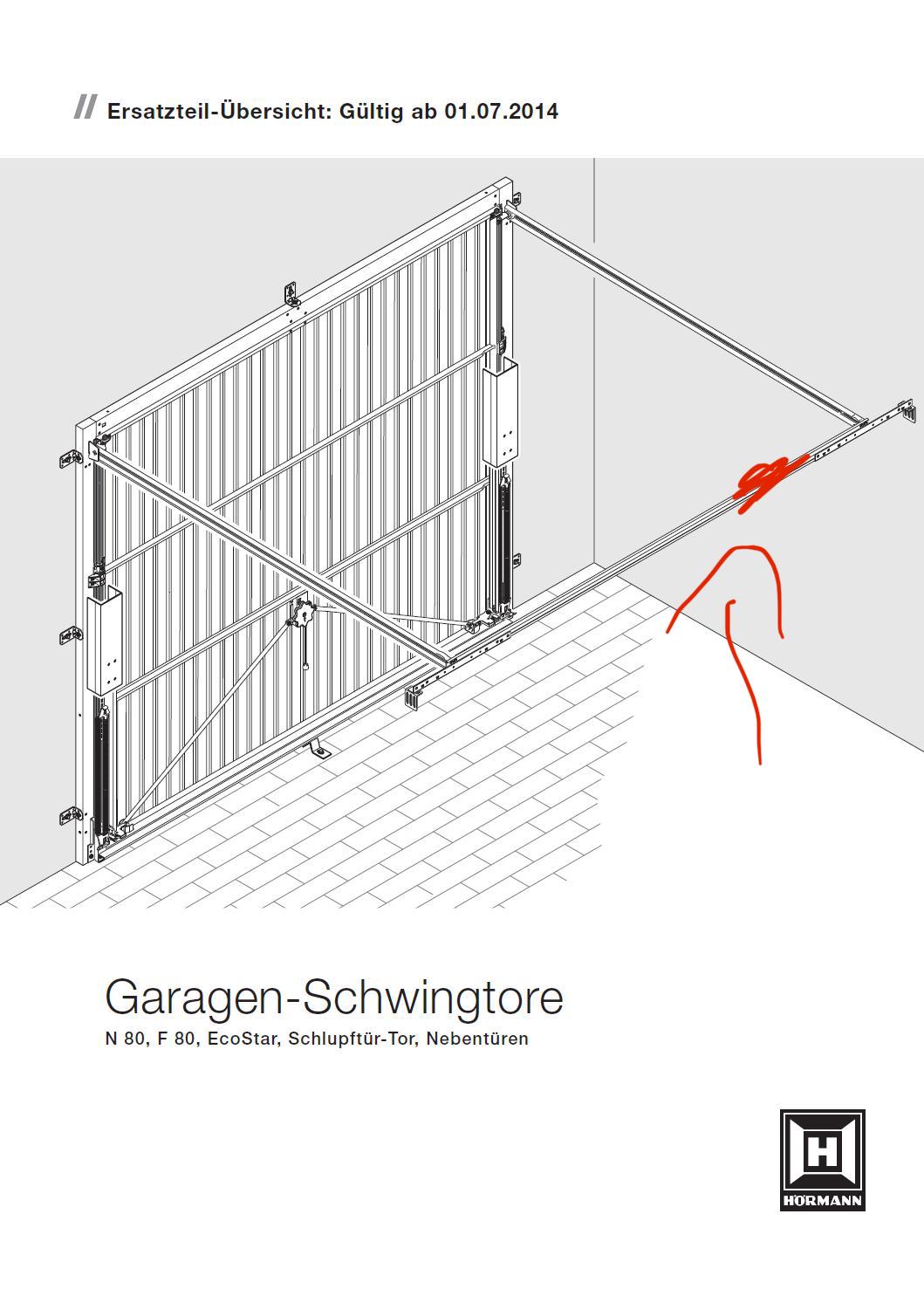
Pixel-Chris
on 9 Oct 2020
The sensor is only for the closed state of the door
Pixel-Chris
on 9 Oct 2020
@Pixel-Chris please help test two-input mode with shelly 2.5, if you have one
rojer
on 9 Oct 2020
NO / NC has nothing to to with the state of the door !
It is only the type of the sensor
Pixel-Chris
on 9 Oct 2020
@rojer
Yes
Everything is here
Shelly 2.5 and extra sensor for door open state
I will update tomorrow and give feedback
Pixel-Chris
on 9 Oct 2020
For Shelly 1
The sensor is only for the side, when the door is closed!
I think you connect it to your garage door, that way, that it should show an opened door, correct?
Correct, it means, the sensors are separeted when the door is closed, sensors are together when the door is open.
Ludelag
on 9 Oct 2020
@rojer this is the log for normally open:
79649570 HAPPlatformTCPStrea:274 0x3fff6464 192.168.1.87:51917 Accepted HAP connection, ns 0/2/9 ts 0x3fff60e4
81212599 shelly_main.cpp:471 Uptime: 81.20, conns 0/2/9 ns 2, RAM: 38920, 22768 free
83017777 HAPPlatformTCPStrea:120 0x3fff6a74 192.168.1.46:52387 Incoming HAP connection, ns 0/2/9
83037579 HAPPlatformTCPStrea:274 0x3fff6a74 192.168.1.46:52387 Accepted HAP connection, ns 0/3/9 ts 0x3fff5b24
84903334 shelly_output.cpp:56 Output 1: off -> on (GDO:close)
84918052 shelly_hap_garage_d:213 GDO 1: Tgt State: open -> closed (0 -> 1) (HAP)
84934313 shelly_hap_garage_d:184 GDO 1: Cur State: open -> closing (0 -> 3)
85216982 shelly_output.cpp:56 Output 1: on -> off (pulse_off)
85450270 shelly_input.cpp:72 Input 1: change (state 0)
85508254 shelly_hap_garage_d:184 GDO 1: Cur State: closing -> closed (3 -> 1)
88753374 shelly_main.cpp:471 Uptime: 88.74, conns 0/3/9 ns 3, RAM: 38920, 22984 free
96754030 shelly_main.cpp:471 Uptime: 96.74, conns 0/3/9 ns 3, RAM: 38920, 22984 free
104753849 shelly_main.cpp:471 Uptime: 104.74, conns 0/3/9 ns 3, RAM: 38920, 22984 free
112753753 shelly_main.cpp:471 Uptime: 112.74, conns 0/3/9 ns 3, RAM: 38920, 22984 free
120753511 shelly_main.cpp:471 Uptime: 120.74, conns 0/3/9 ns 3, RAM: 38920, 22984 free
128753597 shelly_main.cpp:471 Uptime: 128.74, conns 0/3/9 ns 3, RAM: 38920, 22984 free
136753368 shelly_main.cpp:471 Uptime: 136.74, conns 0/3/9 ns 3, RAM: 38920, 22984 free
144753575 shelly_main.cpp:471 Uptime: 144.74, conns 0/3/9 ns 3, RAM: 38920, 22984 free
152753669 shelly_main.cpp:471 Uptime: 152.74, conns 0/3/9 ns 3, RAM: 38920, 22984 free
160754059 shelly_main.cpp:471 Uptime: 160.74, conns 0/3/9 ns 3, RAM: 38920, 22984 free
168753883 shelly_main.cpp:471 Uptime: 168.74, conns 0/3/9 ns 3, RAM: 38920, 22984 free
176753826 shelly_main.cpp:471 Uptime: 176.74, conns 0/3/9 ns 3, RAM: 38920, 22984 free
184753524 shelly_main.cpp:471 Uptime: 184.74, conns 0/3/9 ns 3, RAM: 38920, 22984 free
192753544 shelly_main.cpp:471 Uptime: 192.74, conns 0/3/9 ns 3, RAM: 38920, 22984 free
200753625 shelly_main.cpp:471 Uptime: 200.74, conns 0/3/9 ns 3, RAM: 38920, 22984 free
208753554 shelly_main.cpp:471 Uptime: 208.74, conns 0/3/9 ns 3, RAM: 38920, 22984 free
209154922 HAPPlatformTCPStrea:104 0x3fff6464 192.168.1.87:51917 HAP connection closed, ns 0/3/9 i 2
209171787 HAPPlatformTCPStrea:301 HAPPlatformTCPStreamClose ts 0x3fff60e4 nc 0x0 0/2/9
216753733 shelly_main.cpp:471 Uptime: 216.74, conns 0/2/9 ns 2, RAM: 38920, 23456 free
224753922 shelly_main.cpp:471 Uptime: 224.74, conns 0/2/9 ns 2, RAM: 38920, 23456 free
232753862 shelly_main.cpp:471 Uptime: 232.74, conns 0/2/9 ns 2, RAM: 38920, 23456 free
240753466 shelly_main.cpp:471 Uptime: 240.74, conns 0/2/9 ns 2, RAM: 38920, 23456 free
248753784 shelly_main.cpp:471 Uptime: 248.74, conns 0/2/9 ns 2, RAM: 38920, 23456 free
256753704 shelly_main.cpp:471 Uptime: 256.74, conns 0/2/9 ns 2, RAM: 38920, 23456 free
259770980 mgos_http_server.c:180 0x3fff67ec HTTP connection from 192.168.1.45:55596
259786374 mgos_http_server.c:180 0x3fff643c HTTP connection from 192.168.1.45:55597
Ludelag
on 9 Oct 2020
Log Normally close:
79649570 HAPPlatformTCPStrea:274 0x3fff6464 192.168.1.87:51917 Accepted HAP connection, ns 0/2/9 ts 0x3fff60e4
81212599 shelly_main.cpp:471 Uptime: 81.20, conns 0/2/9 ns 2, RAM: 38920, 22768 free
83017777 HAPPlatformTCPStrea:120 0x3fff6a74 192.168.1.46:52387 Incoming HAP connection, ns 0/2/9
83037579 HAPPlatformTCPStrea:274 0x3fff6a74 192.168.1.46:52387 Accepted HAP connection, ns 0/3/9 ts 0x3fff5b24
84903334 shelly_output.cpp:56 Output 1: off -> on (GDO:close)
84918052 shelly_hap_garage_d:213 GDO 1: Tgt State: open -> closed (0 -> 1) (HAP)
84934313 shelly_hap_garage_d:184 GDO 1: Cur State: open -> closing (0 -> 3)
85216982 shelly_output.cpp:56 Output 1: on -> off (pulse_off)
85450270 shelly_input.cpp:72 Input 1: change (state 0)
85508254 shelly_hap_garage_d:184 GDO 1: Cur State: closing -> closed (3 -> 1)
88753374 shelly_main.cpp:471 Uptime: 88.74, conns 0/3/9 ns 3, RAM: 38920, 22984 free
96754030 shelly_main.cpp:471 Uptime: 96.74, conns 0/3/9 ns 3, RAM: 38920, 22984 free
104753849 shelly_main.cpp:471 Uptime: 104.74, conns 0/3/9 ns 3, RAM: 38920, 22984 free
112753753 shelly_main.cpp:471 Uptime: 112.74, conns 0/3/9 ns 3, RAM: 38920, 22984 free
120753511 shelly_main.cpp:471 Uptime: 120.74, conns 0/3/9 ns 3, RAM: 38920, 22984 free
128753597 shelly_main.cpp:471 Uptime: 128.74, conns 0/3/9 ns 3, RAM: 38920, 22984 free
136753368 shelly_main.cpp:471 Uptime: 136.74, conns 0/3/9 ns 3, RAM: 38920, 22984 free
144753575 shelly_main.cpp:471 Uptime: 144.74, conns 0/3/9 ns 3, RAM: 38920, 22984 free
152753669 shelly_main.cpp:471 Uptime: 152.74, conns 0/3/9 ns 3, RAM: 38920, 22984 free
160754059 shelly_main.cpp:471 Uptime: 160.74, conns 0/3/9 ns 3, RAM: 38920, 22984 free
168753883 shelly_main.cpp:471 Uptime: 168.74, conns 0/3/9 ns 3, RAM: 38920, 22984 free
176753826 shelly_main.cpp:471 Uptime: 176.74, conns 0/3/9 ns 3, RAM: 38920, 22984 free
184753524 shelly_main.cpp:471 Uptime: 184.74, conns 0/3/9 ns 3, RAM: 38920, 22984 free
192753544 shelly_main.cpp:471 Uptime: 192.74, conns 0/3/9 ns 3, RAM: 38920, 22984 free
200753625 shelly_main.cpp:471 Uptime: 200.74, conns 0/3/9 ns 3, RAM: 38920, 22984 free
208753554 shelly_main.cpp:471 Uptime: 208.74, conns 0/3/9 ns 3, RAM: 38920, 22984 free
209154922 HAPPlatformTCPStrea:104 0x3fff6464 192.168.1.87:51917 HAP connection closed, ns 0/3/9 i 2
209171787 HAPPlatformTCPStrea:301 HAPPlatformTCPStreamClose ts 0x3fff60e4 nc 0x0 0/2/9
216753733 shelly_main.cpp:471 Uptime: 216.74, conns 0/2/9 ns 2, RAM: 38920, 23456 free
224753922 shelly_main.cpp:471 Uptime: 224.74, conns 0/2/9 ns 2, RAM: 38920, 23456 free
232753862 shelly_main.cpp:471 Uptime: 232.74, conns 0/2/9 ns 2, RAM: 38920, 23456 free
240753466 shelly_main.cpp:471 Uptime: 240.74, conns 0/2/9 ns 2, RAM: 38920, 23456 free
248753784 shelly_main.cpp:471 Uptime: 248.74, conns 0/2/9 ns 2, RAM: 38920, 23456 free
256753704 shelly_main.cpp:471 Uptime: 256.74, conns 0/2/9 ns 2, RAM: 38920, 23456 free
259770980 mgos_http_server.c:180 0x3fff67ec HTTP connection from 192.168.1.45:55596
259786374 mgos_http_server.c:180 0x3fff643c HTTP connection from 192.168.1.45:55597
Ludelag
on 9 Oct 2020
@rojer, I think should be what @Pixel-Chris says, Shelly works in the other side around, it means I should wire the sensors together when the door is closed and not when they are open.
Ludelag
on 9 Oct 2020
I will change the position of the sensor and let you know @rojer @Pixel-Chris
Ludelag
on 9 Oct 2020
Done! now it works perfect!!! only there is a delay of 1 or 2 seconds when the door is closing.
@rojer you are a genious! @Pixel-Chris you found the right wiring now all is working perfect!!!
Ludelag
on 10 Oct 2020
I think this is a normal behavior because my "old" firmeware of HomeKitBG needs always 1-2 secounds to Show the status. Maybe this is Homkit...But i think this is no real problem 😀
Stundenplan7b
on 10 Oct 2020
Hi, today my time is very little for this project, but i have checked my wiring and retext the pictures...
And i tested it with the Shelly 2.5
So there was one mistake in the connection of the switch, i also correct this in the pictures.
My test results for today:
the webui works fine, the state of the door is correct. But when i press the toggle button, then the shelly is for the time of movement not controllable it dont reacts.
Here both sensor are working correctly !
But in HomeKit they don't work! or it takes some time (but more than 10 seconds?)
I must check that later.
Here the new pictures:
Shelly 1:
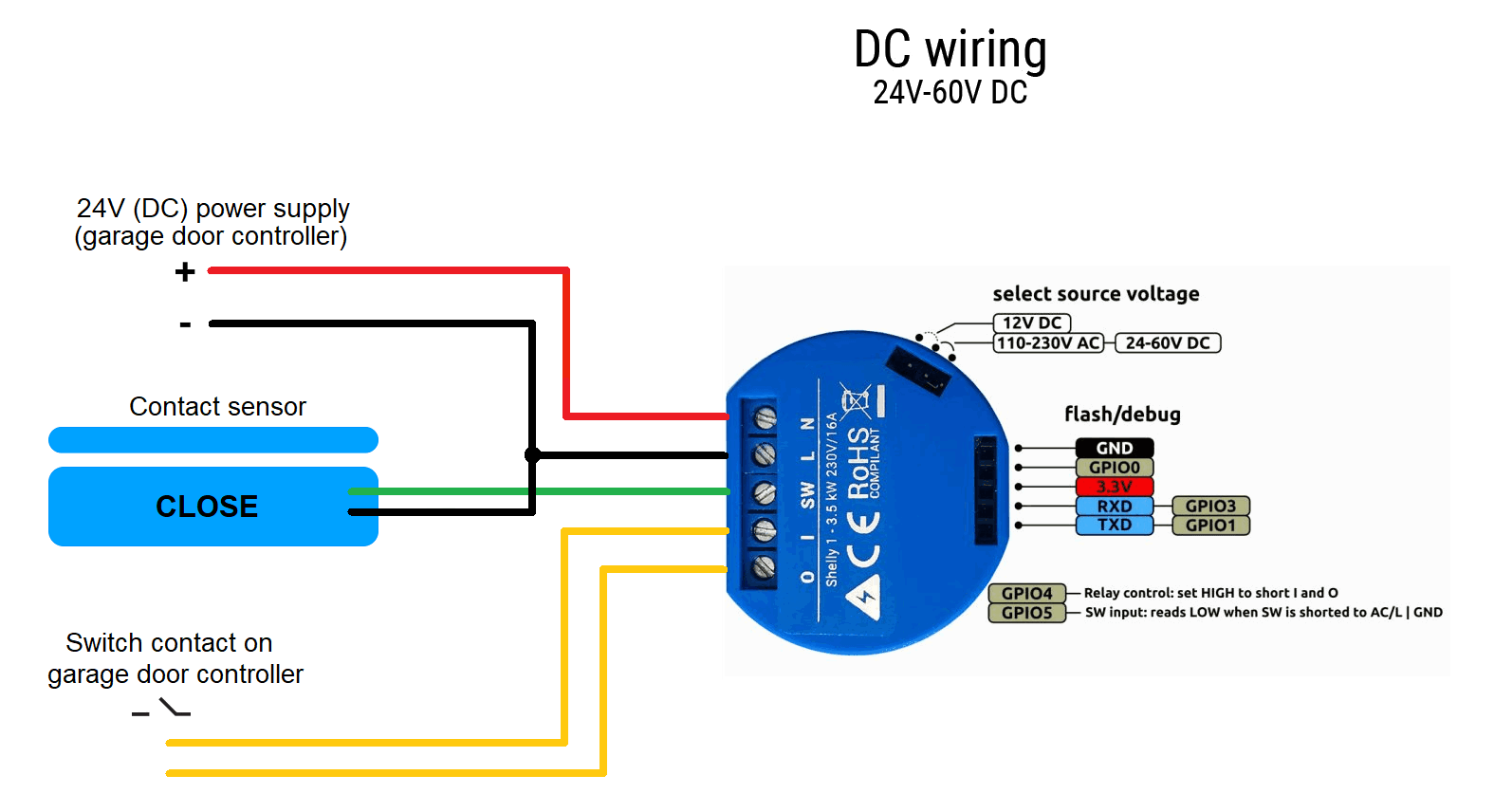
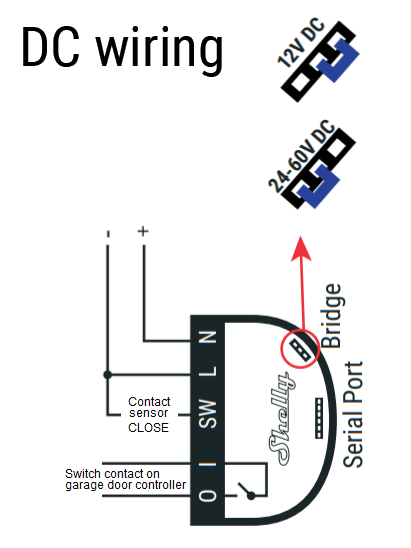
Shelly 2.5:
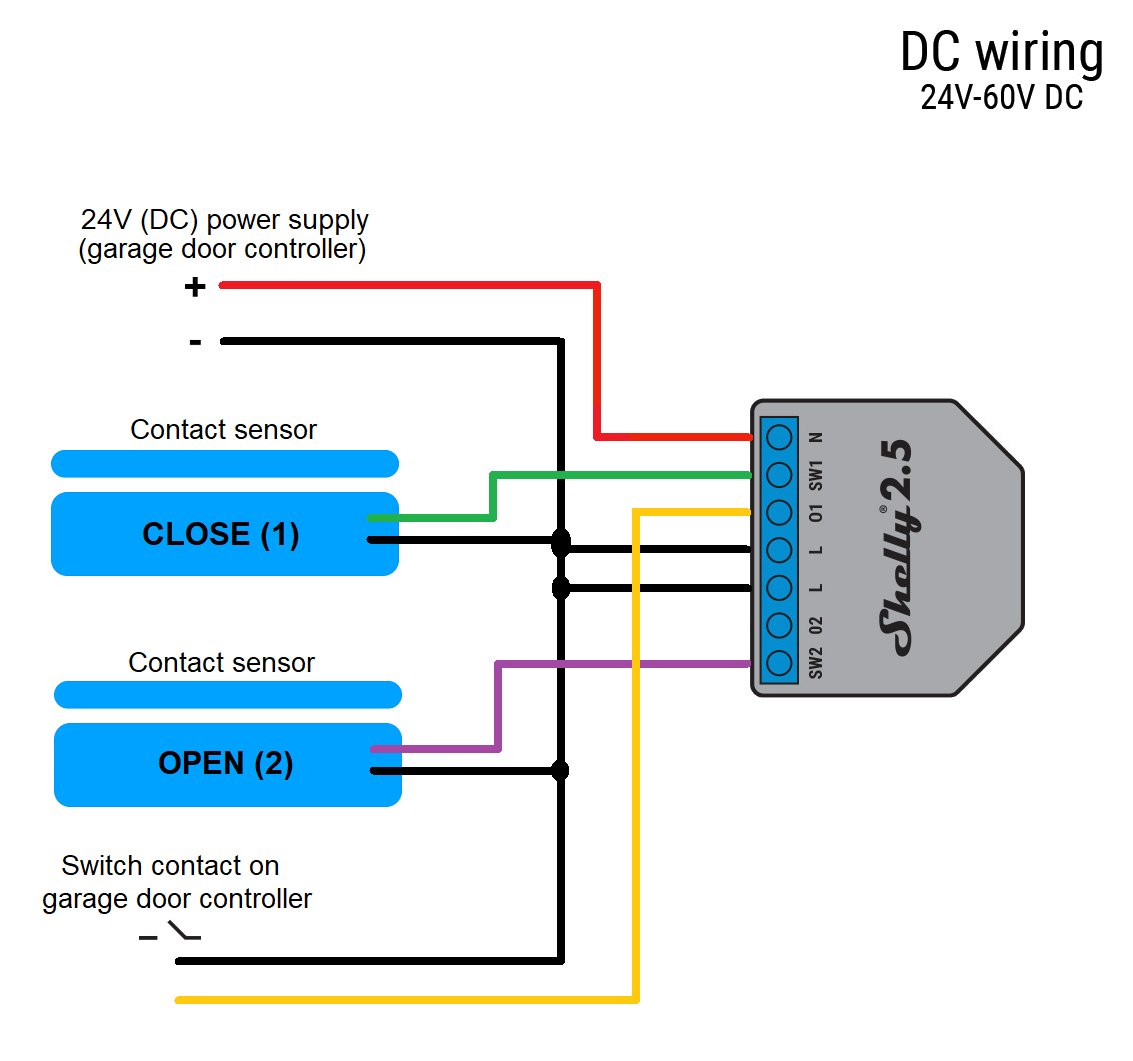
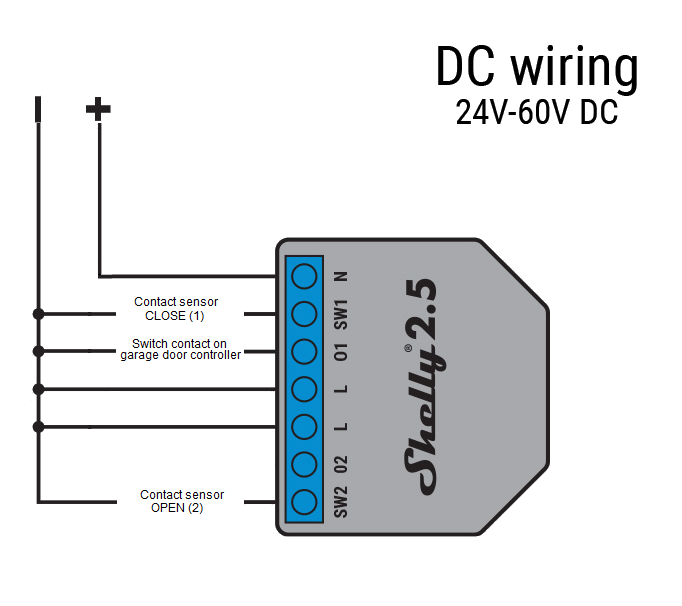
Pixel-Chris
on 10 Oct 2020
ok, that's a subtle difference in how chrome and safari handle invisible select elements.
i'll fix it in a future alpha, for now just ignore the roller shutter setting, it won't do anything on shelly1.
seems to be fixed in alpha2.
andyblac
on 10 Oct 2020
Tested today again.
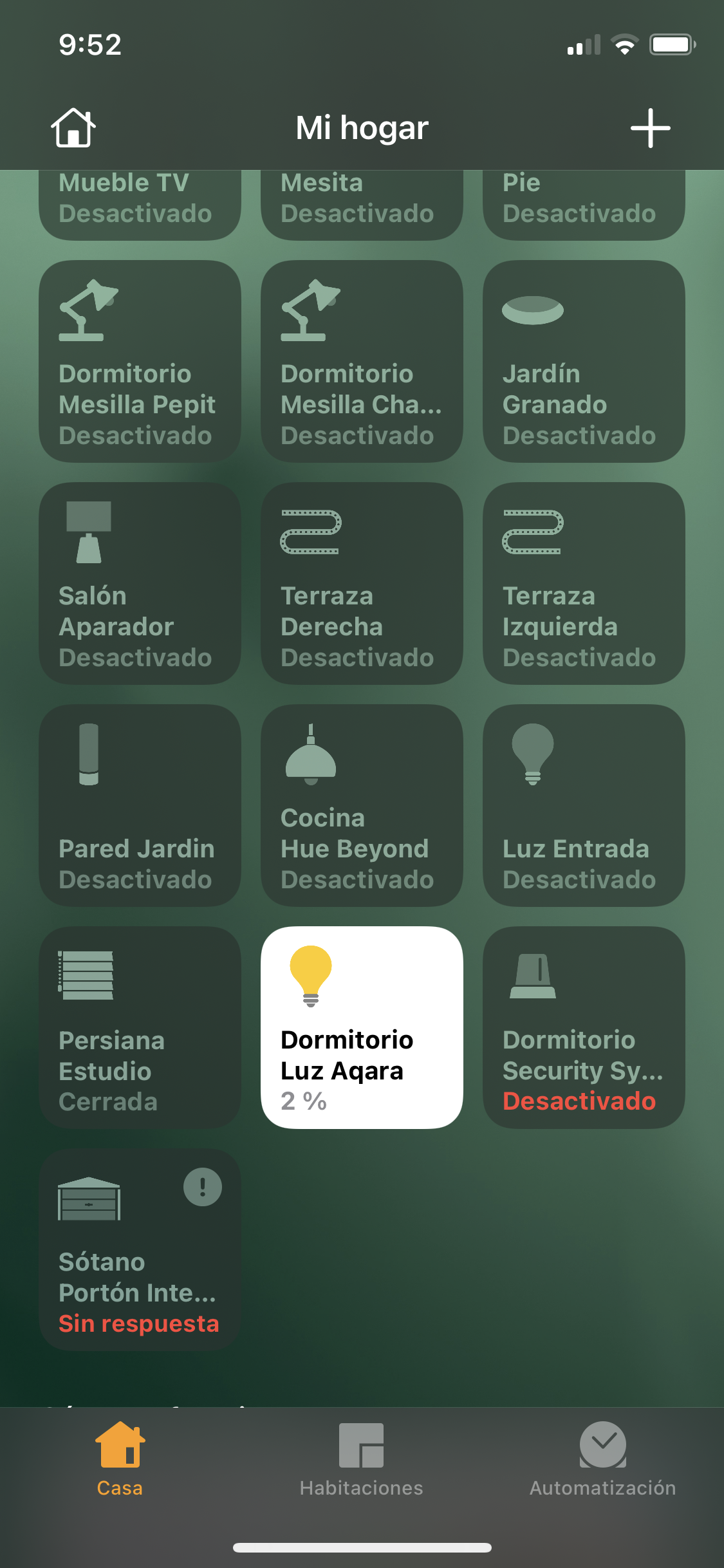
I have “not connection” or “updating” status.
juancitomadrid
on 10 Oct 2020
@Pixel-Chris yes, please test and post results here, along with logs.
@juancitomadrid is the device reachable via web ui? please enable and post logs.
rojer
on 10 Oct 2020
@rojer: by the way, a big THANK YOU for the quick, and efficient, implementation of the garage door mode.
I’ve now configured 2 doors and it works like a charm 👍
Whiterabbit64
on 10 Oct 2020
I notice that sometimes when the door is opening, takes so long time showing opening, then immediately change the status to closing beside the door is open steady and hasn't been trigger to close.
58466845346 mgos_sys_config.c:232 Loading conf2.json
58466879579 mgos_sys_config.c:232 Loading conf3.json
58467071424 mgos_sys_config.c:174 Saved to conf9.json
58467173649 mg_rpc.c:292 Shelly.GetInfo via HTTP 192.168.1.82:56727
58468518219 mgos_http_server.c:180 0x3fff620c HTTP connection from 192.168.1.82:56728
58468536448 mgos_http_server.c:187 0x3fff620c GET /favicon.ico
58470210873 shelly_main.cpp:471 Uptime: 58470.20, conns 0/5/9 ns 5, RAM: 38920, 21624 free
58475772632 mgos_http_server.c:180 0x3fff5b5c HTTP connection from 192.168.1.82:56729
58477673018 mgos_http_server.c:180 0x3fff5b5c HTTP connection from 192.168.1.82:56734
58478224704 shelly_main.cpp:471 Uptime: 58478.20, conns 0/5/9 ns 5, RAM: 38920, 22504 free
58479687911 mgos_http_server.c:180 0x3fff5b5c HTTP connection from 192.168.1.82:56735
58480607627 mgos_http_server.c:180 0x3fff5b5c HTTP connection from 192.168.1.82:56736
58481303660 mgos_http_server.c:180 0x3fff5b5c HTTP connection from 192.168.1.82:56737
58486224714 shelly_main.cpp:471 Uptime: 58486.20, conns 0/5/9 ns 5, RAM: 38920, 22508 free
58489736278 shelly_output.cpp:56 Output 1: off -> on (GDO:open)
58489751081 shelly_hap_garage_d:213 GDO 1: Tgt State: closed -> open (1 -> 0) (HAP)
58489767589 shelly_hap_garage_d:184 GDO 1: Cur State: closed -> opening (1 -> 2)
58490049994 shelly_output.cpp:56 Output 1: on -> off (pulse_off)
58490344842 shelly_input.cpp:72 Input 1: change (state 0)
58494211015 shelly_main.cpp:471 Uptime: 58494.20, conns 0/5/9 ns 5, RAM: 38920, 21984 free
58502210904 shelly_main.cpp:471 Uptime: 58502.20, conns 0/5/9 ns 5, RAM: 38920, 21984 free
58507848142 shelly_hap_garage_d:184 GDO 1: Cur State: opening -> open (2 -> 0)
58510210978 shelly_main.cpp:471 Uptime: 58510.20, conns 0/5/9 ns 5, RAM: 38920, 21984 free
58515525711 shelly_output.cpp:56 Output 1: off -> on (GDO:close)
58515540530 shelly_hap_garage_d:213 GDO 1: Tgt State: open -> closed (0 -> 1) (HAP)
58515555075 shelly_hap_garage_d:184 GDO 1: Cur State: open -> closing (0 -> 3)
58515840104 shelly_output.cpp:56 Output 1: on -> off (pulse_off)
58518211052 shelly_main.cpp:471 Uptime: 58518.20, conns 0/5/9 ns 5, RAM: 38920, 21984 free
58526211062 shelly_main.cpp:471 Uptime: 58526.20, conns 0/5/9 ns 5, RAM: 38920, 21984 free
58533648349 shelly_hap_garage_d:184 GDO 1: Cur State: closing -> stopped (3 -> 4)
58534210963 shelly_main.cpp:471 Uptime: 58534.20, conns 0/5/9 ns 5, RAM: 38920, 21984 free
58535511345 shelly_input.cpp:72 Input 1: change (state 1)
58535547572 shelly_hap_garage_d:184 GDO 1: Cur State: stopped -> closed (4 -> 1)
58536527447 shelly_input.cpp:72 Input 1: long (state 1)
58542211032 shelly_main.cpp:471 Uptime: 58542.20, conns 0/5/9 ns 5, RAM: 38920, 21984 free
58544386235 mgos_http_server.c:180 0x3fff62f4 HTTP connection from 192.168.1.82:56744
Ludelag
on 10 Oct 2020
@Pixel-Chris yes, please test and post results here, along with logs.
@juancitomadrid is the device reachable via web ui? please enable and post logs.
Sorry, I don't know if this is what you need...
I enable logs and this is what I have...
27611129901:1602343832857574 mgos_sys_config.c:232 Loading conf2.json
27611269696 mgos_sys_config.c:174 Saved to conf9.json
27611310026 mg_rpc.c:292 Shelly.GetInfo via HTTP 192.168.2.51:55600
27613747174 mgos_http_server.c:180 0x3fff654c HTTP connection from 192.168.2.51:55603
juancitomadrid
on 10 Oct 2020
@juancitomadrid good, please capture and post log now taht some time has passed. i want to see if there are any conenction attempts.
rojer
on 10 Oct 2020
@Ludelag in the log you posted i see two commands coming via HAP, first to open and then to close. command to close arrives 7.5 seconds after we reported "open" state, i assume it was tap in the Home app. everything seems normal.
rojer
on 10 Oct 2020
@rojer sorry for the silly question ...
but when you say "capture" what do you mean?
Now what I'm doing is just entering Shelly's IP through the browser, using the Alpha2 UI and hitting the Log button.
Here what I get (I think it's the same as before).
27611129901:1602343832857574 mgos_sys_config.c:232 Loading conf2.json
27611269696 mgos_sys_config.c:174 Saved to conf9.json
27611310026 mg_rpc.c:292 Shelly.GetInfo via HTTP 192.168.2.51:55600
27613747174 mgos_http_server.c:180 0x3fff654c HTTP connection from 192.168.2.51:55603
juancitomadrid
on 10 Oct 2020
that's what i meant, yeah. press reload on that page, you should see more recent messages.
rojer
on 10 Oct 2020
I kept getting the same.
I have done it from incognito mode ... and now I think I got it.
32922078423 shelly_main.cpp:471 Uptime: 32921.97, conns 0/2/9 ns 2, RAM: 38920, 23068 free
32929977331 shelly_main.cpp:471 Uptime: 32929.97, conns 0/2/9 ns 2, RAM: 38920, 23068 free
32937977342 shelly_main.cpp:471 Uptime: 32937.97, conns 0/2/9 ns 2, RAM: 38920, 23068 free
32941660581 HAPPlatformTCPStrea:120 0x3fff595c 192.168.2.53:52026 Incoming HAP connection, ns 0/2/9
32941674595 HAPPlatformTCPStrea:274 0x3fff595c 192.168.2.53:52026 Accepted HAP connection, ns 0/3/9 ts 0x3fff5db4
32945977354 shelly_main.cpp:471 Uptime: 32945.97, conns 0/3/9 ns 3, RAM: 38920, 22576 free
32953977293 shelly_main.cpp:471 Uptime: 32953.97, conns 0/3/9 ns 3, RAM: 38920, 22576 free
32961977360 shelly_main.cpp:471 Uptime: 32961.97, conns 0/3/9 ns 3, RAM: 38920, 22576 free
32969977330 shelly_main.cpp:471 Uptime: 32969.97, conns 0/3/9 ns 3, RAM: 38920, 22576 free
32977977322 shelly_main.cpp:471 Uptime: 32977.97, conns 0/3/9 ns 3, RAM: 38920, 22576 free
32985977380 shelly_main.cpp:471 Uptime: 32985.97, conns 0/3/9 ns 3, RAM: 38920, 22576 free
32993977293 shelly_main.cpp:471 Uptime: 32993.97, conns 0/3/9 ns 3, RAM: 38920, 22576 free
33001464917 HAPPlatformTCPStrea:120 0x3fff6a14 192.168.2.62:50037 Incoming HAP connection, ns 0/3/9
33001479898 HAPPlatformTCPStrea:274 0x3fff6a14 192.168.2.62:50037 Accepted HAP connection, ns 0/4/9 ts 0x3fff5bd4
33002559256 shelly_main.cpp:471 Uptime: 33002.55, conns 0/4/9 ns 4, RAM: 38920, 21488 free
33009977381 shelly_main.cpp:471 Uptime: 33009.97, conns 0/4/9 ns 4, RAM: 38920, 22080 free
33017977351 shelly_main.cpp:471 Uptime: 33017.97, conns 0/4/9 ns 4, RAM: 38920, 22080 free
33025977333 shelly_main.cpp:471 Uptime: 33025.97, conns 0/4/9 ns 4, RAM: 38920, 22080 free
33033977329 shelly_main.cpp:471 Uptime: 33033.97, conns 0/4/9 ns 4, RAM: 38920, 22080 free
33041977301 shelly_main.cpp:471 Uptime: 33041.97, conns 0/4/9 ns 4, RAM: 38920, 22080 free
33049977288 shelly_main.cpp:471 Uptime: 33049.97, conns 0/4/9 ns 4, RAM: 38920, 22080 free
33057977335 shelly_main.cpp:471 Uptime: 33057.97, conns 0/4/9 ns 4, RAM: 38920, 22080 free
33065977417 shelly_main.cpp:471 Uptime: 33065.97, conns 0/4/9 ns 4, RAM: 38920, 22080 free
33073977390 shelly_main.cpp:471 Uptime: 33073.97, conns 0/4/9 ns 4, RAM: 38920, 22080 free
33081977369 shelly_main.cpp:471 Uptime: 33081.97, conns 0/4/9 ns 4, RAM: 38920, 22080 free
33089977319 shelly_main.cpp:471 Uptime: 33089.97, conns 0/4/9 ns 4, RAM: 38920, 22080 free
33097977400 shelly_main.cpp:471 Uptime: 33097.97, conns 0/4/9 ns 4, RAM: 38920, 22080 free
33105977379 shelly_main.cpp:471 Uptime: 33105.97, conns 0/4/9 ns 4, RAM: 38920, 22080 free
33108624442 mgos_http_server.c:180 0x3fff6e2c HTTP connection from 192.168.2.51:57558
33108636899 mgos_http_server.c:180 0x3fff6eb4 HTTP connection from 192.168.2.51:57559
33108657726 mgos_http_server.c:187 0x3fff6e2c GET /
33108881130 mg_rpc.c:292 Shelly.GetInfo via HTTP 192.168.2.51:57558
33109868479 HAPPlatformTCPStrea:104 0x3fff61dc 192.168.2.91:57454 HAP connection closed, ns 0/4/9 i 2
33109911403 HAPPlatformTCPStrea:301 HAPPlatformTCPStreamClose ts 0x3fff62cc nc 0x0 0/3/9
33113977361 shelly_main.cpp:471 Uptime: 33113.97, conns 0/3/9 ns 3, RAM: 38920, 21680 free
33117837872 HAPPlatformTCPStrea:104 0x3fff5fe4 192.168.2.51:57466 HAP connection closed, ns 0/3/9 i 2
33117850922 HAPPlatformTCPStrea:301 HAPPlatformTCPStreamClose ts 0x3fff5c24 nc 0x0 0/2/9
33121798373 HAPPlatformTCPStrea:120 0x3fff61dc 192.168.2.51:57561 Incoming HAP connection, ns 0/2/9
33121813396 HAPPlatformTCPStrea:274 0x3fff61dc 192.168.2.51:57561 Accepted HAP connection, ns 0/3/9 ts 0x3fff335c
33122890469 shelly_main.cpp:471 Uptime: 33122.88, conns 0/3/9 ns 3, RAM: 38920, 20976 free
33129977402 shelly_main.cpp:471 Uptime: 33129.97, conns 0/3/9 ns 3, RAM: 38920, 21684 free
33131751438 HAPPlatformTCPStrea:104 0x3fff6a14 192.168.2.62:50037 HAP connection closed, ns 0/3/9 i 2
33131764491 HAPPlatformTCPStrea:301 HAPPlatformTCPStreamClose ts 0x3fff5bd4 nc 0x0 0/2/9
33137977418 shelly_main.cpp:471 Uptime: 33137.97, conns 0/2/9 ns 2, RAM: 38920, 22176 free
33145977370 shelly_main.cpp:471 Uptime: 33145.97, conns 0/2/9 ns 2, RAM: 38920, 22176 free
33153977323 shelly_main.cpp:471 Uptime: 33153.97, conns 0/2/9 ns 2, RAM: 38920, 22176 free
33161977741 shelly_main.cpp:471 Uptime: 33161.97, conns 0/2/9 ns 2, RAM: 38920, 22176 free
33169977432 shelly_main.cpp:471 Uptime: 33169.97, conns 0/2/9 ns 2, RAM: 38920, 22176 free
33177977380 shelly_main.cpp:471 Uptime: 33177.97, conns 0/2/9 ns 2, RAM: 38920, 22176 free
33185977394 shelly_main.cpp:471 Uptime: 33185.97, conns 0/2/9 ns 2, RAM: 38920, 22176 free
33193977409 shelly_main.cpp:471 Uptime: 33193.97, conns 0/2/9 ns 2, RAM: 38920, 22176 free
33201977408 shelly_main.cpp:471 Uptime: 33201.97, conns 0/2/9 ns 2, RAM: 38920, 22176 free
33208689938 HAPPlatformTCPStrea:104 0x3fff595c 192.168.2.53:52026 HAP connection closed, ns 0/2/9 i 2
33208703973 HAPPlatformTCPStrea:301 HAPPlatformTCPStreamClose ts 0x3fff5db4 nc 0x0 0/1/9
33209977392 shelly_main.cpp:471 Uptime: 33209.97, conns 0/1/9 ns 1, RAM: 38920, 22672 free
33217977294 shelly_main.cpp:471 Uptime: 33217.97, conns 0/1/9 ns 1, RAM: 38920, 22672 free
33225977286 shelly_main.cpp:471 Uptime: 33225.97, conns 0/1/9 ns 1, RAM: 38920, 22672 free
33233977388 shelly_main.cpp:471 Uptime: 33233.97, conns 0/1/9 ns 1, RAM: 38920, 22672 free
33241977373 shelly_main.cpp:471 Uptime: 33241.97, conns 0/1/9 ns 1, RAM: 38920, 22672 free
33249977348 shelly_main.cpp:471 Uptime: 33249.97, conns 0/1/9 ns 1, RAM: 38920, 22672 free
33257977341 shelly_main.cpp:471 Uptime: 33257.97, conns 0/1/9 ns 1, RAM: 38920, 22672 free
33265977332 shelly_main.cpp:471 Uptime: 33265.97, conns 0/1/9 ns 1, RAM: 38920, 22672 free
33273977389 shelly_main.cpp:471 Uptime: 33273.97, conns 0/1/9 ns 1, RAM: 38920, 23040 free
33281977279 shelly_main.cpp:471 Uptime: 33281.97, conns 0/1/9 ns 1, RAM: 38920, 23040 free
33289977504 shelly_main.cpp:471 Uptime: 33289.97, conns 0/1/9 ns 1, RAM: 38920, 23040 free
33297977387 shelly_main.cpp:471 Uptime: 33297.97, conns 0/1/9 ns 1, RAM: 38920, 23040 free
33301600227 HAPPlatformTCPStrea:120 0x3fff595c 192.168.2.53:52028 Incoming HAP connection, ns 0/1/9
33301615286 HAPPlatformTCPStrea:274 0x3fff595c 192.168.2.53:52028 Accepted HAP connection, ns 0/2/9 ts 0x3fff58ac
33305977334 shelly_main.cpp:471 Uptime: 33305.97, conns 0/2/9 ns 2, RAM: 38920, 22552 free
33313977396 shelly_main.cpp:471 Uptime: 33313.97, conns 0/2/9 ns 2, RAM: 38920, 22552 free
33321977766 shelly_main.cpp:471 Uptime: 33321.97, conns 0/2/9 ns 2, RAM: 38920, 22552 free
33329977311 shelly_main.cpp:471 Uptime: 33329.97, conns 0/2/9 ns 2, RAM: 38920, 22552 free
33337977302 shelly_main.cpp:471 Uptime: 33337.97, conns 0/2/9 ns 2, RAM: 38920, 22552 free
33345977288 shelly_main.cpp:471 Uptime: 33345.97, conns 0/2/9 ns 2, RAM: 38920, 22552 free
33353977592 shelly_main.cpp:471 Uptime: 33353.97, conns 0/2/9 ns 2, RAM: 38920, 22552 free
33361977566 shelly_main.cpp:471 Uptime: 33361.97, conns 0/2/9 ns 2, RAM: 38920, 22552 free
33369977561 shelly_main.cpp:471 Uptime: 33369.97, conns 0/2/9 ns 2, RAM: 38920, 22552 free
33371553866 mgos_http_server.c:180 0x3fff6a14 HTTP connection from 192.168.2.51:57673
33373429740 mgos_http_server.c:187 0x3fff6e2c GET /
33373547012 mg_rpc.c:292 Shelly.GetInfo via HTTP 192.168.2.51:57558
33377977626 shelly_main.cpp:471 Uptime: 33377.97, conns 0/2/9 ns 2, RAM: 38920, 22180 free
33385977569 shelly_main.cpp:471 Uptime: 33385.97, conns 0/2/9 ns 2, RAM: 38920, 22180 free
33393977719 shelly_main.cpp:471 Uptime: 33393.97, conns 0/2/9 ns 2, RAM: 38920, 22180 free
33401977511 shelly_main.cpp:471 Uptime: 33401.97, conns 0/2/9 ns 2, RAM: 38920, 22180 free
33409977319 shelly_main.cpp:471 Uptime: 33409.97, conns 0/2/9 ns 2, RAM: 38920, 22180 free
33417977555 shelly_main.cpp:471 Uptime: 33417.97, conns 0/2/9 ns 2, RAM: 38920, 22180 free
33425977589 shelly_main.cpp:471 Uptime: 33425.97, conns 0/2/9 ns 2, RAM: 38920, 22180 free
33433977540 shelly_main.cpp:471 Uptime: 33433.97, conns 0/2/9 ns 2, RAM: 38920, 22180 free
33441977557 shelly_main.cpp:471 Uptime: 33441.97, conns 0/2/9 ns 2, RAM: 38920, 22180 free
33449977537 shelly_main.cpp:471 Uptime: 33449.97, conns 0/2/9 ns 2, RAM: 38920, 22180 free
33457977628 shelly_main.cpp:471 Uptime: 33457.97, conns 0/2/9 ns 2, RAM: 38920, 22180 free
33461033683 mgos_http_server.c:187 0x3fff6e2c GET /
33461059473 mgos_http_server.c:180 0x3fff67f4 HTTP connection from 192.168.2.51:57707
33461193630 mg_rpc.c:292 Shelly.GetInfo via HTTP 192.168.2.51:57558
33462205505 mgos_http_server.c:187 0x3fff6e2c GET /
33462327939 mg_rpc.c:292 Shelly.GetInfo via HTTP 192.168.2.51:57558
33465977372 shelly_main.cpp:471 Uptime: 33465.97, conns 0/2/9 ns 2, RAM: 38920, 22176 free
33473977384 shelly_main.cpp:471 Uptime: 33473.97, conns 0/2/9 ns 2, RAM: 38920, 22176 free
33477109447 mgos_http_server.c:180 0x3fff630c HTTP connection from 192.168.2.51:57711
33477152510 mgos_http_server.c:187 0x3fff630c GET /
33477171785 mg_http.c:368 '/index.html.gz' '/index.html' 'text/html'
33477241243 mgos_http_server.c:180 0x3fff6f74 HTTP connection from 192.168.2.51:57712
33477259060 mgos_http_server.c:187 0x3fff6f74 GET /axios.min.js.gz
33477279173 mg_http.c:368 '/axios.min.js.gz' '/axios.min.js' 'application/x-javascript'
33477297217 mgos_http_server.c:180 0x3fff709c HTTP connection from 192.168.2.51:57713
33477308547 mgos_http_server.c:187 0x3fff709c GET /logo.png
33477328322 mgos_mongoose.c:66 New heap free LWM: 12312
33477343114 mgos_mongoose.c:66 New heap free LWM: 12120
33477541144 mgos_http_server.c:180 0x3fff630c HTTP connection from 192.168.2.51:57715
33477558632 mg_rpc.c:292 Shelly.GetInfo via HTTP 192.168.2.51:57715
juancitomadrid
on 10 Oct 2020
@juancitomadrid hm. i see connections come and go, so it is accessible.
no idea why it's unavailable in Home. try removing it, then resetting HAP on the device (press "reset" in the HAP settings section), and re-adding.
rojer
on 10 Oct 2020
I am trying... but...
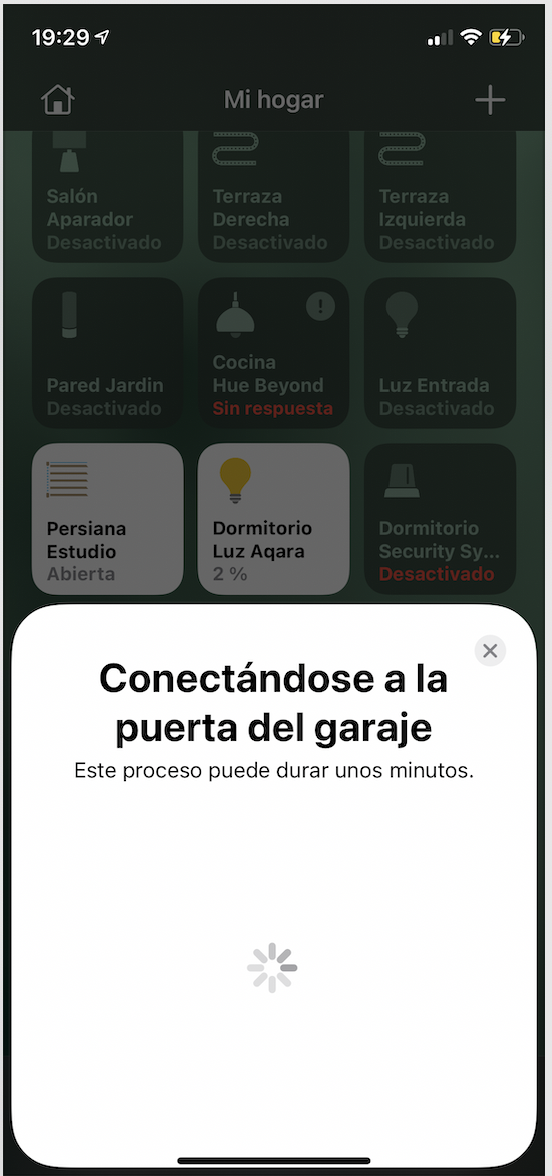
juancitomadrid
on 10 Oct 2020
what if you switch back to "switch" mode for the device and try to add it then? does it work?
rojer
on 10 Oct 2020
Done, at third time I got it
Now is working, but I discover something testing.
Tap to open: The icon show "opening" (the door is opening)
*when is opening > Tap the icon again (the door stop) but the icon show "closing"
At that moment I have the door stoped but in HomeKit showing "closing"
If I tap again: The icon show "opening" (the door is closing)
And the icon still showing "opening"
Edit: I mean closing (bold)
juancitomadrid
on 10 Oct 2020
I just lost the connection again for some minutes... and then come back enable.
Here the log.
478980889 HAPPlatformTCPStrea:104 0x3fff6c34 192.168.2.95:53939 HAP connection closed, ns 0/4/9 i 2
478993089 HAPPlatformTCPStrea:301 HAPPlatformTCPStreamClose ts 0x3fff66f4 nc 0x0 0/3/9
479875589 shelly_input.cpp:72 Input 1: change (state 1)
479919533 shelly_hap_garage_d:184 GDO 1: Cur State: closing -> closed (3 -> 1)
480750636 HAPPlatformTCPStrea:120 0x3fff65cc 192.168.2.95:53941 Incoming HAP connection, ns 0/3/9
480764658 HAPPlatformTCPStrea:274 0x3fff65cc 192.168.2.95:53941 Accepted HAP connection, ns 0/4/9 ts 0x3fff670c
481894020 shelly_input.cpp:72 Input 1: long (state 1)
483541452 shelly_main.cpp:471 Uptime: 483.53, conns 0/4/9 ns 4, RAM: 38920, 20952 free
491541434 shelly_main.cpp:471 Uptime: 491.53, conns 0/4/9 ns 4, RAM: 38920, 20952 free
499541497 shelly_main.cpp:471 Uptime: 499.53, conns 0/4/9 ns 4, RAM: 38920, 20952 free
507541413 shelly_main.cpp:471 Uptime: 507.53, conns 0/4/9 ns 4, RAM: 38920, 20952 free
515541432 shelly_main.cpp:471 Uptime: 515.53, conns 0/4/9 ns 4, RAM: 38920, 20952 free
523541414 shelly_main.cpp:471 Uptime: 523.53, conns 0/4/9 ns 4, RAM: 38920, 20952 free
526968560 HAPPlatformTCPStrea:104 0x3fff6d4c 192.168.2.53:52039 HAP connection closed, ns 0/4/9 i 2
527011926 HAPPlatformTCPStrea:301 HAPPlatformTCPStreamClose ts 0x3fff64ac nc 0x0 0/3/9
531541628 shelly_main.cpp:471 Uptime: 531.53, conns 0/3/9 ns 3, RAM: 38920, 21452 free
539541388 shelly_main.cpp:471 Uptime: 539.53, conns 0/3/9 ns 3, RAM: 38920, 21452 free
540711129 HAPPlatformTCPStrea:120 0x3fff6b6c 192.168.2.53:52047 Incoming HAP connection, ns 0/3/9
540725161 HAPPlatformTCPStrea:274 0x3fff6b6c 192.168.2.53:52047 Accepted HAP connection, ns 0/4/9 ts 0x3fff63a4
547541411 shelly_main.cpp:471 Uptime: 547.53, conns 0/4/9 ns 4, RAM: 38920, 20956 free
550131857 HAPPlatformTCPStrea:104 0x3fff65cc 192.168.2.95:53941 HAP connection closed, ns 0/4/9 i 2
550144561 HAPPlatformTCPStrea:301 HAPPlatformTCPStreamClose ts 0x3fff670c nc 0x0 0/3/9
555541712 shelly_main.cpp:471 Uptime: 555.53, conns 0/3/9 ns 3, RAM: 38920, 21432 free
563541478 shelly_main.cpp:471 Uptime: 563.53, conns 0/3/9 ns 3, RAM: 38920, 20784 free
566347171 HAPPlatformTCPStrea:104 0x3fff6994 192.168.2.91:57544 HAP connection closed, ns 0/3/9 i 2
566390243 HAPPlatformTCPStrea:301 HAPPlatformTCPStreamClose ts 0x3fff5f84 nc 0x0 0/2/9
571541437 shelly_main.cpp:471 Uptime: 571.53, conns 0/2/9 ns 2, RAM: 38920, 21920 free
579542046 shelly_main.cpp:471 Uptime: 579.53, conns 0/2/9 ns 2, RAM: 38920, 21920 free
587541392 shelly_main.cpp:471 Uptime: 587.53, conns 0/2/9 ns 2, RAM: 38920, 21920 free
595541359 shelly_main.cpp:471 Uptime: 595.53, conns 0/2/9 ns 2, RAM: 38920, 21920 free
600903390 HAPPlatformTCPStrea:120 0x3fff62e4 192.168.2.91:57552 Incoming HAP connection, ns 0/2/9
600918400 HAPPlatformTCPStrea:274 0x3fff62e4 192.168.2.91:57552 Accepted HAP connection, ns 0/3/9 ts 0x3fff5f84
603541387 shelly_main.cpp:471 Uptime: 603.53, conns 0/3/9 ns 3, RAM: 38920, 20440 free
611541524 shelly_main.cpp:471 Uptime: 611.53, conns 0/3/9 ns 3, RAM: 38920, 21456 free
619541359 shelly_main.cpp:471 Uptime: 619.53, conns 0/3/9 ns 3, RAM: 38920, 21456 free
627541425 shelly_main.cpp:471 Uptime: 627.53, conns 0/3/9 ns 3, RAM: 38920, 21456 free
635541363 shelly_main.cpp:471 Uptime: 635.53, conns 0/3/9 ns 3, RAM: 38920, 21456 free
643541441 shelly_main.cpp:471 Uptime: 643.53, conns 0/3/9 ns 3, RAM: 38920, 21456 free
651541403 shelly_main.cpp:471 Uptime: 651.53, conns 0/3/9 ns 3, RAM: 38920, 21456 free
659541435 shelly_main.cpp:471 Uptime: 659.53, conns 0/3/9 ns 3, RAM: 38920, 21456 free
660534239 HAPPlatformTCPStrea:120 0x3fff697c 192.168.2.83:52803 Incoming HAP connection, ns 0/3/9
660549288 HAPPlatformTCPStrea:274 0x3fff697c 192.168.2.83:52803 Accepted HAP connection, ns 0/4/9 ts 0x3fff653c
661925799 HAPPlatformTCPStrea:120 0x3fff66ac 192.168.2.92:55675 Incoming HAP connection, ns 0/4/9
663571491 HAPPlatformTCPStrea:274 0x3fff66ac 192.168.2.92:55675 Accepted HAP connection, ns 0/5/9 ts 0x3fff6c74
669712840 shelly_main.cpp:471 Uptime: 669.70, conns 0/5/9 ns 5, RAM: 38920, 20500 free
677712875 shelly_main.cpp:471 Uptime: 677.70, conns 0/5/9 ns 5, RAM: 38920, 20500 free
685712925 shelly_main.cpp:471 Uptime: 685.70, conns 0/5/9 ns 5, RAM: 38920, 20500 free
693712893 shelly_main.cpp:471 Uptime: 693.70, conns 0/5/9 ns 5, RAM: 38920, 20500 free
701712855 shelly_main.cpp:471 Uptime: 701.70, conns 0/5/9 ns 5, RAM: 38920, 20500 free
709712726 shelly_main.cpp:471 Uptime: 709.70, conns 0/5/9 ns 5, RAM: 38920, 20500 free
717712638 shelly_main.cpp:471 Uptime: 717.70, conns 0/5/9 ns 5, RAM: 38920, 20500 free
725712684 shelly_main.cpp:471 Uptime: 725.70, conns 0/5/9 ns 5, RAM: 38920, 20500 free
733712903 shelly_main.cpp:471 Uptime: 733.70, conns 0/5/9 ns 5, RAM: 38920, 20500 free
741712885 shelly_main.cpp:471 Uptime: 741.70, conns 0/5/9 ns 5, RAM: 38920, 20500 free
749712862 shelly_main.cpp:471 Uptime: 749.70, conns 0/5/9 ns 5, RAM: 38920, 20500 free
757712859 shelly_main.cpp:471 Uptime: 757.70, conns 0/5/9 ns 5, RAM: 38920, 20500 free
765712615 shelly_main.cpp:471 Uptime: 765.70, conns 0/5/9 ns 5, RAM: 38920, 20500 free
773713035 shelly_main.cpp:471 Uptime: 773.70, conns 0/5/9 ns 5, RAM: 38920, 20500 free
781712848 shelly_main.cpp:471 Uptime: 781.70, conns 0/5/9 ns 5, RAM: 38920, 20500 free
789712906 shelly_main.cpp:471 Uptime: 789.70, conns 0/5/9 ns 5, RAM: 38920, 20500 free
797713663 shelly_main.cpp:471 Uptime: 797.70, conns 0/5/9 ns 5, RAM: 38920, 20500 free
805712980 shelly_main.cpp:471 Uptime: 805.70, conns 0/5/9 ns 5, RAM: 38920, 20500 free
813712897 shelly_main.cpp:471 Uptime: 813.70, conns 0/5/9 ns 5, RAM: 38920, 20500 free
821712880 shelly_main.cpp:471 Uptime: 821.70, conns 0/5/9 ns 5, RAM: 38920, 20500 free
827826132 HAPPlatformTCPStrea:104 0x3fff62e4 192.168.2.91:57552 HAP connection closed, ns 0/5/9 i 2
827838859 HAPPlatformTCPStrea:301 HAPPlatformTCPStreamClose ts 0x3fff5f84 nc 0x0 0/4/9
829712817 shelly_main.cpp:471 Uptime: 829.70, conns 0/4/9 ns 4, RAM: 38920, 20648 free
837712909 shelly_main.cpp:471 Uptime: 837.70, conns 0/4/9 ns 4, RAM: 38920, 20648 free
840600838 HAPPlatformTCPStrea:120 0x3fff6d64 192.168.2.91:57571 Incoming HAP connection, ns 0/4/9
840644270 HAPPlatformTCPStrea:274 0x3fff6d64 192.168.2.91:57571 Accepted HAP connection, ns 0/5/9 ts 0x3fff6674
846791066 shelly_main.cpp:471 Uptime: 846.78, conns 0/5/9 ns 5, RAM: 38920, 20500 free
854791099 shelly_main.cpp:471 Uptime: 854.78, conns 0/5/9 ns 5, RAM: 38920, 20500 free
862790997 shelly_main.cpp:471 Uptime: 862.78, conns 0/5/9 ns 5, RAM: 38920, 20500 free
870791341 shelly_main.cpp:471 Uptime: 870.78, conns 0/5/9 ns 5, RAM: 38920, 20500 free
878791232 shelly_main.cpp:471 Uptime: 878.78, conns 0/5/9 ns 5, RAM: 38920, 20500 free
886791049 shelly_main.cpp:471 Uptime: 886.78, conns 0/5/9 ns 5, RAM: 38920, 20500 free
888479416 HAPPlatformTCPStrea:104 0x3fff66ac 192.168.2.92:55675 HAP connection closed, ns 0/5/9 i 2
888492160 HAPPlatformTCPStrea:301 HAPPlatformTCPStreamClose ts 0x3fff6c74 nc 0x0 0/4/9
894791036 shelly_main.cpp:471 Uptime: 894.78, conns 0/4/9 ns 4, RAM: 38920, 20976 free
900806582 HAPPlatformTCPStrea:120 0x3fff669c 192.168.2.92:55676 Incoming HAP connection, ns 0/4/9
900850919 HAPPlatformTCPStrea:274 0x3fff669c 192.168.2.92:55676 Accepted HAP connection, ns 0/5/9 ts 0x3fff6724
902119916 HAPPlatformTCPStrea:104 0x3fff669c 192.168.2.92:55676 HAP connection closed, ns 0/5/9 i 2
902132683 HAPPlatformTCPStrea:301 HAPPlatformTCPStreamClose ts 0x3fff6724 nc 0x0 0/4/9
902790939 shelly_main.cpp:471 Uptime: 902.78, conns 0/4/9 ns 4, RAM: 38920, 20976 free
910791001 shelly_main.cpp:471 Uptime: 910.78, conns 0/4/9 ns 4, RAM: 38920, 20976 free
918790997 shelly_main.cpp:471 Uptime: 918.78, conns 0/4/9 ns 4, RAM: 38920, 20976 free
926790954 shelly_main.cpp:471 Uptime: 926.78, conns 0/4/9 ns 4, RAM: 38920, 20976 free
934790916 shelly_main.cpp:471 Uptime: 934.78, conns 0/4/9 ns 4, RAM: 38920, 20976 free
942790926 shelly_main.cpp:471 Uptime: 942.78, conns 0/4/9 ns 4, RAM: 38920, 20976 free
950791034 shelly_main.cpp:471 Uptime: 950.78, conns 0/4/9 ns 4, RAM: 38920, 20976 free
956481483 HAPPlatformTCPStrea:104 0x3fff6d64 192.168.2.91:57571 HAP connection closed, ns 0/4/9 i 2
956525437 HAPPlatformTCPStrea:301 HAPPlatformTCPStreamClose ts 0x3fff6674 nc 0x0 0/3/9
958790896 shelly_main.cpp:471 Uptime: 958.78, conns 0/3/9 ns 3, RAM: 38920, 21448 free
961485348 HAPPlatformTCPStrea:120 0x3fff6644 192.168.2.91:57580 Incoming HAP connection, ns 0/3/9
961499457 HAPPlatformTCPStrea:274 0x3fff6644 192.168.2.91:57580 Accepted HAP connection, ns 0/4/9 ts 0x3fff5e9c
966791001 shelly_main.cpp:471 Uptime: 966.78, conns 0/4/9 ns 4, RAM: 38920, 20956 free
968567128 HAPPlatformTCPStrea:104 0x3fff697c 192.168.2.83:52803 HAP connection closed, ns 0/4/9 i 2
968579848 HAPPlatformTCPStrea:301 HAPPlatformTCPStreamClose ts 0x3fff653c nc 0x0 0/3/9
970945324 shelly_output.cpp:56 Output 1: off -> on (GDO:open)
970956458 shelly_hap_garage_d:213 GDO 1: Tgt State: closed -> open (1 -> 0) (HAP)
970967461 shelly_hap_garage_d:184 GDO 1: Cur State: closed -> opening (1 -> 2)
971255319 shelly_output.cpp:56 Output 1: on -> off (pulse_off)
971466287 shelly_input.cpp:72 Input 1: change (state 0)
974791388 shelly_main.cpp:471 Uptime: 974.78, conns 0/3/9 ns 3, RAM: 38920, 20756 free
982790992 shelly_main.cpp:471 Uptime: 982.78, conns 0/3/9 ns 3, RAM: 38920, 21424 free
990044555 shelly_hap_garage_d:184 GDO 1: Cur State: opening -> open (2 -> 0)
990790951 shelly_main.cpp:471 Uptime: 990.78, conns 0/3/9 ns 3, RAM: 38920, 20728 free
998791170 shelly_main.cpp:471 Uptime: 998.78, conns 0/3/9 ns 3, RAM: 38920, 21424 free
1006791213 shelly_main.cpp:471 Uptime: 1006.78, conns 0/3/9 ns 3, RAM: 38920, 21424 free
1014791293 shelly_main.cpp:471 Uptime: 1014.78, conns 0/3/9 ns 3, RAM: 38920, 21424 free
1020597337 HAPPlatformTCPStrea:120 0x3fff66cc 192.168.2.92:55677 Incoming HAP connection, ns 0/3/9
1020611458 HAPPlatformTCPStrea:274 0x3fff66cc 192.168.2.92:55677 Accepted HAP connection, ns 0/4/9 ts 0x3fff63cc
1021748222 HAPPlatformTCPStrea:120 0x3fff697c 192.168.2.83:53036 Incoming HAP connection, ns 0/4/9
1022319528 HAPPlatformTCPStrea:104 0x3fff66cc 192.168.2.92:55677 HAP connection closed, ns 1/4/9 i 2
1022331345 HAPPlatformTCPStrea:301 HAPPlatformTCPStreamClose ts 0x3fff63cc nc 0x0 1/3/9
1022791836 shelly_main.cpp:471 Uptime: 1022.78, conns 1/3/9 ns 3, RAM: 38920, 20660 free
1023647066 HAPPlatformTCPStrea:274 0x3fff697c 192.168.2.83:53036 Accepted HAP connection, ns 0/4/9 ts 0x3fff6e24
1030791106 shelly_main.cpp:471 Uptime: 1030.78, conns 0/4/9 ns 4, RAM: 38920, 20952 free
1038791025 shelly_main.cpp:471 Uptime: 1038.78, conns 0/4/9 ns 4, RAM: 38920, 20952 free
1046791122 shelly_main.cpp:471 Uptime: 1046.78, conns 0/4/9 ns 4, RAM: 38920, 20952 free
1054791044 shelly_main.cpp:471 Uptime: 1054.78, conns 0/4/9 ns 4, RAM: 38920, 20952 free
1062791199 shelly_main.cpp:471 Uptime: 1062.78, conns 0/4/9 ns 4, RAM: 38920, 20952 free
1070791038 shelly_main.cpp:471 Uptime: 1070.78, conns 0/4/9 ns 4, RAM: 38920, 20952 free
1078791055 shelly_main.cpp:471 Uptime: 1078.78, conns 0/4/9 ns 4, RAM: 38920, 20952 free
1080519063 HAPPlatformTCPStrea:104 0x3fff697c 192.168.2.83:53036 HAP connection closed, ns 0/4/9 i 2
1080532834 HAPPlatformTCPStrea:301 HAPPlatformTCPStreamClose ts 0x3fff6e24 nc 0x0 0/3/9
1080597676 HAPPlatformTCPStrea:120 0x3fff66cc 192.168.2.83:53042 Incoming HAP connection, ns 0/3/9
1080611800 HAPPlatformTCPStrea:274 0x3fff66cc 192.168.2.83:53042 Accepted HAP connection, ns 0/4/9 ts 0x3fff5e64
1081736581 HAPPlatformTCPStrea:120 0x3fff697c 192.168.2.92:55678 Incoming HAP connection, ns 0/4/9
1083651745 HAPPlatformTCPStrea:274 0x3fff697c 192.168.2.92:55678 Accepted HAP connection, ns 0/5/9 ts 0x3fff6c44
1086791132 shelly_main.cpp:471 Uptime: 1086.78, conns 0/5/9 ns 5, RAM: 38920, 20484 free
1094791023 shelly_main.cpp:471 Uptime: 1094.78, conns 0/5/9 ns 5, RAM: 38920, 20484 free
1102744329 HAPPlatformTCPStrea:104 0x3fff6644 192.168.2.91:57580 HAP connection closed, ns 0/5/9 i 2
1102758482 HAPPlatformTCPStrea:301 HAPPlatformTCPStreamClose ts 0x3fff5e9c nc 0x0 0/4/9
1102805589 shelly_main.cpp:471 Uptime: 1102.80, conns 0/4/9 ns 4, RAM: 38920, 20976 free
1110791035 shelly_main.cpp:471 Uptime: 1110.78, conns 0/4/9 ns 4, RAM: 38920, 20976 free
1118790996 shelly_main.cpp:471 Uptime: 1118.78, conns 0/4/9 ns 4, RAM: 38920, 20976 free
1126790986 shelly_main.cpp:471 Uptime: 1126.78, conns 0/4/9 ns 4, RAM: 38920, 20976 free
1128212665 HAPPlatformTCPStrea:104 0x3fff697c 192.168.2.92:55678 HAP connection closed, ns 0/4/9 i 2
1128225459 HAPPlatformTCPStrea:301 HAPPlatformTCPStreamClose ts 0x3fff6c44 nc 0x0 0/3/9
1134791009 shelly_main.cpp:471 Uptime: 1134.78, conns 0/3/9 ns 3, RAM: 38920, 21444 free
1140703140 HAPPlatformTCPStrea:120 0x3fff697c 192.168.2.92:55679 Incoming HAP connection, ns 0/3/9
1140717292 HAPPlatformTCPStrea:274 0x3fff697c 192.168.2.92:55679 Accepted HAP connection, ns 0/4/9 ts 0x3fff653c
1143847560 shelly_main.cpp:471 Uptime: 1143.84, conns 0/4/9 ns 4, RAM: 38920, 20976 free
1151847465 shelly_main.cpp:471 Uptime: 1151.84, conns 0/4/9 ns 4, RAM: 38920, 20976 free
1159847505 shelly_main.cpp:471 Uptime: 1159.84, conns 0/4/9 ns 4, RAM: 38920, 20976 free
1163861174 shelly_output.cpp:56 Output 1: off -> on (GDO:close)
1163872355 shelly_hap_garage_d:213 GDO 1: Tgt State: open -> closed (0 -> 1) (HAP)
1163883236 shelly_hap_garage_d:184 GDO 1: Cur State: open -> closing (0 -> 3)
1164171405 shelly_output.cpp:56 Output 1: on -> off (pulse_off)
1167847414 shelly_main.cpp:471 Uptime: 1167.84, conns 0/4/9 ns 4, RAM: 38920, 20976 free
1175847406 shelly_main.cpp:471 Uptime: 1175.84, conns 0/4/9 ns 4, RAM: 38920, 20976 free
1181008281 shelly_input.cpp:72 Input 1: change (state 1)
1181045978 shelly_hap_garage_d:184 GDO 1: Cur State: closing -> closed (3 -> 1)
1182018348 shelly_input.cpp:72 Input 1: long (state 1)
1183847517 shelly_main.cpp:471 Uptime: 1183.84, conns 0/4/9 ns 4, RAM: 38920, 20976 free
1191847503 shelly_main.cpp:471 Uptime: 1191.84, conns 0/4/9 ns 4, RAM: 38920, 20976 free
1193045999 HAPPlatformTCPStrea:104 0x3fff66cc 192.168.2.83:53042 HAP connection closed, ns 0/4/9 i 2
1193058831 HAPPlatformTCPStrea:301 HAPPlatformTCPStreamClose ts 0x3fff5e64 nc 0x0 0/3/9
1197144527 mgos_http_server.c:180 0x3fff61b4 HTTP connection from 192.168.2.51:58545
1197162428 mgos_http_server.c:187 0x3fff61b4 GET /
1197223188 mgos_http_server.c:187 0x3fff61b4 GET /axios.min.js.gz
1197260380 mgos_http_server.c:180 0x3fff60ec HTTP connection from 192.168.2.51:58546
1197275226 mgos_http_server.c:187 0x3fff60ec GET /logo.png
1197307966 mg_rpc.c:292 Shelly.GetInfo via HTTP 192.168.2.51:58546
1199847529 shelly_main.cpp:471 Uptime: 1199.84, conns 0/3/9 ns 3, RAM: 38920, 21572 free
1200753774 HAPPlatformTCPStrea:120 0x3fff5d6c 192.168.2.91:57613 Incoming HAP connection, ns 0/3/9
1200767933 HAPPlatformTCPStrea:274 0x3fff5d6c 192.168.2.91:57613 Accepted HAP connection, ns 0/4/9 ts 0x3fff5df4
1208922739 shelly_main.cpp:471 Uptime: 1208.91, conns 0/4/9 ns 4, RAM: 38920, 21076 free
juancitomadrid
on 10 Oct 2020
Now is working, but I discover something testing.
Tap to open: The icon show "opening" (the door is opening)
*when is opening > Tap the icon again (the door stop) but the icon show "closing"
At that moment I have the door stoped but in HomeKit showing "closing"
If I tap again: The icon show "opening" (the door is closing)
And the icon still showing "opening"
Edit: I mean closing (bold)
intermediate states we don't handle very well, and cannot, because it all depends on the door controller.
when you tap again while the door is moving, we send a pulse to the controller's input, but that's all we know.
what happens? depends on the controller. your controller stops, but others may not.
although, i think we should assume it stops, there's no harm in that, and it's probably how many of them behave.
it's important that we "re-sync" when the door reaches the sensor.
i'll do it in the next build.
rojer
on 10 Oct 2020
Done, at third time I got it
Now is working, but I discover something testing.
Tap to open: The icon show "opening" (the door is opening)
*when is opening > Tap the icon again (the door stop) but the icon show "closing"
At that moment I have the door stoped but in HomeKit showing "closing"
If I tap again: The icon show "opening" (the door is closing)
And the icon still showing "opening"
Edit: I mean closing (bold)
my official homekit garage door controller does this, it seem homekit does not support (open /stop / close / stop / open /.......) just expects open / close states only.
after stopping, on mine it take it take about 30 seconds, before it registers as open.
andyblac
on 10 Oct 2020
yes, the only command it can give is open or close, not stop.
but just as with roller shutters, we can override what it tells us and do what we think is right instead :)
rojer
on 10 Oct 2020
after stopping, on mine it take it take about 30 seconds, before it registers as open.
that sounds like a bug with the controller. if a device sends a notification on state change, home will react immediately and read the state.
rojer
on 10 Oct 2020
after stopping, on mine it take it take about 30 seconds, before it registers as open.
that sounds like a bug with the controller. if a device sends a notification on state change, home will react immediately and read the state.
I mean it saying opening...., and as the motor never reaches end point, homekit seems to have to timeout, and then it reads the sensor as open.
andyblac
on 10 Oct 2020
ie
tap, to open, homekit says, "Opening....", then you tap again, (to stop), homekit changes to "Closing...", but as it never reaches "Closed". the sensor never sends closed state, so after 30 secs or so, it goes back to correct sensor state which is "Open"
andyblac
on 10 Oct 2020
right, that's the current behavior. i'll change that so that when tapped in intermediate state, we send a pulse to the controller and then assume the door stopped, i expect that to be the most common behavior.
rojer
on 10 Oct 2020
right, that's the current behavior. i'll change that so that when tapped in intermediate state, we send a pulse to the controller and then assume the door stopped, i expect that to be the most common behavior.
this my official HomeKit Door controller. not your firmware ;)
andyblac
on 10 Oct 2020
heh, then it's very similar to 2.3-alpha2 :)
rojer
on 10 Oct 2020
@juancitomadrid so, when you press a button while the door is moving, it stops. what happens when you press again - does it continue in the same direction or does it go in the opposite direction? i.e., is it open - stop - open or open - stop - close?
rojer
on 10 Oct 2020
that depends on controller, normally opposite direction.
andyblac
on 10 Oct 2020
@juancitomadrid so, when you press a button while the door is moving, it stops. what happens when you press again - does it continue in the same direction or does it go in the opposite direction? i.e., is it open - stop - open or open - stop - close?
Opossite direction in mine.
juancitomadrid
on 10 Oct 2020
Opposite direction in mine too (NICE brand).
Whiterabbit64
on 11 Oct 2020
this is about improving the tap behavior when in intermediate state. please test.
note: tile will still show "open" when stopped mid-way, but there should be no long spins.
rojer
on 11 Oct 2020
I’ve just discovered the behavior of my garage door when I stop it while it’s moving.
If I stop it when it’s opening, then it stops. If I press again the push/command button the it closes.
But if I stop while it’s closing, then it goes back to opened position.
So if it’s closed: press-open-press-stop-press-close
If it’s closed: press-close-press-open
What I see in Alpha 3 is that when the door reaches its closed position, the icon in Home App shows « closed » then immediately after « Opening » for 2 seconds or so and then closed again.
Whiterabbit64
on 11 Oct 2020
@rojer @juancitomadrid @andyblac @Pixel-Chris
If I understood right the Alpha 3 changes are the intermediate state means semi open door? In this case maybe is needed a second sensor when door is fully open, Isn't it?
Should I taste alpha 3? With alpha 2 is working ok. What else has changed in alpha 3?
Ludelag
on 11 Oct 2020
@rojer @juancitomadrid @andyblac @Pixel-Chris
If I understood right the Alpha 3 changes are the intermediate state means semi open door? In this case maybe is needed a second sensor when door is fully open, Isn't it?
Should I taste alpha 3? With alpha 2 is working ok. What else has changed in alpha 3?
I not actually testing this as I have no free garage door to test with, but from what I understand yes, if you tap on tile as it opening, it should just stop, and display open. as for a second sensor, shelly1 only has one relay to connect a sensor to, I believe @rojer is going to work on Shelly 2.5 next that can support 2. but IMO a second sensor should not be required, as if the door is only partly open it still open is it not ?, HomeKit can not tell the difference between a partly open door to fully open, and what if you only have it partly open do you not report it as such ?
From what I understand of the Garage Door, HomeKit characteristic it is not like a window covering that has a percentage state of open, garage door only has 2 states Open and Closed.
andyblac
on 11 Oct 2020
Alpha3 checked.
Working fine when you open:
Closed state
Tap> Opening
Tap> Stop
Tap> Closing
So far everything is perfect, BUT if we do it starting in the open state it does not work the same.
Open state
Tap> Closing
Tap> Changes direction and starts to open.
(here the indicator already loses reference if it is opening or closing).
juancitomadrid
on 11 Oct 2020
Still having "not connection" or "updating" status many times (and does not respond).
At first I thought it would be my wifi network, but all the other elements are working perfectly.
Here the log:
1573837025 shelly_main.cpp:471 Uptime: 1573.76, conns 0/4/9 ns 4, RAM: 38920, 21960 free
1579372936 HAPPlatformTCPStrea:104 0x3fff5184 192.168.2.62:50544 HAP connection closed, ns 0/4/9 i 2
1579385868 HAPPlatformTCPStrea:301 HAPPlatformTCPStreamClose ts 0x3fff6a8c nc 0x0 0/3/9
1581771060 shelly_main.cpp:471 Uptime: 1581.76, conns 0/3/9 ns 3, RAM: 38920, 22324 free
1589770858 shelly_main.cpp:471 Uptime: 1589.76, conns 0/3/9 ns 3, RAM: 38920, 22448 free
1597770832 shelly_main.cpp:471 Uptime: 1597.76, conns 0/3/9 ns 3, RAM: 38920, 22448 free
1605771047 shelly_main.cpp:471 Uptime: 1605.76, conns 0/3/9 ns 3, RAM: 38920, 22448 free
1613770848 shelly_main.cpp:471 Uptime: 1613.76, conns 0/3/9 ns 3, RAM: 38920, 22448 free
1621326952 HAPPlatformTCPStrea:120 0x3fff615c 192.168.2.92:56562 Incoming HAP connection, ns 0/3/9
1621341844 HAPPlatformTCPStrea:274 0x3fff615c 192.168.2.92:56562 Accepted HAP connection, ns 0/4/9 ts 0x3fff629c
1622421494 shelly_main.cpp:471 Uptime: 1622.41, conns 0/4/9 ns 4, RAM: 38920, 21276 free
1629770996 shelly_main.cpp:471 Uptime: 1629.76, conns 0/4/9 ns 4, RAM: 38920, 21992 free
1637771028 shelly_main.cpp:471 Uptime: 1637.76, conns 0/4/9 ns 4, RAM: 38920, 21992 free
1645770986 shelly_main.cpp:471 Uptime: 1645.76, conns 0/4/9 ns 4, RAM: 38920, 21992 free
1653770942 shelly_main.cpp:471 Uptime: 1653.76, conns 0/4/9 ns 4, RAM: 38920, 21992 free
1661771102 shelly_main.cpp:471 Uptime: 1661.76, conns 0/4/9 ns 4, RAM: 38920, 21992 free
1669771085 shelly_main.cpp:471 Uptime: 1669.76, conns 0/4/9 ns 4, RAM: 38920, 21992 free
1677421484 HAPPlatformTCPStrea:104 0x3fff6be4 192.168.2.51:60555 HAP connection closed, ns 0/4/9 i 2
1677434476 HAPPlatformTCPStrea:301 HAPPlatformTCPStreamClose ts 0x3fff681c nc 0x0 0/3/9
1677771050 shelly_main.cpp:471 Uptime: 1677.76, conns 0/3/9 ns 3, RAM: 38920, 22480 free
1679493736 HAPPlatformTCPStrea:104 0x3fff66d4 192.168.2.91:58942 HAP connection closed, ns 0/3/9 i 2
1679506324 HAPPlatformTCPStrea:301 HAPPlatformTCPStreamClose ts 0x3fff4394 nc 0x0 0/2/9
1681096858 HAPPlatformTCPStrea:120 0x3fff4f3c 192.168.2.91:58961 Incoming HAP connection, ns 0/2/9
1681110790 HAPPlatformTCPStrea:274 0x3fff4f3c 192.168.2.91:58961 Accepted HAP connection, ns 0/3/9 ts 0x3fff4394
1682192732 HAPPlatformTCPStrea:120 0x3fff3cb4 192.168.2.51:60744 Incoming HAP connection, ns 0/3/9
1684208156 HAPPlatformTCPStrea:274 0x3fff3cb4 192.168.2.51:60744 Accepted HAP connection, ns 0/4/9 ts 0x3fff681c
1685770916 shelly_main.cpp:471 Uptime: 1685.76, conns 0/4/9 ns 4, RAM: 38920, 21992 free
1693770803 shelly_main.cpp:471 Uptime: 1693.76, conns 0/4/9 ns 4, RAM: 38920, 21992 free
1701771463 shelly_main.cpp:471 Uptime: 1701.76, conns 0/4/9 ns 4, RAM: 38920, 21992 free
1709770818 shelly_main.cpp:471 Uptime: 1709.76, conns 0/4/9 ns 4, RAM: 38920, 21992 free
1717770874 shelly_main.cpp:471 Uptime: 1717.76, conns 0/4/9 ns 4, RAM: 38920, 21992 free
1725770836 shelly_main.cpp:471 Uptime: 1725.76, conns 0/4/9 ns 4, RAM: 38920, 21992 free
1733770787 shelly_main.cpp:471 Uptime: 1733.76, conns 0/4/9 ns 4, RAM: 38920, 21992 free
1736677555 HAPPlatformTCPStrea:104 0x3fff4f3c 192.168.2.91:58961 HAP connection closed, ns 0/4/9 i 2
1736690196 HAPPlatformTCPStrea:301 HAPPlatformTCPStreamClose ts 0x3fff4394 nc 0x0 0/3/9
1741281213 HAPPlatformTCPStrea:120 0x3fff5fac 192.168.2.83:49954 Incoming HAP connection, ns 0/3/9
1741295151 HAPPlatformTCPStrea:274 0x3fff5fac 192.168.2.83:49954 Accepted HAP connection, ns 0/4/9 ts 0x3fff4394
1742380246 shelly_main.cpp:471 Uptime: 1742.37, conns 0/4/9 ns 4, RAM: 38920, 21284 free
1749770776 shelly_main.cpp:471 Uptime: 1749.76, conns 0/4/9 ns 4, RAM: 38920, 21996 free
1757770860 shelly_main.cpp:471 Uptime: 1757.76, conns 0/4/9 ns 4, RAM: 38920, 21996 free
1765770859 shelly_main.cpp:471 Uptime: 1765.76, conns 0/4/9 ns 4, RAM: 38920, 21996 free
1773770842 shelly_main.cpp:471 Uptime: 1773.76, conns 0/4/9 ns 4, RAM: 38920, 21996 free
1781770877 shelly_main.cpp:471 Uptime: 1781.76, conns 0/4/9 ns 4, RAM: 38920, 21996 free
1789770872 shelly_main.cpp:471 Uptime: 1789.76, conns 0/4/9 ns 4, RAM: 38920, 21996 free
1797770866 shelly_main.cpp:471 Uptime: 1797.76, conns 0/4/9 ns 4, RAM: 38920, 21996 free
1805770843 shelly_main.cpp:471 Uptime: 1805.76, conns 0/4/9 ns 4, RAM: 38920, 21996 free
1813770816 shelly_main.cpp:471 Uptime: 1813.76, conns 0/4/9 ns 4, RAM: 38920, 21996 free
1821770791 shelly_main.cpp:471 Uptime: 1821.76, conns 0/4/9 ns 4, RAM: 38920, 21996 free
1822542805 HAPPlatformTCPStrea:104 0x3fff61e4 192.168.2.53:49347 HAP connection closed, ns 0/4/9 i 2
1822555821 HAPPlatformTCPStrea:301 HAPPlatformTCPStreamClose ts 0x3fff6844 nc 0x0 0/3/9
1829770831 shelly_main.cpp:471 Uptime: 1829.76, conns 0/3/9 ns 3, RAM: 38920, 22484 free
1830103718 HAPPlatformTCPStrea:104 0x3fff3cb4 192.168.2.51:60744 HAP connection closed, ns 0/3/9 i 2
1830116696 HAPPlatformTCPStrea:301 HAPPlatformTCPStreamClose ts 0x3fff681c nc 0x0 0/2/9
1837770889 shelly_main.cpp:471 Uptime: 1837.76, conns 0/2/9 ns 2, RAM: 38920, 22972 free
1845770807 shelly_main.cpp:471 Uptime: 1845.76, conns 0/2/9 ns 2, RAM: 38920, 22972 free
1853770801 shelly_main.cpp:471 Uptime: 1853.76, conns 0/2/9 ns 2, RAM: 38920, 22972 free
1858663735 HAPPlatformTCPStrea:104 0x3fff615c 192.168.2.92:56562 HAP connection closed, ns 0/2/9 i 2
1858676378 HAPPlatformTCPStrea:301 HAPPlatformTCPStreamClose ts 0x3fff629c nc 0x0 0/1/9
1861225121 HAPPlatformTCPStrea:120 0x3fff681c 192.168.2.51:60811 Incoming HAP connection, ns 0/1/9
1861240047 HAPPlatformTCPStrea:274 0x3fff681c 192.168.2.51:60811 Accepted HAP connection, ns 0/2/9 ts 0x3fff66d4
1862312029 HAPPlatformTCPStrea:120 0x3fff6954 192.168.2.92:56569 Incoming HAP connection, ns 0/2/9
1862330336 HAPPlatformTCPStrea:120 0x3fff4f3c 192.168.2.53:49354 Incoming HAP connection, ns 1/2/9
1862345074 shelly_main.cpp:471 Uptime: 1862.34, conns 2/2/9 ns 2, RAM: 38920, 20320 free
1862821824 HAPPlatformTCPStrea:120 0x3fff621c 192.168.2.91:58977 Incoming HAP connection, ns 2/2/9
1864347248 HAPPlatformTCPStrea:274 0x3fff6954 192.168.2.92:56569 Accepted HAP connection, ns 2/3/9 ts 0x3fff62a4
1867382981 HAPPlatformTCPStrea:274 0x3fff4f3c 192.168.2.53:49354 Accepted HAP connection, ns 1/4/9 ts 0x3fff66fc
1869771155 shelly_main.cpp:471 Uptime: 1869.76, conns 1/4/9 ns 4, RAM: 38920, 21224 free
1870478854 HAPPlatformTCPStrea:274 0x3fff621c 192.168.2.91:58977 Accepted HAP connection, ns 0/5/9 ts 0x3fff6c74
1877770821 shelly_main.cpp:471 Uptime: 1877.76, conns 0/5/9 ns 5, RAM: 38920, 21492 free
1885770991 shelly_main.cpp:471 Uptime: 1885.76, conns 0/5/9 ns 5, RAM: 38920, 21492 free
1891637743 mgos_http_server.c:180 0x3fff6cec HTTP connection from 192.168.2.51:60827
1891680388 mgos_http_server.c:187 0x3fff6cec GET /
1891763895 mgos_http_server.c:187 0x3fff6cec GET /axios.min.js.gz
1891799986 mgos_http_server.c:180 0x3fff6a2c HTTP connection from 192.168.2.51:60828
1891812614 mgos_http_server.c:187 0x3fff6a2c GET /logo.png
1891887863 mg_rpc.c:292 Shelly.GetInfo via HTTP 192.168.2.51:60828
1893770877 shelly_main.cpp:471 Uptime: 1893.76, conns 0/5/9 ns 5, RAM: 38920, 20492 free
juancitomadrid
on 11 Oct 2020
what the RSSI value in wifi section in the UI ?
andyblac
on 11 Oct 2020
what the RSSI value in wifi section in the UI ?
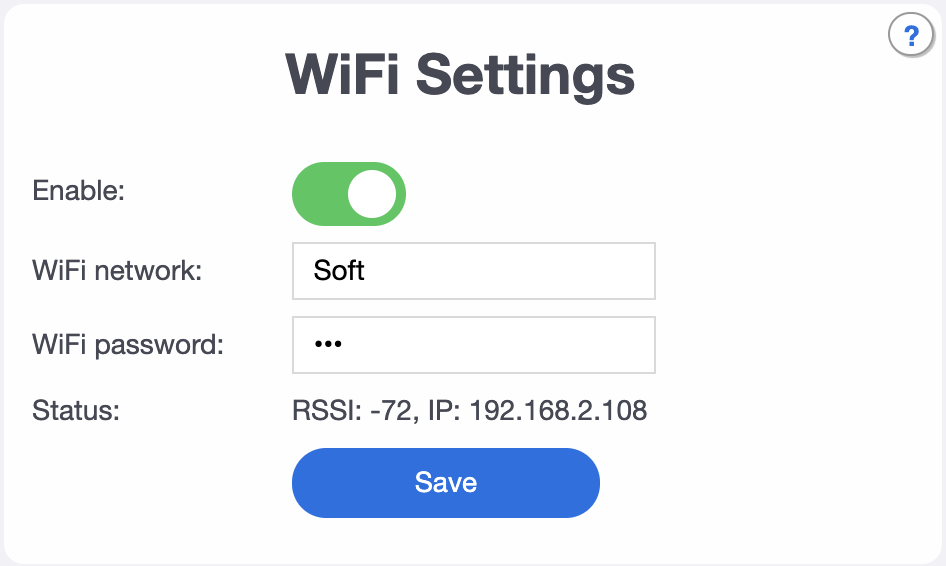
juancitomadrid
on 11 Oct 2020
72 is quite poor signal, you might need to get an extra AP or move an existing one nearer garage.
andyblac
on 11 Oct 2020
@Whiterabbit64 @juancitomadrid behavior you both describe is the same, so i guess we should emulate it.
What I see in Alpha 3 is that when the door reaches its closed position, the icon in Home App shows « closed » then immediately after « Opening » for 2 seconds or so and then closed again.
that's correct. we get confused about the direction door is moving in (due to difference in behavior you describe), but as soon as the closed "sensor" activates, we sync up with reality.
@Ludelag
If I understood right the Alpha 3 changes are the intermediate state means semi open door? In this case maybe is needed a second sensor when door is fully open, Isn't it?
Should I taste alpha 3? With alpha 2 is working ok. What else has changed in alpha 3?
optional "fully open" sensor support was added in alpha2, so if you have both and a shelly2.5 or 2, you can hook it up already.
in alpha3 we are testing the behavior when tile is tapped while the door is moving.
@Whiterabbit64 and @juancitomadrid both found that the behavior depends on direction. what about your controller?
rojer
on 11 Oct 2020
in alpha3 we are testing the behavior when tile is tapped while the door is moving.
@Whiterabbit64 and @juancitomadrid both found that the behavior depends on direction. what about your controller?
The controller behaves the same as the tile. It’s done this way for security reasons.
Most of the time the danger comes from the door closing. That’s why wether you tap the tile or press the physical switch while the door is closing, it will go back to open position. This depends on motor manufacturer.
Whiterabbit64
on 11 Oct 2020
yeah, and same reason the photocell does the same thing.
andyblac
on 11 Oct 2020
in alpha3 we are testing the behavior when tile is tapped while the door is moving.
@Whiterabbit64 and @juancitomadrid both found that the behavior depends on direction. what about your controller?The controller behaves the same as the tile. It’s done this way for security reasons.
Most of the time the danger comes from the door closing. That’s why wether you tap the tile or press the physical switch while the door is closing, it will go back to open position. This depends on motor manufacturer.
+1
juancitomadrid
on 11 Oct 2020
72 is quite poor signal, you might need to get an extra AP or move an existing one nearer garage.
I have -67 now (I have put the ap closer).
Do you think it is enough?
juancitomadrid
on 11 Oct 2020
it's certainly much better (the scale is exponential). let's see if it helps.
rojer
on 11 Oct 2020
Anyway I think it's strange ..
Because if I check in the Unifi panel, shelly never loses connection. And if I open the HOME App on my mac ... many times I have the garage in "not responding".
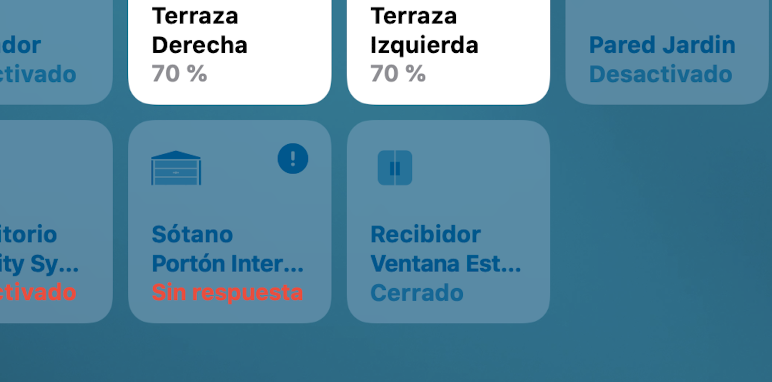
but, on some occasions ... after a few seconds it is available again.
juancitomadrid
on 11 Oct 2020
Anyway I think it's strange ..
Because if I check in the Unifi panel, shelly never loses connection. And if I open the HOME App on my mac ... many times I have the garage in "not responding".
but, on some occasions ... after a few seconds it is available again.
and it's ok in webUI always ?
andyblac
on 11 Oct 2020
@juancitomadrid indeed, it's weird. in the logs you post i see connections getting closed and re-established all the time, but it's not clear why. do you have other shelly-homekit devices in your house? perhaps, you could flash shelly, leave it in default switch mode and see if it does any better? also, place it even closer to the router.
rojer
on 11 Oct 2020
@Whiterabbit64 @juancitomadrid @Ludelag - alpha4.
modified "tap while closing" behavior to reflect actual observed controller behavior (transition to closing instead of stop).
couple other minor changes.
rojer
on 11 Oct 2020
@Whiterabbit64 @juancitomadrid @Ludelag - alpha4.
modified "tap while closing" behavior to reflect actual observed controller behavior (transition to closing instead of stop).
couple other minor changes.
You mean transition to OPENING instead of stop ?
Whiterabbit64
on 11 Oct 2020
sorry - yes. closing -> opening instead of closing -> stop.
rojer
on 11 Oct 2020
Installed, tested. New transition from closing to opening after stop is OK.
Still the same behavior when door is closed on the tile it shows closed-opening for 2 seconds - closed
Whiterabbit64
on 11 Oct 2020
hm, ok, let's focus on that. can you post debug log?
rojer
on 11 Oct 2020
1704168420:1602423436234133 mgos_sys_config.c:232 Loading conf2.json
1704310829 mgos_sys_config.c:174 Saved to conf9.json
1704395606 mg_rpc.c:292 Shelly.GetInfo via HTTP 192.168.1.55:54793
1708257817 shelly_main.cpp:471 Uptime: 1708.25, conns 0/7/9 ns 7, RAM: 38912, 20320 free
1714791008 shelly_output.cpp:56 Output 1: off -> on (GDO:open)
1714802427 shelly_hap_garage_d:248 GDO 1: Tgt State: closed -> open (1 -> 0) (HAPopen)
1714813355 shelly_hap_garage_d:189 GDO 1: Cur State: closed -> opening (1 -> 2)
1714862811 mgos_mongoose.c:66 New heap free LWM: 14296
1715264987 shelly_input.cpp:72 Input 1: change (state 0)
1715300980 shelly_output.cpp:56 Output 1: on -> off (pulse_off)
1716258028 shelly_main.cpp:471 Uptime: 1716.25, conns 0/7/9 ns 7, RAM: 38912, 20296 free
1724257841 shelly_main.cpp:471 Uptime: 1724.25, conns 0/7/9 ns 7, RAM: 38912, 20276 free
1731837344 shelly_hap_garage_d:189 GDO 1: Cur State: opening -> open (2 -> 0)
1732258688 shelly_main.cpp:471 Uptime: 1732.25, conns 0/7/9 ns 7, RAM: 38912, 18868 free
1733527380 shelly_output.cpp:56 Output 1: off -> on (GDO:close)
1733538906 shelly_hap_garage_d:248 GDO 1: Tgt State: open -> closed (0 -> 1) (HAPclose)
1733549660 shelly_hap_garage_d:189 GDO 1: Cur State: open -> closing (0 -> 3)
1734037363 shelly_output.cpp:56 Output 1: on -> off (pulse_off)
1740257814 shelly_main.cpp:471 Uptime: 1740.25, conns 0/7/9 ns 7, RAM: 38912, 20764 free
1748257807 shelly_main.cpp:471 Uptime: 1748.25, conns 0/7/9 ns 7, RAM: 38912, 20764 free
1749119624 shelly_input.cpp:72 Input 1: change (state 1)
1749137370 shelly_hap_garage_d:189 GDO 1: Cur State: closing -> closed (3 -> 1)
1749271427 shelly_input.cpp:72 Input 1: change (state 0)
1749337738 shelly_hap_garage_d:248 GDO 1: Tgt State: closed -> open (1 -> 0) (ext)
1749348735 shelly_hap_garage_d:189 GDO 1: Cur State: closed -> opening (1 -> 2)
1749629135 shelly_input.cpp:72 Input 1: single (state 0)
1750144611 shelly_input.cpp:72 Input 1: change (state 1)
1751155144 shelly_input.cpp:72 Input 1: long (state 1)
1754437754 shelly_hap_garage_d:248 GDO 1: Tgt State: open -> closed (0 -> 1) (ext)
1754448745 shelly_hap_garage_d:189 GDO 1: Cur State: opening -> closed (2 -> 1)
1756258038 shelly_main.cpp:471 Uptime: 1756.25, conns 0/7/9 ns 7, RAM: 38912, 20764 free
1761758025 mgos_http_server.c:180 0x3fff657c HTTP connection from 192.168.1.55:54800
1764267155 shelly_main.cpp:471 Uptime: 1764.25, conns 0/7/9 ns 7, RAM: 38912, 21624 free
1772257727 shelly_main.cpp:471 Uptime: 1772.25, conns 0/7/9 ns 7, RAM: 38912, 20576 free
1780257764 shelly_main.cpp:471 Uptime: 1780.25, conns 0/7/9 ns 7, RAM: 38912, 20768 free
1780946777 mgos_http_server.c:180 0x3fff6744 HTTP connection from 192.168.1.55:54802
Whiterabbit64
on 11 Oct 2020
Door was closed. I’ve opened it, waited to be fully open, then closed it.
Whiterabbit64
on 11 Oct 2020
1749119624 shelly_input.cpp:72 Input 1: change (state 1)
1749271427 shelly_input.cpp:72 Input 1: change (state 0)
1750144611 shelly_input.cpp:72 Input 1: change (state 1)
so this is weird: on the wait to closed position, we see first signal from the sensor, but then 150 ms later it changes back to 150 ms to finally settle 870 ms later. 150 ms looks a bit too long for simple contact noise.
does this always happen? when it does, are timings the same? please capture a couple more logs.
rojer
on 11 Oct 2020
Anyway I think it's strange ..
Because if I check in the Unifi panel, shelly never loses connection. And if I open the HOME App on my mac ... many times I have the garage in "not responding".
but, on some occasions ... after a few seconds it is available again.
I don't believe it's related to RSSI. It's got to be lower than -80 to start suspecting connection problems.
1) Check if you have the latest firmware on Unifi AP.
2) Remove Shelly from homekit, reset setup code to a unique number and then re-add Shelly.
 nk-gx
on 11 Oct 2020
nk-gx
on 11 Oct 2020
1749119624 shelly_input.cpp:72 Input 1: change (state 1)
1749271427 shelly_input.cpp:72 Input 1: change (state 0)
1750144611 shelly_input.cpp:72 Input 1: change (state 1)
so this is weird: on the wait to closed position, we see first signal from the sensor, but then 150 ms later it changes back to 150 ms to finally settle 870 ms later. 150 ms looks a bit too long for simple contact noise.
does this always happen? when it does, are timings the same? please capture a couple more logs.
10790148400 mgos_sys_config.c:232 Loading conf2.json
10790295207 mgos_sys_config.c:174 Saved to conf9.json
10790391558 mg_rpc.c:292 Shelly.GetInfo via HTTP 192.168.1.55:56027
10793546605 shelly_main.cpp:471 Uptime: 10793.53, conns 0/6/9 ns 6, RAM: 38912, 21040 free
10799995104 shelly_output.cpp:56 Output 1: off -> on (GDO:open)
10800006516 shelly_hap_garage_d:248 GDO 1: Tgt State: closed -> open (1 -> 0) (HAPopen)
10800017458 shelly_hap_garage_d:189 GDO 1: Cur State: closed -> opening (1 -> 2)
10800459110 shelly_input.cpp:72 Input 1: change (state 0)
10800504989 shelly_output.cpp:56 Output 1: on -> off (pulse_off)
10801536910 shelly_main.cpp:471 Uptime: 10801.53, conns 0/6/9 ns 6, RAM: 38912, 20000 free
10809537086 shelly_main.cpp:471 Uptime: 10809.53, conns 0/6/9 ns 6, RAM: 38912, 21080 free
10817055498 shelly_hap_garage_d:189 GDO 1: Cur State: opening -> open (2 -> 0)
10817536991 shelly_main.cpp:471 Uptime: 10817.53, conns 0/6/9 ns 6, RAM: 38912, 19668 free
10820936512 shelly_output.cpp:56 Output 1: off -> on (GDO:close)
10820948039 shelly_hap_garage_d:248 GDO 1: Tgt State: open -> closed (0 -> 1) (HAPclose)
10820958797 shelly_hap_garage_d:189 GDO 1: Cur State: open -> closing (0 -> 3)
10821446456 shelly_output.cpp:56 Output 1: on -> off (pulse_off)
10825537107 shelly_main.cpp:471 Uptime: 10825.53, conns 0/6/9 ns 6, RAM: 38912, 21080 free
10832876842 mgos_http_server.c:180 0x3fff6f1c HTTP connection from 192.168.1.45:55146
10833537149 shelly_main.cpp:471 Uptime: 10833.53, conns 0/6/9 ns 6, RAM: 38912, 21080 free
10836681381 shelly_input.cpp:72 Input 1: change (state 1)
10836755629 shelly_hap_garage_d:189 GDO 1: Cur State: closing -> closed (3 -> 1)
10836829016 shelly_input.cpp:72 Input 1: change (state 0)
10836879283 shelly_hap_garage_d:248 GDO 1: Tgt State: closed -> open (1 -> 0) (ext)
10836890275 shelly_hap_garage_d:189 GDO 1: Cur State: closed -> opening (1 -> 2)
10837190794 shelly_input.cpp:72 Input 1: single (state 0)
10837675251 shelly_input.cpp:72 Input 1: change (state 1)
10838688296 shelly_input.cpp:72 Input 1: long (state 1)
10841537081 shelly_main.cpp:471 Uptime: 10841.53, conns 0/6/9 ns 6, RAM: 38912, 21080 free
10841955842 shelly_hap_garage_d:248 GDO 1: Tgt State: open -> closed (0 -> 1) (ext)
10841967832 shelly_hap_garage_d:189 GDO 1: Cur State: opening -> closed (2 -> 1)
10845156500 HAPPlatformTCPStrea:104 0x3fff681c 192.168.1.55:64973 HAP connection closed, ns 0/6/9 i 2
10845170554 HAPPlatformTCPStrea:301 HAPPlatformTCPStreamClose ts 0x3fff63ac nc 0x0 0/5/9
10849536959 shelly_main.cpp:471 Uptime: 10849.53, conns 0/5/9 ns 5, RAM: 38912, 21568 free
10850695422 mgos_http_server.c:180 0x3fff62a4 HTTP connection from 192.168.1.55:56036
10854639766 mgos_http_server.c:180 0x3fff681c HTTP connection from 192.168.1.55:56038
10856564833 mgos_http_server.c:180 0x3fff681c HTTP connection from 192.168.1.55:56039
Whiterabbit64
on 11 Oct 2020
@rojer Your work is exceptional. I've tried several homekit solutions for Shelly and it's the first time I've found something so well designed & developed.
nk-gx
on 11 Oct 2020
I
1749119624 shelly_input.cpp:72 Input 1: change (state 1)
1749271427 shelly_input.cpp:72 Input 1: change (state 0)
1750144611 shelly_input.cpp:72 Input 1: change (state 1)
so this is weird: on the wait to closed position, we see first signal from the sensor, but then 150 ms later it changes back to 150 ms to finally settle 870 ms later. 150 ms looks a bit too long for simple contact noise.
does this always happen? when it does, are timings the same? please capture a couple more logs.
I think I get the point. This is not happening on me second door.
I suspect this is when the magnet passes in front of the magnetic sensor. It might be an issue with the magnet position. So the sensor sends the closed information then the opened then the closed.
So it’s probably not a firmware issue but a physical issue 😉
Whiterabbit64
on 11 Oct 2020
I suspect this is when the magnet passes in front of the magnetic sensor. It might be an issue with the magnet position. So the sensor sends the closed information then the opened then the closed.
yep, that's exactly what it looks like.
@nk-gx thank you for your kind words!
rojer
on 11 Oct 2020
You can use two reed contacts on one input. You wire them up in parallel and place one in "door closed" position and one in "door open" position.
On the software side you check the input gpio for ANY state (high->low and low->high).
So if the door opens, the first sensor opens, the second sensor is still open (GPIO low-> high, closed -> opening) if the door reached the "open" position, the second sensor gets closed (GPIO high -> low, opening->open).
If the relay gets triggered while opening or closing, the door stops (current state -> previous state and new current state is: stopped), a following relay pulse changes direction (previous_state == kHAPCharacteristicValue_CurrentDoorState_Opening -> new target state = "closed".
In my dirty code based on 2.0.12 ;-) I used a button handler with 500ms debouncing and MGOS_GPIO_PULL_UP and MGOS_GPIO_INT_EDGE_ANY. Works fine.
[Oct 11 18:58:35.215] main.c:375 Trigger: Sensor is now open (0)
[Oct 11 18:58:35.218] HAPPlatformLog.c:65 HAP sensorInputHandler: Switching door state: Closed -> Opening.
[Oct 11 18:58:35.229] HAPPlatformLog.c:65 Characteristic [0000000000000001 gtoe-01-1327A3] [0000000000000032 door-state.current] Calling read handler.
[Oct 11 18:58:35.241] HAPPlatformLog.c:65 HAP handleGarageDoorOpenerCurrentDoorStateRead
[Oct 11 18:58:35.246] HAPPlatformLog.c:65 HAP handleGarageDoorOpenerCurrentDoorStateRead: CurrentDoorState_Opening
[Oct 11 18:58:35.255] HAPPlatformLog.c:65 Characteristic [0000000000000001 gtoe-01-1327A3] [0000000000000033 door-state.target] Calling read handler.
[Oct 11 18:58:35.267] HAPPlatformLog.c:65 HAP handleGarageDoorOpenerTargetDoorStateRead
[Oct 11 18:58:35.272] HAPPlatformLog.c:65 HAP handleGarageDoorOpenerTargetDoorStateRead: TargetDoorState_Open
[Oct 11 18:58:36.071] main.c:516 Uptime: 480.50, conns 0/1/9, RAM: 41864, 29752 free
[Oct 11 18:58:41.071] main.c:516 Uptime: 485.50, conns 0/1/9, RAM: 41864, 29752 free
[Oct 11 18:58:46.072] main.c:516 Uptime: 490.50, conns 0/1/9, RAM: 41864, 29752 free
[Oct 11 18:58:46.888] main.c:375 Trigger: Sensor is now closed (1)
[Oct 11 18:58:46.891] HAPPlatformLog.c:65 HAP sensorInputHandler: Switching door state: Opening -> Open.
[Oct 11 18:58:46.902] HAPPlatformLog.c:65 Characteristic [0000000000000001 gtoe-01-1327A3] [0000000000000032 door-state.current] Calling read handler.
[Oct 11 18:58:46.914] HAPPlatformLog.c:65 HAP handleGarageDoorOpenerCurrentDoorStateRead
[Oct 11 18:58:46.919] HAPPlatformLog.c:65 HAP handleGarageDoorOpenerCurrentDoorStateRead: CurrentDoorState_Open
[Oct 11 18:58:51.072] main.c:516 Uptime: 495.50, conns 0/1/9, RAM: 41864, 29752 free
 cduvenhorst
on 11 Oct 2020
cduvenhorst
on 11 Oct 2020
this is fine, but we lose the ability to "re-sync": now closed sensor means either open _or_ closed, there's no way to tell. with one input, having just one sensor in the closed position has this nice property that when sensor is closed, you know the door is closed.
rojer
on 11 Oct 2020
updating to Alpha 4 ......... @rojer let you know will work shelly 1
Ludelag
on 11 Oct 2020
Alpha 4 working for now.
juancitomadrid
on 11 Oct 2020
In case it helps.
The Unifi app shows near perfect connection.

But sometimes when I open the Home app I keep getting "no response". (less times than before).
Here my logs:
22810527844 shelly_main.cpp:471 Uptime: 22810.45, conns 0/2/9 ns 2, RAM: 38912, 22952 free
22818456698 shelly_main.cpp:471 Uptime: 22818.45, conns 0/2/9 ns 2, RAM: 38912, 22952 free
22826456682 shelly_main.cpp:471 Uptime: 22826.45, conns 0/2/9 ns 2, RAM: 38912, 22952 free
22834456734 shelly_main.cpp:471 Uptime: 22834.45, conns 0/2/9 ns 2, RAM: 38912, 22952 free
22842456734 shelly_main.cpp:471 Uptime: 22842.45, conns 0/2/9 ns 2, RAM: 38912, 22952 free
22850456672 shelly_main.cpp:471 Uptime: 22850.45, conns 0/2/9 ns 2, RAM: 38912, 22952 free
22856582678 HAPPlatformTCPStrea:104 0x3fff5fdc 192.168.2.91:64756 HAP connection closed, ns 0/2/9 i 2
22856595320 HAPPlatformTCPStrea:301 HAPPlatformTCPStreamClose ts 0x3fff5bdc nc 0x0 0/1/9
22858456639 shelly_main.cpp:471 Uptime: 22858.45, conns 0/1/9 ns 1, RAM: 38912, 23416 free
22861060846 HAPPlatformTCPStrea:120 0x3fff5af4 192.168.2.95:54853 Incoming HAP connection, ns 0/1/9
22861074842 HAPPlatformTCPStrea:274 0x3fff5af4 192.168.2.95:54853 Accepted HAP connection, ns 0/2/9 ts 0x3fff58f4
22862136937 HAPPlatformTCPStrea:104 0x3fff5af4 192.168.2.95:54853 HAP connection closed, ns 0/2/9 i 2
22862148659 HAPPlatformTCPStrea:301 HAPPlatformTCPStreamClose ts 0x3fff58f4 nc 0x0 0/1/9
22862194773 HAPPlatformTCPStrea:120 0x3fff679c 192.168.2.91:64757 Incoming HAP connection, ns 0/1/9
22864114354 HAPPlatformTCPStrea:274 0x3fff679c 192.168.2.91:64757 Accepted HAP connection, ns 0/2/9 ts 0x3fff5b7c
22865179281 HAPPlatformTCPStrea:104 0x3fff679c 192.168.2.91:64757 HAP connection closed, ns 0/2/9 i 2
22865191971 HAPPlatformTCPStrea:301 HAPPlatformTCPStreamClose ts 0x3fff5b7c nc 0x0 0/1/9
22866456683 shelly_main.cpp:471 Uptime: 22866.45, conns 0/1/9 ns 1, RAM: 38912, 22552 free
22874456690 shelly_main.cpp:471 Uptime: 22874.45, conns 0/1/9 ns 1, RAM: 38912, 23416 free
22882456625 shelly_main.cpp:471 Uptime: 22882.45, conns 0/1/9 ns 1, RAM: 38912, 23416 free
22890456682 shelly_main.cpp:471 Uptime: 22890.45, conns 0/1/9 ns 1, RAM: 38912, 23416 free
22898456639 shelly_main.cpp:471 Uptime: 22898.45, conns 0/1/9 ns 1, RAM: 38912, 23416 free
22906456664 shelly_main.cpp:471 Uptime: 22906.45, conns 0/1/9 ns 1, RAM: 38912, 23416 free
22914456665 shelly_main.cpp:471 Uptime: 22914.45, conns 0/1/9 ns 1, RAM: 38912, 23416 free
22922456714 shelly_main.cpp:471 Uptime: 22922.45, conns 0/1/9 ns 1, RAM: 38912, 23416 free
22930456676 shelly_main.cpp:471 Uptime: 22930.45, conns 0/1/9 ns 1, RAM: 38912, 23416 free
22938456657 shelly_main.cpp:471 Uptime: 22938.45, conns 0/1/9 ns 1, RAM: 38912, 23416 free
22946456637 shelly_main.cpp:471 Uptime: 22946.45, conns 0/1/9 ns 1, RAM: 38912, 23416 free
22954457184 shelly_main.cpp:471 Uptime: 22954.45, conns 0/1/9 ns 1, RAM: 38912, 23416 free
22962456664 shelly_main.cpp:471 Uptime: 22962.45, conns 0/1/9 ns 1, RAM: 38912, 23416 free
22970456712 shelly_main.cpp:471 Uptime: 22970.45, conns 0/1/9 ns 1, RAM: 38912, 23416 free
22978456680 shelly_main.cpp:471 Uptime: 22978.45, conns 0/1/9 ns 1, RAM: 38912, 23416 free
22979283506 HAPPlatformTCPStrea:104 0x3fff692c 192.168.2.53:49505 HAP connection closed, ns 0/1/9 i 2
22979296569 HAPPlatformTCPStrea:301 HAPPlatformTCPStreamClose ts 0x3fff436c nc 0x0 0/0/9
22981088149 HAPPlatformTCPStrea:120 0x3fff6d5c 192.168.2.53:49511 Incoming HAP connection, ns 0/0/9
22981133868 HAPPlatformTCPStrea:274 0x3fff6d5c 192.168.2.53:49511 Accepted HAP connection, ns 0/1/9 ts 0x3fff58f4
22982448454 HAPPlatformTCPStrea:120 0x3fff7144 192.168.2.83:52773 Incoming HAP connection, ns 0/1/9
22982462602 HAPPlatformTCPStrea:120 0x3fff692c 192.168.2.92:57281 Incoming HAP connection, ns 1/1/9
22982485763 HAPPlatformTCPStrea:120 0x3fff6fb4 192.168.2.91:64765 Incoming HAP connection, ns 2/1/9
22984176644 HAPPlatformTCPStrea:274 0x3fff7144 192.168.2.83:52773 Accepted HAP connection, ns 2/2/9 ts 0x3fff61ec
22986457000 shelly_main.cpp:471 Uptime: 22986.45, conns 2/2/9 ns 2, RAM: 38912, 21416 free
22987244004 HAPPlatformTCPStrea:274 0x3fff692c 192.168.2.92:57281 Accepted HAP connection, ns 1/3/9 ts 0x3fff436c
22990321759 HAPPlatformTCPStrea:274 0x3fff6fb4 192.168.2.91:64765 Accepted HAP connection, ns 0/4/9 ts 0x3fff5f4c
22994456714 shelly_main.cpp:471 Uptime: 22994.45, conns 0/4/9 ns 4, RAM: 38912, 21996 free
23002456663 shelly_main.cpp:471 Uptime: 23002.45, conns 0/4/9 ns 4, RAM: 38912, 21996 free
23010457169 shelly_main.cpp:471 Uptime: 23010.45, conns 0/4/9 ns 4, RAM: 38912, 21996 free
23018456839 shelly_main.cpp:471 Uptime: 23018.45, conns 0/4/9 ns 4, RAM: 38912, 21996 free
23026456808 shelly_main.cpp:471 Uptime: 23026.45, conns 0/4/9 ns 4, RAM: 38912, 21996 free
23034456687 shelly_main.cpp:471 Uptime: 23034.45, conns 0/4/9 ns 4, RAM: 38912, 21996 free
23042456661 shelly_main.cpp:471 Uptime: 23042.45, conns 0/4/9 ns 4, RAM: 38912, 21996 free
23050456647 shelly_main.cpp:471 Uptime: 23050.45, conns 0/4/9 ns 4, RAM: 38912, 21996 free
23053789403 HAPPlatformTCPStrea:104 0x3fff692c 192.168.2.92:57281 HAP connection closed, ns 0/4/9 i 2
23053803073 HAPPlatformTCPStrea:301 HAPPlatformTCPStreamClose ts 0x3fff436c nc 0x0 0/3/9
23058456660 shelly_main.cpp:471 Uptime: 23058.45, conns 0/3/9 ns 3, RAM: 38912, 22456 free
23066456724 shelly_main.cpp:471 Uptime: 23066.45, conns 0/3/9 ns 3, RAM: 38912, 22456 free
23074456723 shelly_main.cpp:471 Uptime: 23074.45, conns 0/3/9 ns 3, RAM: 38912, 22456 free
23082456687 shelly_main.cpp:471 Uptime: 23082.45, conns 0/3/9 ns 3, RAM: 38912, 22456 free
23090456649 shelly_main.cpp:471 Uptime: 23090.45, conns 0/3/9 ns 3, RAM: 38912, 22456 free
23098456650 shelly_main.cpp:471 Uptime: 23098.45, conns 0/3/9 ns 3, RAM: 38912, 22456 free
23100977068 HAPPlatformTCPStrea:120 0x3fff692c 192.168.2.92:57284 Incoming HAP connection, ns 0/3/9
23100992083 HAPPlatformTCPStrea:274 0x3fff692c 192.168.2.92:57284 Accepted HAP connection, ns 0/4/9 ts 0x3fff436c
23106456674 shelly_main.cpp:471 Uptime: 23106.45, conns 0/4/9 ns 4, RAM: 38912, 21996 free
23114456729 shelly_main.cpp:471 Uptime: 23114.45, conns 0/4/9 ns 4, RAM: 38912, 21996 free
23116927196 HAPPlatformTCPStrea:104 0x3fff6fb4 192.168.2.91:64765 HAP connection closed, ns 0/4/9 i 2
23116939902 HAPPlatformTCPStrea:301 HAPPlatformTCPStreamClose ts 0x3fff5f4c nc 0x0 0/3/9
23122456621 shelly_main.cpp:471 Uptime: 23122.45, conns 0/3/9 ns 3, RAM: 38912, 22460 free
23130456684 shelly_main.cpp:471 Uptime: 23130.45, conns 0/3/9 ns 3, RAM: 38912, 22460 free
23138456649 shelly_main.cpp:471 Uptime: 23138.45, conns 0/3/9 ns 3, RAM: 38912, 22460 free
23146456730 shelly_main.cpp:471 Uptime: 23146.45, conns 0/3/9 ns 3, RAM: 38912, 22460 free
23154456748 shelly_main.cpp:471 Uptime: 23154.45, conns 0/3/9 ns 3, RAM: 38912, 22460 free
23160975188 HAPPlatformTCPStrea:120 0x3fff5af4 192.168.2.91:64767 Incoming HAP connection, ns 0/3/9
23160989224 HAPPlatformTCPStrea:274 0x3fff5af4 192.168.2.91:64767 Accepted HAP connection, ns 0/4/9 ts 0x3fff5f4c
23162456766 shelly_main.cpp:471 Uptime: 23162.45, conns 0/4/9 ns 4, RAM: 38912, 21100 free
23166607795 HAPPlatformTCPStrea:104 0x3fff692c 192.168.2.92:57284 HAP connection closed, ns 0/4/9 i 2
23166620544 HAPPlatformTCPStrea:301 HAPPlatformTCPStreamClose ts 0x3fff436c nc 0x0 0/3/9
23170456658 shelly_main.cpp:471 Uptime: 23170.45, conns 0/3/9 ns 3, RAM: 38912, 22460 free
23178456679 shelly_main.cpp:471 Uptime: 23178.45, conns 0/3/9 ns 3, RAM: 38912, 22460 free
23186456678 shelly_main.cpp:471 Uptime: 23186.45, conns 0/3/9 ns 3, RAM: 38912, 22460 free
23194456662 shelly_main.cpp:471 Uptime: 23194.45, conns 0/3/9 ns 3, RAM: 38912, 22460 free
23202456677 shelly_main.cpp:471 Uptime: 23202.45, conns 0/3/9 ns 3, RAM: 38912, 22460 free
23210456692 shelly_main.cpp:471 Uptime: 23210.45, conns 0/3/9 ns 3, RAM: 38912, 22460 free
23218456624 shelly_main.cpp:471 Uptime: 23218.45, conns 0/3/9 ns 3, RAM: 38912, 22460 free
23218757271 HAPPlatformTCPStrea:104 0x3fff5af4 192.168.2.91:64767 HAP connection closed, ns 0/3/9 i 2
23218770976 HAPPlatformTCPStrea:301 HAPPlatformTCPStreamClose ts 0x3fff5f4c nc 0x0 0/2/9
23220972896 HAPPlatformTCPStrea:120 0x3fff6de4 192.168.2.91:64768 Incoming HAP connection, ns 0/2/9
23220986958 HAPPlatformTCPStrea:274 0x3fff6de4 192.168.2.91:64768 Accepted HAP connection, ns 0/3/9 ts 0x3fff436c
23222062954 HAPPlatformTCPStrea:120 0x3fff5af4 192.168.2.92:57287 Incoming HAP connection, ns 0/3/9
23224077878 HAPPlatformTCPStrea:274 0x3fff5af4 192.168.2.92:57287 Accepted HAP connection, ns 0/4/9 ts 0x3fff65f4
23225839989 HAPPlatformTCPStrea:104 0x3fff7144 192.168.2.83:52773 HAP connection closed, ns 0/4/9 i 2
23225886074 HAPPlatformTCPStrea:301 HAPPlatformTCPStreamClose ts 0x3fff61ec nc 0x0 0/3/9
23226085087 HAPPlatformTCPStrea:104 0x3fff5af4 192.168.2.92:57287 HAP connection closed, ns 0/3/9 i 2
23226096864 HAPPlatformTCPStrea:301 HAPPlatformTCPStreamClose ts 0x3fff65f4 nc 0x0 0/2/9
23226456641 shelly_main.cpp:471 Uptime: 23226.45, conns 0/2/9 ns 2, RAM: 38912, 22932 free
23234456692 shelly_main.cpp:471 Uptime: 23234.45, conns 0/2/9 ns 2, RAM: 38912, 22932 free
23242456668 shelly_main.cpp:471 Uptime: 23242.45, conns 0/2/9 ns 2, RAM: 38912, 22932 free
23250456616 shelly_main.cpp:471 Uptime: 23250.45, conns 0/2/9 ns 2, RAM: 38912, 22932 free
23258456626 shelly_main.cpp:471 Uptime: 23258.45, conns 0/2/9 ns 2, RAM: 38912, 22932 free
23266456677 shelly_main.cpp:471 Uptime: 23266.45, conns 0/2/9 ns 2, RAM: 38912, 22932 free
23274456674 shelly_main.cpp:471 Uptime: 23274.45, conns 0/2/9 ns 2, RAM: 38912, 22932 free
23276257868 HAPPlatformTCPStrea:104 0x3fff6de4 192.168.2.91:64768 HAP connection closed, ns 0/2/9 i 2
23276270614 HAPPlatformTCPStrea:301 HAPPlatformTCPStreamClose ts 0x3fff436c nc 0x0 0/1/9
23282456650 shelly_main.cpp:471 Uptime: 23282.45, conns 0/1/9 ns 1, RAM: 38912, 23400 free
23290456616 shelly_main.cpp:471 Uptime: 23290.45, conns 0/1/9 ns 1, RAM: 38912, 23400 free
23298456706 shelly_main.cpp:471 Uptime: 23298.45, conns 0/1/9 ns 1, RAM: 38912, 23400 free
23306456609 shelly_main.cpp:471 Uptime: 23306.45, conns 0/1/9 ns 1, RAM: 38912, 23400 free
23314456683 shelly_main.cpp:471 Uptime: 23314.45, conns 0/1/9 ns 1, RAM: 38912, 23400 free
23322456640 shelly_main.cpp:471 Uptime: 23322.45, conns 0/1/9 ns 1, RAM: 38912, 23400 free
23330456652 shelly_main.cpp:471 Uptime: 23330.45, conns 0/1/9 ns 1, RAM: 38912, 23400 free
23338456877 shelly_main.cpp:471 Uptime: 23338.45, conns 0/1/9 ns 1, RAM: 38912, 23400 free
23346456716 shelly_main.cpp:471 Uptime: 23346.45, conns 0/1/9 ns 1, RAM: 38912, 23400 free
23354456699 shelly_main.cpp:471 Uptime: 23354.45, conns 0/1/9 ns 1, RAM: 38912, 23400 free
23362456665 shelly_main.cpp:471 Uptime: 23362.45, conns 0/1/9 ns 1, RAM: 38912, 23400 free
23370456696 shelly_main.cpp:471 Uptime: 23370.45, conns 0/1/9 ns 1, RAM: 38912, 23400 free
23378456652 shelly_main.cpp:471 Uptime: 23378.45, conns 0/1/9 ns 1, RAM: 38912, 23400 free
23386456606 shelly_main.cpp:471 Uptime: 23386.45, conns 0/1/9 ns 1, RAM: 38912, 23400 free
23394456719 shelly_main.cpp:471 Uptime: 23394.45, conns 0/1/9 ns 1, RAM: 38912, 23400 free
23400987967 HAPPlatformTCPStrea:120 0x3fff692c 192.168.2.51:49875 Incoming HAP connection, ns 0/1/9
23401003019 HAPPlatformTCPStrea:274 0x3fff692c 192.168.2.51:49875 Accepted HAP connection, ns 0/2/9 ts 0x3fff436c
23402460943 shelly_main.cpp:471 Uptime: 23402.45, conns 0/2/9 ns 2, RAM: 38912, 22152 free
23410457011 shelly_main.cpp:471 Uptime: 23410.45, conns 0/2/9 ns 2, RAM: 38912, 22940 free
23418456750 shelly_main.cpp:471 Uptime: 23418.45, conns 0/2/9 ns 2, RAM: 38912, 22940 free
23426456719 shelly_main.cpp:471 Uptime: 23426.45, conns 0/2/9 ns 2, RAM: 38912, 22940 free
23434456679 shelly_main.cpp:471 Uptime: 23434.45, conns 0/2/9 ns 2, RAM: 38912, 22940 free
23442456890 shelly_main.cpp:471 Uptime: 23442.45, conns 0/2/9 ns 2, RAM: 38912, 22940 free
23450456683 shelly_main.cpp:471 Uptime: 23450.45, conns 0/2/9 ns 2, RAM: 38912, 22940 free
23458456653 shelly_main.cpp:471 Uptime: 23458.45, conns 0/2/9 ns 2, RAM: 38912, 22940 free
23461001716 HAPPlatformTCPStrea:120 0x3fff63cc 192.168.2.92:57291 Incoming HAP connection, ns 0/2/9
23461016814 HAPPlatformTCPStrea:274 0x3fff63cc 192.168.2.92:57291 Accepted HAP connection, ns 0/3/9 ts 0x3fff6d14
23466456721 shelly_main.cpp:471 Uptime: 23466.45, conns 0/3/9 ns 3, RAM: 38912, 22468 free
23474456660 shelly_main.cpp:471 Uptime: 23474.45, conns 0/3/9 ns 3, RAM: 38912, 22468 free
23482456696 shelly_main.cpp:471 Uptime: 23482.45, conns 0/3/9 ns 3, RAM: 38912, 22468 free
23490456888 shelly_main.cpp:471 Uptime: 23490.45, conns 0/3/9 ns 3, RAM: 38912, 22440 free
23498456664 shelly_main.cpp:471 Uptime: 23498.45, conns 0/3/9 ns 3, RAM: 38912, 22440 free
23506456659 shelly_main.cpp:471 Uptime: 23506.45, conns 0/3/9 ns 3, RAM: 38912, 22440 free
23514456730 shelly_main.cpp:471 Uptime: 23514.45, conns 0/3/9 ns 3, RAM: 38912, 22440 free
23521014010 HAPPlatformTCPStrea:120 0x3fff649c 192.168.2.91:64770 Incoming HAP connection, ns 0/3/9
23521028106 HAPPlatformTCPStrea:274 0x3fff649c 192.168.2.91:64770 Accepted HAP connection, ns 0/4/9 ts 0x3fff5f4c
23522109971 HAPPlatformTCPStrea:104 0x3fff649c 192.168.2.91:64770 HAP connection closed, ns 0/4/9 i 2
23522121823 HAPPlatformTCPStrea:301 HAPPlatformTCPStreamClose ts 0x3fff5f4c nc 0x0 0/3/9
23522456671 shelly_main.cpp:471 Uptime: 23522.45, conns 0/3/9 ns 3, RAM: 38912, 21444 free
23530456758 shelly_main.cpp:471 Uptime: 23530.45, conns 0/3/9 ns 3, RAM: 38912, 22440 free
23538456721 shelly_main.cpp:471 Uptime: 23538.45, conns 0/3/9 ns 3, RAM: 38912, 22440 free
23546456687 shelly_main.cpp:471 Uptime: 23546.45, conns 0/3/9 ns 3, RAM: 38912, 22440 free
23554456622 shelly_main.cpp:471 Uptime: 23554.45, conns 0/3/9 ns 3, RAM: 38912, 22440 free
23562456672 shelly_main.cpp:471 Uptime: 23562.45, conns 0/3/9 ns 3, RAM: 38912, 22440 free
23568078127 HAPPlatformTCPStrea:104 0x3fff63cc 192.168.2.92:57291 HAP connection closed, ns 0/3/9 i 2
23568090943 HAPPlatformTCPStrea:301 HAPPlatformTCPStreamClose ts 0x3fff6d14 nc 0x0 0/2/9
23570456617 shelly_main.cpp:471 Uptime: 23570.45, conns 0/2/9 ns 2, RAM: 38912, 22912 free
23578456685 shelly_main.cpp:471 Uptime: 23578.45, conns 0/2/9 ns 2, RAM: 38912, 22912 free
23581008305 HAPPlatformTCPStrea:120 0x3fff63cc 192.168.2.91:64772 Incoming HAP connection, ns 0/2/9
23581023428 HAPPlatformTCPStrea:274 0x3fff63cc 192.168.2.91:64772 Accepted HAP connection, ns 0/3/9 ts 0x3fff6bac
23582097782 HAPPlatformTCPStrea:104 0x3fff63cc 192.168.2.91:64772 HAP connection closed, ns 0/3/9 i 2
23582109639 HAPPlatformTCPStrea:301 HAPPlatformTCPStreamClose ts 0x3fff6bac nc 0x0 0/2/9
23586457262 shelly_main.cpp:471 Uptime: 23586.45, conns 0/2/9 ns 2, RAM: 38912, 22912 free
23594456680 shelly_main.cpp:471 Uptime: 23594.45, conns 0/2/9 ns 2, RAM: 38912, 22912 free
23596909949 mgos_http_server.c:180 0x3fff63cc HTTP connection from 192.168.2.51:50081
23596925585 mgos_http_server.c:187 0x3fff63cc GET /
23596987888 mgos_http_server.c:187 0x3fff63cc GET /axios.min.js.gz
23597019955 mgos_http_server.c:180 0x3fff7144 HTTP connection from 192.168.2.51:50082
23597035610 mgos_http_server.c:187 0x3fff7144 GET /logo.png
23597100902 mg_rpc.c:292 Shelly.GetInfo via HTTP 192.168.2.51:50082
23602456715 shelly_main.cpp:471 Uptime: 23602.45, conns 0/2/9 ns 2, RAM: 38912, 22052 free
juancitomadrid
on 11 Oct 2020
Alpha 4 is working good so fa. I tried it several times and didn´t fail, only at the beginning I had to trigger twice to make it open the door, but later all was back to normal. Door stops if trigger, triggering again closes. all is perfect!
Ludelag
on 11 Oct 2020
@juancitomadrid indeed, it's weird. in the logs you post i see connections getting closed and re-established all the time, but it's not clear why. do you have other shelly-homekit devices in your house? perhaps, you could flash shelly, leave it in default switch mode and see if it does any better? also, place it even closer to the router.
Sorry @rojer, I forgot to answer this. I have 2 Shelly1 and a Shelly 2.5. All with your firmware. The others do not lose status.
Let’s see if going better, maybe is something wrong in my wifi settings.
juancitomadrid
on 12 Oct 2020
this guy had to go one step further 🤣https://www.youtube.com/watch?v=Co07XW_LyAo
andyblac
on 12 Oct 2020
this guy had to go one step further 🤣https://www.youtube.com/watch?v=Co07XW_LyAo
🤣🤣🤣
Ludelag
on 12 Oct 2020
Question: is there a way yo change the icon of the garage door in Home App ?
I have Xiaomi magnetic sensors for which it’s possible to modify the icon in the settings.
Whiterabbit64
on 12 Oct 2020
no, garage door only has 1 icon in homekit.
andyblac
on 12 Oct 2020
Ok.
By the way, third Shelly1 with your firmware installed. 2 garage doors, 1 front door.
Great job. Thanks again 👍
Next step, Shelly 2.5 for my roller shutters.
Whiterabbit64
on 12 Oct 2020
@rojer @andyblac , talking about shelly 2.5 for roller shutters, what will be the best motor to buy to use with the firmware?
Ludelag
on 12 Oct 2020
I tested with https://www.amazon.co.uk/Roller-Shutter-Solroyal-Powerful-Warranty/dp/B00SFXPF5E but i'm not actually using it for blinds myself.
rojer
on 12 Oct 2020
released 2.3.0, thanks everyone for helping develop and test this feature!
rojer
on 12 Oct 2020
@rojer I just Update the new firmware 2.3.0 but Alpha4 was Working better. Now when closing the status after 3-4 seconds changes to open and not closing. Reminds open until reach the magnet 🧲 sensor. 😞
Ludelag
on 13 Oct 2020
I’d like to re open this post but I’m not sure if it’s a firmware issue or a Homekit issue.
When I ask Siri to open the garage door while it’s already opened, then it will close it.
The same when the garage door is closed: if I ask Siri to close it while it’s closed, then it will open it.
I think the behavior was different in Alpha 1.
It’s important because when you run scenes you have no way to tell if the door is open or closed before scene activation.
So I don’t know if it’s a Homekit issue or a firmware issue.
Whiterabbit64
on 13 Oct 2020
i think i know what's going on, will take a look.
rojer
on 13 Oct 2020
Hi, sorry a little bit late with my tests and a Shelly 2.5:
First big problem.... i think my garage door controller supports less power for a shelly 2.5.
Every time i hit "Toggle" the Shelly 2.5 restarts, no webui, no ping and uptime resets.
230080176:1602608236015718 mgos_sys_config.c:232 Loading conf2.json
230220383 mgos_sys_config.c:174 Saved to conf9.json
230240278 mgos_mongoose.c:66 New heap free LWM: 18600
230267224 mg_rpc.c:292 Shelly.GetInfo via HTTP 192.168.111.213:50454
230287671 mgos_mongoose.c:66 New heap free LWM: 18032
232587729 shelly_main.cpp:471 Uptime: 232.58, conns 0/1/9 ns 1, RAM: 38712, 22424 free
235924606 mg_rpc.c:292 Shelly.GetInfo via HTTP 192.168.111.213:50454
235944123 mgos_mongoose.c:66 New heap free LWM: 17920
239916662 mg_rpc.c:292 Shelly.GetInfo via HTTP 192.168.111.213:50454
240587506 shelly_main.cpp:471 Uptime: 240.58, conns 0/1/9 ns 1, RAM: 38712, 22424 free
241986829 mg_rpc.c:292 Shelly.SetConfig via HTTP 192.168.111.213:50454
241998369 shelly_output.cpp:56 Output 1: off -> on (GDO:open)
242009283 shelly_hap_garage_d:248 GDO 1: Tgt State: closed -> open (1 -> 0) (RPC)
242020083 shelly_hap_garage_d:189 GDO 1: Cur State: closed -> opening (1 -> 2)
242054698 mgos_sys_config.c:232 Loading conf2.json
448336 mgos_rpc_channel_mq:203 0x3fff4264 shellyswitch25-03EEF0/rpc
458900 mgos_rpc_channel_ua:313 0x3fff4cf4 UART0
482010 mgos_ade7953.c:96 ADE7953 silicon version: 0x02 (2)
516360 shelly_main.cpp:304 === Creating accessories
526722 shelly_hap_garage_do:99 GDO 1: cur_state 0
536982 shelly_main.cpp:328 === Starting HAP server (CN 2)
604881 HAPPlatformTCPStrea:185 Listening on 9000
615506 mgos_mdns.c:82 Listening on udp://:5353
631750 mgos_init.c:33 Init done, RAM: 38712 total, 24736 free, 24632 min free
644093 shelly_main.cpp:354 HAP server state: 1
652693 mgos_mongoose.c:66 New heap free LWM: 24592
661895 mgos_mdns.c:55 mDNS socket closed
672371 mgos_mdns.c:82 Listening on udp://:5353
684068 shelly_hap_garage_d:248 GDO 1: Tgt State: open -> closed (0 -> 1) (ext)
694223 shelly_hap_garage_d:189 GDO 1: Cur State: open -> closing (0 -> 3)
707887 mgos_ota_core.c:1335 UID: 03c85b5c8fcfe99f, license: none
722723 mgos_mongoose.c:66 New heap free LWM: 23416
731246 mgos_mdns.c:55 mDNS socket closed
740756 mgos_mdns.c:82 Listening on udp://:5353
750380 mgos_net.c:86 WiFi STA: connecting
1246137 shelly_input.cpp:72 Input 2: change (state 1)
2255454 shelly_input.cpp:72 Input 2: long (state 1)
3402956 esp_main.c:158 SDK: scandone
4296446 esp_main.c:158 SDK: state: 0 -> 2 (b0)
4310823 esp_main.c:158 SDK: state: 2 -> 3 (0)
4328388 esp_main.c:158 SDK: state: 3 -> 5 (10)
4335874 esp_main.c:158 SDK: add 0
4343225 esp_main.c:158 SDK: aid 1
4350780 esp_main.c:158 SDK: cnt
4383022 esp_main.c:158 SDK:
4394136 esp_main.c:158 SDK: connected with WHaTsdaWifi, channel 6
4403030 esp_main.c:158 SDK: dhcp client start...
4418813 mgos_wifi.c:133 WiFi STA: Connected, BSSID 2c:3a:fd:ec:01:1d ch 6 RSSI -66
4431004 mgos_net.c:90 WiFi STA: connected
4466187 esp_main.c:158 SDK: ip:192.168.111.219,mask:255.255.255.0,gw:192.168.111.1
4481368 mgos_net.c:101 WiFi STA: ready, IP 192.168.111.219, GW 192.168.111.1, DNS 192.168.111.1
4495653 mgos_mongoose.c:66 New heap free LWM: 22424
5423801 mgos_sntp.c:95 SNTP query to time.google.com
5435952 mgos_mongoose.c:66 New heap free LWM: 21016
5467332 mgos_mongoose.c:66 New heap free LWM: 21008
5532176 mgos_sntp.c:58 SNTP reply from 216.239.35.0: time 1602608268.188539, local 5.519117, delta 1602608262.669422
5710161:1602608268362180 shelly_hap_garage_d:248 GDO 1: Tgt State: closed -> open (1 -> 0) (ext)
5720610 shelly_hap_garage_d:189 GDO 1: Cur State: closing -> open (3 -> 0)
5920200 mgos_http_server.c:180 0x3fff637c HTTP connection from 192.168.111.213:50552
----- next one ----
230080176:1602608236015718 mgos_sys_config.c:232 Loading conf2.json
230220383 mgos_sys_config.c:174 Saved to conf9.json
230240278 mgos_mongoose.c:66 New heap free LWM: 18600
230267224 mg_rpc.c:292 Shelly.GetInfo via HTTP 192.168.111.213:50454
230287671 mgos_mongoose.c:66 New heap free LWM: 18032
232587729 shelly_main.cpp:471 Uptime: 232.58, conns 0/1/9 ns 1, RAM: 38712, 22424 free
235924606 mg_rpc.c:292 Shelly.GetInfo via HTTP 192.168.111.213:50454
235944123 mgos_mongoose.c:66 New heap free LWM: 17920
239916662 mg_rpc.c:292 Shelly.GetInfo via HTTP 192.168.111.213:50454
240587506 shelly_main.cpp:471 Uptime: 240.58, conns 0/1/9 ns 1, RAM: 38712, 22424 free
241986829 mg_rpc.c:292 Shelly.SetConfig via HTTP 192.168.111.213:50454
241998369 shelly_output.cpp:56 Output 1: off -> on (GDO:open)
242009283 shelly_hap_garage_d:248 GDO 1: Tgt State: closed -> open (1 -> 0) (RPC)
242020083 shelly_hap_garage_d:189 GDO 1: Cur State: closed -> opening (1 -> 2)
242054698 mgos_sys_config.c:232 Loading conf2.json
448336 mgos_rpc_channel_mq:203 0x3fff4264 shellyswitch25-03EEF0/rpc
458900 mgos_rpc_channel_ua:313 0x3fff4cf4 UART0
482010 mgos_ade7953.c:96 ADE7953 silicon version: 0x02 (2)
516360 shelly_main.cpp:304 === Creating accessories
526722 shelly_hap_garage_do:99 GDO 1: cur_state 0
536982 shelly_main.cpp:328 === Starting HAP server (CN 2)
604881 HAPPlatformTCPStrea:185 Listening on 9000
615506 mgos_mdns.c:82 Listening on udp://:5353
631750 mgos_init.c:33 Init done, RAM: 38712 total, 24736 free, 24632 min free
644093 shelly_main.cpp:354 HAP server state: 1
652693 mgos_mongoose.c:66 New heap free LWM: 24592
661895 mgos_mdns.c:55 mDNS socket closed
672371 mgos_mdns.c:82 Listening on udp://:5353
684068 shelly_hap_garage_d:248 GDO 1: Tgt State: open -> closed (0 -> 1) (ext)
694223 shelly_hap_garage_d:189 GDO 1: Cur State: open -> closing (0 -> 3)
707887 mgos_ota_core.c:1335 UID: 03c85b5c8fcfe99f, license: none
722723 mgos_mongoose.c:66 New heap free LWM: 23416
731246 mgos_mdns.c:55 mDNS socket closed
740756 mgos_mdns.c:82 Listening on udp://:5353
750380 mgos_net.c:86 WiFi STA: connecting
1246137 shelly_input.cpp:72 Input 2: change (state 1)
2255454 shelly_input.cpp:72 Input 2: long (state 1)
3402956 esp_main.c:158 SDK: scandone
4296446 esp_main.c:158 SDK: state: 0 -> 2 (b0)
4310823 esp_main.c:158 SDK: state: 2 -> 3 (0)
4328388 esp_main.c:158 SDK: state: 3 -> 5 (10)
4335874 esp_main.c:158 SDK: add 0
4343225 esp_main.c:158 SDK: aid 1
4350780 esp_main.c:158 SDK: cnt
4383022 esp_main.c:158 SDK:
4394136 esp_main.c:158 SDK: connected with WHaTsdaWifi, channel 6
4403030 esp_main.c:158 SDK: dhcp client start...
4418813 mgos_wifi.c:133 WiFi STA: Connected, BSSID 2c:3a:fd:ec:01:1d ch 6 RSSI -66
4431004 mgos_net.c:90 WiFi STA: connected
4466187 esp_main.c:158 SDK: ip:192.168.111.219,mask:255.255.255.0,gw:192.168.111.1
4481368 mgos_net.c:101 WiFi STA: ready, IP 192.168.111.219, GW 192.168.111.1, DNS 192.168.111.1
4495653 mgos_mongoose.c:66 New heap free LWM: 22424
5423801 mgos_sntp.c:95 SNTP query to time.google.com
5435952 mgos_mongoose.c:66 New heap free LWM: 21016
5467332 mgos_mongoose.c:66 New heap free LWM: 21008
5532176 mgos_sntp.c:58 SNTP reply from 216.239.35.0: time 1602608268.188539, local 5.519117, delta 1602608262.669422
5710161:1602608268362180 shelly_hap_garage_d:248 GDO 1: Tgt State: closed -> open (1 -> 0) (ext)
5720610 shelly_hap_garage_d:189 GDO 1: Cur State: closing -> open (3 -> 0)
5920200 mgos_http_server.c:180 0x3fff637c HTTP connection from 192.168.111.213:50552
so when that is correct.... i can't test further with a Shelly 2.5 (because of the wet relais)
Pixel-Chris
on 13 Oct 2020
or that is because of the wet relais !?
Pixel-Chris
on 13 Oct 2020
try /debug/core - if it's a crash, you'll get a crash dump (please share if you do). otherwise, it has something to do with power.
rojer
on 13 Oct 2020
No core dump
it's a power problem or it is not working with my wiring
Pixel-Chris
on 13 Oct 2020
so please add a warning to the shelly 2.5 wiring ! that is is not tested !
for example with my garage door controller:
when i power the shelly with the controller i only need one wire for the integrated sensor and only one wire for the switch (but it must be wired correctly (+/-) !! )
Pixel-Chris
on 13 Oct 2020
Is here someone else you has tested it with a shelly 2.5 ????
Pixel-Chris
on 13 Oct 2020
@Whiterabbit64 please try https://rojer.me/files/shelly/2.3.1-beta1/
rojer
on 13 Oct 2020
@Whiterabbit64 please try https://rojer.me/files/shelly/2.3.1-beta1/
👍
It works.
Thanks for the quick update 😉
Whiterabbit64
on 13 Oct 2020
mop> No core dump
it's a power problem or it is not working with my wiring
Had this same problem with a different firmware and a Hörmann EcoStar garage door opener. The shelly draws much more power than the 100mA supplied by the controller when the relay is energized.
Use a 12v external power supply (works well). Perhaps a capacitor could work.
Or if you dare to solder on the board: Look for test points just behind the rectifier... my transformer has 24v / 60 VA which should be entirely sufficient. Advice for the faint-hearted: Use a external power supply!
cduvenhorst
on 13 Oct 2020
No core dump
it's a power problem or it is not working with my wiringHad this same problem with a different firmware and a Hörmann EcoStar garage door opener. The shelly draws much more power than the 100mA supplied by the controller when the relay is energized.
Use a 12v external power supply (works well). Perhaps a capacitor could work.
will that work with the 24V of the garage door opener ? -> wet relay?
Pixel-Chris
on 13 Oct 2020
can the shelly 2.5 powered with 12V ??
Pixel-Chris
on 13 Oct 2020
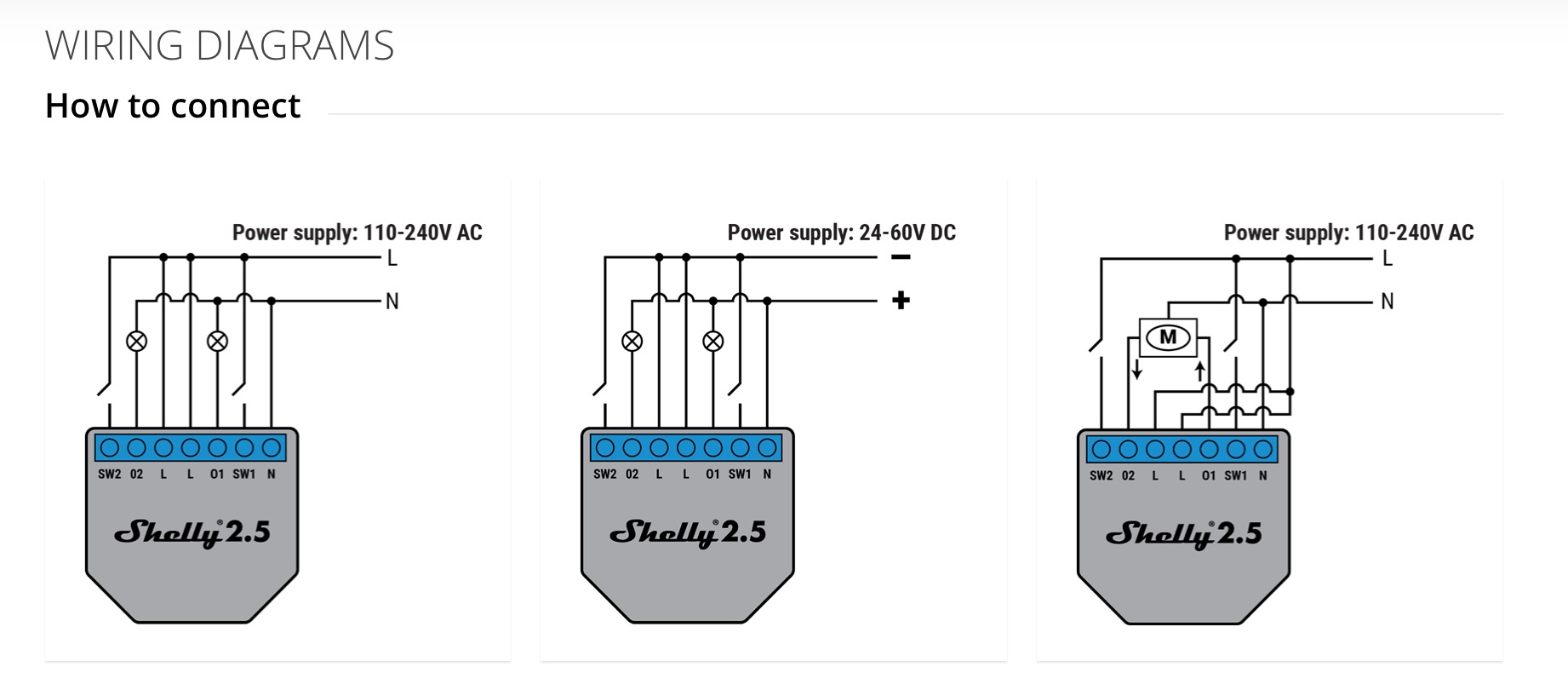
nope
andyblac
on 13 Oct 2020
can the shelly 2.5 powered with 12V ??
No. I used a shelly 1.
cduvenhorst
on 13 Oct 2020
i ordered now a 24V dc powersupply.... so next week some more testing
Pixel-Chris
on 13 Oct 2020
Now the Shelly 1 is wired again.... no problems
@rojer WORKS FINE !!!
Pixel-Chris
on 13 Oct 2020
Now the Shelly 1 is wired again.... no problems
@rojer WORKS FINE !!!
@Pixel-Chris sorry for asking,
Did you update to the beta?? https://rojer.me/files/shelly/2.3.1-beta1/
Ludelag
on 13 Oct 2020
Now the Shelly 1 is wired again.... no problems
@rojer WORKS FINE !!!@Pixel-Chris sorry for asking,
Did you update to the beta?? https://rojer.me/files/shelly/2.3.1-beta1/
@Ludelag
Yes
I tested both
It is a power problem, the power of my garage door opener is insufficient for the Shelly 2.5
Everytime the Relais is switched, it went off and restarts
Pixel-Chris
on 14 Oct 2020
Now the Shelly 1 is wired again.... no problems
@rojer WORKS FINE !!!@Pixel-Chris sorry for asking,
Did you update to the beta?? https://rojer.me/files/shelly/2.3.1-beta1/@Ludelag
Yes
I tested both
It is a power problem, the power of my garage door opener is insufficient for the Shelly 2.5
Everytime the Relais is switched, it went off and restarts
Thank you!!
Ludelag
on 14 Oct 2020
i ordered now a 24V dc powersupply.... so next week some more testing
Testing finished...
Shelly 2.5 with 2 sensors works fine
I powered the Shelly parallel with 24V
Pixel-Chris
on 21 Oct 2020
Dear @Pixel-Chris could let us know the wiring schema please. Does it looks like the same in the home app?
Ludelag
on 22 Oct 2020
Dear @Pixel-Chris could let us know the wiring schema please. Does it looks like the same in the home app?
@Ludelag
my wiring looks now like this:
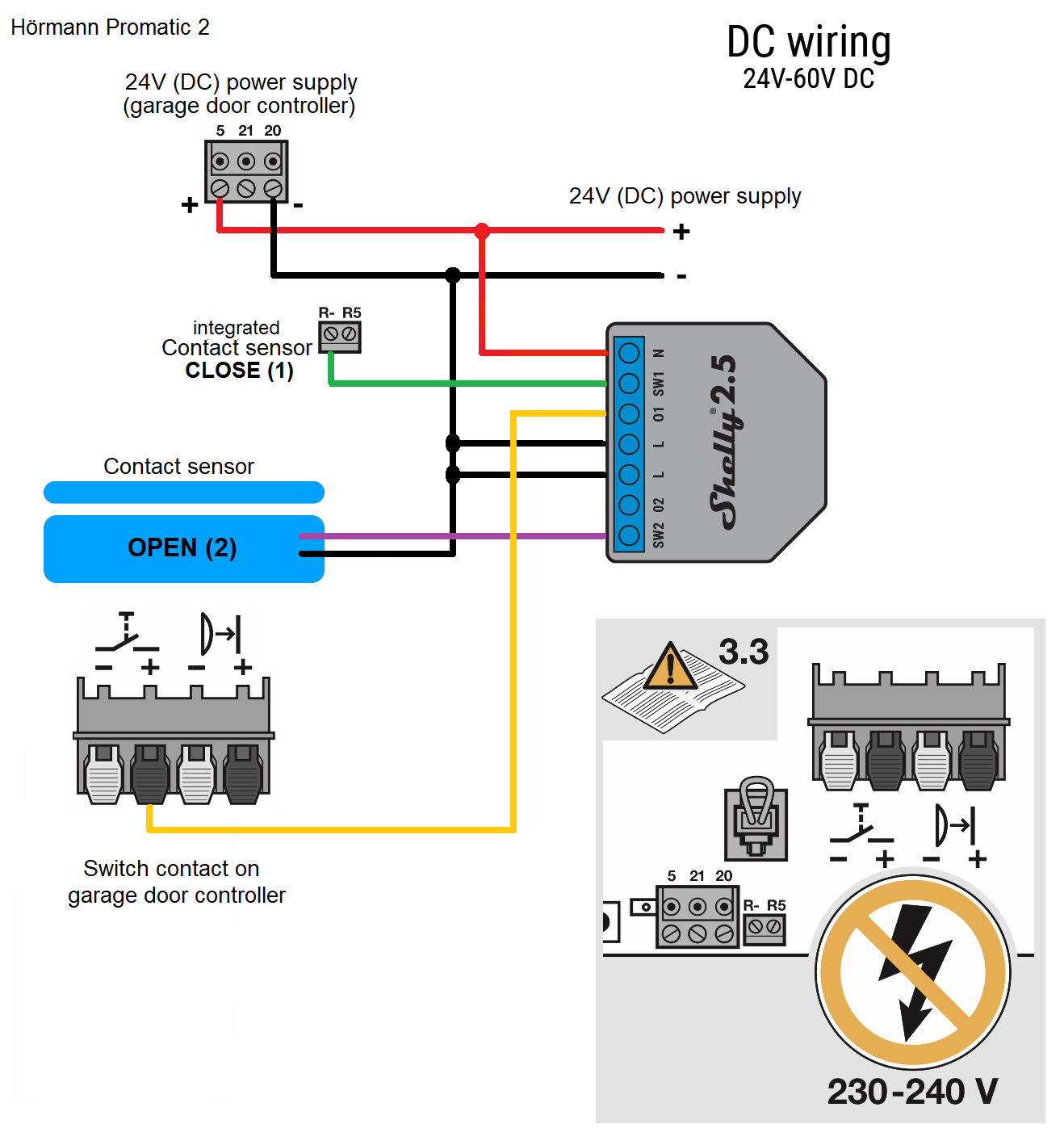
in the home app it is the same, but when the garagedoor is opened and you close it (for example with the remote controll) you get immediately an info about a "closing state" (normally you get only an info about a closed door, when it reaches the closed sensor)
@ALL:
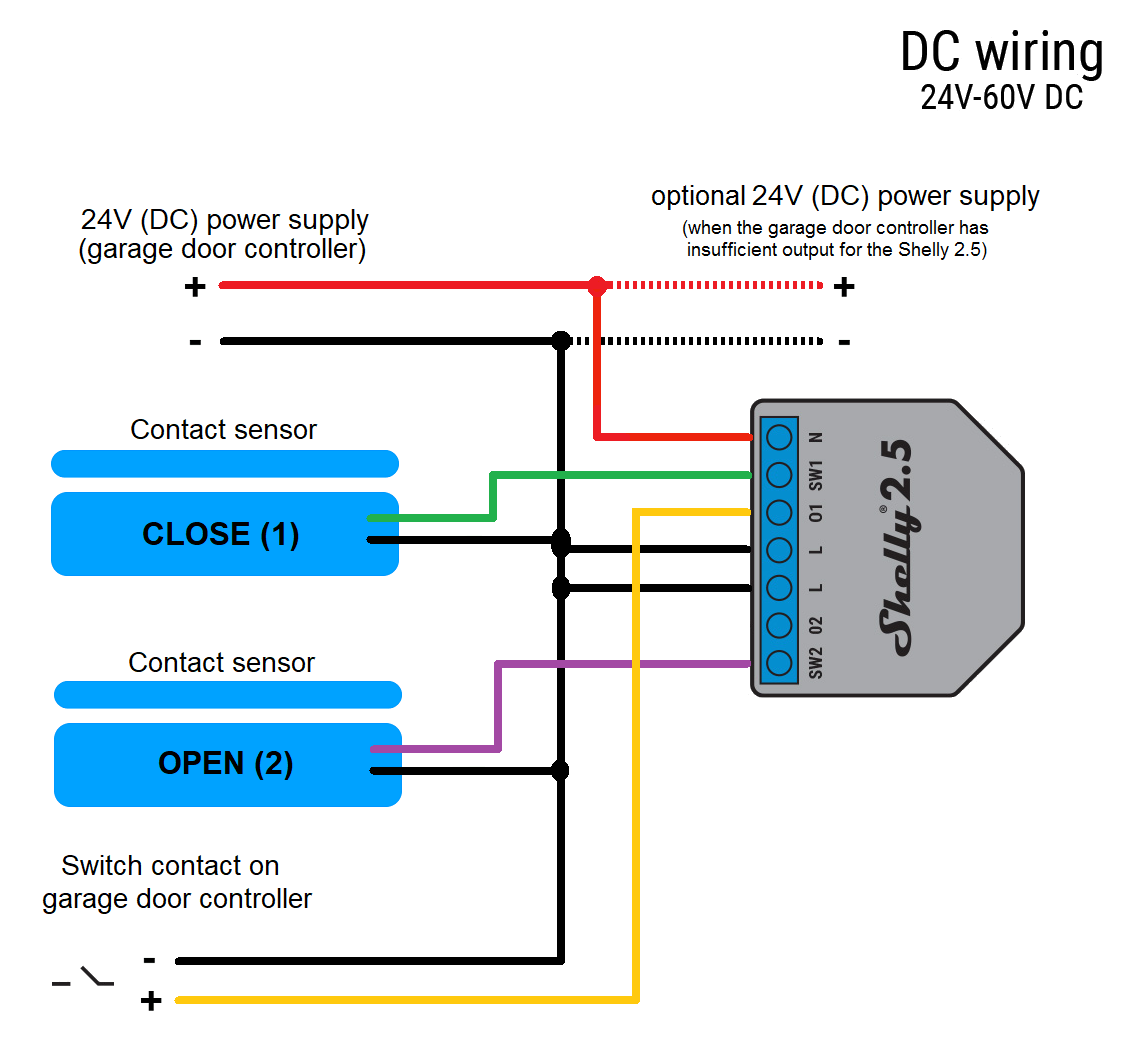
Pixel-Chris
on 22 Oct 2020
Thank you very much !
Ludelag
on 23 Oct 2020
Hello everybody,
first of all a big compliment and thank you to everyone, especially to Rojer !
I have been following the development of the Shelly HomeKit for a while now. I have a Hoermann Supramatic E garage door operator with sectional door (serial number with B at the end / older than 12 years).
I have been using the garage door with the Shelly1 without magnetic sensors for a few weeks and was very happy about the extension in the new firmware.
What works in any case is the Shelly 1 with a magnetic sensor that signals the closed door.
I also find it very good to show both stats (open/closed), so I have now connected a Shelly 2.5.
Here I have the following phenomenon:
The garage door is closed, I start an opening process via the Home app, the Shelly relay clicks, the Home app shows Garage door is opened, but nothing happens.
I press a second or even third time and the door opens, but the first time I press it, the Home app shows Garage door is closed. If it is completely open, the status is OK and also shows open, now e.g. a single trigger is enough to close the door again.
Basically I connected the Shellys via 24V of the Hoermann Supramatic, I also connected an additional 24V power supply to the Shelly 2.5, without any changes.
Here I have taken the pin assignment from the Wiki. Power via contact 5 (24V+) and 20 (24V-).
The garage door switch via contact 20(-) and 21(+).
Do you have an idea where the problem could be ?
Additionally I have a question, the Hoermann Supramatic E operator has the possibility to open/close/stop the door with one button on the connection 20&21 (as already used with the Shelly).
But there is also the possibility to use a double push-button: door open (connection 15&14) and door closed (connection 17&14).
I think this makes sense if you are not in the immediate near of the garage door and want to make sure that the door only opens and does not close.
With the Shelly 2.5 it would be possible to trigger two switching operations. Is there a future plan in development ?
Thanks in advance for your efforts.
And the most important thing: Stay healthy :-)
 guidau
on 25 Oct 2020
guidau
on 25 Oct 2020
@guidau
It is already implemented:
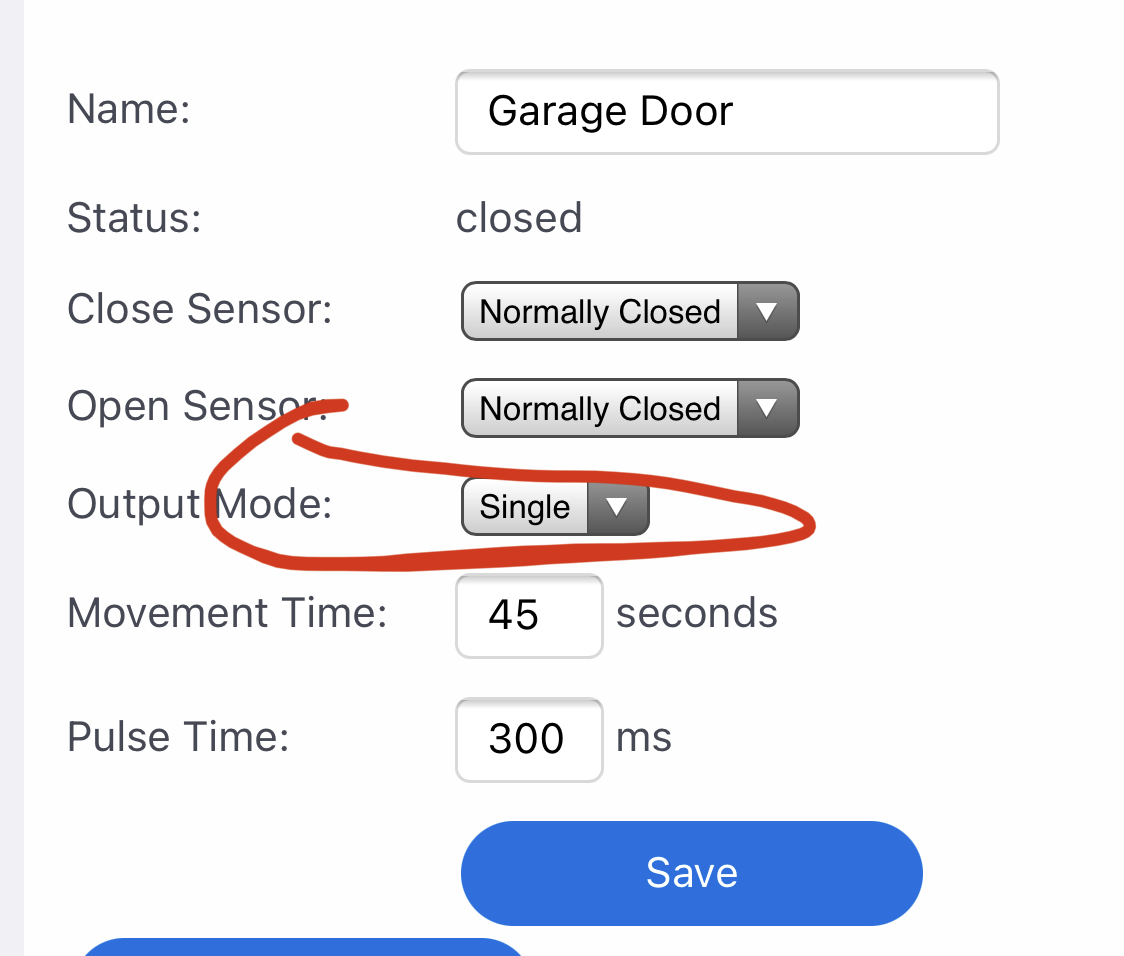
Is the shelly 2.5 reachable (WebGUI) after you here the clicking of the relay?
How do you connect the external 24v power supply? Parallel to the internal power output of the garage door opener?
Like my wiring Schema?
Pixel-Chris
on 25 Oct 2020

Pixel-Chris
on 25 Oct 2020
thanks @Pixel-Chris for helping with this!
rojer
on 25 Oct 2020
Because of my parallel wiring I only need one wire to the + connector of the switch
So you will only need only one wire for the up switch (pin 15) <-> Shelly (pin 01) and one wire for the down switch (pin 17) <-> Shelly (pin 02)
Pixel-Chris
on 25 Oct 2020
@Pixel-Chris could you add this to the Wiki if not already in ?
andyblac
on 25 Oct 2020
@Pixel-Chris :Yes, I used your wiring and also external 24V. The Shelly 2.5 is any time reachable.
I think I have found a mistake. I had the output mode set to dual, so I will set it to single and in the next step to dual with SW02 wiring. But I will do that tomorrow after work and report it.
Thanks a lot and good night
guidau
on 25 Oct 2020
Now it works !
First I changed this morning the output mode type to single and this worked !
Second I changed the output type to dual and connected as Pixel-Chris proposed:
Because of my parallel wiring I only need one wire to the + connector of the switch
So you will only need only one wire for the up switch (pin 15) <-> Shelly (pin 01) and one wire for the down switch (pin 17)
<-> Shelly (pin 02)
This switch assignment caused the same problem as yesterday, so I changed contact 01<>02 and everything worked as desired !
I also updated the new firmware and everything seems to be fine !
Thanks again for your help.
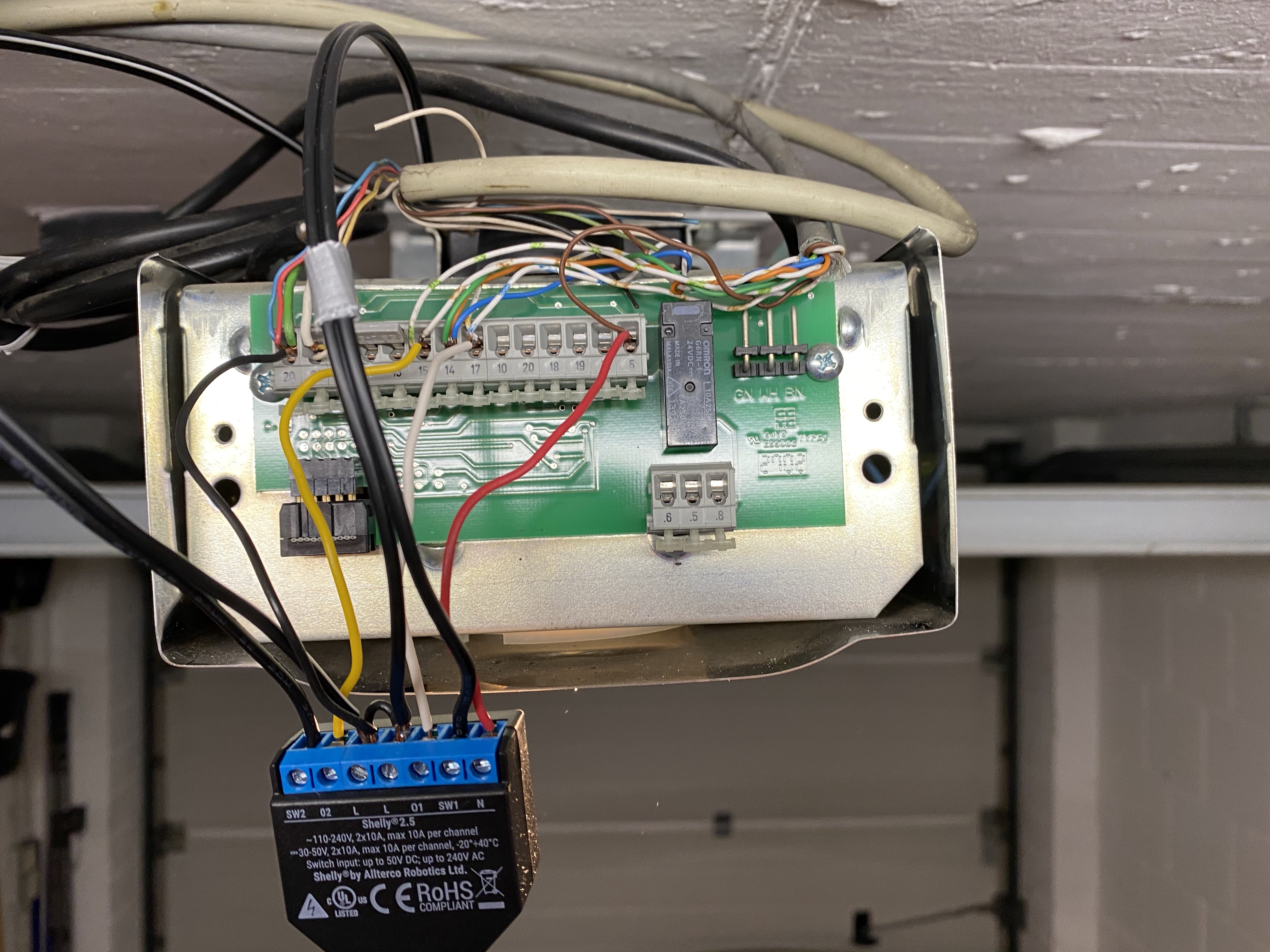
Hoermann (Hörmann) Supramatic E garage door operator SN: xxxxxxxx_B model.
The two black double cable wires lead to the magnet sensors. The marked double cable wire belongs to the sensor that signals the closed gate. No extra power supply.
guidau
on 26 Oct 2020
Good to see all is working, thank you very much @rojer.
Ludelag
on 27 Oct 2020
Hi @Pixel-Chris
I already have a garage door working with Shelly 1 and with a magnetic sensor to inform that it is closed.
Now I have another 2-leaf gate, and I'm intrigued, if the control bord, has opening and closing sensors.
In the motor connections, it shows connections for opening and closing, do you think I can connect the shelly 2.5 there?
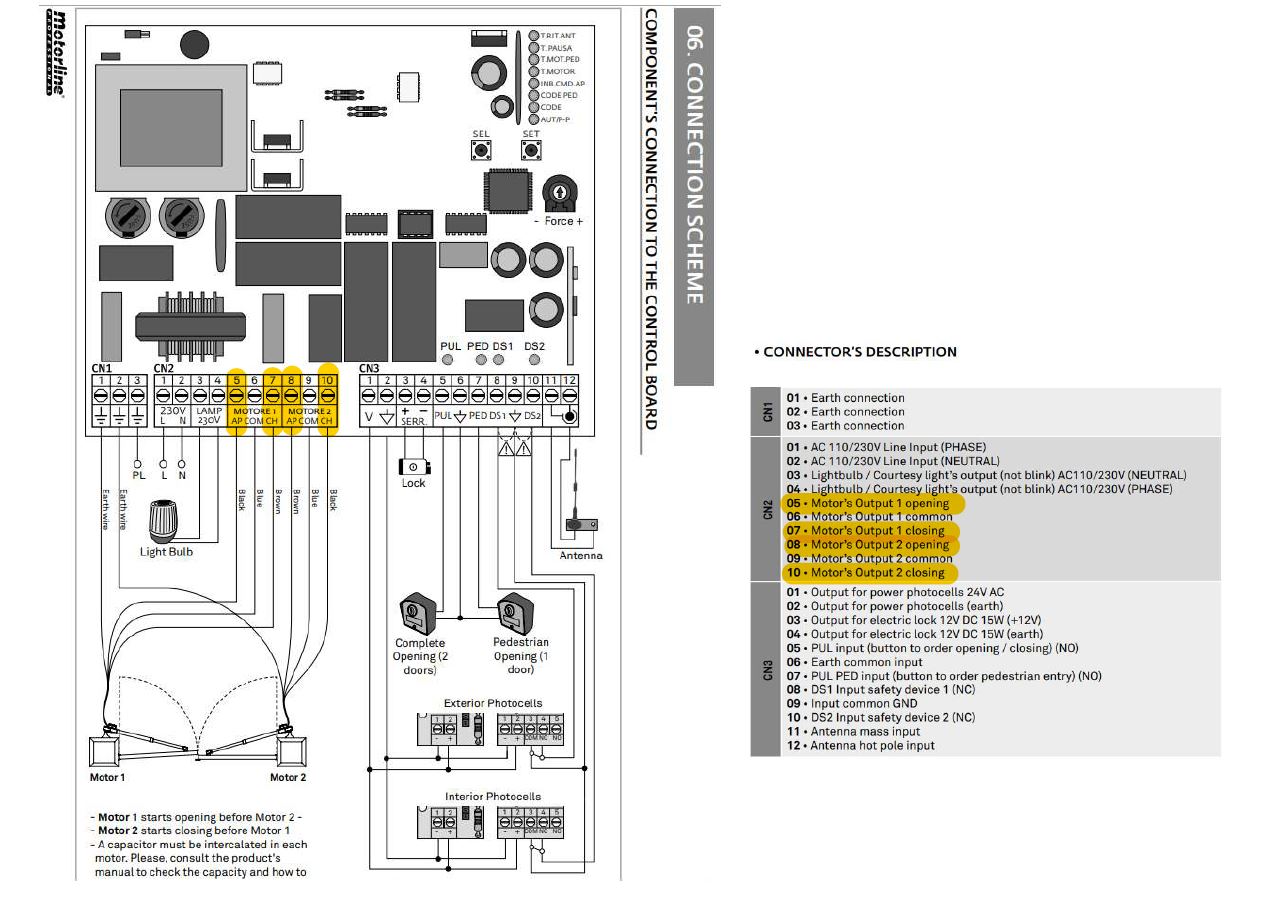
 SilvioMigu
on 18 Nov 2020
SilvioMigu
on 18 Nov 2020
Interesting... I have the same kind of gate (2 leaves), but no information on the main board of the leaves status. I was able to connect a wired magnetic sensor on the leaf close to the main board, but to get the status of the second leaf I’ve used a wireless sensor. But I have issues with this setup, because the gate has 2 different controls: partially open, fully open. If someone uses the wired push button to do a partial opening, the Shelly 1 will assume the gate is fully open because in Home App the status is given by the wired sensor of the first leaf. So if I try to open the door with Home App, I can’t as it’s considered already open. So I’m looking for a way to use the information coming from the wireless sensor placed on the second leaf to the fully open status.
Any idea on how to do that ?
Could it be possible in the Shelly firmware to get a status from an external wireless sensor ?
Whiterabbit64
on 18 Nov 2020
@Whiterabbit64
Have you tried using Shelly 2.5?
So, you could put two magnetic sensors.
I will still try this gate, but as I saw on the control bord the open and closed information on the motor connections, I was wondering if anyone has already connected the shelly directly.
SilvioMigu
on 18 Nov 2020
No I haven’t as I can’t run a cable from the main board to the opposite leaf
Whiterabbit64
on 18 Nov 2020
So i think these are only for the time of movement, when opening or closing is over there must be a signal for closed and opened.
Pixel-Chris
on 18 Nov 2020
You should be able to get through the tube that feeds the other gate leaf
This way, where I mark in red
SilvioMigu
on 18 Nov 2020
So i think these are only for the time of movement, when opening or closing is over there must be a signal for closed and opened.
So can I try to connect the shelly 2.5 to the pins that inform the opening and closing of the motor?
SilvioMigu
on 18 Nov 2020
I will double check, I think the pipe is blocked (I looked at it some months ago). If it’s not, then I will move the magnetic sensor to the second leaf and this will solve my issue. I cross fingers.
Whiterabbit64
on 18 Nov 2020
@SilvioMigu
No, the Shelly supports only sensors for the closed and the opened state
Not for opening/closing
Pixel-Chris
on 18 Nov 2020
I can place the magnetic sensor on both sides.
Today I will test with the shelly 1 and a magnetic sensor in the position that open the two leaves of the gate.
If it works, I no longer think about the shelly 2.5, to connect to the internal connections of the board.
SilvioMigu
on 18 Nov 2020
@SilvioMigu
No, the Shelly supports only sensors for the closed and the opened state
Not for opening/closing
Okay, so I already forgot 😂😂
I will even connect the shelly 1 with a "normaly Open" sensor
Thanks
SilvioMigu
on 18 Nov 2020
I think the best variant is to put two magnetic sensors in a series connection
So that both sides must be opened to send the signal to the Shelly
Pixel-Chris
on 18 Nov 2020
@SilvioMigu
No, the Shelly supports only sensors for the closed and the opened state
Not for opening/closingOkay, so I already forgot 😂😂
I will even connect the shelly 1 with a "normaly Open" sensor
Thanks
A normally open sensor has nothing to do with the state of the door!
Pixel-Chris
on 18 Nov 2020
There are to types of magnetic sensors
Normally closed
And
Normally opened
This describes only the way they work
(If they open the circuit or close it)
Pixel-Chris
on 18 Nov 2020
I'll put the sensor on the inside
One fixed on the wall and another fixed on the door
When the gate opens, they will pull over and should inform you that the gate is open.
When closing the gate, should you give the information that it is closed? 🙄
SilvioMigu
on 18 Nov 2020
You can use to shelly 1, with open or close status with one sensor. then in any case if one of the door is damaged or the garage door is brocken you will still have operating and communicating the other. As in your schema two different motors means two systems working together. Maybe worth to use two Shellies
Ludelag
on 18 Nov 2020
You want to use a Shelly 1
With an sensor for the opened state
You can use two different types of magnetic sensor (NC - normally closed and NO - normally opened)
So the sensor type has nothing to do with the door state.
Pixel-Chris
on 18 Nov 2020
I would use one Shelly 1 and set two magnetic sensors in series connection
So only when both gates are open
The Shelly will get the information that the Doors are opened
Pixel-Chris
on 18 Nov 2020
As the sheets have a 3 second delay between them, I would receive two notifications, I think.
By placing only one sensor, it can be more correct.
I will test and then report here
SilvioMigu
on 18 Nov 2020
If you put two sensors in series connection, there will be only one
Pixel-Chris
on 18 Nov 2020
Ah ok, I understand what you mean.
I thought that even if they were connected between them, if there was a delay in contacting each other, they would give different notifications.
SilvioMigu
on 18 Nov 2020
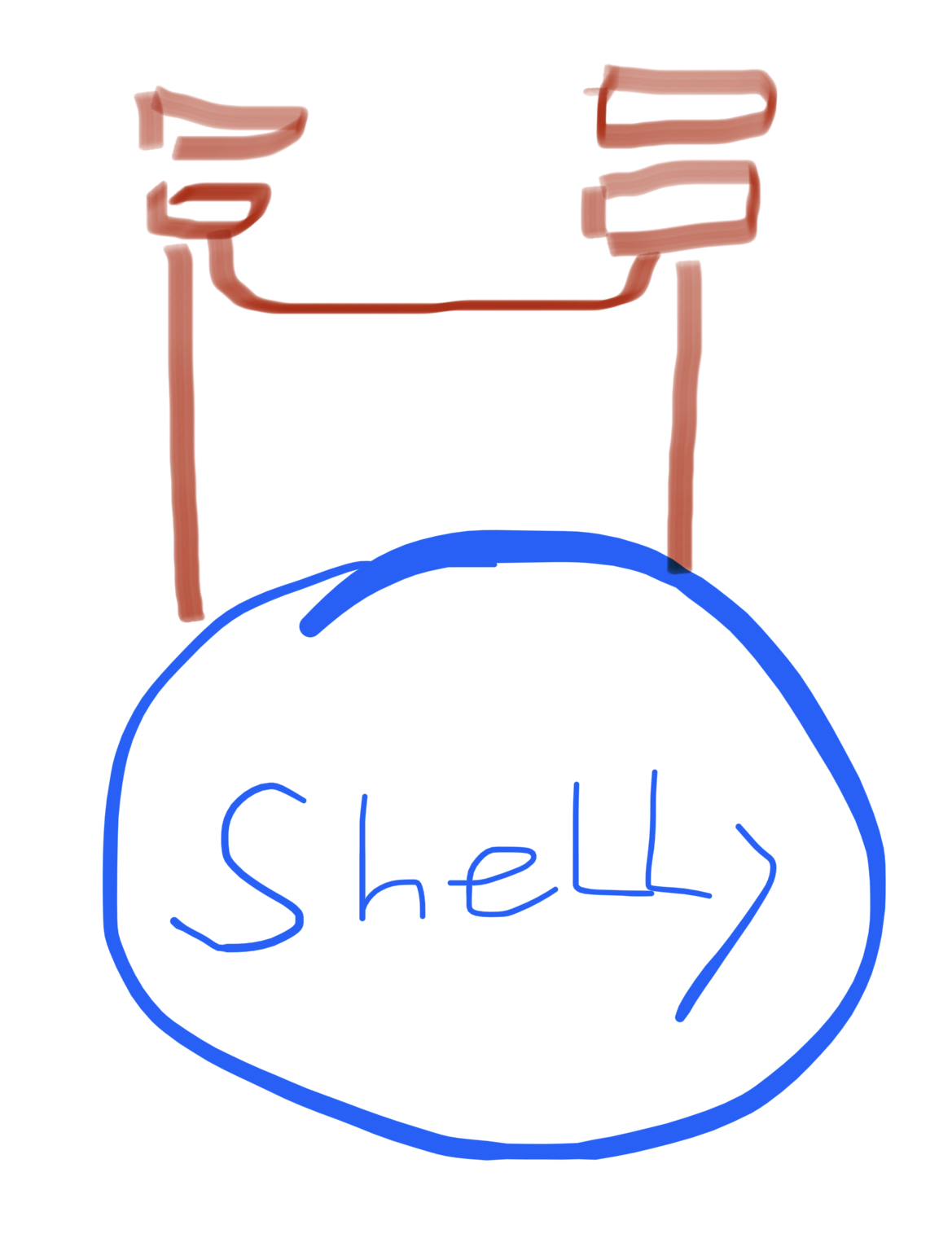
Pixel-Chris
on 18 Nov 2020
In fact, I have a sheet, which makes the function "pedestrian" and as I think of placing the sensor on that door, in principle it works for both functions.
When I open both, or when I open only one.
In fact, I have a sheet, which makes the function "pedestrian" and as I think of placing the sensor on that door, in principle it works for both functions.
When I open both, or when I open only one.
By the way, I like your drawings 😁😄
SilvioMigu
on 18 Nov 2020
Good Morning
As promised is due, here is a picture of the magnetic sensor assembly on the 2-leaf gate.
It works, but the notifications are a little mixed up.
When I open it, it says to open, after 3 seconds, it says closed, and then when the magnetic sensor touches, it says it is open.
Watch the video
https://youtu.be/xfaK0y4Bp7k

SilvioMigu
on 19 Nov 2020
@roger
I leave the Log here
1346306780:1605744097260202 mgos_sys_config.c:232 Loading conf2.json
1346330369 mgos_sys_config.c:232 Loading conf3.json
1346461673 mgos_sys_config.c:174 Saved to conf9.json
1346480732 mgos_mongoose.c:66 New heap free LWM: 21832
1346748616 mg_rpc.c:305 Shelly.GetInfo via HTTP
1346769677 mgos_mongoose.c:66 New heap free LWM: 21336
1352565685 shelly_main.cpp:530 Up 1352.55, HAP 0/2/9 ns 2, RAM: 25536/41288; st 0; 5.1: cur:closed tgt:closed cl:1 op:-1
1360255219 mg_rpc.c:305 Shelly.SetConfig via HTTP
1360266459 shelly_output.cpp:56 Output 1: off -> on (GDO:open)
1360278001 shelly_hap_garage_d:294 GDO 1: Tgt State: closed -> open (1 -> 0) (RPC)
1360289418 shelly_hap_garage_d:209 GDO 1: Cur State: closed -> opening (1 -> 2)
1360324473 mgos_sys_config.c:232 Loading conf2.json
1360348036 mgos_sys_config.c:232 Loading conf3.json
1360479299 mgos_sys_config.c:174 Saved to conf9.json
1360565702 shelly_main.cpp:530 Up 1360.55, HAP 0/2/9 ns 2, RAM: 25496/41288; st 0; 5.1: cur:opening tgt:open cl:1 op:-1
1360578120 shelly_output.cpp:56 Output 1: on -> off (pulse_off)
1361628622 mg_rpc.c:305 Shelly.GetInfo via HTTP
1365319970 shelly_hap_garage_d:294 GDO 1: Tgt State: open -> closed (0 -> 1) (ext)
1365332476 shelly_hap_garage_d:209 GDO 1: Cur State: opening -> closed (2 -> 1)
1368565622 shelly_main.cpp:530 Up 1368.55, HAP 0/2/9 ns 2, RAM: 25536/41288; st 0; 5.1: cur:closed tgt:closed cl:1 op:-1
1376565572 shelly_main.cpp:530 Up 1376.55, HAP 0/2/9 ns 2, RAM: 25536/41288; st 0; 5.1: cur:closed tgt:closed cl:1 op:-1
1378048242 shelly_input.cpp:70 Input 1: change (state 1)
1378119828 shelly_hap_garage_d:294 GDO 1: Tgt State: closed -> open (1 -> 0) (ext)
1378132305 shelly_hap_garage_d:209 GDO 1: Cur State: closed -> opening (1 -> 2)
1384565613 shelly_main.cpp:530 Up 1384.55, HAP 0/2/9 ns 2, RAM: 25536/41288; st 0; 5.1: cur:opening tgt:open cl:0 op:-1
1388219492 shelly_hap_garage_d:209 GDO 1: Cur State: opening -> open (2 -> 0)
1392565277 shelly_main.cpp:530 Up 1392.55, HAP 0/2/9 ns 2, RAM: 25544/41288; st 0; 5.1: cur:open tgt:open cl:0 op:-1
1400565340 shelly_main.cpp:530 Up 1400.55, HAP 0/2/9 ns 2, RAM: 25544/41288; st 0; 5.1: cur:open tgt:open cl:0 op:-1
1403226287 mg_rpc.c:305 Shelly.SetConfig via HTTP
1403237632 shelly_output.cpp:56 Output 1: off -> on (GDO:close)
1403249196 shelly_hap_garage_d:294 GDO 1: Tgt State: open -> closed (0 -> 1) (RPC)
1403261508 shelly_hap_garage_d:209 GDO 1: Cur State: open -> closing (0 -> 3)
SilvioMigu
on 19 Nov 2020
However, check that there are two types of magnetic sensors
Normally Closed (NC)
Normally Open (NO)
In my case, what I bought is usually closed.
Maybe it should be replaced by a normally open one
It's a matter of experimenting
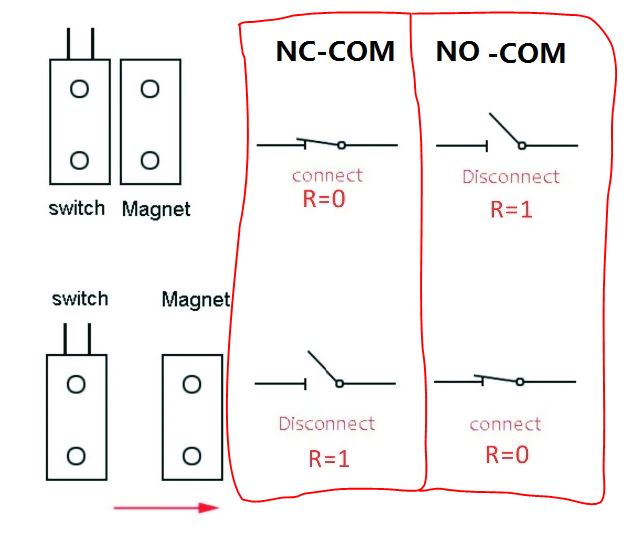
SilvioMigu
on 19 Nov 2020
So when you use a Shelly one
You can only use a sensor for the state closed!
Pixel-Chris
on 19 Nov 2020
Yes, but in my case, I want use sensor for open
SilvioMigu
on 19 Nov 2020
I think, Then you need to open a new issue.
Pixel-Chris
on 19 Nov 2020
I took the liberty of making a video, with the homekit app and at the same time viewing the gate opening.
SilvioMigu
on 19 Nov 2020
Ok
But for a firmware change, you need to open a new issue, so that someone of the team around rojer can do that for you.
The actual firmware for the Shelly 1 can only handle an closed state.
The Shelly 2.5 also an closed state and optional the open state.
But only the open state is actually not possible.
(Sorry I can’t watch the Video, I habe no YouTube-/Google-Account)
Pixel-Chris
on 19 Nov 2020
Maybe it’s better to open a new problem.
The roger, could see this situation here and talk about whether it is possible or not.
What I find strange, are the notifications during the opening.
Because when it is fully open, the sensor is in contact and only then does it give the correct information.
SilvioMigu
on 19 Nov 2020
Ok
But for a firmware change, you need to open a new issue, so that someone of the team around rojer can do that for you.
The actual firmware for the Shelly 1 can only handle an closed state.
The Shelly 2.5 also an closed state and optional the open state.
But only the open state is actually not possible.
(Sorry I can’t watch the Video, I habe no YouTube-/Google-Account)
Try again whatch the video
SilvioMigu
on 19 Nov 2020
So maybe you have chosen the wrong sensor typ in the Shelly GUI? Switch the sensor typ. And check/try it again
Normally when the door is completely open and the magnet reaches the sensor it should say that the door ist closed.
Can‘t you put the magnetic sensor in between both doors? And check if it is closed? So the sensor on one door and the magnet on the other door?
Pixel-Chris
on 19 Nov 2020

Pixel-Chris
on 19 Nov 2020
But he is giving the correct information as it is.
When it opens fully, it goes into the open state.
The point here is, that during the opening movement, it appears in the homekit that is closed and then when the door is fully open, it already appears open.
But I also thought of putting it in the middle of the two doors, but the sensor cable going through the door is not very good
SilvioMigu
on 19 Nov 2020
With the actually firmware you need to put the sensor in the middle, it can only be used for a sensor that recognize a closed state and you have to change the sensor typ.
Pixel-Chris
on 19 Nov 2020
Exactly, I am currently "normally open"
If I move the sensor to the middle of the gate, I have to switch to the "normally closed.
I have another garage door, open to the roof and it is working well, only closing sometimes, inform me of the two states.
I already opened an issue "Shelly 1 garage notifications # 277"
SilvioMigu
on 19 Nov 2020
Do your homekit notifications appear right?
Sometimes mine double ...

SilvioMigu
on 19 Nov 2020
Exactly, I am currently "normally open"
If I move the sensor to the middle of the gate, I have to switch to the "normally closed.I have another garage door, open to the roof and it is working well, only closing sometimes, inform me of the two states.
I already opened an issue "Shelly 1 garage notifications # 277"
No!!!
With the actual firmware you can only connect one sensor to the Shelly 1.
That sensor can only recognize a closed door!!!
You can not connect an sensor to recognize an open door!!!
You get wrong or double notifications, because you use the Shelly wrong!
Change the sensor typ...
Than you will see that the Shelly recognize a closed door when the real door is open! That is the correct sensor typ!!
And than all is working correctly.
Pixel-Chris
on 19 Nov 2020
Sorry, but I am using the correct shelly 1 (there is only 1) and with the correct roger firmware.
This: Shelly 1: http: //A.B.C.D/ota? Url = http: //rojer.me/files/shelly/shelly-homekit-Shelly1.zip
And this scheme:

And it works, I am very grateful for the work of Roger and others who have helped.
But sometimes, it’s not always, I get two notifications from two different states… It’s not always.
SilvioMigu
on 19 Nov 2020
I always wanted this to work on garage gates, I am very happy.
However, I am only exposing what sometimes appears in the notifications.
Because the final state in the homekit is always the correct one.
SilvioMigu
on 19 Nov 2020
Sorry
Eventually my english is to bad...
So, you have a 2-leaf door, correct?
And you connected a sensor to the Shelly 1 to recognize the state of one „leaf“, correct?
And you want this sensor to recognize when that „leaf“ is open, correct?
Pixel-Chris
on 19 Nov 2020
Google translator:
Com o firmware atual, um sensor deve ser conectado para detectar uma porta fechada!
o tipo de sensor que pode ser configurado não tem nada a ver com o status do portão.
Pixel-Chris
on 19 Nov 2020
Herr is my GUI configuration with a Shelly 2.5:

Pixel-Chris
on 19 Nov 2020
I use for both, the close sensor and the open sensor
NC sensors (normally closed sensors)
That is only the way these sensors work!
Pixel-Chris
on 19 Nov 2020
My English is not the best 😉
I have two gates:
- »one in the house that opens upwards
- »one on the wall with two opening doors
I have both, the shelly 1 working with magnetic sensor
Notifications are sometimes mixed up, but the status in the homekit app is correct with the position of the gates.
SilvioMigu
on 19 Nov 2020
2 door version:
You get mixed up notifications because your sensor is at the wrong position!
Again:
The Shelly 1 must be used with a sensor (no matter what typ of Sensor - NC and NO is possible), that detects a closed door
Open state is not possible with a Shelly 1
Pixel-Chris
on 19 Nov 2020
You must put the sensor in the middle of the doors
Pixel-Chris
on 19 Nov 2020
When you want to get correct notifications you MUST put your sensor to the middle!!
Pixel-Chris
on 19 Nov 2020
At the gate that opens up, I have the sensor in its closed position and when the gate closes the magnetic sensor pulls up, I sometimes receive two notifications.
![Uploading 99713087...]this time i got home and when closing the garage, just gave a notification as i wanted 😌
SilvioMigu
on 19 Nov 2020
Pictures my garage and sensor

SilvioMigu
on 19 Nov 2020
Good afternoon
I already have the gates working well 😊😊😊
Now I wanted to test a Shelly 2.5 on the window blinds, is there a connection scheme for the shelly?
SilvioMigu
on 27 Nov 2020
Related issues
 cschildhorn
·
7Comments
cschildhorn
·
7Comments
 BlancoDeMallloca
·
3Comments
BlancoDeMallloca
·
3Comments
 Makaba05
·
6Comments
Makaba05
·
6Comments
 tohmc
·
10Comments
tohmc
·
10Comments
 marcopeeters
·
3Comments
marcopeeters
·
3Comments
Most helpful comment
Done! now it works perfect!!! only there is a delay of 1 or 2 seconds when the door is closing.
@rojer you are a genious! @Pixel-Chris you found the right wiring now all is working perfect!!!