Shell: Overview no longer displaying properly
Distribution (run cat /etc/os-release):
NAME="Pop!_OS"
VERSION="20.04 LTS"
ID=pop
ID_LIKE="ubuntu debian"
PRETTY_NAME="Pop!_OS 20.04 LTS"
VERSION_ID="20.04"
HOME_URL="https://pop.system76.com"
SUPPORT_URL="https://support.system76.com"
BUG_REPORT_URL="https://github.com/pop-os/pop/issues"
PRIVACY_POLICY_URL="https://system76.com/privacy"
VERSION_CODENAME=focal
UBUNTU_CODENAME=focal
LOGO=distributor-logo-pop-os
Related Application and/or Package Version (run apt policy pop-shell or provide the latest commit if building locally):
pop-shell:
Installed: 0.1.0~1593273798~20.04~9e8ab29
Candidate: 0.1.0~1593273798~20.04~9e8ab29
Version table:
* 0.1.0~1593273798~20.04~9e8ab29 1001
1001 http://ppa.launchpad.net/system76/pop/ubuntu focal/main amd64 Packages
1001 http://ppa.launchpad.net/system76/pop/ubuntu focal/main i386 Packages
100 /var/lib/dpkg/status
Issue/Bug Description:
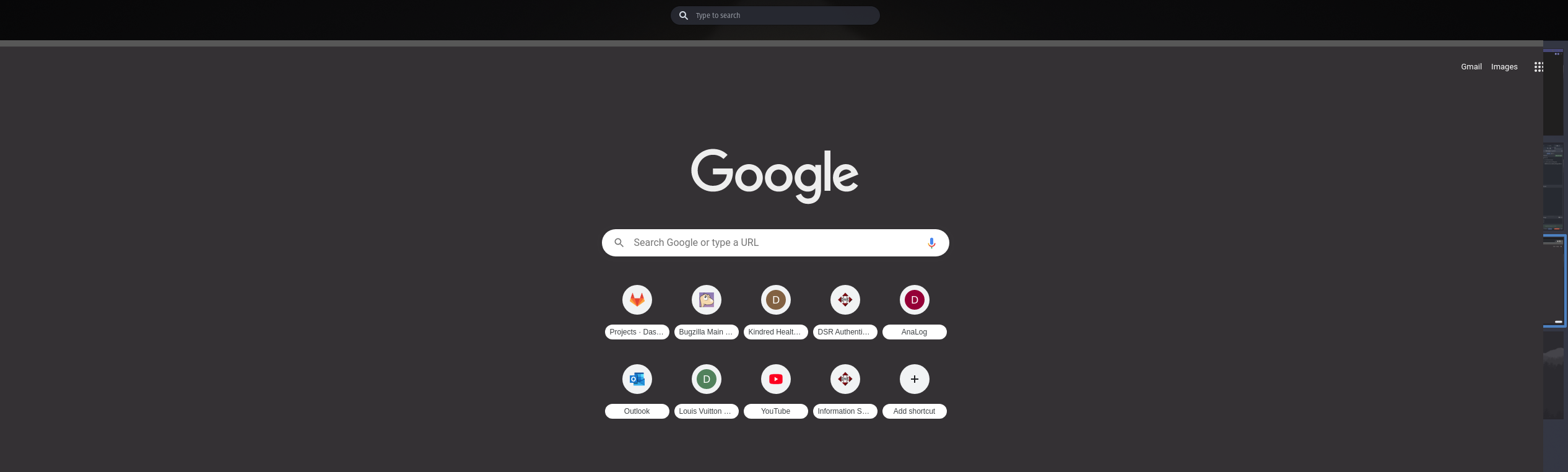
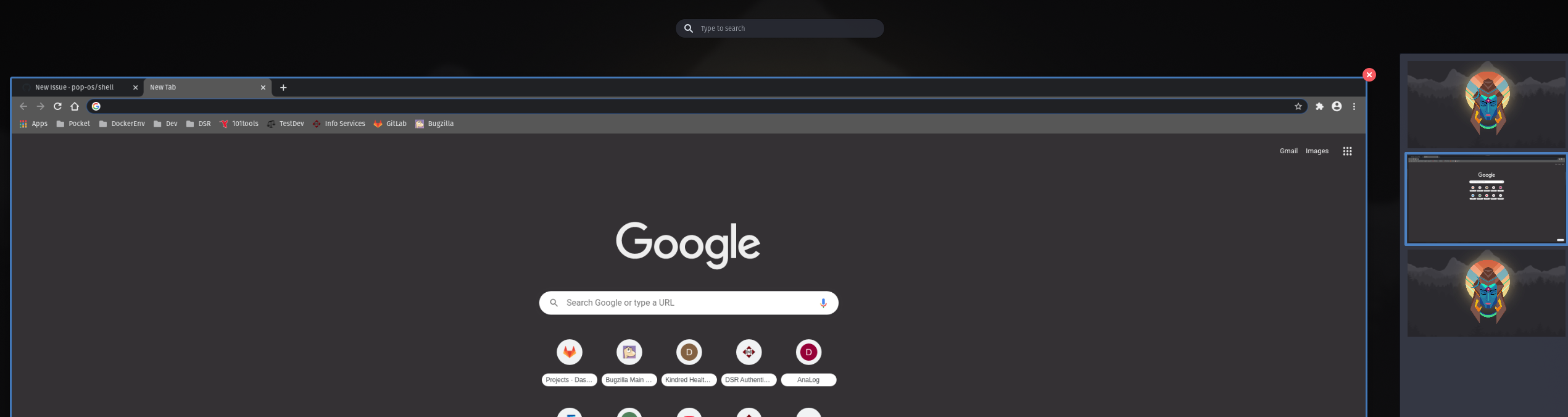
When going into the overview, applications are no longer minimized for view and covers the side panel showing the virtual desktops.
Steps to reproduce (if you know):
Open the overview
Expected behavior:
Other Notes:
Toggling between overview and application view sometimes gets the overview to display properly.
NVIDIA Driver Version: 440.100
 Anatzum
All 19 comments
I have the same problem. It appeared with the latest OS update that I installed today (july 31, 2020). Reverting back to yesterdays Timeshift snapshot removes the bug, so it's definitely related to the update.
 mimavox
on 31 Jul 2020
mimavox
on 31 Jul 2020
Same issue here after yesterday's update.
 ximian
on 31 Jul 2020
ximian
on 31 Jul 2020
Same issue after updating
 tomszar
on 31 Jul 2020
tomszar
on 31 Jul 2020
Same issue after update 3 days ago.
 hiagopinacio
on 3 Aug 2020
hiagopinacio
on 3 Aug 2020
I'm not able to replicate this.
 mmstick
on 3 Aug 2020
mmstick
on 3 Aug 2020
I have 3 machines with pop 20.02 that I've done further tests on.
2 of the machines are using Nvidia drivers and after upgrading, both are getting these issues.
I have a darter pro from system76 that is using Intel graphics and after upgrading, the issue is not present.
I have not had a chance to try and determine which package or combination is resulting in this issue but at least this shows a difference.
Anatzum
on 4 Aug 2020
The only time I've seen something like this was with multiple monitors on an unreleased Nvidia driver version: https://github.com/pop-os/nvidia-graphics-drivers/pull/52
Can you describe your display configuration and which Nvidia GPU(s) you have?
 leviport
on 4 Aug 2020
leviport
on 4 Aug 2020
I'm using NVIDIA 440.100. And 2 monitors.
This issue only occurs when there is an active window.
If u close the active window and press Super without click or activate another window, the overview works properly.
hiagopinacio
on 4 Aug 2020
@hiagopinacio How are your two monitors arranged? Landscape, both side-by-side? Are they both 1920x1080? I also would like to know the specific model of Nvidia card you have, if you don't mind sharing that (e.g. GTX 1070, RTX 2060, ...)
leviport
on 4 Aug 2020
==============NVSMI LOG==============
Timestamp : Tue Aug 4 09:28:24 2020
Driver Version : 440.100
CUDA Version : 10.2
Attached GPUs : 1
GPU 00000000:01:00.0
Product Name : GeForce GTX 1660 Ti
Product Brand : GeForce
Display Mode : Enabled
Display Active : Enabled
Persistence Mode : Disabled
Accounting Mode : Disabled
Accounting Mode Buffer Size : 4000
Driver Model
Current : N/A
Pending : N/A
Serial Number : N/A
GPU UUID : GPU----------------------------------------------------
Minor Number : 0
VBIOS Version : 90.16.25.40.A8
MultiGPU Board : No
Board ID : 0x100
GPU Part Number : N/A
Inforom Version
Image Version : G001.0000.02.04
OEM Object : 1.1
ECC Object : N/A
Power Management Object : N/A
GPU Operation Mode
Current : N/A
Pending : N/A
GPU Virtualization Mode
Virtualization Mode : None
Host VGPU Mode : N/A
IBMNPU
Relaxed Ordering Mode : N/A
PCI
Bus : 0x01
Device : 0x00
Domain : 0x0000
Device Id : 0x219110DE
Bus Id : 00000000:01:00.0
Sub System Id : 0x3FFC17AA
GPU Link Info
PCIe Generation
Max : 3
Current : 1
Link Width
Max : 16x
Current : 16x
Bridge Chip
Type : N/A
Firmware : N/A
Replays Since Reset : 0
Replay Number Rollovers : 0
Tx Throughput : 6000 KB/s
Rx Throughput : 24000 KB/s
Fan Speed : N/A
Performance State : P8
Clocks Throttle Reasons
Idle : Active
Applications Clocks Setting : Not Active
SW Power Cap : Not Active
HW Slowdown : Not Active
HW Thermal Slowdown : Not Active
HW Power Brake Slowdown : Not Active
Sync Boost : Not Active
SW Thermal Slowdown : Not Active
Display Clock Setting : Not Active
FB Memory Usage
Total : 5944 MiB
Used : 961 MiB
Free : 4983 MiB
BAR1 Memory Usage
Total : 256 MiB
Used : 8 MiB
Free : 248 MiB
Compute Mode : Default
Utilization
Gpu : 1 %
Memory : 9 %
Encoder : 0 %
Decoder : 0 %
Encoder Stats
Active Sessions : 0
Average FPS : 0
Average Latency : 0
FBC Stats
Active Sessions : 0
Average FPS : 0
Average Latency : 0
Ecc Mode
Current : N/A
Pending : N/A
ECC Errors
Volatile
SRAM Correctable : N/A
SRAM Uncorrectable : N/A
DRAM Correctable : N/A
DRAM Uncorrectable : N/A
Aggregate
SRAM Correctable : N/A
SRAM Uncorrectable : N/A
DRAM Correctable : N/A
DRAM Uncorrectable : N/A
Retired Pages
Single Bit ECC : N/A
Double Bit ECC : N/A
Pending Page Blacklist : N/A
Temperature
GPU Current Temp : 47 C
GPU Shutdown Temp : 100 C
GPU Slowdown Temp : 95 C
GPU Max Operating Temp : 87 C
Memory Current Temp : N/A
Memory Max Operating Temp : N/A
Power Readings
Power Management : N/A
Power Draw : 10.17 W
Power Limit : N/A
Default Power Limit : N/A
Enforced Power Limit : N/A
Min Power Limit : N/A
Max Power Limit : N/A
Clocks
Graphics : 300 MHz
SM : 300 MHz
Memory : 405 MHz
Video : 540 MHz
Applications Clocks
Graphics : N/A
Memory : N/A
Default Applications Clocks
Graphics : N/A
Memory : N/A
Max Clocks
Graphics : 2100 MHz
SM : 2100 MHz
Memory : 6001 MHz
Video : 1950 MHz
Max Customer Boost Clocks
Graphics : N/A
Clock Policy
Auto Boost : N/A
Auto Boost Default : N/A
Anatzum
on 4 Aug 2020
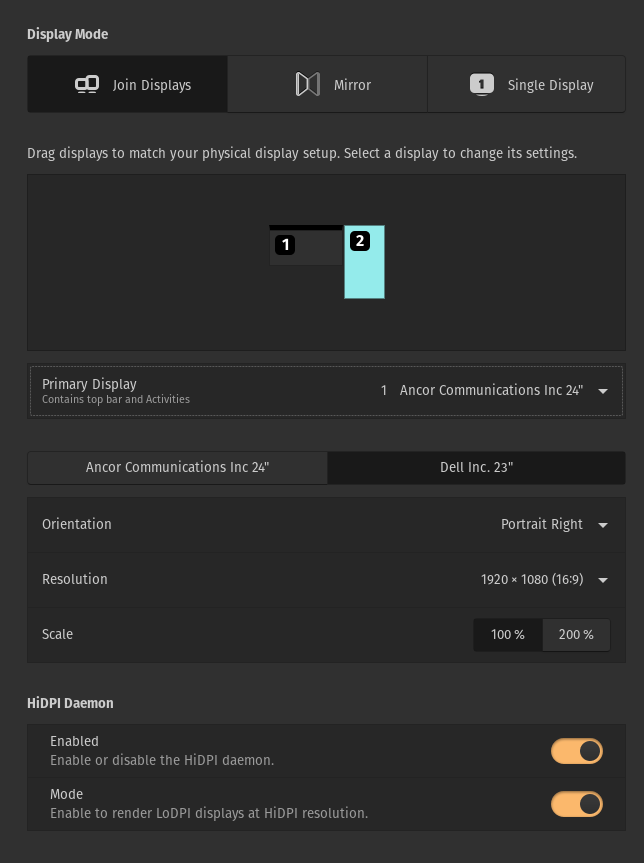
@hiagopinacio How are your two monitors arranged? Landscape, both side-by-side? Are they both 1920x1080? I also would like to know the specific model of Nvidia card you have, if you don't mind sharing that (e.g. GTX 1070, RTX 2060, ...)
Nvidia card: GTX 1060
Display Mode: Join Displays
Primary Display: 1920x1080 Landscape
2nd Display: 1920x1080 Portrait Right
hiagopinacio
on 4 Aug 2020
Thanks for the info, I'll do some more digging into this today.
leviport
on 4 Aug 2020
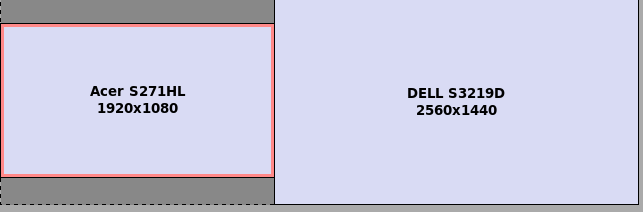
After further testing on a Gazelle with a GTX 1650 with a fresh installation of Pop!_OS 20.04, with a primary 1920x1080 display arranged to the left and a 2560x1440 secondary display arranged to the right, I still cannot reproduce this issue. This could be related to gnome-shell extensions; do you have any non-default extensions installed?
leviport
on 4 Aug 2020
I don't think that it's nVidia only problem. The issue occurs on my HP Elitebook 840 G2 which has only Intel graphics card. I've also tried to disable all non-default extensions (Caffeine, Gsconnect, Multi monitors add-on in my case) and nothing have changed. The problem persists no matter if I have an external monitor connected or not.
ximian
on 4 Aug 2020
Same as @ximian, the issue occurs with my lenovo yoga 910 with Intel graphics card. Disabled all non-default extensions, disconnected from external monitor, but the issue persists
tomszar
on 4 Aug 2020
Alright, probably it was being caused by some extension in my case.
I removed all installed extensions and reboot. It worked.
These are the extensions that I had installed.
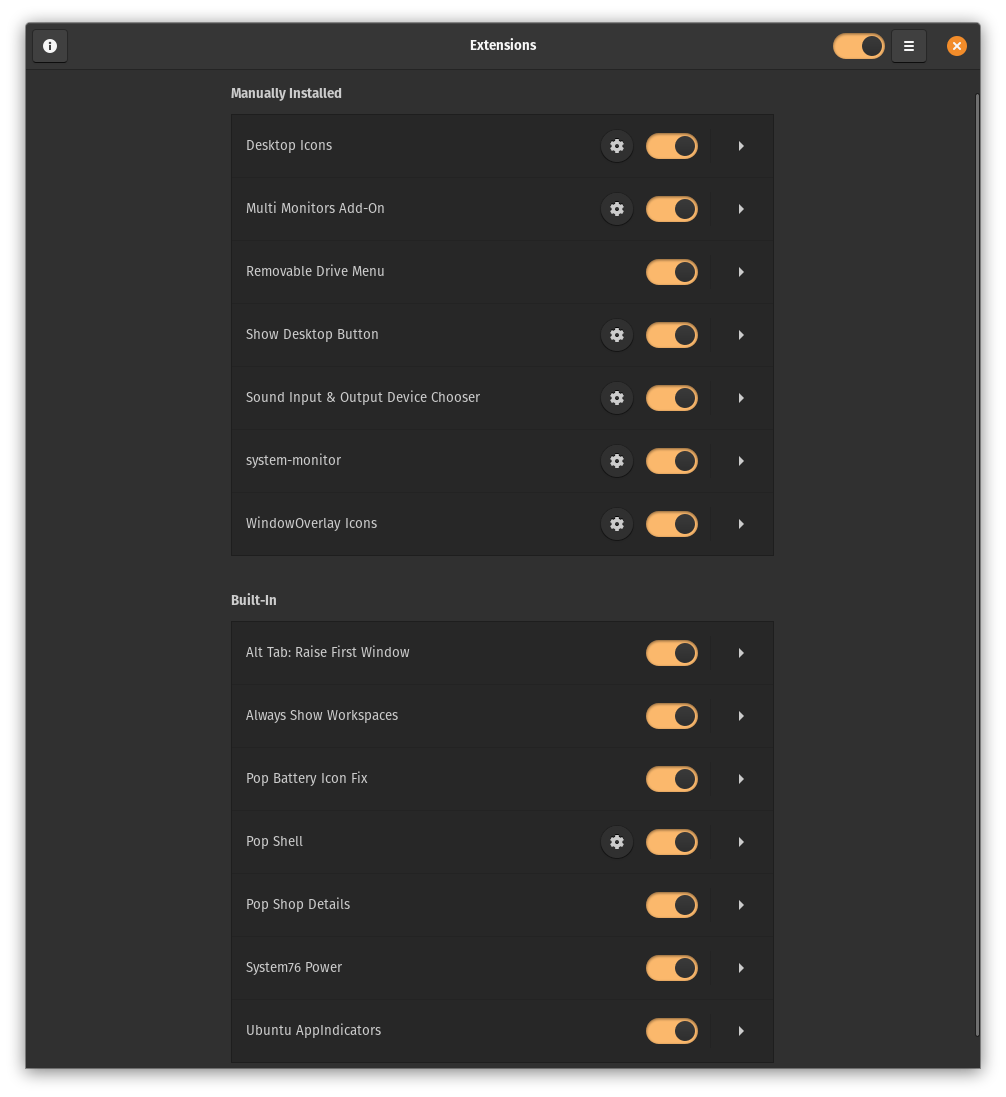
EDIT: It was Multi Monitors Add-On, a very useful extension for 2 screens. =/
hiagopinacio
on 5 Aug 2020
Tried disabling extension and rebooting and it worked as well
These are my manually installed extensions
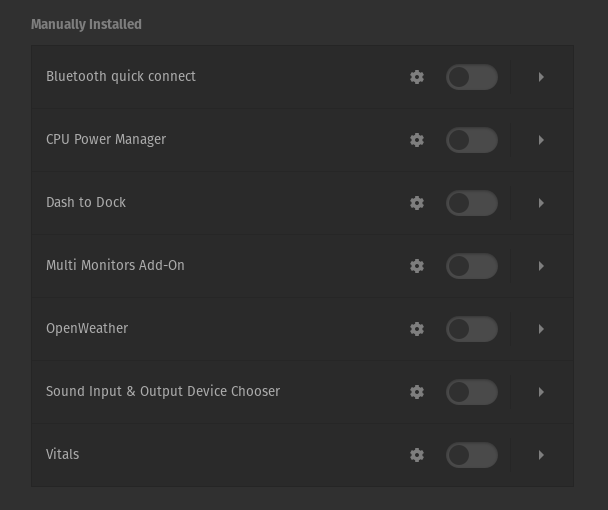
For the looks of it, comparing with @hiagopinacio, the multi monitor add-on or the sound input extension might be the ones conflicting
EDIT: same for me, the multi monitors add-on was the one
tomszar
on 5 Aug 2020
Yep, I installed Multi Monitors Add-On and saw the same behavior. It kept happening even after I disabled pop-shell, so I believe this is a bug with that extension. I would recommend filing an issue with its maintainers so they can work on a fix.
leviport
on 5 Aug 2020
Can confirm that it works with Multi Monitors extensions removed.
mimavox
on 5 Aug 2020
Related issues
 diegobernardes
·
3Comments
diegobernardes
·
3Comments
 TomFaulkner
·
4Comments
TomFaulkner
·
4Comments
 JoelMon
·
4Comments
JoelMon
·
4Comments
 domwoolf
·
9Comments
domwoolf
·
9Comments
 carlwgeorge
·
8Comments
carlwgeorge
·
8Comments